1
•
•
•
First data available, most frequently used data, and/or most
important data should be at the beginning.
All data about a single function should be grouped together.
Irrelevant information should be minimized.
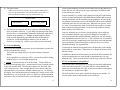
1)
Captions Within Blanks
Last Name, First Name:
2) Captions Above Blanks
Fill in Last Name, First Name:
9.6.2 Components of Forms
Basic elements of forms are
•
Descriptive information — provides help on how to identify, fill in
or use the form. In particular, should direct writer which portions
should be filled out for each situation. For check boxes, should
indicate whether either or both of two boxes can be ticked.
•
Intentional information — is the labels and headings to indicate
what goes in the blanks.
•
Extensional information — which is the spaces to be filled in.
•
Spaces can be blanks in which numbers or text are entered.
•
Spaces can be check boxes to be selected.
•
Different styles and sizes of type may be used to distinguish titles,
headings and captions.
•
Areas reserved for data may be a different color.
In forms analysis, forms are divided into data areas.
9.6.3 Styles of Forms
•
There are three common styles of forms.
•
They differ in the relationship between the intentional captions and
the extensional blanks.
•
Captions can be above, preceding or within the blanks.
9-23
3) Captions Precede Blanks
Fill in Last Name, First Name: ______________________________
•
•
Captions before blanks often used when original form is created by
a typewriter or word processor.
In this case, all text may be in same size and style of font, which
makes it not as clear.
9.6.4 Physical Considerations in Form Design
Several physical characteristics of a form have to be specified:
•
Size — standard sizes are 8 1/2 by 11 and 8 1/2 by 14 inches (legal).
Smaller forms may be half a standard size.
•
Color — should be light to make written material readable. Type
should be in black ink.
•
Format — 8 1/2 inch dimension should be horizontal (portrait
format). This fits computer screen width, printers, file folders and
document feeders.
•
Type — should be a clear simple font. Captions and headings
should be large enough to read clearly. Boldface can be used to
emphasize.
9-24