1
User Manual Magic 308/616 CLI
User Manual Magic 308/616 CLI
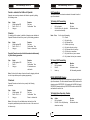
External Music-on-Hold
EXTENSION FEATURES
When an extension user talking with external party and subsequently
putting them on hold, the external party will listen music. You can connect
your system with any external music source such as FM receiver, CD
player, Walkman or any standalone music source through a jack provided
in the system.
Remote Maintenance
Extension To Extension Call (Right dependent)
One room/service extension can speak to another room/service
extension directly by dialing the desired room/extension number.
This feature allows your authorised service center/dealer to maintain
your EPABX from any remote location.
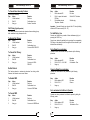
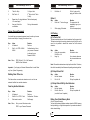
Step
1.
2.
Call Budgeting
Note: - In case the called extension is busy or no reply, use call back
Any extension user can be restricted upto a fix amount of budget for any
type of outgoing calls. It can be refresh by the system automatically by
weekly, forth weekly or by monthly.
facility.
Outgoing Call Control
The system can control your outgoing call by alerting you while you are
making any outgoing calls.
(a) Beeps on Trunk Calls
Action
Lift the handset
Dial Extension number, wait for
Internal Extension Group Dialing
(For service extension only)
The system can have multiple extension groups, which can be call by
their own group access code. One group can have maximum 4
extensions. On dialing any extension group all extension in that group
will start ringing as per predefined pattern.
The system can provide the beeps after a predefined time interval for
incoming/outgoing calls.
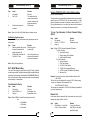
Step
1.
2.
(b) Call Disconnection After Beeps
Note:
The system can be programmed for automatic call disconnection for
incoming/outgoing calls after predefined beep counts.
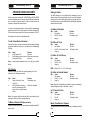
Operator Call
Status of Busy Extension/Trunk on Console
Console can check the status of busy extension/trunk by just pressing
the DSS keys of busy port. The display will show all information about that
port.
If extension 302 is busy with CO 61 with an outgoing call (say 26817414).
By pressing the DSS key of 302, display will show
ST-302
O61-26817414
If extension 44 is busy with an incoming call from 26817414 at CO 62,
then display will show.
I62-26817414
ST-44
24
Reaction
Dial tone.
Speak when called party
answers.
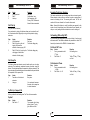
Action
Lift the handset
Dial 5 + G
Reaction
Dial tone.
Listen for the ring back tone
& wait for replay.
- where G (0-7) is Extension Group Number.
The system permits any extension to be defining as an operator.
Operator extension can be called by a single digit code.
Step
1.
2.
Action
Lift the handset.
Dial 9
Reaction
Dial tone.
Operator extension will
start ringing, wait for reply.
Important: - First Hardware Port is Operator Extension by default.
Floor Service Call
(Only for Room extensions)
Any room extension can call floor service extension group by dialing a
single digit code. First digit of room extension will be the Floor service
extension group.
1