1
Fossil Version Control
A Users Guide
With all those hassles why do it? The biggest answer is freedom (huh ?). By following the procedures of a source control system you gain the freedom to modify your code any way you want.
How does that follow ? One of the most horrible feelings as a developer is the “It worked yesterday” syndrome. That is, you had code that worked just fine and now it doesn’t. You have a very
helpless feeling of how do you get back to working code. With a source control system and careful
adherence to procedures you can just go back in time and get yesterday’s code. Then, starting from
known good code you can figure out what happened.
Having a source control system also gives you the freedom to experiment, “let’s try that radical new
technique”, and if it doesn’t work it’s easy to just go back to the previous state.
The rest of this book is a user manual for the Fossil version control system that does code management and much much more. It runs on multiple OS’s and is FREE. It is simple to install as it has
only one executable and the repositories it creates are a single file that is easy to back up and are
usually only 50% the size of the original source.
1.2.1
How to get it
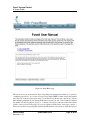
If this has interested you then you can get a copy of the Fossil executable here http://www.
fossil-scm.org/download.html. There are Linux, Mac, and Windows executable links
on this page. Also there is a source Tarball from which you can compile from source. This web site
is self-hosted by Fossil itself (see Section 3 on page 27).
1.3
Source control description
This next section is useful if you have not used source control systems before. I will define some of
the vocabulary and explain the basic ideas of source control.
1.3.1
Check out systems
When describing the grandaddy of source control systems, like SCCS I said it managed the changes
for a single file and also prevented multiple people from working on the same file at the same time.
This is representative of a whole class of source control systems. In these you have the idea of
“checking-out” a file so you can edit it. At the same time while other people using the system can
see who is working on the file they are prevented from touching it. They can get a read-only copy so
they can say build software but only the “owner” can edit it. When done editing the “owner” checks
it back in then anyone else could work on on it. At the same time the system has recorded who had
it and the changes made to it.
This system works well in small groups with real time communication. A common problem is that
a file is checked out by some one else and you have to make a change in it. In a small group setting,
just a shout over the cube wall will solve the problem.
PAN-20100424
Revision: 1.79
28 December 2014
Page 6 of 85