1
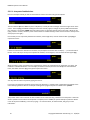
DB004 arrayForth User's Manual block called seed which will store a value from the arrayForth stack at location 13 and then call upd to inject that value into the PWM as a new slope. As soon as the code is written we add the phrase 842 load into block 200 so that the next time we type compile this block will be included in the compilation. Once we do so we will observe that all our grey numbers which were initially 001 have all been modified by the F18 compile to reflect the program counter at that point in the program. If you mistyped any names or used a name before defining it the compiler will abort with question mark appended to the word you typed (such as compile ) to perform the compilation. If you respond with e the editor will take you to the point in the block where the error was first detected. If all compiles well the next step is to generate some IDE script to help us install and test the code. 9.4 The IDE script We believe that interactive development is not merely the responsibility of some esoteric, third-party, software development platform. We believe it is primarily a mindset. The choices and tools presented by the development platform must simply not conflict with the proper mindset. The mindset cannot be enforced by the tools. The following precepts can be considered to be part of the mindset. Make small changes. Save often. Test every change. Make sure all steps are repeatable (such as rebuilding everything before each test). Choose development paths that do not preclude testing for significant intervals. Shun tools which delay your feedback because they serve to distract you. The reason colorForth keeps all source code memory-resident and compiles all code from pre-parsed tokens is to encourage recompiling often. The use of scripts encourages repeatability and in colorForth you cannot even make a definition without first committing it into a block. The arrayForth word compile supports these precepts by quickly rebuilding all F18 object code and also by reloading whatever test environment you have configured for the current stage in your development. To support the latter function, whenever you load testing tools they should begin with the phrase 0 fh orgn ! which directs compile to reload that test environment as part of its job. In block 844 you will find the test script we have built for exercising the PWM demo. The template for this script was copied from the host block that you loaded earlier when we typed host load as part of assumption checking for node 600 and our wiring. We encourage you to read the shadow for the host block. In our present case we have deleted the sample definition and the canon load and added two script definitions on top the standard serial IDE functions. We could also, if we had wanted, defined here a custom wiring path to replace the standard one but the defaults will be adequate for such a simple program. configure ide for demo testing. 844 list demo ide boot empty compile serial load ***no canonical opcodes*** use the 'remote' ones customize -canon 0 fh orgn ! a-com sport ! !nam seed loads pwm 'rate' and re-/runs cycle. run selects node 600 target, loads the pwm into it and starts it with a default value. seed n 13 r! 12 call upd ; run talk 0 600 hook 0 64 600 boot upd ?ram panel 0 lit 18000 seed ; The word seed uses IDE remote commands to place its argument on top of the template literal in node 600 upd and to restart the PWM at the upd entry point. The panel stack display is also updated so that, if you are viewing the panel, you will see your new argument there. It is helpful when outputting a sequence to see what you put out last. On the other hand outputting a new seed does not force panel display as this would be presumptuous and could easily be considered a distraction. Copyright© 2010-2011 GreenArrays, Inc. 10/30/13 45