1
Utility I/O
Routines
7.11
The following routines aid the user of the Terminal
Control System in outputting or inputting data. These
routines, however, should be used carefully and in most
cases will not need to be called.
Setting the
Output Buffep
Format:
Subroutine SETBUF
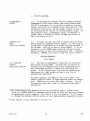
7.11.1 The user will find it necessary to control his
output format after implementation of the package only
when changing to a different Terminal type (e.g., from a
4010 to a 4014) or when transferring to a different
computer system. The output format must be changed in
these cases in order to avoid interline character problems
(see the Implementation Notes). Interline characters,
particularly carriage return (CR), line feed (LF), and
timing characters (NUL or SYN), need to be suppressed to
make graphic input possible. If the user's implementation
doesn't suppress interline characters, the user will need
to call SETBUF as well as TERM when chaging from a 4010 or
4012 Terminal to a 4014 Terminal.
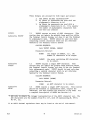
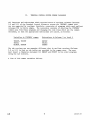
CALLING SEQUENCE:
CALL SETBUF (KFORM)
Parameter Entered:
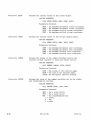
the format of the output buffer, after
the following code:*
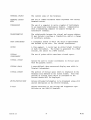
KFORM
1 -
For 4010 and 4012 Terminals. This
format is for systems on which interline
characters cannot be suppressed.
Characters necessary to generate a move
back to the current beam position are
stored at the beginning of each buffer.
Graphic cursor input is not possible.
With buffer Type 1, the move back to the
current stored beam position happens
before every Terminal Control System
buffer output. For example, CALL CHRSIZ
(2). CALL ANMODE moves the alphanumeric
cursor to the location at which it was
after the previous buffer was transmitted.
The subsequent system-supplied interline
characters may move the cursor to the
left and down one line, so any nonTerminal Control System output that
follows will begin there.
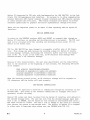
* The following discussion is important for users who:
(a) Wish to mix Terminal Control System output with other types of output
(e.g., FORTRAN).
(b) Wish to run programs on different computer systems, or
(c) Wish to change Terminal types (e.g., from a 4012 to a 4014 Terminal).
7-6
@
4010A01 User