1
5 Test Scenarios
5.1 Test procedure
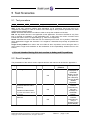
Step
Action
N/A
Result
Origin of the problem
Comment
Step: a test may comprise multiple steps depending on its complexity. Each step has to be
completed successfully in order to conform to the test. Step 0 when present represents the initial
state for all the following steps.
Action: describes which action to realize in order to set-up the conditions of the test.
N/A: the step within this test is not applicable to this application. This has to be filled in only if the
test is checked as mandatory in the applicability box. In that case, the column comment must
indicate the reason of the non-applicability (e.g.: service not supported).
Result: describes the result of the test from an external point of view. If it is positive, it describes
which application's trigger was checked. If it is negative, it describes as precisely as possible the
problem.
Origin of the problem: this column has to be filled in when a problem occurs during the test. It
must contain a high level evaluation of the localization of the responsibility: Alcatel-Lucent or the
Partner.
it is not intended during this test session to debug and fix problems.
5.2 Result template
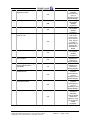
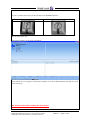
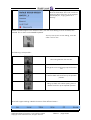
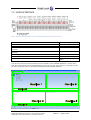
The presentation of the various screen captures and the user manual can be found in appendix A.
Step
1
Action
N/A
Result
Incoming call
OK
2
Display of the information on
the screen after the call is
picked up
OK
3
Indication of Caller ID and
any other information about
the phone
Indication of Caller ID and
status bar
OK
Application Partner Program – Inter-working report
Copyright © 2012 Alcatel-Lucent, All rights reserved
Origin of the
problem
Comment
The information
is displayed on
the Braille
display, the the
user picks up
the call directly
from the Alcatel
4059EE
Keyboard .
The user can
read the
information by
using two
shortkeys on
the Braille
Display
The user can
read the
information by
using a
shortkey on the
Braille Display
Edition 1 - page 11/29