1
SEBA HYDROMETRIE, user manual
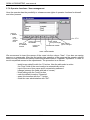
2.7.6 Operator functions / User management
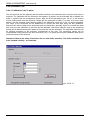
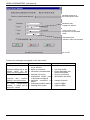
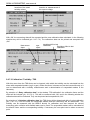
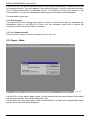
Here the operator has the possibility to release access rights of operator functions for himself
and other persons.
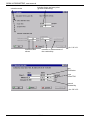
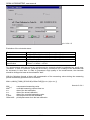
mark for
1. datafile
mark
to go 1
datafile
back
pic. 2.7.6
mark to go
one datafile
forward
mark to get to the
last datafile
insert new
datafile
finish editing
accept changes
edit marked datafile
finish editing
ignore changes
erase marked datafile
We recommend to insert the names of the users into the column "User". Your also can assign
same or no passwords. After the first setting into operation of the program the operator should
effect his own insertion and should erase the default-insertion "Operator, SysAdmin" in order to
avoid unqualified access to the adjustments. The procedure is as follows:
- install a new data-file with the "+"-button. Now the edit-mode is active.
the "User"-field of the new insertion is automatically active.
- input of the new User-name and if requested a password
(change between the fields with tab or mouse).
- finish editing with the "hook"-button
- mark the default-insertion "Operator"
- erase this insertion with the "-"-button
- finish the user administration with "OK".
- 15/48 -