1
EXT: SQL-based Data Provider - dataquery User manual
User manual
Defining a query
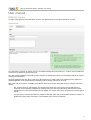
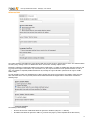
To create a new SQL query using Data Query, create a new “Data Queries” record. This is divided into two tabs.
General tab
The “Hide” field is currently not actively used (i.e. the Display Controller does not check for it). It can be used to indicate that
a given query is obsolete or should not be used.
The “Title” field is mandatory and should be a short summary of what the query does. The “Description” field can be used for
entering more information.
The action happens in the “SQL Query” field, where the actual query is written. Refer to the “Writing queries” chapter for a
detailed explanation of the syntax allowed in this field (not all of the SQL elements can be used).
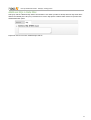
Next to the “SQL query” field is a “Validate Query” button, which can be used to verify that the query is alright. It does two
checks:
•
first, it parses the query and rebuilds it. The internal query parser may come up with errors at that point. If it
doesn't the success message will display the resulting query (as in the screenshot above). Note that here TYPO3
mechanisms (see below) and Data Filters are not applied. It is only the “raw” query, as typed in the text field, that is
parsed.
•
next, the query is executed. This makes it possible to catch SQL errors early on. Note that a condition of “LIMIT 1” is
applied to the query before executing it, to avoid draining server resources needlessly.
5