1
3.6 History Management Module
The History Management Module is in charge of tracking the history of the database:
When a row is modified within HGVbase through a SQL “UPDATE” sentence, the old
value is stored to allow access of it afterwards.
This utility offers two useful properties to the system:
• Protects the database against accidental modifications: Old values can be
restored.
• Stores historical values: thus, information always remains within the database.
Basically, this module represents a call to the SQL “UPDATE” function, which has this
behaviour:
UPDATE TABLE table SET field1=”newValue1”, […], field2=”newValue2” WHERE Key
=”value”
Consequently, a call to the “UPDATE” function is considered an atomic access by the
History Management Module. The “UPDATE” statement presents some features that
will be used to design the whole Module:
• Only one table in the same statement can be modified: therefore, any atomic
modification can be done just to one table.
• A “WHERE clause”10 may be used, in order to avoid a massive upgrade of all
the rows in the table. Hence, the field used in the “WHERE clause” to address
the target rows to be modified is also used as a key in the History Management
Module to address the modification.
• An undetermined number of fields can be upgraded at the same time. Supposing
that more than one will be realistic, the fields modified will be stored in a
separate table to reduce redundancy (see below for further information).
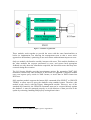
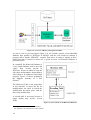
Figure 3.4 on the next page illustrates an overview of the module and its internal
organization. Note that the arrow going from the user to the module is unidirectional,
this is, the user can only call the SQL “UPDATE” function, and receive feedback only
about the correctness of it.
This leads us to an important point of this module: It has been designed to store the
modifications in a small database of its own, but not to provide the user with an
interface to browse this database. Such an interface may be part of a possible future
upgrade for this module. In the current design, browsing through the Historical
database must be done using direct SQL statements.
10
WHERE clause is part of the SQL language. Refer to Appendix II for further details.
13