1
section 6
FIXTURE SETTINGS
This section describes how to set the address and personalities, read lamp hours, DMX values, and other information;
calibrate effects, control the fixture manually, and run test and demo programs from the 4-digit LED control panel.
Functions that do not require feedback can also be performed remotely via the serial link using the MPBB1 Uploader.
Please refer to the MPBB1 manual.
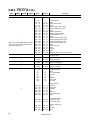
Menu navigation
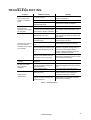
The DMX or Martin address, depending on the mode, and any error messages are displayed after the MAC 300 resets.
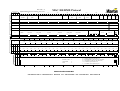
To enter the menu, press [MENU]. Use the [↑] and [↓] keys to move within the menu. To select a function or submenu,
press [Enter]. To escape, press [MENU].
Address/
Messages
AddR
PSET
PERS
INFO
TEST
UTIL
MAN
AdJ
DMX
MOdE
PATI
HRS
TSEQ
UPLd
RST
RST
SWAP
PINV
TINV
TOTL
RSET
DMXL
dEMO
L ON
L ON
MINP
MAXP
MINT
MAXT
GO
LOFF
LOFF
L HR
STCO
SHUT
...
E SP
SHUT
FEbA
dIM
HEAd
MART
AUTO
PTSP
dLOF
TOTL
RSET
PCb
dRES
L ST
ALON
TOTL
RSET
dISP
dINT
dMOd
VER
CYAN
FACT
MAG
ETST
MTST
STST
CPU
FEbA
dISP
SCUT
YEL
dIM
COL
CYAN
MAG
YEL
FROS
COL
PATI
FROS
CAL
PAN
EFFb
TILT
TRAC
MOdE
CAL
P OF
T OF
d OF
C OF
M OF
Y OF
dFOF
dFSE
FACT
CUS1
CUS2
CUS3
Figure 4: MAC 300 menu
Fixture Settings
9