1
2
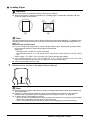
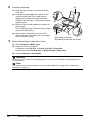
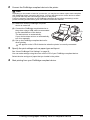
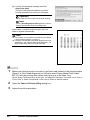
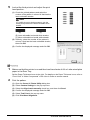
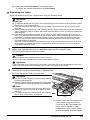
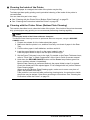
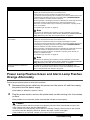
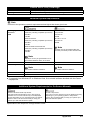
Load the envelopes.
(B)
(1) Slide the Paper Guide to the left side of the
Rear Tray.
(2) Load the envelope against the guide on the
right side of the Rear Tray. Load with the
address side facing UP and the rear flaps
DOWN on the left. Up to 10 envelopes can be
loaded at once.
(3)
(2)
(3) Slide the Paper Guide against the left side of
the envelope.
Do not slide the Paper Guide too strong. Paper
may not be fed properly.
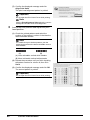
(4) Set the Paper Thickness Lever to the left.
Reset the Paper Thickness Lever to the right
when you finish printing.
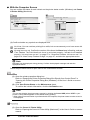
3
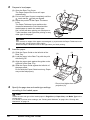
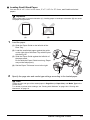
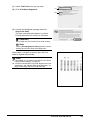
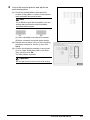
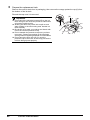
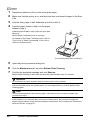
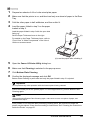
Specify the settings in the printer driver.
(4)
(A)
(A) Printing orientation
(B) Make sure the flaps are folded.
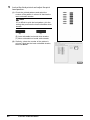
(1) Select Envelope in Media Type.
(2) Select the size for envelopes.
In Windows, select DL Env. or Comm. Env. #10 in Page Size.
In Macintosh, select DL Envelope or #10 Envelope in Paper Size.
(3) Select Landscape in Orientation.
.
Important
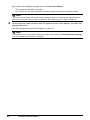
Be sure to set the printer driver setting properly. If you do not, the address will be printed in the
wrong direction.
Note
For details on printer driver settings, see “Printing with Windows” on page 18 or “Printing with
Macintosh” on page 19.
16
Before Using the Printer