1
PREPASSR
Tutorial/Reference Manual
PREPASSR/TEAPAC
Ver 2.81 27MAY08
May, 2008
This work is protected under the Copyright
Act of 1976. Created by Strong Concepts.
All rights reserved.
Contains its trade
secrets; reverse engineering prohibited.
PREPASSR/TEAPAC
Pre- and Post-processor for PASSER-II Arterial Optimization
PREPASSR is a pre- and post-processor to be used in conjunction with the PASSER-II program.
PASSER input such as phasing, minimums, volumes and saturation flow input must be carefully
coded and coordinated in order to generate valid results, sometimes in a confusing and errorprone manner. On the other hand, PREPASSR accepts data in a form directed by traffic
engineering terms which are easy to understand, and builds the required PASSER input coding,
thus eliminating user error in preparing its input.
This interactive analysis tool will automatically generate the network structure for the signalized
arterial being analyzed through the use of the standard TEAPAC NETWORK command.
Further, the phasing and timings for each signal is specified in straightforward traffic engineering
terms, and can be changed easily when testing alternatives. After an analysis by PASSER is
completed, PREPASSR has the capability of interactively plotting a time-space diagram for any
portion of the system. The optimum timings which have been generated can also be imported
and displayed for each intersection, including a phasing diagram which makes understanding the
results quite easy. These diagrams also include each clearance interval of each phase. Because
of the speed of the computer and the ease of input, an entire day's variation in traffic conditions
can be analyzed quickly and accurately. This, in combination with the capacity analysis output of
SIGNAL2000, provides all the information needed to implement the optimum timings in an
arterial network.
Furthermore, PREPASSR has the ability to read SIGNAL2000 data files directly, eliminating the
need to enter any data at all if SIGNAL2000 was used to estimate saturation flows and allowed
signal phasings and timings for each signal. Since both of these are required inputs of PASSER,
the use of PREPASSR in conjunction with SIGNAL2000 makes a smooth, error-free system for
complete signal timing optimization. PREPASSR can also use data files from PRETSPPD,
PRETRANSYT, PRESYNCHRO and PRENETSIM, allowing the interchangeable use of
TSPPD, PASSER-II, TRANSYT, SYNCHRO and NETSIM/CORSIM based on the same data
base to take advantage of the benefits each program offers.
PASSER performs a two-way bandwidth optimization for a linear arterial signal system. The
program can be also used to simulate existing signal system operations to a limited degree.
Inputs to PASSER depend on a sometimes confusing application of the NEMA phasing
definitions, but PREPASSR allows inputs in the standard TEAPAC scheme, thus eliminating
these problems and allowing quick and effective use of PASSER.
PREPASSR
- ii -
Manual
ACKNOWLEDGMENTS
The PREPASSR program was developed by and is presently supported by and undergoing
continued development by Dennis W. Strong of Strong Concepts.
The PREPASSR Tutorial/Reference Manual was written by and is presently being enhanced and
maintained by Dennis W. Strong of Strong Concepts.
PASSER-II is a program which was developed and copyrighted by the Texas Transportation
Institute. PASSER is a registered trademark of the Texas Transportation Institute. PASSER-II is
currently distributed by the McTrans Center in Gainesville, Florida and PC-TRANS in Lawrence,
Kansas.
This document, the PREPASSR Tutorial/Reference Manual, is provided as a part of the license to
use PREPASSR/TEAPAC. References in this document are made to other documents which are
not included with the PREPASSR program and are available from various sources. In particular,
references are made to the TEAPAC Tutorial/Reference Manual which is available from Strong
Concepts. This document applies generically to all TEAPAC programs and describes the details
of and advanced usage procedures for the common interface used by all TEAPAC programs.
Reference is also made to the PASSER-II Manual and M.O.S.T. Volume 3, available from the
McTrans Center and PC-TRANS.
Comments on the usefulness and organization of the program and this document are welcome, as
continual updates and improvements are being made. Please direct your comments to Strong
Concepts.
Strong Concepts
15 Timber Lane
Northbrook, Illinois U.S.A. 60062-3715
phone: 847/564-0386 fax: 847/474-4486
email: [email protected]
internet: www.StrongConcepts.com
PREPASSR
- iii -
Manual
PROPRIETARY NOTICE
TEAPAC programs and tutorial/reference manuals are protected under the Copyright Act of 1976
and all rights are reserved by Strong Concepts. Only you, as the original purchaser, may use the
TEAPAC programs, and only on computer systems located in the one office of your agency for
which the programs are licensed. As an original purchaser of the TEAPAC programs, you are
hereby licensed only to read the programs from their medium into the memory of a computer
solely for the purpose of executing the programs. Use of the TEAPAC programs purchased
hereby by any other entity or on computer systems other than the ones for which it is licensed is
an unauthorized use. Except for the limited purpose of system back-up, the copying, duplicating,
selling, or otherwise distributing of TEAPAC programs is a violation of the law.
The TEAPAC documentation may not, in whole or in part, be copied, photocopied, reproduced,
translated, or reduced to any electronic medium or machine readable form without the express
written permission of Strong Concepts, other than for personal convenience.
DISCLAIMER
Strong Concepts shall have no liability or responsibility to licensee or any other person or entity
with respect to any liability, loss, or damage caused or alleged to be caused directly or indirectly
by TEAPAC programs or documentation, including but not limited to any interruption of service,
loss of business or anticipatory profits or consequential damages resulting from the use or
operation of such computer programs. Strong Concepts makes no representations, commitments,
or warranties with respect to the contents hereof. TEAPAC programs are licensed on an "as is"
basis. THERE ARE NO WARRANTIES EXPRESSED OR IMPLIED, INCLUDING BUT NOT
LIMITED TO ANY IMPLIED WARRANTIES OF MERCHANTIBILITY OR FITNESS FOR
ANY PARTICULAR PURPOSE. ALL SUCH WARRANTIES ARE EXPRESSLY AND
SPECIFICALLY DISCLAIMED. Further, Strong Concepts reserves the right to revise programs
and related publications and to make changes from time to time in the content thereof without
obligation of Strong Concepts to notify any person or organization of such revision or changes.
PREPASSR
- iv -
Manual
CONTENTS
PREPASSR - Pre- and Post-processor for PASSER-II Arterial Optimization
Acknowledgments
Proprietary Notice
Disclaimer
List of Tables
List of Figures
Tutorial Manual
Chapter 1 - INTRODUCTION
Chapter 2 - INITIAL EXAMPLE
Chapter 3 - ANALYSIS PROCEDURES
Chapter 4 - ACTIONS AND ENTRY PARAMETERS
Chapter 5 - ADVANCED PROCEDURES
Reference Manual
Summary of Appendices
Appendix A - ABBREVIATED DESCRIPTION OF ACTIONS AND ENTRIES
Appendix B - DETAILED DESCRIPTION OF ACTIONS AND ENTRIES
Appendix C - ANALYSIS METHODS AND FORMULATIONS
Appendix D - REPORT DESCRIPTIONS AND EXAMPLES
Appendix E - ERROR MESSAGES AND TROUBLE SPOTS
Appendix F - TEAPAC SYSTEM ERROR MESSAGES
Appendix G - OPERATING SYSTEM MESSAGES AND INSTALLATION NOTES
Appendix H - ADDENDA
Index
PREPASSR
-v-
Manual
LIST OF TABLES
1-1
1-2
2-1
2-2
4-1
Organization of the PREPASSR Tutorial
Definition of Terms
Demand Volumes for Example Problem
Saturation Flow Rates for Example Problem
Organization of Command Discussions
A-1
A-2
A-3
D-1
F-1
G-1
Group Name Structure
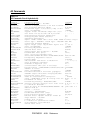
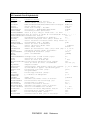
Cross-Reference of Commands and Groups
All Commands Listed Alphabetically
Report Descriptions and Examples
Summary of TEAPAC System Error Messages
Summary of Operating System Messages and Installation Notes
LIST OF FIGURES
1-1
1-2
2-1
2-2
Intersection Approach and Turning Movement Conventions
Phasing Codes for PREPASSR
Intersection Geometrics for Example Problem
Signal Phasings and Timings for Example Problem
PREPASSR
- vi -
Manual
CHAPTER 1
Introduction
Chapter 1 Topics
Strong Concepts develops and maintains a package of programs which provides quick, accurate
and consistent analysis and design of traffic and transportation-related engineering problems.
These programs are known collectively as TEAPAC, an acronym for Traffic Engineering
Application PACkage. More than a dozen integrated programs are included in TEAPAC, all of
which use the same basic user interface and procedures to direct the actions of the programs. In
addition, these programs share the same characteristics with regard to data entry conventions and
storage format for data files. This allows convenient and efficient sharing of information
between programs.
PREPASSR is one of the programs within the TEAPAC program package. PREPASSR is
designed to aid in the use of the PASSER-II arterial signal optimization program. PREPASSR is
an interactive preprocessor program which is used to prepare input data in a fixed format for the
PASSER program. Besides allowing easy-to-understand free format input, PREPASSR also
provides for error checking prior to executing the PASSER program. As a postprocessor for
PASSER, it also plots time space diagrams of existing and optimized results, as well as displays
signal timing diagrams that are easy to read for timing implementation in the field.
In order to illustrate these features, an initial example for the PREPASSR program has been
created. By following the step-by-step instructions contained in Chapter 2 of this manual, you
will become familiar with the basic PREPASSR commands and procedures. If unfamiliar with
the TEAPAC package in general, review of the tutorial section (Chapters 1-4) of the TEAPAC
Tutorial/Reference Manual will increase the speed and effectiveness of learning the PREPASSR
program.
Chapter 1 Topics
Chapter 1 Introduction
Structure and Organization
Conventions
Review of TEAPAC Procedures
PREPASSR
-1-
Tutorial
Chapter 1
INTRODUCTION
Structure and Organization
This document, the PREPASSR Tutorial/Reference Manual, explains the data entries and
procedures necessary to use the PREPASSR program. The organization of the PREPASSR
Tutorial/Reference Manual is similar to all of the TEAPAC manuals. Chapters 1 through 5 serve
as the program Tutorial Manual. The tutorial steps through a simple example problem and then
discusses the specific analysis techniques and procedures of the PREPASSR program. The
attached appendices form the program Reference Manual which provides easy look-up of detail
on the program's inputs, operation and output. The following paragraphs briefly describe each
section of this manual.
This chapter, Chapter 1, discusses the overall structure of the tutorial/reference manual and the
conventions used throughout (see the outline in Table 1-1). It also contains a brief explanation of
the basic procedures of TEAPAC which are described in detail in the TEAPAC
Tutorial/Reference Manual. If you are unfamiliar with the TEAPAC package, you could review
the tutorial section of the TEAPAC Tutorial/Reference Manual in order to better understand the
basic TEAPAC inputs and procedures.
PREPASSR
-2-
Tutorial
Chapter 1
INTRODUCTION
Table 1-1
Organization of the PREPASSR Tutorial
Chapter 1 - INTRODUCTION
Structure and Organization
Conventions
Review of TEAPAC Procedures
Chapter 2 - INITIAL EXAMPLE
Description of Example Problem
Data Entry
Data Review
Analysis
Evaluation
Exiting the Program
Additional Concerns
Chapter 3 - ANALYSIS PROCEDURES
Input Requirements
Analysis Procedures
Chapter 4 - ACTIONS AND ENTRY PARAMETERS
RESULTS Dialogs
PARAMETERS Dialogs
Common TEAPAC Dialogs
Chapter 5 - ADVANCED PROCEDURES
Sharing Data Files with Other TEAPAC Programs
In order to illustrate the features and basic procedures of PREPASSR, Chapter 2 presents a
"hands-on" example problem with detailed step-by-step instructions on how to execute a simple
analysis using the PREPASSR program. This chapter provides an opportunity to use the
PREPASSR program and observe the results.
Chapter 3 discusses the analysis techniques and procedures which should be used with the
PREPASSR program, as illustrated by the example presented in the previous chapter. After
reading this section, it should be possible to perform simple analyses using the PREPASSR
program.
Chapter 4 provides a summary of each of the action and entry dialogs used by the PREPASSR
program, organized by function (details are in Appendix B). This includes a summary of the
basic TEAPAC actions and entries which appear in all TEAPAC programs. More detail on these
TEAPAC functions can be found in Appendix B and the TEAPAC Tutorial/Reference Manual.
PREPASSR
-3-
Tutorial
Chapter 1
INTRODUCTION
Chapter 5 discusses advanced techniques for using the PREPASSR program which will improve
the efficiency of conducting analyses. These techniques require a working familiarity with the
basic principles of using both the TEAPAC package and the PREPASSR program, as described
in Chapters 1-4.
Attached to this tutorial are eight appendices (A through H) which form the PREPASSR
Reference Manual. Each of these appendices is designed to provide quick answers to questions
which may arise during the use of PREPASSR. These appendices provide detail on program
actions, entries, methods and formulae used in calculating results, program reports, error
messages, operating system conventions and addenda. Their contents are each ordered in a
manner that is convenient for lookup purposes. The introduction at the front of the appendices
briefly describes each appendix and how to use it as a reference document. An index at the end
of the entire document is provided for the combined Tutorial/Reference Manual.
Conventions
Due to the interactive nature of the PREPASSR program, the tutorial contains sections which
provide "hands-on" program instructions. When reading these sections, it is recommended that
each step be executed as shown in the documentation. The information described below will
help in understanding the conventions and terms used in this example, as well as the entire
document.
Definition of Terms
Intersection Approach and Movement Data Entry
Phasing Sequence Codes
Version Number
Input Modes
Example Data Entries
Parameter Symbols
Definition of Terms
Important terms which are used throughout the documentation are defined in Table 1-2. It is
helpful to be familiar with these terms prior to using the tutorial/reference manual.
PREPASSR
-4-
Tutorial
Chapter 1
INTRODUCTION
Table 1-2
Definition of Terms
Program Control Menu. PREPASSR starts up in the Normal View of the Visual Mode by first
displaying the Main Menu. From this menu, all program options can be selected and executed,
including the Tabular View and the Manual Mode.
Menu Line Item. A Menu Line Item is one of the options displayed in any drop-down menu, or
in a lower-level menu. It can be selected and executed to display a dialog box to enter data or
execute a function.
Dialog Box. When a Menu Line Item is selected or the ASK command is used, a dialog box is
displayed. In this display, data entries can be easily entered and changed, and calculations can be
initiated, by simple cursor and/or mouse movements.
Command. A Command is the keyword used to identify a dialog box, and is the first word of an
Input Line which identifies the kind of action to be performed by the program. These actions are
either to enter data or to perform analyses.
Parameter Values. Parameter Values are data entries found in a dialog box, or which follow a
Command on an Input Line. These values define the data being entered or control the analysis to
be performed. Most dialog boxes have at least one Parameter Value associated with it.
Default Value. When the program is run initially, all parameter values take on pre-assigned
default values. These are reasonably typical values. Default Values can be restored using the
File-New menu or the RESET command.
Command Level Prompt. The Command Level Prompt, "→", is displayed in the Manual Mode
when ready to accept a Command Input Line from the keyboard.
Input Line. An Input Line consists of a Command keyword and its Parameter Values. An Input
Line may be entered in either the Tabular View or Manual Mode, or LOADed from a data file.
Group Name. Groups Names are used to identify sets of commands which share a common
function. These commands can be referenced together as a group by using the Group Name
enclosed in square brackets, e.g. [BASIC].
File. A file is a place on a permanent storage disk where program entry information is stored.
This information can be either input data information (a data file), commands to direct
computations (a control file), or a combination of both.
Intersection Approach and Movement Data Entry
PREPASSR
-5-
Tutorial
Chapter 1
INTRODUCTION
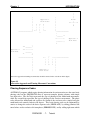
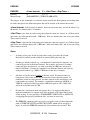
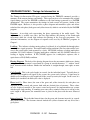
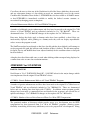
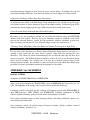
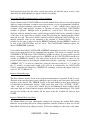
TEAPAC programs enter intersection approach and movement data in a standard order, starting
from the north and moving clockwise around the intersection. These conventions should be
understood when entering intersection data, as described below and as illustrated in Figure 1-1.
Approach Data - When approach information is required and four parameter values are to
be entered, one for each approach, data will be entered starting with the north approach
followed by the east, south and west approaches (approach numbers 1, 2, 3, and 4). When
data is required for a specific approach, the approach should be specified using the cardinal
direction codes North, East, South, and West, meaning from the North, from the East, etc.
Turning Movement Data - When movement information is required and twelve parameter
values are to be entered, one for each movement, data will be entered starting with the
right-turn movement on the north approach followed by the through movement and leftturn movements on the north approach, then continuing with the right, through, and left on
the east, south, and west approaches (movement numbers 1, 2, 3, up to movement 12).
When data is required for a specific movement, the movement should be specified using
numbers 1 through 12.
PREPASSR
-6-
Tutorial
Chapter 1
INTRODUCTION
|
|
|
|
|
1
|
|
|
|
|
|
________________| <--
|
|
|
|
|
|
|
|
|______________
Approach 1
from North
2
|
|
|
|
v
3
|
|
|
-->
^
|
|
|
North
|
W --+-- E
|
S
^
|______ 4
<------- 5
______
|
6
v
Approach 2
from East
^
12 _______|
Approach 4
from West
11 ------->
_______
10
|
v
________________
|
|
|
|
|
|
|
|
|
<-|
|
|
9
^
|
|
|
|
8
______________
-->
|
|
|
7
Approach 3
from South
|
|
|
|
|
|
|
|
|
Intersection approach and turning movement data should be entered in the order shown in this figure.
Figure 1-1
Intersection Approach and Turning Movement Conventions
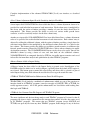
Phasing Sequence Codes
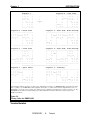
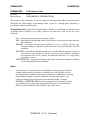
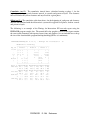
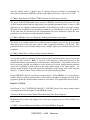
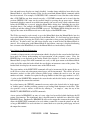
All TEAPAC programs which require phasing information for an intersection use the same basic
phasing codes on the SEQUENCES entry to represent complex phasing schemes with simple
two-digit codes. The first digit represents the type of phasing for the north/south movements,
while the second digit represents the type of phasing for the east/west movements. The phase
codes allowed for north/south and east/west are identical, the east/west codes simply being the
north/south code rotated clockwise 90 degrees. This basic phasing code can be augmented by
entries to change the order of the basic sequence code (LEADLAGS), by adding permitted left
turns before or after exclusive left turn phases (PERMISSIVES), and by adding right turns which
PREPASSR
-7-
Tutorial
Chapter 1
INTRODUCTION
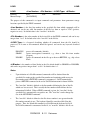
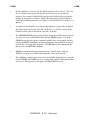
overlap into the other direction's phases (OVERLAPS). Figure 1-2 illustrates each of the eight
basic phase types, with an example of how they are combined to create a SEQUENCE phase
code.
PREPASSR
-8-
Tutorial
Chapter 1
INTRODUCTION
Sequence 1
------------| * * *
|
| * * *
|
|<* * *>
|
|
v
^
|
|
<* * *>|
|
* * * |
|
* * * |
-------------
Sequence 4 - Dual Lead
------------------------|
* ^
| * * +
|
|
* ++++| * * +
|
|
*>
|<* * +>
|
|
|
v
^
|
|
<*
|
<+ * *>|
|++++ *
|
+ * * |
|
v *
|
+ * * |
-------------------------
^
|
|
North
|
Sequence 2 - North Lead
------------------------| * * * ^
| * * +
|
| * * * ++++| * * +
|
|<* * *>
|<* * +>
|
|
v
|
v
^
|
|
|
<* * *>|
|
|
* * * |
|
|
* * * |
-------------------------
Sequence 5 - Dual Lead, North Overlap
------------------------------------|
* ^
| * * * ^
| * * +
|
|
* ++++| * * * ++++| * * +
|
|
*>
|<* * *>
|<* * +>
|
|
|
v
|
v
^
|
|
<*
|
|
<+ * *>|
|++++ *
|
|
+ * * |
|
v *
|
|
+ * * |
-------------------------------------
Sequence 3 - South Lead
Sequence 6 - Dual Lead, South Overlap
------------------------------------------------------------|
| * * *
|
|
* ^
|
| * * +
|
|
| * * *
|
|
* ++++|
| * * +
|
|
|<* * *>
|
|
*>
|
|<* * +>
|
|
^
|
v
^
|
|
|
^
|
v
^
|
|
<* * *>|
<+ * *>|
|
<*
|
<* * *>|
<+ * *>|
|++++ * * * |
+ * * |
|++++ *
|++++ * * * |
+ * * |
|
v * * * |
+ * * |
|
v *
|
v * * * |
+ * * |
------------------------------------------------------------____________________________________________________
Sequence 7 - Split Phase
------------------------| * * * ^
|
|
| * * * ++++|
|
|<* * *>
|
|
|
v
|
^
|
|
|
<* * *>|
|
|++++ * * * |
|
|
v * * * |
-------------------------
Sequence 8 - Lead/Lag
------------------------------------| * * * ^
| * *
|
|
| * * * ++++| * *
|
|
|<* * *>
|<* *
|
|
|
v
|
v
^
|
^
|
|
|
<+ * *>|
<* * *>|
|
|
+ * * |++++ * * * |
|
|
+ * * |
v * * * |
-------------------------------------
Rotate diagrams clockwise 90 degrees for phase types of East/West movements. Use PERMISSIVES to allow left turns shown
with "+" symbols. Use OVERLAPS to allow right turns shown with "+" symbols where exclusive right turn lanes exist. Use
LEADLAGS to reverse the order of a phase type. Phase types are combined for both directions to create a sequence code. E.g.,
SEQUENCE 53 is a Dual Lead, North Overlap (5) for the North/South movements followed by a West Lead (3) for the
East/West movements.
Figure 1-2
Phasing Codes for PREPASSR
Version Number
PREPASSR
-9-
Tutorial
Chapter 1
INTRODUCTION
The version number (x.yz) and date describe what revision of the program is being used. Minor
revisions of the program increment the z-part of the version number, with more significant
changes affecting the y-part of the version number. The version number itself (x) changes when
major program changes are made. The date reflects when the given version of the program was
introduced. The version number and date of the program is displayed using the Help-About
menu. It is also displayed in each printed report title. This information should match the title
page of any printed program documentation or the Help-Version menu of the on-screen
documentation. If this is not the case, check by using the Help-RecentChanges menu for addenda
which explain changes which have been implemented since your documentation was prepared.
These addenda should be printed and inserted in Appendix H in the back of the manual for future
off-line reference. The version number of the TEAPAC Interface used in the program is also
displayed with the Help-About menu.
Input Modes
The Main Menu of the Visual Mode is the first display. This is where all program actions can be
initiated, including data entry and computations. Each line of a menu uses a command keyword
to describe what that menu line selection will allow the user to accomplish. For sub-menus, a
‘group name’ is used to label the primary menu line.
Menu selections can be made with the mouse, or with the underlined Alt keys (and the Enter key,
if required). When this is done, a dialog box is displayed which allows entry or editing of current
data values, or execution of action dialogs with the Execute button. Dialog boxes can be
terminated with the OK button, the Close button, or the ESCape key.
The Main Menu can be used to select the Tabular View as an alternate input environment using
the View menu. In Tabular View displays, each line of the display is preceded by a command
keyword which describes the contents of the command line. The bottom line of the dialog
provides HELP on how to use this command. If this command is an action command it requires
use of the Execute button to perform the action. The Help (?) button can be used to access
context-sensitive on-screen help. The Tabular View can also be toggled using the F3 key.
The Main Menu can also be used to select the Manual Mode as another alternate input
environment using the Options menu. This mode allows quick entry of the same command lines
of the Tabular View, but without the rigid structure of the Tabular View dialog box. The Manual
Mode is indicated by the presence of the command prompt in the Manual Mode window, as
shown below:
→
When a command prompt is displayed, the program is ready to accept command keyword input.
Input is the same as a line of the Tabular View display, but must be preceded by the command
(or abbreviation) which is to be used for the input. The Manual Mode can also be toggled using
the F4 function key.
PREPASSR
- 10 -
Tutorial
Chapter 1
INTRODUCTION
Example Data Entries
When executing the "hands-on" examples in this manual, actual entries to be made by the user
are shown here in BOLDFACE CAPITAL LETTERS. The information which precedes these
values indicates what command keyword should be used, showing both the menu line group
name and the command name. In the Visual Mode, the menu group name in square brackets
[xxx] can be found in the Edit menu to change data entries or the command keyword can be
found in the Results menu to execute actions. In the Manual Mode, only the command keyword
and parameter values need to be entered after the command prompt, followed by the OK button
or ENTER key. For example, consider the entry below which might be found in the manual.
[Basic] → VOLUMES 225 665 165 ...
In the Visual Mode, Basic should be selected from the Edit menu, then the VOLUMES item
should be selected and the values entered, each followed by TAB, then the Execute button. In
the Manual Mode, following the command prompt, simply enter the "VOLUMES 225 665 165"
information followed by a single ENTER key or the OK button. The result is the same in either
case: VOLUMES values are set to the three values listed.
When an ellipsis "..." appears in this document, this indicates that the additional input fields
which are displayed in the Visual Mode need not be entered, thus using any current/default
values which are displayed. In the Manual Mode, the ellipsis is ignored (and should not be
typed), thus retaining any current/default values which may exist. If an asterisk "*" appears
separated from other characters, this means to skip over the input field for the asterisk to
use/retain that field's current/default value.
Parameter Symbols
When discussing the use of PREPASSR entries in the documentation or in using HELP in the
program, descriptions of parameter values to be entered for each command will be shown
enclosed by the angle bracket symbols, "<" and ">". A typical command keyword and parameter
value HELP line is shown below:
FILES 5*<File Name>
In this example, FILES is the command keyword or menu selection to be used. The "5*"
indicates that up to five <File Name> parameter values may be entered in the Visual Mode or on
an input line. In the Manual Mode, these follow a typed FILES command, each separated by at
least one blank. The number preceding the asterisk (five in this example) indicates the number
of parameter values that may be entered on an input line for the command. In some cases, all
parameter values must be entered, while in others only some are required. If all values are not
entered, the ones not entered will remain unchanged.
This same HELP line is provided at the bottom of each dialog box for immediate on-screen
HELP for the command line currently selected in the display. The F1 key or the Help button can
PREPASSR
- 11 -
Tutorial
Chapter 1
INTRODUCTION
be used to bring up the associated part of the on-screen manual.
The TEAPAC
Tutorial/Reference Manual gives extensive detail on how to enter parameter values in either the
Visual or Manual Mode.
Review of TEAPAC Procedures
Before beginning the example problem in Chapter 2, it is worthwhile to review the basic
procedures of running TEAPAC programs. There are four basic steps of an analysis using a
TEAPAC program: Data Entry, Data Review, Analysis and Evaluation. This section briefly
describes each step of this procedure which is used by all the TEAPAC programs. Additional
detail can be found in Chapter 3 of the TEAPAC Tutorial/Reference Manual.
Data Entry
Data Review
Analysis
Evaluation
Data Entry
The first step in using any TEAPAC program is to enter the data required to describe the
problem. This is normally accomplished using the Edit Menu and its sub-menus. Data may also
be loaded from a disk data file (created earlier with the save options of the File menu) by using
the Open option of the File menu. If a multi-scenario structure has been created in the file by the
SCENARIO program, then a specific scenario case can be retrieved with the GetScenarioCase
option of the File menu. TEAPAC programs contain default values for many of the parameter
values; however, there are some parameter values which must be entered for each analysis to
adequately define the problem. The dialog box display shows all of these default values.
Data entry may also be accomplished in the Manual Mode, particularly when a known and small
group of command keywords are to be used. In this mode, the HELP command is useful in
identifying those commands which can be used to enter these necessary parameter values. The
commands can be entered directly with their parameters, or the ASK command can be used to
generate a custom input/editing session with a specified sequence of dialog boxes (Normal View)
or a specified list of input lines (Tabular View).
Before entering the detailed data above, the analysis network can be created on-screen in the
main window with the use of the mouse in most TEAPAC programs (not in NOSTOP or
TUTOR). Creating the network in this manner replaces the need to do it using the Edit menu (as
above), and the network data can be edited further by additional mouse actions in the main
window, or with the Edit menu. After the network is entered, the data for each intersection can
be entered by right-clicking the intersection and using the same menus which appear in the Edit
menu described above.
A network is created with the mouse by first clicking anywhere in the main window to reveal a
grid with 500' spacing, then clicking the 'Create Link' button in the Edit Mode section of the leftPREPASSR
- 12 -
Tutorial
Chapter 1
INTRODUCTION
side toolbar. In the Create Link mode, simply click down at the location of the beginning of the
link (street), drag the mouse to the position of the end of the link, and release the mouse. A link
terminated by two 'dummy' nodes will be shown. Any time a created link crosses an existing
link, a 'real' analysis intersection is created and numbered in increasing order starting from #1.
Dummy nodes are numbered in decreasing order starting from #999. In the 'Select Intersection'
mode, the intersection which is clicked becomes the 'current' intersection for which any
subsequent entered data will belong or results may pertain. The current intersection can also be
selected with the Intersection dialog of the Edit menu or the Select Intersection toolbar button
under the main menu (or with the ^-Home key combination). When dragging the mouse, the
status bar at the bottom of the window shows the coordinate location of the mouse cursor, as well
as the distance of the cursor from the 'current' intersection. Using the Pan & Zoom buttons
allows the user to move around the network, as necessary.
If a bitmap file (.bmp) of appropriate resolution exists for the study area, (for example, an aerial
photograph or map) that bitmap can first be identified and calibrated with the Setup button on the
left-side toolbar. The file must be in the same folder that the data file (will) reside(s) in. If the
data file already exists, and the bitmap has the same primary file name, then entering '*' as the
bitmap file name will connect the two files automatically. Like data files, bitmap file names
should not have more than 8 characters or have any spaces in the name. When creating a
network from scratch, it is best to first calibrate the bitmap scale by entering a known distance
and the number of pixels in the bitmap that represent that distance. The Click button to the right
of the bitmap distance entry can be a convenient way to establish the pixel distance. For
example, if the distance between two intersections on the bitmap is known, type that distance in
the known distance field and use the mouse to click and drag a box with opposite corners located
at those two intersections. A base point for the coordinate system can also be established with
the translational relationship entries found in the top portion of the dialog. Once a network has
been created, its shift and scaling can be modified by changing the same Setup dialog entries, or
equivalently with the Anchor and Stretch buttons in the Adjust Display left-side toolbar.
Once a network has been created, the 'Move Intersection' Edit Mode button can be used to
relocate any intersection or dummy node. By default, the link distance for all links connected to
the moved node will be modified according to the move made. If the move is simply to better
match the underlying bitmap and the link distances have already been entered and verified, the
Adjust NETWORK checkbox in the Setup dialog should be unchecked to prevent the existing
distances from being changed. (Each time the program is first run, this option is set to the
selected status.) The 'Insert Bend Node' Edit Mode button can be used to create a dummy node
on the link nearest to the click location so the network more precisely reflects curves in the
network.
When creating legs to any intersection, use care to meet the standard TEAPAC requirement that
each intersection can have only 4 legs and understanding that these legs will be assigned to the
four positions North, East, South and West, regardless of their actual orientation. If two skewed
legs might be interpreted by the program to have an approach angle which assigns them both to
the same leg of the intersection, initially create the legs with angles are such that they do not
conflict, then Move the upstream external or bend node to correctly orient the leg visually.
PREPASSR
- 13 -
Tutorial
Chapter 1
INTRODUCTION
Data Review
Once data has been entered, it should be checked for accuracy and correctness. In the Visual
Mode, or when using the ASK command for input, this process is direct and immediate, since all
of the current values of the entered commands are continuously displayed. The View-Summary
menu is also a quick way to see all current data entries. In the Manual Mode, the TEAPAC
commands DATA and SUMMARISE are used for data review. These commands display the
current parameter values contained in the program. If no data has been entered for a command,
its current values will be the default (RESET) values. If incorrect data is detected, it may be
corrected using either of the data entry techniques described above. In the Manual Mode, the
ASK command is frequently a good way to check data integrity, since it displays all values, and
also allows immediate re-entry in the dialog box display if an error is found.
Analysis
The third step in program execution is to perform an analysis using the current parameter values.
When satisfied with the accuracy of the program data, it is possible to use one or more of the
commands in the Results Menu ([RESULTS] commands) to perform an analysis. All TEAPAC
programs have one or more [RESULTS] commands which cause the program to act on the
current data. These commands typically produce a report which displays the results of the
analysis. Since more than one analysis may be required to generate the desired results, several
[RESULTS] commands may be used at this step in the procedure.
Action commands can be executed by first selecting the Results Menu. This contains all of the
action commands which are specific to PREPASSR. If the parameter values need to be changed
first, they should be entered in the dialog, then the Execute button is pressed to execute the
selected function.
In the Manual Mode, the action command need only be typed at the command prompt, followed
by any desired parameter values to control the action, then the ENTER key or OK button.
Evaluation
After executing an action function(s), the results contained in the report(s) must be evaluated for
reasonableness and to determine if subsequent analyses are required. Additional analyses may be
necessary for a variety of reasons. One of the most common reasons for further analyses is to test
adjustments to the input conditions. These could be in the form of simulated before and after
studies or testing multiple scenarios. Another type of evaluation might be a sensitivity analysis
to refine initial results or identify how a specific parameter value impacts the overall results. In
any of these cases, the methods described above for data entry, review and analysis should be
used.
PREPASSR
- 14 -
Tutorial
CHAPTER 2
Initial Example
Chapter 2 Topics
In order to illustrate some of the basic commands and procedures essential to using the
PREPASSR program, as well as to provide some experience using them and observing the
program's responses, an example problem has been developed which can be analyzed with the
PREPASSR program. Consider the following basic traffic problem.
Chapter 2 Topics
Chapter 2 Introduction
Description of Example Problem
Data Entry
Data Review
Analysis
Evaluation
Exiting the Program
Additional Concerns
Description of Example Problem
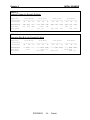
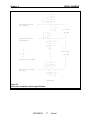
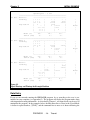
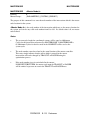
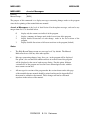
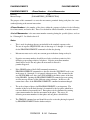
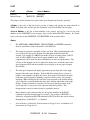
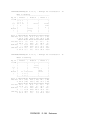
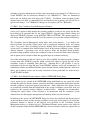
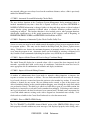
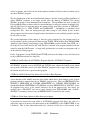
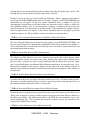
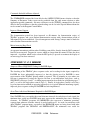
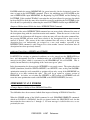
The three-signal arterial system shown in Figure 2-1 is to be timed using the PASSER program.
The PREPASSR program is to be used as a pre-processor to the PASSER program. The system
currently has timings for each isolated intersection, but no system offsets. The phase diagrams
and timings are shown in Figure 2-2. Table 2-1 contains the demand volumes to be used for each
intersection, while Table 2-2 contains the saturation flow rate for each lane group shown in
Figure 2-1. Both tables are organized by approach, the way all input to TEAPAC programs is
performed, as described in Chapter 1. The task is to generate a PASSER input file, produce a
report which shows the phasings and timings, and plot a time-space diagram using the existing
splits and offsets. In addition, use the PASSER-generated offsets to re-plot the time-space
diagram.
PREPASSR
- 15 -
Tutorial
Chapter 2
INITIAL EXAMPLE
Table 2-1
Demand Volumes for Example Problem
Approach
==========
Intersectn
__________
#13 Monroe
#14 Main
#15 Water
From North
_____________
RT
TH
LT
___ ____ ____
122 216
80
150 813 244
0
0
0
From East
______________
RT
TH
LT
____ ____ ____
79 722 187
0 1296 589
466 780
0
From South
______________
RT
TH
LT
____ ____ ____
212 310 198
0
0
0
386 135 453
From West
______________
RT
TH
LT
____ ____ ____
139 660 134
386 620
0
0 573 291
From South
______________
RT
TH
LT
____ ____ ____
0 2337 1433
0
0
0
1345 4402
0
From West
______________
RT
TH
LT
____ ____ ____
0 2525 1448
1448 2634
0
0 2486 1300
Table 2-2
Saturation Flow Rates for Example Problem
Approach
==========
Intersectn
__________
#13 Monroe
#14 Main
#15 Water
From North
_____________
RT
TH
LT
___ ____ ____
0 2410
0
0 5296
0
0
0
0
From East
______________
RT
TH
LT
____ ____ ____
0 2771 1433
0 3041 2606
1359 3387
0
PREPASSR
- 16 -
Tutorial
Chapter 2
INITIAL EXAMPLE
#15 Water Street
(X,Y)=2656,0
#14 Main Street
(X,Y)=2125,0
N
o
<---r-t
h
assume 12 ft lanes
#13 Monroe Street
(X,Y)=0,0
| ^
| ---|<---| | | | |<---| | | | |<---<| | | | |<---v v v | v
---------------*--------------|
^ ^
^
|<| | |>
|
| | | |
530 feet
| | | |
| | | | |
35 mph
| | | | |
|
| | | |>|
|
v v |> |
v
---------------*--------------^ | ^ ^
^
---->| | | |>
|
---->| | | |
|
---->| | | |
|
---->|
|
v |
|
|
|
|
2130 feet
|
|
35 mph
|
|
|
|
|
|
| ^
|
| | | |<---|
| | | |<---|
<| | |>| ---|
v v
| v
v
---------------*--------------^ |
^ ^
---->|<| | |>
---->| | | |
v | | | |
Pershing
Figure 2-1
Intersection Geometrics for Example Problem
PREPASSR
- 17 -
Tutorial
Chapter 2
INITIAL EXAMPLE
System Cycle - 60 sec
_____________________________________________________
Int #13 - Monroe &
Pershing
------------------------------------| * * *
|
^
|
^
|
| * * *
|
****|
****|
|<* * *>
|
<****|
<****|
Seq Code 12
|
v
|
****|
|
|
^
|
v
|****>
|
|
<* * *>|
|****
|
|
* * * |
|
v
|
|
* * * |
|
|
------------------------------------Green (%)
32.0
14.0
39.0
Yellow (sec)
3.0
3.0
3.0
_____________________________________________________
Int #14 - Main &
Pershing
------------------------------------| * * *
|
|
|
| * * *
|
|
|
|<* * *>
|
<****|
<****|
Seq Code 12
|
v
|
****|
|
|
|
v
|****>
|
|
|
|****
|
|
|
|
v
|
|
|
|
|
------------------------------------Green (%)
23.0
26.0
36.0
Yellow (sec)
3.0
3.0
3.0
_____________________________________________________
Int #15 - Water &
Pershing
------------------------------------|
|
|
^
|
|
|
|
****|
|
|
^
|
<****|
Seq Code 13
|
|****
|
|
|
^
|****>
|****>
|
|
<* * *>|
|
|
|
* * * |
|
|
|
* * * |
|
|
------------------------------------Green (%)
34.0
11.0
40.0
Yellow (sec)
3.0
3.0
3.0
^
|
|
|
North
|
|
^
|
|
|
North
|
|
^
|
|
|
North
|
|
Figure 2-2
Signal Phasings and Timings for Example Problem
Data Entry
If you are not currently running the PREPASSR program, do so according to the way it was
installed on your computer (see Appendix G). The program will display the program name along
with important licensing information. As described in Chapter 1, two input modes can be used to
manipulate the program. In the examples below, the Edit menu line to select in the Visual Mode
is shown in square brackets, "[XXX]", and the command line to move to is shown following the
PREPASSR
- 18 -
Tutorial
Chapter 2
INITIAL EXAMPLE
arrow, "→". To enter the desired parameter values, move the cursor to the appropriate display
area and type the value in, followed by the TAB key. Use the OK button when done entering
data to return to the Main Menu. To display more entries on a single dialog box, first select the
Tabular View in the View menu before entering data using the Edit menu.
To use the Manual Mode for this tutorial, select the Manual Mode from the Options menu, or
simply press F4. Once the program is ready to accept input, it will display the command prompt
arrow. To enter the desired parameter values, enter the command keyword and parameter values,
each separated by a space, all followed by the ENTER key. If the Visual Mode is desired at any
point, simply press the F4 function key.
If you wish, you can use the drag-and-drop graphical network creation method to create your
analysis network in the main window before entering detailed data. To do this, follow the
instructions in the Data Entry section of Chapter 1, working from left-to-right so that the
intersections that are created are numbered in the correct order. Use the “distance from the
current node” information in the status bar to get your intersection spacings correct (approximate
is adequate for the example). After the network is created, the additional detailed data described
below can be entered by right-clicking on the appropriate intersection, including a check of the
data already created by the drag-and-drop network creation. The intersections can also be renumbered to the numbers used here with a right-click option.
The first step in using any TEAPAC program is to enter the data required to describe the problem
to be solved. This is accomplished using commands designated as [PARAMETERS] commands,
such as VOLUMES and WIDTHS. The Commands option of the Help menu can be used to
display help for all commands.
The Help-Commands menu displays all commands, along with information on how to use each.
Note the number of parameters for each command and their associated default values. For
example, the VOLUMES command requires volumes for the twelve (12*) possible movements
at the intersection.
Since a lot of commands exist, getting HELP for a smaller group might be appropriate. The
[BASIC] group consists of only those commands which are essential to solving problems with
PREPASSR. These commands can be viewed by issuing the following command from the
Manual Mode.
→ HELP [BASIC]
If help for only one command is needed, the HELP command will display the same detailed HLP
file information for that command which is produced by the Help buttons in Visual Mode
dialogs. For example, use the following Manual Mode entry to obtain complete help for the
NODELIST entry to be made in the next paragraph.
→ HELP NODELIST
PREPASSR
- 19 -
Tutorial
Chapter 2
INITIAL EXAMPLE
Now let's enter the information needed to describe the problem. The first entry should be the list
of valid node numbers for the system (NODELIST).
[Basic] → NODELIST 13 14 15
This information sets up the system data, while the entries below describe the conditions at each
individual intersection. Note that the INTERSECTION command identifies which intersection
the data that follows applies to. In the Tabular View, INTERSECTION is an active command
which needs to be executed with the Execute button in order to change the dialog box values to
the new intersection. Also, when entering the movement parameters, PREPASSR expects the
data to be entered starting with the North approach right-turns and proceeding clockwise around
the intersection as shown below. See Chapter 1 - Conventions for more detail. Enter the
following information for intersection 13.
[Basic] → INTERSECTION 13 MONROE
[Intersection] → NODELOCATION 0 0
As an efficiency aid, one can move to the next dialog box in sequence as shown in the Edit menu
with the Next button instead of using the menu each time. Thus, instead of pressing the OK
button after the INTERSECTION entry above and using the Edit menu to select NETWORK,
simply press the Next button.
[Basic] → NETWORK EAST 2130 35 14 ...
[Basic] → VOLUMES 122 216 80 79 722 187 212 310 198 139 660 134
[Basic] → WIDTHS 0 24 0 0 24 12 0 24 12 0 24 12
[Basic] → SATFLOWS 0 2410 0 0 2771 1433 0 2337 1433 0 2525 1448
[Basic] → SEQUENCE 12
[Basic] → CYCLES 60 60 ...
[Basic] → GREENTIMES 0.32 0.14 0.39 ...
[Basic] → YELLOWTIMES 3.0 3.0 3.0 ...
The NODELOCATION command is used to provide the X,Y coordinates of the intersection.
The NETWORK command is used to connect each intersection to adjacent intersections by
indicating which intersection node number is upstream of each approach. It also indicates the
distance between these two nodes and the average speed at which vehicles travel this distance. In
the case of the WIDTHS entries, note that if right- or left-turning movements do not have
exclusive turn lanes, the WIDTH entry is zero. Also note that the width given is for all lanes in
PREPASSR
- 20 -
Tutorial
Chapter 2
INITIAL EXAMPLE
each lane group. The SATURATIONFLOWS values are given for each non-zero lane group
WIDTH. The phasing for each intersection is given by the SEQUENCE code according to the
codes listed in Figure 1-2. The timings for each phase are entered with the CYCLES,
GREENTIMES and YELLOWTIMES commands in the order of the phasing.
Now use the INTERSECTION command to change to the next intersection and enter the
following information for intersection 14.
[Basic] → INTERSECTION 14 MAIN
[Intersection] → NODELOCATION 2125 0
[Basic] → NETWORK EAST 530 35 15 ...
[Basic] → NETWORK WEST 2130 35 13 ...
[Basic] → VOLUMES 150 813 244 0 1296 589 0 0 0 386 620 0
[Basic] → WIDTHS 0 48 0 0 24 24 0 0 0 12 24 0
[Basic] → SATFLOWS 0 5296 0 0 3041 2606 0 0 0 1448 2634 0
[Basic] → SEQUENCE 12
[Basic] → CYCLES 60 60 ...
[Basic] → GREENTIMES 0.23 0.26 0.36 ...
[Basic] → YELLOWTIMES 3.0 3.0 3.0 ...
Finally, select intersection 15 and enter its information, as follows.
[Basic] → INTERSECTION 15 WATER
[Intersection] → NODELOCATION 2656 0
[Basic] → NETWORK WEST 530 35 14 ...
[Basic] → VOLUMES 0 0 0 366 780 0 386 135 453 0 573 291
[Basic] → WIDTHS 0 0 0 12 36 0 12 48 0 0 24 12
[Basic] → SATFLOWS 0 0 0 1359 3387 0 1345 4402 0 0 2486 1300
PREPASSR
- 21 -
Tutorial
Chapter 2
INITIAL EXAMPLE
[Basic] → SEQUENCE 13
[Basic] → CYCLES 60 60 ...
[Basic] → GREENTIMES 0.34 0.11 0.40 ...
[Basic] → YELLOWTIMES 3.0 3.0 3.0 ...
The Tabular View is a particularly efficient data entry mode when lots of data is to be entered,
buts lacks some of the dialog box cues that the Normal View provides. Use the View menu (or
the F3 key) and the Edit menu to explore this view and see the data values you have entered. If
you have entered a value improperly, simply re-enter the proper value. The next section shows
how you can verify all entries, particularly if you are using the Manual Mode.
Data Review
Once data has been entered, it should be checked for accuracy and completeness. In the Visual
Mode, this process is simply a matter of reviewing the data entered in each dialog, since this
reflects the actual current values. In the Manual Mode, DATA and SUMMARISE are used for
this data review. Either of these commands may be used to display the current parameter values
for the PREPASSR entries. SUMMARISE provides a formatted summary report for all of the
command parameter values, while DATA displays only the parameter values for the list of
commands requested. To illustrate this operation, in either the Visual or Manual Modes, enter
the following. Note that again, since this is an active command, the Visual Mode requires that
the Execute button be used to execute the command. The View-Summary menu can also be
used.
[Datafiles] → SUMMARISE
The current values of all input commands are listed with the values just entered, as well as any
default values which were not entered. Note that the movement parameters, such as VOLUMES
and WIDTHS, have approach and movement labels and a report title is displayed. The DATA
command only displays the information, without any special formatting.
[Datafiles] → DATA INTERSECTION VOLUMES WIDTHS
The program displays the current parameter values for only the INTERSECTION, VOLUMES
and WIDTHS commands of the current intersection. Note that no other command's values are
listed, nor are there any headings. Since DATA accepts other commands as parameter values,
DATA can be requested for only one, several or all commands, where SUMMARISE always
gives all values. This makes DATA quicker to use, but less clear for others to review other than
on the computer display.
PREPASSR
- 22 -
Tutorial
Chapter 2
INITIAL EXAMPLE
Note also that the VOLUMES and WIDTHS listed are only for the "current" intersection, as
defined by the current value of the INTERSECTION command. To review information for any
given intersection, precede the data command with the proper INTERSECTION command, as
below.
[Basic] → INTERSECTION 13 ...
[Basic] → DATA VOLUMES SATFLOWS
[Basic] → INTERSECTION 15 ...
[Basic] → DATA VOLUMES SATFLOWS
The most efficient way to check input from the Manual Mode is to use the ASK command. This
displays the current values of the commands "ASKed for" in a dialog box display which provides
on-screen HELP and allows the user to move the cursor among the data fields and even change
any values desired (just like the Visual Mode). Try the following from the Manual Mode, both in
the Normal and Tabular Views (use F3 to toggle between views):
→ ASK [BASIC]
In the Visual Mode, the “+” and “-” buttons can be used at any time to increment and decrement
the intersection number displayed in the dialog, according to the order defined in the
NODELIST. The Ctrl-PageUp and Ctrl-PageDown keys (^Page-Up/Down) may also be used as
shortcut keys, as long as no changes have been made to input fields in the dialog. If a change is
made, first TAB to the next field, then use ^Page-Up/Down. Try this as the quickest way to
review and/or edit data input for each intersection.
Review the data values listed using any of the methods described above. Note that there is an
error in the VOLUMES entered for intersection 15. The right turn on the east approach should
be 466, not 366. To correct this, re-enter the VOLUMES entry with the proper value using either
of the entry modes, Visual or Manual.
[Basic] → VOLUMES * * * 466 ...
Note that in either mode, only the value to be changed need be entered. In the Visual Mode, the
cursor is moved to the field with the 366 value and the 466 is typed right over the 366, followed
by TAB or ENTER. In the Manual Mode, the VOLUMES command is typed followed by 3
asterisks used as place holders to skip the first three entries.
It is frequently desirable to print the summary of input values, both as a document to use in the
input checking process, as well as a physical record of the input data used in subsequent analyses.
Use of the printer is easy with PREPASSR. Simply use the File-Print menu of the output
window (or Ctrl-P) to direct the output to the default printer. Various available printers and
printer options can be selected using the Setup options in the File menu, and the last produced
PREPASSR
- 23 -
Tutorial
Chapter 2
INITIAL EXAMPLE
output can be printed from the File menu of the main window. If your printer is connected,
perform the above sequence for the SUMMARISE command to get a printed summary of input,
then recheck all the data input for proper values before proceeding.
Analysis
The third step in program execution is to perform an analysis of the current data. Once satisfied
with the accuracy of the input data, use the TIMINGS command in the Results menu to execute a
PREPASSR analysis.
[Results] → TIMINGS ...
The TIMINGS command produces a report which summarizes the current timings and calculates
the offsets to the beginning-of-green and beginning-of-yellow for all phases. These calculations
can be useful in implementing the timings in the field. A complete phase diagram is also
displayed to clarify which phase each timing belongs to.
The PLOT command is another useful command which displays a time-space diagram for the
selected nodes in the NODELIST. As an example of this option, type the following.
[Results] → PLOT 500 ...
The PLOT command generates a time-space diagram for the current timings. The horizontal axis
represents time in percent of cycle and the vertical axis is distance in feet. Note that the PLOT
command has two parameter values, <Scale>, and <List of Nodes>. In the above analysis, the
time-space diagram was plotted for all nodes in the node list at a scale of 500 feet per line.
The EXPORT command is used to create an input data file for the PASSER program. The
OPTIMIZE command instructs the EXPORT as to what type of optimization is desired.
[Basic] → OPTIMIZE OFFSETS ...
[Results] → EXPORT AUTO YES ...
Note that while the EXPORT is in process, the program displays on the screen what is being
written into the file. The file is ready to be used with the PASSER program, and if PASSER is
referenced properly in the Options-Setup menu of PREPASSR, the AUTO option selected above
will launch PASSER automatically with the created file open and ready to Run (two advice
dialogs will require affirmative responses, followed by pushing the Run button).
PREPASSR
- 24 -
Tutorial
Chapter 2
INITIAL EXAMPLE
Evaluation
One powerful aspect of TEAPAC software is the capability to quickly test multiple scenarios or
conditions in an interactive environment. For example, to manually input the offsets generated
by a run of the PASSER program, simply use the following command entries.
[Intersection] → INTERSECTION 13 ...
[Intersection] → OFFSET 0.65 2
[Intersection] → INTERSECTION 14 ...
[Intersection] → OFFSET 0.88 2
[Intersection] → INTERSECTION 15 ...
[Intersection] → OFFSET 0.02 2
PASSER optimized results are always output to a disk file, so IMPORT can read this file to
import the optimized timings directly into PREPASSR without the need for the manual inputs
illustrated above. For example, to import the optimum timings from the example EXPORT
AUTO run above, type the following:
[Results] → IMPORT AUTO YES
Now the optimum timings and time space diagram can be reviewed with the TIMINGS and
PLOT commands.
[Results] → TIMINGS ...
[Results] → PLOT 500 ...
Compare the new time-space diagram to the original diagram. Note that in the first diagram the
offsets were zero and no progression was achieved, while in the second diagram there is a
definite band of progression.
While the example problem is over-simplified, it does demonstrate that PREPASSR’s interactive
analysis and design techniques allow many conditions to be tested quickly and efficiently. In
addition, printed reports can be produced to document the analysis, and analysis conditions can
be saved at any time, as illustrated below.
At this point of the analysis, we may feel we have an adequate solution to the problem, and wish
to SAVE the data values which created the final results for future use. The typical Save/SaveAs
options of the File menu are normally used, but the [DATAFILES] commands of the File menu
PREPASSR
- 25 -
Tutorial
Chapter 2
INITIAL EXAMPLE
also offer these capabilities by first defining the disk FILE name to be used for storage, then
issuing the SAVE command to save the parameter values.
[Datafiles] → FILES SAMPLE/N ...
[Datafiles] → SAVE 1 1 ...
Note that the file name "SAMPLE" has a "/N" switch added to its name the first time it is used to
indicate to PREPASSR that you expect to create a new file. This is not required, but saves the
steps of responding to the new file creation query. When used, an error will be produced only if
this file name already exists. Other such switches and file name conventions are discussed in
Appendix G, as they relate to your operating system. Also note that as many as five files can be
named at any given time, and that the SAVE command describes which of these five files are to
be used. The SAVE command can also tell the program where in the file to save information,
allowing different scenarios to be stacked one after the other in the same file. The LOAD
command is used to retrieve the information at a later date. All of these options relate to
advanced file manipulation capabilities such as batch control file scripts and multiple scenarios,
described in detail in the TEAPAC Tutorial/Reference Manual.
Exiting the Program
Additional experiments may be conducted at this point. When finished, the Exit option of the
File menu can be used. In the Manual Mode, the STOP (or QUIT) command can also be used.
[Control] → STOP ...
Control of the computer is returned to the operating system. This step is not necessary if you will
continue with the examples of Chapter 3.
Additional Concerns
The procedures and commands presented in this chapter are representative of the functions which
can be performed using the PREPASSR program. A number of important aspects were not
presented in the interest of simplifying the example problem. Specifically, default values were
used for many of the possible parameter values of the program. These parameter default values
may not be appropriate for the conditions to be studied and thus may require modification.
Another important command not mentioned is the SUBSYSTEM command which allows a
subset of the network to be exported to PASSER in Usage Level 2 and 3 versions of
PREPASSR.
These procedures, as well as other important elements of the complete use of the PREPASSR
program, are discussed in detail in Chapters 3, 4 and 5, and should be addressed as soon as you
are comfortable with the basic elements discussed in this initial example.
PREPASSR
- 26 -
Tutorial
CHAPTER 3
Analysis Procedures
Chapter 3 Topics
Having stepped through the example problem in Chapter 2, it is now possible to discuss in
greater detail the actual procedures and entries used to perform analyses using the PREPASSR
program. This chapter discusses the minimum input requirements to conduct a reasonable
analysis, as well as practical limitations of the program. Then appropriate analysis procedures
are explained. This chapter is designed to fully explain the operation of the PREPASSR program
and provide additional understanding of the example shown in Chapter 2.
Chapter 3 Topics
Chapter 3 Introduction
Input Requirements
Analysis Procedures
Input Requirements
This section discusses the basic input requirements for PREPASSR. It begins with a discussion
of the minimum input requirements to produce various reports, and then discusses the limitations
to data input which exist. This section is quite important in that it sets the minimum information
for valid results, as well as the limitations of the program.
Minimum Input Requirements
Input Limitations
Minimum Input Requirements
Many of the input parameter values have defaults which eliminate the need to enter data for
every parameter.
After the program is started or the File-New menu or RESET
[PARAMETERS] command is issued, these default values can be viewed in any of the input
dialogs of the Visual Mode or with the DATA or ASK commands in the Manual Mode. The
default values of each command are also listed in the right-hand section of the HELP displays
which are generated by the Help-Commands menu or the HELP command in the Manual Mode.
PREPASSR
- 27 -
Tutorial
Chapter 3
ANALYSIS PROCEDURES
On the other hand, there are a number of commands for which it is necessary to input data in
order to produce legitimate results. The most obvious of these are the NODELIST and
SEQUENCE commands to describe the intersections under study and their phasings. Values for
these commands are needed to do most any function of the PREPASSR program. As such,
examples of these inputs were illustrated in the initial example of Chapter 2. For an approximate
effort, only a few of these commands may be needed. For a more detailed operations analysis,
the other commands which describe intersection conditions completely should be used, although
each has a preset default value which may be usable in an analysis. Each of the input parameters
for these commands should be reviewed to check the appropriateness of the default values using
the View-Summary menu or the dialog boxes of the Edit menu.
The PREPASSR program has three basic modes of operation, one where an export of input
values to PASSER is desired, another where phasing and timing diagrams for each intersection is
desired, and a third where a time-space diagram of input conditions is desired. The input
requirements for these three modes are noticeably different, and thus are discussed below in
separate sections.
EXPORT Inputs. The EXPORT mode means that a complete set of conditions are given in
order for the program to code these inputs for PASSER and produce a complete and valid
PASSER model. This means that the NODELIST command must be entered for the system to
define the intersection numbers which will be used. Then for each INTERSECTION, the
NETWORK, VOLUMES, WIDTHS, SATURATIONFLOWS and SEQUENCES commands
must be entered. After defining for which INTERSECTION the following inputs will apply, the
NETWORK command describes the speed and distance relationship of the intersections, the
VOLUMES describes the demand volumes for each of the 12 possible turning movements, and
the WIDTHS and SATURATIONFLOWS describes the lane use configuration and capacities of
each. The SEQUENCES command is used to specify the phasing according to the sequence code
method discussed in Chapter 1.
If a simulation of given conditions is desired, this is indicated with the OPTIMIZE command
(NONE, a simulation is the default), and GREENTIMES and YELLOWTIMES must be given
for each phase, as well as the CYCLE and OFFSET.
Only GREENTIMES and
YELLOWTIMES are required if only the offsets will be optimized, but if splits will also be
optimized, as indicated by the OPTIMIZE command, then the GREENTIMES and
YELLOWTIMES are not needed and the MINIMUMS are required. If a version of PASSER
other than the most current version is to be used, this must be indicated with the OUTPUT
command.
Optional inputs include the SIMULATION command to set parameters which define the type of
simulation to be performed, and the MASTERNODE command to define which intersection
represents the master node. The NODELOCATION, RIGHTTURNONREDS, LANES,
GROUPTYPE,
TRUCKPERCENTS,
PEAKHOURFACTORS,
ACTUATIONS,
STARTUPLOST, ENDGAIN, STORAGE, LEADLAGS, PERMISSIVES, OVERLAPS and
PHASEMOVS commands may also be used to further define the intersection coordinates, the
PREPASSR
- 28 -
Tutorial
Chapter 3
ANALYSIS PROCEDURES
movement's RTOR, lanes, lane groupt types, heavy vehicles, peak hour factors, actuated, startup
lost time, end gain time and storage conditions, and the SEQUENCE of operation at each signal.
Route entries may also be used to define specific arteries in the system. If a subset of the entire
nodelist is to be analyzed, this can be done conveniently by using the SUBSYSTEM command in
Usage Level 2 and 3 versions of PREPASSR.
Timing Diagrams Inputs. In order to produce phasing and timing diagrams for each
intersection, virtually the same basic inputs are required as for a simulation EXPORT, as
described above, including the GREENTIMES, YELLOWTIMES and OFFSET inputs. The
major exception is that the NETWORK, WIDTHS and SATURATIONFLOWS are not required,
nor are any of the optional inputs described above such as SIMULATION, etc. Note that
VOLUMES are required in order to display the proper arrows in the phasing diagram. The
special phasing commands may be used to further define the SEQUENCE used, and
SUBSYSTEM may be used to see a subset of the NODELIST in Usage Level 2 and 3 versions of
PREPASSR.
Time-Space Inputs. In order to produce time-space diagrams, the input requirements are the
same as the timing diagrams inputs, except that the NETWORK inputs are required and the
VOLUMES inputs are not.
Input Limitations
PREPASSR is designed to optimize the operation of as many as 500 four-legged intersection
using the PASSER program as a basis for the analyses. In accomplishing this objective, certain
limitations in the input and use of the program exist. These are described in this section. In
some instances, references to Chapter 5 are made where techniques are described to get around
some of these limitations. None of these limitations constrain the basic use of the program for
most situations, however, and this section should not be viewed as diminishing the usability of
the program, but merely documenting the limitations which should be observed in its use.
Usage Level 2 of PREPASSR allows the definition of up to 100 intersections, of which up to 20
intersections can be directly EXPORTed; Usage Level 3 handles up to 500 intersections. Smaller
systems can also be defined with these large versions of PREPASSR. Usage Level 1 of
PREPASSR will only allow the definition of up to 12 intersections for a single analysis.
As many as four approaches can be analyzed for each intersection as long as they generally
follow the geometric layout of two crossing two-way streets. The primary concern here is that
the designated left turns conflict with through movements on the opposite approach as in a
normal four-way intersection, since these are what the pre-coded sequences address. Sixty-four
phasings can be handled automatically through use of the standard TEAPAC phase sequence
numbering scheme described in Chapter 1. Through use of sequence codes less than 0 and the
PHASEMOVEMENTS command, completely arbitrary phasings can be handled, as long as the
rules of describing the phasing are followed for the PHASEMOVEMENTS command.
PREPASSR
- 29 -
Tutorial
Chapter 3
ANALYSIS PROCEDURES
The PASSER program is somewhat comprehensive, and not all options of the program can be
coded directly with PREPASSR. When these options are desired, the EXPORTed PASSER
input file can be modified to include these features using the PASSER input system which is
provided with PASSER-II. This allows PREPASSR to perform the bulk of the PASSER coding
effort and the user to exercise the more detailed aspects of the program.
Analysis Procedures
When using PREPASSR, it is important to understand the fundamentals of how the data entries
and actions are used together in order to get results in an efficient and accurate manner. In the
example in Chapter 2, certain processes produced specific results. In this section, these steps are
reviewed and discussed in detail to provide a more complete understanding of the program
functions. First the basic analysis procedures are outlined, then more specialized procedures are
described. Chapter 5 describes unique ways that these basic and special procedures can be
combined to solve unusual problems with PREPASSR.
Basic Analysis Procedures
Special Analysis Procedures
Printing and Saving PASSER Results
Basic Analysis Procedures
In performing any of the functions of PREPASSR, the basic method of using the program is to
enter the parameters which describe the signalized system conditions, as described in the Input
Requirements above, then follow this with the either the EXPORT, TIMINGS or PLOT
commands. These entries and actions are done with the Edit and Results menus, respectively. If
properly installed, the AUTO option of EXPORT can be used to link directly to PASSER. The
Results menu allows the direct IMPORT of PASSER's results and manipulation of the commonly
changed values which follow a PASSER run, such as OFFSETS, as well as either the TIMINGS
or PLOT commands.
In the Manual Mode, all the same steps can be performed by simply entering the commands
desired with their appropriate parameter values. The end of Chapter 3 of the TEAPAC
Tutorial/Reference Manual describes how the ASK command can be used in the Manual Mode
to further enhance the process of performing iterative tabulations and analyses, especially when
using the special group names described in Appendix A of this document.
Special Analysis Procedures
PREPASSR can also be used in a sequential manner for the typical steps of a signal timing effort.
If existing timings for a network are known, it is usually desirable to evaluate these timings prior
to a PASSER optimization, then optimize the network so the before and after conditions can be
compared. This is done easily using PREPASSR, as described below.
PREPASSR
- 30 -
Tutorial
Chapter 3
ANALYSIS PROCEDURES
First, all of the known timing and phasing information should be entered for each intersection
along with the basic geometric, demand and capacity information, as described in the Minimum
Requirements section above. Then the PLOT command can be issued to draw a time-space
diagram of these existing conditions. The TIMINGS command can also be issued to document
the complete timing and phasing information which was entered. Then the EXPORT command
is used to create a simulation run of PASSER, using the SIMULATION command to detail the
simulation parameters. This run of PASSER can also be used to check the resultant PASSER
model for validity and reasonableness.
Following a successful run with PASSER, the same data can be EXPORTed to PASSER
preceded by the OPTIMIZE command to describe what PASSER will be allowed to optimize
(only offsets, both splits and offsets, or the cycle and splits and offsets). When PASSER
finishes, the resultant timings can be IMPORTed into PREPASSR to define the final timings and
interactive time-space diagrams can be PLOTted to observe the results on screen or on the
printer. The TIMINGS command can again be used to document in a clear manner what the final
timings are.
From this point, it is common to speculate what would happen if certain changes to the timings
are made which are intuitively "better" than those produced by PASSER. This is typically the
result of looking at the time-space diagrams and speculating small changes in offsets which
appear to improve the progression of traffic which PASSER doesn't really consider. These
changes can be made easily within PREPASSR and re-PLOTted with PREPASSR to observe the
apparent results. When a satisfactory change has been entered, these inputs can again be
exported to PASSER for evaluation so that these timings can be compared to PASSER's
"optimized" timings. In addition, the PASSER optimized timings can be sent to SIGNAL2000,
PRETRANSYT, PRETSPPD or PRENETSIM for further assessment or optimization by these
programs. Using this technique, a final set of timings can be arrived at in a quick and definitive
fashion, documented with final PLOT and TIMINGS reports, and stored in the final PREPASSR
data file.
In Usage Level 2 and 3 versions of PREPASSR, the same process can be executed for
SUBSYSTEMs of the entire network to assess the potential impact of running the entire system
as several independent subsystems.
Printing and Saving PASSER Results
If the AUTO option of EXPORT is used to make runs of PASSER directly from PREPASSR, the
results of the PASSER run must be printed separately if the printed results are desired. This can
be done from PASSER directly, as desired. The name of the file group used is TMPPSR stored
in a folder below the data subdirectory defined by the PREPASSR.CFG file. The program output
file to print is called xxxTMPPSR.P2O where xxx is the cycle length used.
If these files are to be retained for future review or archival purposes, they must be copied
elsewhere or renamed to something different than the TMPPSR name before the next EXPORT
AUTO is executed, or they will be over-written by that EXPORT.
PREPASSR
- 31 -
Tutorial
CHAPTER 4
Actions and Entry Parameters
Chapter 4 Topics
This chapter provides a summary description of all of the actions and entry parameters of the
PREPASSR program. The usage format of each command dialog and associated parameter
values are provided along with a functional description of the command dialog. The dialogs are
grouped and presented in the following three logical categories:
•
[RESULTS] Dialogs - action commands for PREPASSR found in the Results menu
which are specific to the act of solving the traffic problem addressed by the PREPASSR
program, and used to control the type of analysis performed.
•
[PARAMETERS] Dialogs - entry commands for PREPASSR found in the Edit menu
which are specific to the process of entering data for the traffic problem to be solved by
the PREPASSR program.
•
Common TEAPAC Dialogs - entry and action commands of the PREPASSR program
which are common to and used by all of the TEAPAC programs. These are found
primarily in the Datafiles and Control sub-menus of the File menu.
Table 4-1 describes the detailed organization of how each of the PREPASSR commands is
presented in this chapter, according to these categories.
PREPASSR
- 33 -
Tutorial
Chapter 4
ACTIONS AND ENTRY PARAMETERS
Table 4-1
Organization of Command Discussions
RESULTS Dialogs
PARAMETERS Dialogs
Commands to Enter Basic Data
Commands to Enter System Data
Commands to Enter Intersection Data
Commands to Enter Additional Intersection Data
Commands to Enter Traffic Generator Data
Commands to Enter Traffic Count Data
Common TEAPAC Dialogs
Commands to Aid Interactive Input of Data
Commands to Label Output
Commands to Control Operation of Program
Commands to Access Data Stored in Files
Commands to Control Program Execution
For each command discussed, the first line of a command header provides the basic usage format
of the command dialog, as shown in the sample format below:
COMMAND
<Parameter Value> 5*<Another Parameter>
Parameter values which are enclosed by angle brackets, "<" and ">", indicate that the bracketed
description is to be replaced by a parameter value as described. If a command requires more than
one parameter value of the same type, this is represented by an asterisk, "*", preceded by the
number of entries expected or allowed. In the example above, as many as five of <Another
Parameter> can be entered. This command header is then followed by a summary which
describes the main purpose of the command. Details of the command’s usage are found in
Appendix B.
Remember that each PREPASSR command has been classified into one or more "groups" which
share functional similarities. Appendix A provides a tabular summary of all commands assigned
to each command group. Appendix B provides a detailed table of information for each
command, listed in alphabetical order. Appendices A and B can be used as reference documents
when questions arise regarding any given group or command. Refer to Chapter 4 - TEAPAC
Command Structure in the TEAPAC Tutorial/Reference Manual for a detailed discussion of
group names and their uses.
Chapter 4 Topics
Chapter 4 Introduction
RESULTS Dialogs
PARAMETERS Dialogs
Common TEAPAC Dialogs
PREPASSR
- 34 -
Tutorial
Chapter 4
ACTIONS AND ENTRY PARAMETERS
RESULTS Dialogs
[RESULTS] commands are the active command dialogs which perform the various analyses
specific to the purpose of the PREPASSR program. These commands are summarized in this
section. All the details about each command dialog can be found alphabetically in Appendix B.
The data entry values which must be made prior to using the active commands are listed in the
following section.
EXPORT
<File/AUTO/STACK> <Display Output> <Auto Option>
Create a PASSER-compatible input data file from the current data values, with an optional
automatic link to PASSER-II.
IMPORT
<File/AUTO> <Display Output>
Import signal timings from a PASSER-II output file which was created by a PREPASSR Export.
PLOT
<Scale> <List of Nodes>
Plot a time-space diagram for the nodes specified.
TIMINGS
<List of Nodes>
Display the phasing and timings defined for each intersection in the list of nodes, including the
system offset value.
PARAMETERS Dialogs
[PARAMETERS] commands are the data entry command dialogs used to enter the parameter
values which are specific to the purpose of the PRENETSIM program. Each is summarized in
the following paragraphs. First, those [PARAMETERS] commands which are the most basic
entry commands are described. These commands are frequently the only ones needed to describe
a signalized system completely, using the defaults for the remaining [PARAMETERS]
commands. These remaining commands are then described, organized by the type of inputs they
represent, including the basic commands. All the details about each command dialog can be
found alphabetically in Appendix B.
Commands to Enter Basic Data
Commands to Enter System Data
Commands to Enter Intersection Data
Commands to Enter Additional Intersection Data
Commands to Enter Traffic Generator Data
Commands to Enter Traffic Count Data
Commands to Enter Basic Data
The following are the commands which are used to enter the basic data to describe the problem
to be solved.
PREPASSR
- 35 -
Tutorial
Chapter 4
NODELIST
ACTIONS AND ENTRY PARAMETERS
100*<Node Number>
OPTIMIZE
<Optimization Type> <Step Size List>
Enter the type of optimization to be performed by PASSER.
INTERSECTION
<Node Number> <Description>
Enter the node number of the current intersection (and an optional description) as defined in the
network.
NETWORK
<Direction> <Distance> <Speed> <Node #> 4*<Movement #>
<Assignment Method> <Curvature> <Manual Distance>
Enter the current intersection's relative location in the system network, including spatial and
speed parameters.
VOLUMES
12*<Design Hour Volume>
Enter the turning and through movement volumes for each of the movements at the current
intersection.
WIDTHS
12*<Lane Group Width>
Enter the width of the lane group for each movement at the current intersection.
PEAKHOURFACTORS
12*<Peak Hour Factor>
Enter the peak hour factor for each movement of the current intersection.
MINIMUMS
12*<Minimum Green Time>
Enter the minimum green time requirements for each of the twelve movements at the current
intersection.
STORAGE
12*<Storage Distance>
Enter the amount of storage distance for queued vehicles for each of the twelve movements of
the current intersection.
SATURATIONFLOWS
12*<Stream Saturation Flow>
Enter the maximum capacity for each lane group of the current intersection.
SEQUENCES
<Sequence Code>
Enter the desired and allowed phasings of the traffic signal of the current intersection according
to the codes defined in Figure 1-2 of Chapter 1.
CYCLES
<Minimum Cycle> <Maximum Cycle> <Cycle Increment>
Enter the cycle length for the current intersection to be used for PASSER's simulation or
optimization, as well as a time-space plot or timing diagram, as well as a possible cycle
optimization range.
GREENTIMES
6*<Phase Green Time>
PREPASSR
- 36 -
Tutorial
Chapter 4
ACTIONS AND ENTRY PARAMETERS
Enter the duration of green for each of the phases of a specified phase sequence, or optionally for
each of the movements, of the current intersection.
YELLOWTIMES
6*<Phase Yellow Time>
Enter the clearance interval at the end of each phase of a phase sequence, or optionally for each
of the movements, of the current intersection.
OFFSET
<Offset>
<Phase Number>
Enter the coordinated offset for a phase of the phase sequence at the current intersection.
Commands to Enter System Data
The following are commands which can be used to describe the signalized system which is being
analyzed. Some of these commands were also included in the Basic Data discussed above.
NODELIST
100*<Node Number>
Enter the list of nodes to be simulated or optimized.
SUBSYSTEM
100*<Node Number>
Enter the subset of the NODELIST for which subsequent actions should be taken.
ROUTE
<Route #> <List of Artery Nodes>
Enter a list of node numbers which represent the intersections on the artery for the given route
number.
MASTERNODE
<Master Node #>
Enter the node number of the intersection which is the master node location for the system.
QUEUEMODELS <Model #> <Percentile> <Auto> <Truck>
Enter parameters which control the queue model calculations used for all intersections under
study.
SIMULATION
<Steps/Cycle> < Analysis Period > <Stop Penalty>
<Link Numbering Method> <Model Actuated>
<Assignment Method>Analysis Period
Enter simulation control parameters, including the length of the analysis period for all
intersections under study.
OPTIMIZE
<Optimization Type> <Step Size List>
Enter the type of optimization to be performed by PASSER.
OUTPUT
<Prog> <PASSER Version>
Enter the version of PASSER to create input for.
LINKLIST
200*< <Node Number> <Direction> >
PREPASSR
- 37 -
Tutorial
Chapter 4
ACTIONS AND ENTRY PARAMETERS
Enter the simulation order for each link in the network, primarily for earlier versions of
TRANSYT. This command appears only for compatibility with PRETRANSYT, and is not
presently used in PREPASSR.
Commands to Enter Intersection Data
The following are commands which can be used to describe each intersection being analyzed.
Some of these commands were also included in the Basic Data discussed above.
INTERSECTION
<Node Number> <Description>
Enter the node number of the current intersection (and an optional description) as defined in the
network.
NODELOCATION <X-Y Coordinates>
Enter the X and Y coordinates of the current intersection.
NETWORK
<Direction> <Distance> <Speed> <Node #> 4*<Movement #>
<Assignment Method> <Curvature> <Manual Distance>
Enter the current intersection's relative location in the system network, including spatial and
speed parameters.
APPLABELS
4*<Approach Label>
Enter labels for each approach of the current intersection.
MOVLABELS
12*<Movement Label>
Enter abbreviated labels for each movement of the current intersection.
RIGHTTURNONREDS
4*<Right Turn on Red Volume>
Enter the right turn on red volume for the right turns on each approach of the current intersection.
VOLUMES
12*<Design Hour Volume>
Enter the turning and through movement volumes for each of the movements at the current
intersection.
VOLFACTORS
<# Years> 12*<Volume Adjustment Factor>
Enter number of times to compound and each multiplier used for each movement to adjust the
volume data entered by the VOLUMES command at the current intersection.
VOLADDITIONALS <AddFactor> 12*<Additional Volume>
Enter the factor and additional volume to be added for each movement of the current intersection.
WIDTHS
12*<Lane Group Width>
Enter the width of the lane group for each movement at the current intersection.
LANES
12*<Number of Lanes>
PREPASSR
- 38 -
Tutorial
Chapter 4
ACTIONS AND ENTRY PARAMETERS
Enter the number of lanes which are assigned for use by each of the twelve movements at the
current intersection.
GROUPTYPES
12*<Lane Group Type>
Enter the special lane group type for each possible lane group, such as dual-optional lanes, freeflow lanes and sign-controlled lanes for the current intersection.
TRUCKPERCENTS
12*<Truck-Through Bus Percentage>
Enter the truck and through bus (heavy vehicle) traffic percentage for each movement of the
current intersection.
PEAKHOURFACTORS
12*<Peak Hour Factor>
Enter the peak hour factor for each movement of the current intersection.
ACTUATIONS
12*<Actuated Movement>
Enter the type of phase module present, actuated or non-actuated, for each movement of the
current intersection.
MINIMUMS
12*<Minimum Green Time>
Enter the minimum green time requirements for each of the twelve movements at the current
intersection.
STARTUPLOST
12*<Startup Lost Time>
Enter the length of the lost time at the beginning of a movement’s green period for each of the
twelve movements of the current intersection.
ENDGAIN
12*<End Gain Time>
Enter the length of time that vehicles effectively extend the green period into the yellow and allred period for each of the twelve movements of the current intersection.
STORAGE
12*<Storage Distance>
Enter the amount of storage distance for queued vehicles for each of the twelve movements of
the current intersection.
SATURATIONFLOWS
12*<Stream Saturation Flow>
Enter the maximum capacity for each lane group of the current intersection.
SEQUENCES
<Sequence Code>
Enter the desired and allowed phasings of the traffic signal of the current intersection according
to the codes defined in Figure 1-2 of Chapter 1.
PERMISSIVES
4*<Permissive Left>
Enter an option for each approach identifying the permissability of left-turning traffic to turn on a
through phase following or preceding a protected left turn phase of the current intersection.
PREPASSR
- 39 -
Tutorial
Chapter 4
ACTIONS AND ENTRY PARAMETERS
OVERLAPS
4*<Right Turn Overlap>
Enter how right turn overlaps are to be handled for each approach of the current intersection.
LEADLAGS
2*<Lead-Lag Phasing>
Enter the order of the phases, particularly in multiphase operation, of the current intersection.
CYCLES
<Minimum Cycle> <Maximum Cycle> <Cycle Increment>
Enter the cycle length for the current intersection to be used for PASSER's simulation or
optimization, as well as a time-space plot or timing diagram, as well as a possible cycle
optimization range.
GREENTIMES
6*<Phase Green Time>
Enter the duration of green for each of the phases of a specified phase sequence, or optionally for
each of the movements, of the current intersection.
YELLOWTIMES
6*<Phase Yellow Time>
Enter the clearance interval at the end of each phase of a phase sequence, or optionally for each
of the movements, of the current intersection.
OFFSET
<Offset>
<Phase Number>
Enter the coordinated offset for a phase of the phase sequence at the current intersection.
PHASEMOVEMENTS
<Phase Number> <List of Movements>
Enter the movements permitted during each phase for a non-standard phasing at the current
intersection.
Commands to Enter Additional Intersection Data
The following are commands which can be used to describe each intersection being analyzed but
whose data values are not used by PREPASSR. Their inclusion in the program is to provide
seamless data file compatibility with the SIGNAL2000 program.
METROAREA
<Location>
Enter the location of the current intersection within the metropolitan area.
LEVELOFSERVICE
<Target Delay/LOS> <Max Delay/LOS> <Delay Incr>
<Target v/c> <Max v/c> <v/c Incr>
Enter the range of delay (or level of service) and v/c which should be tested by a DESIGN
optimization and GOVERCS for the current intersection.
EXCESS
<List of Priority Movement Numbers>
Enter the movements to which the TIMINGS command will assign available excess portions of
the cycle length for the current intersection.
APPLABELS
4*<Approach Label>
PREPASSR
- 40 -
Tutorial
Chapter 4
ACTIONS AND ENTRY PARAMETERS
Enter labels for each approach of the current intersection.
GRADES
4*<Grade of Approach>
Enter the grade of each approach of the current intersection.
PEDLEVELS
4*<Pedestrian Interference>
Enter the level of pedestrian interference for right turns on each approach of the current
intersection.
BIKEVOLUMES
4*<Conflicting Bicycles>
Enter the volume of conflicting bicycles for right turns on each approach of the current
intersection.
PARKINGSIDES 4*<Parking Location>
Enter parking conditions on each approach of the current intersection.
PARKVOLUMES 4*<Parking Volume>
Enter the number of parking maneuvers per hour on each side of each approach of the current
intersection.
BUSVOLUMES
4*<Stopping Bus Volume>
Enter the volumes of stopping buses which stop on each approach of the current intersection.
UPSTREAMVC
4*<Upstream v/c Ratio>
Enter the v/c ratio of the upstream intersection for each approach of the current intersection.
MOVLABELS
12*<Movement Label>
Enter abbreviated labels for each movement of the current intersection.
UTILIZATIONS
12*<Lane Utilization Factor>
Enter the lane utilization factor for each movement of the current intersection.
ARRIVALTYPES 12*<Quality of Progression>
Enter the quality of progression for each movement of the current intersection.
REQCLEARANCES
12*<Required Clearance>
Enter the clearance times required for each movement of the current intersection.
INITIALQUEUE
12*<Initial Queue Size>
Enter the number of vehicles queued at the intersection at the start of the analysis period for each
of the twelve movements of the current intersection.
IDEALSATFLOWS
12*<Ideal Saturation Flow Rate>
Enter the base (ideal) saturation flow rate for each movement of the current intersection.
PREPASSR
- 41 -
Tutorial
Chapter 4
ACTIONS AND ENTRY PARAMETERS
FACTORS
12*<Satflow Adjustment Factor>
Enter satflow adjustment factors for each movement of the current intersection to adjust 2000
Highway Capacity Manual satflow computations.
DELAYFACTORS
12*<Delay Adjustment Factor>
Enter factors for each movement of the current intersection used to adjust the delay calculations,
for example, to match delays obtained from a network simulation model.
NSTOPFACTORS
12*<Stops Adjustment Factor>
Enter twelve factors used to adjust the number of stops calculations of the EVALUATE report of
the current intersection, for example, to match the number of stops obtained from a network
simulation model.
CRITICALS
6*<Critical Movement Number>
Enter the movement which is critical for each phase of the phase sequence of operation of the
current intersection.
PEDTIME
<Exclusive Pedestrian Phase Time> <Phase Number>
Enter the time for an exclusive pedestrian scramble phase of the current intersection.
Commands to Enter Traffic Generator Data
The following are commands which can be used to describe traffic generator data for each
intersection being analyzed but whose data values are not used by PREPASSR. Their inclusion
in the program is to provide seamless data file compatibility with the SITE program in particular,
and all TEAPAC programs, in general.
SITESIZE
<# of Distribution Types> <# of Inbound Types>
Enter the number of distribution types to be used to describe the inbound and outbound traffic
generation.
ROUND
<Precision of Totals>
Enter the precision to be used in computing the results.
BASE
<Generation Base> <X-Y Coord LL> <X-Y Coord UR>
Enter the base development size for generating trips as it relates to the generation rates used for
the development.
GENERATION
<Direction> <Generation Rate> 10*<Node-Dir>
Enter the traffic generation rates and access points and access directions for the development.
PATHDISTRIBUTION
<Distr Type #> <Distr %> <Node #> <Node Dir>
<Descr>
Enter and set the current distribution type number, and enter its related distribution percentage,
external node, and description.
PREPASSR
- 42 -
Tutorial
Chapter 4
ACTIONS AND ENTRY PARAMETERS
PATHASSIGNMENT
<Path #> <Path %> <Path List>
Enter a path (list of intersections) which vehicles of the current distribution type follow when
traveling to and from the development.
ASSIGNMENT
<Type #> <Intersection #>
12*<<Movement #> <Assignment Factor>>
Enter the percentage of a distribution type to be assigned to the movements at an intersection.
This is only used to define special assignment situations, and is not normally used for typical site
traffic assignment situations.
Commands to Enter Traffic Count Data
The following are commands which can be used to describe traffic count data for each
intersection being analyzed but whose data values are not used by PREPASSR. Their inclusion
in the program is to provide seamless data file compatibility with the TURNS and WARRANTS
programs in particular, and all TEAPAC programs, in general.
COUNTTYPE
<Type of Data> <Type of Truck Counts>
Enter the type of count data which is to be supplied to the program at the current intersection, and
to provide a description of the count.
PERIODS
<Count Interval> 5*< <Start Time> <Stop Time> >
Enter the count interval and the beginning and ending times for each count period for which
subsequent data will be entered at the current intersection.
CONDITIONS
<Major Direction> <# N-S Lanes> <# E-W Lanes>
<High Speed> <Low Population>
<Progression Impact> <Remedial Actions Failed>
<# Accidents for Signal> <Stop Sign Delay>
<# Accidents for Stop> <Minor Street Delay>
Enter intersection conditions which affect the conduct of a Warrant Analysis at the current
intersection.
ADTFACTOR
<Factor to Expand Counts to 24 Hour Volumes>
Enter a factor which will be used to estimate 24-hour volumes from partial day's counts at the
current intersection.
VEHICLECOUNTS
<Movement or Time> <List of Counts>
Enter the count of vehicles for a count interval or movement number at the current intersection.
TRUCKCOUNTS
<Movement or Time> <List of Counts>
Enter the count of trucks for a count interval or movement number at the current intersection.
PREPASSR
- 43 -
Tutorial
Chapter 4
ACTIONS AND ENTRY PARAMETERS
Common TEAPAC Dialogs
There are 22 command dialogs common to all TEAPAC programs. These commands control
interactive functions, output labeling, program operation, permanent data storage and program
execution. These common TEAPAC commands are summarized in this section. All the detail
about these commands is found alphabetically in Appendix B of this manual with the other
commands of the program discussed previously (as well as in Appendix B of all other TEAPAC
program manuals).
Commands to Aid Interactive Input of Data
Commands to Label Output
Commands to Control Operation Of Program
Commands to Access Data Stored In Files
Commands to Control Program Execution
Commands to Aid Interactive Input of Data
The commands described below have functions related to the interactive use of the program.
These commands control on-screen help functions as well as provide the means to review
program data. Many of these commands act on a set of commands as their parameter values.
MESSAGES
<Level of Messages>
Display messages concerning changes made to the program since the last printing of the
tutorial/reference manual.
HELP
<List of Commands>
Display the command names, parameter descriptions, and default values for each command
listed.
ASK
<List of Commands>
Produce a dialog box display for each of the listed commands.
RESET
<List of Commands>
Reset the parameters of the specified commands to their default values.
DATA
<List of Commands>
Display the current parameter values for the specified commands.
SUMMARISE
-Display a formatted summary of all [PARAMETERS] values. It has no parameters.
Commands to Label Output
The four commands described below control the report headings of the program. Report
headings are used to identify the conditions of an analysis. Report headings are critical when
multiple analyses are performed and documentation of various conditions analyzed is required.
PREPASSR
- 44 -
Tutorial
Chapter 4
ACTIONS AND ENTRY PARAMETERS
PROJECT
<First Title Line>
Enter the first line of information used to identify the situation being analyzed.
DESCRIPTION
<Second Title Line>
Enter the second line of information used to identify the situation being analyzed.
NOTE
<Third Title Line>
Enter the third line of information contained in the title of each report.
HEADING
<Number of Lines>
Display the current title heading lines.
Commands to Control Operation of Program
The following commands control various aspects of program operation.
ECHO
<Input/Output Echo Condition>
Enter the echo condition flag indicating whether or not command information should be
displayed after being input from or output to a file.
IODEVICES
<Visual View> <Page #> <Lines/Pg> <Last Line #>
Set the visual view style for dialogs, as well as the page number and the size of the output
medium (i.e., paper).
NEWPAGE
<Page Advance Option>
Enter a flag indicating that the next output report should begin with title headings at the top of
the next page.
Commands to Access Data Stored In Files
The following commands are used when analysis data and/or commands are to be stored in
permanent data files for later use.
FILES
5*<File Name>
Enter the names of the permanent storage file areas where information is to be LOADed and
SAVEd.
SAVE
<Line Number> <File Number> <List of Commands>
Save the current parameter values of the listed commands in permanent storage locations
specified by the FILES command, for future retrieval with the LOAD command.
LOAD
<Line Number> <File Number> <LOAD Type> <# Blocks>
Input commands and parameters from permanent storage locations specified by the FILES
command.
PREPASSR
- 45 -
Tutorial
Chapter 4
ACTIONS AND ENTRY PARAMETERS
RETURN
-Return to the source of input which was being used when the last LOAD command was
encountered. It has no parameters.
NEXTLINES
5*<Next Line of File>
Enter the default next line to be accessed in each of the five files.
Commands to Control Program Execution
The following commands are used to direct program control. Typically, these commands are
used within "control" files to execute a series of program steps.
STOP
<Next Program>
Stop running the current program and optionally run a new program.
REPEAT
<Variable Name> <First Val> <Last Val> <Increment>
Initiate a loop in a control file so that the set of commands which follow will be repeated a finite
number of times.
GOTO
<Destination>
Divert the input stream within a file by providing the next location to be LOADed from that file.
CALCULATE
<Algebraic Expression>
Perform a calculation for the given expression and optionally assign the integer result to a user
variable.
PREPASSR
- 46 -
Tutorial
CHAPTER 5
Advanced Procedures
Chapter 5 Topics
Chapters 1 through 4 covered the basic methods and commands required to use the PREPASSR
program to solve most problems which will be encountered. The advanced procedures discussed
in this chapter can greatly increase efficiency in solving problems with PREPASSR, as well as
provide insights into how to use PREPASSR to solve unusual problems. Before beginning this
section, it is necessary to have a good understanding of the material covered in the previous
chapters, as well as in the TEAPAC Tutorial/ Reference Manual. If this is not the case, please
review this material prior to continuing. Chapter 5 of the TEAPAC Tutorial/Reference Manual
can also be used to discover advanced procedures which can be used by PREPASSR, as well as
all TEAPAC programs.
Chapter 5 Topics
Chapter 5 Introduction
Sharing Data Files with Other TEAPAC Programs
Sharing Data Files with Other TEAPAC Programs
A major element in the design of TEAPAC programs is the ability to share both input and output
data amongst any TEAPAC programs which can make valid use of the data. All TEAPAC
application programs (except NOSTOP) use the same single data file which contains all data
entries used by all programs. This includes intersection traffic and geometric data, network data,
traffic count data and traffic generator data, whether or not this data is specifically germaine to
the purpose of the specific program being used at the time. This means that all of this data can be
shared amongst all TEAPAC programs by simply opening the one data file into the program
desired, and saving the data, as appropriate, before moving to another program. The easiest way
to accomplish this is by using the LinkTo menu which automatically closes the current program
and opens the selected program with the same data file.
In the case where data changes within one program as a result of an analysis and these changes
are needed for use in another program, the user need only save the changes in the file before
opening the file in the next program. The LinkTo menu provides a simple way to transfer control
PREPASSR
- 47 -
Tutorial
Chapter 5
ADVANCED PROCEDURES
of the file to that next program (after saving) by simply selecting the next program. Examples of
circumstances where this exchange of results might occur are illustrated below:
In SIGNAL2000
• Computed HCM-compliant SATURATIONFLOWS can be transferred to TEAPAC
PREprocessors for use by PASSER, TRANSYT, CORSIM, SYNCHRO or TSPPD.
• HCM-optimized SEQUENCES, GREENTIMES and YELLOWTIMES can be transferred to
TEAPAC PREprocessors for use by NOSTOP, PASSER, TRANSYT, CORSIM, SYNCHRO
or TSPPD for various forms of coordinated operation assessment and/or optimization.
In PREprocessors
• Imported optimized OFFSETS (and possibly GREENTIMES) can be transferred to
SIGNAL2000 or other TEAPAC PREprocessors for evaluation, graphical rendition,
simulation, animation or further optimization.
In TURNS/WARRANTS
• Peak 15-minute or 60-minute VOLUMES (and possibly TRUCKPERCENTS and
PEAKHOURFACTORS) can be transferred to SIGNAL2000 for HCM-compliant capacity
analysis, HCM phasing/timing optimization or intersection design.
• Peak 15-minute or 60-minute VOLUMES (and possibly TRUCKPERCENTS and
PEAKHOURFACTORS) can be transferred to TEAPAC PREprocessors for use by
PASSER, TRANSYT, CORSIM, SYNCHRO or TSPPD.
• Peak 15-minute or 60-minute VOLUMES can be transferred to SITE as background traffic
for traffic impact analysis studies.
In SITE
• Projected added volumes (VOLADDITIONALS) can be transferred to SIGNAL2000 for
HCM-compliant capacity analysis, HCM phasing/timing optimization or intersection design.
• Projected added volumes (VOLADDITIONALS) can be transferred to TEAPAC
PREprocessors for use by PASSER, TRANSYT, CORSIM, SYNCHRO or TSPPD.
Traffic volumes are an important element either determined by or used by virtually all modules
of TEAPAC, thus a discussion here of how volume information flows among all the TEAPAC
programs will be helpful. Analysis volumes in any TEAPAC program are the additive
combination of VOLUMES and VOLADDITIONALS entries. Thus, for any given movement,
the VOLUMES entry for that movement is added to the VOLADDITIONALS entry for that
movement to arrive at the analysis volume for that movement. For added flexibility, VOLUMES
entries can be factored up or down by corresponding VOLFACTORS entries (with the additional
possibility of compounded growth applied to those factors) and VOLADDITONALS entries can
be factored up or down by a separate factor. Normally, VOLUMES will be either entered by the
user or set automatically by peak period analysis in TURNS or WARRANTS (consistent with the
then-current VOLFACTORS entries). Normally, VOLADDITIONALS will be either entered by
the user or set automatically by traffic generation computations in SITE (consistent with the thencurrent VOLUMES and VOLFACTORS entries). The user is directed to the specific formulas
for analysis volume determination described in detail in Appendix C.
PREPASSR
- 48 -
Tutorial
Chapter 5
ADVANCED PROCEDURES
The following discussion provides further program-specific notes about data file sharing for this
program.
Sharing Data with SIGNAL2000, PRENOSTOP, PRETRANSYT, PRETSPPD, PRESYNCHRO
and PRENETSIM
Input Data from TURNS, WARRANTS and SITE
Sharing Data with SIGNAL2000, PRENOSTOP, PRETRANSYT,
PRETSPPD, PRESYNCHRO and PRENETSIM
SIGNAL2000 can provide a number of relevant analyses for typical arterial signal timing studies.
For existing conditions, SIGNAL2000 can provide a complete and comprehensive capacity
analysis strictly according to the methods of the 2000 Highway Capacity Manual (HCM). When
optimizing the signal timings of each signal in an arterial, SIGNAL2000 will consider HCM
level of service, virtually every possible phasing combination, for both the major street and the
cross street, and will completely consider the effects which right turns, clearance intervals and
minimums have on the best timings. Each of these optimized conditions can be SAVEd with
SIGNAL2000, and then PREPASSR can be run using all of these results without any re-entry of
data. This virtually eliminates any input at all to PREPASSR, using all of the data already
entered and optimized from SIGNAL2000.
Since the data inputs and file information for SIGNAL2000, PRENOSTOP, PREPASSR,
PRETRANSYT, PRETSPPD, PRESYNCHRO and PRENETSIM are identical, files which are
opened and saved with PREPASSR can be opened directly with all the others using the FileOpen menu, allowing the immediate use of the SIGNAL2000 HCM capacity analysis and HCM
delay optimization program, the NOSTOP bandwidth optimization program, the PASSER
bandwidth optimization program, the TRANSYT simulation/optimization program, the TSPPD
time-space platoon progression diagram program, the SYNCHRO simulation/optimization
program and the NETSIM simulation and animation program for the data previously input to
PREPASSR. The most convenient way to move among all of these programs is to use the
LinkTo menu provided in each program. This gives access to each of the SIGNAL2000,
NOSTOP, PASSER-II, TRANSYT, TSPPD, SYNCHRO and NETSIM programs from a single
data base.
If optimized intersection results from SIGNAL2000 are to be used by PREPASSR, these results
should be SAVEd after they are computed. Also, if SIGNAL2000's SATURATIONFLOWS are
to be used by PREPASSR, they must be SAVEd after an action command such as ANALYZE or
SERVICEVOLS computes them.
In another joint use scenario, a common effort is to use the optimized results of PASSER as a
starting point for a TRANSYT optimization. In order to accomplish this easily, the PASSER
results should be imported into PREPASSR and all info then SAVEd. This file can be
transferred directly to PRETRANSYT using the LinkTo menu and EXPORTed immediately to
TRANSYT.
PREPASSR
- 49 -
Tutorial
Chapter 5
ADVANCED PROCEDURES
Input Data from TURNS, WARRANTS and SITE
TURNS (and WARRANTS) is another program which can provide useful results for
PREPASSR (as well as SIGNAL2000). After the turning movement count summaries and peakperiod analyses of TURNS are completed, the peak-period VOLUMES entries which are created
are normally used as existing traffic volumes for the initial capacity analyses with SIGNAL2000
and demand volumes for PREPASSR. The VOLUMES results of the TURNS peak-period
analyses can be saved directly to the data file which can then be read by both SIGNAL2000 and
PREPASSR for these purposes. Note also that these VOLUMES can be easily factored by using
the individual VOLFACTORS entries, as well as the global entry of VOLFACTORS when
intersection 0 (all intersections) is selected.
The SITE program can be used in exactly the same manner as TURNS, creating a set of projected
VOLADDITIONALS in the file, allowing a duplicate analysis to be performed on projected
volumes, as well as existing volumes. Note also that these VOLADDITIONALS can be easily
factored by using the individual VOLADDITIONALS factor entry, as well as the global entry of
the factor when intersection 0 (all intersections) is selected. Another use of the factor, including
its global entry, is to disable the VOLADDITIONALS by using a factor of 0.
PREPASSR
- 50 -
Tutorial
APPENDICES
Reference Manual
The following appendices form the PREPASSR Reference Manual. This manual is designed to
provide detailed information regarding various aspects of the PREPASSR program. The
information in the appendices is ordered such that easy reference access is possible. Each of the
appendices is described briefly below.
Appendix A
ABBREVIATED DESCRIPTION OF ACTIONS AND ENTRIES
Appendix A lists all PREPASSR commands by group name. This appendix is designed for
quick reference regarding group names and command hierarchy. The single line descriptions are
identical to the descriptions provided by the Help-Commands menu and the HELP command.
The descriptions identify the names and number of parameter values along with any default
values.
Appendix B
DETAILED DESCRIPTION OF ACTIONS AND ENTRIES
Appendix B provides complete detail regarding the PREPASSR commands and their associated
parameter values. All PREPASSR commands are listed in this section. Five categories of
information are provided for each command: 1) Format, 2) Function, 3) Parameters, 4) Group
Names and 5) Notes. This appendix provides specific details on how to use a PREPASSR
command and what, if any, limitations exist on the associated parameter values. The Note
category provides useful "hints" on the use of the command.
Appendix C
ANALYSIS METHODS AND FORMULATIONS
Appendix C discusses the methods and formulae used by the PREPASSR program to calculate
results. Using the procedures discussed in this appendix, it is possible to manually recreate the
results calculated by PREPASSR.
PREPASSR
- 51 -
Reference
Appendix D
REPORT DESCRIPTIONS AND EXAMPLES
Appendix D describes the reports generated by the PREPASSR program. In addition, sample
output is provided for each type of report generated by the PREPASSR program. The elements
of each report are described in detail.
Appendix E
ERROR MESSAGES AND TROUBLE SPOTS
Appendix E describes program specific error messages of the PREPASSR program, the potential
cause of such errors and potential solutions. PREPASSR errors are identified by the letters
"PPS" followed by a two-digit number. In addition, potential trouble spots associated with using
the PREPASSR program are outlined. This appendix is useful for identifying program-specific
causes for certain problems in the use of PREPASSR, as well as preventing future errors.
Appendix F
TEAPAC SYSTEM ERROR MESSAGES
Appendix F describes error messages which are common to all TEAPAC programs. TEAPAC
error or warning messages are identified by the letters "TPC" followed by a two digit number.
This appendix discusses each TEAPAC error and potential causes and solutions. Appendix F of
each TEAPAC Manual is identical for quick reference purposes.
Appendix G
OPERATING SYSTEM MESSAGES AND INSTALLATION NOTES
Appendix G discusses the unique aspects of the installation of TEAPAC programs on a particular
operating system. Operating system dependent functions such as error messages, file
specification procedures and output control features are discussed. Special function keys, such as
control characters, are also discussed. Appendix G of each TEAPAC Manual is identical for
quick reference purposes.
Appendix H
ADDENDA
Appendix H provides a location for recent release notes and addenda which may be published
after the official release of this documentation. This appendix can also be used to store printed
copies of new release notes for updated versions of PREPASSR, as produced by the HelpRecentChanges menu or the MESSAGES command, for off-line reference.
PREPASSR
- 52 -
Reference
APPENDIX A
Abbreviated Description of Actions and
Entries
Appendix A Topics
Appendix A is designed as a quick reference to the PREPASSR commands and their associated
parameter values. This appendix is also useful for identifying what specific Group Names exist
in the PREPASSR program (Table A-1), which commands can be found in each group (Table A2), and an alphabetical list of commands (Table A-3). The command information contained in
this appendix can be accessed interactively using the HELP command.
In Table A-1, the column labeled "Std Name" has an "X" entered for every group name that is a
standard name found in each TEAPAC program. The name and meaning of these groups in each
TEAPAC program is identical, allowing a quick understanding of how commands are organized
in each TEAPAC program. The column labeled "Std Group" has an "X" entered for every group
which is comprised of standard TEAPAC commands. In these cases, not only is the name of the
group the same in every TEAPAC program, but the names and purposes of the commands in the
groups are also identical among TEAPAC programs, further enhancing the quick understanding
of commands in each TEAPAC program.
Group names are useful when using a command which requires a list of commands as a
parameter value. These are the RESET, ASK, DATA, HELPand SAVE commands. Group
names make it possible to list a complete set of commands using a single parameter value. In
order to use a group name as a parameter value, it is necessary to enclose the group name in
square brackets, "[XXX]", as shown in this appendix.
PREPASSR
A-53
Reference
Table A-1
Group Name Structure
Std
Std
[GROUP NAME] - Types of Commands Included in Group
Name
Group
____________________________________________________________________________
[ALL] - All of the PREPASSR commands, alphabetically
X
[INFO]
- help & information about updates
X
X
[DATAFILES]
- data and file management
X
X
[TITLES]
- enter the headings for report output
X
X
[CONTROL]
- control program execution environment X
X
[RESULTS]
- perform program-specific actions
[PARAMETERS] - enter program-specific data
[BASIC]
- enter essential data requirements
[SYSTEM]
- enter system data
X
X
X
[INTERSECTION] - enter intersection data
[SIGNAL2000] - enter additional intersection data
[TURNS/WARRANTS] - enter traffic count data
[SITE] - enter traffic generator data
[EXPORT] - related to export-to-PASSER actions
[IMPORT] - related to import-from-PASSER actions
Appendix A Topics
Appendix A Introduction
PREPASSR Command Structure
All Commands
PREPASSR Command Structure
Each PREPASSR command has been classified into one or more "groups", each of which consist
of a subset of all PREPASSR commands. Each group contains commands which share
functional similarities. The Group Name associated with each group describes the function
shared by the commands. The Group Names form a heirarchical command structure, as outlined
in Table A-1. Group names are either common names used in all TEAPAC programs, or special
names used by the PREPASSR program, as described in the following sections.
Table A-2 provides a cross-reference between each of the commands and the group names.
Abbreviated group names appear across the top of the table and commands along the left side.
PREPASSR
A-54
Reference
An "X" in the table indicates that the command to the left is included in the group name above.
This table allows a quick view of the relationship between group names and commands.
Common TEAPAC Group Names
Special PREPASSR Group Names
PREPASSR
A-55
Reference
Table A-2
Cross-Reference of Commands and Groups
Command
MESSAGES
HELP
RESET
DATA
SUMMARISE
FILES
NEXTLINES
ECHO
LOAD
SAVE
ASK
PROJECT
DESCRIPTION
NOTE
STOP
IODEVICES
NEWPAGE
HEADING
CALCULATE
REPEAT
GOTO
RETURN
EXPORT
IMPORT
PLOT
TIMINGS
NODELIST
SUBSYSTEM
ROUTE
MASTERNODE
QUEUEMODELS
SIMULATION
OPTIMIZE
OUTPUT
LINKLIST
INTERSECTION
NODELOCATION
NETWORK
APPLABELS
MOVLABELS
RIGHTTURNONREDS
VOLUMES
VOLFACTORS
VOLADDITIONALS
WIDTHS
LANES
GROUPTYPES
TRUCKPERCENTS
PEAKHOURFACTORS
Groups:
ALL INF DAT TIT CON RES PAR BAS SYS INT SIG TUR SIT EXP IMP
X
X
X
X
X
X
X
X
X
X
X
X
X
X
X
X
X
X
X
X
X
X
X
X
X
X
X
X
X
X
X
X
X
X
X
X
X
X
X
X
X
X
X
X
X
X
X
X
X
X
X
.
.
.
.
.
.
.
.
.
.
.
.
.
.
.
.
.
.
.
.
.
.
.
.
.
.
.
.
.
.
.
.
.
.
.
.
.
.
.
.
.
.
.
.
.
.
.
.
.
X
X
X
X
X
X
X
X
X
.
.
.
.
.
.
.
.
.
.
.
.
.
.
.
.
.
.
.
.
.
.
.
.
.
.
.
.
.
.
.
.
.
.
.
.
.
.
.
.
.
.
.
.
.
.
.
.
.
X
X
X
.
.
.
.
.
.
.
.
.
.
.
.
.
.
.
.
.
.
.
.
.
.
.
.
.
.
.
.
.
.
.
.
.
.
.
.
.
.
.
.
.
.
.
.
.
.
.
.
.
X
X
X
X
X
X
X
X
.
.
.
.
.
.
.
.
.
.
.
.
.
.
.
.
.
.
.
.
.
.
.
.
.
.
.
PREPASSR
.
.
.
.
.
.
.
.
.
.
.
.
.
.
.
.
.
.
.
.
.
.
X
X
X
X
.
.
.
.
.
.
.
.
.
.
.
.
.
.
.
.
.
.
.
.
.
.
.
A-56
.
.
.
.
.
.
.
.
.
.
.
.
.
.
.
.
.
.
.
.
.
.
.
.
.
.
X
X
X
X
X
X
X
X
X
X
X
X
X
X
X
X
X
X
X
X
X
X
X
.
.
.
.
.
.
.
.
.
.
.
.
.
.
.
.
.
.
.
.
.
.
.
.
.
.
X
.
.
.
.
.
X
.
.
X
.
X
.
.
.
X
.
.
X
.
.
.
X
.
.
.
.
.
.
.
.
.
.
.
.
.
.
.
.
.
.
.
.
.
.
.
.
.
.
X
X
X
X
X
X
X
X
.
.
.
.
.
.
.
.
.
.
.
.
.
.
.
Reference
.
.
.
.
.
.
.
.
.
.
.
.
.
.
.
.
.
.
.
.
.
.
.
.
.
.
.
.
.
.
.
.
.
.
.
X
X
X
X
X
X
X
X
X
X
X
X
X
X
.
.
.
.
.
.
.
.
.
.
.
.
.
.
.
.
.
.
.
.
.
.
.
.
.
.
.
.
.
.
.
.
.
.
.
.
.
.
X
X
.
.
.
.
.
.
.
.
.
.
.
.
.
.
.
.
.
.
.
.
.
.
.
.
.
.
.
.
.
.
.
.
.
.
.
.
.
.
.
.
.
.
.
.
.
.
.
.
.
.
.
.
.
.
.
.
.
.
.
.
.
.
.
.
.
.
.
.
.
.
.
.
.
.
.
.
.
.
.
.
.
.
.
.
.
.
.
.
.
.
.
.
.
.
.
.
.
.
.
.
.
.
.
.
.
.
.
.
.
.
.
.
.
.
.
.
.
.
.
.
.
.
.
.
.
.
.
.
.
X
.
.
.
.
X
X
X
.
.
X
X
.
.
.
.
.
.
.
.
.
.
.
.
.
.
.
.
.
.
.
.
.
.
.
.
.
.
.
.
.
.
.
.
.
.
.
.
.
.
X
X
X
.
.
.
.
.
.
.
.
.
X
.
.
.
.
.
.
.
.
.
.
.
.
.
Table A-2 (continued)
Cross-Reference of Commands and Groups
Command
ACTUATIONS
MINIMUMS
STARTUPLOST
ENDGAIN
STORAGE
SATURATIONFLOWS
SEQUENCES
PERMISSIVES
OVERLAPS
LEADLAGS
CYCLES
GREENTIMES
YELLOWTIMES
OFFSET
PHASEMOVEMENTS
METROAREA
LEVELOFSERVICE
EXCESS
GRADES
PEDLEVELS
BIKEVOLUMES
PARKINGSIDES
PARKVOLUMES
BUSVOLUMES
UPSTREAMVC
UTILIZATIONS
ARRIVALTYPES
REQCLEARANCES
INITIALQUEUE
IDEALSATFLOWS
FACTORS
DELAYFACTORS
NSTOPFACTORS
CRITICALS
PEDTIME
COUNTTYPE
PERIODS
CONDITIONS
ADTFACTOR
VEHICLECOUNTS
TRUCKCOUNTS
SITESIZE
ROUND
BASE
GENERATION
PATHDISTRIBUTION
PATHASSIGNMENT
ASSIGNMENT
Groups:
ALL INF DAT TIT CON RES PAR BAS SYS INT SIG TUR SIT EXP IMP
X
X
X
X
X
X
X
X
X
X
X
X
X
X
X
X
X
X
X
X
X
X
X
X
X
X
X
X
X
X
X
X
X
X
X
X
X
X
X
X
X
X
X
X
X
X
X
X
.
.
.
.
.
.
.
.
.
.
.
.
.
.
.
.
.
.
.
.
.
.
.
.
.
.
.
.
.
.
.
.
.
.
.
.
.
.
.
.
.
.
.
.
.
.
.
.
.
.
.
.
.
.
.
.
.
.
.
.
.
.
.
.
.
.
.
.
.
.
.
.
.
.
.
.
.
.
.
.
.
.
.
.
.
.
.
.
.
.
.
.
.
.
.
.
.
.
.
.
.
.
.
.
.
.
.
.
.
.
.
.
.
.
.
.
.
.
.
.
.
.
.
.
.
.
.
.
.
.
.
.
.
.
.
.
.
.
.
.
.
.
.
.
.
.
.
.
.
.
.
.
.
.
.
.
.
.
.
.
.
.
.
.
.
.
.
.
.
.
.
.
.
.
.
.
.
.
.
.
.
.
.
.
.
.
.
.
.
.
.
.
.
.
.
.
.
.
.
.
.
.
.
.
.
.
.
.
.
.
.
.
.
.
.
.
.
.
.
.
.
.
.
.
.
.
.
.
.
.
.
.
.
.
.
.
.
.
.
.
X
X
X
X
X
X
X
X
X
X
X
X
X
X
X
X
X
X
X
X
X
X
X
X
X
X
X
X
X
X
X
X
X
X
X
X
X
X
X
X
X
X
X
X
X
X
X
X
.
X
.
.
X
X
X
.
.
.
X
X
X
X
.
.
.
.
.
.
.
.
.
.
.
.
.
.
.
.
.
.
.
.
.
.
.
.
.
.
.
.
.
.
.
.
.
.
.
.
.
.
.
.
.
.
.
.
.
.
.
.
.
.
.
.
.
.
.
.
.
.
.
.
.
.
.
.
.
.
.
.
.
.
.
.
.
.
.
.
.
.
.
.
.
.
Common TEAPAC Group Names
PREPASSR
A-57
Reference
X
X
X
X
X
X
X
X
X
X
X
X
X
X
X
.
.
.
.
.
.
.
.
.
.
.
.
.
.
.
.
.
.
.
.
.
.
.
.
.
.
.
.
.
.
.
.
.
.
.
.
.
.
.
.
.
.
.
.
.
.
.
.
X
X
X
X
X
X
X
X
X
X
X
X
X
X
X
X
X
X
X
X
.
.
.
.
.
.
.
.
.
.
.
.
.
.
.
.
.
.
.
.
.
.
.
.
.
.
.
.
.
.
.
.
.
.
.
.
.
.
.
.
.
.
.
.
.
.
.
.
X
X
X
X
X
X
.
.
.
.
.
.
.
.
.
.
.
.
.
.
.
.
.
.
.
.
.
.
.
.
.
.
.
.
.
.
.
.
.
.
.
.
.
.
.
.
.
.
.
.
.
.
.
.
X
X
X
X
X
X
X
.
.
.
.
.
.
.
.
.
.
.
.
.
.
.
.
.
.
.
.
.
.
.
.
.
.
.
.
.
.
.
.
.
.
.
.
.
.
.
.
.
.
.
.
.
.
.
.
.
.
.
.
.
.
X
.
.
X
X
X
X
X
.
.
.
.
.
.
.
.
.
.
.
.
.
.
.
.
.
.
.
.
.
.
.
.
.
.
.
.
.
.
.
.
.
.
The group name [ALL] contains every possible PREPASSR command. This group is organized
in alphabetical order. The [ALL] group is divided into six sub-groups, all of which have
standard group names used in every TEAPAC program. These are [INFO], [DATAFILES],
[TITLES], [CONTROL], [RESULTS], and [PARAMETERS]. The first four encompass the 22
standard TEAPAC commands found in every TEAPAC program. These are used primarily for
the basic housekeeping chores needed for program manipulation, such as on-screen help, data
manipulation, file handling, output labeling, printer control, and control file actions. The last two
sub-groups contain commands specific to the PREPASSR program. The first, [RESULTS],
consists of active commands which produce specific PREPASSR results. The other,
[PARAMETERS], consists of all of the commands which can be used to enter the data values
which describe the scenarios to be analyzed by the [RESULTS] commands.
The [PARAMETERS] group has another standard TEAPAC group name as its sub-set. This is
the [BASIC] group, which consists of those important and necessary [PARAMETERS]
commands needed as a minimum to describe the data for an analysis. In the PREPASSR
program, since the [PARAMETERS] group is quite large, it is further sub-divided into additional
special groups as described below.
Special PREPASSR Group Names
The PREPASSR program contains seven special group names, five of which are subsets of the
[PARAMETERS] group.
The subset groups are [SYSTEM], [INTERSECTION],
[SIGNAL2000], [TURNS/WARRANTS] and [SITE]. The [SYSTEM] commands are used to
enter those parameters which set up the network to be studied, while the [INTERSECTION]
commands are used to input those parameters which affect each individual intersection. The
[SIGNAL2000], [TURNS/WARRANTS] and [SITE] commands are used to enter those
parameters which are needed only by SIGNAL2000, TURNS, WARRANTS and SITE -- these
are present for seamless data file compatibility with these programs using the LinkTo menu.
The other two special group names are for actions which relate to exporting PREPASSR data to
PASSER and to importing the results of PASSER back into PREPASSR. These are called
[EXPORT] and [IMPORT], respectively. These special group names are best used with the ASK
command from the Manual Mode to generate helpful sequences of command dialogs for the
activities described above.
PREPASSR
A-58
Reference
All Commands
Table A-3
All Commands Listed Alphabetically
Command
ACTUATIONS
ADTFACTOR
APPLABELS
ARRIVALTYPES
ASK
ASSIGNMENT
BASE
BIKEVOLUMES
BUSVOLUMES
CALCULATE
CONDITIONS
COUNTTYPE
CRITICALS
CYCLES
DATA
DELAYFACTORS
DESCRIPTION
ECHO
ENDGAIN
EXCESS
EXPORT
FACTORS
FILES
GENERATION
GOTO
GRADES
GREENTIMES
GROUPTYPES
HEADING
HELP
IDEALSATFLOWS
IMPORT
INITIALQUEUE
INTERSECTION
IODEVICES
LANES
LEADLAGS
LEVELOFSERVICE
LINKLIST
LOAD
MASTERNODE
MESSAGES
METROAREA
MINIMUMS
MOVLABELS
NETWORK
NEWPAGE
NEXTLINES
NODELIST
NODELOCATION
NOTE
Parameter Values
Defaults
12*<Actuated Phase - NO/YES>
12*NO
<Factor to Expand Counts to 24 Hour Volumes> 0.0
4*<1-character Approach Label>
N,E,S,W
12*<Arrival Type - 1/2/3/4/5/6; PVG; or RP>
12*3
<List of Commands>
[PARAM]
<Type#> <Int#> 12*<<Mov#> <Asgn Fctr (%)>>
- - - 12*0
<Dev Size> <LL X,Y Coord> <UR X,Y Coord>
0 0 0 0 0
4*<Conflicting Bicycles (bikes/hr)>
4*0
4*<Stopping Bus Volume (bus/hr)>
4*0
<Algebraic Expression>
<MjDr> <LnNS> <LnEW> <SPD> <POP> <PRG> <REM> 2*<<Acc> <Dly>>
<Count Type - CUM/RED> <Truck Type - INC/SEP> RED INC
6*<Critical Movement Number>
6*0
<Cycle Length (sec)> <Cycle Max> <Cycle Inc> 60 120 30
<List of Commands>
[PARAM]
12*<Delay Adjustment Factor>
12*1.00
<Second Title Line>
blanks
<Input/Output Echo Condition - NO/YES>
NO
12*<End Gain Time (sec)>
12*2.0
<List of Priority Movement #'s>
0
<File>/AUTO/STACK <NO/YES> <VIEW/IMPRT/BOTH> AUTO NO IMP
12*<Capacity Adjustment Factor>
12*1.00
5*<File Name>
5*blanks
<IN/OUT/BOTH> <Gen Rate> 10*<Node-Dir>
- 0.0 10*(0-)
<Line #>/<Repeat Variable>
next
4*<Grade of Approach (%)>
4*0.0
6*<Phase Green Time (sec or sec/sec)>
6*0.0
12*<Lane Group - NORM/FREEFL/DUALOPT/STP/YLD> 12*NORMAL
<Number of Lines>
3
<List of Commands>
[PARAM]
12*<Ideal Saturation Flow Rate (pcphgpl)>
12*1900
<PASSER Output File>/AUTO <Display-NO/YES>
AUTO NO
12*<Initial Queue (veh)>
12*0
<Node #> <Intersection Description>
0 blanks
<View - NORM/TABL> <Page #> <Ln/Pg> <Lst Ln> Norm 0 66 63
12*<Number of Lanes>
12*0
2*<Lead-Lag Phasing - NONE/LEAD/LAG>
2*NONE
<Delay1> <Delay2> <Delay3> <vc1> <vc2> <vc3> C E 5 90 100 5
500*<<Node #> N/E/S/W>
500*0
<Line #> <File #> <PROCESS/SHARE/IGNORE> <#> next next P 1
<Master Node #>
0
<Level - 0/1/2/3>
3
<Location - CBD/NON-CBD>
NON-CBD
12*<Minimum Green Time (sec)>
12*5.0
12*<2-character Movement Label>
RT,TH,LT
N/E/S/W <Dist> <Speed> <Node #> 4*<Mov #>
<Page Advance - NO/YES>
YES
5*<Next Line of File>
5*0
100*<Node # in Optimization Order>
100*0
<X Coordinate> <Y Coordinate>
0 0
<Third Title Line>
blanks
PREPASSR
A-59
Reference
Table A-3 (continued)
All Commands Listed Alphabetically
Command
Parameter Values
Defaults
NSTOPFACTORS
12*<Stops Adjustment Factor>
12*1.00
OFFSET
<Phase Offset (sec/sec)> <Phase #>
0.0 1
OPTIMIZE
NONE/OFFSTS/SPLTS+OFFS/CYCLE/LIST 15*<Steps> NONE 15*0
OUTPUT
<Prog> 287/290/202
PPS 202
OVERLAPS
4*<Rt Turn Overlap - NO/YES>
4*YES
PARKINGSIDES
4*<Location - NONE/RIGHT/LEFT/BOTH>
4*NONE
PARKVOLUMES
4*<Parking Volume (manuv/hr)>
4*20
PATHASSIGNMENT <Path # (1-5)> <Asg %> <Node List - 16 max>
- - PATHDISTRIBUTION <Typ #> <Distr %> <Node #> <Dir-N/E/S/W> <Desc> - 0 0 - PEAKHOURFACTORS 12*<Peak Hour Factor>
12*0.90
PEDLEVELS
4*<Pedestrian Interference (ped/hr)>
4*0
PEDTIME
<Exclusive Ped-phase Time (sec)> <Phase #>
0.0 0
PERIODS
<Count Interval> 5*<<Start Time> <Stop Time>> 15 - PERMISSIVES
4*<Permissive Left - NO/YES>
4*NO
PHASEMOVEMENTS <Phase #> <List of Movements>
PLOT
<Scale (ft/line)> <Node List>
0 nodelist
PROJECT
<First Title Line>
blanks
QUEUEMODELS
<Model #> <Percentile> <Auto (ft)> <Trk (ft)> 1 90 25 40
REPEAT
<Variable> <Start> <End> <Increment>
- 1 1 1
REQCLEARANCES
12*<Required Clearance (sec)>
12*4.0
RESET
<List of Commands>
[PARAM]
RETURN
RIGHTTURNONREDS 4*<Right Turn on Red Volume (vph)>
4*0
ROUND
<Precision of Totals (Veh)>
1
ROUTE
<Route #> <List of Node #s>
- 25*0
SATURATIONFLOWS 12*<Lane Group Saturation Flow (vphg)>
12*0
SAVE
<Line #> <File #> <List of Commands>
nxt nxt [P]
SEQUENCES
<Sequence Code>
0
SIMULATION
<Steps/Cycle> <Min Simul> <Stop Pen> <Links> 60 15 -1 TEAPC
SITESIZE
<# Distribution Types> <# Inbound Types>
0 0
STARTUPLOST
12*<Startup Lost Time (sec)>
12*2.0
STOP
<Program Name>
STORAGE
12*<Storage Distance (feet)>
12*0
SUBSYSTEM
100*<Node # of Subsystem>
100*0
SUMMARISE
TIMINGS
<Node List>
nodelist
TRUCKCOUNTS
<Movement #>/<Time> <List of Counts>
0
TRUCKPERCENTS
12*<Truck-Thru Bus Percentage (%)>
12*2.0
UPSTREAMVC
4*<Upstream v/c Ratio>
4*0.0
UTILIZATIONS
12*<Lane Utilization Factor>
12*0.0
VEHICLECOUNTS
<Movement #>/<Time> <List of Counts>
0
VOLADDITIONALS <Factor> 12*<Additional Volume>
1.0 12*0
VOLFACTORS
<# Years> 12*<Count Adjustment Factor>
1 12*1.00
VOLUMES
12*<Design Hour Volume (veh/hr)>
12*0
WIDTHS
12*<Lane Group Width (feet)>
12*0
YELLOWTIMES
6*<Phase Yellow Time (sec or sec/sec)>
6*0.0
PREPASSR
A-60
Reference
APPENDIX B
Detailed Description of Actions and
Entries
Appendix B Topics
Appendix B provides detailed information on each PREPASSR command and any associated
parameter values. The commands are listed in alphabetical order. This appendix includes the 22
basic TEAPAC commands as well as the unique PREPASSR commands. Five specific
categories of information are provided for each command, as described below:
COMMAND
<Parameter Name>
5*<Another Parameter>
Defaults:
Menus/Groups:
[default for <Parameter Name>]
[<menu/group name>]
5*[default for <Another Parameter>]
This section shows the proper usage format of the command, including the parameter values and
their order of input. The command is in capital letters and parameter names are in angle
brackets, "< " and ">". An integer followed by an asterisk, "*", indicates that the parameter can
be repeated the specified number of times (five times in the example).
Below the command line, each of the default values for each parameter is shown, followed by a
list of any menu/group names to which the command belongs, other than [ALL]. This is
followed by a description of the purpose of the command.
For each parameter listed, a separate paragraph provides a complete description of the parameter,
its allowed values and its default value.
All of the parameters descriptions are followed by a section of Notes which describe any special
information, warnings and other "hints" to insure the proper use of the command.
Appendix B Topics
Appendix B Introduction
Alphabetical List of Commands
PREPASSR
B-61
Reference
Alphabetical List of Commands
Commands:
ACTUATIONS
ADTFACTOR
APPLABELS
ARRIVALTYPES
ASK
ASSIGNMENT
BASE
BIKEVOLUMES
BUSVOLUMES
CALCULATE
CONDITIONS
COUNTTYPE
CRITICALS
CYCLES
DATA
DELAYFACTORS
DESCRIPTION
ECHO
ENDGAIN
EXCESS
EXPORT
FACTORS
FILES
GENERATION
GOTO
GRADES
GREENTIMES
GROUPTYPES
HEADING
HELP
IDEALSATFLOWS
IMPORT
INITIALQUEUE
INTERSECTION
IODEVICES
LANES
LEADLAGS
LEVELOFSERVICE
LINKLIST
LOAD
MASTERNODE
MESSAGES
PREPASSR
B-62
Reference
METROAREA
MINIMUMS
MOVLABELS
NETWORK
NEWPAGE
NEXTLINES
NODELIST
NODELOCATION
NOTE
NSTOPFACTORS
OFFSET
OPTIMIZE
OUTPUT
OVERLAPS
PARKINGSIDES
PARKVOLUMES
PATHASSIGNMENT
PATHDISTRIBUTION
PEAKHOURFACTORS
PEDLEVELS
PEDTIME
PERIODS
PERMISSIVES
PHASEMOVEMENTS
PLOT
PROJECT
QUEUEMODELS
REPEAT
REQCLEARANCES
RESET
RETURN
RIGHTTURNONREDS
ROUND
ROUTE
SATURATIONFLOWS
SAVE
SEQUENCES
SIMULATION
SITESIZE
STARTUPLOST
STOP
STORAGE
SUBSYSTEM
SUMMARISE
TIMINGS
PREPASSR
B-63
Reference
TRUCKCOUNTS
TRUCKPERCENTS
UPSTREAMVC
UTILIZATIONS
VEHICLECOUNTS
VOLADDITIONALS
VOLFACTORS
VOLUMES
WIDTHS
YELLOWTIMES
PREPASSR
B-64
Reference
ACTUATIONS
ACTUATIONS
ACTUATIONS
12*<Actuated Movement>
Defaults:
Menus/Groups:
12*NO
[PARAMETERS] [INTERSECTION]
The purpose of this command is to enter the type of phase module present, actuated or nonactuated, for each movement of the current intersection.
<Actuated Movement> is a keyword describing whether or not the movement is part of an
actuated phase, as described below:
NO
YES
the movement is not part of an actuated phase (default).
the movement is part of an actuated phase.
Notes
•
Specifying YES for all non-zero lane groups indicates a fully actuated signal.
Specifying NO for all non-zero lane groups indicates a pretimed signal.
Specifying YES for some, but not all, non-zero lane groups indicates a
semiactuated signal.
PREPASSR
B-65
Reference
ADTFACTOR
ADTFACTOR
ADTFACTOR
<Factor to Expand Counts to 24 Hour Volumes>
Defaults:
Menus/Groups:
0.0
[PARAMETERS] [TURNS/WARRANTS]
The purpose of this command is to enter a factor which will be used to estimate 24-hour volumes
from partial day's counts.
<Factor to Expand Counts to 24 Hour Volumes> is a factor which, when multiplied by
the entire counted traffic, will produce a reasonable estimate of 24-hour traffic volumes, or
average daily traffic (ADT). It can be any decimal number from 0.0 to 100.0. Its default value is
0.0.
Notes
•
The single factor entered on the ADTFACTOR command is used in Usage Level
2 of WARRANTS to multiply the total counted volume of each movement to
estimate the 24-hour volume of each movement. This 24-Hour Volume Estimates
report is produced at the end of the ANALYZE outputs when the default
ANALYZE command is used. It is not produced if a specific time range is
selected for the ANALYZE command. The REPORTS command can also be
used to produce the 24-Hour report using the ADT option in the list of reports.
•
When the ADTFACTOR is zero, the default value, the 24-Hour Volume
Estimates report is omitted under all conditions.
PREPASSR
B-66
Reference
APPLABELS
APPLABELS
APPLABELS
4*<Approach Label>
Defaults:
Menus/Groups:
N E S W
[PARAMETERS] [INTERSECTION] [SIGNAL2000]
The purpose of this command is to enter labels for each approach of the current intersection.
<Approach Label> is a two-character abbreviation for each of the four approaches at the
intersection, and can be any two characters. Its default value is N, E, S, & W for each of the
approaches, respectively.
Notes
•
Alternate labels could be, for example, SB, WB, NB, & EB, respectively, or A, B,
C, & D.
•
Use of APPLABELS does not change the order of entry -- this order is always
clockwise starting with the north approach. APPLABELS merely allows each
approach to be labeled with the user’s choice of characters.
PREPASSR
B-67
Reference
ARRIVALTYPES
ARRIVALTYPES
ARRIVALTYPES
12*<Quality of Progression>
Defaults:
Menus/Groups:
12*3
[PARAMETERS] [SIGNAL2000]
The purpose of this command is to enter the quality of progression for each movement of the
current intersection (for SIGNAL2000 file compatibility only).
<Quality of Progression> specifies various types of parameters related to the quality of
progression for use in the determination of the Delay Adjustment Factor, and can take on values
in the ranges described below:
0 <= Value <= 6
indicates the actual Arrival Type.
7 <= Value <= 300 indicates the value entered is the percentage of platoon ratio (RP).
-100 <= Value <= -1 indicates the value entered is the negative of the percentage of all
vehicles in the movement arriving during the green phase (PVG).
Its default value is 3 for all movements.
Notes
•
ARRIVALTYPES is used for computing the Progression Adjustment Factor
according to Exhibit 16-12 of the 2000 Highway Capacity Manual.
•
For RP values less than or equal to 6%, use Arrival Type 1.
•
If the value is entered as either PVG or RP, the program will determine the arrival
type based on the method outlined in the 2000 Highway Capacity Manual.
Values 1 through 6 are defined as in Exhibit 16-11 of the manual.
•
An ARRIVALTYPE value other than 3 may be used for a movement with
ACTUATIONS set to something other than NO, but only where it is clear that the
coordinated movement is truly actuated when it is also coordinated.
•
Note that although many intersections in a network may be entered into
SIGNAL2000, the arrival type is a user entry and is not determined by the
program based on flows from other intersections in the network.
PREPASSR
B-68
Reference
ASK
ASK
ASK
<List of Commands>
Defaults:
Menus/Groups:
[PARAMETERS]
[DATAFILES]
The purpose of this command is to produce a dialog box display for each of the listed commands.
<List of Commands> is a set of commands and/or group names, and can be any valid
commands or group names of the program. Its default value is [PARAMETERS] - all nonactive
commands for entry of parameters related to the analysis procedures.
Notes
•
The ASK command will prompt the user for entry of parameter values for each of
the commands in the list. An input dialog for each command (Normal View) or
the entire list (Tabular View) will be initiated showing the current DATA values
and a line of HELP at the bottom of the dialog.
•
When a correctable error is detected in the parameter list of any command entered
from the Manual Mode, the ASK command is automatically performed for that
command in order to allow re-entry of the parameter(s) in error.
•
ASK may only be used from the Manual Mode. It is a powerful way to review
current data values and to allow any necessary changes to be made
simultaneously. It can also be used to create custom input and action sequence
displays.
PREPASSR
B-69
Reference
ASSIGNMENT
ASSIGNMENT
Defaults:
Menus/Groups:
ASSIGNMENT
<Type #>
<Intersection #>
12*<<Movement #> <Assignment Factor>>
12*<0 0>
[PARAMETERS] [SITE]
The purpose of this command is to enter the percentage of a distribution type to be assigned to
the movements at an intersection. This is only used to define special assignment situations, and
is not normally used for typical site traffic assignment situations.
<Type #> is the number of the distribution type being assigned, and can be 1-150 (see note
below). It has no default value, it must be entered.
<Intersection #> is the number of the intersection to which traffic is being assigned as defined
on the INTERSECTION command, and can be 1-999 (see note below). It has no default value; it
must be entered.
<Movement #> is the movement number to which the traffic is being assigned, and can be any
integer from 0 to 12, as described below:
1-12 - one of the turning movements.
0 - designates that a list of assignments for all 12 movements will follow.
It has no default value; it must be entered.
<Assignment Factor> is the percentage of the traffic of the distribution type being assigned
that is assigned to the specified movement, and can be 0-100 percent. Its default value is 0.
Notes
•
The purpose of this command is to give the greatest degree of freedom in
assigning traffic for a given distribution type to a given intersection. When this
technique is used, SITE cannot check that the entered values are consistent with
upstream and downstream assignments, as is the case when using the
PATHASSIGNMENT command. As such, ASSIGNMENT should only be used
in those rare instances when the PATHASSIGNMENT command cannot achieve
the desired special-purpose assignment. It can also be used when using old SITE
data files which were created before the PATHASSIGNMENT command was
available.
•
<Type#> may not exceed the limit previously set with the SITESIZE command,
and <Intersection #> must represent a node included in the NODELIST command.
•
Movement numbers begin with the north leg right-turn as movement number 1,
and proceed clockwise around the intersection to movement number 12.
PREPASSR
B-70
Reference
ASSIGNMENT
•
ASSIGNMENT
Multiple pairs of movement numbers and their associated assignment factors may
be entered on one ASSIGNMENT command. They should be entered one after
the other at the end of the ASSIGNMENT command.
PREPASSR
B-71
Reference
BASE
BASE
BASE
Defaults:
Menus/Groups:
<Generation Base>
0
[PARAMETERS] [SITE]
<X-Y Coord LL>
0 0
<X-Y Coord UR>
0 0
The purpose of this command is to enter the base development size for generating trips as it
relates to the generation rates used for the development.
<Generation Base> is the base development size to which the traffic generation rates are
applied, and can be any integer from -9999 to 32767. Its default value is 0.
<X-Y Coord LL> are the X and Y coordinates of the lower-left (southwest) corner of the site for
display in the schematic diagram, and can be any common coordinate system value, as an integer
from -2,147,483,647 to 2,147,483,647. Its default value is 0,0.
<X-Y Coord UR> are the X and Y coordinates of the upper-right (northeast) corner of the site
for display in the schematic diagram, and can be any common coordinate system value, as an
integer from -2,147,483,647 to 2,147,483,647. Its default value is 0,0.
Notes
•
The coordinate system used for BASE should match that used by each
NODELOCATION command.
PREPASSR
B-72
Reference
BIKEVOLUMES
BIKEVOLUMES
BIKEVOLUMES
4*<Conflicting Bicycles>
Defaults:
Menus/Groups:
4*0
[PARAMETERS] [SIGNAL2000]
The purpose of this command is to enter the volume of conflicting bicycles for right turns on
each approach of the current intersection (for SIGNAL2000 file compatibility only).
<Conflicting Bicycles> is the volume of conflicting bicycles, in bikes per hour, for right turns
on the approach, and can be any integer from 0 to 2000. Its default value is 0.
Notes
•
Entries for bicycle interference should be made for the approach from which the
conflicting right turn is made. For example, bicycles crossing the east leg of the
intersection interfere with right turns made from the south approach, so the
<Conflicting Bicycles> value for that right turn should be input for the south
approach.
PREPASSR
B-73
Reference
BUSVOLUMES
BUSVOLUMES
BUSVOLUMES
4*<Stopping Bus Volume>
Defaults:
Menus/Groups:
4*0
[PARAMETERS] [SIGNAL2000]
The purpose of this command is to enter the volumes of stopping buses which stop on each
approach of the current intersection (for SIGNAL2000 file compatibility only).
<Stopping Bus Volume> is the hourly volume of local buses which stop at the bus stop
designated for the approach, and can be any integer from 0 to 250. Its default value is 0, no
stopping bus volume.
Notes
PREPASSR
B-74
Reference
CALCULATE
CALCULATE
CALCULATE
<Algebraic Expression>
Defaults:
Menus/Groups:
none
[CONTROL]
The purpose of this command is to perform a calculation for the given expression and optionally
assign the integer result to a user variable.
<Algebraic Expression> is an expression in the form of an algebraic formula or equation, and
can be any valid expression containing numeric constants, user variables and valid operators, as
described below. It has no default value; it must be entered.
Notes
•
The expression entered must be of the form of a normal algebraic expression
using any of the four operators +, -, * and / (addition, subtraction, multiplication
and division). This means that each operator must have two operands, one on
either side of the operator. An operand may be either a numeric constant or one of
the 26 1-character user variables A - Z. User variables must have had values
assigned to them by a previous CALCULATE command or with a REPEAT
command. A minus sign may also be used as a single operand operator to reverse
the sign of the following constant or variable.
•
Expressions are evaluated from left to right, except that multiplication and
division operations always precede addition and subtraction. This order of
precedence can be altered by surrounding parts of the expression which should be
evaluated first with parentheses.
•
If the result of the calculation is to be saved as the value of a user variable (A - Z),
the single-character variable name should precede the expression and be separated
from the expression with an equal sign, representing a normal algebraic equation.
The value assigned to the variable will be rounded to the nearest integer, as
described below.
•
All internal calculations for the expression are made using 32-bit decimal
arithmetic. The result is displayed in a format with four decimal places that can
handle numbers less than 10 billion (1 x 10^10) and greater than -1 billion (-1 x
10^9). Regardless of the number of digits shown in the result, only 6-7 digits of
accuracy exist; any other digits that are shown may be random.
•
When a result is assigned to a user variable, the result is rounded to the nearest
integer value. Results assigned to user variables must be less than or equal to
32,767 and greater than or equal to -32,768.
PREPASSR
B-75
Reference
CALCULATE
•
CALCULATE
If a variable is used in a calculation before its value has been assigned by a
CALCULATE or REPEAT command, its value will be zero.
PREPASSR
B-76
Reference
CONDITIONS
CONDITIONS
CONDITIONS
<Major Direction> <# N-S Lanes> <# E-W Lanes>
<High Speed> <Low Population>
<Progression Impact> <Remedial Actions Failed>
<# Accidents for Signal> <Stop Sign Delay>
<# Accidents for Stop> <Minor Street Delay>
Defaults:
Menus/Groups:
NORTHSOUTH 1 1 NO NO NO NO 0 0 0 0
[PARAMETERS] [TURNS/WARRANTS]
The purpose of this command is to enter intersection conditions which affect the conduct of a
Warrant Analysis at the current intersection.
<Major Direction> is a keyword which describes whether the major street is counted on the
North-South approaches or East-West approaches. It can be any of the following:
NORTHSOUTH - major street counted on North & South approaches (default).
EASTWEST - major street counted on East & West approaches.
<# N-S Lanes> is the number of lanes for moving traffic on each of the North and South
approaches. It can be any integer from 1 to 4. Its default value is 1.
<# E-W Lanes> is the number of lanes for moving traffic on each of the East and West
approaches. It can be any integer from 1 to 4. Its default value is 1.
<High Speed> is a keyword which describes whether the 85th percentile speed of major street
traffic exceeds 40 mph. It can be any of the following:
NO - major st. speeds don't exceed 40 (default).
YES - major street speeds exceed 40 mph.
<Low Population> is a keyword which describes whether the intersection is in an isolated
community with a population less than 10,000. It can be any of the following:
NO - population is not less than 10,000 (default).
YES - population is less than 10,000.
<Progression Impact> is a keyword which describes whether a signal installation will not
seriously disrupt progressive traffic flow. It can be any of the following:
NO - signal will disrupt progression (default).
YES - signal will not disrupt progression.
<Remedial Actions Failed> is a keyword which describes whether trials of less restrictive
remedies have failed. It can be any of the following:
NO - other remedies have not failed (default).
PREPASSR
B-77
Reference
CONDITIONS
CONDITIONS
YES - other remedies have failed.
<# Accidents for Signal> is the number of reported accidents, correctable by traffic signal
control, within a 12-month period. It can be any integer number from 0 to 20. Its default value is
0.
<Stop Sign Delay> is the number of vehicle-hours of peak hour stop sign delay experienced
by traffic on one minor approach of the intersection. It can be any integer from 0 to 20. Its
default value is 0.
<# Accidents for Stop> is the number of reported accidents, correctable by multi-way stop
control, within a 12-month period. It can be any integer number from 0 to 20. Its default value is
0.
<Minor Street Delay> is the average peak hour delay experienced by traffic on all minor
approaches of the intersection in seconds/vehicle. It can be any integer from 0 to 300. Its default
value is 0.
Notes
•
The data entered for the CONDITIONS command are used by the WARRANTS
command in WARRANTS and Usage Level 2 of TURNS to describe intersection
conditions which affect the warrant levels and conditions which must be met to
satisfy the warrants.
•
<# N-S Lanes> and <# E-W Lanes> is the number of lanes for moving traffic on
each of the North-South and East-West approaches, respectively, and normally
does not include exclusive turn lanes. It is the number of lanes on each approach,
not the total number of lanes on the street. If the actual number of lanes exceeds
the maximum allowed entry of 4, enter 4 (the MUTCD only considers whether
there is 1 lane or more than 1 lane).
PREPASSR
B-78
Reference
COUNTTYPE
COUNTTYPE
COUNTTYPE
<Type of Data>
<Type of Truck Counts>
<Count Description>
Defaults:
REDUCED
INCLUDED
40 blanks
[PARAMETERS] [TURNS/WARRANTS]
Menus/Groups:
The purpose of this command is to enter the type of count data which is to be supplied to the
program at the current intersection, and to provide a description of the count.
<Type of Data> is a keyword which defines the type of count data which will be entered on the
VEHICLECOUNTS and TRUCKCOUNTS commands, and can be any of the following:
CUMULATIVE
REDUCED
The count data entered is the cumulation of traffic counted from
the start of the survey.
The data entered is the actual volume counted for the count interval
(default).
<Type of Truck Counts> is a keyword which defines the type of truck count data which will
be entered on the VEHICLECOUNTS and TRUCKCOUNTS commands, and can be any of the
following:
INCLUDED
SEPARATE
VEHICLECOUNTS data includes truck counts entered with the
TRUCKCOUNTS command (default).
VEHICLECOUNT data does not include truck counts entered with
the TRUCKCOUNTS command.
<Count Description> is a 40-character description of the count that was conducted, to include
such things as the date, weather, count station, etc. The default value is all blanks.
Notes
•
If entered data is declared CUMULATIVE, the data entered is the cumulation of
traffic counted from the start of the survey, starting at an arbitrary value
(sometimes 0). The actual volume will be the subtraction of successive
cumulative entries. For REDUCED counts, the data entered is the actual volume
counted for the count interval.
•
When truck counts are INCLUDED, the truck counts entered with the
TRUCKCOUNTS commands are also included in the VEHICLECOUNT data
values and no adjustments are made by the program. When truck counts are
declared SEPARATE, the truck counts entered with the TRUCKCOUNTS
commands are not included in the VEHICLECOUNTS data values, so must be
added to VEHICLECOUNTS by the program to get total traffic numbers.
PREPASSR
B-79
Reference
CRITICALS
CRITICALS
CRITICALS
6*<Critical Movement Number>
Defaults:
Menus/Groups:
6*0
[PARAMETERS] [SIGNAL2000]
The purpose of this command is to enter the movement which is critical for each phase of the
phase sequence of operation of the current intersection (for SIGNAL2000 file compatibility
only).
<Critical Movement Number> is the movement number designating the movement which
controls the design of the signal phase, and can be 0-12. Its default value is 0, no critical
movement.
Notes
•
Designation of a critical movement in any phase will result in that movement
appearing with asterisks in the phase movement diagram. This is normally used
to represent movements which were used to control a DESIGN. This diagram
appears as part of the DIAGRAMS, ANALYZE, EVALUATE and
QUEUECALCS reports. If a movement is designated as critical in any phase, the
line for that movement in the ANALYZE report is flagged with an asterisk in the
LOS column.
•
The TIMINGS command automatically implements a CRITICAL command for
the phases of the specified sequence which have been DESIGNed.
PREPASSR
B-80
Reference
CYCLES
CYCLES
CYCLES
<Minimum Cycle> <Maximum Cycle> <Cycle Increment>
Defaults:
Menus/Groups:
40
140
5
[PARAMETERS] [BASIC] [INTERSECTION] [EXPORT] [IMPORT]
The purpose of this command is to enter the cycle length for the current intersection to be used
for PASSER's simulation or optimization, as well as a time-space plot or timing diagram, as well
as a possible cycle optimization range.
<Minimum Cycle> is the length of the cycle, in seconds, or the minimum cycle of an
optimization range, and can be any integer from 0 to 900. Its default value is 60 seconds.
<Maximum Cycle> is the largest cycle length, in seconds, which should be tested by a cycle
optimization, and can be any positive integer equal to or larger than <Minimum Cycle>, from 0900. Its default value is 120 seconds.
<Cycle Increment> is the precision to which the specified cycle length range will be
optimized, i.e., the increment of cycle length which will be added to <Minimum Cycle> until
<Maximum Cycle> is exceeded, and can be any positive integer from 0-900. Its default value is
30 seconds.
Notes
•
<Minimum Cycle> is the cycle length which is used for PLOT and TIMINGS, and
for PASSER simulations.
•
When a cycle range is used for a PASSER optimization, the same logic as the
SPLIT+OFFSET optimization of PREPASSR is used, since PASSER must
optimize splits in order to vary the cycle length. To implement this option, the
CYCLE+SPL+OFF option of the OPTIMIZE command must also be used.
Although this option of PREPASSR makes the cycle evaluation with PASSER
convenient, it is recommended that this PASSER option only be used to select a
system cycle. When the cycle is selected, a more robust optimization of splits
with SIGNAL2000 should be used, followed by the use of PASSER only for
offset optimization. NOSTOP may also be used for powerful cycle optimization
for arterials.
•
The system cycle length for coordinated systems will be equal to <Minimum
Cycle> for the intersection referenced by MASTERNODE. If MASTERNODE is
0, <Minimum Cycle> for the first node in the NODELIST will be used as the
system cycle.
PREPASSR
B-81
Reference
DATA
DATA
DATA
<List of Commands>
Defaults:
Menus/Groups:
[PARAMETERS]
[DATAFILES]
The purpose of this command is to display the current parameter values for the specified
commands.
<List of Commands> is a set of commands and/or groups names, and can be any valid
commands or group names of the program. It default value is [PARAMETERS] - all non-active
commands for entry of parameters related to the analysis procedures.
Notes
•
DATA will tabulate a list of the current parameter values of the listed commands.
To obtain a formatted list of all data values with column headings and labels, etc.,
use the SUMMARISE command.
•
In the Manual Mode of menu versions of TEAPAC programs, use of ASK for the
same list of commands will display the current data values, as well as allow any
input editing which may be needed, all in a single step.
PREPASSR
B-82
Reference
DELAYFACTORS
DELAYFACTORS
DELAYFACTORS
12*<Delay Adjustment Factor>
Defaults:
Menus/Groups:
12*1.00
[PARAMETERS] [SIGNAL2000]
The purpose of this command is to enter factors for each movement of the current intersection
used to adjust the delay calculations, for example, to match delays obtained from a network
simulation model (for SIGNAL2000 file compatibility only).
<Delay Adjustment Factor> is the factor to adjust delay calculated for each movement, and
can be any number from 0.01 to 9.99. Its default value is 1.00, no adjustment.
Notes
•
If delay values have been simulated with a network model such as TRANSYT-7F
or NETSIM/CORSIM which does a better job of modeling delay between
coordinated signals than the 2000 Highway Capacity Manual allows,
DELAYFACTORS may be used to force the calculations of delay in
SIGNAL2000 to the same values. For example, if SIGNAL2000 calculates delay
of 20 seconds, but TRANSYT7F estimates 16 seconds, use a DELAYFACTOR of
0.80.
PREPASSR
B-83
Reference
DESCRIPTION
DESCRIPTION
DESCRIPTION
<Second Title Line>
Defaults:
Menus/Groups:
80 blanks
[TITLES]
The purpose of this command is to enter the second line of information used to identify the
situation being analyzed.
<Second Title Line> is the second of three lines of information displayed at the top of every
output report, and can be up to 80 characters of alphabetic or numeric information. Its default
value is 80 blanks.
Notes
•
If the first character of the DESCRIPTION parameter is a plus sign, "+", the
characters entered on this command will be overlaid over those of the previously
entered DESCRIPTION command. This overlay will begin at the character
position identified by the digits of the first two characters which follow the "+",
and will end after the last non-blank character which is entered. See Chapter 5 of
the TEAPAC Tutorial/Reference Manual for further explanation and examples of
this feature.
•
Entries on this command may be enclosed in 'single quotes' or "double quotes".
This option provides the capability to include leading blanks in the entry, which is
otherwise not possible. This option can also be used to enter a single blank as the
title line using a ' ' or " " entry, thereby blanking out the entire prior contents of the
title line.
•
The name of the current open file can be inserted anywhere in the title line by
placing %F at the desired location of the title line. The file name can be placed at
a specific column location in a title line by using the +XX form of a title entry
noted above.
PREPASSR
B-84
Reference
ECHO
ECHO
ECHO
<Input/Output Echo Condition>
Defaults:
Menus/Groups:
NO
[DATAFILES]
The purpose of this command is to enter the echo condition flag indicating whether or not
command information should be displayed after being input from or output to a file.
<Input/Output Echo Condition> is a keyword describing whether or not file input and output
should be echoed, and can be either of the keywords described below.
NO
YES
File I/O will not be echoed (default).
File I/O will be echoed.
Notes
•
When data is LOADed from or SAVEd to data files, listings of the actual data
lines being transferred can be obtained by first setting the ECHO parameter to
YES. This is a convenient way to visualize what is happening during LOADs and
SAVEs. As such, it is also a powerful tool for debugging complicated batch
control file sequences.
•
ECHO can also be used to view some other file data transfer functions such as
outputting volumes to files from TURNS and SITE for use by SIGNAL2000, etc.
PREPASSR
B-85
Reference
ENDGAIN
ENDGAIN
ENDGAIN
12*<End Gain Time>
Defaults:
Menus/Groups:
12*2.0
[PARAMETERS] [MOVEMENT]
The purpose of this command is to enter the length of time that vehicles effectively extend the
green period into the yellow and all-red period for each of the twelve movements of the current
intersection.
<End Gain Time> is the number of seconds during the yellow and all-red period which is
effectively used as green time, and can be any number from 0.0 to 30.0. Its default value is 2.0.
Notes
•
The usage of the system-wide LOSTTIMES entry has been discontinued, now
being replaced by the more detailed, movement-specific STARTUPLOST and
ENDGAIN entries described above. The system-wide LOSTTIME entry was
used by PREPASSR to code the system-wide lost time entry required by
PASSER. Since LOSTTIMES entries found in prior data files will now be
ignored, PREPASSR will always enter a standard default system-wide lost time
value of 4 seconds, consistent with the same default in the Highway Capacity
Manual and SIGNAL2000. The user should note, however, that the default lost
time used previously for LOSTTIMES was 3 seconds, so a slight difference in lost
time modeling will occur.
PREPASSR
B-86
Reference
EXCESS
EXCESS
EXCESS
<List of Priority Movement Numbers>
Defaults:
Menus/Groups:
0
[PARAMETERS] [SIGNAL2000]
The purpose of this command is to enter the movements to which the TIMINGS command will
assign available excess portions of the cycle length for the current intersection (for SIGNAL2000
file compatibility only).
<List of Priority Movement Numbers> is the movement numbers for the movements which
should receive available excess time, and can be 0-12. Its default value is 0, no priority
movements.
Notes
•
For DESIGN, the <Target Delay/LOS> entry of the LEVELOFSERVICE
command sets the target delay (or level of service) which is to be achieved for all
critical movements of the intersection. If this target level is achieved with excess
time still available at the intersection, then the excess time is assigned to the
phases according to the entries on the EXCESS command. If no EXCESS entries
have been made, time is allocated proportionally to all phases. However, if
EXCESS is used, this provides a means to designate a worst-case delay/LOS
performance level for all critical movements and to assign all additional time to
the priority movements of the EXCESS command. This is the preferred
optimization scheme for the DESIGN function of SIGNAL2000 (see Appendix C
for more details).
•
The excess time will be allocated to the phases in which the specified movements
occur. If the movements specified occur in more than one phase, the excess time
will be allocated to each in proportion to the g/C required by each.
•
If a specified movement occurs in more than one phase, its excess time phase will
be designated as the single phase serving the movement (i.e., if movement 2 is
specified with sequence 21, the excess will go to the north-south through phase).
PREPASSR
B-87
Reference
EXPORT
EXPORT
EXPORT
<File/AUTO/STACK>
<Display Output> <Auto Option>
Defaults:
Menus/Groups:
AUTO
[RESULTS] [EXPORT]
NO
VIEW
The purpose of this command is to create a PASSER-compatible input data file from the current
data values, with an optional automatic link to PASSER.
<File/AUTO/STACK> is the name of the PASSER input data file to EXPORT to, and can be
any valid file name or the keywords AUTO or STACK. Its default value is AUTO.
<Display Output> option is a keyword which describes if the EXPORTed data is to be
displayed during the EXPORT process, and can be either NO or YES. Its default value is NO.
<Auto Option> is a keyword which describes what action should follow an automatic link to
PASSER. It can be any of the keywords listed below:
NONE
VIEW
no further action.
view PASSER results onscreen (default).
Notes
•
The default file name extension is .DAT and follows the data file structures used
prior to PASSER II-02. If PASSER II-02 or later is being used, the file is directly
useable. In this case, the user will be prompted to acknowledge a name-change
and with a warning about converted data values. Both responses should be
affirmative and the renamed file will have the .P2I extension.
•
A direct linkage to and from PASSER can be created which handles the export
file naming, running of PASSER, and optional review of PASSER's results. This
option is selected by entering AUTO as the EXPORT file name. When AUTO is
selected, a third parameter can be entered to define what actions should be taken
after the automatic export. The third parameter is ignored if AUTO is not
selected. AUTO may not be abbreviated, nor may any file name used start with
the four letters A-U-T-O. When the AUTO option is selected, the export file
name used is TMPPSR.DAT and the PASSER results are stored in the file
TMPPSR.P2O.
•
In order for the AUTO option of EXPORT to function properly, the
PREPASSR.CFG file must be configured to properly represent the folders where
the TEAPAC, PREPASSR, data and PASSER files are stored (see Options-Setup
menu for on-screen editing of the PREPASSR.CFG file).
•
The output of the EXPORT command normally starts at the beginning of the file
named. It can also be stacked behind a previous EXPORT to the same file used
by the previous EXPORT so that multiple runs of PASSER can be made from a
PREPASSR
B-88
Reference
EXPORT
EXPORT
single input data file. This function is performed by using STACK for
<File/AUTO/STACK> on the EXPORT command after having previously used a
specified file name for an EXPORT. STACK may not be abbreviated, nor may
any file name used start with the five letters S-T-A-C-K. Further user edits of the
STACKed file will normally be required before a multiple run of PASSER can be
made.
•
If no NODELIST exists, no EXPORT is attempted. This option can be used to
establish the name of the export file for subsequent EXPORT STACK commands,
particularly if they are in a REPEAT loop where each EXPORT is to be stacked
one after the other.
PREPASSR
B-89
Reference
FACTORS
FACTORS
FACTORS
12*<Satflow Adjustment Factor>
Defaults:
Menus/Groups:
12*1.00
[PARAMETERS] [SIGNAL2000]
The purpose of this command is to enter satflow adjustment factors for each movement of the
current intersection to adjust 2000 Highway Capacity Manual satflow computations (for
SIGNAL2000 file compatibility only).
<Satflow Adjustment Factor> is an adjustment factor which, when multiplied by satflows
obtained from the 2000 Highway Capacity Manual, produce satflows that more accurately reflect
conditions known to exist in the study area. It can be any number from 0.01 to 9.99. Its default
value is 1.00, no adjustment.
Notes
•
FACTORS are useful in adjusting 2000 Highway Capacity Manual computations
to match surveyed satflows (i.e., calibration).
•
FACTORS may also be useful in estimation of special-use lane satflows (i.e.,
dual-optional turn lanes - see Chapter 5).
PREPASSR
B-90
Reference
FILES
FILES
FILES
5*<File Name>
Defaults:
Menus/Groups:
5*nul
[DATAFILES]
The purpose of this command is to enter the names of the permanent storage file areas where
information is to be LOADed and SAVEd.
<File Name> is the name of the file to be used, and can be any valid file name (see Appendix
G). Its default value is no defined file.
Notes
•
FILES can be used so that the program remembers the name of the file to be used
by subsequent LOAD and SAVE commands, thus avoiding the file name entry for
each LOAD and SAVE.
•
The file numbers referenced by the file access commands are determined by the
order of the file names in the FILES command. For example, the third file name
specified on the FILES command is designated as file #3 for LOAD and SAVE.
•
Each time a new file name is specified by a FILES command, the associated "next
line" and "last line" values of the file are both reset to point to line 1.
•
Appendix G describes details about specifying file names, etc. for your specific
operating system. For example, new files that don't presently exist may use the /N
suffix to the file name in order to allow the program to create a new file
automatically, preventing accidental use of pre-existing files thought not to exist.
•
If the /N suffix (switch) described above is not used to indicate the desire to create
a New file, but the file named is not found, a message to this effect will be issued.
At this point the user will be given the opportunity to say that the file should be
created anyway. This action is presented in the form of a warning message, but is
a valid way of creating new files without using the /N switch.
•
If the /N switch is used, but the file named already exists, a message to this effect
is issued and the user is given an option to use the existing file anyway, if desired.
•
The default location for user data files is defined in the dialog opened by the
Options-Setup menu. The Options-Setup dialog changes dynamically as the user
navigates through the File-Open and File-SaveAs dialogs, and the current contents
of the dialog can be saved at any time in the program’s .CFG file by pressing the
Save button in the Options-Setup dialog. This will cause this saved location to be
the default file location the next and subsequent times the program is run, until a
PREPASSR
B-91
Reference
FILES
FILES
new location is saved. See the detailed discussion of program installation and
CFG files in Appendix G.
PREPASSR
B-92
Reference
GENERATION
GENERATION
Defaults:
Menus/Groups:
GENERATION
<Direction> <Generation Rate>
10*<Node-Dir>
0.000
10*<0->
[PARAMETERS] [BASIC] [GENERATOR]
The purpose of this command is to enter the traffic generation rates and access points and access
directions for the development.
<Direction> is a keyword which describes whether the following information applies to
inbound, outbound or both directions of trip generation, and can be any keyword, as described
below:
IN - data applies to inbound trips only.
OUT - data applies to outbound trips only.
BOTH - data applies to inbound & outbound trips (Manual Mode only).
It has no default value; it must be entered.
<Generation Rate> is the trip generation rate to be applied to the generation base, and can be
any number, which when multiplied by the BASE development size, yields the total vehicle trips
generated, from -9.99 to 99.99. Its default value is 0.000.
<Node-Dir> is the node number and leg direction providing the access to the development site.
For example, a 1N entry means the north leg of node 1 provides access to the site. The Node part
of the entry can be 0-999 (see note below) and its default value is 0 - at least one access node is
required. The Dir part of the entry is a character which describes the leg of the intersection
which provides access to the site, can be either N, E, S, or W, and has no default value; it must be
entered for every non-zero Node entry.
Notes
•
The Node part of <Node-Dir> must be included in the list of intersections
previously established with the NODELIST command.
•
If a previously entered list of access nodes must be shortened, the entry of Node
number 0 anywhere in the list will erase all nodes and directions from that point to
the end of the list.
PREPASSR
B-93
Reference
GOTO
GOTO
GOTO
<Destination>
Defaults:
Menus/Groups:
next
[CONTROL]
The purpose of this command is to divert the input stream within a file by providing the next
location to be LOADed from that file.
<Destination> is a number which defines the next line number which will be LOADed from
the current file, or a variable name associated with a REPEAT loop, and can be any valid line
number of the current file less than or equal to 32767 (positive, negative or zero), or any
REPEAT loop variable name that is currently in use. Its default value is the line number which
follows the line which contains the GOTO command.
Notes
•
A REPEAT loop variable name can be used with GOTO if the same variable
name is in active use by a REPEAT command. In addition, the GOTO command
can only be encountered when its associated REPEAT command is the most
active REPEAT command. This means that REPEAT loops must not partially
overlap one another - i.e., one must be entirely contained within the other, or they
must be completely separate from each other.
•
A negative line number of -n will divert input to a point in the current file n lines
before the line which follows the GOTO command - i.e., GOTO -5 sets up a loop
which will continue to LOAD the four lines prior to the GOTO.
PREPASSR
B-94
Reference
GRADES
GRADES
GRADES
4*<Grade of Approach>
Defaults:
Menus/Groups:
4*0.0
[PARAMETERS] [SIGNAL2000]
The purpose of this command is to enter the grade of each approach of the current intersection
(for SIGNAL2000 file compatibility only).
<Grade of Approach> is the grade of the approach, in percent, either positive or negative, and
can be any number from -10 to 10. Its default value is 0.
Notes
•
Approaches that run uphill into the intersection have a positive grade for this
input. Downhill approaches have a negative grade.
PREPASSR
B-95
Reference
GREENTIMES
GREENTIMES
GREENTIMES
6*<Phase Green Time>
Defaults:
Menus/Groups:
6*0.0
[PARAMETERS] [BASIC] [INTERSECTION] [IMPORT]
The purpose of this command is to enter the duration of green for each of the phases of a
specified phase sequence, or optionally for each of the movements, of the current intersection.
<Phase Green Time> is the duration of green for the phase or movement, given in either
seconds or seconds/second, and can be any number from 0 to 900. Its default value is 0.0
seconds.
Notes
•
If the list of GREENTIMES is preceded by the keyword 'Movmt', then each of the
entered values will be interpreted as timings for individual through and left turn
movements, clockwise around the intersection. If not, or the optional keyword
'Phase' is used, each value is for the phases defined by the SEQUENCE code.
•
When entering or viewing controller timings, a Convert button appears on the
GREENTIMES dialog which allows the user to select the style of entry or view,
either 'By Phase' which is the traditional HCM method, or 'By Movement' which
is more similar to the way timings are used on NEMA and other dual-ring
controllers. If any timings are present, they will be converted to the other format
at the same time, including YELLOWTIMES if the GREENTIMES dialog is
displayed, and vice versa. When timings are Converted, the conversion will also
include reviewing the allowed SEQUENCES list and moving the appropriate
sequence code to the top of the list according to the timings present.
•
It is important to make sure that YELLOWTIMES and REQCLEARANCES
entries are always kept consistent with each other, especially when converting
Timings by Phase to Timings by Movement and when exporting to third-party,
ring-based software.
•
Allowing timings 'By Movement' makes it apparent that for certain overlap
phases, phase lengths which are apparently negative in the 'By Phase' method are,
in fact, perfectly valid timings for dual-ring controllers, as long as the negative
value of the overlap phase greentime does not exceed the yellowtime of that same
phase. This permits a wider range of timings to be represented by the traditional
'By Phase' (HCM) methodology.
•
'By Movement' timings are not allowed when special phasings represented by
negative SEQUENCE codes are used.
PREPASSR
B-96
Reference
GREENTIMES
GREENTIMES
•
If green times are entered in seconds/second, the first cycle length of the CYCLES
command will be used to convert the phase times to seconds.
•
If all entries are greater than or equal to 1.0, they are assumed to be seconds; if all
entries are less than 1.0, they are assumed to be seconds/second.
•
If entering GREENTIMES by phase, they must be entered in the order of the
phases as specified by the SEQUENCES code and the LEADLAGS command.
•
To prevent division by zero errors in PASSER, all phases except overlap phases
must have non-zero GREENTIMES. To analyze a phase with an effective
greentime of zero, use 0.01 seconds. This will display as zero, but prevent
division by zero errors.
•
When EXPORTing to PASSER for a split or cycle optimization, the input of
GREENTIMES is not required, since they will be ignored by PASSER. If a zero
time for an overlap phase is used, this is permitted by PREPASSR, although 1
second is used for PASSER since PASSER will not allow a zero-time phase. In
the event that an overlap phase's green and yellow times are both zero, the
clearance time is set to the minimum value of 1 second rather than the 4-second
default.
PREPASSR
B-97
Reference
GROUPTYPES
GROUPTYPES
GROUPTYPES
12*<Lane Group Type>
Defaults:
Menus/Groups:
12*NORMAL
[PARAMETERS] [MOVEMENT]
The purpose of this command is to enter the special lane group type for each possible lane group,
such as dual-optional lanes, free-flow lanes and sign-controlled lanes for the current intersection.
<Lane Group Type> is a keyword describing the type of lane group being used, and can be
any of the following:
NORMAL
FREEFLOW
DUALOPTIONAL
STOP
YIELD
- normal lane group (default).
- free-flow lane group not controlled by the signal.
- dual-optional lane group.
- stop sign controlled lane group
- yield sign controlled lane group
Notes
•
This input has no effect on PREPASSR calculations, but appears for compatibility
with other TEAPAC programs such as SIGNAL2000, PRETRANSYT and
PRENETSIM.
PREPASSR
B-98
Reference
HEADING
HEADING
HEADING
<Number of Lines>
Defaults:
Menus/Groups:
3
[CONTROL]
The purpose of this command is to display the current title heading lines.
<Number of Lines> is the number of lines of the three-line heading which are to be displayed,
and can be any number from 0 to 3, either positive or negative. Its default value is 3.
Notes
•
The lines which will be displayed are identified by counting the number of lines
requested starting at the last line of the heading, i.e., an entry of 1 will display
only the last line of the heading -- the NOTE.
•
In an appended output window, or within a script/control file, use of HEADING 0
will force a page break at that point in the output stream.
•
HEADING -1 in a script/control file will force the update of the output window so
that progressive results can be observed before the control file completes.
PREPASSR
B-99
Reference
HELP
HELP
HELP
<List of Commands>
Defaults:
Menus/Groups:
[PARAMETERS]
[INFO]
The purpose of this command is to display the command names, parameter descriptions, and
default values for each command listed.
<List of Commands> is a set of commands and/or group names, and can be any valid
commands or group names of the program. Its default value is [PARAMETERS] - all non-active
commands for entry of parameters related to the analysis procedures.
Notes
•
HELP provides a brief, 1-line summary for each of the listed commands,
including the parameters and values expected and their default values.
•
The Help-Commands menu produces the same result as using HELP [ALL], an
alphabetical list of all commands, as found in Appendix A. The Manual Mode
must be used for any of the other HELP command options.
•
If HELP is requested for one command, the detailed help of the Help button or the
F1 key found in any Visual Mode dialog is displayed, as found in Appendix B.
PREPASSR
B-100
Reference
IDEALSATFLOWS
IDEALSATFLOWS
IDEALSATFLOWS
12*<Ideal Saturation Flow Rate>
Defaults:
Menus/Groups:
12*1900
[PARAMETERS] [SIGNAL2000]
The purpose of this command is to enter the base (ideal) saturation flow rate for each movement
of the current intersection (for SIGNAL2000 file compatibility only).
<Ideal Saturation Flow Rate> is the base saturation flow rate of a single lane under ideal
conditions, in pcphgpl, and can be any integer value from 0 to 3000. Its default value is 1900.
Notes
PREPASSR
B-101
Reference
IMPORT
IMPORT
IMPORT
<File/AUTO>
<Display Output>
Defaults:
Menus/Groups:
AUTO
NO
[RESULTS] [IMPORT]
The purpose of this command is to import signal timings from a PASSER-II output file which
was created by a PREPASSR Export.
<File/AUTO> is the name of the PASSER output file to import from, and can be any valid file
name or the keyword AUTO. Its default value is AUTO.
<Display Output> is a keyword which describes if the IMPORTed data is to be displayed
during the IMPORT process and can be either NO or YES. The default value is NO.
Notes
•
When PASSER's results are saved in an output file, this output file can be read by
IMPORT and the CYCLE length and OFFSETs are set directly into the
PREPASSR program for each intersection as if manually entered. If the
OPTIMIZE command is set to SPLITS+OFFSETS or CYCLES when the
IMPORT is performed, each intersection's GREENTIMES and YELLOWTIMES
are entered as well.
•
If <File/AUTO> is entered as AUTO, then the automatic file name
(TMPPSR.P2O) used by the automatic EXPORT option is used (see EXPORT).
AUTO may not be abbreviated, nor may any file name used start with the four
letters A-U-T-O.
•
The default filename extension is .P2O.
PREPASSR
B-102
Reference
INITIALQUEUE
INITIALQUEUE
INITIALQUEUE
12*<Initial Queue Size>
Defaults:
Menus/Groups:
12*0
[PARAMETERS] [SIGNAL2000]
The purpose of this command is to enter the number of vehicles queued at the intersection at the
start of the analysis period for each of the twelve movements of the current intersection (for
SIGNAL2000 file compatibility only).
<Initial Queue Size> is the number of vehicles queued at the start of the analysis period due to
unsatisfied demand in the previous analysis period, and can be any integer from 0 to 999. Its
default value is 0.
Notes
•
If the initial queue is observed in the field, it should be the queue observed at the
end of a green phase at the start of the analysis period. This observation will
reflect unsatisfied demand. The queue should not be observed at the end of a red
phase, since this would be a queue which also included the significant effects of
cyclical queueing, not just unsatisfied demand. The observer should also take
care that the observed queue is typical of other cycles at the end of green and near
the start of the analysis period, and not unduly influenced by random fluctuations
in demand.
•
If a non-zero initial queue value is entered, SIGNAL2000 will compute the
additional d3 delay term and adjust the d1 term as appropriate according to the
methods of the 2000 Highway Capacity Manual. The analyst should be aware
that an analysis period with an initial queue value may generate more delay per
vehicle than another analysis period which has higher volume but no initial queue.
Thus, it may be appropriate to investigate any time periods which follow oversaturated periods (and thus have initial queue values) to see if the delay in these
periods exceeds the over-saturated time period(s).
•
If an initial queue cannot be observed where it is known (by observation or
analysis) that a given time period is over-saturated, it is possible to estimate the
initial queue for a given period by assessing the unsatisfied demand of a previous
time period. This unsatisfied demand is displayed near the bottom of the Level of
Service Worksheet, as well as the Initial Queue Delay Worksheet, and is labelled
Final Queue. If this method of estimating the initial queue value is used, care
should be exercised in recognition of the accumulated error which might exist
each time an estimated Final Queue value is transferred to the next analysis period
as an Initial Queue.
PREPASSR
B-103
Reference
INTERSECTION
INTERSECTION
INTERSECTION
<Node Number>
<Description>
Defaults:
Menus/Groups:
0
-[PARAMETERS] [BASIC] [INTERSECTION] [IMPORT]
The purpose of this command is to enter the node number and description of the current
intersection, as defined for the complete signal network.
<Node Number> is a unique intersection number assigned to the intersection, and can be any
integer from 0 to 999. Its default value is 0 -- no intersection is specified.
<Description> is the information describing the intersection, and can be up to 30 alphanumeric
characters. Its default value is all blanks.
Notes
•
This is one of several entries (including NODELIST, SUBSYSTEM,
INTERSECTION, NODELOCATION and NETWORK) which can be made or
might be altered when using the drag-and-drop network creation/editing functions
in the main window. Entries made from a dialog will change the values created in
the main window, and vice-versa.
•
The node number entry made on the INTERSECTION command defines which
intersection the following [INTERSECTION] entry commands will apply to. The
INTERSECTION command must be issued prior to any other [INTERSECTION]
commands. The node number used must be a number already listed in the
NODELIST.
•
The common convention used for describing the intersection name is to place the
North-South street name first, followed by the East-West name, both separated by
an ampersand, "&". Use of this convention is strongly suggested.
•
If INTERSECTION 0 is specified and RESET is used, the commands which are
RESET will be reset for all intersections. For example, INTERSECTION 0
followed by RESET VOLUMES will reset the VOLUMES to zero for all
intersections in the NODELIST.
•
In a Visual Mode dialog that includes INTERSECTION or intersection data, the
"+" button, "-" button, ^Page-Up key and ^Page-Down key can be used to, in
effect, dynamically issue an INTERSECTION command for the next and previous
intersection in the NODELIST. If data values are changed on a screen display, the
^Page keys should not be used before the data is first entered with the TAB key.
PREPASSR
B-104
Reference
IODEVICES
IODEVICES
IODEVICES
<Visual View>
<Page #>
<Lines/Pg> <Last Line #>
Defaults:
Menus/Groups:
NORMAL
[CONTROL]
0
66
63
The purpose of this command is to set the visual view style for dialogs, as well as the page
number and the size of the output medium (i.e., paper).
<Visual View> is a keyword representing view of the Visual Mode which will be used, and can
be either keyword described below.
NORMAL
TABULAR
the normal view of the Visual Mode (default).
the tabular view of the Visual Mode.
<Page #> is the number of the next page to be printed, and can be zero, -1, or any positive
integer up to 32767. Its default value is 0 - do not display page number on output.
<Lines/Pg> is the number of printable lines on each page of output, and can be zero, or any
positive integer up to 32767. Its default value is 66, the typical size of printed output on 8-1/2 x
11 paper at 6 lines per inch.
<Last Line #> is the number of lines, counting from the top of the page, which are to be used
for printing, and can be zero, or any positive integer less-than or equal to <Lines/Pg>. Its default
value is 63, which normally allows a half-inch margin at the bottom of a 66-line page.
Notes
•
Printers normally print 6 lines per inch, thus an 11-inch page is 66 lines and an 8
1/2-inch page is 51 lines. Normally <Last Line #> is 3 less than <Lines/Pg> to
allow a 1/2-inch margin.
•
Every time a <Line/Pg> entry is made, <Last Line #> is re-calculated as 3 lines
less than <Lines/Pg>. This usually provides a 1/2" margin at the bottom of each
page of output. As a result, unless a different bottom margin is desired, <Last
Line #> need not be entered.
•
Use of <Lines/Pg> and <Last Line #> are primarily for the purposes of batch
operations or any commands which generate multiple pages of output.
•
If the <Page #> entry is greater than zero, this number will used to label the page
number of the next printed page of output. Every time this occurs, the <Page #>
is incremented so that the next printed page will be automatically numbered with
the page number. If <Page #> is zero, no page number will be displayed on the
printed output. If <Page #> is -1, the date and time will also be omitted from the
the output.
PREPASSR
B-105
Reference
LANES
LANES
LANES
12*<Number of Lanes>
Defaults:
Menus/Groups:
12*0
[PARAMETERS] [BASIC] [MOVEMENT]
The purpose of this command is to enter the number of lanes which are assigned for use by each
of the twelve movements at the current intersection.
<Number of Lanes> is the number of lanes which are allocated for use by each movement,
and can be any integer from 0 to 10. Its default value is 0.
Notes
•
Values for this command are automatically generated each time a new lane width
is given on a WIDTHS command. The number of lanes generated is defined by
the tens digit of the approach width (in feet). Approach widths of less than ten
feet and greater than zero are assumed to have one lane. Thus, usage of the
LANES command is necessary only for those lanes where this assumption of
number of lanes is not appropriate.
•
This input has no effect on PREPASSR calculations, but appears for compatibility
with other TEAPAC programs such as SIGNAL2000, PRETRANSYT and
PRENETSIM.
PREPASSR
B-106
Reference
LEADLAGS
LEADLAGS
LEADLAGS
2*<Lead-Lag Phasing>
Defaults:
Menus/Groups:
2*NONE
[PARAMETERS] [INTERSECTION] [IMPORT]
The purpose of this command is to enter the order of the phases, particularly in multiphase
operation, of the current intersection.
<Lead-Lag Phasing> is the keyword which, in multi-phase operation, specifies whether the
exclusive phase(s) (usually turning phase) precede(s) or follow(s) the through phase, and can be
any of the following:
NONE
LEAD
LAG
no exclusive turn phase(s) exist, or if they do, they LEAD (default).
exclusive turn phase(s) precede(s) the through phase.
exclusive turn phase(s) follow(s) the through phase.
Notes
•
The first <Lead-Lag Phasing> is used for the north-south movements, the second
for east-west movements.
•
In split phase operation NONE or LEAD indicates the north (east) movement
precedes the south (west) movement. LAG indicates the south (west) precedes the
north (east).
PREPASSR
B-107
Reference
LEVELOFSERVICE
LEVELOFSERVICE
LEVELOFSERVICE
<Target Delay/LOS>
<Target v/c>
Defaults:
35:C
80:E
90
100
[PARAMETERS] [SIGNAL2000]
Menus/Groups:
<Max Delay/LOS> <Delay Incr>
<Max v/c>
<v/c Incr>
5
5
The purpose of this command is to enter the range of delay (or level of service) and v/c which
should be tested by a DESIGN optimization and GOVERCS for the current intersection (for
SIGNAL2000 file compatibility only).
<Target Delay/LOS> is the desired or target delay (or level of service) of operation of the
critical movements, and can be any integer delay from 0 to 300 seconds, or a level of service
grade A, B, C, D, or E. Its default value is 35 seconds of delay (LOS C).
<Max Delay/LOS> is the worst amount of delay (or level of service) to be considered before a
v/c optimization is attempted, and can be any integer delay from 0 to 300 seconds, or a level of
service grade A, B, C, D, or E. Its default value is 80 seconds of delay (LOS E).
<Delay Incr> is the increment of delay which should be used to reach the <Max Delay/LOS> if
the <Target Delay/LOS> cannot be achieved by a DESIGN, and can be any integer delay from 1
to 100 seconds. Its default value is 5 seconds.
<Target v/c> is the desired or target v/c of operation of the critical movements, and can be any
integer v/c from 0 to 300 percent. Its default value is 90 percent (v/c = 0.90).
<Max v/c> is the worst amount of v/c to be considered before an optimization is abandoned and
a solution is forced, and can be any integer v/c from 0 to 300 percent. Its default value is 100
percent (v/c = 1.00).
<v/c Incr> is the increment of v/c which should be used to reach the <Max v/c> if the <Target
v/c> cannot be achieved by a DESIGN. Its default value is 5 percent.
Notes
•
For DESIGN, the <Target Delay/LOS> entry of the LEVELOFSERVICE
command sets the target delay (or level of service) which is to be achieved for all
critical movements of the intersection. If this target level is achieved with excess
time still available at the intersection, then the excess time is assigned to the
phases according to the entries on the EXCESS command. If no EXCESS entries
have been made, time is allocated proportionally to all phases. However, if
EXCESS is used, this provides a means to designate a worst-case delay/LOS
performance level for all critical movements and to assign all additional time to
the priority movements of the EXCESS command. This is the preferred
optimization scheme for the DESIGN function of SIGNAL2000 (see Appendix C
for more details).
PREPASSR
B-108
Reference
LEVELOFSERVICE
LEVELOFSERVICE
•
The <Max Delay/LOS> must be a worse level or the same level as the <Target
Delay/LOS>.
•
If <Target Delay/LOS> is set to zero, any attempt to balance delays among the
critical movements is skipped and the optimization starts with an attempt to meet
the <Target v/c> value for all critical movements.
PREPASSR
B-109
Reference
LINKLIST
LINKLIST
LINKLIST
200*< <Node Number> <Direction> >
Defaults:
Menus/Groups:
<all possible links>
[PARAMETERS] [SYSTEM]
The purpose of this command is to enter the simulation order for each link in the network,
primarily for earlier versions of TRANSYT. This command appears only for compatibility with
PRETRANSYT, and is not presently used in PREPASSR.
<Node Number> is the number assigned to each intersection as identified on the NODELIST
command, and can be any integer from 0 to 327. Its default value is 0, it must be specified.
<Direction> is the direction from which the traffic is approaching the node, and can be the
keyword NORTH, EAST, SOUTH or WEST. It has no default value, and must be entered.
Notes
PREPASSR
B-110
Reference
LOAD
LOAD
LOAD
<Line Number> <File Number> <LOAD Type> <# Blocks>
Defaults:
Menus/Groups:
next
[DATAFILES]
next
PROCESS
-
The purpose of this command is to input commands and parameters from permanent storage
locations specified by the FILES command.
<Line Number> is the first line number in the specified file from which commands will be
obtained, and can be any valid line number of the file less than or equal to 32767 (positive,
negative or zero). Its default value is the "next line" of the file.
<File Number> is the order number of the desired file on the FILES command, and can be any
integer from 1 to 5. Its default value is the "next file" in the file list.
<LOAD Type> is a keyword describing whether all commands from the file should be
processed, or if some or all commands should be ignored, and can be any keyword described
below.
PROCESS
SHARE
IGNORE
process all commands (default).
ignore unrecognized commands, e.g., share a data file from another
program.
ignore all commands in the file up to the next RETURN, e.g., skip a data
block.
<# Blocks> is the number of data blocks in the file which should be SHAREd or IGNOREd,
and can be any positive integer from 1 to 999. Its default value is 1.
Notes
•
Upon initiation of a LOAD command, commands will be obtained from the
specified file starting at the specified line number and continuing with successive
line numbers until a RETURN command is encountered. SAVE automatically
places a RETURN command at the end of SAVEd information for future LOADs.
•
The "next line" default is defined as the line number following the line of the file
which was last accessed. This is usually the line number which follows the last
information LOADed. When a FILES command is given, the "next line" for the
specified file is automatically set equal to one. The "next line" can be changed by
use of the NEXTLINES command.
•
The "next file" default is defined as the file whose number is one greater than the
file number currently in use. The keyboard should be considered file 0 for this
purpose. Thus, the default file number for a LOAD from the keyboard is file #1.
If a LOAD command is encountered in file #1, its "next file" default is file #2, etc.
PREPASSR
B-111
Reference
LOAD
LOAD
•
If <Line Number> is entered as 0, the LOAD will start at the "last line". The "last
line" is defined as the last point in the file where file access was previously
initiated. For example, LOAD 10 followed later by LOAD 0 will re-execute the
LOAD 10, effectively a re-LOAD. LOAD 10 followed later by SAVE 0 will reSAVE the LOADed parameters (see Chapter 5 of the TEAPAC Tutorial/Reference
Manual).
•
A negative <Line Number> of -n will start the LOAD at a point in the designated
file n lines before the default "next line" of the file - i.e., LOAD -5 will start the
LOAD five lines prior to the current "next line" of the file.
•
The SHARE/IGNORE option is only in effect during the LOAD where the option
was used (do not use embedded LOADs with the SHARE option). Use of the
SHARE option not only ignores commands which it does not recognize, but also
ignores any RESET commands encountered during the current LOAD. It is used
to share files created by other programs. IGNORE ignores all commands in the
file up to the next RETURN command.
•
SHARE is automatic when the program detects a data file from a different
TEAPAC program, or is unable to determine the source of the data file.
•
The <# Blocks> indicates how many successive LOADs should be done, using the
current SHARE or IGNORE option, as a result of the single LOAD command that
was issued. This option does not apply to the PROCESS keyword.
PREPASSR
B-112
Reference
MASTERNODE
MASTERNODE
MASTERNODE
<Master Node #>
Defaults:
Menus/Groups:
0
[PARAMETERS] [SYSTEM] [EXPORT]
The purpose of this command is to enter the node number of the intersection which is the master
node location for the system.
<Master Node #> is the node number of the intersection which acts as the master location for
the system, and can be any valid node number from 0 to 999. Its default value is 0, no master
node defined.
Notes
•
The system cycle length for coordinated systems will be equal to <Minimum
Cycle> for the intersection referenced by MASTERNODE. If MASTERNODE is
0, <Minimum Cycle> for the first node in the NODELIST will be used as the
system cycle.
•
The node number entered need not be the actual location of the master controller.
This entry simply indicates that the offset which is entered for the master
intersection will not be changed by TRANSYT or PASSER during the
optimization process.
•
If the node number given is not included in the current
NODELIST/SUBSYSTEM, the master node input for TRANSYT or PASSER
will be omitted to prevent an error in the TRANSYT and PASSER runs.
PREPASSR
B-113
Reference
MESSAGES
MESSAGES
MESSAGES
<Level of Messages>
Defaults:
Menus/Groups:
3
[INFO]
The purpose of this command is to display messages concerning changes made to the program
since the last printing of the tutorial/reference manual.
<Level of Messages> is the level of detail desired for the update messages, and can be any
integer from 0 to 3, as described below.
0
1
2
3
display only the current version/level of the program.
display a summary of changes made in the last revision of the program.
display detailed discussions of each change made in the last revision of the
program.
display detailed discussions of all recent revisions to the program (default).
Notes
•
The Help-RecentChanges menu uses message level 3 by default. The Manual
Mode must be used for any of the other options.
•
Messages concerning changes, bugs, fixes, etc., in the program will be displayed.
For option 3, the version/level number and date of each revision of the program
will be displayed at the start of each message listing. For this option, different
version/levels of the program are listed in reverse chronological order, with the
most current version first.
•
All messages for versions of the program after the version shown on the title page
of the tutorial/reference manual should be printed and inserted in Appendix H of
the manual as addenda to the manual. These changes will not be referenced
anywhere in that release of the manual.
PREPASSR
B-114
Reference
METROAREA
METROAREA
METROAREA
<Location>
Defaults:
Menus/Groups:
NON-CBD
[PARAMETERS] [SIGNAL2000]
The purpose of this command is to enter the location of the intersection within the metropolitan
area of the current intersection (for SIGNAL2000 file compatibility only).
<Location> is a keyword describing the location of the intersection within the metropolitan
area, and can be any of the following:
CBD
NON-CBD
central business district.
any area other than CBD (default).
Notes
•
Entry of any keyword other than CBD will generate a NON-CBD entry, since this
is the only area location distinction made by the 2000 Highway Capacity Manual
computations. The other keywords are allowed for compatibility with previous
versions of SIGNAL2000 (SIGNAL97, SIGNAL94, SIGNAL85 and SIGNAL).
Only the CBD and NON-CBD keywords are SAVEd in a data file.
PREPASSR
B-115
Reference
MINIMUMS
MINIMUMS
MINIMUMS
12*<Minimum Green Time>
Defaults:
Groups/Menus:
12*5.0
[PARAMETERS] [BASIC] [INTERSECTION]
The purpose of this command is to enter the minimum green time requirements for each of the
twelve movements at the current intersection.
<Minimum Green Time> is the number of seconds which, as a minimum, must be received by
the movement in order to satisfy requirements of safety and driver reaction, and can be any
number from 0 to 99.9. Its default value is 5.0 seconds.
Notes
•
Use of MINIMUMS is only important if PASSER will be allowed to optimize the
split times at each intersection. This includes a CYCLE+SPLIT+OFFSET
optimization. In this case, MINIMUMS must be entered very carefully to control
the limits to which PASSER will be allowed to go when optimizing the splits.
See notes below.
•
When allowing PASSER to optimize splits, MINIMUMS are useful in
establishing minimum pedestrian crossing times, as well as operational
minimums. To consider a minimum pedestrian constraint, usually setting the
minimum green time for the through movement adjacent to the pedestrian
crossing will properly constrain the optimum timings. For example, pedestrians
crossing the east leg would typically use the same green time as the through
movement on the south approach, so the minimum of the south through
movement should be set to consider these pedestrians.
•
Yellow and all-red clearance times should not be included in the minimum green
time entries.
•
The minimums which are used by PASSER must include clearance time. In
PREPASSR, the MINIMUMS only apply to green periods. Thus, since clearance
times in PASSER are defined by the input lost times, the minimums created by an
EXPORT for PASSER are the sum of a given MINIMUM and the two
LOSTTIMES values for PREPASSR.
PREPASSR
B-116
Reference
MOVLABELS
MOVLABELS
MOVLABELS
12*<Movement Label>
Defaults:
Menus/Groups:
4*(RT TH LT)
[PARAMETERS] [INTERSECTION] [SIGNAL2000]
The purpose of this command is to enter abbreviated labels for each movement of the current
intersection.
<Movement Label> is a two-character abbreviation used to identify each of the twelve
movements at the intersection, and can be any pair of printable characters. Its default value is
RT, TH, LT, for the right turns, throughs, and left turns of each approach, respectively.
Notes
•
Use of MOVLABELS does not change the order of entry -- this order is always
clockwise starting with the north approach. MOVLABELS merely allows each
movement to be labeled with the user’s choice of characters.
PREPASSR
B-117
Reference
NETWORK
NETWORK
NETWORK
<Direction> <Distance> <Speed> <Node #> 4*<Movement #>
<Assignment Method> <Curvature> <Manual Distance>
Defaults:
-0
0
0
Default
None
[PARAMETERS] [BASIC] [INTERSECTION]
Menus/Groups:
4*0
The purpose of this command is to enter the current intersection's relative location in the system
network, including spatial and speed parameters.
<Direction> is the the approach to the intersection for which the following data applies, and can
be NORTH, EAST, SOUTH, or WEST. There is no default value for this parameter, it must be
entered.
<Distance> is the the distance, in feet, from the closest upstream node for the approach
specified, and can be any number from 0 to 32000. Its default value is 0.
<Speed> is the the travel speed, in miles per hour, approaching the node for the approach
specified, and can be any number from 0 to 65. Its default value is 0.
<Node #> is the upstream node number for the approach specified, and can be any node number
defined in the system and usually but not necessarily in the specified node list, from 0 to 999. Its
default value is 0.
<Movement #> is the movement number at the specified upstream node which provides traffic
flow to the current intersection, and can be 0 or 1-12. Its default value is 0 (see discussion
below).
<Assignment Method> is the method to be used to assign upstream volumes to downstream
links, and can be DEFAULT, FULL or LIMITED. Its default value is DEFAULT.
<Curvature> is curvature of the link from the perspective of the driver approaching the
intersection, and can be NONE, RIGHT or LEFT. Its default value is NONE.
<Manual Distance> is a flag which identifies if the upstream distance above has been entered
manually and is intentionally inconsistent with the network scale, and can be NO or YES. Its
default value is NO.
Notes
•
This is one of several entries (including NODELIST, SUBSYSTEM,
INTERSECTION, NODELOCATION and NETWORK) which can be made or
might be altered when using the drag-and-drop network creation/editing functions
in the main window. Entries made from a dialog will change the values created in
the main window, and vice-versa.
PREPASSR
B-118
Reference
NETWORK
NETWORK
•
If no <Movement #> is entered, <Movement #>s are calculated when needed
assuming a rectangular network relationship. That is, if no <Movement #> is
entered for the north approach, the movement numbers of the upstream node
which are assumed to feed the downstream node are 2, 6 and 10.
•
<Assignment Method> and <Curvature> are not not used by PREPASSR.
•
If <Manual Distance> is set to YES, the upstream distance for this link will be
excluded from the calculation of the avergage network scale factor, as well as any
checks for consistency between the link’s apparent scale factor (based on its
endpoint coordinates) and the rest of the network. A value of NO is
recommended, but if an upstream distance is intentionally inconsistent with the
coordinate values and real network scale factor, YES should be used to prevent
that condition from improperly affecting the calculation of the average network
scale factor and related contingency checks for network connections which are
made.
PREPASSR
B-119
Reference
NEWPAGE
NEWPAGE
NEWPAGE
<Page Advance Option>
Defaults:
Menus/Groups:
YES
[CONTROL]
The purpose of this command is to enter a flag indicating that the next output report should begin
with title headings at the top of the next page.
<Page Advance Option> is a keyword identifying whether or not the next report should be
forced onto the next page of output even if it will fit on the remaining portion of the current page,
and can be either of the keywords described below.
NO
YES
do not force a new page with the next report.
advance to a new page with the next report output (default).
Notes
•
If the page length is set to zero with IODEVICES, titles will be printed at the
current page location without a page advance (continuous printing). Use of
NEWPAGE is primarily oriented towards the batch mode, using control files.
•
In the batch mode, if a report is too large to fit on the remaining portion of the
designated report length on the current page (as designated on the IODEVICES
command), it will be placed on a new page regardless of the condition specified
by the NEWPAGE command.
•
If the first command to reset on the RESET command is [PARAMETERS], a
NEWPAGE YES command is automatically invoked. Thus, any report produced
following a RESET command will be forced to the top of the next page. This
feature can be defeated by use of a NEWPAGE NO following the RESET
command.
PREPASSR
B-120
Reference
NEXTLINES
NEXTLINES
NEXTLINES
5*<Next Line of File>
Defaults:
Menus/Groups:
5*next
[DATAFILES]
The purpose of this command is to enter the default next line to be accessed in each of the five
files.
<Next Line of File> is the line number of the default next line to be accessed in the file, and
can be zero or any positive number less than or equal to the last line of the file and less than or
equal to 32767. Its default value is the line number after the last line accessed for each file.
Notes
•
The "next line" of a file is automatically set each time a RETURN command is
encountered in a file. In this case, the "next line" of that file is set to the line
number of the line which follows the RETURN command.
•
The "next line" of a file is automatically set to 1 each time a file is opened with
the FILES command.
•
This command is particularly useful to initialize repeated execution of sets of
commands which use the default value of <Line Number> for the LOAD
command.
PREPASSR
B-121
Reference
NODELIST
NODELIST
NODELIST
500*<Node Number>
Defaults:
Menus/Groups:
[PARAMETERS] [BASIC] [SYSTEM]
The purpose of this command is to enter the list of nodes to be optimized.
<Node Number> is the unique number assigned to each intersection on the INTERSECTION
command, and can be any integer from 0 to 999. Its default value is all zeroes, and thus must be
entered.
Notes
•
This is one of several entries (including NODELIST, SUBSYSTEM,
INTERSECTION, NODELOCATION and NETWORK) which can be made or
might be altered when using the drag-and-drop network creation/editing functions
in the main window. Entries made from a dialog will change the values created in
the main window, and vice-versa.
•
For compatibility with PRETRANSYT, node numbers cannot exceed the value of
327, since all node numbers will be multiplied by 100 when link numbers are
created, and PRETRANSYT cannot create link numbers greater than 32767 due to
internal arithmetic limitations. When using Release 6 or higher of TRANSYT7F
and modeling permitted left turns, either with exclusive-permissive phases or
permitted-only phases, TRANSYT requires that the permitted movement link
number be input as a negative number. Since only five columns are allowed for
the input, the negative sign leaves four columns for the link number, thus node
numbers less than 100 are recommended. 99 is the limit for TRANSYT Release
9.
•
In Usage Level 1, the NODELIST can only be 12 nodes in length. In Usage Level
2 versions, the NODELIST can be as many as 100 nodes in length. Usage Level 3
allows up to 500 nodes. When using a Usage Level 2 or 3 version, note that
PASSER will only accept input for up to 20 nodes at a time in a single run. If
more than 20 intersections are included in the NODELIST, only the first 20 will
be exported to PASSER unless the SUBSYSTEM command is used to select a
different group to export.
•
When in the Visual Mode or using the ASK command to enter the NODELIST,
the actual list can be enetered only once. After this entry, the list must be
modified one intersection at a time with the edit buttons of the NODELIST dialog.
When entering the NODELIST this first time, type no more than 80 characters per
entry, using ampersands (&) to continue long entries to subsequent entry lines.
PREPASSR
B-122
Reference
NODELOCATION
NODELOCATION
NODELOCATION <X-Y Coordinates>
Defaults:
Menus/Groups:
0, 0
[PARAMETERS] [INTERSECTION]
The purpose of this command is to enter the X and Y coordinates of the current intersection.
<X-Y Coordinates> is the X and Y coordinates of the intersection, and can be any common
coordinate system value, as an integer from -9999 to 32767. Its default value is 0, 0.
Notes
•
This is one of several entries (including NODELIST, SUBSYSTEM,
INTERSECTION, NODELOCATION and NETWORK) which can be made or
might be altered when using the drag-and-drop network creation/editing functions
in the main window. Entries made from a dialog will change the values created in
the main window, and vice-versa.
•
This input has no effect on PREPASSR calculations, but appears for compatibility
with other TEAPAC programs such as PRENETSIM and SITE.
PREPASSR
B-123
Reference
NOTE
NOTE
NOTE
<Third Title Line>
Defaults:
Menus/Groups:
80 blanks
[TITLES]
The purpose of this command is to enter the third line of information contained in the title of
each report.
<Third Title Line> is the third of three lines of information, generally used to note further
conditions identifying the situation being analyzed, displayed at the top of every output report.,
and can be up to 80 characters of information. Its default value is 80 blanks.
Notes
•
If the first character of the NOTE parameter is a plus sign, "+", the characters
entered on this command will be overlaid over those of the previously entered
NOTE command. This overlay will begin at the character position identified by
the digits of the first two characters which follow the "+", and will end after the
last non-blank character which is entered. See Chapter 5 of the TEAPAC
Tutorial/Reference Manual for further explanation and examples of this feature.
•
Entries on this command may be enclosed in 'single quotes' or "double quotes".
This option provides the capability to include leading blanks in the entry, which is
otherwise not possible. This option can also be used to enter a single blank as the
title line using a ' ' or " " entry, thereby blanking out the entire prior contents of the
title line.
•
The name of the current open file can be inserted anywhere in the title line by
placing %F at the desired location of the title line. The file name can be placed at
a specific column location in a title line by using the +XX form of a title entry
noted above.
PREPASSR
B-124
Reference
NSTOPFACTORS
NSTOPFACTORS
NSTOPFACTORS
12*<Stops Adjustment Factor>
Defaults:
Menus/Groups:
12*1.00
[PARAMETERS] [SIGNAL2000]
The purpose of this command is to enter twelve factors for the current intersection used to adjust
the number of stops calculations of the EVALUATE report, for example, to match the number of
stops obtained from a network simulation model (for SIGNAL2000 file compatibility only).
<Stops Adjustment Factor> is the factor to adjust number of stops calculated for each
movement, and can be any number from 0.01 to 9.99. Its default value is 1.00, no adjustment.
Notes
•
If number of stops have been simulated with a network model such as
TRANSYT-7F or NETSIM/CORSIM which does a better job of modeling delay
between coordinated signals than the 2000 Highway Capacity Manual allows,
NSTOPFACTORS may be used to force the calculations of number of stops in
EVALUATE to the same values. For example, if EVALUATE calculates 20
stops, but TRANSYT-7F estimates 16 stops, use an NSTOPFACTOR of 0.80.
PREPASSR
B-125
Reference
OFFSET
OFFSET
OFFSET
<Offset>
<Phase Number>
Defaults:
Groups/Menus:
0.00
0
[PARAMETERS] [BASIC] [INTERSECTION] [IMPORT]
The purpose of this command is to enter the coordinated offset for a phase of the phase sequence
at the current intersection.
<Offset> is the coordinated offset in seconds or seconds/second, and can be any number from 0
to 900. Its default value is 0.00.
<Phase Number> is the phase for which the offset is specified, and can be 0-6. Its default
value is 1.
Notes
•
An offset greater than or equal to 1.0 is assumed to be in seconds; less than 1.0 is
assumed to be in seconds/second.
PREPASSR
B-126
Reference
OPTIMIZE
OPTIMIZE
OPTIMIZE
<Optimization Type>
<Step Size List>
Defaults:
Menus/Groups:
NONE
15*0
[PARAMETERS] [BASIC] [SYSTEM] [EXPORT]
The purpose of this command is to enter the type of optimization to be performed by PASSER.
<Optimization Type> defines the values that are to be optimized by PASSER and can be any
of the following keywords:
NONE
OFFSETS
SPLITS+OFFSETS
CYCLE+SPL+OFF
LIST
No optimization, only a simulation of input (default).
Optimize offsets only.
Optimizes splits and offsets.
Optimizes cycle, split and offset.
Allows user to specify the step sizes used in the hillclimb
optimizing process.
For compatibility with options available with PRETRANSYT, the keyword LIST may also be
used. It has the same effect as SPLITS+OFFSETS above.
<Step Size List> defines up to 15 step sizes to be used by TRANSYT when the LIST option is
selected above, or defines the DI, PI, PROS/DI, optimization type and multi-cycle options of card
type 5x when LIST is not selected. It can be any valid step sizes or option values for the
TRANSYT model, from -3 to 99. Its default value is 0 0 0 2 0 which assumes the LIST option is
not selected.
Notes
•
If CYCLE optimization is selected for TRANSYT or PASSER, the CYCLES
command must also specify a cycle range with more than one cycle.
•
If the LIST option of OPTIMIZE is not used, then the first three step size values
input are used to designate the 2nd, 3rd and 4th fields of the 5X card. These are,
respectively, the definition of the disutility index (DI), the definition of the
performance index (PI), and the relative weight of PROS for the PROS/DI
performance index. The default values of 0 for these fields perform the normal
minimization of delay and stops, but these entries can be used to conduct other
optimizations, with the PROS model being the one of greatest interest.
•
If the LIST option of OPTIMIZE is not used, then the fourth step size value input
is used to designate the 8th field of the 5X card, the optimization algorithm -- 2
for Hillclimb, 1 for Genetic non-elitist, and 0 for Genetic elitist.
•
If the LIST option of OPTIMIZE is not used, then the fifth step size value input is
used to designate whether a single-cycle (0) or multi-cycle (1) simulation will be
PREPASSR
B-127
Reference
OPTIMIZE
OPTIMIZE
performed, as defined by the X-value of the 5X card. If multi-cycle is selected,
step-wise simulation will be forced.
•
If LIST is used, then when a zero value is entered as a step size anywhere except
the first field, this will zero out the remainder of the step size list.
PREPASSR
B-128
Reference
OUTPUT
OUTPUT
OUTPUT
<Prog>
<PASSER Version>
Defaults:
Menus/Groups:
PREPASSR 202
[PARAMETERS] [SYSTEM] [EXPORT]
The purpose of this command is to enter the version of PASSER to create input for.
<Prog> is the TEAPAC program for which the OUTPUT values are to be provided, and can be
any valid TEAPAC program name. Its default value is PREPASSR.
<PASSER Version> is the version of PASSER to be used, and can be either 287, 290 or 202.
Its default value is 202 to export to PASSER II-02.
Notes
PREPASSR
B-129
Reference
OVERLAPS
OVERLAPS
OVERLAPS
4*<Right Turn Overlap>
Defaults:
Menus/Groups:
4*YES
[PARAMETERS] [INTERSECTION]
The purpose of this command is to enter how right turn overlaps are to be handled for each
approach of the current intersection.
<Right Turn Overlap> is a keyword which describes whether right turns will be added to the
standard phasings in overlap phases where exclusive right turn lanes exist, as follows:
NO
YES
don't allow right turn overlap under any condition.
allow right turn overlap into adjacent phases if an exclusive right turn lane
exists (default).
Notes
•
The default is YES for each right turn, meaning that if an exclusive right turn lane
exists and the phasing would allow a non-conflicting overlap to be added as an
extension of the normal right turn indication, it will be added. The other option,
NO, will prevent the addition of a right turn in an overlap phase, regardless of the
turn lane or phasing conditions.
PREPASSR
B-130
Reference
PARKINGSIDES
PARKINGSIDES
PARKINGSIDES
4*<Parking Location>
Defaults:
Menus/Groups:
4*NONE
[PARAMETERS] [SIGNAL2000]
The purpose of this command is to enter parking conditions on each approach of the current
intersection (for SIGNAL2000 file compatibility only).
<Parking Location> is a keyword which describes, from the driver's point of view, the parking
conditions on the approach, and can be any of the following:
NONE
LEFT
RIGHT
BOTH
- no parking (default).
- parking on the left side.
- parking on the right side.
- parking on both sides.
Notes
•
PARKVOLUMES must be used in conjunction with PARKINGSIDES to define
the number of parking maneuvers each hour. The default PARKVOLUMES is
20, but if PARKINGSIDES is NONE, PARKVOLUMES is ignored.
•
Parking conditions only apply to the lane group to which they are adjacent.
PREPASSR
B-131
Reference
PARKVOLUMES
PARKVOLUMES
PARKVOLUMES
4*<Parking Volume>
Defaults:
Menus/Groups:
4*20
[PARAMETERS] [SIGNAL2000]
The purpose of this command is to enter the number of parking maneuvers per hour on each side
of each approach of the current intersection (for SIGNAL2000 file compatibility only).
<Parking Volume> is the number of parking maneuvers per hour, and can be any integer from
0 to 180. Its default value is 20.
Notes
•
PARKVOLUMES must be used in conjunction with PARKINGSIDES to define
the number of parking maneuvers each hour. The number entered is for one side
of the approach only. If parking exists on both sides of a 1-way approach, the
average number of maneuvers on each side should be entered. If one lane group is
adjacent to both sides of parking, the number entered will be doubled to calculate
the parking adjustment factor.
•
The default PARKVOLUMES is 20, but if PARKINGSIDES is NONE,
PARKVOLUMES is ignored.
PREPASSR
B-132
Reference
PATHASSIGNMENT
PATHASSIGNMENT
Defaults:
Menus/Groups:
PATHASSIGNMENT
<Path #>
<Path %>
0
0
[PARAMETERS] [SITE]
<Path List>
8*0
The purpose of this command is to enter a path (list of intersections) which vehicles of the
current distribution type follow when traveling to and from the development.
<Path #> is the path number which determines which of the four possible paths is to be defined
for the current distribution type, and can be 1-5 - a selected path number. It has no default value;
it must be entered.
<Path %> is the percentage of total trips generated for the current distribution type which is to
be assigned to the following path, and can be 0 - 100 percent. Its default value is 0.
<Path List> is a list of intersection node numbers, separated by spaces, through which vehicles
generated by the site for the current distribution type, in the order they occur in the path, and not
to exceed 16 intersections in length. Each entry can be any valid intersection number (see note
below). Its default value is 0; it must be entered.
Notes
•
The first and last node numbers of the <Path List> must agree with the external
node number of the current PATHDISTRIBUTION type and one of the access
points of the GENERATION command. If the distribution type is an inbound
type, the first node number must be the external node of the current distribution
type and the last node number must be an inbound access node. If the distribution
type is outbound, the reverse applies.
•
Previously entered path lists on the PATHASSIGNMENT command can be
deleted by entering a zero percentage for the list. This completely removes the list
of intersections, which is readily apparent in the Visual Mode, and also ignores
any list which may be entered following the zero percentage. This allows the
removal of an unneeded list of intersections.
•
If a previously entered PATHASSIGNMENT list must be shortened, the entry of
node number 0 anywhere in the list will erase all nodes from that point to the end
of the list. If the entire path is to be discarded, either replace it with a new path or
use 0 percent so that the path is effectively ignored -- at this point an entire path
cannot be eliminated from the PATHASSIGNMENT command.
•
Intersection node numbers in <Path List> must match intersections previously
established with the NODELIST command.
PREPASSR
B-133
Reference
PATHDISTRIBUTION
PATHDISTRIBUTION
Defaults:
Menus/Groups:
PATHDISTRIBUTION
<Distr Type #>
<Distr %>
<Descr>
0
30-blanks
[PARAMETERS] [SITE]
<Node #>
<Node Dir>
0
-
The purpose of this command is to enter and set the current distribution type number, and enter
its related distribution percentage, external node, and description.
<Distr Type #> is the number of the distribution type for which the following distribution
information applies, and which will become the current distribution type #. It can be any integer
from 0-150 (see note below). Its default value is 0; it must be entered.
<Distr %> is the percentage of total trips generated by the site which are distributed to this
distribution type, and can be -100 to 100 percent. Its default value is 0; it must be entered.
<Node #> is the external node number through which all traffic for this distribution type enters
or exits the study network, and can be 0-999 (see note below). Its default value is 0; it must be
entered.
<Node Dir> is the approach of the external intersection which connects the study network to the
external road network, and can be the keyword NORTH, EAST, SOUTH or WEST. It has no
default value; it must be entered.
<Descr> is a set of words which describe what type of traffic is defined by this distribution type,
usually including whether it is inbound or outbound traffic and which point of the compass or
primary travel route the external point of the trips are destined, and can be any 30 alphabetic or
numeric characters. Its default value is 30 blanks.
Notes
•
The PATHDISTRIBUTION command must first be used to define the "current"
distribution type before the PATHASSIGNMENT command can be used to
describe travel paths for the "current" distribution type.
•
All PATHDISTRIBUTIONs must be defined before the FINDPATHS command
can be used to assist in the definition of PATHASSIGNMENTS.
•
<Distribution Type #> must not exceed the limit previously established by the
SITESIZE command, and <Node #> must be an intersection included in the
current NODELIST command.
•
In a Visual Mode dialog that includes PATHDISTRIBUTION or distribution type
data, the "+" button, "-" button, ^Page-Up key and ^Page-Down key can be used
to, in effect, dynamically issue a PATHDISTRIBUTION command for the next
PREPASSR
B-134
Reference
PATHDISTRIBUTION
PATHDISTRIBUTION
and previous type numbers. If data values are changed on a screen display, the
^Page keys should not be used before the data is first entered with the TAB key.
PREPASSR
B-135
Reference
PEAKHOURFACTORS
PEAKHOURFACTORS
PEAKHOURFACTORS
12*<Peak Hour Factor>
Defaults:
Menus/Groups:
12*0.90
[PARAMETERS] [BASIC] [INTERSECTION]
The purpose of this command is to enter the peak hour factor for each movement of the current
intersection.
<Peak Hour Factor> is the peak hour factor for each movement, and can be any number from
0.50 - 1.00. Its default value is 0.90.
Notes
•
Peak hour factors are applied to the demand volume to determine the "adjusted
volume" for future use in the V/C and delay calculations. As such, caution should
be used in applying peak hour factors much less than 0.90 since "adjusted
volumes" substantially higher than the hourly volumes will be generated.
•
Caution should be exercised in calculating peak hour factors from traffic counts,
particularly on a movement-by-movement basis, since this calculation may not be
statistically stable, especially for low volume movements.
PREPASSR
B-136
Reference
PEDLEVELS
PEDLEVELS
PEDLEVELS
4*<Pedestrian Interference>
Defaults:
Menus/Groups:
4*0
[PARAMETERS] [SIGNAL2000]
The purpose of this command is to enter the level of pedestrian interference for right turns on
each approach of the current intersection (for SIGNAL2000 file compatibility only).
<Pedestrian Interference> is the volume of conflicting pedestrians, in peds per hour, for
right turns on the approach, and can be any integer from 0 to 5000. Its default value is 0.
Notes
•
Entries for pedestrian interference should be made for the approach from which
the conflicting right turn is made. For example, pedestrians crossing the east leg
of the intersection interfere with right turns made from the south approach, so the
<Pedestrian Interference> value for that right turn should be input for the south
approach.
•
Under certain phasing conditions, pedestrian interference can also affect the left
turns coming from the opposite approach than the right turns described in note 1.
above. For example, pedestrians crossing the east leg of the intersection may also
interfere with left turns made from the north approach. The <Pedestrian
Interference> value for this left turn should be input for the opposite (south)
approach as in the case of the right turns in note 1. above.
•
Versions of the SIGNAL/TEAPAC program prior to SIGNAL2000 (SIGNAL97,
SIGNAL94, etc.) permitted the use of certain keywords to represent typical ped
volume conditions. To permit upwards-compatibility of data files from these
earlier programs, SIGNAL2000 will convert these keywords in the same manner
as the earlier programs using the following relationships between the number of
conflicting pedestrians and the keyword used: LOW=50, MODERATE=200 and
HIGH=400. These numeric values will be the values saved if this data is
subsequently saved by SIGNAL2000.
•
If an exclusive pedestrian phase is defined with the PEDTIME entry,
PEDLEVELS should be set to zero since there should be no pedestrian
interference with vehicular traffic during vehicle phases.
PREPASSR
B-137
Reference
PEDTIME
PEDTIME
PEDTIME
<Exclusive Pedestrian Phase Time> <Phase Number>
Defaults:
Menus/Groups:
0.0
[PARAMETER] [SIGNAL2000]
0
The purpose of this command is to enter the time for an exclusive pedestrian scramble phase for
the current intersection (for SIGNAL2000 file compatibility only).
<Exclusive Pedestrian Phase Time> is the length of time in seconds to be allocated to an
exclusive pedestrian phase (all red for vehicles), and can be any number from 0 to 900 and less
than the cycle length for the phasing. Its default value is 0.0.
<Phase Number> is the number of the phase which the exclusive pedestrian phase follows,
and can be any number from 0 to 6 and less than or equal to the number of phases in the
sequence of operation. Its default value is 0 for no exclusive ped phase, or position in phasing is
not important (placed at end of phasing).
Notes
•
If an exclusive pedestrian phase is defined with the PEDTIME entry,
PEDLEVELS should be set to zero since there should be no pedestrian
interference with vehicular traffic during vehicle phases.
•
PEDTIME can also be used to hold aside time for any sort of interruption in the
cycle, not just a ped phase. For example, legs of the intersection not included in
the four legs of the analysis or certain types of pre-emption.
PREPASSR
B-138
Reference
PERIODS
PERIODS
PERIODS
<Count Interval>
5*< <Start Time> <Stop Time> >
Defaults:
Menus/Groups:
15
5*<- ->
[PARAMETERS] [TURNS/WARRANTS]
The purpose of this command is to enter the count interval and the beginning and ending times
for each count period for which subsequent data will be entered at the current intersection.
<Count Interval> is the interval, in minutes, between each count entry, and can be either 15 or
60 minutes. Its default value is 15 minutes.
<Start Time> is the time for each count period when the count was started, on a 24-hour clock,
and can be any valid time between 0 - 2400 hours. It has no default value, and at least one <Start
Time> must be entered.
<Stop Time> is the time for each count period when the count was stopped, on a 24-hour clock,
and can be any valid time between 0 - 2400 hours. It has no default value , and at least one <Stop
Time> must be entered.
Notes
•
As many as five pairs of start and stop times can be given after the <Count
Interval> for various periods which were counted during the same day.
•
If counts are already reduced (e.g., not cumulative from interval to interval), one
count will exist for each interval counted. For example, one hour of 15-minute
counts will have four intervals, say with a start time of 1600 hours and an end
time of 1645 hours. If counts are cumulative, an additional interval will exist for
each period counted (e.g., 1600 to 1700 hours for the above example).
•
All times are for the interval starting at the time stated. If reduced counts are
being entered, these time entries are the start time of each interval counted. If
cumulative counts are being entered, the times entered are the actual times each
count number is recorded. For example, a cumulative count from 4:00 P.M. to
5:00 P.M. would record the first count at 1600, then again at 1615, 1630, 1645,
and at the end of the count at 1700.
•
If counts for a location are made on separate days, it is suggested that they be
input and summarized as separate runs of the program, even if their time periods
do not overlap. It is not possible to SUMMARISE, TABULATE, or ANALYZE
overlapping time periods for different days; two runs are necessary.
•
The PERIODS command values are used to set up the values of other commands
such as VEHICLECOUNTS and TRUCKCOUNTS which will be accepted as
input. As such, the PERIODS command is active and must be executed. This
PREPASSR
B-139
Reference
PERIODS
PERIODS
sets up the new limits of the counts and opens up the required
VEHICLECOUNTS and TRUCKCOUNTS commands in the full-screen displays.
•
If <Start Time> and <Stop Time> values of zero are entered for a given time
period, all subsequent time periods in the list are deleted.
PREPASSR
B-140
Reference
PERMISSIVES
PERMISSIVES
PERMISSIVES
4*<Permissive Left>
Defaults:
Menus/Groups:
4*NO
[PARAMETERS] [INTERSECTION]
The purpose of this command is to enter an option for each approach of the current intersection
identifying the permissability of left-turning traffic to turn on a through phase following or
preceding an exclusive left turn phase.
<Permissive Left> is the keyword which identifies whether or not left turns are allowed to turn
on through phases following or preceding exclusive left turn phases, and can be any of the
following:
NO - compound left-turn phasing not allowed (default).
YES - compound left-turn phasing allowed, but restricted to non-trap and single-lane turn
lane conditions.
TRAPOK - compound left-turn phasing allowed, even in so-called ‘left-turn trap’
conditions which are otherwise considered unsafe, but not for multi-lane turn lane
conditions.
MULTIOK - compound left-turn phasing allowed, even when the left turn lane consists of
more than one lane (multi-lane), but not for left-turn trap conditions. Permitted
left operations will also be allowed for multi-lane turn lanes in a single phase
when this is selected.
UNRESTRICTED - compound left-turn phasing allowed under any conditions, including
left-turn trap and multi-lane conditions.
Notes
•
A left-turn trap is a condition where the through movement opposing a left turn
continues moving after the left turn’s permitted phase ends, possibly leaving a
left-turning vehicle stranded in the intersection facing a red indication, or causing
the potentially stranded left-turner to think the opposing traffic phase is also
ending and making the left turn directly into oncoming traffic. Selecting
TRAPOK or UNRESTRICTED allows the program to set the phasing so such a
trap condition exists, with the presumption that the analyst is satisfied that the
otherwise unsafe condition will be handled safely on the street.
PREPASSR
B-141
Reference
PHASEMOVEMENTS
PHASEMOVEMENTS
PHASEMOVEMENTS
<Phase Number> <List of Movements>
Defaults:
Menus/Groups:
-6*0
[PARAMETERS] [INTERSECTION]
The purpose of this command is to enter the movements permitted during each phase for a nonstandard phasing at the current intersection.
<Phase Number> is the number of the phase within the sequence of phases for he following
list of movements, and can be 0-6. There is no default for <Phase Number>, it must be entered.
<List of Movements> is the movement number occurring during the specified phase, and can
be -12 through 12. Its default value is 0.
Notes
•
This is used for phasings that are not included in the standard sequence codes.
The use of negative SEQUENCES codes in the range of -1 through -9 is required
for the PHASEMOVEMENTS command to define the phasing.
•
Movements must receive only one constant green indication during each cycle.
•
Negative movement numbers should be used only to indicate permissive lefts
following or preceding exclusive left phases. Negative movement numbers
should not be used if the only phase the movement is allowed is
permitted/opposed.
•
If the SHARE option of the LOAD command encounters a
PHASEMOVEMENTS command in a data file when the SEQUENCE code is not
in the range of -1 through -5, it is ignored without an error. This accounts for the
way SIGNAL2000 saves data, since SIGNAL2000 is the likely source of the data
being SHAREd. Ignoring the PHASEMOVEMENTS command prevents getting
an error message because of this different saving technique. In this case, the
current data values of the PHASEMOVEMENTS command remain unchanged.
•
The order of input of phases for PHASEMOVEMENTS is not important. The
number of phases in the final phasing is determined by the last phase which has a
non-zero number of movements in it. Extra phases can be eliminated by entering
a movement number 0 as the first movement in the phase. This erases all
following movement numbers for that phase and any phases which follow.
•
The TIMINGS command can and should be used to review the phasing designated
by PHASEMOVEMENTS before further analysis.
PREPASSR
B-142
Reference
PLOT
PLOT
PLOT
<Scale>
<List of Nodes>
Defaults:
Menus/Groups:
0
<Nodelist>
[RESULTS] [IMPORT]
The purpose of this command is to plot a time-space diagram for the nodes specified.
<Scale> is the scale of the plot in feet per line of output, and can be any integer from 0 to
10000. Its default value is 0 feet per line (automatic scale to fit the PLOT on one page).
<List of Nodes> is the list of node numbers to be plotted, and can be a list of any node
numbers in the NODELIST or the negative value of any defined ROUTE number. Its default
value is all nodes in the NODELIST or SUBSYSTEM, in the specified order.
Notes
•
The NETWORK, GREENTIMES, YELLOWTIMES and OFFSET commands
must be specified for each node which is to be PLOTted.
•
The output on a printer is normally six lines per inch. When determining the scale
to be used for the time-space diagram, this print pitch should be taken into
account. For example, if a 600 feet per inch is desired on such a printer, a PLOT
scale of 100 (= 600/6) feet per line of output should be used. Similar
computations can be made for other combinations of scales and print pitches. The
<Scale> of the diagram can also be adjusted in many cases so that the entire timespace diagram will fit into the available screen display or on one page of output
(the default).
•
The time-space diagram will display approximate speed slope lines in the right
margin of the time-space diagram. If the width of the output device (screen or
printer) is not adequate to display these lines, they can be relocated into the body
of the time-space diagram by inputting a negative <Scale> entry. For example,
inputting -100 would display the same time-space diagram as the default, but the
speed slope lines would be within the time-space diagram rather than in the right
margin. Caution should be used in this case, however, that the position of the
speed slope lines is not perceived to represent traffic flow profiles. This
interpretation is one best achieved only by a qualified analyst.
•
Route numbers can be referenced by use of negative numbers on the PLOT
command to quickly identify routes for analysis. For example, if ROUTE 1 is
defined by an appropriate ROUTE command, a PLOT for this route can be created
through the use of the PLOT * -1 command.
•
<List of Nodes> is limited to 25 intersections in Usage Level 2, and limited to 12
intersections in Usage Level 1.
PREPASSR
B-143
Reference
PROJECT
PROJECT
PROJECT
<First Title Line>
Defaults:
Menus/Groups:
80 blanks
[TITLES]
The purpose of this command is to enter the first line of information used to identify the situation
being analyzed.
<First Title Line> is the first of three lines of information, generally used for the project name,
displayed at the top of every output report, and can be up to 80 characters of alphabetic or
numeric information. Its default value is 80 blanks.
Notes
•
If the first character of the PROJECT parameter is a plus sign, "+", the characters
entered on this command will be overlaid over those of the previously entered
PROJECT command. This overlay will begin at the character position identified
by the digits of the first two characters which follow the "+", and will end after the
last non-blank character which is entered. See Chapter 5 of the TEAPAC
Tutorial/Reference Manual for further explanation and examples of this feature.
•
Entries on this command may be enclosed in 'single quotes' or "double quotes".
This option provides the capability to include leading blanks in the entry, which is
otherwise not possible. This option can also be used to enter a single blank as the
title line using a ' ' or " " entry, thereby blanking out the entire prior contents of the
title line.
•
The name of the current open file can be inserted anywhere in the title line by
placing %F at the desired location of the title line. The file name can be placed at
a specific column location in a title line by using the +XX form of a title entry
noted above.
PREPASSR
B-144
Reference
QUEUEMODELS
QUEUEMODELS
QUEUEMODELS
<Model #>
<Percentile>
Defaults:
Menus/Groups:
1
90
[PARAMETERS] [SYSTEM]
<Auto>
<Truck>
25
40
The purpose of this command is to enter parameters which control the queue model calculations
used for all intersections under study (for SIGNAL2000 file compatibility only).
<Model #> is the number of the preferred queue model as computed by the QUEUECALCS
command, and can be any integer from 1 to 10, but not 2 or 5. Its default value is 1.
1 - HCM
3 - ARRB
4 - HCM
6 - MBQ
7 - S97E+
8 - S97A+
9 - S97E
10 - S97A
2000 HCM, MBQ, Worst Lane. XXth Percentile Queue
ARRB, MBQ, Worst Lane, 95th Percentile Queue
2000 HCM, MBQ, Worst Lane, Average Queue
Historical MBQ, Average Lane, Average Queue
SIGNAL97 Evaluate+, MQL, Average Lane, XXth Percentile Queue
SIGNAL97 Analyze+, MQL, Average Lane, XXth Percentile Queue
SIGNAL97 Evaluate, MQL, Average Lane, 90th Percentile Queue
SIGNAL97 Analyze, MQL, Average Lane, 90th Percentile Queue
<Percentile> is the percentile value desired to be estimated by the queue models, and can be
any integer from 50 to 99. Its default value is 90.
<Auto> is the average queue spacing between front bumpers of queued automobiles, in feet, and
can be any integer from 5 to 100. Its default value is 25.
<Truck> is the average queue spacing between front bumpers of queued trucks, in feet, and can
be any integer from 5 to 100. Its default value is 40.
Notes
•
The <Model #> defines the preferred queue model which will be used to calculate
queues represented in the ANALYZE and EVALUATE results, as well as the
bottom of the QUEUECALCS report.
•
See Appendix C for a complete description of each of the queue models which
can be computed by SIGNAL2000.
•
All models do not support the calculation of any specified percentile value. For
example, only a limited set of percentile values can be selected for the HCM
model, the ARRB model always uses the 95th percentile, and the original
SIGNAL97 models always uses the 90th percentile (see Appendix C).
PREPASSR
B-145
Reference
QUEUEMODELS
QUEUEMODELS
•
All models do not support the calculation of an entered length of autos and trucks.
For example, the lengths of autos and trucks for the original SIGNAL97 models
always use 25 and 40 feet, respectively (see Appendix C).
•
Average lane Models 2 & 5 are no longer separately defined by the 2000 HCM.
PREPASSR
B-146
Reference
REPEAT
REPEAT
REPEAT
<Variable Name> <First Val> <Last Val> <Increment>
Defaults:
Menus/Groups:
[CONTROL]
1
1
1
The purpose of this command is to initiate a loop in a control file so that the set of commands
which follow will be repeated a finite number of times.
<Variable Name> is the name of the variable to be associated with the loop, and can be any
character string beginning with a letter. It has no default value; a variable name must be
provided.
<First Val> is the value which will be assigned to the loop variable the first time through the
loop, and can be any integer from -32767 to 32767. Its default value is 1.
<Last Val> is the last value which the loop variable will be allowed to have in the loop, and can
be any integer from -32767 to 32767. Its default value is 1.
<Increment> is the value which will be added to the loop variable for each pass of the loop in
order to increment from <First Val> to <Last Val>, and can be any non-zero integer from -32767
to 32767. Its default value is 1.
Notes
•
The end of a REPEAT loop is defined by a GOTO command which has <Variable
Name> as its <Destination>.
•
Although any character string is allowed as a variable name, only the first letter is
used as the actual variable. All following non-blank characters are ignored. If
another loop is currently active, its associated loop variable may not be used.
•
A REPEAT loop will terminate when the value of the loop variable exceeds the
specified <Last Val>. When a loop terminates, the loop variable will have the
same value as <Last Val>.
•
A negative value for <Increment> is allowed, in which case the loop variable will
be decremented until it is less than <Last Val>.
•
A limit of five REPEAT loops may be active at any one time (i.e., nested). Any
number of sequential loops may be used (i.e., un-nested).
•
See the detailed discussion of the various possible uses of the REPEAT loops and
control files in Chapter 5 of the TEAPAC Tutorial/Reference Manual.
PREPASSR
B-147
Reference
REQCLEARANCES
REQCLEARANCES
REQCLEARANCES
12*<Required Clearance>
Defaults:
Menus/Groups:
12*4.0
[PARAMETERS] [SIGNAL2000]
The purpose of this command is to enter the clearance times required for each movement of the
current intersection (for SIGNAL2000 file compatibility only).
<Required Clearance> is the clearance time required for each movement in seconds, and can
be any number from 0 to 99.9. Its default value is 4.0.
Notes
•
Required clearance times are used only by DESIGN to determine how much
clearance time is needed to terminate each phase. This clearance time includes
both yellow and all-red clearance. ANALYZE and EVALUATE use the clearance
times specified on the YELLOWTIMES command, regardless of the values on
REQCLEARANCES.
•
It is important to make sure that YELLOWTIMES and REQCLEARANCES
entries are always kept consistent with each other, especially when converting
Timings by Phase to Timings by Movement and when exporting to third-party,
ring-based software.
PREPASSR
B-148
Reference
RESET
RESET
RESET
<List of Commands>
Defaults:
Menus/Groups:
[PARAMETERS]
[DATAFILES]
The purpose of this command is to reset the parameters of the specified commands to their
default values.
<List of Commands> is a set of commands and/or group names, and can be any valid
commands or group names of the program. Its default value is [PARAMETERS] - all non-active
commands for entry of parameters related to the analysis procedures.
Notes
•
The File-New menu does a RESET for [ALL] commands.
•
When a RESET [PARAMETERS] command is given, the NEWPAGE YES
condition is automatically set. This can be subsequently disabled by the
NEWPAGE NO command.
•
RESET is not executed when it is encountered during a LOAD which uses the
SHARE option.
PREPASSR
B-149
Reference
RETURN
RETURN
RETURN
--
Defaults:
Menus/Groups:
-[CONTROL]
The purpose of this command is to return to the source of input which was being used when the
last LOAD command was encountered. It has no parameters.
Notes
•
The RETURN command will cause control (the source of input) to be changed
from its current location (a file) to the source of the last LOAD command. If the
last LOAD was from a file, control is given to the line which follows the LOAD
command which caused a source change. If the previous LOAD command was
read from the keyboard, control will return to the keyboard.
•
If an end-of-file is encountered control is returned to the keyboard, in a similar
fashion to a RETURN command. Control is always returned to the keyboard in
these cases, however, as this is considered an abnormal condition.
PREPASSR
B-150
Reference
RIGHTTURNONREDS
RIGHTTURNONREDS
RIGHTTURNONREDS
4*<Right Turn on Red Volume>
Defaults:
Menus/Groups:
4*0
[PARAMETERS] [APPROACH]
The purpose of this command is to enter the right turn on red volume for the right turns on each
approach of the current intersection.
<Right Turn on Red Volume> is the volume, in vehicles per hour, of right turns being made
on red, and can be any integer from 0 to 300. Its default value is 0.
Notes
•
This input has no effect on PREPASSR calculations, but appears for compatibility
with other TEAPAC programs such as SIGNAL2000, PRETRANSYT and
PRENETSIM.
PREPASSR
B-151
Reference
ROUND
ROUND
Defaults:
Menus/Groups:
ROUND
<Precision of Totals>
1
[PARAMETERS] [SITE]
The purpose of this command is to enter the precision to be used in computing the results.
<Precision of Totals> defines the precision of rounding of assignment totals for each
intersection movement, and can be any integer from 1 to 1000. Its default value is 1.
Notes
•
All computations are calculated to the nearest vehicle until the last computation is
completed. At this point, the results for each intersection are rounded to the
nearest whole multiple of the rounding precision entered on the ROUND
command.
•
If multiple computations are being CUMULATED by the COMPUTE command,
successive rounding errors can be eliminated by making all the initial calculations
and cumulations to the nearest 1 vehicle, except the last, which should be
ROUNDed to the desired precision.
PREPASSR
B-152
Reference
ROUTE
ROUTE
ROUTE
<Route #>
<List of Artery Nodes>
Defaults:
Menus/Groups:
[PARAMETERS] [SYSTEM] [EXPORT]
The purpose of this command is to enter a list of node numbers which represent the intersections
on the artery for the given route number.
<Route #> is the number of the route which is defined by the following list of artery nodes, and
can be any integer from 1 to 8. It has no default value and must be entered.
<List of Artery Nodes> is a list of up to 25 node numbers in the current
NODELIST/SUBSYSTEM whose order defines the artery route. It can be any node number in
the NODELIST/SUBSYSTEM from 0 to 999. It has no default value and must be entered.
Notes
•
For compatibility with PRETRANSYT, the definition of routes should follow the
specific rules presented in the TRANSYT manual. For example, a route may be
1-way or 2-way, but may not be partially 1-way and partially 2-way. None of
these checks are performed by PREPASSR to validate the route definition. The
user must retain final responsibility for the proper definitions of routes for use by
PRETRANSYT.
•
Route numbers can be referenced by use of negative numbers on the
SUBSYSTEM, PLOT and TIMINGS commands to quickly identify routes for
analysis. For example, if ROUTE 1 is defined by an appropriate ROUTE
command, a subsystem analysis for only this route can be created through the use
of the SUBSYSTEM -1 command (this is only valid in Usage Level 2 versions of
PREPASSR). Negative route numbers can also be used on the PLOT and
TIMINGS commands to list only the nodes in the defined route. This option of
the PLOT and TIMINGS commands can also be used in Usage Level 1 versions
of PREPASSR.
PREPASSR
B-153
Reference
SATURATIONFLOWS
SATURATIONFLOWS
SATURATIONFLOWS
12*<Stream Saturation Flow>
Defaults:
Menus/Groups:
12*0
[PARAMETERS] [BASIC] [INTERSECTION]
The purpose of this command is to enter the maximum capacity for each lane group of the
current intersection.
<Stream Saturation Flow> is the saturation flow rate for the lane group, in vehicles per hour
of green, and can be any integer from 0 to 9999. Its default value is 0.
Notes
•
For exclusive left-turn lanes, the saturation flow rate for separate signal control
should be used. If no exclusive turn-phase exists, PASSER will calculate the
appropriate opposed saturation flow rate.
PREPASSR
B-154
Reference
SAVE
SAVE
SAVE
<Line Number>
<File Number>
<List of Commands>
Defaults:
Menus/Groups:
next
[DATAFILES]
next
[PARAMETERS]
The purpose of this command is to save the current parameter values of the listed commands in
permanent storage locations specified by the FILES command, for future retrieval with the
LOAD command.
<Line Number> is the line number in the file where the first command in the list is to be saved,
and can be any valid line number of the file less than or equal to 32767 (positive, negative or
zero). Its default value is the "next line" of the file.
<File Number> is the order number of the desired file on the FILES command, and can be any
integer from 1 to 5. Its default value is the "next file" in the file list.
<List of Commands> is a set of commands and/or group names, and can be any valid
commands or group names of the program. Its default value is [PARAMETERS] - all non-active
commands for entry of parameters related to the analysis procedures.
Notes
•
The "next line" default is defined as the line number following the line of the file
which was last accessed. This is usually the line number which follows the last
information LOADed or SAVEd. When a FILES command is given, the "next
line" for the specified file is automatically set equal to one. The "next line" can be
changed by use of the NEXTLINES command.
•
The "next file" default is defined as the file whose number is one greater than the
file number currently in use. The keyboard should be considered file 0 for this
purpose. Thus, the default file number for a SAVE from the keyboard is file #1.
If a SAVE command is encountered in file #1, its "next file" default is file #2, etc.
•
If <Line Number> is entered as 0, the SAVE will start at the "last line". The "last
line" is defined as the last point in the file where file access was previously
initiated. For example, LOAD 10 followed later by SAVE 0 will "re-SAVE" the
information LOADed at line 10 (see Chapter 5 of the TEAPAC Tutorial/Reference
Manual).
•
SAVE will always put a RETURN command into the file after the last command
of the list for subsequent LOADs.
•
If the first parameter in <List of Commands> is [PARAMETERS], then
PROJECT, DESCRIPTION, NOTE, and RESET will be saved in the file at the
PREPASSR
B-155
Reference
SAVE
SAVE
specified line number, before the <List of Commands> and RETURN is saved.
This is the case when the default condition is used.
•
A negative <Line Number> of -n will start the SAVE at a point in the designated
file n lines before the default "next line" of the file - i.e., SAVE -5 will start the
SAVE five lines prior to the current "next line" of the file. Thus, SAVE -1 will
SAVE <List of Commands> on top of the previously saved RETURN command,
effectively appending the newly SAVEd information to the end of the previously
SAVEd information.
PREPASSR
B-156
Reference
SEQUENCES
SEQUENCES
SEQUENCES
<Sequence Code> <List of Possible Sequence Codes>
Defaults:
Menus/Groups:
11
ALL
[PARAMETERS] [BASIC] [INTERSECTION] [IMPORT]
The purpose of this command is to enter the desired and allowed phasings of the traffic signal of
the current intersection according to the codes defined in Figure 1-2 of Chapter 1.
<Sequence Code> is a sequence code which represents the desired phasing, and can be any
valid two-digit code, or -1 through -9. Its default value is 11 - two-phase operation.
<List of Possible Sequence Codes> is a list of two-character sequence codes which
represent the possible phasings which are allowed, each of which can be any valid two-digit
code, a two-character abbreviation for a list of codes, or ALL. Its default value is ALL - all
possible sequence codes.
Notes
•
A LEADLAGS entry can be used in addition to the SEQUENCES entry for
phasings which are not in the same order as shown on the code sheet. Use
PERMISSIVES to add permitted left turns before or after protected left turn
phases. Use OVERLAPS to designate right turn overlaps.
•
Special abbreviation characters A-D can be used in place of codes 1-8 as shortcuts
to represent common lists of phasing possibilities, as noted below:
A represents codes 1-8
B represents codes 1-6
C represents codes 4-6
D represents codes 7-8
Thus, a list of 14 15 16 could be entered as a single code 1C, and a list of 11 21 31
41 51 61 could be entered as simply B1. Use DIAGRAMS * to view all the
SEQUENCES listed for a given abbreviation made here.
•
The use of SEQUENCES -1 through -9 requires use of PHASEMOVEMENTS to
identify the movements for each phase.
PREPASSR
B-157
Reference
SIMULATION
SIMULATION
SIMULATION
<Steps/Cycle>
<Analysis Period>
<Stop Penalty>
<Link Numbering Method>
<Model Actuated>
<Assignment Method>Analysis Period
Defaults:
300
15
TEAPAC
Full
[PARAMETERS] [SYSTEM]
Menus/Groups:
NO
-1
The purpose of this command is to enter simulation control parameters, including the length of
the analysis period for all intersections under study.
<Steps/Cycle> is the number of increments each cycle will be divided into in the TRANSYT
simulation, and can be any value from -300 to 300. The absolute value of the input is the number
of steps per cycle. If the value is negative a step-wise simulation is performed; otherwise a
standard link-wise simulation is performed. Its default value is 300. It is used by
PRETRANSYT only.
<Analysis Period> is the length of the analysis period in minutes, and can be any integer from
-999 to 9999. Its default value is 15. It may also be entered as a negative number whose positive
value is the number of cycle lengths which define the analysis period.
<Stop Penalty> is the stop penalty to be used in calculating the performance index of the
TRANSYT simulation, and can be any value from -1 to 9999. Its default value is -1 to minimize
fuel consumption. It is used by PRETRANSYT only.
<Link Numbering Method> is a keyword which describes which link numbering method will
be used when creating links for TRANSYT, and can be any of the three following keywords:
TEAPAC
TRANSYT
NEMA
links will be numbered using TEAPAC's normal numbering scheme,
counting clockwise around the intersection starting with the right turn on
the north approach (default).
links will be numbered using the scheme described in the TRANSYT-7F
user manual.
links will be numbered using the alternate NEMA scheme described in the
TRANSYT-7F user manual.
<Model Actuated> is a keyword which describes whether the TRANSYT or PASSER actuated
model should be used for actuated movements, and can be NO or YES. Its default is NO. It is
used by PRETRANSYT and PREPASSR only.
<Assignment Method> is the default method to be used to assign upstream volumes to
downstream links if not specified on a NETWORK entry, and can be FULL or LIMITED. Its
default value is FULL. It is used by PRETRANSYT only.
Notes
PREPASSR
B-158
Reference
SIMULATION
SIMULATION
•
If the analysis period is anything other than the default of 15 minutes, VOLUMES
should be entered as the flow rates in vehicles per hour during this period and
PEAKHOURFACTORS should be entered as 1.0.
•
The use of the PASSER actuated model which is used to simulate actuated
systems can be somewhat confusing, and may lead to erroneous results and
misinterpretations of the results if not clearly understood by the user. On the other
hand, the ACTUATIONS input makes it quite simple to implement this model
without knowledge of the consequences. The <Model Actuated> entry can be
used to disable the PASSER actuated model, regardless of the ACTUATIONS
inputs, and disabling the PASSER actuated model is the default and
recommended condition.
PREPASSR
B-159
Reference
SITESIZE
SITESIZE
SITESIZE
<# of Distribution Types>
<# of Inbound Types>
Defaults:
Menus/Groups:
0
[PARAMETERS] [SITE]
0
The purpose of this command is to enter the number of distribution types to be used to describe
the inbound and outbound traffic generation.
<# of Distribution Types> is the total number of inbound and outbound distribution types
which will be used to define the distribution of trips generated into and out of the site, and can be
any integer from 0-150 (see note below). Its default value is 0; it must be entered before any
distribution information can be entered.
<# of Inbound Types> is how many of the total distribution types are to be used to define
those trips which are destined for the site. These will be the first of the total distribution types,
the remainder of which will be declared outbound types. It can be any integer from 0-150, and
less than or equal to the <# of Distribution Types>. Its default value is 0.
Notes
•
The SITESIZE command must be virtually the first command entered when
defining a study network and generator, since no [GENERATOR] or
[ASSIGNMENT] commands can be entered until the SITESIZE of the study is
defined.
•
The maximum size of the study depends on the licensed Usage Level of the
program. Usage Level 1 allows up to 50 distribution types, while Usage Level 2
allows up to 100 distribution types, and Usage Level 3 allows up to 150
distribution types.
•
In the Manual Mode, <# Inbound Types> does not need to be entered. If it hasn't
been entered, its default value will be one-half of the total number of distribution
types, set only after <# of Distribution Types> is first entered. Its value cannot
exceed the entered <# of Distribution Types>.
•
It is possible to declare 0 distribution types on the SITESIZE command so that all
subsequent calculations only apply to defined non-site VOLUMES and
appropriate growth VOLFACTORS. This is particularly useful when calculating
non-site volumes separately from a set of cumulated multi-site volumes, in order
to separate the non-site volume definitions completely from any of the site traffic.
•
The SITESIZE command can specify that all of the declared distribution types are
either all inbound or all outbound. This effectively increases the number of
inbound or outbound distribution types in a single calculation from a maximum of
15 to a maximum of 30 (in the largest SITE distribution Usage Level). All types
PREPASSR
B-160
Reference
SITESIZE
SITESIZE
in a given calculation can be inbound, followed by a cumulated calculation of all
outbound types.
PREPASSR
B-161
Reference
STARTUPLOST
STARTUPLOST
STARTUPLOST
12*<Startup Lost Time>
Defaults:
Menus/Groups:
12*2.0
[PARAMETERS] [MOVEMENT]
The purpose of this command is to enter the length of the lost time at the beginning of a
movement’s green period for each of the twelve movements of the current intersection.
<Startup Lost Time> is the number of seconds which is not used at the beginning of a
movement’s green period, and can be any number from 0.0 to 30.0. Its default value is 2.0.
Notes
•
The usage of the system-wide LOSTTIMES entry has been discontinued, now
being replaced by the more detailed, movement-specific STARTUPLOST and
ENDGAIN entries described above. The system-wide LOSTTIME entry was
used by PREPASSR to code the system-wide lost time entry required by
PASSER. Since LOSTTIMES entries found in prior data files will now be
ignored, PREPASSR will always enter a standard default system-wide lost time
value of 4 seconds, consistent with the same default in the Highway Capacity
Manual and SIGNAL2000. The user should note, however, that the default lost
time used previously for LOSTTIMES was 3 seconds, so a slight difference in lost
time modeling will occur.
PREPASSR
B-162
Reference
STOP
STOP
STOP
<Next Program>
Defaults:
Menus/Groups:
-[CONTROL]
The purpose of this command is to stop running the current program and optionally run a new
program.
<Next Program> is the name of another program which is to be run following the end of the
current program, and can be any valid program name. Its default value is blanks; no program
will be run following the end of the current program.
Notes
•
<Next Program> may also include a file name to be used by the named program.
•
The command QUIT may be used in the Manual Mode as an alias command to
represent the STOP command. It cannot be used in any <List of Commands>
entries such as with ASK or HELP.
PREPASSR
B-163
Reference
STORAGE
STORAGE
STORAGE
12*<Storage Distance>
Defaults:
Menus/Groups:
12*0
[PARAMETERS] [MOVEMENT]
The purpose of this command is to enter the amount of storage distance for queued vehicles for
each of the twelve movements of the current intersection.
<Storage Distance> is the distance, in feet, which can be used to store a queue of vehicles
without obstructing vehicles in other lane groups or at other intersections, and can be any integer
from 0 to 9999. Its default value is 0.
Notes
•
This input has no effect on PREPASSR calculations, but appears for compatibility
with other TEAPAC programs such as SIGNAL2000, PRETRANSYT and
PRENETSIM.
PREPASSR
B-164
Reference
SUBSYSTEM
SUBSYSTEM
SUBSYSTEM
100*<Node Number>
Defaults:
Menus/Groups:
100*0
[PARAMETERS] [SYSTEM] [EXPORT]
The purpose of this command is to enter the subset of the NODELIST for which subsequent
actions should be taken.
<Node Number> is a unique number assigned to each intersection on INTERSECTION
command, and can be any integer from 0 to 999, or the negative value of any defined ROUTE
number. Its default value is 0.
Notes
•
This is one of several entries (including NODELIST, SUBSYSTEM,
INTERSECTION, NODELOCATION and NETWORK) which can be made or
might be altered when using the drag-and-drop network creation/editing functions
in the main window. Entries made from a dialog will change the values created in
the main window, and vice-versa.
•
The SUBSYSTEM command allows a subset of the complete NODELIST to be
exported to PASSER in Usage Level 2+ versions of PREPASSR. This means that
the entire network (up to 500 signals) may be LOADed into PREPASSR, then
only the pertinent signals are exported to PASSER. This allows for extremely
efficient testing of various potential subsystem boundaries. Single intersection
analysis with PASSER may also be executed using SUBSYSTEM to select only
one signal.
•
Like the NODELIST command, the entry of a 0 node in the SUBSYSTEM list
will terminate the SUBSYSTEM list of nodes and zero out any subsequent nodes
in the list.
•
In Usage Level 2 versions of PREPASSR, the SUBSYSTEM can be as many as
100 nodes in length. In Usage Level 3, SUBSYSTEM can be as many as 500
nodes in length. Before using more than 20 nodes in the SUBSYSTEM, make
sure that the PASSER version to be used can support more than 20 nodes. The
current distribution version of PASSER supports only 20 nodes.
•
When in the menu mode or using the ASK command to enter the SUBSYSTEM
command, only 12 intersections can be entered. If a subsystem of more than 12
intersections must be entered, use the Manual Mode to make the original entry or
any future edits, using ampersands (&) to continue long command lines to the
subsequent entry line. When using the Visual Mode, only the first 12 entries may
be entered or modified.
PREPASSR
B-165
Reference
SUBSYSTEM
SUBSYSTEM
•
The order of entries on SUBSYSTEM has no effect on the order that the
intersections are EXPORTed to PASSER. The NODELIST defines this order.
•
Route numbers can be referenced by use of a negative number on the
SUBSYSTEM command to quickly identify a route for analysis. For example, if
ROUTE 1 is defined by an appropriate ROUTE command, a subsystem analysis
for only this route can be created through the use of the SUBSYSTEM -1
command.
PREPASSR
B-166
Reference
SUMMARISE
SUMMARISE
SUMMARISE
--
Defaults:
Menus/Groups:
-[DATAFILES]
The purpose of this command is to display a formatted summary of all [PARAMETERS] values.
It has no parameters.
Notes
•
SUMMARISE is similar in function to DATA, but provides better column
organization and section headings, where DATA only lists the current data values
for each command. DATA, on the other hand, allows selection of which
command's data to view, and can sometimes save time, whereas SUMMARISE
will always display all data values.
•
The SUMMARISE command is spelled with an 'S' at the end in order that it does
not conflict with the typical command SIZE. If SUMMARISE were spelled with
a 'Z', then typing the full command SIZE would still be an ambiguous
abbreviation for both the SIZE and SUMMARIZE commands, and the SIZE
command could never be executed.
PREPASSR
B-167
Reference
TIMINGS
TIMINGS
TIMINGS
<List of Nodes>
Defaults:
Menus/Groups:
<Nodelist>
[RESULTS] [IMPORT]
The purpose of this command is to display the phasing and timings defined for each intersection
in the list of nodes, including the system offset value.
<List of Nodes> is a list of node numbers to be displayed, and can be any number in the
specified NODELIST, or the negative value of any defined ROUTE number. Its default value is
all nodes in the NODELIST or SUBSYSTEM, in the specified order.
Notes
•
VOLUMES must be defined for each intersection in order that the phasing
diagram which is displayed shows the actual movements which move during each
phase. The NETWORK, WIDTHS and SATURATIONFLOWS need not be
entered for TIMINGS to operate properly.
•
Route numbers can be referenced by use of negative numbers on the TIMINGS
command to quickly identify routes for display. For example, if ROUTE 1 is
defined by an appropriate ROUTE command, a TIMINGS for this route can be
created through the use of the TIMINGS -1 command.
PREPASSR
B-168
Reference
TRUCKCOUNTS
TRUCKCOUNTS
TRUCKCOUNTS
<Movement or Time>
<List of Counts>
Defaults:
Menus/Groups:
none
(zeros)
[PARAMETERS] [TURNS/WARRANTS]
The purpose of this command is to enter the count of trucks for a count interval or movement
number at the current intersection.
<Movement or Time> is the movement number or the beginning time of the time interval for
the counts to be entered, and can be any of the following:
1-12 (Movement number), or
0-2400 (Beginning time)
This parameter has no default value, and must be entered each time the
TRUCKCOUNTS command is used.
<List of Counts> is the list of counted trucks for the specified movement number or time
interval, and can be any number from -999 to 9999. Its default value is 0, e.g., it must be entered.
Notes
•
Movement numbers begin with the north leg right-turn and proceed clockwise
around the intersection. If a movement number is given for the first parameter,
the counts should be for that movement only, one for each interval in each of the
periods. If a time is given, twelve counts for each of the movements at that time
should follow. Use of the movement number option is limited to the Manual
Mode only.
•
Usually, for capacity analysis purposes, vehicles with 6 or more tires or 3 or more
axles should be considered trucks (heavy vehicles).
•
All counted trucks entered by this command may either be included or not
included in the counts on the VEHICLECOUNTS command. This is determined
by the second parameter of the COUNTTYPE command.
•
Truck counts may not exceed 9999. Input should always be no more than four
digits. If cumulative counts are made with five-digit counters, only enter the last
four digits. When cumulative counts are being reduced, if the difference is
negative (the counter turned over the 9999 mark to 0000), TURNS automatically
adds 10,000 to the negative result.
PREPASSR
B-169
Reference
TRUCKPERCENTS
TRUCKPERCENTS
TRUCKPERCENTS
12*<Truck-Through Bus Percentage>
Defaults:
Menus/Groups:
12*2
[PARAMETERS] [BASIC] [MOVEMENT]
The purpose of this command is to enter the truck and through bus (heavy vehicle) traffic
percentage for each movement of the current intersection.
<Truck-Through Bus Percentage> is the percentage of trucks and through buses in each
movement volume, and can be any number from 0 to 99.9. Its default value is 2.0.
Notes
•
This input has no effect on PREPASSR calculations, but appears for compatibility
with other TEAPAC programs such as SIGNAL2000, PRETRANSYT and
PRENETSIM.
PREPASSR
B-170
Reference
UPSTREAMVC
UPSTREAMVC
UPSTREAMVC
4*<Upstream v/c Ratio>
Defaults:
Menus/Groups:
4*0.0
[PARAMETERS] [SIGNAL2000]
The purpose of this command is to enter the v/c ratio of the upstream intersection for each
approach of the current intersection (for SIGNAL2000 file compatibility only).
<Upstream v/c Ratio> is the v/c ratio of the upstream intersection, and can be any number
from 0.0 to 3.0. Its default value is 0.
Notes
•
Note that although many intersections in a network may be entered into
SIGNAL2000, the upstream v/c is a user entry and is not determined by the
program based conditions in other parts of the network.
PREPASSR
B-171
Reference
UTILIZATIONS
UTILIZATIONS
UTILIZATIONS
12*<Lane Utilization Factor>
Defaults:
Menus/Groups:
12*0.00
[PARAMETERS] [SIGNAL2000]
The purpose of this command is to enter the lane utilization factor for each movement of the
current intersection (for SIGNAL2000 file compatibility only).
<Lane Utilization Factor> allows the specification of non-uniform lane usage, and can be any
number from 0.00 to 1.00. Its default value is 0.00 (see below).
Notes
•
If an input value of 0.00 is made (the default), this indicates a desire by the user
for the 2000 Highway Capacity Manual default values to be used.
•
Specifying a value of 1.00 indicates the desire to evaluate the overall performance
of the lane group, not the heaviest-traveled lane of the lane group.
•
Lane utilizations are used to determine the adjusted saturation flow rate for use in
the v/c and delay calculations, as well as queues. As such, caution should be used
in applying lane utilization factors substantially less than 1.00 since in these cases
the analysis is only valid for the heaviest-traveled lane (not the entire lane group),
and this aspect of the analysis may be overlooked by those looking at the analysis
summary.
PREPASSR
B-172
Reference
VEHICLECOUNTS
VEHICLECOUNTS
VEHICLECOUNTS
<Movement or Time>
<List of Counts>
Defaults:
Menus/Groups:
none
(zeros)
[PARAMETERS] [TURNS/WARRANTS]
The purpose of this command is to enter the count of vehicles for a count interval or movement
number at the current intersection.
<Movement or Time> is the movement number or the beginning time of the time interval for
the counts to be entered, and can be any of the following:
1-12 (Movement number), or
0-2400 (Beginning time)
This parameter has no default value, and must be entered each time the
VEHICLECOUNTS command is used.
<List of Counts> is the list of counted vehicles for the specified movement number or time
interval, and can be any number from -999 to 9999. Its default value is 0, e.g., it must be entered.
Notes
•
Movement numbers begin with the north leg right-turn and proceed clockwise
around the intersection. If a movement number is given as the first parameter, the
counts should be for that movement only, one for each interval in each of the
periods. If a time is given, twelve counts for each of the movements at that time
should follow. Use of the movement number option is limited to the Manual
Mode only.
•
If the truck COUNTTYPE is INCLUDED, all counted vehicles should be
included in these entries, including any trucks specified by the TRUCKCOUNTS
command. If the truck COUNTTYPE is SEPARATE, VEHICLECOUNTS
should be all vehicles except trucks, which will be entered only on the
TRUCKCOUNTS command.
•
Vehicle counts may not exceed 9999. Input should always be no more than four
digits. If cumulative counts are made with five-digit counters, only enter the last
four digits. When cumulative counts are being reduced, if the difference is
negative (the counter turned over the 9999 mark to 0000), TURNS automatically
adds 10,000 to the negative result.
PREPASSR
B-173
Reference
VOLADDITIONALS
VOLADDITIONALS
VOLADDITIONALS <AddFactor>
Defaults:
Menus/Groups:
12*<Additional Volume>
1
12*1.00
[PARAMETERS] [INTERSECTION]
The purpose of this command is to enter the factor and additional volume to be added for each
movement at the current intersection.
<AddFactor> is the factor which is multiplied by each <Additional Volume> entered to get the
total additional volume added to each movement, and can be any number from 0.0 to 20.0. Its
default value is 0.00 (no additional volumes added).
<Additional Volume> is a volume of additional traffic to be added to the entered volumes, as
adjusted by the <AddFactor>, and can be any number from -9999 to 9999. Its default value is 0.
Notes
•
Normally <AddFactor> will have a value of 0.0 or 1.0 to disable or enable,
respectively, any <Additional Volumes> which have been entered, without the
need to actually change the <Additional Volume> entries. This feature makes it
easy to add and remove additional volumes from an analysis. <AddFactor> may
also be used as a multiplier for the <Additional Volumes> for easy testing of
incremental values of additional volumes.
•
See the discussion in Appendix C (Calculation of Volumes) for a complete
discussion of how VOLUMES, VOLFACTORS, VOLADDITIONALS and
PEAKHOURFACTORS are used to generate analysis volumes for various types
of analyses within TEAPAC.
PREPASSR
B-174
Reference
VOLFACTORS
VOLFACTORS
VOLFACTORS
<# Years>
12*<Adjustment Factor>
Defaults:
Menus/Groups:
1
12*1.00
[PARAMETERS] [INTERSECTION]
The purpose of this command is to enter number of times to compound and each multiplier used
for each movement to adjust the volume or count data entered at the current intersection.
<# Years> is the number of times (years) to compound each multiplier, and can be any positive
integer from 1 to 99. Its default value is 1 (no compounding).
<Adjustment Factor> is a multiplier used to adjust the movement volumes or counts input to
the program, and can be any number from 0.0 to 9.99. Its default value is 1.00 (no adjustment).
Notes
•
If a number greater than one is entered for the <# Years>, the <Adjustment
Factor> will be taken as an annual growth factor for entered traffic volumes or
counts, applied for each of the years entered. For example, if the growth rate is 2
percent per year over 3 years, a VOLFACTORS 3 1.02 entry would be made to
effect a 1.0612 adjustment to entered volumes or counts (=1.02 x 1.02 x 1.02).
•
The use of VOLFACTORS will adjust all volumes displayed in the output reports
by the specified factors. It will not change the volume or count values entered.
This is a convenient way to adjust traffic count data for seasonal variations in
count data or to apply a projected growth factor
•
VOLFACTORS can also be used to project growth of traffic at the intersection,
for example, if the count is several years old and must be used for a current study
or to project a future volume condition.
•
See the discussion in Appendix C (Calculation of Volumes) for a complete
discussion of how VOLUMES, VOLFACTORS, VOLADDITIONALS and
PEAKHOURFACTORS are used to generate analysis volumes for various types
of analyses within TEAPAC.
PREPASSR
B-175
Reference
VOLUMES
VOLUMES
VOLUMES
12*<Design Hour Volume>
Defaults:
Menus/Groups:
12*0
[PARAMETERS] [BASIC] [INTERSECTION]
The purpose of this command is to enter the turning and through movement volumes for each of
the movements at the current intersection.
<Design Hour Volume> is a volume, in vehicles per hour, for the movement, and can be any
integer from 0 to 9999. Its default value is 0.
Notes
•
A volume of 0 indicates the movement is prohibited at the intersection - allowed
movements with no measured activity should show at least 1 vehicle per hour.
•
Note that the VOLUMES entered will be factored up for analysis by PASSER
according to the PEAKHOURFACTORS entries made for each movement.
•
See the discussion in Appendix C (Calculation of Volumes) for a complete
discussion of how VOLUMES, VOLFACTORS, VOLADDITIONALS and
PEAKHOURFACTORS are used to generate analysis volumes for various types
of analyses within TEAPAC.
PREPASSR
B-176
Reference
WIDTHS
WIDTHS
WIDTHS
12*<Lane Group Width>
Defaults:
Menus/Groups:
12*0
[PARAMETERS] [BASIC] [INTERSECTION]
The purpose of this command is to enter the width of the lane group for each movement at the
current intersection.
<Lane Group Width> is the the width, in feet, of the lane group for each movement, and can
be in the range of 0.0 - 60.0 feet. Its default value is 0.0 feet.
Notes
•
Widths for turning movements should be entered only if the approach has
exclusive turning lanes. If no turning lanes exist, the turns will come out of the
designated through lane group.
PREPASSR
B-177
Reference
YELLOWTIMES
YELLOWTIMES
YELLOWTIMES
6*<Phase Yellow Time>
Defaults:
Menus/Groups:
6*0.0
[PARAMETERS] [BASIC] [INTERSECTION] [IMPORT]
The purpose of this command is to enter the clearance interval at the end of each phase of a phase
sequence, or optionally for each of the movements, of the current intersection.
<Phase Yellow Time> is the duration of the clearance interval after each phase or movement
in seconds or seconds/second, and can be any number from 0 to 900. Its default value is 0.0
seconds.
Notes
•
If the list of YELLOWTIMES is preceded by the keyword 'Movmt', then each of
the entered values will be interpreted as timings for individual through and left
turn movements, clockwise around the intersection. If not, or the optional
keyword 'Phase' is used, each value is for the phases defined by the SEQUENCE
code.
•
When entering or viewing controller timings, a Convert button appears on the
YELLOWTIMES dialog which allows the user to select the style of entry or view,
either 'By Phase' which is the traditional HCM method, or 'By Movement' which
is more similar to the way timings are used on NEMA and other dual-ring
controllers. If any timings are present, they will be converted to the other format
at the same time, including YELLOWTIMES if the GREENTIMES dialog is
displayed, and vice versa. When timings are Converted, the conversion will also
include reviewing the allowed SEQUENCES list and moving the appropriate
sequence code to the top of the list according to the timings present.
•
It is important to make sure that YELLOWTIMES and REQCLEARANCES
entries are always kept consistent with each other, especially when converting
Timings by Phase to Timings by Movement and when exporting to third-party,
ring-based software.
•
'By Movement' timings are not allowed when special phasings represented by
negative SEQUENCE codes are used.
•
If entering YELLOWTIMES by phase, they must be entered in the order of the
phases as specified in the SEQUENCES and LEADLAGS commands.
•
All-red time should be included in the YELLOWTIMES command.
PREPASSR
B-178
Reference
YELLOWTIMES
YELLOWTIMES
•
If all YELLOWTIMES are entered in seconds/second, the first cycle length of the
CYCLES command will be used to convert the phase clearance times to seconds.
Normally, YELLOWTIMES should be entered in seconds.
•
If all entries are greater than or equal to 1.0, they are assumed to be seconds; if all
entries are less than 1.0, they are assumed to be seconds/second.
•
When EXPORTing to PASSER for a split or cycle optimization,
YELLOWTIMES may be omitted, in which case the time for each clearance
interval in PASSER will be set to a default value of 4 seconds. In the event that
an overlap phase's green and yellow times are both zero, the clearance time is set
to the minimum value of 1 second rather than the 4-second default.
PREPASSR
B-179
Reference
APPENDIX C
Analysis Methods and Formulations
Appendix C Topics
The following describes the various methods and formulations which are used in the PREPASSR
program.
Appendix C Topics
Appendix C Introduction
Calculation of Volumes
Calculation of Volumes
In the simplest form, a user enters volumes (V) for each intersection movement with the
VOLUMES dialog and these volumes are used in any subsequent analyses which requires a
measure of traffic demand. These volumes are provided in vehicles per hour and frequently they
represent the average hourly flow rate (or equivalently, the hourly count) for the hour to be
analyzed. Since the Highway Capacity Manual (HCM) dictates that the normal analysis period is
to be 15 minutes, the PEAKHOURFACTORS entry (PHF) is then used to estimate the flow rate
(v) during the peak 15 minutes of the hour for which the average hourly volume is entered.
v = V / PHF
where:
v = analysis flow rate during peak 15 minutes of the hour (vehicles per hour)
V = entered average hourly VOLUME during the hour (vehicles per hour)
PHF = 15-minute peak hour factor (ratio of average flow to peak 15-minute flow)
If the actual peak 15-minute flow rate (vph) is known and entered as the VOLUMES entry (e.g.,
a 15-minute count multiplied by four), then the PEAKHOURFACTORS entry should be set to
1.0 so that v = V above and the entered VOLUME will become the analysis flow rate.
In order to facilitate sensitivity and alternative analyses, the VOLUMES entry can be modified by
two other related entries. First, the VOLFACTORS entry can be used to multiply each
VOLUMES entry by a factor. This is simply a multiplicative factor, either to inflate or deflate
PREPASSR
C-181
Reference
the entered volume. It is entered in such a way that it can also be interpreted as a growth factor if
such an interpretation is appropriate. First, a number of years (N) is entered which applies to all
VOLFACTORS for the intersection, then individual factors (fV) are given for each movement.
The entry for number of years (N) is actually the number of times the individual factors (fV) will
be compounded, in which case the entered factor (fV) can be more generally interpreted as a
periodic growth factor and the number of years (N) can be interpreted as the number of periods
which the growth factor (fV) is compounded.
V' = V * (fV ** N)
where:
V'
V
fV
N
= factored average hourly volume for analysis (vehicles per hour)
= entered average hourly VOLUME during the hour (vehicles per hour)
= entered VOLFACTOR adjustment factor (for each N periods)
= entered VOLFACTOR number of periods to compound the fV factor
If a simple inflation or deflation factor is all that is required, the number of years should be
entered as N = 1, in which case V' = V * fV above.
A second volume adjustment entry can be made via the VOLADDITIONALS dialog. This is an
additive value above and beyond the adjustment described above for VOLFACTORS. First, a
factor (fadd) is entered which applies to all additional volumes for the intersection, then individual
additional volumes (Vadd) are given for each movement. In its simplest form, the factor entered
is either 0 (zero) or 1 (one) to either exclude or include the additional volumes given, repectively.
This makes it easy to leave the additional volume entries but remove and/or re-include them in
the analysis with a single factor entry. In its broadest application, the entered factor (fadd) can be
used to inflate or deflate the additional volume entries (Vadd) by the factor entered.
V' = V + Vadd * fadd
where:
V' = adjusted average hourly volume for analysis (vehicles per hour)
V = entered average hourly VOLUME during the hour (vehicles per hour)
Vadd = entered VOLADDITIONAL additional volume
fadd = entered VOLADDITIONAL adjustment factor
Thus, in the most general form, the demand volumes used for an analysis are determined using
the following formula:
v = (V * (fV ** N) + Vadd * fadd) / PHF
where:
v = analysis flow rate during peak 15 minutes of the hour (vehicles per hour)
V = entered average hourly VOLUME during the hour (vehicles per hour)
fV = entered VOLFACTOR adjustment factor (for each N periods)
N = entered VOLFACTOR number of periods to compound the fV factor
Vadd = entered VOLADDITIONAL additional volume
fadd = entered VOLADDITIONAL adjustment factor
PREPASSR
C-182
Reference
PHF = 15-minute peak hour factor (ratio of average flow to peak 15-minute flow)
The TURNS and WARRANTS programs of TEAPAC can determine peak-hour or peak-15minute volumes from entered traffic count data using the ANALYZE function. In these
programs, entered VOLUMES and VOLADDITIONALS are ignored by ANALYZE and the
results of the peak analysis are placed in the VOLUMES entries automatically. VOLFACTORS
are applied to the traffic count data as 'growth' or 'seasonal' adjustment factors, thus the resulting
automatic VOLUMES entries have these same VOLFACTORS removed so that the calculation
of analysis volumes from the general formula above will result in the same peak volumes
determined by the ANALYZE function. For example, if count data is analyzed with a
VOLFACTORS growth factor of 10% (fV = 1.10 and N = 1) and results in a peak volume of 110
vph, the corresponding VOLUMES entry will be set to 100 vph so that the VOLFACTORS entry
will inflate the VOLUME to 110 for analysis. PEAKHOURFACTORS are also set according to
the specification of the TURNS or WARRANTS OUTPUT dialog, as are TRUCKPERCENTS.
VOLADDITIONALS entries are unaffected by the ANALYZE results.
The SITE program of TEAPAC can estimate future volumes due to the impact of certain
specified development scenarios. In this program, the VOLUMES entries are used as the
background traffic for the complete scenario assessment by the COMPUTE function, including
the effect VOLFACTORS has on these background VOLUMES. VOLADDITIONALS,
however, have no effect on the computations, and the results of the scenario computations are
placed in the VOLADDITIONALS entries automatically (with the contribution of VOLUMES
and VOLFACTORS removed) so that the calculation of analysis volumes from the general
formula above will result in the same volume scenario determined by the COMPUTE function.
For example, if a counted movement VOLUME is 100 and the background traffic growth
VOLFACTOR entry is 1.10 (fV = 1.10 and N = 1), resulting in 110 vph projecterd background
traffic, and the computed total traffic for that movement under a given development scenario is
250 vph, the VOLADDITIONAL entry will be 140 vph (with fadd = 1.0) so that the computed
analysis volume for subsequent analyses will result in 250 vph.
In summary, analysis volumes are computed for performance assessments and design functions
as the combination of entered volumes (VOLUMES), 'growth' factors (VOLFACTORS) and
additive volumes (VOLADDITIONALS), and adjusted by peak hour factors
(PEAKHOURFACTORS).
VOLUMES
and
PEAKHOURFACTORS
(and
TRUCKPERCENTS) can be determined directly by TURNS and WARRANTS from traffic
count data, including the effect of 'growth' or 'seasonal' factors (VOLFACTORS) and ignoring
any entered VOLUMES, PEAKHOURFACTORS or VOLADDITIONALS (or
TRUCKPERCENTS).
VOLADDITIONALS can be determined directly by SITE for
development scenarios, including the effect of 'growth' factors (VOLFACTORS) on any entered
VOLUMES and ignoring any entered VOLADDITIONALS. This process makes for a
completely seamless integration of all of the TEAPAC programs with respect to consistent traffic
volumes used by each program.
PREPASSR
C-183
Reference
APPENDIX D
Report Descriptions and Examples
Appendix D Topics
This appendix describes each of the major output reports which can be produced by the
PREPASSR program. The reports are discussed, followed by an example output, in the order
indicated in Table D-1. The table includes the report title and the primary command associated
with the contents of the report. The report title and primary command for each report appear at
the top of each page of the appendix for easy reference.
Each of the outputs presented in this appendix was created using the example data included in the
sample file named PREPASSR.FOR. These results can be re-created by opening this file (found
in the installed program folder) and executing a LOAD command with default parameters from
the File-Datafiles menu. The reports shown here are the text-only versions of the output in order
to reduce the size of the downloadable programs, demos, updates, help files and .pdf manuals.
Using the LOAD command above will, by default, produce the far superior-looking graphical
output reports whose inclusion herein would vastly increase the size of the downloads
mentioned.
Opening the file reads in the basic data for the examples of this appendix. The LOAD command
will produce the output reports contained in this appendix by reading a control file script stacked
in the file after the input data. This procedure is a good way to verify the operation of the
program, as well as to create a starting point for further experimentation with the PREPASSR
program. The data used in the example outputs is summarized in the first output example,
Summary of Parameter Values. Each report description that follows includes all of the
commands which can be used to generate the report.
PREPASSR
D-185
Reference
Table D-1
Report Descriptions and Examples
Report Title
-------------------------------------Summary of Parameter Values
Keyword
--------SUMMARISE
PASSER2xx Formatted Input
EXPORT
Time-Space Diagram for Cycle = XX sec
PLOT
Timings for Intersection XX
TIMINGS
PASSER-II Imported Data
IMPORT
Appendix D Topics
Appendix D Introduction
PREPASSR/TEAPAC - Summary of Parameter Values
PREPASSR/TEAPAC - PASSER2xx Formatted Input
PREPASSR/TEAPAC - Time-Space Diagram for Cycle = XX sec
PREPASSR/TEAPAC - Timings for Intersection xx
PREPASSR/TEAPAC - PASSER-II Imported Data
PREPASSR
D-186
Reference
PREPASSR/TEAPAC - Summary of Parameter Values
The Summary of Parameter Values report, generated using the SUMMARISE command, is a
compilation of the data required to analyze network progression, recognizing all the pertinent
information required by the PASSER program. It is divided into two report sections, the first for
system parameters, and a section of intersection parameters for each intersection. The contents
of these two sections are discussed below.
System Parameters
The System Parameters are those parameters which define parameter values for the entire system
or network. These values are entered only once for the system.
Simulation Period. The length of time, in minutes, of the simulation period.
Steps per TRANSYT Cycle. The number of incremental steps to be used to simulate the
performance during each cycle period. This is used by PRETRANSYT only.
Actuated Model.
movements.
Describes whether PASSER's actuated model will be used for actuated
Default Link Assignment Method. The link assignment method which will be used on any
given link where a link-specific assignment method has not been selected.
Optimization Type. The parameters to be optimized such as cycle, splits and/or offsets, or a
user-specified list. NONE indicates simulation only.
List of Intersection #'s in Network. The list of valid node numbers that are to be included in
the study network. The Master Node represents which of these is the master location or master
offset for the system, if not 0.
List of Intersection #'s in Defined Routes. The list of node numbers that are included in each
of the defined artery routes for the system.
List of Intersection #'s in Subsystem. The list of node numbers that are to be included in the
simulation or optimization. If no list appears, all nodes of the network list will be included in the
analysis. A negative number represents the negative value of the route number which will be
used for the SUBSYSTEM definition.
Specified List of Links to be Simulated. The list of links, in simulation order, that are to be
simulated for the network. If no list appears, all possible links will be included in the simulation.
This is used by PRETRANSYT only.
Intersection Parameters
PREPASSR
D-187
Reference
The Intersection Parameters are those parameters which define an individual intersection within
the network. These parameters are used by PREPASSR to generate the actual PASSER network.
Intersection #. The intersection node number and description of the intersection. The node
number is as appears in the system node list above.
Demand Volumes. The design hour volumes, in vehicles per hour, at the intersection for each of
the twelve possible movements at the intersection.
Peak Hour Factors. The peak hour factors for each of the twelve possible movements at the
intersection.
Truck Percentages. The percentage of heavy vehicles in the traffic stream for each of the
twelve possible movements at the intersection.
Right Turn on Red. The volume of right turn on red maneuvers made per hour for each right
turn at the intersection.
Approach Widths. The widths of pavement available for each of the twelve movements at the
intersection. If no exclusive turn lane exists, a width of zero is shown for the turn movement.
Number of Lanes. The number of lanes included in the above width for each lane group at the
intersection.
Lane Group Type. The type of lane group designated for each lane group above, including
Normal, FreeFlow, DualOptional, Stop controlled or Yield controlled.
Saturation Flow. The maximum release flow rate, in vehicles per hour of green, for each lane
group of the intersection. Each non-zero width requires a non-zero saturation flow rate.
Minimum Green. The minimum green time, in seconds, required for safe passage of each of the
twelve movements.
Actuated Movements. A NO or YES flag which indicates whether each movement of the
intersection is part of an actuated phase.
Startup Lost Time. The number of seconds of startup lost time at the beginning of green
indications for each lane group at the intersection.
End Gain Time. The number of seconds of end gain time at the end of green indications for
each lane group at the intersection.
Storage. The distance in feet for each lane group of the intersection in which stored vehicles can
wait without impacting other lane groups of the intersection or system.
PREPASSR
D-188
Reference
Phasing/Order. A two-digit code representing the basic phasing of the traffic signal is followed
by the order codes. For multi-phase signal operation, the order indicates whether turning phases
lead ahead of or lag behind the through phase. The first entry is for the north-south phases, the
second is for the east-west phases.
Permissives. Denotes whether left turns are allowed to move on a permitted through phase
following an exclusive left turn phase. If the phasing is single phase for the left turn, the
movement is permitted regardless of the permissives setting.
RT Overlaps. Denotes whether right turns are allowed to overlap into adjacent left turn phases
when an exclusive right turn lane exists.
Greentimes. The green time, in seconds, for each signal phase, in the order of the designated
Sequence and Leadlag entries. Numbers less than 1.00 represent proportions of the system cycle
time, in seconds/second.
Yellowtimes. The yellow time, in seconds, for each signal phase, in the order of the designated
Sequence and Leadlag entries.
Cycle Length. The cycle length, in seconds, for the intersection. This is also the minimum
cycle length if a cycle range is given.
Max Cycle. The maximum cycle length, in seconds, which will be searched in a cycle range
evaluation.
Cycle Increment. The increment of cycle length, in seconds, which will be used in a cycle range
evaluation to get from the minimum cycle to the maximum cycle.
Offset. The system progression offset for the phasing, and the phase number to which this offset
applies. Numbers less than 1.00 represent proportions of the system cycle time, in
seconds/second.
Network Data. The description of the location of the intersection in the network being analyzed.
For each approach to the intersection, this includes the distance in feet from the upstream node,
the average travel speed from the upstream node, the node number of the upstream node, and the
movements numbers at the upstream node which supply traffic to the downstream node, the link
assignment method, the link curvature, and if the link distance has been manually entered. The
X,Y coordinates of the node are also given.
The following is an example of the Summary of Parameter Values text-only report using the
PREPASSR program sample data. The normal full-color graphics version of the report contains
the same results formatted with superior layout, fonts and graphics (it is not included here to keep
the size of the downloadable program/demo/update/help/pdf files to a minimum).
PREPASSR
D-189
Reference
PREPASSR/TEAPAC[Ver 2.71.07] - Summary of Parameter Values
SYSTEM PARAMETERS
=================
Simulation Period of 15 minutes, 300 Steps per TRANSYT Cycle
Use actuated model? No, Default link assignment method: Full
Optimization Type: Spl+Off
List of Intersection #'s in Network: (Master Node is
13
14
15
13)
List of Intersection #'s in Defined Routes:
Route 1:
13
14
15
INTERSECTION # 13 MacArthur & Pershing
==================================================
MOVEMENT DATA
--------------Demand Volumes
Peak Hr Factors
Truck Percents
Rt Turn on Red
Approach Widths
Number of Lanes
Lane Group Type
Saturation Flow
Minimum Green
Actuated Movmts
Startup Lost
End Gain
Storage
Rt
122
0.90
2.0
0
0.0
0
Norm
0
5.0
No
2.0
2.0
0
North
Th
Lt
216
80
0.90 0.90
2.0 2.0
24.0 0.0
2
0
Norm Norm
2410
0
5.0 5.0
No
No
2.0 2.0
2.0 2.0
0
0
SIGNAL CONTROL
-------------Phasing/Ordr 12 No Ld
Permissives Ys Ys Ys Ys
RT Overlaps Ys Ys Ys Ys
NETWORK DATA
-----------N Approach
E Approach
S Approach
W Approach
Dist
0
2130
0
0
Spd
0
35
0
0
Rt
79
0.90
2.0
0
0.0
0
Norm
0
5.0
No
2.0
2.0
0
Greentimes
Yellowtimes
Cycle(s)
Offset
Node
0
14
0
0
East
Th
Lt
722 187
0.90 0.90
2.0 2.0
24.0 12.0
2
1
Norm Norm
2771 1433
5.0 5.0
No
No
2.0 2.0
2.0 2.0
0
0
South
Th
Lt
310 198
0.90 0.90
2.0 2.0
24.0 12.0
2
1
Norm Norm
2337 1433
5.0 5.0
No
No
2.0 2.0
2.0 2.0
0
0
Rt
139
0.90
2.0
0
0.0
0
Norm
0
5.0
No
2.0
2.0
0
Phase
1
2
3
4
23.00
8.00 20.00
0.00
3.00
3.00
3.00
0.00
60
60
30
0.65 to start of Phase 2
Movements
0 0 0 0
5 9 1 0
0 0 0 0
0 0 0 0
PREPASSR
Rt
212
0.90
2.0
0
0.0
0
Norm
0
5.0
No
2.0
2.0
0
D-190
Asg Crv Man
Def No No
Def No No
Def No No
Def No No
Reference
West
Th
Lt
660 134
0.90 0.90
2.0 2.0
24.0 12.0
2
1
Norm Norm
2525 1448
5.0 5.0
No
No
2.0 2.0
2.0 2.0
0
0
5
0.00
0.00
X-Coord
0
6
0.00
0.00
Y-Coord
0
PREPASSR/TEAPAC[Ver 2.71.07] - Summary of Parameter Values
INTERSECTION # 14 Main & Pershing
==================================================
MOVEMENT DATA
--------------Demand Volumes
Peak Hr Factors
Truck Percents
Rt Turn on Red
Approach Widths
Number of Lanes
Lane Group Type
Saturation Flow
Minimum Green
Actuated Movmts
Startup Lost
End Gain
Storage
Rt
150
0.90
2.0
0
0.0
0
Norm
0
5.0
No
2.0
2.0
0
North
Th
Lt
813 244
0.90 0.90
2.0 2.0
48.0 0.0
4
0
Norm Norm
5296
0
5.0 5.0
No
No
2.0 2.0
2.0 2.0
0
0
SIGNAL CONTROL
-------------Phasing/Ordr 12 No Lg
Permissives Ys No Ys Ys
RT Overlaps Ys Ys Ys Ys
NETWORK DATA
-----------N Approach
E Approach
S Approach
W Approach
Dist
0
530
0
2130
Spd
0
35
0
35
Rt
0
0.90
2.0
0
0.0
0
Norm
0
5.0
No
2.0
2.0
0
Greentimes
Yellowtimes
Cycle(s)
Offset
East
Th
Lt
1296 589
0.90 0.90
2.0 2.0
24.0 24.0
2
2
Norm Norm
3041 2606
5.0 5.0
No
No
2.0 2.0
2.0 2.0
0
0
Rt
386
0.90
2.0
0
12.0
1
Norm
1448
5.0
No
2.0
2.0
0
Phase
1
2
3
4
16.90 17.10 17.00
0.00
3.00
3.00
3.00
0.00
60
60
30
0.65 to start of Phase 2
Node Movements
0
0 0 0 0
15
5 9 1 0
0
0 0 0 0
13 11 3 7 0
PREPASSR
South
Rt
Th
Lt
0
0
0
0.90 0.90 0.90
2.0 2.0 2.0
0
0.0 0.0 0.0
0
0
0
Norm Norm Norm
0
0
0
5.0 5.0 5.0
No
No
No
2.0 2.0 2.0
2.0 2.0 2.0
0
0
0
D-191
Asg Crv Man
Def No No
Def No No
Def No No
Def No No
Reference
West
Th
Lt
620
0
0.90 0.90
2.0 2.0
24.0 0.0
2
0
Norm Norm
2634
0
5.0 5.0
No
No
2.0 2.0
2.0 2.0
0
0
5
0.00
0.00
X-Coord
2125
6
0.00
0.00
Y-Coord
0
PREPASSR/TEAPAC[Ver 2.71.07] - Summary of Parameter Values
INTERSECTION # 15 Water & Pershing
==================================================
MOVEMENT DATA
--------------Demand Volumes
Peak Hr Factors
Truck Percents
Rt Turn on Red
Approach Widths
Number of Lanes
Lane Group Type
Saturation Flow
Minimum Green
Actuated Movmts
Startup Lost
End Gain
Storage
North
Rt
Th
Lt
0
0
0
0.90 0.90 0.90
2.0 2.0 2.0
0
0.0 0.0 0.0
0
0
0
Norm Norm Norm
0
0
0
5.0 5.0 5.0
No
No
No
2.0 2.0 2.0
2.0 2.0 2.0
0
0
0
SIGNAL CONTROL
-------------Phasing/Ordr 13 No Lg
Permissives Ys Ys Ys No
RT Overlaps Ys Ys Ys Ys
NETWORK DATA
-----------N Approach
E Approach
S Approach
W Approach
Dist
0
0
0
530
Spd
0
0
0
35
Rt
466
0.90
2.0
0
12.0
1
Norm
1359
5.0
No
2.0
2.0
0
Greentimes
Yellowtimes
Cycle(s)
Offset
East
Th
Lt
780
0
0.90 0.90
2.0 2.0
36.0 0.0
3
0
Norm Norm
3387
0
5.0 5.0
No
No
2.0 2.0
2.0 2.0
0
0
South
Th
Lt
135 453
0.90 0.90
2.0 2.0
48.0 0.0
4
0
Norm Norm
4402
0
5.0 5.0
No
No
2.0 2.0
2.0 2.0
0
0
Rt
0
0.90
2.0
0
0.0
0
Norm
0
5.0
No
2.0
2.0
0
Phase
1
2
3
4
11.90 20.10 19.00
0.00
3.00
3.00
3.00
0.00
60
60
30
0.76 to start of Phase 2
Node Movements
0
0 0 0 0
0
0 0 0 0
0
0 0 0 0
14 11 3 7 0
PREPASSR
Rt
386
0.90
2.0
0
12.0
1
Norm
1345
5.0
No
2.0
2.0
0
D-192
Asg Crv Man
Def No No
Def No No
Def No No
Def No No
Reference
West
Th
Lt
573 291
0.90 0.90
2.0 2.0
24.0 12.0
2
1
Norm Norm
2486 1300
5.0 5.0
No
No
2.0 2.0
2.0 2.0
0
0
5
0.00
0.00
X-Coord
2656
6
0.00
0.00
Y-Coord
0
PREPASSR/TEAPAC - PASSER2xx Formatted Input
The PASSER2xx Formatted Input report is generated when the EXPORT command is used to
"build" a PASSER input data file. The file created during an EXPORT is a "card image" file
ready for use with the PASSER program. The PASSER2xx Formatted Input report can be used
to check the PASSER data input prior to running PASSER.
PASSER2xx Formatted Input. The title line of the report displays the PASSER version
number for which the input data has been generated. PASSER287 represents the PASSER II-87
program, PASSER290 represents PASSER II-90, and PASSER202 represents PASSER II-02.
PASSER Data Input. The "card images" which are listed include all the pertinent data required
to run the PASSER program for the designated version. In addition, the data is in the correct
fixed field format required by the PASSER program.
PHASER.DAT Offset Reference File. The information needed to coordinate the PREPASSR
offsets with those used by PASSER is coded into the PHASER.DAT file as required by
PASSER. All user inputs for offsets are converted to the offset to the beginning of the first
arterial phase, which is what is is coded into PHASER.DAT.
The following is an example of the PASSER2xx Formatted Input text-only report using the
PREPASSR program sample data. The normal full-color graphics version of the report contains
the same results formatted with superior layout, fonts and graphics (it is not included here to keep
the size of the downloadable program/demo/update/help/pdf files to a minimum).
PREPASSR
D-193
Reference
PREPASSR/TEAPAC[Ver 2.71.07] - PASSER202 Formatted Input
0
1
2
3
4
5
6
7
8
12345678901234567890123456789012345678901234567890123456789012345678901234567890
-------------------------------------------------------------------------------1Signal StudyArterial System Retiming 092104 301 60 60 0 0110402000001301
#13-MacArthu 1
0 0
0 0 0 0000201006441N 3900
#14-Main & P 2213035213035 0 0020001005222N 3900
#15-Water & 3 53035 53035 0 0020001002252N 4560
1 208 887 220 465 149 890
0 580
1143325251433241014482771
02337
1
8
8
0
8
0
8
0
8
2 654 689
01341
01440
0
0
226062634
05296
03041
0
0
2
8
8
0
8
0
8
0
0
3
0 637
0
0 323 867
0 653
3
02486
0
013003387
04402
3
0
8
0
0
8
8
0
8
P1900 152.04.0A0.90T6.519.532.552.078.061750
4.50000000
2.50000000
0.00000
PHASER.DAT Offset Reference File
0
1
2
3
4
5
6
7
8
12345678901234567890123456789012345678901234567890123456789012345678901234567890
-------------------------------------------------------------------------------Master & System Int # 13, Offset to Start of 1st Art. Phase
1 1 39.0 0 BEGIN
Master & System Int # 13, Offset to Start of 1st Art. Phase
1 1 39.0 0 BEGIN
PREPASSR
D-194
Reference
PREPASSR/TEAPAC - Time-Space Diagram for Cycle = XX sec
The Time-Space Diagram report is generated using the PLOT command. A time-space diagram
can be plotted for the offsets obtained from the PASSER program or from any offsets input into
PREPASSR. A time-space diagram is useful in visualizing the progression within a system. The
terminology of Left, Right, Top and Bottom in the discussion below assumes that the time-space
diagram is viewed with the distance axis running horizontally and such that the title headings are
on the left-hand side of the page.
Time-Space Diagram for Cycle = XX sec. The title line of the report displays the cycle length,
in seconds, for which the time-space diagram is plotted. This is the overall system cycle length.
Vertical Axis. The vertical axis of the diagram represents time, in percent of the system cycle
length. The axis shows three complete cycles (100%, 200% & 300%) with each vertical
increment equal to five (5) percent of the cycle. The specified cycle length can be used to
convert these axes to seconds for calculating the actual travel time between intersections.
Horizontal Axis. The horizontal axis of the diagram represents distance, in feet, measured
cumulatively from the first intersection at the left of the diagram. The intersection numbers are
shown in the bottom row of numbers, while the row of numbers directly below the axis shows
the cumulative distance from the first intersection.
Speed Slope Guide Lines. The top of the time-space diagram shows diagonal lines which
approximately represent the slope of the speed profiles between intersections. These lines can be
used as guides to estimate the travel profiles of vehicles traveling through the system by copying
these slopes into the body of the time-space diagram, usually beginning at the start of green at
each intersection. If paper or screen width is a problem, these speed slope lines may optionally
be displayed within the body of the time-space diagram, but are not intended to represent the
actual flow profiles when this is the case.
Time-Space Plot. The body of the diagram shows each phase of each signal's operation, both
main street and side street, through the duration of the three cycles. These phases are displayed
using different characters to represent each phase, as described in the Legend of Phase Symbols.
Legend of Phase Symbols. Darker characters (=, F, L, and E) are used to represent periods of
the cycle when main-street flow is entirely blocked by cross-street phases. Lighter characters
(blank, ', ., and :) are used to represent periods when main-street flow is permitted in varying
degrees. The following describes the meaning of each of the symbols used in the plot, as shown
in the Legend of Phase Symbols.
Symbol
======
blank
'''
...
:::
Signal Phase Description
================================================
Main Street Through Phase
Main Street Lead or Lag from the Right (Overlap)
Main Street Lead or Lag from the Left (Overlap)
Main Street Lead or Lag (Dual) Left-Turn Phase
PREPASSR
D-195
Reference
===
FFF
LLL
EEE
Side
Side
Side
Side
Street
Street
Street
Street
Through
Lead or
Lead or
Lead or
Phase
Lag from the Top
Lag from the Bottom
Lag (Dual) Left-Turn Phase
The following is an example of the Time-Space Diagram text-only report using the PREPASSR
program sample data. The normal full-color graphics version of the report contains the same
results formatted with superior layout, fonts and graphics (it is not included here to keep the size
of the downloadable program/demo/update/help/pdf files to a minimum).
PREPASSR/TEAPAC[Ver 2.71.07] - Time-Space Diagram for Cycle =
13
14
15
0
2130
2500
2660
60 sec
0%
100%
200%
300%
-+---------+---------+---------+---------+---------+---------+
!
!
+
=========''''
=========''''
=========''''
+
!
!
!
!
!
!
!
!
+
+
!
!
!
!
!
!
!''''''=======
''''''=======
''''''=======
'!
+
+
!
.......=====
.......=====
.......=====
!
!
!
-+---------+---------+---------+---------+---------+---------+
0%
100%
200%
300%
Legend of Phase Symbols
Main Street
Side Street
Thru
Phase
(blanks)
========
Lead/Lag
(N or E)
''''''''
FFFFFFFF
Lead/Lag
(S or W)
........
LLLLLLLL
PREPASSR
Dual
Lefts
::::::::
EEEEEEEE
D-196
Reference
.
.
.
.
.
.
.
.
. .
..
. .
.
.
.
.
PREPASSR/TEAPAC - Timings for Intersection xx
The Timings for Intersection XX report, generated using the TIMINGS command, provides a
summary of the current phasings and timings. This report can be used to summarize the original
signal timings used for the PASSER evaluation or the final timings generated by a PASSER
optimization. The report summarizes the timings in both seconds and percent, similar to the
PASSER output. However, it also provides a phase diagram and cumulative splits and offsets
calculated for each phase (both green and yellow intervals) which is not included by the PASSER
program.
Sequence. A two-digit code representing the phase sequencing of the traffic signal. The
sequence code is actually two codes, the first digit indicates the phasing of the north-south
movements while the second digit indicates the phasing of the east-west movements. For
additional information, see the diagram of sequence codes used by all TEAPAC programs in
Chapter 1.
Leadlags. This indicates whether turning phases lead ahead of or lag behind the through phase
in multi-phase signal operation. The north-south Leadlag condition is the first value and the eastwest is the second value, both separated by a slash. LD (LEAD) indicates a leading multi-phase
condition, LG (LAG) indicates a lagging multi-phase condition, and NO (NONE) indicates no
leading or lagging condition. If NO (NONE) appears for a multi-phase sequence, this is
equivalent to a LD (LEAD) condition.
Phasing Diagram. The body of the phasing diagram shows the movements which move during
each phase. Each movement is represented by a group of asterisk characters, "*", with an "arrow
head" character which indicates whether the movement is straight through, turns right, or turns
left.
Cycle Length. This is the cycle length, in seconds, for the individual signal. Typically there is
only one cycle length for all signals in the system, the system cycle; however, a signal may be
double-cycled, making its cycle length half of the overall system cycle length. In the event of a
double-cycle condition, the half-cycle value is displayed.
Phase (sec/%). Phase times (the sum of the green and yellow intervals) for each phase are
displayed in both seconds and percent, both with one decimal place of accuracy. These values
are also displayed rounded to the nearest second and percent, for implementation on systems
which require such rounding. If rounding error causes these rounded values not to add up to the
cycle length or 100 percent, the cumulated error is placed in the phase with the most allocated
time.
Interval (sec/%). The individual interval times for the green and clearance intervals, in seconds
and percent of cycle. The clearance interval includes the yellow clearance and any all-red for a
given phase.
PREPASSR
D-197
Reference
Cumulative (sec/%). The cumulative interval times, calculated starting at phase 1, for the
beginning of each green and clearance interval, in seconds and percent of cycle. The clearance
interval includes the yellow clearance and any all-red for a given phase.
Offset (sec/%). The cumulative splits from above, for the beginning of each green and clearance
interval, but calculated with the intersection's system offset applied to all phases, both in seconds
and percent of cycle.
The following is an example of the Timings for Intersection XX text-only report using the
PREPASSR program sample data. The normal full-color graphics version of the report contains
the same results formatted with superior layout, fonts and graphics (it is not included here to keep
the size of the downloadable program/demo/update/help/pdf files to a minimum).
PREPASSR/TEAPAC[Ver 2.71.07] - Timings for Intersection
MacArthur & Pershing
------------------------------------Sq 12 | Phase 1 | Phase 2 | Phase 3 |
**/LD ------------------------------------| * * *
|
^
|
^
|
.
| * * *
|
****|
****|
/|\ |<* * *>
|
<****|
<****|
|
|
v
|
****|
^
++++|
|
|
^
|
v
|****
v
|
North |
<* * *>|
|****>
|
|
|
* * * |
|****
|
|
* * * |
|
v
|
------------------------------------Cyc= 60 Green+Clear Green+Clear Green+Clear
Phs-sec 26.0 ( 26) 11.0 ( 11) 23.0 ( 23)
% 43.3 ( 44) 18.3 ( 18) 38.3 ( 38)
Green Clear Green Clear Green Clear
Int-sec 23.0
3.0
8.0
3.0 20.0
3.0
% 38.3
5.0 13.3
5.0 33.3
5.0
Cum-sec
0.0 23.0 26.0 34.0 37.0 57.0
%
0.0 38.3 43.3 56.7 61.7 95.0
Off-sec 13.0 36.0 39.0 47.0 50.0 10.0
% 21.7 60.0 65.0 78.3 83.3 16.7
PREPASSR
D-198
Reference
13
PREPASSR/TEAPAC[Ver 2.71.07] - Timings for Intersection
14
Main & Pershing
------------------------------------Sq 12 | Phase 1 | Phase 2 | Phase 3 |
**/LG ------------------------------------| * * *
|
|
|
.
| * * *
|
|
|
/|\ |<* * *>
|
<****|
<****|
|
|
v
|
|
****|
|
|
|
|
v
|
North |
|****>
|
|
|
|
|****
|
|
|
|
v
|
|
------------------------------------Cyc= 60 Green+Clear Green+Clear Green+Clear
Phs-sec 19.9 ( 20) 20.1 ( 20) 20.0 ( 20)
% 33.2 ( 33) 33.5 ( 34) 33.3 ( 33)
Green Clear Green Clear Green Clear
Int-sec 16.9
3.0 17.1
3.0 17.0
3.0
% 28.2
5.0 28.5
5.0 28.3
5.0
Cum-sec
0.0 16.9 19.9 37.0 40.0 57.0
%
0.0 28.2 33.2 61.7 66.7 95.0
Off-sec 19.1 36.0 39.0 56.1 59.1 16.1
% 31.8 60.0 65.0 93.5 98.5 26.8
PREPASSR/TEAPAC[Ver 2.71.07] - Timings for Intersection
Water & Pershing
------------------------------------Sq 13 | Phase 1 | Phase 2 | Phase 3 |
**/LG ------------------------------------|
|
^
|
|
.
|
|
****|
|
/|\ |
|
<****|
|
|
|
|
|
^
|
|
|
^
|
|****
|
North |
<* * *>|****>
|****>
|
|
|
* * * |
|
|
|
* * * |
|
|
------------------------------------Cyc= 60 Green+Clear Green+Clear Green+Clear
Phs-sec 14.9 ( 15) 23.1 ( 23) 22.0 ( 22)
% 24.8 ( 25) 38.5 ( 38) 36.7 ( 37)
Green Clear Green Clear Green Clear
Int-sec 11.9
3.0 20.1
3.0 19.0
3.0
% 19.8
5.0 33.5
5.0 31.7
5.0
Cum-sec
0.0 11.9 14.9 35.0 38.0 57.0
%
0.0 19.8 24.8 58.3 63.3 95.0
Off-sec 30.7 42.6 45.6
5.7
8.7 27.7
% 51.2 71.0 76.0
9.5 14.5 46.2
PREPASSR
D-199
Reference
15
PREPASSR/TEAPAC - PASSER-II Imported Data
The PASSER-2 Imported Data report is generated when the IMPORT command is used to
automatically input the optimized timings from a PASSER-2 output file. The PASSER-2
Imported Data report can be used to verify the data values which were extracted from the
PASSER-2 output.
Pin Settings Found. This message indicates that a valid PASSER-II output file was found with
the necessary Pin Settings report included. If no such output is found, an error message to this
effect is reported instead.
PSR Greens & Yellows. This message indicates whether the green times and yellow times
found in the Pin Settings report are included in or excluded from the IMPORT process. This is
controlled by the type of OPTIMIZation selected.
PASSER-II Imported Data. The actual data values which are found in the Pin Settings report
are listed in the form of the PREPASSR command which is used to input these data values into
PREPASSR. This includes INTERSECTION, OFFSET, CYCLES, GREENTIMES and
YELLOWTIMES.
The following is an example of the PASSER-2 Imported Data text-only report using the
PREPASSR program sample data. The normal full-color graphics version of the report contains
the same results formatted with superior layout, fonts and graphics (it is not included here to keep
the size of the downloadable program/demo/update/help/pdf files to a minimum).
PREPASSR/TEAPAC[Ver 2.71.07] - PASSER-II Imported Data
Pin Settings Found in IMPORT File
PSR Greens & Yellows are Included in IMPORT
NOTE PSR IMPORT
INTERSECTION
13
GREENTIMES
23.0
8.0 20.0
YELLOWTIMES
3.0
3.0
3.0
OFFSET
.65
2
INTERSECTION
14
GREENTIMES
16.9 17.1 17.0
YELLOWTIMES
3.0
3.0
3.0
OFFSET
.65
2
INTERSECTION
15
GREENTIMES
11.9 20.1 19.0
YELLOWTIMES
3.0
3.0
3.0
OFFSET
.76
2
RETURN
14 lines of data IMPORTed into PREPASSR
PREPASSR
D-200
Reference
APPENDIX E
Error Messages and Trouble Spots
Appendix E Topics
This appendix contains a description of each error message which the PREPASSR program is
capable of issuing that is specific to the PREPASSR program. Each PREPASSR program error
message is discussed as to the potential cause, as well as actions which might be taken to correct
the errors. Note also that additional error messages can be generated by the TEAPAC package
itself, or by the operating system environment. These error messages are listed separately in
Appendices F and G.
In addition to the PREPASSR error messages, discussion of typical problem areas and potential
trouble spots is given to further assist in debugging problems with PREPASSR, and to help avoid
problems in the future.
Appendix E Topics
Appendix E Introduction
PREPASSR Error Messages
PREPASSR Trouble Spots
PREPASSR Error Messages
The following messages are issued to indicate that the conditions of the program are not as
expected. The PPSxx number that precedes the message in this document is the error number
which is displayed at the top of the error message window. The notes that follow the message
here indicate where to look for conditions that may have caused the message, and how to correct
these conditions. Messages designated as WARNINGS may not cause computations to stop,
while those designated as ERRORS will terminate all computations.
Errors and Warnings:
PPS01: ERROR
PPS02: WARNING
PPS03: WARNING
PPS04: ERROR
PREPASSR
E-201
Reference
PPS05: ERROR
PPS06: WARNING
PPS07: ERROR
PPS08: ERROR
PPS09: ERROR
PPS10: ERROR
PPS11: ERROR
PPS12: ERROR
PPS13: ERROR
PPS14: ERROR
PPS15: ERROR
PPS16: WARNING
PPS17: ERROR
PPS20: ERROR
PPS01: ERROR
The system cycle length has not been entered. Enter CYCLE before continuing.
This error indicates that one of the [RESULTS] commands has been executed prior to the entry
of a valid system cycle length. Only IMPORT can be executed without a system cycle length
entered. Action: Use the CYCLES command to enter a valid system cycle length.
PPS02: WARNING
An INTERSECTION number must be given before this input can be made.
This warning indicates that an attempt has been made to enter data values for an
[INTERSECTION] command prior to defining which intersection this data belongs to. Action:
Use the INTERSECTION command to first define the intersection number data will be entered
for, then re-enter the data. In the Tabular View, make sure the Execute button is used to
"execute" the INTERSECTION command.
PPS03: WARNING
An INTERSECTION number must be given before this DATA can be listed.
This warning indicates that a request has been made to display the current DATA values for an
[INTERSECTION] command prior to defining which intersection this data is requested for.
Action: Use the INTERSECTION command to first define the intersection number DATA is
desired for, then re-enter the DATA request. In the Tabular View, make sure the Execute button
is used to "execute" the INTERSECTION command.
PPS04: ERROR
The number of nodes in the LINKLIST exceeds the maximum of the program (XXX).
This error indicates that when the LINKLIST command was processed to create the links to be
simulated, the program limit of XXX simulation links was exceeded. Action: Break up the
system into two or more smaller sub-systems, or don't use the LINKLIST to specify the links you
want simulated. This error only applies to PRETRANSYT.
PREPASSR
E-202
Reference
PPS05: ERROR
This INTERSECTION number is not in the NODELIST. Re-enter or add to NODELIST.
This error indicates that the INTERSECTION command was executed using a node number that
was not in the NODELIST. Action: If the node number desired is already in the NODELIST, reexecute the INTERSECTION command using the proper node number. If the node number is
not in the NODELIST, but should be, append it to the end of the current NODELIST so as not to
disturb any of the intersection entries already made, then re-execute the desired INTERSECTION
command. The Manual Mode may be needed to append the new node number to the NODELIST
if more than 12 entries will result. See the special Notes section of the NODELIST command for
an explanation.
PPS06: WARNING
The SEQUENCE code for this INTERSECTION must be -1 thru -5 to use PHASEMOVS.
This warning indicates that the PHASEMOVEMENTS command was executed for an
intersection whose SEQUENCES code was not in the range of -1 through -5. Action: The
SEQUENCE code for the intersection must first be set to a number in the range of -1 through -5
before the PHASEMOVS command can be executed.
PPS07: ERROR
Too many links are required for this network. Merge links or split network.
This error indicates that the internal program limit for the number of links which can be modeled
has been exceeded when the internal link diagram was being constructed. Action: Break up the
system into two or more smaller sub-systems, or specify fewer lane groups (non-zero WIDTHS)
to describe your system. By merging lane groups, fewer links will be generated. This error only
applies to PRETRANSYT.
PPS08: ERROR
GREENS & YELLOWS must add up to demo limit of 60 seconds. Re-enter.
In a demonstration version of PREPASSR, only 60 second cycle lengths can be modeled. This
error indicates that this limitation has been exceeded. Action: Correct the GREENTIMES and
YELLOWTIMES so that they add up to the demo limit of 60 seconds, or purchase a full-use
license of PREPASSR to eliminate this artificial constraint. This message will not be issued in a
full-use licensed version of PREPASSR.
PPS09: ERROR
YELLOWTIMES are limited to values of only 3.0 seconds in demo. Re-enter.
In a demonstration version of PREPASSR, clearance intervals can only take on values of 3.0
seconds. This error indicates that this limitation has been exceeded. Action: Correct the
YELLOWTIMES so that they equal the demo limit of 3.0 seconds, or purchase a full-use license
of PREPASSR to eliminate this artificial constraint. This message will not be issued in a full-use
licensed version of PREPASSR.
PREPASSR
E-203
Reference
PPS10: ERROR
Zero GREENTIME for phase X of node XX not allowed. Re-enter or use 0.01 sec.
This error indicates that a phase for the intersection whose node number is indicated has a
GREENTIMES value of 0.0 seconds. PASSER will not allow this to be modeled. Action: Reenter the proper, non-zero GREENTIME for the phase. If the actual phase time is 0.0 seconds,
enter a value of 0.01 seconds so that PASSER will not reject the input.
PPS11: ERROR
Movement XX of node XX with non-zero WIDTH needs non-zero SATFLOW. Re-enter.
This error indicates that a movement for the intersection whose node number is indicated which
has a non-zero WIDTHS entry has a SATURATIONFLOWS entry of 0 vphg. PASSER will not
allow this to be modeled. Action: Re-enter the proper, non-zero SATURATIONFLOWS for the
lane group.
PPS12: ERROR
Movement XX of node XX with non-zero WIDTH needs non-zero VOLUME. Re-enter.
This error indicates that a movement for the intersection whose node number is indicated which
has a non-zero WIDTHS entry has a VOLUMES entry of 0 vph. This suggests that a volume has
been omitted, since every non-zero lane group should have a non-zero volume in it. Action:
Enter a non-zero VOLUME for the referenced movement, or remove the movement's WIDTH
entry if the lane group does not exist.
PPS13: ERROR
Movement XX of node XX with non-zero VOLUME needs non-zero WIDTH. Re-enter.
This error indicates that a movement for the intersection whose node number is indicated which
has a non-zero VOLUMES entry has a WIDTHS entry of 0 feet. This suggests that a lane group
has been omitted, since every non-zero volume should have a non-zero lane group in which it
flows. Action: Enter a non-zero WIDTH for the referenced movement, or remove the
movement's VOLUME entry if the movement does not exist.
PPS14: ERROR
Usage Level 2 or higher is required for use of the SUBSYSTEM command.
The SUBSYSTEM command is limited to only Usage Level 2 licenses of PREPASSR, or above.
Action: Reduce the size of the network under study so it includes only the subset of signals
desired, or license a Usage Level 2 version of PREPASSR.
PPS15: ERROR
Node XXX is not properly connected to other nodes in the NODELIST/SUBSYSTEM.
A check is made before an EXPORT or PLOT to make sure that each of the intersections in the
NODELIST and/or SUBSYSTEM are reasonably connected. This does not guarantee that the
system is fully or properly connected, but will catch intersections that are not connected to any
other intersections in the network. Action: Review the NETWORK commands of the referenced
intersection to make sure traffic flow from every signal in the NODELIST/SUBSYSTEM is
PREPASSR
E-204
Reference
properly defined, including both the source nodes and source movements.
intersections whose NETWORK commands include the referenced intersection.
Also check
In the case of ‘diagonal’ connections between intersections, special care must be taken when
creating these connections, as follows. A diagonal connection is a link that connects two
intersections without the typical rectangular relationship. For example, a rectangular connection
might connect the east leg of one intersection to the west leg of another, while a diagonal
connection might connect the east leg of one to, for example, the north leg of the other. The
connection does not need to be a straight, diagonal line to be considered a diagonal connection,
and often appears as a curved link -- the important consideration is that the link does not connect
two intersections with the typical east-to-west or north-to-south relationship.
The best way to assure that the proper relationships are created for a diagonal link is to first
create stubs for each of the intersections which approach the intersections from the typical
rectangular directions, then connect these stubs with a new link, then move the dummy nodes at
the ends of the original stubs (which have now become bend nodes) and/or add additional bend
nodes to create the desired link appearance. If you have received this error message for a node
which is connected with a diagonal (or curved) link, these requirements have probably not been
met, and the easiest way to correct the situation is probably to delete any bend nodes on the link,
and then re-create the connection with the instructions above.
PPS16: WARNING
Code X error detected during IMPORT (see App. E). Check results carefully.
Several possible and typical errors which may be encountered when IMPORTing data from
PASSER-II output files are identified, as listed below.
0
File read error, usually due to a bad diskette or hard disk, no import is performed.
Action: Determine and correct the cause of the bad disk.
2
Pin settings not found in PASSER output file, no import is performed.
Action: Make sure that the run being made generates the Pin Settings output. This error
may also occur if a PASSER error has occurred so no PASSER results exist; view the
results to see if this is so.
3
Node number in import file is not in the node list, import is aborted.
Action: Make sure that the NODELIST contains all of the intersections which are found
in the PASSER output, otherwise PREPASSR cannot IMPORT the results to the proper
intersection's data.
PPS17: ERROR
A cycle length different than 60 sec. is not allowed in demo. IMPORT aborted.
The demonstration version of PREPASSR only allows cycle lengths of 60 seconds and a
different cycle length was found in the PASSER output file. Action: Change the PASSER run to
a 60 second cycle length, or obtain a Full-Use licensed copy of PREPASSR.
PREPASSR
E-205
Reference
PPS20 - ERROR
Host program defined by Options-Setup not found. Install or adjust setup.
A check is made before the Auto option of EXPORT is performed to make sure the required host
program (PASSER) is present on the system. This error indicates that the designated host
program cannot be located, and the Export is aborted. Action: The Options-Setup menu dialog
defines the system path where the host PASSER program is installed. Use this menu dialog to
verify that the entry is correct. Optionally use the Browse button to either verify the path/folder
named or to find and select the correct folder (select the required executable file). Press the Save
button to save the new configuration. The Save button updates the contents of the
PREPASSR.CFG file for the next time PREPASSR is run. If a change is made, a corresponding
change will likely be required in the TEAPAC.CFG file -- if needed, make the change using any
available text editor such as NotePad.
If the host program has not been installed, install it and verify the corresponding Options-Setup
entry. If the program file to be executed is different than the name expected by PREPASSR
(such as when the version of PASSER differs from the most recent supported version) the
executable file name to be used can be added at the end of the path entry.
PREPASSR Trouble Spots
A number of common problems occur when people are first using PREPASSR, or as they begin
to attempt more advanced applications. This section provides a limited discussion of these types
of problems that have been identified. If other such problems occur, jot them down in this part of
the manual, then contact Strong Concepts so that they may be updated in future issues of the
manual, and immediate solutions or workarounds can be developed for you. This approach will
also allow for future versions of the program to account for these trouble spots to the degree
possible.
Lane Group WIDTH Designation
Phasing SEQUENCE Designations
INTERSECTION Command
Lane Group WIDTH Designation
The WIDTHS command is a powerful command that designates both the width of a lane group
as well as its lane usage. As such, it can be initially confusing, but ultimately provides a
powerful and easy-to-use means of identifying this information in a simple and concise manner.
The first thing to recognize is that if a non-zero WIDTH appears in a through lane group slot, this
WIDTH can be used by any vehicles on the approach. The only limitation is that turning vehicles
that have designated exclusive turn lane WIDTH will not use the through lane width. Exclusive
turn lane WIDTH is designated by putting a non-zero WIDTH in a turn lane group slot.
Another way of looking at this is how VOLUMES are assigned to lane group WIDTHS.
Through lane VOLUMES can only be assigned to through lane group WIDTHS. Turning
PREPASSR
E-206
Reference
VOLUMES will be assigned entirely to exclusive turn lane group WIDTHS, if they exist,
otherwise they will be assigned only the adjacent through lane group WIDTH.
A common occurrence of this dilemma is on the stem of a "T" intersection, where no throughs
exist, but all turns are made out of a single lane approach. In this case, the only option is to
declare the single lane as a through lane from which all turns will be made. If more than one lane
exists, each can be assigned to the appropriate turns as they are used.
Phasing SEQUENCE Designations
Any time a "sequence code" is required by the program, a two-digit number must be entered.
The first digit represents the phasing type for the north-south movements, as defined in Figure 12 of Chapter 1, while the second digit represents the phasing type for the east-west movements.
This is a standard convention used by all TEAPAC programs which require the specification of a
signal phasing. It only requires remembering the eight distinct phasing types shown in Figure 12, all of which follow a logical progression of phasing treatment for left turns. By learning these
eight types, a combination of 64 distinct phasings can be precisely represented with a single twodigit number. This phasing can also be communicated quickly and succinctly to other users.
Note also that the phasings specified by the sequence code can be altered slightly by the addition
of permissive left turns as defined by the PERMISSIVES command, by a change in phase order
as defined by the LEADLAGS command, and by the addition of overlapping right turns based on
the existence of exclusive right turn lanes (OVERLAPS). Also, if SEQUENCES code -1 through
-5 is specified, the phasing can be defined arbitrarily by proper use of the PHASEMOVEMENTS
command.
INTERSECTION Command
In the Tabular View, the INTERSECTION command is an active command which requires use
of the Execute button to "execute" it. When selecting a new intersection number from the
NODELIST to use on the INTERSECTION command so that information can be entered or
reviewed for that intersection, first enter the new node number, then use the Execute button to
"execute" the INTERSECTION command. The dialog box will now show the current values for
the new intersection. The first time the INTERSECTION command is issued for an intersection,
the description can also be entered before the Execute button is used. When subsequent entries
of the INTERSECTION command are made without the description, the previously entered
description is retrieved.
PREPASSR
E-207
Reference
APPENDIX F
TEAPAC System Error Messages
Appendix F Topics
TEAPAC system messages are displayed by all TEAPAC programs whenever an identifiable
fault condition is detected. The message may be due to the command itself, to one of its
parameters, or as a result of the action taken by the command. When a condition is detected, an
error number and message is displayed identifying the type of condition encountered. This
appendix discusses the TEAPAC messages and their meanings, followed by a discussion of
potential causes and actions which may correct the conditions. Table F-1 summarizes the error
numbers which are discussed in this appendix. The remainder of the appendix lists and discusses
each of these messages in numerical order.
The messages in this appendix are specifically TEAPAC system messages which can be detected
by any TEAPAC program. These are identified by a prefix of "TPC" in the error code.
Appendix E lists those errors which are unique to a specific TEAPAC program. These are
identified by a different prefix, "XXX", related to the program being run. Appendix G lists those
errors which are generated by the operating environment being used, and as such are unique to
that operating environment. The form of these error messages is dependent upon the operating
environment being used. Messages are either WARNINGS or ERRORS. A WARNING might
be advisory only, while ERRORS are usually fatal and terminate the current action.
Once an error message has been displayed and acknowledged, the program will respond with
either an opportunity to re-enter a parameter value, or, in the Manual Mode, the possible need to
re-enter an entire new command line in order to fix the error. If a new parameter value is all that
is needed to correct the problem, the program will prompt for this using the appropriate dialog.
TEAPAC
F-209
Reference
Table F-1
Summary of TEAPAC System Error Messages
Command Entry Errors
TPC01: ERROR - command is not recognizable
TPC02: ERROR - abbreviation for more than one command
File Errors
TPC11: ERROR - file name cannot be located as specified
TPC12: ERROR - file number is not in the range of 0 to 5
TPC13: ERROR - file number is not defined by FILES command
TPC14: ERROR - requested file number is currently in use
TPC15: ERROR - file access exceeds 6 levels of nesting
TPC16: WARNING - file name does not exist, create?
TPC17: ERROR - read/write error at line xxxxx in file x
TPC18: WARNING - file name already exists, overwrite?
TPC19: ERROR - failed attempt to read past end of file x
TPC20: ERROR - path\file name exceeds size limits
TPC21: WARNING - data written by XXXXX Vv.vv.bb may be lost, overwrite?
TPC22: WARNING - possible inconsistent usage of advanced data file
Parameter Errors
TPC31: WARNING - keyword is not recognizable
TPC32: WARNING - more parameters found than were expected
TPC33: WARNING - parameter is not a valid numeric entry
TPC34: WARNING - integer number not in the accepted range
TPC35: WARNING - decimal number not in the accepted range
TPC36: WARNING - node number not in NODELIST
Command as Parameter Errors
TPC41: WARNING - INVALID COMMAND IGNORED
TPC42: WARNING - too many commands listed on this command
TPC43: WARNING - AMBIGUOUS ENTRY IGNORED
Demonstration Errors
TPC44: ERROR - AUTO Export not allowed for demo
TPC45: ERROR - only one file can be opened at a time for demo
TPC46: ERROR - use of printer not allowed for demo
TPC47: ERROR - writing to disk not allowed for demo
TPC48: ERROR - allowed input range limited for demo
TPC49: ERROR - default values cannot be changed for demo
TEAPAC
F-210
Reference
Table F-1 (continued)
Summary of TEAPAC System Error Messages
Command Specific Errors
TPC51: ERROR - GOTO variable does not match current REPEAT
TPC52: ERROR - ERROR IN PROGRAM SPECIFICATION
TPC53: ERROR - REPEAT specification is not valid
TPC54: ERROR - PERIODS allows only 5 distinct time period ranges
TPC55: ERROR - PERIODS time period 2nd entry occurs before 1st
TPC56: ERROR - PERIODS time value entered is not a valid time entry
TPC57: ERROR - PERIODS time periods entered define too many entries
TPC58: ERROR - PERIODS time periods entered cannot overlap
TPC59: ERROR - COUNTS (VEHICLE or TRUCK) too many entries
TPC60: ERROR - COUNTS (VEHICLE or TRUCK) invalid entry
TPC61: WARNING - INTERSECTION # required before input can be made
TPC62: WARNING - INTERSECTION # required before data can be listed
TPC63: ERROR - INTERSECTION # not in NODELIST
TPC64: WARNING - old UTILIZATION entries must be inverted
TPC65: WARNING - negative SEQUENCE code needed to use PHASEMOVS
TPC66: ERROR - CONDITIONS values cannot be entered for demo
TPC67: ERROR - PATHASSIGNMENT list must start/end with valid node
TPC68: WARNING - PATHDISTRIBUTION type # required before input can be made
TPC69: WARNING - PATHDISTRIBUTION type # required before data can be listed
Miscellaneous Errors
TPC71: ERROR - BUFFER SIZE EXCEEDED...SORT ABORTED
TPC72: ERROR - SCRATCH FILE LIMITS EXCEEDED...SORT ABORTED
TPC81: ERROR - higher Usage Level License is needed
TPC91: ERROR - HELP FILE MUST HAVE STRING COUNT IN LINE 1
TPC92: ERROR - TOO MANY CHARS REQUIRED FOR COMMAND STRINGS:
Appendix F Topics
Appendix F Introduction
TPC01 - ERROR
This command is not recognizable. Re-enter or type HELP [ALL] for full list.
This error message will be displayed if a command entry cannot be identified as a valid
command. This error is generally generated by the misspelling of a command or an invalid
command abbreviation in the Manual Mode. TEAPAC programs will accept a wide variety of
abbreviations for any one command as long as the characters are unique to one and only one
command (see TPC02 below) and the characters appear in the correct order as in the command.
For example, VLMS is a valid abbreviation for the VOLUMES command while VMLS would
generate a TPC01 error message. Since the command could not be identified, the program does
not process any of the parameters entered and requests another entry. Action: Re-enter the
TEAPAC
F-211
Reference
command or a valid command abbreviation along with its appropriate parameters. Use the HelpCommands menu or HELP [ALL] to see all possible commands alphabetically.
TPC02 - ERROR
This is an abbreviation for more than one command. Use more letters.
This error is generated when the program has been unable to identify one and only one command
from an abbreviated command in the Manual Mode. An abbreviation could be a single character
if it uniquely defines a command; however, if the character or string of characters can be
interpreted as more than one command, a TPC02 error message will be displayed. Since the
command could not be identified, the program does not process any of the parameters entered
and returns to the command level prompt. This error only applies to the Manual Mode. Action:
Re-enter the correct command or a valid command abbreviation along with its appropriate
parameters. Use the Help-Commands menu or HELP [ALL] to see all possible commands
alphabetically.
TPC11 - ERROR
This file name cannot be located as specified. Re-enter a different name.
This error message has been superseded by TPC16 and TPC18.
TPC12 - ERROR
File number xxxxx is not in the range of 0 to 5. All file access is aborted.
TEAPAC programs can access from one to five data files at a given time. These five files are
specified by the use of the FILES command. Each file is numbered from one to five in the order
they are entered with the FILES command. Commands such as LOAD and SAVE direct the
program to these files by giving the <File Number> of the file to be used. This error will occur if
the <File Number> parameter value used is not between 1 and 5, inclusive. Other file access
commands, such as OUTPUT, use the <File Number> parameter in a similar fashion. Action:
Re-specify the command which is referencing an improper <File Number> with the correct <File
Number>.
TPC13 - ERROR
File number xxxxx is not defined by the FILES command. File access aborted.
TEAPAC programs can access from one to five data files at a given time. These five files are
specified by the use of the FILES command. Each file is numbered from one to five in the order
they are entered with the FILES command. Commands such as LOAD and SAVE direct the
program to these files by giving the <File Number> of the file to be used. This error will occur if
the <File Number> parameter of a command references a position of the FILES command which
is not currently defined. This error typically occurs when the FILES command is not used to
define a <File Number> before referencing its use in a LOAD or SAVE command. It may also
occur if an incorrect <File Number> was specified. Action: First define the <File Name> for the
<File Number> being referenced with the FILES command, then re-issue the file access
command; or re-issue the file access command with the correct <File Number>.
TEAPAC
F-212
Reference
TPC14 - ERROR
Requested file number xxxxx is currently in use. All file access is aborted.
Each of the five files named on the FILES command can be accessed by several commands;
however, if a file is currently being access by one command (such as LOAD), that file can not be
accessed by another command (such as another nested LOAD) until the current access is
completed. This situation can occur when using a control file where one file's commands access
another file's commands through use of nested LOADs. Action: Remove the multiple
referencing to a single <File Number>; or restructure the file access so that one access is
completed before the next is begun.
TPC15 - ERROR
File access (LOAD/SAVE/etc) exceeds 6 levels of nesting. All access aborted.
File access commands such as LOAD and SAVE can only be nested to a depth of six levels. If
more than six levels of file access are generated, this error message will result. This situation can
inadvertently develop when a file process is aborted upon execution of the next file access
command. Action: Re-issue the file access command which was aborted (this error will clear all
file access); or eliminate the situation which requires more than six levels of file access.
TPC16 - WARNING
This file name does not exist. Create a file by this name? ........(No/Yes)
This error message occurs when the requested <File Name> on the FILES command does not
exist. Typically, this occurs when the File Switch for a new file was not used and the file cannot
be located as specified (see Appendix G - File Specification). For example, if no Switch is
designated and the file does not currently exist, then the warning message will be displayed to
indicate that the file will need to be created if it has been specified properly. This condition
normally occurs if the name of an existing file is misspelled on the FILES command or a request
has been made to use a non-existent file. In either case, this message prevents a new file from
inadvertently being created if this was not the intention. Action: The program is prompting the
user whether the non-existent file should be created as if the /N switch had been used. By
responding "Y" to this prompt, the file name used will be created and the error condition is
erased. If any other character is pressed, then the file name will not be created and the user
should re-specify the correctly spelled file name.
TPC17 - ERROR
Read/write error at line xxxxx in file x. ESCape to abort continued attempts.
This error indicates that the <Record Number> in the file currently being accessed is not
readable. This typically occurs when the record of the file has never been defined by a SAVE
command or other file creation techniques. It will also occur if an attempt is made to access data
past the physical end of the file, especially if the file does not have an end of file terminator.
Action: Re-specify the location within the file to be accessed; or first create information in that
part of the file before trying to use it. In the case where repeated TPC17 errors occur through an
attempt to LOAD non-existent information from a file (normally past the end of the defined file's
contents), the ESCape key will abort the LOAD process and return to enter another command.
Frequently, this error can be avoided by adding an end of file terminator to the end of the file.
TEAPAC
F-213
Reference
TPC18 - WARNING
This file name already exists. Use it anyway? .....(No/Yes)
This error message occurs when the requested <File Name> on the FILES command already
exists, but the File Switch for a new file was used (see Appendix G - File Specification). For
example, if the /N Switch is designated and the file currently exists, then the warning message
will be displayed to indicate that the file's contents, if any, will be overwritten if the file has been
specified properly. This condition normally occurs if the name of a new file is misspelled on the
FILES command or the intended new file name has already been used. In either case, this
message prevents the existing file from inadvertently being overwritten if this was not the
intention. Action: The program is prompting the user whether the existent file should be used
anyway, as if the /N switch had not been used. By responding "Y" to this prompt, the file will be
used as specified and the error condition is erased. If any other character is pressed, then the file
named will not be overwritten and the user should re-specify the correctly spelled or different file
name.
TPC19 - ERROR
Failed attempt to read past end of file x at line xxxxx. File access aborted.
This message indicates that an end of file marker was read in a data file during a read operation
(typically LOAD). The program will abruptly halt the file access with this message at that point
and return to the command input mode. Normally, this situation will not occur, since the
program should return from file access via the occurrence of a RETURN command in the data
file. Action: Verify that the file access location is correct and that a RETURN command exists at
the end of the file's information. Then re-issue the file access command, if appropriate.
TPC20 - ERROR
Invalid path\file. Path exceeds 180 chars or name of file exceeds 70 chars.
This message indicates that an attempt was made to name or open a file whose file path or file
name specification exceeded the TEAPAC limits of 180 characters for the file path or 70
characters for the file name. The file path limit includes the drive letter, and the file name limit
includes the file extension and any switches used. Action: If the file path is too long, re-locate
the file or sub-folder being used to a location where this limit will not be exceeded. Then reissue the file access command, if appropriate. As an alternate, network drives can frequently be
mapped to a new drive name, thereby reducing the file path length considerably by using a drive
letter instead. If the file name is too long, re-name the file so that it meets the file name limit.
Since SCENARIO Condition files and certain file switch options can add as many as 6 characters
to file names designated by users, it is recommended that user file names not exceed a limit of 64
characters to avoid potential problems when these tools are used.
TPC21 - WARNING
Data written by XXXXX Vv.vv.bb may be lost. Overwrite?...(No/Yes)
This message indicates that a save operation has been requested for a file which contains data
which was written by a different TEAPAC program, and thus is subject to possible data loss if
the save operation is permitted. The authoring program of a file is determined when a file is
opened and used, only if it was created by any TEAPAC program with the Version 5 or later
TEAPAC
F-214
Reference
TEAPAC interface. This message may also be issued if an earlier version of the same TEAPAC
program being used created the file and that earlier version saved information in a different
manner such that data loss may occur. The authoring program’s name, version and build
numbers are listed in the warning message. Action: The program is prompting the user whether
the existing data in the file should be overwritten anyway. By responding "Y" to this prompt, the
file will be used as specified, with the possible loss of prior data values. If any other character is
pressed, then the file named will not be overwritten and the user should re-specify a different file
name, as appropriate, and re-specify the save operation desired.
TPC22 - WARNING
This Save appears inconsistent with prior Advanced file usage. Save anyway?
This message indicates that a save operation has been requested for a file using a normal
Windows menu such as File-Save where it appears that such a save might be inconsistent with
prior advanced file usage techniques applied to this same file. Primarily this is detected when the
most recent file activity was to a different location in the file, or to a different file. In such a
case, a normal Windows save function such as File-Save which will go to line 1 of file 1 is
anticipated to be an inadvertant save which might not be desired by the user. Action: This
condition is merely a warning to prevent a possible overwrite of data in an advanced use file.
The program is prompting the user whether the save should be performed, or not, at the user’s
discretion. If the save is desired, select Yes; if not or there is any uncertainty, select No to abort
the save.
TPC31 - WARNING
This keywordis not recognizable. Look at HELP for its allowed values.
This error message indicates that an invalid parameter value was detected. Generally, this
indicates that an invalid character string was entered as a parameter value. Action: Re-enter the
appropriate parameter value or values to correct the invalid entry; or press the ENTER key to
ignore the invalid entry and leave the previous parameter value.
TPC32 - WARNING
More parameters were found than were expected. The extras have been ignored.
This message is displayed when more parameter values are entered for a particular command
than the program will accept. This usually indicates a miscount of input; often a parameter value
was entered twice. Most commands will re-prompt for a correct parameter list after this error.
After this error, any extra entries will be ignored. The parameter list can also be re-typed starting
at the position where a duplicate or unwanted entry was typed. Null (*) entries may be used to
skip over to that position in the input. All other correct parameter entries for the command are
accepted and processed as usual. Action: Re-enter those parameter values necessary to edit the
parameter values into the desired set of values. In the Manual Mode, where this error will most
likely occur, it is recommended that the DATA or ASK command be used to verify that the final
accepted parameter values are those which were desired.
TEAPAC
F-215
Reference
TPC33 - WARNING
This parameter is not a valid numeric entry. Re-enter with a proper number.
This error message indicates that alphabetic or special characters were entered for a parameter
which must be a numeric value. Most commands will re-prompt for parameter re-entry after this
error. After this error is received, the invalid entries will be ignored. The parameter list can also
be re-typed starting at the position where the invalid entry was typed. Null (*) entries may be
used to skip over to that position in the input. All other correct parameter entries for the
command are accepted and processed. Action: Re-enter those parameter values necessary to edit
the parameter values into the desired set of values. In the Manual Mode, it is recommended that
the DATA or ASK command be used to verify that the final accepted parameter values are those
which were desired.
TPC34 - WARNING
This integer number is not in the accepted range xxxxx to xxxxx. Re-enter it.
This input is not in the accepted range xxxxxxxxxx to xxxxxxxxxx. Re-enter.
When a parameter value is entered which lies outside the allowable range of values, this error
message is displayed. If the input entry accepts decimal places, TPC35 is displayed. If input
entries are rounded to the nearest integer value, TPC34 is displayed. The appropriate ranges of
allowable values shown in the error message are usually constants; however, they may be
controlled by other input parameters on other commands. Further information on input limits
can be found in Chapter 4 or Appendix B of the program documentation. Most commands will
re-prompt for parameter entry after this error. After the error is issued, the invalid entries will be
ignored. The parameter list can also be re-typed starting at the position where invalid entry was
typed. Null (*) entries may be used to skip over to that position in the input. All other correct
parameter entries for the command are accepted and processed as usual. Action: Re-enter those
parameter values necessary to edit the parameter values into the desired set of values. In the
Manual Mode, it is recommended that the DATA or ASK command be used to verify that the
final accepted parameter values are those which were desired.
TPC35 - WARNING
This decimal number is not in the accepted range xxx.xx to xxx.xx. Re-enter.
When a parameter value is entered which lies outside the allowable range of values, this error
message is displayed. If the input entry accepts decimal places, TPC35 is displayed. If input
entries are rounded to the nearest integer value, TPC34 is displayed. The appropriate ranges of
allowable values shown in the error message are usually constants; however, they may be
controlled by other input parameters on other commands. Further information on input limits
can be found in Chapter 4 or Appendix B of the program documentation. Most commands will
re-prompt for parameter entry after this error. After the error is issued, the invalid entries will be
ignored. The parameter list can also be re-typed starting at the position where invalid entry was
typed. Null (*) entries may be used to skip over to that position in the input. All other correct
parameter entries for the command are accepted and processed as usual. Action: Re-enter those
parameter values necessary to edit the parameter values into the desired set of values. In the
Manual Mode, it is recommended that the DATA or ASK command be used to verify that the
final accepted parameter values are those which were desired.
TEAPAC
F-216
Reference
TPC36 - WARNING
Node # xx used in xxxxxxxxxxxxxxxx entry is not in NODELIST.
When a node number is entered which is not included in the NODELIST, certain functions are
not likely to perform properly. These include PATHDISTRIBUTION, PATHASSIGNMENT,
GENRATION and ASSIGNMENT. Other entries such as NETWORK and MASTERNODE
permit the entry of node numbers not included in the current NODELIST/SUBSYSTEM.
Action: In the cases where the entered node number is expected to be included in the
NODELIST, either add the intersection to the NODELIST, if appropriate, or change the entry so
it uses an intersection number already in the NODELIST.
TPC41 - WARNING
INVALID COMMAND IGNORED
This error message indicates that an invalid command used as a parameter value was detected.
This most often occurs when an unrecognizable command string is entered for either the HELP,
ASK, DATA, SAVE, or RESET commands. These commands will ignore the entire command
list when this occurs. Action: Re-issue the command with the correct or properly abbreviated
command parameters.
TPC42 - WARNING
There are too many commands listed as parameters for this command. Re-enter.
This message is displayed when too many commands are entered as parameter values for a
particular command. This only occurs when using the HELP, ASK, DATA, SAVE, or RESET
commands (which use commands as parameters). Typically, this error occurs when using Group
Names as parameter values. The total number of commands contained in the list cannot exceed
the total number of commands in the program. When this error occurs, the program will prompt
the user to re-enter the command with a shorter list. Action: Re-issue the command with the
correct list of command parameters, or re-issue the command several times with partial lists to
get the desired result.
TPC43 - WARNING
AMBIGUOUS ENTRY IGNORED
This error is identical to TPC41 above, where the command used as a parameter is ambiguous
and the parameter is ignored. Action: Same as TPC41 above.
TPC44 - ERROR
This demonstration version does not permit use of the AUTO option of EXPORT.
For a demonstration program, the AUTO option of EXPORT is disabled. Normally, this option
allows the exported file to be launched directly into the host program without the need to name
the file and manually run the host program and open the exported file. Action: Purchase a fulluse license for this program to enable this feature.
TEAPAC
F-217
Reference
TPC45 - ERROR
This demonstration version permits use of only one file. Others are ignored.
For a demonstration program, the use of multiple files simultaneously is disabled. Normally, this
option allows up to five data files to be open simultaneously for easy access to data in all files
using the advanced file handling techniques of TEAPAC. Action: Purchase a full-use license for
this program to enable this feature.
TPC46 - ERROR
This demonstration version does not permit use of printer. Request ignored.
For a demonstration program, the ability to print results is disabled. Normally, this option allows
the contents of any output window to be directed to any printer accessible from your computer.
Action: Purchase a full-use license for this program to enable this feature.
TPC47 - ERROR
This demonstration version does not permit use of the AUTO option of EXPORT.
For a demonstration program, writing information to a disk file is disabled. Normally, input data
and results can be saved to disk files at locations accessible from your computer. Action:
Purchase a full-use license for this program to enable this feature.
TPC48 - ERROR
This value is limited to the range allowed by this demonstration version.
For a demonstration program, certain input ranges are limited so arbitrary input values cannot be
entered. Normally, a full range of typical input values is allowed for every input accepted by the
program. Action: Purchase a full-use license for this program to enable this feature.
TPC49 - ERROR
This command's values cannot be modified in this demonstration version.
For a demonstration program, certain command entry values cannot be changed from their
default values. Normally, a full range of typical input values is allowed for every input accepted
by the program. Action: Purchase a full-use license for this program to enable this feature.
TPC51 - ERROR
The GOTO variable does not match the current REPEAT command. Access aborted.
If the <Destination> parameter on a GOTO command is not a <Variable> parameter of the most
active REPEAT command, this message will be displayed. Command execution is terminated
and a new command instruction is issued. Action: Verify that all REPEAT and GOTO variable
references are correct and re-issue the LOAD command to restart the REPEAT loop process.
TPC52 - ERROR
ERROR IN PROGRAM SPECIFICATION
This error occurs when an invalid <Program Name> parameter is used with the STOP command.
The <Program Name> parameter must be specified following the rules for file specification
outlined in Appendix G. Action: Re-issue the STOP command using the correct file
TEAPAC
F-218
Reference
specification; or execute the STOP command without a <Program Name> and do a system
directory to determine the proper name for the desired program.
TPC53 - ERROR
The REPEAT specification is not valid. Check manual. File access aborted.
This error occurs when any of the parameter values for the REPEAT command are not
acceptable. For example, it could be that the <Variable> used is already in use or not an
alphabetic character, or that the range and increment variables are not valid numeric values.
Action: Re-issue the REPEAT command using proper parameter values.
TPC54 - ERROR
Only X distinct time period range(s) is(are) allowed. More have been defined.
The PERIODS command allows only five distinct time periods of counts to be defined. This
requires five pairs of start and stop times to be entered. If more than five time periods are
entered, this error will be generated. Action: If more than five periods were actually counted,
they will need to be separated into two distinct runs of TURNS or merged into fewer time
periods with zeros entered for some of the count intervals which were not counted. If this is not
the case, check for the proper entry of each of the start and stop times on the PERIODS
command following the count interval.
TPC55 - ERROR
The second time of the period cannot occur before the first time. Re-enter.
The PERIODS command allows the entry of pairs of start and stop times to define the range of
time each count period encompasses. The first number entered for each pair defines the start
time, entered in 24-hour time notation. The second time of each pair defines the end time of the
period, and must not be less than the first time of the period. If the second time is less than the
first, this error is displayed. Action: In this case, correct the PERIODS entry so that each stop
time is no earlier than its associated start time.
TPC56 - ERROR
The time that was entered is not a valid time entry. Re-enter.
If the time entry of the PERIODS command does not match the count interval entered, it is
designated as an invalid time entry by this error message. For example, if 15-minute counts are
to be entered, every time entry of the PERIODS command must end with 00, 15, 30 or 45. If 60minute counts are to be entered, each time entry of PERIODS must end with 00. Action: Check
the count interval used (first parameter of PERIODS) and make sure the times used on PERIODS
match the constraints listed above or round entries to the nearest value that matches the above
constraints.
TPC57 - ERROR
The time periods entered have created more than the max of 97 entries.
For an entire day of counts (24 hours), 96 distinct 15-minute time periods exist. If cumulative
counts are performed, 97 count intervals will be needed for these counts. This is the maximum
number of 15-minute intervals TURNS allows. This error is issued if it attempts to create more
TEAPAC
F-219
Reference
than 97 count intervals, based on the time period start and stop times entered. Action: Make sure
that the start and stop times entered for the time periods do not overlap, cover more than a single
24-hour period, or in any other fashion attempt to generate more than 97 distinct count intervals.
Non-overlapping count periods for a single day will always fit into this limit without error, if
defined properly on the PERIODS command. Attempts to combine several days' counts for a
single intersection should be avoided, with this error message being a common result of such an
attempt.
TPC58 - ERROR
The time periods entered cannot overlap. Re-enter without overlap.
Each of the time periods defined on the PERIODS command are not allowed to overlap in any
way. If the start time is the same as or precedes any other stop time, or if a stop time is the same
as or follows any other start time, this error will be displayed. Action: Check that the time
periods entered do not overlap in any way. If they do, they must be entered as two separate
problems to TURNS, and cannot be combined.
TPC59 - ERROR
The extra inputs for this movement entry have been ignored. Check for error.
This error is generated by either the VEHICLECOUNTS or TRUCKCOUNTS command when
too many entries have been entered in the Manual Mode. If entries are being made for a given
movement number, there cannot be more count entries following the movement number than
there are number of count intervals defined by the PERIODS command. If entries are being
made for a given time interval, no more than twelve count entries may follow the time being
entered, one for each movement. Action: Check the entries made following the movement
number of time, making sure the number of entries match the limits discussed above. This can
be particularly tricky when entering counts for a given movement, especially when more than one
time period is defined by the PERIODS command. Use the Tabular View of the Visual Mode or
the ASK VEHICLECOUNTS command to see on the full-screen display what entries are
expected when entering rows or columns of the count tables.
TPC60 - ERROR
xxxxx is not a valid movement number or time value entry. Re-enter properly.
The first parameter of the VEHICLECOUNTS and TRUCKCOUNTS commands must define
whether the following entries are for a given movement or a given time interval. To do this, the
first entry must be a valid movement number (1-12) or a valid time interval as defined by the
PERIODS command. Action: If entering data for a given time interval, use the DATA or ASK
command to display the valid times which have been generated by the current PERIODS
command. Re-issue the VEHICLECOUNTS or TRUCKCOUNTS command with a proper
movement number or time, or re-issue the PERIODS command so the proper times are defined
for your count information.
TEAPAC
F-220
Reference
TPC61 - WARNING
An INTERSECTION # must be given before this input can be made. Enter here?
This message indicates that an INTERSECTION number has not been selected prior to the entry
of a data value. When an input value is entered that is intended to pertain to a specific
intersection, that intersection number must first be selected with the INTERSECTION entry
before the input value is entered. If this has not occurred, the program doesn’t know which
intersection to assign the entry value to. Action: If you know the intersection number you intend
to be using, enter it in the error dialog and select Yes. In this case, the INTERSECTION
command will be issued for you for that intersection. If you do not know the intersection number
you wish to use, or are uncertain, select No, then use the INTERSECTION command to select an
intersection from the NODELIST and re-enter the input value for that selection. In the Tabular
View, make sure the Execute button is used to "execute" the INTERSECTION command.
TPC62 - WARNING
An INTERSECTION # must be given before this DATA can be listed. Enter here?
This message indicates that an INTERSECTION number has not been selected prior to the
request to list a DATA value. When a data value is to be listed with DATA for a specific
intersection, that intersection number must first be selected with the INTERSECTION entry
before the value can be listed. If this has not occurred, the program doesn’t know which
intersection’s data to list. Action: If you know the intersection number you intend to be using,
enter it in the error dialog and select Yes. In this case, the INTERSECTION command will be
issued for you for that intersection. If you do not know the intersection number you wish to use,
or are uncertain, select No, then use the INTERSECTION command to select an intersection
from the NODELIST and re-enter the DATA request for that selection. In the Tabular View,
make sure the Execute button is used to "execute" the INTERSECTION command.
TPC63 - ERROR
This INTERSECTION number is not in the NODELIST. Add to NODELIST? ..(No/Yes)
This message is issued if an intersection number is entered that is not currently in the
NODELIST. Since the purpose of INTERSECTION is to select a node number from the list in
NODELIST, most often this condition indicates an invalid selection that the user will want to
correct. Action: The normal response will be to select No, indicating that the intersection
number entered is incorrect and must be corrected. However, there a several cases where this
message can be used as a shortcut method for adding intersections to the NODELIST. In the
case where it is known that the entered number is not in the NODELIST and it is desired to add it
to the end of the NODELIST, select Yes and the intersection will be added to the NODELIST
and selected in a single click. This can be a very effective way of building a NODELIST on the
fly as new intersections or scenarios are needed, or as multiple data files are loaded into a single
multi-intersection database to be saved as a single file.
TPC64 - WARNING
UTILIZATION entries > 1.0 from old data file have been inverted for HCM 2000.
This warning indicates that a UTILIZATION entry has been encountered with a value greater
than 1.0, normally when a SIGNAL85 or SIGNAL94 data file has been loaded. Due to the new
TEAPAC
F-221
Reference
technique used to define unbalanced lane utilization in the 1997 & 2000 HCMs, these values
have been automatically inverted (1/x) to reflect the new definition. This message warns the user
of this automatic conversion. Action: If the UTILIZATION values > 1.0 are, in fact, from an old
SIGNAL85 or SIGNAL94 file, no action should be required. In any case, the user should simply
make sure that this is the case and verify that the inverted results are appropriate.
TPC65 - WARNING
The SEQUENCE code for this INTERSECTION must be -1 thru -9 to use PHASEMOVS.
This warning indicates that the PHASEMOVEMENTS command was executed for an
intersection whose SEQUENCES code was not in the range of -1 through -9. Action: The
SEQUENCE code for the intersection must first be set to a number in the range of -1 through -9
before the PHASEMOVS command can be executed.
TPC66 - ERROR
Entry of this command is not allowed for the demonstration program.
In a demonstration version of TURNS, the intersection conditions for a warrant analysis take on
preset values which cannot be changed by use of the CONDITIONS command. This error
indicates an attempt has been made to use the CONDITIONS command. Action: Purchase a fulluse license of TURNS to eliminate this artificial constraint. This message will not be issued in a
full-use licensed version of TURNS.
TPC67 - ERROR
Path list must start/end with valid external/access node numbers. Re-enter.
When entering a PATHASSIGNMENT command for the current PATHDISTRIBUTION type of
traffic, the path list must either start or end with a valid external node number, and conversely
must then end or start with a valid access node. Action: For inbound distribution types, the first
node of the path list must be the same as the external node number appearing on the current
PATHDISTRIBUTION command, and the last node must be one of the inbound access nodes on
the inbound GENERATION command. Conversely, for outbound distribution types, the first
node of the path list must be one of the outbound access nodes on the outbound GENERATION
command, and the last node must be the same as the external node number appearing on the
current PATHDISTRIBUTION command. Check what condition is not being met and adjust as
appropriate.
TPC68: WARNING
A PATHDISTRIBUTION type # must be given before this input can be made.
This message indicates that a PATHDISTRIBUTION type number has not been selected prior to
the entry of a data value. When an input value is entered that is intended to pertain to a specific
distribution type, that type must first be selected with the PATHDISTRIBUTION entry before
the input value is entered. If this has not occurred, the program doesn’t know which type to
assign the entry value to. Action: If you know the distribution type you intend to be using, enter
it in the error dialog and select Yes. In this case, the PATHDISTRIBUTION command will be
issued for you for that type. If you do not know the type you wish to use, or are uncertain, select
No, then use the PATHDISTRIBUTION command to select a type and re-enter the input value
TEAPAC
F-222
Reference
for that selection. In the Tabular View, make sure the Execute button is used to "execute" the
PATHDISTRIBUTION command.
TPC69: WARNING
A PATHDISTRIBUTION type # must be given before this DATA can be listed.
This message indicates that a PATHDISTRIBUTION type number has not been selected prior to
the request to list a DATA value. When a data value is to be listed with DATA for a specific
distribution type, that type must first be selected with the PATHDISTRIBUTION entry before
the value can be listed. If this has not occurred, the program doesn’t know which type’s data to
list. Action: If you know the distribution type you intend to be using, enter it in the error dialog
and select Yes. In this case, the PATHDISTRIBUTION command will be issued for you for that
type. If you do not know the type you wish to use, or are uncertain, select No, then use the
PATHDISTRIBUTION command to select a type and re-enter the DATA request for that
selection. In the Tabular View, make sure the Execute button is used to "execute" the
PATHDISTRIBUTION command.
TPC71 - ERROR
BUFFER SIZE EXCEEDED...SORT ABORTED
Programs which perform substantial built-in sorting functions may encounter files whose
contents require too much buffer space to be sorted. Within a TEAPAC program, it is difficult to
correct this situation. Action: Attempt to reduce the amount of information being sorted; or use a
system program to sort the file external to the TEAPAC program.
TPC72 - ERROR
SCRATCH FILE LIMITS EXCEEDED...SORT ABORTED
Programs which perform substantial built-in sorting functions may encounter files whose
contents require too much scratch file space to be sorted. Within a TEAPAC program, it is
difficult to correct this situation. Action: Attempt to reduce the amount of information you are
trying to sort; or use a system program to sort the file external to the TEAPAC program.
TPC81 - ERROR
A higher Usage Level License is needed to use this command. Upgrade license.
A command or action request has been made for a function which is not supported by the Usage
Level which has been licensed. For example, a design optimization function of Usage Level 2
may have been requested while using a program licensed only for Usage Level 1 which does not
optimize. Also, the limits of program may have been exceeded for the Usage Level licensed, as
in trying to use 25 intersections when the licensed usage level only allows 12. Action: Limit the
function and/or size of the problem being analyzed to those licensed; or upgrade your licensed
Usage Level to include the function and/or size needed.
TPC91 - ERROR
HELP FILE MUST HAVE STRING COUNT IN LINE 1
This error indicates there is a problem with the information in the XXXXX.CMD file which
supports the running of the TEAPAC program, where XXXXX is the name of the program. This
TEAPAC
F-223
Reference
information is not user serviceable. Action: Re-install the program from the master program
disk.
TPC92 - ERROR
TOO MANY CHARS REQUIRED FOR COMMAND STRINGS
This error indicates there is a problem with the information in the XXXXX.CMD file which
supports the running of the TEAPAC program, where XXXXX is the name of the program. This
information is not user serviceable. Action: Re-install the program from the master program
disk.
TEAPAC
F-224
Reference
APPENDIX G
Operating System Messages and
Installation Notes
Appendix G Topics
Certain aspects of program installation and execution will vary among different computer
systems. This is dependent upon the operating system of the computer rather than the software
installed. Run-time error codes and file specification are two of the more prominent of these
aspects. In addition, control of printed output, interactive editing control and program
installation are dependent on the operating system.
This appendix discusses these aspects of TEAPAC program implementation for any of the 32-bit
Windows operating systems. The details discussed herein should be appropriate for any standard
implementation of the these operating systems. Table G-1 summarizes the organization of this
appendix.
Table G-1
Summary of Operating System Messages and Installation Notes
Run-Time Error Codes
File Specification
File Access
Line Numbers
File Numbers
Output Control
Printer Control
Disk File Output
Installing TEAPAC Programs
Appendix G Topics
Appendix G Introduction
Run-Time Error Codes
File Specification
TEAPAC
G-225
Reference
File Access
Output Control
Installing TEAPAC Programs
Run-Time Error Codes
The list of standard run-time error codes for the software development system used for TEAPAC
is too extensive to be produced here. The most common one is a divide-by-zero error, indicating
unexpected conditions, usually where not enough information has been provided. If this or any
other un-documented error is encountered and you are unable to identify and/or correct the
problem, Strong Concepts may be able to assist you with the problem if enough information is
available to reproduce the problem. If the problem can be reproduced, document the input
conditions which existed prior to executing the command upon which the error occurs. This can
be done with SUMMARISE prior to issuing the last command which generates the error, and
copying this output to the printer. Transmit the printed information to Strong Concepts so that
the problem can be duplicated and resolved. As a convenient alternate, send the data file to
Strong Concepts via email as an attachment with an appropriate description of the problem and
where to look for the anomaly in the output, if appropriate.
File Specification
There are four descriptive elements used by a TEAPAC program to define and access a disk data
file. The elements are 1) the name of the disk drive and path to be used; 2) the actual disk file
name; 3) the file name extension; and 4) a switch option. When these elements are combined,
they constitute a file name specification which usually appears in the form of <File Name> in the
documentation and help files:
<File Name> = d:\path\nnnnn.eee/s
It is important to note that a colon ":" must separate the name of the disk drive and the rest of the
file specification, back-slashes "\" must be used to define a specific path on the drive or the
network (the file path), a dot "." must separate the actual file name and the file name extension,
and a slash "/" must separate the switch option from the other elements. The name of the disk
drive-path, actual file name and file extension elements are identical to the file specification
conventions of Windows. The fourth element, the switch option, is a unique element of the
TEAPAC program package used to control an aspect of data file creation. Each of the four
elements are discussed in detail below.
Drive-Path Designation (d:\path\)
File Name (nnnnn)
File Extension (.eee)
Switch (/s)
TEAPAC
G-226
Reference
Drive-Path Designation (d:\path\)
The drive-path designation indicates which disk drive and/or system path should be used to find
an existing <File Name> or to place a new <File Name>. Typically, drive-path designations are
letters such as C: for the local hard drive, folder or sub-folder names enclosed in back-slashes,
network paths starting with double back-slashes, or a combination of these designations. The
length of the drive-path designation cannot exceed a maximum of 180 characters, and
upper/lower case characters and spaces are allowed. If no drive-path designation is provided, the
default drive-path comes from the third entry displayed in the dialog of the Options-Setup menu.
This location comes from the program’s CFG file on program startup, a file whose contents can
be altered with the Save button of the Options-Setup dialog. The Options-Setup dialog changes
dynamically as the user navigates through the File-Open and File-SaveAs dialogs
A common feature of Windows can be used to direct TEAPAC data files to another drive path.
This is the Map Network Drive function. This process substitutes a network drive location for a
drive designation. For example, on a typical system with an A, B and C drive, a MAPped D
drive can be created pointing to a network drive elsewhere on the network. Then files on the
network drive can be referenced in a TEAPAC program by simply using the D: drive. The
Command Prompt SUBST command can also be used to map any folder or sub-folder to a virtual
drive, not just map a drive as above. This is a particularly convenient way to get around the 180character limit imposed by TEAPAC on the drive-path designation.
File Name (nnnnn)
This element is the actual file name of the data file and should be descriptive of the information
contained within the file. The file name, including any file extension or switch (see below),
cannot exceed a maximum of 70 characters. Upper/lower case characters and spaces are allowed.
Since SCENARIO Condition files and certain file switch options can add as many as 6 characters
to file names designated by users, it is recommended that user file names not exceed a limit of 64
characters to avoid potential problems when these tools are used. There are some special
symbols which may not be used such as colons ":", dots "." and slashes "/" which are used as
separators between the <File Name> elements. In order to minimize potential problems in
naming files, it is recommended that only letters and digits be used in the disk file name.
File Extension (.eee)
As many as three characters may be used to describe the file extension. Typically, the file
extension describes the format of a data file rather than the actual contents. In TEAPAC
programs, if a file extension is not entered, the program will automatically generate ".tpc" as the
default extension. The older TEAPAC file format extension of ".for" is also allowed. Use of the
default extension is recommended.
Switch (/s)
When using the FILES command, the operating systems provide the capability to automatically
create data files on disk. This capability also allows the unintentional creation of a file or the
TEAPAC
G-227
Reference
accidental overwriting of an existing file without warning. In the case of overwriting an existing
file, the loss of valuable data may result. In order to eliminate these potential file management
problems, TEAPAC programs use two switches ("/N" and "/O") to indicate the intention of
creating a new disk data file. If a data file is expected to already exist, a switch is not required.
The "/N" switch is used to automatically create a "New" data file that doesn't already exist,
without any error or user query. If the "/N" option is used and a data file already exists for <File
Name>, a warning message will be displayed stating that the <File Name> already exists. This
protects the user from accidentally over-writing an existing file when a new file was expected. If
no switch is used, the TEAPAC program will expect to find an existing data file on the
designated disk drive. If there is no existing data file for <File Name>, a warning message will
be displayed indicating the file can not be located. This protects the user from accidentally
creating a new file when an existing file was expected to exist, probably identifying a spelling
error in the file name.
If a requested file does not exist and the /N Switch is not used, the user will be prompted as to
whether to allow the program to create the data file anyway. This effectively eliminates the need
to use the /N Switch; the program will create a new file if prompted to do so even when /N is not
used. Conversely, if a requested file exists and the /N Switch is used, the user will be prompted
as to whether to allow the program to overwrite the contents of the data file anyway, even though
it was thought to be a new file. In either case, a user response of "Y" eliminates the potential
error condition and the program continues with the selected action. If "N" or any other response
is made, the program processes the condition as an error, usually with an opportunity to re-enter
the bad file specification.
The "/O" switch is used to designate an "Otherwise" or "dOn't care" condition. If a data file
exists for <File Name>, the file will be used and possibly overwritten. If the data file does not
exist, a new file will be created under this option. This option can also be interpreted as the
"Output" option, since it is typically invoked only when the file is to be used for output, rather
than input. This mode creates a file if it is needed or uses one that already exists.
File Access
All file access commands in TEAPAC programs (such as LOAD and SAVE) use line numbers
and file numbers to describe where the file access is to take place. For example, the syntax of the
LOAD command is: LOAD <Line Number> <File Number>. In order to LOAD the proper
information from the data file, the proper <Line Number> and <File Number> must be specified.
The <File Number> describes which of the defined FILES are to be used, while the <Line
Number> describes where in the file to start the access. Each of these parameters are discussed
below.
The File-Open/Save/SaveAs dialogs always work with line number 1 of file number 1; the
following discussion only applies to the Advanced Files LOAD and SAVE options.
Line Numbers
TEAPAC
G-228
Reference
File Numbers
Line Numbers
The line number of the file describes where in the file the access should begin. If a new file has
been opened to SAVE information, the line number should be line 1 to start at the beginning of
the file. When this information is to be retrieved, line 1 should be used for the LOAD command.
If only one set of information is to be stored in the file, line 1 should always be used for every
SAVE and LOAD performed. This is equivalent to the standard Windows functions of FileOpen/Save/SaveAs.
Information may be stacked in files sequentially. For example, if the data for an analysis is
SAVEd starting at line 1 of a file and takes up 50 lines of the file, another scenario can be
SAVEd starting at line 51 of the file. If it also takes 50 lines, as reported by the SAVE
command, this information will be stored in lines 51-100. In order to retrieve this information,
line 51 should be used as the starting line number of the LOAD command. If the first scenario is
desired again, simply LOAD starting at line 1 again.
Any number of scenarios or conditions may be SAVEd and LOADed to and from a file, simply
by knowing at which line number the information starts. When SAVing information, it is
important to either re-SAVE starting at the same line number as previously used, or to SAVE
starting at the next available line number of the file. When re-SAVing information, make sure
the same information is SAVEd as previously used so that it takes up the same number of lines
used previously. If more lines are used, they will overwrite the beginning of the next information
(if it exists), and if less lines are used they will not erase the end of the previously SAVEd
information.
After any file access is completed, such as a LOAD or a SAVE, the default line number for that
file remains at the "next line" of the file until another file access command is executed or another
file is opened. For example, after the first SAVE above taking 50 lines of the file, the default
line number for the next file access command will be line 51. If another scenario is to be
SAVEd, the default line number may be used without remembering what it is. For File #1, this
line number is displayed in the dialog box of the file access command. Another use of the
default line number is for access of SAVEd scenarios in the same order they were SAVEd. For
example, the first scenario from above can be LOADed starting at line 1 and analyzed, then the
next scenario can be LOADed starting at the default line number of 51, again without
remembering what it is.
Another line number that is remembered by the program is the "last line" that was used for the
file by any file access command. This line number is designated by using line 0 of the file. For
example, if information from the second scenario above was LOADed (starting at line 51) and
the analysis determined that are error in the input existed, it could be corrected and re-SAVEd
using line number 0. Since the previous file access command (LOAD) started at line 51, whether
by default or actual input, the following SAVE 0 command will start at line 51 again, effectively
re-SAVing the information over the previous information with the corrections. In this sense, a
TEAPAC
G-229
Reference
repeated series of LOAD * and SAVE 0 commands will LOAD the next information from the
file, then re-SAVE any changes made before LOADing the next information.
File Numbers
The file numbers used in file access commands such as SAVE and LOAD refer to the position in
which the file name desired exists on the current FILES command. The FILES command can
carry up to five files simultaneously and the file number assigned to each is the position of the
file name in the FILES list. For example, if existing conditions for an analysis are stacked
sequentially in a file called EXIST and optimized conditions are to be stored in a file called
OPTIM, each could be open at the same time by using the FILES EXIST OPTIM command.
Since EXIST is the first file in the file list, it will then be referred to as file number 1 by
subsequent file access commands. OPTIM is the second file name in the list, so subsequent file
access commands will use file number 2 for optimized conditions.
For example, using this situation, each scenario of existing conditions would be retrieved by
using the command LOAD * 1 and each set of optimized conditions would be SAVEd by using
the command SAVE * 2. If the optimized conditions are to be retrieved while the same FILES
command is in effect, the first scenario would be retrieved by a LOAD 1 2 command and
subsequent scenarios would be retrieved by LOAD * 2 commands.
The file number used only applies to the current FILES list in effect, and need not be the same
every time the files are used. For example, if the above optimized scenarios are to be retrieved
on another day and the existing conditions are of no concern, the FILES OPTIM command can
be used to define OPTIM as file number 1, then the optimized scenarios can be retrieved with
LOAD * 1 commands. Furthermore, since file number 1 is the default file number when
executed from the keyboard and the next line number is always the default line number, the
entire default LOAD * * command can be used, making the LOADing as easy as possible.
Output Control
Within a TEAPAC program it is possible to redirect output display on the screen to other output
devices. The most common use of this function is to direct output to the printer; however, it is
also possible to direct output to disk files. This section discusses the methods of redirecting
output to these devices.
Printer Control
Disk File Output
Printer Control
Any of the results generated by a TEAPAC program will appear in a Results window from which
they can be printed. The Results window has a File menu from which the Print command can be
selected. This will direct the program output in the Results window to the default printer. The
Ctrl-P key may also be used as a shortcut key to print the Results window. From the main menu,
TEAPAC
G-230
Reference
the File-Print (Ctrl-P) selection will print a copy of the last output seen in the Results window.
This last output can be viewed with the View-LastOutput menu command.
The PrintSetup options of these File menus can be used to select specific printers, as well as
printer options like number of copies, print to file, print both sides, etc. prior to issuing the FilePrint command. The SetupAndPrint option performs both functions with a single menu
selection. The default printer can be set outside of the TEAPAC program by selecting the
Printers folder of My Computer, selecting the desired printer, and clicking the Set_As_Default
option in the File menu.
Disk File Output
TEAPAC programs have several options for directing program output to disk files. In the
Results window the File-SaveAsText menu option can be used to copy the contents of the
Results window to a file named and located by the subsequent dialog entry. This file is an ASCII
text file which can be opened by any text editor. Its default extension is .txt. The Edit-CopyAll
menu option will copy the entire contents of the Results window to the Windows clipboard
which can then be used by any other Windows program such as a text editor or word processor.
The Edit-Copy menu option will copy to the clipboard only that part of the Results window
which has been selected by dragging the mouse cursor over a small portion of visible text. In the
event that too much output has been generated to be displayed by the Results window, as in the
case of output from a control file, the SaveAsText file will contain all of the output even though
it cannot all be displayed. Some printer drivers and/or Windows printing systems may also offer
other alternative ways to direct printed output to a file, although this will normally not result in a
strict ASCII text file like the options above.
Installing TEAPAC Programs
Installation of TEAPAC programs follow the normal Windows practice of running the Setup.exe
program from the selected program folder of the distribution CD-ROM. Demos and updates
downloaded from the internet install the same way using the downloaded .exe file such as
S2Kw32.exe for SIGNAL2000. The installation process prompts the user for information about
the installation folder, etc. and performs all the necessary configuration of the Windows
environment, including icon creation and un-install options in the Control Panel. The TEAPAC
Menu is automatically installed as a part of the process, and the default .CFG files are also
created.
The default .CFG files (whose contents can be reviewed and changed from the Options-Setup
menu) contain the default installation path name for the most recent supported version of any
host program which works in conjunction with the TEAPAC program (e.g., HCS2000 for
SIGNAL2000, PASSER-II for PREPASSR, TRANSYT-7F for PRETRANSYT, CORSIM for
PRENETSIM, etc.). These paths should be modified, as necessary, to reflect the actual installed
location of the host program. The same is true of the TEAPAC.CFG file which directs the
TEAPAC Menu where to find non-TEAPAC programs. (if edited externally, TEAPAC.CFG
must be edited with a text editor.) The program will look for the host program before an
TEAPAC
G-231
Reference
EXPORT AUTO is performed, and will issue a message if it cannot be located as specified. In
the event that a host program uses a name for the required executable file which is different than
that expected by the TEAPAC program, the desired executable name can be added at the end of
the path in the Options-Setup dialog (or the .CFG file directly).
All TEAPAC programs are designed to co-exist in the same installed folder, and work best
together when installed this way. If a TEAPAC program is to be re-located to a different folder
on a system, it is highly advised that it first be un-installed using the Add/Remove Programs
dialog in the Control Panel, then re-installed to the desired location. Network installations must
take care that all files and directories used have correct read/write privileges for the users.
TEAPAC
G-232
Reference
APPENDIX H
Addenda
Appendix H Topics
Appendix H provides a location for recent release notes and addenda which may be published
after the official release of this documentation. This appendix can also be used to store printed
copies of new release notes for updated versions of the software, as produced by the HelpRecentChanges menu or the MESSAGES command, for off-line reference.
Appendix H Topics
Appendix H Introduction
Version Notes:
Ver 2.81
Ver 2.80
Ver 2.71
Ver 2.70
Ver 2.61
Ver 2.60
Ver 2.02
Ver 2.00
Ver 1.61
Ver 1.60
Ver 1.54
Ver 1.53
Ver 1.52
Ver 1.51
Ver 1.50
V1 L4.0
V1 L3.0
V1 L1.3
V1 L1.2
V1 L1.1
V1 L1.0
PREPASSR
H-233
Reference
:PREPASSR Ver 2.81 27MAY08
Build 11 - 27MAY08
>Dialogs identify need for consistency between Yellowtimes & ReqClearances.
The dialogs for GreenTimes and YellowTimes have been updated with additional text to clarify
the importance of maintaining a consistency between the YellowTimes and ReqClearances
entries. This consistency is especially important when the entry format is Converted from ByPhase to By-Movement and when Exporting to ring-based software.
>Correct offsets displayed in time-space diagram for exclusive pedestrian phase.
When an intersection included an exclusive pedestrian phase, as defined by the PedTime entry, it
was possible that the offsets and/or phases displayed in the time-space diagram of a Plot would
not be correct. This possibility has been eliminated.
>No attempt to Export, Plot or Timings if no real nodes have been selected.
Any attempt by the program to perform an Export, Plot or Timings directive will now be aborted
in the event that no real nodes have been selected for the desired action, thus avoiding a potential
crash due to lack of adequate data to perform the selected action.
>Error message for improperly connected node has detailed help text.
Error #15 which is issued when a node is detected that is not properly connected to the rest of the
network now includes a reference to the Help text for the message which gives details about
potential causes and resolutions. In particular, diagonal connections between nodes which have
not been created properly are described in detail.
>Include manual distance status for dummy nodes in View-Summary (SUMMARISE).
The status of a link's Network distance entry is now displayed properly for dummy nodes,
eliminating the garbage that could potentially be displayed in its place in the View-Summary or
Summarise output report.
>Plot & Timings only check for valid data of intersections to be plotted/listed.
The Plot and Timings actions will now only check that data entries appear valid for nodes to be
plotted or timings listed, rather than all nodes in the defined network. This allows portions of a
large network to be plotted or timings listed before data for the entire network has been entered.
>Widen timing field in TIMINGS report to allow intervals over 99.9 seconds long.
PREPASSR
H-234
Reference
The display fields for the TIMINGS output report have been increased so that timing intervals
with values larger than 99.9 seconds can be displayed properly.
>Generic changes made to all Ver 7.81 TEAPAC programs.
Allow negative percentage on ASSIGNMENT for Passbys and Diverted trips.
Use Shift while dragging mouse to define development area on network display.
Dialogs identify need for consistency between Yellowtimes & ReqClearances.
Display dummy node dot and node number if it is current node or in Subsystem.
Note in CrdSysMgmt dialog that NewLinkDist button assumes coords are in feet.
Able to save from OpenIntoEdit if it was first file opened into program.
NOTE shows 'Issue X Not Selected' when case selection does not select an Issue.
File-OpenMerge does not allow existing Network data to be overwritten by zeros.
File-SaveAs to an existing file name with Scenario conditions doesn't hang.
File-SaveAs shows file type of current file & better file type descriptions.
:PREPASSR Ver 2.80 25APR07
Build 00 - 08JUN07
>Long File Names and Longer Path Names Implemented, Plus New File Format.
All aspects of TEAPAC data file storage, including SCENARIO condition files, have been
extended so that file names can have as many as 70 characters in their names, and file path names
can have as many as 180 characters, both including upper or lower case characters and spaces.
Since SCENARIO condition files and certain file switch options can add as many as 6 characters
to file names, it is best if user-entered names are no more than 64 characters.
A new, higher capacity data file format with a new file extension (.tpc) has been introduced
which will be used by default for all new files created by all TEAPAC programs. This format is
text-based like the old .for format so it is still easy to see what is in a file, as well as write such
files from other programs, but with a look to the future this format has line length maximums of
256 characters per line (254 useable) instead of the more limiting maximums of the .for format
which had maximums of 128 characters per line (80 useable). The old format can still be read
and written simply by continuing to use the .for extension, but users are encouraged to convert
files to the new format simply by saving .for file with the new .tpc extension (then archive the
.for files so they are not used by mistake). The long file names and paths mentioned above are
valid for either extension.
>New User Discussion Forum Is Accessible Directly from the Help Menu.
The new User Discussion Forum which has been implemented for TEAPAC users and is
available 24/7 for posting questions and searching through answers to previous questions can
PREPASSR
H-235
Reference
now be accessed directly from the Help menu of the program. The Forum can also be accessed
directly using any internet browser at www.StrongConcepts.com/Forum.
:PREPASSR Ver 2.71 08SEP06
Build 07 - 25JAN07
Scroll down to 'Ver 2.70 07NOV05, Build 07 - 11NOV05' below for the major changes which
were implemented for the original Visual TEAPAC release.
>SCENARIO Program Makes its Debut.
SCENARIO is a new Visual TEAPAC program that can create multi-scenario data files either
from scratch or from data files of earlier versions of TEAPAC. Users can 1) select from predefined typical scenario structures like multiple volume conditions or multiple timing plans, 2)
create completely unique scenario conditions for their analyses, or 3) customize a pre-defined
scenario structure to meet their specific needs. The primary advantage of using SCENARIO is
that all the scenario data is saved without dangers of duplicated data which often occur when
scenarios are managed by the typical use of File-SaveAs.
The SCENARIO program also functions as an automatic plugin for all other Visual TEAPAC
programs so that each program automatically understands the SCENARIO file structure which
has been created, and at no additional cost (see below).
SCENARIO can easily define both single-issue and multi-issue conditions, and any data dialog
can be assigned or re-assigned to any defined issue for as many as five independent, mutuallyexclusive Issues. 25 Conditions can be defined for each Issue. For example, a very common and
simple single-issue scenario would be having multiple volume conditions for one or more
intersections for which capacity analysis, intersection design and/or signal timing optimization
would be needed. Other examples of a single-issue analysis could be multiple years of traffic
count data for TURNS or WARRANTS, or multiple years or zones of land use for SITE's
projected traffic estimation.
Multi-issue scenarios could be combinations of any of these, where the variation of one variable
is independent of the others. Another example of a multi-issue scenario could be where one
Issue is changing volumes based on the time-of-day and/or day-of-week while the other Issue is
independently changing intersection geometrics which depend on differing funding possibilities.
>SCENARIO Support in All Visual TEAPAC Programs.
All Visual TEAPAC programs have been updated so that support for multi-issue data files
created by SCENARIO is automatic and seamless. The SCENARIO program serves as a plugin
to the other Visual TEAPAC programs so that they automatically support the SCENARIOstructured files for both File-Open and File-Save. A new File menu option labeled Get-Scenario-
PREPASSR
H-236
Reference
Case allows the user to select any of the Conditions for all of the Issues which have been created,
and any subsequent changes to data which are made are automatically saved in the correct
Condition files which have been defined. SCENARIO has also been added to all LinkTo menus
so that SCENARIO is immediately available to modify the defined scenario structure, as
necessitated by changing project assumptions.
>Generic Enhancements Made to All Visual TEAPAC Programs.
A number of additional generic enhancements and fixes have been made to the original Ver 7.00
releases of Visual TEAPAC and are collectively included as Ver 7.01 Build 07. These are
documented below. Ver 7.01 Build 07 changes are free updates for Ver 7.00 licenses.
Data entry dialogs that don't apply to dummy nodes have been modified so that if they are
inadvertently displayed while pointing to a dummy node they will not display unpredictable
values or cause the program to crash.
The LinkTo menu has been adjusted so that if no data file path has been defined it will attempt to
use the program's file path, but will not crash if neither of these is defined. The file menu options
for Open, SaveAs and IntoEdit have been adjusted similarly for the condition when no data path
has been defined.
A bug has been fixed that could cause a crash when clicking within an output being displayed at
a zoomed-out scale on some low-resolution monitors.
:PREPASSR Ver 2.70 07NOV05
Build 28 - 28AUG06
Scroll down to 'Ver 2.70 07NOV05, Build 07 - 11NOV05' below for the major changes which
were implemented for the original Visual TEAPAC release.
>V7.00.28: Generic Enhancements Made to All Visual TEAPAC Programs.
A number of generic enhancements and fixes have been made to the original Ver 7.00 releases of
Visual TEAPAC and are collectively included as Ver 7.00 Build 28. These are documented
below and use heading lines that begin with V7.00.28:. In addition, minor program-specific
changes have been made, as summarized here and detailed in the program's own specific list of
updates and changes. Ver 7.00 Build 28 changes are free updates for Ver 7.00 licenses.
>V7.00.28: Number of Access Drives Increased From 5 to 10 for SITE Computations.
The permitted number of driveways which provide access to a development area for SITE
computations has been increased from 5 to 10 in all TEAPAC programs, allowing greater
flexibility in modeling all driveways which may exist or be proposed for a development. Along
PREPASSR
H-237
Reference
with this change comes a quicker way of entering driveway locations by combining the
intersection leg direction (N/E/S/W) with the node number of the drive, such as 1N or 132E.
>V7.00.28: Input Limit for VOLFACTORS Adjusted for Consistency with Save.
The largest VOLFACTOR which can be saved in a TEAPAC data file has always been 9.99, but
it's been recently noticed that the input dialog error checking permitted factors as large as 20.0
without an error, resulting in subsequent problems if an attempt was made to save such an entry.
The input error checking has been modified to match the save limitation to resolve this problem.
At the same time, the discussion in the documentation has been modified to reflect the same
precision of save accuracy to avoid any further confusion.
>V7.00.28: Multiple Copies of a Program Can Be Open Simultaneously Again.
The source of a problem which has recently prevented multiple copies of any given program
from being open at the same time, such as when comparing alternatives side-by-side. This
problem has been resolved and the ability to have multiple copies open simultaneously has been
re-enabled.
>V7.00.28: Minor Fixes to Drag-and-Drop Network Interface.
An occasional problem connecting T-intersections properly when bend nodes were present in the
network has been resolved. Build 21 versions of the programs would notify the user of the
problem immediately upon creation of a link under these circumstances. If an earlier version was
used to create the network, the problem is easily detected (if it exists) with the Analyze function
in the new Coordinate System section of the Setup button dialog in the main window. the
problem would manifest itself with upstream connections to the wrong node and/or incorrect
distances. Creation of most T-intersections were not affected by this problem.
If an old TEAPAC data file saved from a program prior to Visual TEAPAC was opened using a
LinkTo, drag-to or from a command line, a crash could result when an attempt was made by the
program to update the Nodelist format to the new save format. This problem has been resolved.
Build 21 - 27JUL06
Scroll down to 'Ver 2.70 07NOV05, Build 07 - 11NOV05' below for the major changes which
were implemented for the original Visual TEAPAC release.
>Check for Problematic Offset Entries When Producing Time-Space Diagram.
Problematic offset entries that might crash a time-space diagram plot are detected before they
cause a crash.
>V7.00.21: Generic Enhancements Made to All Visual TEAPAC Programs.
PREPASSR
H-238
Reference
A number of generic enhancements and fixes have been made to the original Ver 7.00 releases of
Visual TEAPAC and are collectively included as Ver 7.00 Build 21. These are documented
below and use heading lines that begin with V7.00.21:. In addition, minor program-specific
changes have been made, as summarized here and detailed in the program's own specific list of
updates and changes. Ver 7.00 Build 21 changes are free updates for Ver 7.00 licenses.
>V7.00.21: New Coordinate System Management Features.
A new set of options to help manage the network coordinate system for any given data file has
been added to all programs that use the Visual TEAPAC drag-and-drop network editing and
display (all TEAPAC programs except NOSTOP, TED and TUTOR). The options appear in a
new dialog which is displayed when the Coord Sys button is pressed in the network Setup dialog.
The Coordinate System Management dialog offers three main function - 1) to Analyze the
current network for possible coding errors such as improperly-connected nodes and scaling
issues, 2) to create a New Coordinate System by shifting and/or scaling the current coordinate
system, and 3) to compute New Link Distances based on the current coordinate system. For the
Analyze function, a percentage error can be input to define the threshold which identifies
potential scaling problems between the coordinate system scale and each link's entered distance,
and an option can be selected to check the approach angle of each intersection leg.
One of the motivations for this new option is to be able to identify and adjust network coordinate
systems from older TEAPAC programs which exercised the option to specify the units of the
coordinate system in something other than feet. Although this is still possible, it can be
problematic with the new drag-and-drop Visual TEAPAC interface, and is not recommended. In
combination with the new Manual Distance option described below and the functions of this new
dialog, old coordinate systems can be easily converted for more predictable use under the new
Visual TEAPAC methods.
>V7.00.21: New Manual Distance Option Added to NETWORK Dialog Entry.
A new option can be selected in the NETWORK dialog individually for any given link of the
network that indicates that the distance entered for that link is intentionally inconsistent with the
network coordinate system and apparent network scale. Links which have this option selected
are specifically excluded from the computation of the average coordinate system scale used and
reported in the network Analysis function described above. Although not recommended,
selecting this option allows a link's distance to be inconsistent with the coordinate system
without adversely affecting the management and checking of the rest of the network.
In addition to this option, the NETWORK dialog also shows the calculated link distance based
on the coordinate system (and the average coordinate system scale, if not equal to 1.0), and if this
calculated distance is outside of the allowed error specified in the Coordinate System
Management dialog, it is displayed in red. The Manual Distance option status is also shown in
all data summaries which include NETWORK data, and new distances which are required due to
PREPASSR
H-239
Reference
any network editing are now always based on the coordinate distance, unless a link is previously
marked for Manual Distance.
>V7.00.21: Automatic Network Relationship Checks Made.
The new Analyze function of the Coordinate System Management dialog mentioned above is
invoked automatically any time a data file is Opened or Saved, or any time NETWORK or
NODELOCATION information is changed (either via drag-and-drop actions or direct keyboard
entry), thereby giving immediate feedback when a network definition problem could be
corrupting an analysis. The Analyze function is also invoked prior to other program functions
which make significant use of the spatial arrangement of the network, such as Exporting in
PRENETSIM, PRESYNCHRO and PRETSPPD and FindPaths in SITE.
>V7.00.21: Frequency of Automatic Update Check Can Be Set By User.
A new user entry can now be made which controls the number of days between automatic checks
for program updates. The entry can be found in the Help-Check_For_Newer_Updates menu
dialog. With this new feature, the maximum frequency of automatic checks is once per day, not
every time the program is run. Automatic checks can be disabled by entering a frequency of 0
days, but this is not recommended (checking for updates every 10-30 days is recommended).
>V7.00.21: Improved Initial Zoom-All View for Large Coordinate Range.
The initial Zoom-All display for a network when a file is opened has been improved for all
networks, especially those with a wide range of coordinates, such that the zoom level used is
more appropriate for all combinations of networks and display resolutions.
>V7.00.21: Improved Network Editing Features.
A number of enhancements have been made to network editing functions to improve the
response to various user actions, as follows. If a new link connection will over-write an existing
leg of a node, the user is warned and given the option to select another leg or abort. If a new link
creation is aborted for any reason, any new dummy nodes created as part of that process are
deleted (including clicking on the network without dragging, now deleting the single node which
was previously created). If a third leg is added to a bend node as part of a new link creation, the
bend node is converted to a real node (and re-numbered accordingly). If deleting a node removes
one leg of a bend node, the bend is converted to an external node. Default source movements for
a new link which connects existing nodes with a diagonal are determined more reliably. Leftclick can be used while in the Create New Link mode to select the current node.
>V7.00.21: Fixes to SIMULATION Dialog.
The 'Use TRANSYT or PASSER Actuated Model' option of the SIMULATION dialog is now
both properly selectable without any error messages, and displayed properly in the dialog, and a
PREPASSR
H-240
Reference
random glitch which garbled part of the main window Network display when the SIMULATION
dialog opened has been fixed.
>V7.00.21: Make Help File Useable When a Data File is Double-clicked.
A problem locating the .HLP file when a user data file was double-clicked in Windows Explorer
to open it has been fixed.
Build 14 - 20APR06
Scroll down to 'Ver 2.70 07NOV05, Build 07 - 11NOV05' below for the major changes which
were implemented for the original Visual TEAPAC release.
>V7.00.14: Generic Enhancements Made to All Visual TEAPAC Programs.
A number of generic enhancements and fixes have been made to the original Ver 7.00 release of
Visual TEAPAC and are collectively included as Ver 7.00 Build 14. These are documented
below and use heading lines that begin with V7.00.14:. Ver 7.00 Build 14 changes are free
updates for Ver 7.00 licenses.
>V7.00.14: Color Selection Added to Options Menu.
The Options menu now provides a Colors option for selecting colors which are used when
generating formatted output reports and the main window network display. Any selections made
are retained and used during future program sessions. Most of the default colors for formatted
output reports are taken from the user's desktop color scheme (DisplayProperties-Appearance), so
changing the color scheme will automatically change the output colors used when the defaults are
selected. All colors selected, including actual selections and defaults, are displayed in the Color
management dialog produced by the Options-colors menu selection.
>V7.00.14: Browse Button Added to Select a Bitmap File.
A browse button has been added to the Network Display and Edit Management dialog which is
displayed when the Setup button of the main window is pressed. This can be used to select a
bitmap background file in the data file folder as an alternative to simply typing the file name in
the entry field.
>V7.00.14: INTERSECTION Dialog Options Added.
The INTERSECTION dialog which is used to select the 'current' node has been significantly
enhanced with several new features, as follows. A check box enables the inclusion of dummy
nodes in the drop-down list so dummy nodes can be selected from the dialog; and nodes in the
drop-down list can be ordered in any of three arrangements - the order they appear in the
NODELIST, numeric order by node number, or alphabetic order by intersection description.
PREPASSR
H-241
Reference
On a related note, the network display is now updated any time a new current intersection is
selected, including when it is entered from the Manual Mode, when it is entered from file input,
etc. Also, when a dummy node is selected as the current node, it is always highlighted in the
network display, even when the zoom level is such that other dummy nodes are not displayed.
>V7.00.14: Option Added to Delete All References to Deleted Node.
When a node is deleted or cut from the network, either from the main window network display or
from the NODELIST dialog, a prompt to verify the deletion is now always issued, and the
prompt now includes a new option to include the deletion of all other references to the deleted
node elsewhere in the network. The option to delete all references is pre-selected by default on
each deletion, but can be de-selected in the prompt dialog box.
On a related note, the manipulation of nodes in the NODELIST dialog has been extended to
include dummy nodes as well as real nodes, offering greater flexibility in managing the entire
node list from this dialog. A problem with the Copy and Paste functions (to and from the
clipboard) has also been fixed.
>V7.00.14: Improved Support for PDF Creation.
Difficulties producing PDF files for formatted output reports with certain PDF writers have been
resolved.
>V7.00.14: Improved Constraint In Use of SUBSYSTEM Function.
The use of the drag function in the main window network display to create or edit a
SUBSYSTEM has been constrained for better consistency with the allowed use of the
SUBSYSTEM feature based on the program's licensed Usage Level. This prevents inadvertent
setting of the SUBSYSTEM which then causes an error when opening a file which has this
feature saved.
>V7.00.14: Maximum Link Length Increased from 9999 to 32000.
The maximum link length allowed by all TEAPAC programs has been increased from 9,999 feet
(<2 miles) to 32,000 feet (> 6 miles), and a warning message is now issued if a link is created in
the main window network display that exceeds this limit.
>V7.00.14: File-OpenMerge Function Enhanced.
The File-OpenMerge function has been enhanced in several ways, as follows. First, if a file
being merged contains information about a bitmap file and its scaling, this information is ignored
in deference to the bitmap/scaling information currently in effect in the program. The help
PREPASSR
H-242
Reference
strings for this function have also been updated, and the function is initialized more completely
each time it is used to avoid overlap with responses to previous error situations.
>V7.00.14: Help File Formatting Restored to Previous Style.
The numbering of the indented paragraphs in the Notes section of Appendix B of the Help file
has been restored, as appeared previously.
>V7.00.14: Minor Cleanups and Fixes Implemented.
A number of (mostly internal) cleanups and fixes have been implemented for more reliable
operation of Visual TEAPAC programs. Most of these will not be noticeable to users, but a
couple will resolve certain problems a few users have experienced. For example, opening an old
TEAPAC data file which does not contain valid NODELOCATION entries for each intersection
will not crash, and moving a bend node under certain conditions will not cause the program to
close prematurely.
Build 07 - 11NOV05
>Visual TEAPAC - A Whole New Way of Seeing TEAPAC.
All 13 modules of the TEAPAC suite of programs have been upgraded to the Visual TEAPAC
(Version 7) interface. Primarily, this means each program sports a much more visual input and
output system to make entering and viewing data for the analysis network much easier and to
make the resulting output reports clearer and easier to read. The general aspects of the two major
enhancement areas, visual input and visual output, are described below, followed by the many
other supporting enhancements that go along with the Visual TEAPAC upgrade.
When combined with the unparalleled 1-file, 1-click, 500-intersection, completely seamless data
sharing introduced with each of the 13 TEAPAC2004 (Version 6) programs, Visual TEAPAC
provides an unmatched experience of fully-integrated visual traffic engineering and traffic
planning software. Read on for the details.
>Visual TEAPAC - Graphical Input and Display of Analysis Network.
All TEAPAC programs (except NOSTOP and TUTOR) now provide a drag-and-drop user
interface as a way to create and/or display the study network in the main window of the program.
The network can be drawn schematically or to precise scale with the aid of an underlying grid, or
a bitmap can be displayed under the network to make drawing easy and/or display of the network
more meaningful. The bitmap file can be an aerial photograph, a street map, as-built drawings,
or any other such display which would be helpful, and this bitmap is exported to third-party
program such as CORSIM and TRANSYT as permitted.
PREPASSR
H-243
Reference
Streets can be drawn by clicking on the grid or scaled bitmap and dragging across the extent of
the street section, creating analysis intersections where the new street segment crosses existing
street segments. The Setup button can be used to identify the bitmap, scale the bitmap and
establish an axis origin, either before the network is drawn or afterwards for pre-existing data
files. Special display adjustment modes allow quick re-orientation to new bitmaps, such as when
using higher-resolution bitmaps for a zoomed-in study area versus a regional area bitmap.
Dummy nodes are automatically created to orient external legs of intersections around the
periphery of the study network, and internal dummy bend nodes are easily created for better
network representation between analysis intersections. Proper treatment of all dummy nodes
(externals and bends) are fully integrated into all of the TEAPAC application programs, as well
as the eleven+ third-party programs to which TEAPAC analyses can be exported. Dummy nodes
do not count against the maximum number of intersections allowed by each Usage Level.
Intersections and dummy nodes are easily moved within the network by simply dragging them
across the grid or bitmap, with the option to freeze the associated link distances, or have them
adjust automatically as they are moved.
The network view is easily adjusted with buttons for panning in eight directions, zoom in, zoom
out, zoom all to show the entire network, and a rubber-band selection to outline the desired
zoom-in area. The display of either the bitmap or the network is easily toggled on or off, as
required, and the current intersection for subsequent dialog data entry or analysis is made by
simply clicking the intersection. Intersections can also be selected by a right-click which opens a
popup menu with all the data entry and data analysis dialogs immediately available, either in
Normal View or Tabular View (use F3 to toggle the view). The popup menu also allows the
renumbering or deletion of the selected node. Dragging a rubber-band selection box around a set
of intersections can be used to define or add to (with Ctrl key) a subsystem of intersections for
subsequent analysis.
The on-screen shortest-path FindPath assignment function of the SITE program is now
performed in color directly on the main-window graphics network display, including the bitmap
background, providing helpful visual cues while performing the assignment process.
The on-screen Startup Help? button provides immediate assistance for all of the functions
described above. Visit www.StrongConcepts.com for examples of the new graphical input frontend now found in Visual TEAPAC.
>Visual TEAPAC - Enhanced Graphical Output Reporting.
All TEAPAC programs now feature enhanced, graphical output reporting for all results
produced. Output reports now make full use of color and graphics drawing for arrows, phasing
diagrams, permitted movements, time-space diagrams, intersection diagrams, cycle optimization
graphs, daily count variation graphs, etc. All reports are printable on any color or black & white
printer supported by Windows, including PDF writers. Any graphics output page can be copied
to the clipboard as a bitmap so it can be pasted into other applications. The prior version's textPREPASSR
H-244
Reference
only results are still viewable alone or in parallel with the graphical results, and selected text can
be copied to the clipboard or saved to a text file for subsequent use, as before. In Visual
TEAPAC, you are no longer limited to the old, archaic, hard-to-read character graphics which
was used when TEAPAC was originally created (what did your computer look like 30 years
ago?).
All output reports use shades of color from the desktop theme/style setting to highlight the
results, including report titles, report sub-sections, column headings and alternating output lines.
The proportionally-spaced, sans-serif Tahoma font is used for easier readability, including rightjustified numeric results in columns.
Viewing options include zoom in, zoom out, zoom all to see an entire page, rubber-band
selection to zoom in, drag the page to scroll and click to re-center. Text strings can be searched
for within one or many pages of results and multi-page results can be quickly scanned with
controls to advance to the next or previous page, the next or previous report, or the beginning or
end of all results.
Visit www.StrongConcepts.com for examples of the new graphical output back-end now found
in Visual TEAPAC.
>Other Generic Enhancements Found in All Visual TEAPAC Programs.
Many other generic enhancements have been made to the Visual TEAPAC user interface which
is now included in every TEAPAC program. These include:
-- Windows XP style buttons, drop-down lists, scroll windows, etc.
-- all Edit and Results menus can be accessed by right-click.
-- all demos allow at least 4 intersections to be entered and analyzed.
-- license keys are valid for any older version of the same program;
license info displays in Help-About, including site license address.
-- leading W removed from all program file names for easy recognition;
LinkTo and Menu looks for new name first, then old name with W, for
backward compatibility with older versions of other TEAPAC programs.
-- default node to renumber is the current node, not 0.
-- Startup Help button is located in main window and now in Help menu;
StartUp.txt can be modified by user with virtually unlimited size.
-- View-Network and Options-Graphics menu options have been removed.
>Program-Specific Enhancements Included in Visual TEAPAC Upgrade.
The new Permissives options for SIGNAL2000 are displayed and exported properly to all host
programs. Dummy nodes are ignored for any PLOT or TIMINGS result, and bend nodes or
unsignalized locations are ignored for any time-space PLOT. Node number entries for PLOT and
TIMINGS are allowed up to the more recent upper bound of 999 instead of the older limit of 327.
Various input error checks are skipped for dummy nodes, and dummy node conditions are
PREPASSR
H-245
Reference
reported in abbreviated form at the end of a Summary of Parameter Values produced for all
intersections.
Dummy external nodes are omitted from the PASSER Export in order to minimize the number of
intersections sent to PASSER (which has a maximum of 20 intersections), and links with bend
nodes and/or unsignalized intersections are merged into a single link for the same reason.
PREPASSR output reports which are significantly enhanced by the new color-graphics results
produced by Visual TEAPAC include: all phasing displays, clearly showing permitted
movements, either in HCM 'by-phase' style or ring-based 'by-movement' style; and the full-color
time-space diagram which shows all phases and clearance intervals, directional offsets and band
widths.
:PREPASSR Ver 2.61 23MAY05
Build 12 - 30SEP05
>Field Width Error Detection Modified for More Useful Performance.
A new error check was recently introduced to warn a user that too many characters for an input
field had been entered and that the entry would be truncated. The aggressive response to this
condition (ignoring the entry entirely) has been toned back, now accepting the truncated input
with a similar warning. This reduces the potential for the need to re-type an entry which may be
perfectly fine in its truncated form, or require only minor editing to correct instead of complete
re-entry. The new error check has also been eliminated for any entries of the GROUPTYPES
dialog, most of whose possible entry values can typically exceed the actual allocated input field
width.
Another effect of the overly-aggressive error check was that certain drop-down list values in a
number of dialog boxes had pre-programmed entries which exceeded the input field width, thus
preventing them from executing properly. These included drop-down lists in the OUTPUT,
CONDITIONS, GENERATION and PATHDISTRIBUTION dialogs. The field widths of all of
these entries have been modified to accept the full drop-down list pre-programmed entries.
>Extra Warning Message Eliminated When Opening New Files.
If a user is warned about unsaved data or results values when a new file is about to be opened,
with an option to first save the values, certain circumstances could cause the same message to be
re-displayed a second time, regardless of the user response to the first message. This duplicate
warning message has been eliminated.
>Debug Value Removed from Display for Text Search Function.
PREPASSR
H-246
Reference
A spurious debug value was inadvertently left in the production version of the program,
displaying each time a text string is searched for in any output window or edit window. The
debug display has been removed.
>Key Files Are Now Valid for All Prior Versions of Program.
The key file processing logic has been enhanced to allow a given key file to be used not only for
various builds and minor updates for the licensed version, but also for any version of the program
prior to the licensed version. This minimizes the hassle of multiple key file management when
multiple versions of a program are being used, for example, to maintain consistency in results
throughout the course of a project which was begun with an older version of a given program that
has been updated.
Build 11 - 22AUG05
>Optimized Timings Can be Imported When Entry Style is Defined 'By-Movement'.
Optimized timings can now be Imported when the timing entry style is 'By-Movement'.
Previously, this was not possible.
Build 10 - 04AUG05
>Print Problem Resolved from Tabular View.
Difficulties experienced by some users attempting to print results when using the Tabular View
have been resolved.
>Improved Phasing Display in Dialog Boxes.
The currently-selected signal phasing for an intersection which is displayed in some dialog boxes
has been improved so that improperly-coded permitted left turns display differently than
expected to indicate the error in coding.
Build 00 - 23MAY05
>Enhancements Made to Time-Space Diagram.
The default scale for PLOTting a time-space diagram has been changed from 100 feet/line to 0,
the new default of 0 being a code that instructs PREPASSR to determine a scale automatically
which will include the entire time-space diagram on a single page.
>New Message Warns User That Calculated and/or Imported Values Have Not Been Saved.
PREPASSR
H-247
Reference
A new message has been created which warns a user when calculated and/or imported values will
be lost when the program is closed or File-New is used. This provides a check against
inadvertently losing data results which could otherwise be saved in a file for future use or use by
another program. The existence of unsaved calculated and/or imported values is indicated in the
window caption with an asterisk (*) in the same fashion as changed user entry values. In the case
of PREPASSR, the protected values are any imported CYCLES, GREENTIMES,
YELLOWTIMES and/or OFFSETS. A similar message is now issued when File-Open or Reset
[Parameters] is used when edited, calculated and/or imported values have not been saved.
>Edit Window Contents Can Be Printed, Including Line Numbers.
The contents of the TED Edit window, either within TED or the built-in edit window in any
TEAPAC program, can now be printed using the normal print menu or toolbar buttons, including
line numbers.
>Global Entry of Additional Sequence Codes Now Includes All Extra Codes.
The entry of additional sequence codes for intersection 0 (to be assigned to all intersections) has
been expanded so that all extra sequence codes will be assigned to all intersections, not just the
first extra sequence code. This allows added flexibility when using this global entry feature for
SEQUENCES.
>VOLADDITIONALS Values Now Allowed to be Negative.
The entry or computed values for VOLADDITIONALS is now allowed to have negative values,
with a complete input range permitted from -9999 to 9999. This is primarily to afford the
possibility of re-assignments of traffic to result in a net reduction of volume for individual
movements, either by manual entry or computations from SITE. In the case of SITE, this also
means that ROUNDing of results can create small negative VOLADDITIONALS in locations
that receive little or no new traffic and where final volumes are rounded down (this is appropriate
and to be expected).
>LinkTo followed by Another LinkTo Performs Properly.
Multiple LinkTo operations can now be performed smoothly under all conditions without
limitation. Previously it was observed that under certain conditions, one LinkTo followed by
another LinkTo could cause certain problems successfully connecting to the next desired
program.
>Better Graphics for Phasing Display and Bitmap Buttons.
The arrows used to represent phasing in various dialogs have been improved in quality and
appearance, and if timings for phasings are defined by-movement instead of by-phase, the by-
PREPASSR
H-248
Reference
movement phasing diagrams are now shown in every relevant dialog. In addition, the pan and
zoom button bitmaps within the View-Network display have been improved for better clarity.
>Option to Select Pages to Print; Page 0 for Current Page.
An option has been added to the Print-Setup dialog which allows the selection of specific pages
to be printed instead of always printing all pages in the output window. Selection of page 0 will
print only the current output page (the page which contains the insertion point cursor).
>View-Network Works Without Defined Network Distances.
Previously it was not possible to perform the View-Network function unless all NETWORK
distances had been entered. This was due to the function's attempt to establish a scale factor
between the network distances entered and the potentially arbitrary coordinate system used.
Now, if distances are not entered, View-Network simply assumes the scale factor is 1.
>Warnings Issued If Too Many Characters Entered or Number Too Large in an Input Field.
If a user enters more characters in a dialog's input field than the dialog expects or can process, a
warning is now issued and the entire entry is ignored, rather than just ignoring the extra
characters. This allows for better understanding by the user that the entry may not have been
processed correctly. The F5 Refresh button should be used in all cases to see the current dialog
values after the warning. On a similar note, if an entry has a numeric value too large for the
intended internal variable, this condition is also noted with a message rather than allowing the
possibility of a more catastrophic reaction by the program at a later point.
:PREPASSR Ver 2.60 08SEP04
Build 06 - 22SEP04
>Summary of TEAPAC2004 Release of PREPASSR.
After 2 years in development, the TEAPAC2004 version of PREPASSR has been released as Ver
2.60. The highlights of the changes since its prior release include the following:
Completely seamless, one-click, one-file exchange of all input and results with SIGNAL2000, all
other PRE-processors, SITE, TURNS and WARRANTS, including calculations of HCM
satflows, optimized timings, peak-period turn counts and estimated site traffic.
New volume adjustment inputs to allow factoring volumes and adding additional volumes on a
movement-by-movement basis.
New sensitivity controls for global testing of factored volumes, additive volumes, factored
satflows, minimums, clearances, etc.
PREPASSR
H-249
Reference
Complete implementation of the enhanced TEAPAC2004 (Ver 6) user interface, as described
below.
>New Volume Adjustment Inputs Provide Sensitivity Analysis Flexibility.
A new input called VOLFACTORS has been added that allows a volume adjustment factor to be
provided for each individual movement of each intersection. Each volume entry is multiplied by
this factor, with the option of further providing a number of years the factor should first be
compounded. This feature provides the ability to easily test various traffic growth factor
scenarios, as well as sensitivity analysis for the base volume entry.
Another new input called VOLADDITIONALS has been added that allows a volume adjustment
value to be provided for each individual movement of each intersection. Each volume entry is
adjusted by adding this additional volume, with the option of further providing a single factor for
each intersection which is first multiplied by the additional volume before the it is added to the
base volume. This feature provides the ability to test additive growth scenarios, in addition to the
factored growth scenarios allowed by VOLFACTORS above, such as when evaluating site traffic
development scenarios. The VOLADDITIONALS factor can also be used to easily 'turn off' the
additional volume by using a factor of zero, and 'turn back on' the additional volumes.
VOLADDITIONALS are computed directly by SITE for site traffic impact scenarios and saved
in data files for immediate analysis and optimization by other TEAPAC programs.
>Browse Button Added to Import Dialog.
A Browse button has been added to the Import dialog to permit easier identification of the
PASSER results file which is to be used for Import, especially when the default AUTO option is
not selected. This button opens a normal file-select dialog, and when a file is selected it is placed
in the Import dialog entry field without the need for the user to type the actual file name.
>T2004v6: TEAPAC2004 Interface Enhancements Found In All Programs.
TEAPAC2004 (Ver 6) includes a multitude of enhancements which are part of the generic user
interface found in all TEAPAC programs (some do not apply to NOSTOP, TED or TUTOR, for
readily-apparent reasons). All of the generic enhancements are listed below with heading lines
that begin with T2004v6:.
>T2004v6: One Common Data File Supports All TEAPAC Programs.
The most significant and obvious change made to each TEAPAC program in Version 6 is that all
programs now share a single, common data file structure that contains all of the data entries used
by all TEAPAC programs. This means that any TEAPAC program (except NOSTOP and
TUTOR) can open any file from any other TEAPAC program, make changes to any of the data
PREPASSR
H-250
Reference
values it contains, and re-Save the file with complete retention of all data values for future use by
any other TEAPAC program.
The first implication of this major fundamental change is that the concept of File-OpenShare of
earlier TEAPAC programs is no longer needed since the sharing of TEAPAC files among
TEAPAC programs is now fundamental and automatic. File-OpenShare has been re-named to
File-OpenMerge/Share to better reflect its current function, to merge the content of multiple files,
and can still be used to read and merge the content of files from older versions of SIGNAL97,
SIGNAL2000 (Ver 1), SITE, TURNS and WARRANTS -- OpenMerge is automatic when
reading these files. Also, the warning message when saving to a file created by one of these
other programs has been removed, again because this function is now standard procedure and has
no risk of loss of data.
The second implication of this change is that any values computed by one program and to be
used by another (such as peak-period volumes from TURNS, HCM satflows from SIGNAL2000,
optimized signal timings and phasings from SIGNAL2000, projected traffic from SITE, etc.)
need only be saved into the data file with File-Save, then the next program launched with the
same file using the LinkTo menu. A single click positions the user in the next program ready to
do the analysis of that program.
Lastly, all programs (except NOSTOP and TUTOR) now have the ability to store all of this data
for up to 500 intersections in a single file.
>T2004v6: LinkTo Menu In All TEAPAC Programs Includes All TEAPAC Programs.
All TEAPAC programs (except NOSTOP and TUTOR) now contain the LinkTo menu which
now provides immediate access to all other TEAPAC programs with a single click which causes
the current data file to be re-opened in that program.
>T2004v6: LinkTo Function Now Allows Direct Link to Host Programs.
A new function of the LinkTo menu has been added which allows direct linkage to the six host
programs which are supported by the six TEAPAC preprocessors. These are PRETRANSYT for
TRANSYT, PREPASSR for PASSER, PRENETSIM for CORSIM, PRESYNCHRO for
Synchro/SimTraffic, PRETSPPD for TS-PP/Draft, and now PRENOSTOP for NOSTOP. Since
all programs have access to the control directives for all the preprocessors, this means, for
example, that a TRANSYT run can be made directly from SIGNAL2000 with a LinkToTRANSYT (assuming a licensed copy of PRETRANSYT is installed on the system).
>T2004v6: Global Input Option for Most Intersection Inputs.
A powerful new feature has been added to all TEAPAC programs that allows the value of a
single data entry to be made to all intersections in the NODELIST (or the SUBSYSTEM, if one
is defined). This is done when Intersection 0 is selected, and the user is first warned of the
PREPASSR
H-251
Reference
pending global entry action and followed by an audible beep when the global entry is made. The
warning message can be omitted for future such actions, if desired.
Examples of uses for this new feature include the following: Enter a common cycle length or
cycle range for SIGNAL2000 optimization of all signals; designate a full SIGNAL2000 phasing
optimization for all signals; set the new volume adjustment factor or number of years for
compounding a growth factor for all intersections for sensitivity analysis; enable or disable the
new additional volumes entry for all intersections; designate a common peak hour factor for
specific movements or all movements of all intersections; set the minimum or required clearance
values for optimization at all signals; set the satflow adjustment factor for all signals to perform
sensitivity analysis; etc. The possibilities of this new feature are virtually endless.
>T2004v6: View-Network Function Improved with Easier Pan & New Zoom.
The View-Network function has been added to all programs (except NOSTOP and TUTOR), and
has been greatly improved in functionality regarding the ability to pan up/down and left/right, as
well as new functions for zoom in/out and selecting a view area of the network connections and
underlying bitmap with the mouse.
>T2004v6: Output/Edit Window Major Enhancements.
The Output and Edit Windows have been enhanced with menus and toolbar buttons which
provide the ability to Find a user-entered text string, find the next output report and find the next
page of results. A button also allows moving backwards thru the output to the previous output
page. In the Edit Window, an additional Find & Replace function has also been provided. Also,
the current line number of the cursor is displayed in the status line of the window, and the ^A
function now performs the standard 'SelectAll' function instead of copying the entire window to
the clipboard.
>T2004v6: Toolbar Button Provided for Intersection Selection.
A toolbar button has been provided in the main window next to the +/- buttons which provides
direct access to the Intersection dialog to select the 'current' intersection, allowing quick access to
this common function without the need to use the menus.
>T2004v6: Intersection/Type Description Listed in Dialog Caption.
If an intersection description has been provided for the current intersection (via the Intersection
dialog), this description is displayed in the caption of any intersection data dialog in addition to
the intersection number. For traffic impact studies with SITE, the same function is true for the
current distribution type. These number and description displays are now also included in the
caption of the Tabular View window.
>T2004v6: Check For Internet Update Function Provided.
PREPASSR
H-252
Reference
A new function has been provided in the Help menu of every TEAPAC program that allows the
user to have the program check the internet for any available downloadable updates. This
function can be set to automatically check for updates every time the program is launched. If
updates are found, this fact is displayed along with the status of the update (free or if a fee is
involved and what that fee is), as well as a link to a complete description of what functionality
changes the update includes, the ability to launch an email requesting a new key for a paid update
or a quote for an upgrade. Options to view a complete price list online, to launch an email
requesting technical support, and to go to the Strong Concepts main web page are also provided.
This feature was partially implemented in the most recent downloads of several TEAPAC
programs and accepted with great enthusiasm.
>T2004v6: INTERSECTION Dialog Includes Option to Renumber a Node and All Refs.
The INTERSECTION dialog now contains a feature to renumber any intersection in the
NODELIST to any value not currently in the NODELIST. When selected, all references to the
old node number anywhere else in the network are also updated, making renumbering a snap.
>T2004v6: Save Remembers Selected Intersection/Type for Subsequent Open.
When data files are saved, a directive is placed at the end of the file which remembers the
'current' intersection and current distribution type so that these positions can be reset when the
file is subsequently re-opened by either the same program or any other TEAPAC program.
>T2004v6: Error Message Help Leaves Dialogs Open so Errant Entries Can Be Seen.
When Help for an error or warning message is displayed, the dialog entry which caused the error
or warning is now left open so the entered values can be inspected in relation to the help advise
given. Also, a note is provided in the message to use the Refresh button to see the dialog with
the actual current values which are likely to not reflect the entry attempted (which caused the
error or warning).
>T2004v6: Errors Contain Cancel Button to Abort File-Open or Control File.
When errors or warnings are issued as a result of reading a data file, a Cancel button is now
provided which allows the user to abort continued attempts to read the file. This is now a
convenient way to halt attempted processing of a file which is clearly not what was intended, or
for power users, a way to kill a control file which has gone off the deep end.
>T2004v6: OUTPUT Dialog Contains Entries for All Programs.
The OUTPUT dialog is a common dialog name which has had different content for most
TEAPAC programs. This conflict and impediment for combining all the TEAPAC data into a
single file for TEAPAC2004 has been resolved by having a common OUTPUT dialog for all
PREPASSR
H-253
Reference
programs which contains the OUTPUT parameters for all TEAPAC programs. In the manual
mode and control files, this involves the addition of a new parameter #1 which is the name of the
program for which the following values apply, and thus all OUTPUT parameters for all programs
are stored in the file and displayed in the dialog.
>T2004v6: Wording on Dialogs Used by Multiple Programs Improved.
The wording on dialogs which are used by multiple programs in TEAPAC2004 have been
clarified so that it is more apparent what the relevance is to the current program in which the
dialog is found.
>T2004v6: NODELIST Entry Protected from Change in Tabular View.
The only safe place to change the NODELIST after it has been entered is in the Normal View
NODELIST dialog, so the NODELIST entry in the Tabular View has been greyed and protected
from change to avoid unintended changes and possible disastrous results.
>T2004v6: Options-Setup Uses Browse for Folder, not Browse for File.
The Browse button in the Options-Setup dialog now produces a Browse-for-Folder dialog instead
of the File-Open dialog so it is more clear what the function will return.
>T2004v6: Dialog Actions Re. ROUTEs with 9+ Nodes Fixed, Including Save.
Certain problems with ROUTES which contained more than 8 nodes have been fixed, including
saving these route definitions.
>T2004v6: Recent File Menu Option Works Under All Windows Platforms.
Display of recently used files in the File menu has presented problems under certain Windows
platforms, and thus an option has been provided to turn this display off so recent files are
accessed only thru the File-RecentFiles dialog. This problem has been fixed so recent files can
be displayed in the File menu on any Windows platform, and thus the default condition for this
feature has been changed from No to Yes.
>T2004v6: Command-Line Control File Enhancements.
When a user has set a TEAPAC program to start in the Tabular View, ASK commands in
command-line control files could not be used. This limitation has been eliminated so this feature
can be used, if desired.
The output window for output generated by a command-line control file now appears in front of
the main window so it is immediately visible without the need to click it to bring it to the front.
PREPASSR
H-254
Reference
A new /x option has been added at the end of a command-line file name which instructs the
program to open the command-line file as File #x (the default is File #1, as before). This allows
the data file which a control file #2-5 opens to be designated as File #1 so that it is the file which
will be open for subsequent File-Save operations from the File menu. Opening command-line
control files as #2-5 instead of #1 is now the recommended practice.
>T2004v6: -X Entry for INTERSECTION Number Allowed As Positional Input.
The intersection number on an INTERSECTION command line or dialog is now allowed to be a
negative number between -1 and -N where N is the number of intersections in the NODELIST.
When this is the case, the intersection selected is the i-th node of the NODELIST when -i is used.
The expected use of this feature is to allow REPEAT loops in control files to easily sequence
through all the nodes of the NODELIST when the NODELIST is not in numerical order and/or
not a sequential list of nodes from 1 to N.
>T2004v6: TEAPAC Menu Enhancements.
A new File menu in the TEAPAC Menu shows recent files which have been used by the
program; a new Options menu allows program folder setup for all of the third-party programs
supported by the Menu; a new Help menu can list recently installed changes and check the
internet for updates; default support for VISSIM 4 and TRANSYT-7F Release 10 is provided.
TEAPAC files which are double-clicked to be launched thru the TEAPAC Menu now open into
the menu only without launching the program that created the file (since any file can now be used
by any program, this old action is no longer appropriate).
>T2004v6: Printable On-screen Manuals Available as PDF Downloads.
The full documentation for each TEAPAC program has always been directly available as the onscreen manual which also serves as the context-sensitive Help document. Options for obtaining
printed/bound copies of this document have also been available at an additional cost. Now, in
addition, this document is available as a downloadable PDF file which provides the ability to
print a copy locally, as well as search the entire document for user-defined strings.
:PREPASSR Ver 2.02 22NOV03
Build 16 - 16JUL04
>Fix for >100 Nodes in NODELIST and SUBSYSTEM Dialogs of 500 Node Version.
A problem has been fixed which could cause difficulties displaying a node list with more than
100 nodes in the NODELIST and SUBSYSTEM dialogs of the 500-node version of the program.
PREPASSR
H-255
Reference
>Automatic Check for Updates Added When Connected to Internet.
A new feature has been added which allows an automatic check for updates via the internet any
time the program is started when an internet connection is present. The automatic check can be
disabled from the Help menu using the CheckForUpdates option. The same menu selectiion can
be used to manually check for updates, to review details about any available updates, to
download updates, to see update prices (if they are not free), to request a quote for updates and to
order certain updates.
>Accelerator Key Definitions Added to Tooltip Help for Dialog Buttons.
Tooltip help strings for certain dialog box buttons have been updated to include the accelerator
keys which can be used in lieu of the buttons.
Build 14 - 29MAR04
>Installation Setup Modified for Proper Creation of Shortcuts.
A change has been made to the configuration of the new MSI installation setup now used by
most TEAPAC programs. Now when shortcuts are created in the start menu or the desktop
during installation, they are configured properly with the installation folder set as the 'Start In'
folder (Working Directory) for the shortcut. In recent TEAPAC releases which use the new MSI
installation system, this configuration option was not selected, resulting in a possible problem
when running the program in locating the Help file (on-screen manual, Help-Contents menu,
Help buttons and F1 key) and/or the Recent Changes file (Help-RecentChanges menu).
Build 12 - 03MAR04
>Better Default System Cycle Length Used.
The 'system cycle length' or 'cycle optimization range' for a TRANSYT analysis is determined by
the cycle information provided for the intersection which is designated as the MASTERNODE
intersection. In the event that the MASTERNODE is not defined, or if it points to an intersection
not in the current SUBSYSTEM, the program now uses the first intersection of the
SUBSYSTEM rather than the first intersection of the NODELIST to define the default 'system
cycle length' or 'cycle optimization range'.
The same determination of the default cycle length is made when identifying the sub-folder
where PASSER results will be imported from.
>Further Enhancements to Ver 5.12 Interface.
The Ver 5.12 TEAPAC interface found in most TEAPAC programs has been further refined with
additional features to aid in the analysis process. These include: 1) saving the current
PREPASSR
H-256
Reference
intersection in the data file so that when the file is re-opened, the same current intersection is reestablished (rather than always being pointed to the last intersection in the Nodelist), 2) providing
the ability to scale a bitmap background for a single intersection analysis by right-clicking on a
point 100 feet from the intersection, and 3) providing a Clear button on the Subsytem and Route
dialogs so that the lists displayed can be removed with a single click.
Build 10 - 31DEC03
>Imported Timings Treated Properly if Input Timings were Decimal Percentages.
Imported timings from PASSER are always displayed in units of seconds. If prior user input
timings were decimal percentages (sec/sec), the imported timings in seconds would not be treated
properly except for a Save and subsequent Open action. Now the internal flags are set properly
to indicate that the imported timingsare in seconds instead of the original secconds/second, so
any subsequent analyses will be performed correctly.
>Default Path Set to C:\PASSER II-02.
In the event that a PREPASSR configuration file is not present (WPREPASS.CFG), the default
path used for PASSER-II has been changed from C:\P290 to C:\PASSER II-02.
>Pending New PRENOSTOP Program Added to LinkTo Menu.
A pending new TEAPAC program call PRENOSTOP which interfaces the NOSTOP program to
the data of other TEAPAC programs such as this program and SIGNAL2000 has been added to
the LinkTo menu.
>Further Enhancements to Ver 5.1x Interface.
If a NODELIST entry is read from a Shared file, the new NODELIST is appended to the current
NODELIST instead of replacing it. This effectively allows the merging of separate data files to
create a larger system. Caution must be used when one file is already open in a program and
another file is opened that was not created by the current program, since this file will
automatically be Open-Shared, and thus appended if it has a different NODELIST.
If an INTERSECTION entry is read from a Shared file and is not in the current NODELIST, it is
automatically appended to the end of the NODELIST. As with NODELIST above, this makes
the Shared function effectively an automatic Merge function.
Duplicate nodes encountered in a NODELIST entry or an appended NODELIST are ignored.
The File-OpenShared menu item has been changed to File-OpenMerge/Shared to better indicate
the fuction which this type of Open normally performs.
PREPASSR
H-257
Reference
When a LinkTo function prompts the user to save changed data before the LinkTo is performed
and a new path/file name is given, this path/file name is used by the LinkTo function. If no file
has been provided, the LinkTo function performs properly with a linkage to the next rpogram,
but without any data transfer.
:PREPASSR Ver 2.00 02FEB03
Build 54 - 05JUN03
>New Build for Consistency with New SIGNAL2000 and PRESYNCHRO.
Build 54 has been created for consistent numbering with new builds of SIGNAL2000 and
PRESYNCHRO. No other changes have been made to the program in this build.
Build 52 - 04JUN03
>EXPORT AUTO Allows Data Files Located In Paths with Spaces in Name for P2-02.
EXPORT AUTO did not communicate properly with PASSER II-02 in Build 50 when user data
files were located in folders which had spaces in the path name. This condition is now handled
properly.
>Convert ByPhase to ByMov Uses Reqclearances to Maintain Individual Y+AR.
The Convert button on the GREENTIMES and YELLOWTIMES dialogs has been modified so
that when ByPhase timings are converted to ByMovement, the REQCLEARANCES values for
each movement are used to define the ByMovement clearances rather than using the ByPhase
phase clearances. This permits individual movements to maintain distinctly different clearance
times, regardless of how many timnes the Convert button is used. To this end, entries of
ByMovement clearance times in the YELLOWTIMES dialog are always transferred directly to
the REQCLEARANCES dialog, and REQCLEARANCES entries are transferred directly to the
YELLOWTIMES dialog if timings are ByMovement.
>Dummy Nodes Are Ignored by TIMINGS Report.
Any intersection identified as a 'Dummy node' in the INTERSECTION description field will be
omitted from the TIMINGS results, along with unsignalized intersections which are already
omitted.
Build 50 - 08MAY03
>Support for New PASSER II-02 Program.
PREPASSR
H-258
Reference
PREPASSR Version 2 is an upgrade that supports the new PASSER II-02 Windows version of
PASSER-II. This includes the new executable file names and launching syntax, default
installation folders, and new input and output file name extensions and locations.
202 is now the default version of PASSER to Export to as found in the Edit-System-Output
menu. When opening old data files which have 290 or 287 in this field for the older verions of
PASSER-II, the value must be changed to 202 in order to let PREPASSR know of the user's
intent to Export to PASSER II-02.
When Export AUTO is used, PASSER II-02 will be launched automatically with the PASSER
data file created. PASSER II-02 will provide a warning that the data file format and extension
will be changed from .DAT to .P2I (press the Yes button) followed by advice about details
regarding the computations of Satflows (press the Ok button). When PASSER II-02 opens, press
the Run button to generate the PASSER results.
Results from PASSER II-02 optimizations can be imported back into PREPASSR, as before, if
the PASSER II-02 run was originally generated by PREPASSR. This includes whatever
variables were allowed to be optimized according to the Optimize dialog selection in
PREPASSR, including optimized offsets, splits and cycle lengths. Import AUTO should be used
to import results of an Export AUTO.
>Seamless Integration with SIGNAL2000, PRETRANSYT, PRENETSIM, PRESYNCHRO and
PRETSPPD.
The option to enter and manage SIGNAL2000 data which is not required by PREPASSR has
been added to PREPASSR with the new Edit-SIGNAL2000 menu which now makes
PREPASSR data files completely compatible with SIGNAL2000. This allows a seamless
exchange of information between PREPASSR and SIGNAL2000 Version 2, as well as the other
TEAPAC preprocessors. To this end, a new LinkTo menu has been created in PREPASSR that
allows immediate transfer of control to SIGNAL2000, PRETRANSYT and PRENETSIM, as
well as the two new TEAPAC programs PRESYNCHRO and PRETSPPD. This transfer of
control includes closing the current data file, with a prompt to save unsaved data, and passing
that file to the new program. This permits immediate use of SIGNAL2000 or any of the other
preprocessor functions with virtually no overhead of data file or program management. This is
due primarily to the new multi-intersection feature added to SIGNAL2000 Version 2 and the
presence of all SIGNAL2000 data in PREPASSR.
>Maximum Network Size Increased to 500 Intersections with Improved Management Tools.
The maximum size of a PREPASSR network has been increased from 100 to 500 intersections
with the addition of a new Usage Level 3. All Usage Levels use a new NODELIST dialog to
manage the list of intersection numbers which have been used and a new INTERSECTION
dialog to select the 'current' intersection from the NODELIST. The current intersection can be
selected by using the drop-down list in the INTERSECTION dialog, or by 'walking' through the
NODELIST with the new +/- buttons found on the main toolbar and relevant entry dialogs. The
PREPASSR
H-259
Reference
current intersection is displayed in the status bar at the bottom of the main window. Intersection
numbers can now range from 1 to 999.
New intersections can be added to the network by first adding it with the NODELIST dialog,
then selecting it from the INTERSECTION drop-down list (or typing it in the INTERSECTION
combo box). As a shortcut, the new intersection number can be typed (with a description) in the
INTERSECTION combo box, in which case the user will be prompted with an option to add the
intersection to the end of the NODELIST automatically.
INTERSECTION 0 is a selection which represents all intersections in the NODELIST. When
this is selected, certain actions like View-Summary will be performed for all intersections.
Otherwise, View-Summary will now summarise the data only for the current intersection.
>View-Network Menu Added to Display Connected Intersection Network.
This new menu option permits viewing the interconnections between intersections which have
been defined, primarily in the NETWORK dialogs. The graphical display shows all of the
relationships between intersections which have been established in a proportional diagram layout
that can be scrolled across the entire network area. If desired, a bitmap of an aerial photograph or
map of the study area can be defined as a background for this display to show the study network
in relation to the information reflected by that background. The bitmap should be stored in the
same folder as the associated data file, and should have the same name as the data file, but with a
.BMP extension. An example bitmap background is supplied with the sample data file
PREPASSR.FOR.
>Explicit Ability to Represent Nema-style Controllers.
When entering or viewing controller timings, a new Convert button appears on the
GREENTIMES and YELLOWTIMES dialogs which allows the user to select the style of entry
or view, either 'By Phase' which is the traditional HCM method, or 'By Movement' which is more
similar to the way timings are used on NEMA and other dual-ring controllers. If any timings are
present, they will be converted to the other format at the same time, including YELLOWTIMES
if the GREENTIMES dialog is displayed, and vice versa. When timings are Converted, the
conversion will also include reviewing the allowed SEQUENCES list and moving the
appropriate sequence code to the top of the list according to the timings present.
Allowing timings 'By Movement' makes it apparent that for certain overlap phases, phase lengths
which are apparently negative in the 'By Phase' method are, in fact, perfectly valid timings for
dual-ring controllers, as long as the negative value of the overlap phase greentime does not
exceed the yellowtime of that same phase. This permits a wider range of timings to be
represented by the traditional 'By Phase' (HCM) methodology. 'By Movement' timings are not
allowed when special phasings represented by negative SEQUENCE codes are used.
>More Generic and Consistent Definition of Cycle Lengths.
PREPASSR
H-260
Reference
For the compatibility with SIGNAL2000 described above, as well as future compatibility with
other traffic modeling software, cycle lengths are now defined individually for each intersection
of the network, instead of providing the one cycle length for the system offered previously by
PREPASSR. When a 'system cycle length' is required, the cycle defined for the intersection
indicated as the MASTERNODE is used. In the case where a MASTERNODE has not been
defined, the first node of the NODELIST is assumed to be the masternode. This change in cycle
length definition will still accommodate the old style of system cycle definition which might be
encountered when opening or LOADing an old PREPASSR data file by assigning this system
cycle to each intersection defined in the NODELIST read from the file.
>Exclusive Pedestrian Phase Considered from New PEDTIME Entry.
The new SIGNAL2000 data support which has been added (as described above) includes the
possible definition of an exclusive pedestrian phase via the PEDTIME entry. If this is used,
PREPASSR recognizes this entry when displaying the phasing with TIMINGS by showing the
word PEDPHASE in the vertical divider line which separates the two vehicle phases which
surround the exclusive ped phase. In addition, the existence of the ped phase is accounted for
when calculating offsets for every interval displayed in the TIMINGS report.
>Definition of Up to 9 Special Phasings Allowed.
Prior versions of PREPASSR allowed up to 5 special phasings to be defined by referencing
SEQUENCE codes -1 to -5. With the increase in the maximum number of intersections to 500,
the number of special phasings allowed has been increased to 9 through use of the SEQUENCE
codes -1 to -9.
>Phasing Diagrams in Dialogs use Better Arrow Representations of Movements.
Arrows shown in dialog boxes depicting turning movements have been improved in design so
they are easier on the eye and more clearly depict the movement intended. In addition, permitted
movements in phasing diagrams in dialogs are depicted with dashed lines for added clarity.
Also, arrows have been added to some dialogs for improved clarity.
>Preview of Pending TEAPAC Interface Version 6 Changes (Interface Version 5.11).
A number of generic enhancements which will appear in all TEAPAC programs as TEAPAC
Interface Version 6 are being previewed in PREPASSR Version 2. Licensees of this version will
be entitled to receive free updates to the Version 6 release when it is made official. These
enhancements are described below:
>Output and Edit Window Management Changes.
The output window has been vastly enhanced with a number of important new features which the
user will find helpful. These are: 1) The output window can be left open to accept additional
PREPASSR
H-261
Reference
subsequent output in situations where having all the output together in one place will make its
assessment easier. 2) The maximum size of output held in the output window has been increased
from a nominal amount to a virtually unlimited amount, limited only by available memory. 3)
Toolbar buttons and status-bar/tool-tip help has been added for all output window menu items.
4) The output generated by long calculations or multi-intersection computations can be viewed
progressively in the output window as they are generated, rather than needing to wait until they
are all completed. 5) In control files, the HEADING -1 command can be used to force a display
of results generated so far. 6) The output window is sizable and moveable, and the size and
location is remembered throughout the remainder of the session. Most of these changes apply to
the Edit window as well.
>Moveable Dialogs, Location Remembered.
All dialog boxes and message boxes are now moveable to any location on the screen, and the
location is remembered for future dialogs throughout the remainder of the session. This allows
for custom organization of the user's desktop which matches the immediate needs of his/her
analysis. This can be particularly helpful in highly multi-tasked environments, on ultra-high
resolution screens, and on systems with dual monitors.
>New Refresh Button for Normal and Tabular Views of Visual Mode.
A new Refresh button has been placed on virtually every dialog box for the purpose of refreshing
the dialog with the current values in each entry cell, in the event there is any confusion about
whether a given entry has been accepted. This is particularly helpful after certain errors have
been encountered or in a Tabular View display where one entry may change another entries
values without changing the display (eg, when a WIDTH entry changes a LANES entry in a
different place of the dialog). It can also be used to reset an action dialog's entries to the defaults
after first being changed by the user.
>Warning of Possible Incompatible Advanced File Usage.
Advanced users of multiple files and/or multiple data sets in a single file are warned if a normal,
simple Windows file command such as File-Save is used that appears inconsistent with the prior
advanced file usage for the currently opened files. This is intended to prevent inadvertent saving
of data on top of unintended places in advanced usage files.
>Help Available for Errors and Warnings from Manual Mode.
The Help button has been enabled in error and warning boxes which are issued as a result of
actions initiated from the Manual Mode. Previously, these helps were not available.
:PREPASSR Ver 1.61 25APR02
Build 16 - 14JUL02
PREPASSR
H-262
Reference
>Updated Build for Consistency with Release of Build 16 of Full TEAPAC Ver 5 System.
Build 16 of PREPASSR has been created for consistency with the complete release of Build 16
of the full TEAPAC Ver 5 system (which includes the generic TEAPAC2000 interface update to
Ver 5.02). Since these updates were included in the previous build of PREPASSR, no changes
other than the build number have occurred for this program.
Build 00 - 25APR02
>Many New Entries Allow Advanced Modeling.
A vast array of new entries have been added to the inputs which are used to describe intersection
conditions. These match inputs by the same labels allowed in the SIGNAL2000 program, and
thus can be input directly from SIGNAL2000 data files. They also match corresponding updates
in PRETRANSYT and PRENETSIM so the same information can be shared with these programs
as well. These new entries are primarily for enhanced modeling possibilities in PRETRANSYT
and PRENETSIM, but the same input changes are made here in PREPASSR for purposes of data
sharing. The new inputs allowed are described briefly here. The new inputs are also displayed
by the View-Summary menu and the SUMMARISE command. Also, if an attempt is made to
Save information into a file written by an older version of the program, a warning will be issued
to guard against the possibility of over-writing stacked data sets in a file due to the additional
space required by the new entries for each scenario saved.
GROUPTYPE can be used to define special lane group conditions, such as DualOptional lanes,
FreeFlow lanes, and Stop controlled lanes. The default is Normal. It is not used by PREPASSR.
LANES can be used to define the number of lanes found in each lane group defined by a nonzero WIDTH entry. Its default value is deduced from the WIDTHS entry using the tens digit of
the WIDTH entry. It is not used by PREPASSR.
STORAGE can be used to define the distance in feet available for the storage of vehicles for a
given lane group. This is the space available before queued vehicles in this particular lane group
will start to interfere with the performance of other lane groups. The default is 0. It is not used
by PREPASSR.
TRUCKPERCENTS can be used to define the truck activity in each lane group as a percentage
of total traffic. Its default value is 2%, consistent with the Highway Capacity Manual and
SIGNAL2000. It is not used by PREPASSR.
RIGHTTURNONREDS can be used to indicate that RTOR is permitted on a given approach. Its
default value is 0, indicating RTOR is not permitted, consistent with the Highway Capacity
Manual and SIGNAL2000. It is not used by PREPASSR.
PREPASSR
H-263
Reference
STARTUPLOST can be used to define an explicit amount of startup lost time for each individual
movement of each intersection. Its default value is 2 seconds, consistent with the Highway
Capacity Manual and SIGNAL2000. It is not used by PREPASSR.
ENDGAIN can be used to define an explicit amount of end gain time for each individual
movement of each intersection. Its default value is 2 seconds, consistent with the Highway
Capacity Manual and SIGNAL2000. It is not used by PREPASSR.
NETWORK has two new options added at the end of the entry, one to define the upstreamdownstream assignment method to be used on links of the TRANSYT network, and the other to
define the link curvature for CORSIM. Their defaults are Default and None, respectively. They
are not used by PREPASSR.
SIMULATION has a new option which defines the default link assignment method to be used by
PRETRANSYT if not specifically selected on a NETWORK entry, as described above. It is not
used by PREPASSR.
>New Lost Time Model is More Consistent with Highway Capacity Manual.
The usage of the system-wide LOSTTIMES entry has been discontinued, now being replaced by
the more detailed, movement-specific STARTUPLOST and ENDGAIN entries described above.
The system-wide LOSTTIME entry was used by PREPASSR to code the system-wide lost time
entry required by PASSER. Since LOSTTIMES entries found in prior data files will now be
ignored, PREPASSR will always enter a standard default system-wide lost time value of 4
seconds, consistent with the same default in the Highway Capacity Manual and SIGNAL2000.
The user should note, however, that the default lost time used previously for LOSTTIMES was 3
seconds, so a slight difference in lost time modeling will occur.
>Allowable Limits Increased for Coordinate Entries via NODELOCATION.
Coordinate values entered via the NODELOCATION entry can now have a range of plus or
minus 2,147,483,647 instead of the prior limited range of -9999 to 32,768. This greatly increases
the flexibility and ease with which coordinate values can be derived and used, although this
information is not used by PREPASSR.
>New Features for Export-Auto Host Definition and Launching.
The Options-Setup dialog now allows the name of the Host executable file to be added at the end
of the Host path, in the event that this executable name is different than used by default. This is
possible when Exporting to releases of PASSER earlier than the most recent version supported
by PREPASSR. The dialog also displays the 64-char limit for path\file names which must be
observed. When the AUTO option of Export is executed, the program will now first look for the
designated Host program (either the default or specified name) and issue a message if it is not
found, cancelling the Export. Also, some systems may have experienced problems returning to
PREPASSR
H-264
Reference
PREPASSR after Export AUTO due to a random loss-of-focus problem which could
occaissionally occur; this has been corrected.
>Other Export-Auto Enhancements.
Before Export AUTO is executed, any previous ARTDATA file (for LEART) which exists in the
PASSER host folder will be deleted so that it is not confused with the current run of PASSER,
particularly in the event of a problem with the current run. Also, since PREPASSR supports data
folder names which exceed the limits of PASSER, these limits are checked before the Export
AUTO and if PASSER will not be able to handle the folder name, C:\ will be used for the
location of the PASSER data files instead of the PREPASSR data folder.
>TEAPAC2000 Version 5.02 Generic Interface Fine-tuning.
In the first release of the TEAPAC2000 Ver 5 Interface, users may have experienced difficulty
using the Advanced Datafiles LOAD and SAVE functions from the Tabular View. These
functions have been updated to work properly from the Tabular View.
Error messages generated from the Manual Mode, data files or control files will list the specific
line of input which generated the error, with the offending item highlighted in red. If the
information came from a file, the file number and line number of the error is also listed.
The File-New function has been updated to make sure that previous NETWORK entries are set
back to default values, not just hidden. This assures that the old values do not unexpectedly
appear later when an incomplete NETWORK entry is made.
Shortcut keys have been added to the File-RecentFiles and File-Save dialogs for more expediant
keyboard manipulation.
Certain warning and error messages shouldn't be closed automatically by the new AutoClose
option if these messages expect or require user response. The AutoClose option is now ignored
for these cases.
The Help-Messages menu item has been changed to Help-RecentChanges to better reflect its
purpose.
The Help-About menu item now shows the specific program name.
The default size of the Help window has been increased in size vertically to better display the
contents of the complete, on-screen manual and context-sensitive help topics.
:PREPASSR Ver 1.60 25SEP01
>Enhanced Dialog Buttons to Navigate Through Intersection Data.
PREPASSR
H-265
Reference
New buttons have been added to each dialog which contains intersection data which makes it
easy to move through the NODELIST of intersections when viewing that dialog's data. Pressing
the '+' button in the dialog will change the intersection being viewed to the next one in the
NODELIST, while pressing the '-' button will change to the previous intersection in the
NODELIST.
>IMPORT Enhanced.
IMPORT has been enhanced so that only a single set of PASSER data is imported, rather than
the two sets which have been imported in the past. The two sets resulted from the way that the
results file from PASSER is structured. IMPORT now recognizes this format and halts the
import when a single complete set of import data has been imported. No change in the imported
data results from this change, merely a less confusing and less redundant IMPORT report.
>TEAPAC2000 User Interface Version 5 Implemented.
The WinTEAPAC2000 Version 5 interface has been implemented in PREPASSR to provide the
latest standardized TEAPAC interface found in all TEAPAC programs. The following lists the
many changes which this new interface provides:
>New Tabular View Option Provides Dense Data Entry Displays.
Two views for Visual Mode, normal and tabular
More data inputs per dialog, less helps and cues
Toggle view between Normal and Tabular with View menu or F3 key
Tooltip help and status line help for each entry field
Context-sensitive help button for access to complete help in .HLP
Execute button for action functions
Next & Prev buttons if input list takes more than one dialog (PgUp & PgDn)
Alt-X accel to move through input keywords (commands) with keyboard
Create custom Tabular View input dialog with ASK command from Manual Mode
IODEV param #1 changed to toggle View
Options-Setup allows option to startup program in Tabular View
>New Recent File Dialog in File Menu.
Review list of last nine files and paths used
Can select/edit file names and re-open selected files
Option to include list of recent files and paths in File menu
List of recent files can be cleared from the dialog
>New Features for Saving Files.
PREPASSR
H-266
Reference
Files now contain name & version of program which wrote the file
also include the date & time of the Save
easily viewable information at the beginning of the file
Message advising of successful save remains visible until closed by user
option to close the message automatically for subsequent Saves
Warning if Save is attempted into a file that may over-write other info
warning condition is if file was written by another program or unknown
certain earlier versions of the same prog may provide warning if relevant
option to cancel save or to permit save anyway
>New Feature for Opening Files.
If data from another prog or earlier ver of same program read from a file,
that file is protected from Saves that may over-write other information
In particular, for file from another program, Share is automatic, makes
File-Open same as File-OpenShared & LOAD * * * same as LOAD * * Share
eliminates the need to use the OpenShared or LOAD * * Share explicitly
>New Results Log Option.
Ability to create text file with results of primary functions of program
Log Results item in Options menu
Log On/Off toggles whether computed results are currently being logged
Start New Log clears all prior logged results and toggles Log On
Log file is always the program name with .log extension
located in folder where program was installed
>Improvements Regarding Output Titling Information.
Any time a title line is read from a file, displayed in the title bar
provides feedback when loading multiple stacked files or control file
Blank title entries are saved in such a way that they will be restored
previously, blank entries were ignored, leaving the prior entry
The option to use %F in a title line entry is noted in the input dialog
>TED Edit Window Available in Advanced Edit Option of File Menu.
Option to edit current open file (#1) contents directly,
particularly for control files
also option to open a different file into the editor
converts to TEAPAC format when Saved
CONVERT.exe no longer needed for small files
available only when licensed copy of TED is installed
Upon saving the edits, option to open the edited file into the program
PREPASSR
H-267
Reference
e.g., to Launch an edited control file
>Printer Setup Supported Directly in File Menu.
Option to Setup printer only, or Setup and Print
ability to select printer and printer options while in the program
prior method only allowed printing to current selected printer and option
Toolbar button and Ctrl-P accelerator print immediately with current setup
Same print options are provided in the File menu of the Output window
>Improved Context-sensitive Help Features.
Tooltip popup help has been added for any dialog box input field or button
display after delay when mouse cursor hovers over input field or button
Status line help also appears for the input field with the input cursor
HELP in manual mode for a single command displays the relevant part of .HLP
As before, Help button or F1 key to display the relevant part of .HLP
>New Save and Linkage Features Provided When Exiting the Program.
Warning message for unsaved data has been reversed with option to Save
message now consistent with most other Windows programs
(in the way the question is asked)
option to Save or not save, or to Cancel the exit
New ability to link to another program using the File-Control-Stop dialog
name the next program to run, as well as file to use, if desired
can be used from a control file to link programs or control files
also link from Manual Mode
The Quit menu which duplicated the File-Exit menu has been removed
>Command History in Manual Mode.
Remembers last 10 manual mode commands used
Use up- and down-arrows to see history of commands
Re-use previous command or adjust to create new command
>WinTEAPAC2000 Ver 5 Menu Program Enhanced.
A data file can be named in the display for the next selected program
A Browse button has been added to assist in naming the data file to be used
provides standard extensions for typical files of supported programs
A data file from a TEAPAC2000 Version 5 program can be dragged to WinTEAPAC
will launch the program that created the file and use the dragged file
can drag the file to the WinTEAPAC window or desktop icon
PREPASSR
H-268
Reference
The .FOR extension used by TEAPAC is registered when WinTEAPAC runs
allows double-clicking .FOR files in Explorer and START command in .BAT
>Other Changes:
A 'Getting Started' help button is now available in the main window
The option to Save output to a text file now allows the user to name a file
A more informative message is issued if a file to open is already in use
Better message if attempt to Open a non-TEAPAC file
TEAPAC programs can now be installed in a folder with spaces in path name
A new option exists to automatically close subsequent warnings and errors
stays in effect until control returned to user
for stacked files and control files
Files can now be dragged to a desktop icon to launch the program
uses the dragged file
All keywords now display using title-case instead of all-caps
All dialog boxes have been enhanced with a more modern look
using depressed input fields
Protect the Options-Setup fields which should not be changed
except by re-installing
Browse buttons have been added for the data and host path entries
to simplify changes
The current data file path from Options-Setup is shown in the FILES dialog
Reading data from a file during control file execution doesn't set flag so
won't get prompted with message to save data from a control file
Better closure of main window if control file halts program
same function improved if control file dragged to main window halts prog
Hourglass mouse cursor displays while printing
:PREPASSR Ver 1.54 15JAN00
Build 14
>New Print Module for 32-bit Windows.
A new TEAPAC print module (TEAPACPR.exe) has been created for 32-bit Windows platforms
(Windows 95, Windows 98, Windows NT and Windows 2000) which has greater compatibility
with some 32-bit printer drivers which have been distributed by printer vendors recently. This
module also has continued compatibility with older printer drivers. The new module is now
distributed as the standard print module for all Win32 versions of TEAPAC programs. The
original print module is still distributed as the standard print module for all Win16 versions, and
is also distributed as an alternate print module for the Win32 versions.
Build 10
PREPASSR
H-269
Reference
>Intersection Descriptions Displayed in TIMINGS Output.
Signal timing outputs produced by the TIMINGS command now display the intersection
description in addition to the intersection number, if such a description has been provided.
>Changes to Standard TEAPAC2000 Interface, Ver 4.01.
All TEAPAC programs which have Windows versions use the new TEAPAC2000 Interface
which was introduced in November, 1999. The following changes have been made to this
interface to further enhance its effectiveness:
>Spaces Allowed in Folder Names for Data Files.
Folders which contain data files may now contain spaces in the folder name. Data files
themselves are still limited to 11 characters including the extension and may not have embedded
spaces (for continued compatibility with supported DOS products), but the restriction on path
names (folders) has been removed.
>File Name Can Be Inserted in Title Lines.
The name of the current open file can be inserted anywhere in a title line (PROJECT,
DESCRIPTION or NOTE entry) by placing %F at the desired location of the title line. The file
name can be placed at a specific column location in a title line by using the +XX form of a title
entry (see Help for any of the title commands).
>Bigger Output Window for Higher Resolution Displays.
Output windows containing program results which are displayed at resolutions of 1024x768 or
higher now use a larger window so that more results can be displayed and less scrolling is
required to observe all of the results.
>Additional Help and Shortcut Features Added.
Several new help features have been added. One of these is a new Help button on the toolbar for
direct access to the on-line manual. Help notes in the status line at the bottom of the window for
each of the menu items in the File menu have also been added. The File-Close menu item in the
main window now uses a shortcut of 'C' instead of 'L' for consistency with other programs, and
the File-Exit menu item in the Results window has been changed to File-CloseResults to avoid
confusion with the File-Exit menu item of the main window. Lastly, the last used file name is
retained in the File-Open and File-SaveAs dialogs, even when a previous dialog was cancelled.
>New Warning Messages.
PREPASSR
H-270
Reference
A new warning message has been generated to warn users if unsaved data values are about to be
reset to default values by the File-New menu item. A new message also warns if the installed
folder has spaces in its name, which will cause problems in certain operations like printing.
>Potential Problem Running Under Windows NT Eliminated.
In the initial release of the TEAPAC 2000 interface (07NOV99), a technique for dynamic menu
building was used which had a conflict with certain service packs and memory configurations of
Windows NT. To avoid this potential problem on any given machine, the dynamic menu
building has been removed and replaced with a method that will work on all configurations of
Windows NT.
:PREPASSR Ver 1.53 07NOV99
>Additional Help Features Added.
Several new help features have been added which were inadvertently omitted from the initial
TEAPAC2000 release. One of these is a new Help button on the toolbar for direct access to the
on-line user guide. This guide is a complete, fully-indexed copy of the printed manual. Help
notes in the status line at the bottom of the window for each of the menu items in the File and
Edit menus have also been added.
>Potential Problem Running Under Windows NT Eliminated.
In the initial, full release of the TEAPAC 2000 interface (07NOV99), a technique for dynamic
menu building was used which appears to have a possible conflict with certain service packs and
memory configurations of Windows NT. To avoid this potential problem, the dynamic menu
building has been removed and replaced with a method that will work on all configurations of
Windows NT.
>WinPREPASSR Uses the New TEAPAC2000 Interface Version 4.00.
WinPREPASSR has been released with the new TEAPAC2000 Interface (Interface Version 4.00)
which offers many new features to enhance the computing experience with TEAPAC programs.
The following new features are among those provided by the TEAPAC2000 Interface:
-- Context-sensitive link to Help file for error messages.
-- Context-sensitive link to Help file for program outputs.
-- Modernized dialog box design consistent with Windows 95/98/NT.
-- New radio button and drop-down list input features.
-- Sizable main window for better screen display and integration with other running programs.
-- New Toolbar buttons for common functions.
-- File name and save status displayed in main window caption.
-- Help strings for menu options.
PREPASSR
H-271
Reference
-- Dynamic title display during batch control file execution.
-- New accelerator keys (shortcuts) for common menu selections.
-- New File-Close menu option.
-- Sizable File-Open dialog.
-- Proportional scroll button for viewing output.
Other useful and unique features carried over from the previous Windows interface for TEAPAC
include:
-- Visual Mode of input that shows graphically what inputs are needed.
-- Optional Manual Mode of input for blazing fast input by power users.
-- Context-sensitive link to Help file for all Visual Mode inputs.
-- Complete, fully-indexed manual on-line as Help file.
-- Ability to create and run batch/script/macro-type control files.
-- Ability to drag a data or control file from Explorer to the running TEAPAC program.
-- Free program updates via Internet downloads.
-- Complete data file compatibility between old, new, DOS and Windows versions.
-- Complete Y2K compliance.
Updates for the new TEAPAC2000 Interface can be downloaded from the
www.StrongConcepts.com internet web page at no charge for users who hold an up-to-date
Windows license for PREPASSR. These downloads are available to the general public, but will
be rendered as demos for those who do not qualify for the free update.
:PREPASSR Ver 1.52 27AUG98
>TEAPAC Interface Ver 3.03 Changes Made.
A unique new licensing technique has been implemented in the Ver 3.03 Interface which will
allow users to download free updates of TEAPAC programs from the Internet, without the need
for pre-arranged passwords or download codes. When the demos found at the Strong Concepts
homepage are run on the users system, the licensed Usage Level will be automatically enabled.
The licensing also allows either Win16 or Win32 operation from the same license, both of which
will be available along with the DOS-based version of each program on CD-ROM distribution.
The SaveAs function will now report that a selected file name already exists, asking if it should
be overwritten. Also, the brief window giving feedback about the successful Save or SaveAs
function has been lengthened from 3 to 5 seconds. The default location of user data files has
been changed from '.\' to the installed TEAPAC folder location (usually C:\TEAPAC) for more
consistency with normal Windows operations.
A new option for DOS TEAPAC programs in line five of the .CFG file allows the entry of
'HPLJx' to indicate that the printer attached to 'LPTx' is a Hewlett Packard LaserJet compatible
printer. This complements the 'LPTx' option added in the Ver 3.01 interface so that required
PREPASSR
H-272
Reference
HPLJ printer codes are sent to the printer for each page, and are no longer required as a separate
effort by the user. This is most significant in shared and networked printer environments. Note
that when LPTx is used, the F6 key functions only when the printer is attached to LPT1 (or
PRN).
When the '&' character is used in the Manual Mode of a Windows program, the next prompt
received has been modified to include the '&' character to indicate that the entry to be made is a
continuation of the previous entry, not a new command entry. This now behaves similarly to the
DOS Manual Mode, in this regard.
>Problem Fixed for Long Time-space Diagrams from Windows Versions.
Time-space diagrams (from the PLOT command) which were longer than a single page may have
caused printer overflow problems for certain printers when running any of the Windows versions
of the program. The line-counting strategy used has been changed to prevent this overflow. The
result is that time-space diagrams which are longer than a single page will have the necessary
page breaks, but each successive page will not carry the full headings so the long time-space
diagram may be viewed with the least disruption from the multiple paging.
:PREPASSR Ver 1.51 05MAR98
>TEAPAC Interface Ver 3.02 Changes Made.
Various support files which are used by the program are now closed after their use so that other
TEAPAC applications which are running concurrently on the same or other networked computers
have less opportunity to conflict with the use of these files.
In Win32 versions, the vertical scroll button of the Output window can now be clicked and
dragged to scroll through the output from top to bottom. Previously, this button's position could
only be clicked to change the view of the output.
In Win32 versions, the File-Open and File-SaveAs dialog boxes now display the last file used in
the FileName field, as well as the dialog's caption, providing an easier way to retrieve and save
files with variations of previous file names.
:PREPASSR Ver 1.50 17DEC97
>First Release of Windows Version of PREPASSR.
This version of PREPASSR marks the first release of a Windows version of PREPASSR,
featuring the new Visual Mode of operation. PREPASSR for Windows is available in a 16-bit
version which runs on Windows 3.x and Windows 95, as well as a 32-bit version which runs on
Windows 95 and Windows NT.
PREPASSR
H-273
Reference
>Add Intersections to NODELIST Simply by Using a New INTERSECTION Number.
Intersections may now be added to the end of the NODELIST simply by using an
INTERSECTION number which is not currently in the NODELIST. When this happens, the user
is prompted as to whether the new number should be added or re-entered. This means the user
can avoid the strict use of the NODELIST command entry, if desired, simply by creating the
NODELIST every time a new INTERSECTION number is referenced. The most useful place
this might occur is when multiple intersection files are being LOADed from files created by
SIGNAL94.
>New Actions and Defaults for EXPORT AUTO.
The VIEW option is now the default action for EXPORT AUTO, so that the normal process will
be to VIEW the PASSER output file which is generated. The previous default, IMPORT, is still
a valid option for DOS versions, but under Windows the IMPORT command must now be used
to import PASSER results after the PASSER run is completed (due to the multi-tasking operation
of newer Windows platforms). A new option NONE has also been created for EXPORT AUTO
which performs no additional actions after the EXPORT AUTO is executed.
>Improved File Management by EXPORT.
When EXPORT AUTO is used, previous PASSER result files (TMPPSR.POF, etc.) which may
exist from a previous PASSER run are first deleted before the PASSER run is made. This
prevents any possible confusion as to what results were generated by the current run, since the
same output file name will be used.
In addition, the EXPORT file is closed after the EXPORT is completed so that in a multi-tasking
Windows system this file may be opened by any other program (such as PASSER itself, or an
editor) while PREPASSR is still running.
>New Option Available to Disable PASSER's Actuated Model.
The use of the PASSER actuated model which is used to simulate actuated systems can be
somewhat confusing, and may lead to erroneous results and misinterpretations of the results if
not clearly understood by the user. On the other hand, the ACTUATIONS input makes it quite
simple to implement this model without knowledge of the consequences. In light of this
dilemma, a new option has been added to the SIMULATION entry to disable the PASSER
actuated model, regardless of the ACTUATIONS inputs, and disabling the PASSER actuated
model is the default and recommended condition.
>Additional Method for Defining Analysis Period.
PREPASSR
H-274
Reference
An option that was implemented for PRENETSIM has now been implemented for PREPASSR
as well. This allows the simulation period to be defined as an even number of signal cycles by
entering the number of cycles as a negative number for the SIMULATION period.
>Workaround for PASSER Bug in LEART.
In PASSER, the IOSPEC.DAT file is supposed to point to the data files which are used for a
given run of PASSER. However, in the case of LEART and its associated ARTDATA file, it
appears that LEART ignores the IOSPEC file and always utilizes the ARTDATA file in the main
PASSER directory, if it exists. In order to minimize the potential for using the wrong
ARTDATA file, the IOSPEC.DAT file is now created such that the ARTDATA file is placed in
the main PASSER directory.
>TEAPAC Interface Ver 3.01 Changes Made.
Minor changes which are now incorporated into Ver 3.01 of the standard TEAPAC Interface
have been implemented in PREPASSR. These include the following changes and enhancements:
In Windows versions of PREPASSR, data files can be dragged from other applications like
Windows Explorer or File Manager and dropped on the main window of a running copy of
WinPREPASSR. This is equivalent to using the File-Open dialog of the program for the dragged
file.
The maximum size of file names (including the path defined in the .CFG file) has been increased
to 64 characters. Under the Win32 version of WinPREPASSR the defined paths may now also
have embedded blanks, although this is not recommended. Actual file names should still be 11
characters or less (including Win32 versions), and any embedded blanks for a SaveAs name will
be replaced by the underscore character, since embedded blanks are still not permitted in file
names. Note that if SAVEd files are renamed to include more than 11 characters or embedded
blanks, the shortened (8.3) file name displayed by the DIR command of the Command Prompt
may still be used, even in the Win32 version of the program.
In the DOS version of PREPASSR, a new entry has been added to the end of the
PREPASSR.CFG file which can be used to define the destination of printed output. The default
has been changed from the "PRN" value previously used to "LPT1". This can be changed to any
valid DOS printer device name. A file name may also be used for this entry to direct all
"printed" output to an ASCII file (in lieu of the IODEVICES option which requires use of the
Manual Mode).
New versions of the TEAPAC.BAT and WinTEAPAC shell programs (Ver 3.01) have also been
produced, primarily to handle the new CORSIM program. CORSIM is now the default option of
each shell. WinTEAPAC also allows running the DOS version (NETSIM) by first selecting a
DOS check box. The DOS check box can also be used to over-ride the presence of a Windows
version of a TEAPAC program such as SIGNAL94, PREPASSR, PRETRANSYT or
PRENETSIM by forcing the running of the DOS version instead. The normal mode is now to
PREPASSR
H-275
Reference
search for and run the Windows version of any TEAPAC program before a DOS version is
attempted. The newest version of WinTEAPAC also fixes a problem sometimes encountered on
WinNT (and some Win95 systems) when trying to run DOS programs from the WinTEAPAC
shell. Improved error message have been created as well, and long path names are also
supported, although not encouraged, in the WTEAPAC.CFG file.
:PREPASSR V1 L4.0 22NOV94
>New Commands for More Analysis Options - Caution Re. Increased Save Length.
Several new commands have been added, resulting in a net increase of many new lines of data
which are SAVEd in a file. This has an important impact on re-saving data into files where
multiple scenarios have already been SAVEd, since each SAVE now takes more lines than
previously. Such situations require that the original information be LOADed from the original
file, then updated, then SAVEd into a different file, stacking the scenarios in the new file as
before, but with more lines per scenario. If you have any questions about this process, call
Strong Concepts for assistance.
In addition to saving the new commands identified above, a full-sized NODELIST and
SUBSYSTEM is always saved along with complete PHASEMOVS so that if these options are
used before a re-SAVE in the future, the problem described above will not occur. Along a
similar line, if SAVE is issued without a NODELIST, the [SYSTEM] commands are now saved
in the file, as opposed to not being saved in the past.
>New ROUTE Command Offers Shortcut Option.
A new command, ROUTE, has been implemented which can be used to identify up to eight
"artery" routes. The first entry is the route number, 1-8, followed by a list of up to 25 nodes
which make up the route. ROUTE is primarily to define routes for TRANSYT from
PRETRANSYT for route summaries and PROS optimization, but several applications in
PREPASSR are available, as described below.
Route numbers can be referenced by use of negative numbers on the SUBSYSTEM, PLOT and
TIMINGS commands to quickly identify routes for analysis. For example, if ROUTE 1 is
defined by an appropriate ROUTE command, a subsystem analysis for only this route can be
created through the use of the SUBSYSTEM -1 command (this is only valid in Usage Level 2
versions of PREPASSR). Negative route numbers can also be used on the PLOT and TIMINGS
commands to list only the nodes in the defined route. This option of the PLOT and TIMINGS
commands can be used in Usage Level 1 versions of PREPASSR.
Definition of routes with the ROUTE command should follow the specific rules presented in the
TRANSYT manual regarding routes in the event they are used by PRETRANSYT. For example,
a route may be 1-way or 2-way, but may not be partially 1-way and partially 2-way. Many of
these checks are performed by PRETRANSYT to validate the route definition, but not all
PREPASSR
H-276
Reference
possibilities are checked. The user must retain final responsibility for the proper definitions of
routes in PRETRANSYT. One basic check made by PRETRANSYT is that all nodes of the
route exist in the current NODELIST and/or SUBSYSTEM, and that all of the nodes on the route
are connected in the proper order.
>New PEAKHOURFACTORS Command Allows Input Consistent with HCM & SIGNAL85.
A new command, PEAKHOURFACTORS, has been implemented for each intersection which
can be used to input peak hour factors for each movement of the intersection. The entered value
which can be in the range of 0.50 to 1.00 is used to convert entered VOLUMES into the volumes
to be used by the PASSER analysis. These converted volumes are technically interpreted as the
flow rate in vehicles per hour during the peak fifteen minute period. If the peak fifteen minute
flow rate is entered on the VOLUMES command, or if the entered VOLUMES are meant to
represent the average hour, PEAKHOURFACTORS of 1.0 should be used. The default
PEAKHOURFACTORS values are 0.9, consistent with SIGNAL85/94 and the Highway
Capacity Manual.
>New ACTUATIONS Command Can Be Used to Defined Actuated Movements.
A new command, ACTUATIONS, has been implemented for each intersection which can be
used to input the actuated status of each movement of the intersection. The entered value can be
either NO or YES, and is used to set the actuated flag within PASSER. The default value of
ACTUATIONS is NO.
>New OVERLAPS Command Can Be Used to Define Right Turn Phasing.
A new command, OVERLAPS, has been implemented for each intersection which can be used to
determine if any of the right turns of the intersection are allowed to overlap into adjacent left turn
phases. The entered value can be either NO or YES, and defaults to YES. A NO entry prevents
a right turn from overlapping into adjacent phases.
>New MASTERNODE Command Allows Definition of a Master Intersection.
A new command, MASTERNODE, has been implemented which can be used to identify which
node of the NODELIST is the "master" intersection. When this is done, PASSER holds the
offset of the master intersection fixed, while other offsets can be varied around its value. The
default value is 0, indicating that no master node is identified. If the designated master node is
not in the SUBSYSTEM and/or NODELIST being used, it is ignored.
>New NODELOCATION Command Added for PRENETSIM Compatibility.
For compatibility with the need for intersection coordinates in PRENETSIM, the standard
TEAPAC NODELOCATION inputs have been added to PREPASSR. These input values are not
PREPASSR
H-277
Reference
used anywhere by PREPASSR, but allow improved data file interchangeability between
PRETRANSYT, PREPASSR and PRENETSIM.
>Single Intersection Analysis with PASSER Permitted.
Error detection logic in PREPASSR has been improved to allow a single intersection to be
exported to PASSER. Previous logic perceived this condition to be an error because no
connections to other intersections were found. This new feature provides the opportunity to use
PASSER for single-intersection analysis not available with other single intersection models.
>New Default Values for Simulation Period & Ideal Satflow Rate.
The default value of the simulation period on the SIMULATION input has been changed from 60
minutes to 15 minutes. This is consistent with the prevailing analysis concepts in the Highway
Capacity Manual which dictates an analysis period of 15 minutes, as well as the new
PEAKHOURFACTORS inputs which are now allowed in PREPASSR.
The ideal satflow rate coded into PASSER's embedded data has also been updated from 1800 to
1900 for compatibility with the pending 1994 update to the Highway Capacity Manual.
>Multiple Loads from SIGNAL85 Files Allowed with Share Option.
A new feature of the SHARE option of LOAD now allows consecutive sets of SIGNAL85/94
intersection data to be LOADed from one file with a single command. For example, if 20
intersections of SIGNAL85/94 data are SAVEd one after the other in a single file, the command
LOAD 1 1 SHARE 20 would read all of these data sets into PREPASSR. The only entry
required prior to the LOAD would be a NODELIST command to identify the node numbers to be
read from the SIGNAL85/94 file. Previously, the RESET command in each of the
SIGNAL85/94 data sets was executed if the SHARE number was greater than one, thereby
erasing the NODELIST and any previous intersection input. This new option allows the simple
entry of many sets of stacked data sets in a file to be quickly LOADed without the need for a
control file or the repetitive entry of many individual LOAD command.
>New Shortcut Way to Move Between Intersection Input Screens.
A new feature added with the V2 L2.3 TEAPAC Interface described below is the ability to move
between intersection input screens with a single keystroke combination: Ctrl-Page-Up and CtrlPage-Down. When any data input screen is displayed, the "current" intersection can be
incremented or decremented up and down the NODELIST by pressing the Page-Down or PageUp keys while holding the Control key down. Although the INTERSECTION command can still
be used to select any intersection in the nodelist, this new shortcut is usually faster, unless the
next intersection desired is a long way up or down the nodelist. Caution should be used to not
press Ctrl-Page-Up/Down immediately after changing a data value on a screen display because
PREPASSR
H-278
Reference
that data value will not be entered. First use TAB or ENTER to enter the value, then use CtrlPage-Up/Down.
>New Option on Timings Allows Selection of Nodes to List.
A new option on the TIMINGS command allows a list of nodes to be entered (up to 25 nodes) for
which timings are to be listed. As before, if the list is omitted, the default list is the entire
SUBSYSTEM. If the SUBSYSTEM command is not used, the default is the complete
NODELIST. If a negative number is entered as the first (and only) entry, this is interpreted as the
route number of a previously entered ROUTE for which TIMINGS are to be listed.
>Name of Automatic EXPORT Data Files Changed from TEMPPSR to TMPPSR.
The name of the temporary data files used by the AUTO option of the EXPORT command have
been changed from TEMPPSR.* to TMPPSR.*. This is an incidental change dictated by the
graphics file naming conventions required by NETSIM, but is important to users who will use
these temporary files after the automatic EXPORT. A specific case in point is when these output
files are to be printed with PASSER or renamed so they are retained and not over-written by
subsequent automatic EXPORTS.
>Minor Adjustments Made to Summarise Report.
Changes to the SUMMARISE report have been made to incorporate the new command inputs, as
well as other minor adjustments.
>Bug Fixed for Certain Entries in Line Three of PREPASSR.CFG File.
In earlier versions of PREPASSR, under certain conditions, edits made to line three of the
PREPASSR.CFG file may not perform properly. This line defines the subdirectory where user
data files are to be stored. Such symptoms have only been observed during the IMPORT phase
of an automatic EXPORT. This bug has been fixed.
>New PASSER File Name Conventions and Support Programs Used.
All default file naming by PREPASSR now follows the latest conventions of PASSER.
Specifically, the default file extension for PASSER input files created by EXPORT is now PIN
and the default file extension for PASSER output files created by EXPORT and used by
IMPORT is now POF.
>New Export File Options and File Handling.
PREPASSR
H-279
Reference
AUTO is now the default option for both EXPORT and IMPORT. This new default generates an
automatic run of PASSER and IMPORTs results from the file created by the automatic export,
respectively.
If the file being exported already exists and the STACK option is not used, the existing file is
now deleted before the export so that none of its preceding contents remain at the end of the new
file. In addition, the file which is exported is closed after the export. This allows the exported
file to be used by another program (e.g., PASSER) while PREPASSR is still resident in memory,
such as in multi-tasking operating systems like Windows.
>Large Systems Can Now Be SAVEd & EXPORTed from the Menu Mode.
Previously, systems with more than 12 nodes (Usage Level 2 versions of PREPASSR) needed to
be SAVEd from the Manual Mode in order for the NODELIST and/or SUBSYSTEM to be saved
with more than 12 intersections. The Manual Mode was also needed for the AUTO option of
EXPORT since a SAVE is performed in the background for this case. This limitation has now
been removed, allowing SAVE and EXPORT to be performed from either the Menu Mode or the
Manual Mode, as desired by the user. The complete NODELIST and/or SUBSYSTEM
command of greater than 12 intersections must still be entered from the Manual Mode only, since
only a single input line is available to enter these values from the Menu Mode.
>New IMPORT Error Messages Help Understand Import Problems.
Several possible and typical errors which may be encountered when importing data from
PASSER output files are now identified with a new PREPASSR error message to identify these
conditions. These are listed below.
0 - file read error, usually due to a bad diskette, no import.
2 - pin settings not found in PASSER output file, no import.
3 - node number in import file is not in the node list, import aborted.
>Improved Escape From Multiple Errors And Output Reports.
Checking for the ESCAPE key during multiple error occurrences and certain multi-page reports
has been substantially improved, resulting in quicker response to the ESCAPE key when used to
abort these circumstances. This is particularly helpful on faster computer systems which process
so quickly that it has been difficult for the user to press ESCAPE before the computer has already
checked for it.
>Embedded Speed Lines Re-enabled For Time-space PLOT.
The earlier option to display speed lines within the time-space diagram of the PLOT command
has been re-enabled. This option was inadvertently disabled in an earlier version when the input
limit for the scale entry was set to a range of 0 to 10,000. The input range is now -9999 to
PREPASSR
H-280
Reference
10,000 with the negative inputs indicating the desire to display the speed lines within the body of
the time-space diagram, not in the margin. This option may help the user identify traffic flow in
the diagram when it is displayed directly on-screen. In either case, the user must translate the
slope of the displayed speed lines into the diagram so they represent meaningful traffic flow.
>Phasing Diagram of TIMINGS Modified Slightly.
The phasing diagram of the TIMINGS command has been modified slightly to replicate the
format of SIGNAL85/94. This is primarily in the form of a more clear North arrow.
>Improved Handling of Phasemovs to Avoid Errors.
In order to avoid the possibility that a short PHASEMOVS definition at one intersection is
improperly affected by a longer PHASEMOVS definition at an earlier intersection, all six
possible phases are always displayed and SAVEd for every intersection. In addition, if a zero is
entered in a list of movements within PHASEMOVS, the remainder of that phase's movements
are zeroed. Furthermore, all phases which follow a phase without any movements will also be
zeroed. These modifications limit the potential for input errors and simplify the PHASEMOVS
editing process.
>NETWORK Movements Not Set if No Source Node is Provided.
PREPASSR has always set the default movement numbers on NETWORK entries any time the
cursor is placed on a NETWORK entry. This has confused some users when the default
movement numbers pop up on a NETWORK entry that has no source node. In this case, the
movement numbers would be ignored, but for clarity the movement numbers are now always left
at zero unless a non-zero source node is provided.
>EXPORT AUTO Now Works from the Root Directory.
The design of the AUTO option of EXPORT was previously such that it only worked from a
subdirectory other than the root directory (e.g., C:\). It was intended that the user would be
logged to a data subdirectory when the option was used. This artificial limitation has been
removed, now allowing EXPORT AUTO to be executed when the user is logged to the root
directory, as well as any other subdirectory. Another change made to EXPORT AUTO is the
deletion of the IOSPEC.DAT file which is created during the process, helping to make sure this
file is not inadvertently used by another independent run of PASSER.
>Lost Time Now Entered with a Single Value, Consistent with SIGNAL85/94.
The LOSTTIME entry is now made with a single value instead of the Start Lag and End Lag
which was previously used. This is now consistent with the way lost time is handled and SAVEd
with SIGNAL85/94, making the sharing of SIGNAL85/94 data files more consistent. If two
PREPASSR
H-281
Reference
LOSTTIME entries are input, as would be the case when LOADing an old PREPASSR data file,
the two entered values are added together and placed in the single input position for the new
LOSTTIME entry. This keeps PREPASSR upwards compatible with old data files. The allowed
input range has also been limited to values from 0.0 to 30.0.
>PLOT Command No Longer Requires the Input of the Starting Main Direction.
For the PLOT command, the main-street direction input for the first link of the time-space
diagram is no longer a required input. The main street direction is determined automatically by
PLOT. If an entry of this input is made, however, say from the Manual Mode or from an old
control file, it will be accepted without error and then ignored. This keeps PREPASSR upwards
compatible with old data and control files (as well as old habits). The same logic used to
determine the main street direction for PLOT is also used in preparing the new card type 61
which requires the input of a route orientation.
>NODELIST Check Improved, Especially for One-way Streets.
Any time an active command is executed, PREPASSR inspects the SUBSYSTEM/ NODELIST
entry to make as sure as possible that no obvious omissions have been made in the network
definition. This check has been slightly improved to better accommodate conditions which
might exist at the end-point nodes of one-way streets.
>EXPORT Review Option Changed to VIEW.
The REVIEW option of the EXPORT AUTO command has been changed to the keyword VIEW
to better indicate the intended purpose of the option: to view the output created by PASSER.
>Generic Changes for Newest TEAPAC Interfaces - V2 L2.3 And V2 L2.4.
The generic changes involved in the latest TEAPAC Interfaces have been fully implemented in
PREPASSR, as described below:
V2 L2.4 17JUN94
Better ESCape Processing Provided.
An improved method for detecting and trapping ESCape depressions has been implemented to
provide quicker response to a user's desire to escape from a current activity in the program. This
problem has become more of an issue in recent years as computer processing speeds have
increased. More frequently the user finds himself pressing ESCape after the computer has
checked for it because the computer processes the intervening activities so quickly. This has led
to the need to press ESCape repeatedly to abort, and sometimes never actually executing the
abort process. The new method used nearly eliminates this problem completely allowing the
program to respond to the ESCape key instantly almost any time it is pressed.
PREPASSR
H-282
Reference
Better Error Message Procedures Used.
Faster and more screen-compatible error display procedures are now used to minimize the
occurrence of spurious error display problems which sometimes locked up the screen or
displayed gibberish. Several minor clarifications in the text of some of the standard error
messages have also been made.
Better Diagnostic Response if HELP File Not Found at Program Start.
An improved error message is now displayed if the program's .HLP file cannot be located when
the program is first started.
Dynamic Pointer Key Operation Enhanced.
The dynamic pointer increment/decrement function using the Ctrl-Page-Down/Up key
combination has been enhanced from its initial implementation in V2 L2.3. Now the command
on which the cursor resides is not executed when these keys are pressed and the cursor is not
moved to the next line of the screen display.
Manual Mode Message from Opening Screen Doesn't Over-write Loading Message.
The Manual Mode message given at the opening screen when the Manual Mode is entered has
been shortened so that it does not over-write the "Loading Command File" message which also
appears on the same line. This comes into play when a command file is loaded directly from the
DOS prompt, particularly during an EXPORT AUTO operation. A similar message has also
been added when the Manual Mode is entered directly from a full-screen display with the F4 key.
Prevent Saving Problem with PROJECT Command in Certain Manual Mode Cases.
Earlier versions of the TEAPAC Interface may have experienced a spurious occurrence of a
problem SAVing the PROJECT command. This would only occur if the Manual Mode is
entered directly from the opening screen using the ESCape key and then a SAVE is performed
before any other full-screen operations. In this rare instance, the PROJECT information is
SAVEd at the first line of the SAVE in a manner that cannot be LOADed without an error. This
has been corrected.
V2 L2.3 07NOV93
Control-key Option Increments/Decrements Pointer Commands Like INTERSECTION.
Ctrl-Page-Down and -Up can be used to increment and decrement a pointer command (such as
INTERSECTION) in programs that use pointer commands; this is most useful for programs like
PREPASSR, PRETRANSYT and PRENETSIM to move between INTERSECTIONS, and SITE
to move between either INTERSECTIONS or PATHDISTRIBUTION types.
PREPASSR
H-283
Reference
Multiple LOADS Allowed with SHARE Option without RESET Execution.
RESET is not executed when multiple SHAREd LOADS are executed; this is most useful for
programs like SITE, PREPASSR, PRETRANSYT and PRENETSIM when they LOAD a
complete set of SIGNAL85 intersection data from a single file with a single LOAD command,
e.g. LOAD 1 1 SHARE 20.
Version/Level Number of Program Listed in All Printed Output.
The program's Version/Level number is now included as a part of all printed report titles to make
it clear what version of the program generated the results.
Improvements to CALCULATE Command.
A bug is fixed in assigning CALCULATE results to variables in a full-screen display;
CALCULATE results are displayed in a bigger format which accommodates all possible integer
results; and better overflow error checking is performed.
New Editing Keys and On-line Help Update.
Using Ctrl-END has the same effect as using the END key; on-line help screens have been
updated with this and other changes, such as Ctrl-ENTER.
Improved Error Checking and Processing.
An invalid command in the SAVE list now generates a more reasonable response by terminating
all file access before the SAVE is aborted.
An invalid command in the ASK list now aborts the ASK function, rather than proceeding
without the invalid entry.
Error messages listed as WARNINGS in the documentation are now labeled as WARNINGS in
the screen displays.
Improved Drive, Subdirectory and DOS Environment Support.
Disk drives A: through Z: are now supported, rather than A: through P:.
Dynamic program linkages, such as to and from HCS, can now be performed from the root
directory in addition to any subdirectory.
A bigger DOS environment can be scanned when searching for the system PATH, now 1024
bytes rather than 512.
PREPASSR
H-284
Reference
Helpful Prompt when Entering Manual Mode Directly from Opening Screen.
Pressing ESC at the opening screen to enter the Manual Mode generates the "Use F4 for Menu
Mode" message, in the event the Manual Mode was not intended.
Demo Time-out Period Decreased for Faster Demos.
The time-out period between demo screens is reduced from 10 sec. to 7 sec.
:PREPASSR V1 L3.0 01MAY92
>PASSER2-90 Explicitly Supported in Addition to PASSER2-87.
The latest PASSER2-90 version of PASSER is now explicitly supported, and is the default
version for the EXPORT process, even though the data files of both latest versions of PASSER2
(87 and 90) are nominally compatible.
>New Offset-only Optimization and Simulation Options Implemented.
It is now possible using PREPASSR to constrain PASSER so that it will only change the offsets
during its optimization process, leaving the splits which were entered into PREPASSR
unchanged. This is done with the new OFFSETS option of the OPTIMIZE command. This
option is a good way to prevent PASSER from creating greentimes which are too short and create
too much delay for minor movements which are not part of the arterial flow (this is a common
problem observed with PASSER's optimization process). Further, if the splits in PREPASSR
came from SIGNAL85's optimization process, thus reflecting an optimization of the critical
movement level of service, the results from PASSER will still guarantee this HCM level of
service performance. To accomplish this, the sum of the greens and yellows for each movement
are passed to PASSER as the minimums for the optimization. Since PASSER will only accept
these minimums in even seconds and the sum of the minimums must not exceed the cycle length,
the greens and yellows are truncated, not rounded, when exported to PASSER. The same
process is done for the new simulation option when the NONE option of OPTIMIZE is used.
>PHASER.DAT File Included in Export with Consistent Offsets.
The creation of the PHASER.DAT file is now included during the EXPORT process and the
offsets which are exported to PASSER are consistent with this PHASER.DAT file. The
PHASER.DAT file includes the required two sets of offset pointer information, both indicating
that the offsets provided are to the beginning of the first occurring arterial phase. These are the
offsets which are then exported to PASSER for simulation and subsequently returned by
PASSER after an optimization. When the PASSER results are imported back into PREPASSR
(either manually or automatically -- see new IMPORT option below), the TIMINGS command
PREPASSR
H-285
Reference
can be used to show the offset to any phase or clearance interval, including a phasing diagram
and a north arrow which minimizes confusion in interpreting the results.
>New IMPORT Command Brings PASSER Results Directly into PREPASSR.
PASSER results can now be imported directly into PREPASSR using the new IMPORT
command. When PASSER's results are saved in an output file, this output file is read by
IMPORT and the CYCLE length and OFFSETS are set directly into the PREPASSR program for
each intersection as if manually entered.
If the OPTIMIZE command is set to
SPLITS+OFFSETS or CYCLES when the IMPORT is performed, each intersection's
GREENTIMES and YELLOWTIMES are entered as well. The first parameter of IMPORT is the
name of the PASSER output file to import from (the default is PSR.OUT) and the second
parameter determines whether the imported values should be displayed in a report format (the
default is NO). If the file name is entered as AUTO, then the automatic file name
(TEMPPSR.OUT) used by the automatic EXPORT option is used (see following section).
AUTO may not be abbreviated, nor may any file name used start with the four letters A-U-T-O.
>New EXPORT Option Allows Automatic Linkage to and from PASSER.
A direct linkage to and from PASSER can now be created which handles the export file naming,
running of PASSER, optional review of PASSER's results, re-loading of PREPASSR, and
optional import of PASSER's results into PREPASSR. This option is selected by entering
AUTO as the EXPORT file name. The second parameter to display the exported data can still be
set to NO or YES. When AUTO is selected, a third parameter can be entered to define whether
the PASSER results should be automatically IMPORTed back into PREPASSR (the keyword is
IMPORT), whether the PASSER output file should be reviewed on-screen (the keyword is
REVIEW), or both functions should be performed (the keyword is BOTH). The default value of
the third parameter is IMPORT, and the third parameter is ignored if AUTO is not selected.
AUTO may not be abbreviated, nor may any file name used start with the four letters A-U-T-O.
The default file to export to has been set to PSR.IN and can now be input with 16 characters.
When the AUTO option is selected, the export file name used is TEMPPSR.IN and the PASSER
results are stored in the file TEMPPSR.OUT. If multiple exports are to be stacked in a single
data file for a batch run of PASSER, the file name STACK must be used and the file used by the
previous EXPORT will be used by placing the new export after the previous export. STACK
may not be abbreviated, nor may any file name used start with the five letters S-T-A-C-K.
In order for the AUTO option of EXPORT to function properly, the PREPASSR program must
be initiated using the TEAPAC Menu System and the PREPASSR.CFG file must be configured
to properly represent the subdirectories where the system's batch, PREPASSR, data and PASSER
files are stored. The TEAPAC.BAT file must be similarly configured for the system's batch file
location. A complete installation guide is provided in the Appendix G update.
>New SUBSYSTEM Command Available in Usage Level 2.
PREPASSR
H-286
Reference
The SUBSYSTEM command has been implemented, allowing a subset of the complete
NODELIST to be exported to PASSER in Level 2 versions of PREPASSR. This means that the
entire network (up to 100 signals) may be LOADed into PREPASSR, then only the pertinent
signals are exported to PASSER. This allows for extremely efficient testing of various potential
subsystem boundaries.
Like the NODELIST command, the entry of a 0 node in the SUBSYSTEM list will terminate the
SUBSYSTEM list of nodes and zero out any subsequent nodes in the list. Like the LINKLIST
command, the SUBSYSTEM command is not SAVEd into a data file unless it has been defined.
If this is the case, the SAVE will possibly take up more lines than a previous SAVE, so caution
must be used if multiple scenarios are SAVEd into a single file.
>PASSER Cycle Range Optimization Implemented.
The PASSER option to optimize the cycle length has now been implemented as an automatic
function of PREPASSR. It uses the same logic as the SPLIT+OFFSET optimization of
PREPASSR, since PASSER must optimize splits in order to vary the cycle length, with the
additional use of the new cycle range inputs on the CYCLES command. To implement this
option, the Minimum Cycle, Maximum Cycle and Cycle Increment must be input on the
CYCLES command and the new CYCLE+SPL+OFF option of the OPTIMIZE command must
be used. In conjunction with this enhancement, the CYCLES command has been added to the
[EXPORT] group name.
Although this new option of PREPASSR makes the cycle optimization with PASSER more
convenient, it is still recommended that this PASSER option not be used in lieu of a more robust
optimization of splits with SIGNAL85 and the use of PASSER only for offset optimization.
>New Data Displayed in TIMINGS Report.
The TIMINGS report has been enhanced with the addition of two types of phase time
calculations. First, phase times (the sum of the green and yellow intervals) for each phase are
displayed in both seconds and percent, both with one decimal place of accuracy. These values
are also displayed rounded to the nearest second and percent, for implementation on systems
which require such rounding. If rounding error causes these rounded values not to add up to the
cycle length or 100 percent, the cumulated error is placed in the phase with the most allocated
time. The characters used to display arrow head and vertical lines have also been improved,
while still maintaining compatibility with any ASCII printer, and the report has been compressed
slightly so that six-phase intersections will fit on any 80-character screen or printer.
>Check Made to Make Sure Input Network is Connected Throughout.
A check is now made before an EXPORT or PLOT to make sure that each of the intersections in
the NODELIST and/or SUBSYSTEM are reasonably connected. This does not guarantee that
PREPASSR
H-287
Reference
the system is fully or properly connected, but will make sure each intersection in sequence is
connected in both directions to the following intersection.
>System Node Number Included in EXPORT Street Name.
Since PASSER only accepts intersection numbers from 1 to 20, these numbers can be easily
confused with system network numbers which are normally any arbitrary numbering scheme.
System node numbers are used by the INTERSECTION command to reference each intersection
in the network. These node numbers are now included in the street name which is exported to
PASSER so that the PASSER results clearly indicate which intersection is which. This also aids
in the problem of the limited number of characters which are allowed by PASSER for the street
name since the node number is now always listed first. This node number is also used by the
new IMPORT process to place the imported timings with the proper intersection.
>Improvements in EXPORT Minimize Problems When Running PASSER.
Several minor adjustments to the EXPORT process have been implemented which help minimize
problems when PASSER is running using the exported data.
When a split+offset optimization is performed, the minimums for non-overlapping phases which
are given to PASSER are checked to be sure they are the same, since this is required by
PASSER. If they are not the same, the largest minimum for each phase is used. These apply, for
example, to SEQUENCE codes 1, 4 and 7.
If no left turn lane exists, left turn volumes are not shown separately, but included in the through
volumes. The PASSER phasing used for unopposed single phase operation when a left turn lane
doesn't exist has also been changed.
>YELLOWTIMES Inputs Override LOSTTIMES in PASSER Minimum Inputs.
If YELLOWTIMES are input when a SPLIT+OFFSET or CYCLE optimization is requested,
these values will be added to the green MINIMUMS to generate PASSER's input minimum
values. If no YELLOWTIMES are provided, the sum of the two LOSTTIMES values will be
used instead.
>Improved Input Checking.
Tighter input range checks have been implemented, with particular attention to only allowing the
input of values which can be properly displayed in the Menu Mode, even if entered in the Manual
Mode. This prevents bogus displays from appearing in the Menu Mode under these conditions.
Active commands are also prevented from continuation if an error has been detected, in the event
that it is not corrected properly.
>GREENTIMES Not Required as Input for SPLIT or CYCLE Optimization.
PREPASSR
H-288
Reference
When EXPORTing to PASSER for a split or cycle optimization, the input of GREENTIMES is
no longer required, since they will be ignored by PASSER. YELLOWTIMES may also be
omitted, in which case the time for each clearance interval in PASSER will be set to the sum of
the LOSTTIMES values. On a related note, if a zero time for an overlap phase is used, this is
permitted by PREPASSR, although 1 second is used for PASSER since PASSER will not allow
a zero-time phase. In the event that an overlap phase's green and yellow times are both zero, the
clearance time is set to the minimum value of 1 second rather than the LOSTTIMES values.
>Operation Changes Made for Better Program Responses.
A number of operational changes in the program's execution have been made for better responses
to certain situations.
•
•
•
•
•
•
•
The field separator between the INTERSECTION number and description is now always
displayed except when the cursor is in the number field.
Extra SEQUENCE codes which SIGNAL85 may have placed in a data file are ignored if
the file is being LOADed with the SHARE option. Only the first SEQUENCE code is
accepted.
If no NODELIST exists, no EXPORT is attempted. This option can be used to establish
the name of the export file for subsequent EXPORT * commands, particularly if they are
in a REPEAT loop where each EXPORT is to be stacked one after the other.
The PLOT and TIMINGS commands no longer require that SATFLOWS have been
entered in order to execute.
The ESCape key is checked more frequently during repeated error displays.
WIDTHS inputs are now maintained at the same accuracy as SIGNAL85 for better
compatibility with that and other TEAPAC programs.
New error checks occur to make sure each non-zero WIDTH entry has VOLUME in it
and that each non-zero VOLUME entry has a WIDTH.
>Minor Bugs Fixed.
A bug in the re-entry of a NODELIST longer than 12 intersections using the ASK command has
been fixed, as has a line counting problem for certain cases displayed by the SUMMARISE
command. Also a potential bug in terminating control files executed from the DOS command
prompt has been repaired. Finally, PREPASSR now requires that all GREENTIMES be entered
as values less than 1.00 (a decimal percentage) before any of them will be converted to seconds.
The same is true of YELLOWTIMES. A bug has been located and fixed which caused
difficulties when trying to enter PHASEMOVEMENTS in the Menu Mode when no
PHASEMOVEMENTS had been previously defined.
>TEAPAC Interface V2 L2.0, V2 L2.1 and V2 L2.2 Installed.
PREPASSR
H-289
Reference
The latest releases of the standard TEAPAC Interface, V2 L2.0 11NOV91, V2 L2.1 07JAN92,
and V2 L2.2 01MAY92, have been installed in the PREPASSR program, these interfaces being a
major update of the version previously used in PREPASSR. The following paragraphs
summarise the improvements and changes implemented, as documented in the updated TEAPAC
Tutorial/Reference Manual. Check this documentation for complete details of this new interface
release.
V2 L2.2 01MAY92
Simplified LOAD and SAVE Commands Don't Require FILES Command.
The LOAD and SAVE commands can now be used without using the FILES command first to
define the file to be used. If the FILES command is not used to define the file before the LOAD
or SAVE commands are used, the user will now be prompted to enter the file name, if desired. If
this is done, the LOAD or SAVE proceeds as normal, with the exception that the file named will
not be retained in the FILES list and the LOAD will start at line 1 of the named file regardless of
any line number given. The file name must be entered each time the file is accessed in this
fashion. Entering the file name once on the FILES command eliminates this duplicate entry, and
is recommended if a file will be accessed more than once in a given session.
New .CFG Files Designate Location of Data Files.
New .CFG files can now be used to designate the drive and path where data files are to be stored
(among other things). If no drive or path is specified for a file, this location will be used for the
data file. A specified drive or path will over-ride the .CFG file location. A TEAPAC.CFG file
can be used for any and all TEAPAC programs, but it will be over-ridden by a program-specific
.CFG file, if it exists. The definition of the contents of these .CFG files appear in Appendix G
along with the discussion of the new TEAPAC Menu System which also uses the .CFG files (see
next section).
Data files can now also be preceded by the ".\" notation to refer to the current logged subdirectory
or by the "..\" notation to refer to the parent subdirectory of the current logged subdirectory. If no
CFG files are located by the program, the default location for any file name entered will be the
current logged sub-directory ".\", unless a drive or path is entered in front of the actual file name.
If "~" is placed in front of the actual file name, the system PATH will be searched for the file.
See the detailed discussion of program installation and CFG files in Appendix G for further
information.
<Next Program> Option of STOP Command Implemented; Also New SHELL Option.
The <Next Program> option of STOP has been implemented, allowing the definition of the next
program to run when the current program is terminated. In order for this function to work, the
current program must be initiated with the TEAPAC Menu System which is described in detail in
Appendix G. This is an efficient way to go directly from one program to another. It allows the
PREPASSR
H-290
Reference
user to run the next program without returning to the operating system, and is also used by the
automatic export features of some TEAPAC programs.
If SHELL is entered in the <Next Program> field, the running program will remain resident in
memory and the user will be allowed to enter any single DOS command to be executed. When
that DOS task is completed, DOS will return control to the original program. If more than one
DOS command is needed, the DOS command for SHELL should be COMMAND. When done,
the EXIT command will return control to the original program. This is the DOS SHELL
function.
Improved Error Checking and Status Messages.
A number of minor improvements have been made in the arena of input error checking and
processing following certain types of errors. Valid ranges of input have been established for
certain commands like GOTO, HEADING, IODEVICES, LOAD, NEXTLINES, REPEAT, and
SAVE, and no action is taken on these types of active commands if any type of input error is
detected. Commands with no parameters (like SUMMARISE) are also verified to make sure no
parameters were entered.
A new status message in the opening screen indicates that a DOS command line file entry is
being loaded (rather than "press any key"). The error message displays have also been enhanced
to indicate if a message is only a warning rather than an error.
New Meaning for Escape in Program Control Menu.
When the Program Control Menu is displayed, pressing the ESCape key now has the same
meaning as pressing Q for Quit. That is, pressing ESCape now places the cursor on the Quit
menu selection in preparation to terminate the program.
Command Buffer Size Increased to 10 Lines.
The number of manual mode commands which are remembered has been increased from five to
ten. These commands can be retrieved by using the up- and down-arrows in the Manual Mode.
Minor Problems Resolved in Menu Displays.
A few minor bugs have been repaired which sometimes caused unpredictable results. For
example, if an active command which was executed from a menu display happened to be
displayed on the last possible display line of the menu, the next display of the same menu would
have random garbage in it. This has been corrected. Also fixed is a rare problem where the last
lines of certain long output reports would be distorted on the screen. A minor enhancement has
also been made which eliminates unnecessary pauses in the screen displays when output is being
directed to the printer or a file.
V2 L2.1 07JAN92
PREPASSR
H-291
Reference
Opening Screen Displays TEAPAC Interface Version Being Used.
The opening screen of TEAPAC programs now display the version, level and date of the
TEAPAC interface being used for easy reference. This will be most useful in the future when
checking the interface version being used by TEAPAC programs installed on a given computer.
More Editing Keys Added.
Two new editing keys have been added for compatibility with some word processors and editors
which are available. When editing a field in either the Menu or Manual Mode, the cursor can be
advanced to the beginning of the next "word" of the field by as using Ctrl-Right-Arrow, as well
as ^F. The cursor can be moved to the beginning of the previous "word" by using Ctrl-LeftArrow, as well as ^A. These additions should be noted in Table G-2 of Appendix G in the
TEAPAC Tutorial/Reference Manual
DOS Shell Option Added from Menu.
The DOS Shell option which has been available with the STOP command is now also available
when using the Quit selection in the Program Control Menu. The user is now prompted with
"Exit to DOS (No/Yes/Shell)?". If "S" is pressed, the user will be prompted for a DOS command
which will be executed, then the TEAPAC program will resume operation where it left off with
no loss of input data. As before, the DOS program to be run while using the Shell option must
be small enough to fit in memory while the TEAPAC program is still in memory or a DOS error
will occur. This is a useful option, for example, for executing a DIR command to determine the
name of a file to use for a subsequent SAVE.
V2 L2.0 11NOV91
Clearer Messages/Response for File Open Errors.
Users have frequently been confused by the file-related error messages previously issued by
TEAPAC programs. This has been particularly true when a named file did not exist, as well as
when a file designated as a "new file" (by using the "/N" switch) already existed. The messages
which are displayed under these two conditions have been clarified, as have the action responses
which the user may take as a result of these conditions. When a named file does not exist, the
user is given the opportunity to re-specify its name or to create a file with that name. When a
"new file" already exists, the user is given the opportunity to use the existing file anyway, or to
re-specify its name.
New LOAD Options Allow Multiple SHAREs and IGNORE Sections of Files.
The LOAD command has been enhanced in two ways, as described below. An additional
parameter has been added which can be used when the SHARE option is used. This indicates
how many sets of data should be LOADed during the SHARE operation. For example, if five
PREPASSR
H-292
Reference
sets of intersection data for SIGNAL85 are stored sequentially in a file by SIGNAL85, and are to
be LOADed by PRETRANSYT, all five intersections can be LOADed with the SHARE option
by using the "LOAD 1 1 SHARE 5" command.
A new option has been added to the LOAD command which allows sets of data to be skipped in
a file. This is the IGNORE option. For example, if the same file as above is used by
SIGNAL85, but only the fifth intersection is needed, the "LOAD 1 1 IGNORE 4" command can
be used to skip over the first four intersections, then followed by "LOAD *" to LOAD the fifth.
This option can be particularly useful when LOADing the lines which need to be skipped would
over-write data already LOADed into the program. Since the IGNORE option does not process
the skipped lines at all, the previous data will be retained. This option also assists in moving
quickly through a file without the need to know the line numbers where desired section begin.
Improved Full-screen Editing Options.
A frustrating problem with earlier versions of TEAPAC programs was when data values were
entered on an active command, then the cursor was inadvertently moved off the active command
line, thereby losing the entered information. A check has now been added which prevents the
user from moving off of an active command line after changes to it have been made. A message
to this effect is now displayed, also offering the ESCape key as a way to abort the active
command if the change was unintentional.
Another bothersome trait of the Menu Mode was that the last entry on a command line was not
right-justified after it was entered, since the cursor moved to the next line before the justification
occurred. This gave the inaccurate impression that the entry had not been completed properly.
This condition has been corrected so that before the cursor leaves a line of a full-screen display
the line is shown in its completed and formatted form. This is also true after the ESCape key and
other abortive-type actions are taken.
Five new cursor editing keys have been added to the full-screen displays which allow improved
text editing and cursor control. ^A will move the cursor forward to the start of the next "word"
of the current field, ^F will move the cursor backward to the start of the previous "word" of the
field, ^T will delete the current "word" of the field, and ^Y will delete the remainder of the field,
starting at the current cursor position. These keys will operate in this fashion in any field of a
full-screen display, but are particularly useful when editing the text of [TITLES] and
INTERSECTION commands. The ^ENTER (or ^J) key may also be used to enter a field on a
line of a full-screen display and immediately move the cursor to the first field of the next line.
This is particularly useful when the last entry for a line is not in the last field of the line, avoiding
the need for several cursor movements which would otherwise be necessary to move to the next
input field.
A feature that has been in testing in some programs like SITE, PREPASSR and PRETRANSYT
has now been formalized, allowing the clearer display of the field boundaries on active "selector"
commands in the full-screen displays. This allows that when the selector field such as the
INTERSECTION number is entered, the entire line is blanked so that the previous fields will not
PREPASSR
H-293
Reference
inadvertently be entered for the newly selected intersection, but when the cursor is move to the
other fields, the field boundaries re-appear for more clear editing.
New CALCULATE Command and Use of User Variables.
A new command called CALCULATE has been added which allows the user to use the program
either as a simple calculator, a complex expression evaluator, or even a programmable calculator.
Arbitrarily complex arithmetic expressions using the +, -, * and / symbols can be entered and
evaluated, using either numeric constants as operands or using previously CALCULATEd
variables as operands. Multiple levels of parentheses ( ) can be used. The result is always
displayed with four decimal accuracy, and the integer-rounded value can be optionally assigned
as the value of any of the 26 user variables A thru Z by preceding the equation with the variable
name and an = sign. These user variables can then be used in subsequent CALCULATions, or as
numeric parameter values in any command of the program, as described below. The user
variables are the same as those used by the REPEAT command, allowing REPEAT variables to
be used in the CALCULATion, and vice versa. The CALCULATE command replaces the
unused USERMODEL command.
User variables from either CALCULATE or REPEAT commands can now be used as parameter
values for any numeric field of any command in the program. This means, for example, that the
VOLUMES of TUTOR can be CALCULATEd to include the effects of several iterative growth
factors, or that the <Cycle Length> used in a DESIGN can be CALCULATEd from the user
variable of a REPEAT command. The value of any of the 26 user variables is entered as the
parameter value simply by preceding the variable name with the = equal sign. As an example, if
a REPEAT CYC 1 5 is used in a control file, giving the successive values of 1, 2, 3, 4 and 5 to
the "C" variable, an actual cycle length to be used can be calculated by the CALCULATE
X=25*C command and followed by a DESIGN =X command, to analyze the impact of the five
cycles 25, 50, 75, 100 and 125.
Improved Status Messages.
The Error Number which is listed in the program documentation in Appendix E and F is now
displayed in the error box on the screen, making it easier to look up the error causes and possible
responses in the manual. The "ERROR" display is also now blinking to draw more attention to
it, particularly on monochrome displays. Other status flags such as the "ACTIVE", "WAIT",
"cont..", and "more..", as well as a new "acknol" flag are also blinking for better visibility, and all
such status flags are cleared from the display when they have been acknowledged. The SAVE
message also includes the file number and the name of the file in which the data has been
SAVEd.
Improved Manual Mode Operations.
The Manual Mode has been substantially enhanced by removing the archaic DOS editing
functions and providing full-screen editing capabilities virtually identical to those used in the
Menu Mode for full-screen editing of entries. Full-screen editing keys that relate to the multi-
PREPASSR
H-294
Reference
line and multi-screen displays are simply disabled. Another feature which has been added to the
Manual Mode is a five-line memory of the last five non-blank Manual Mode commands which
have been entered. For example, if a DESIGN 120 2 command is issued, but the results indicate
that a VOLUME has not been entered correctly, a VOLUME command can be issued, then the
previous DESIGN 120 2 entry can be recalled simply by pressing the up arrow twice. Manual
commands which are entered or recalled from memory can now be easily edited with cursor keys
before the ENTER key is pressed, using the Menu Mode editing keys (including the new keys
described above). For example, the DESIGN 120 2 can be quickly changed to DESIGN 130 2 by
recalling it and then editing it before ENTER is pressed. The Manual Mode editing line now also
displays the status of the INSert mode next to the display of the PRINTR status.
The F4 key can now be used not only to go to the Menu Mode from the Manual Mode, but also
to go to the Manual Mode from any display in the Menu Mode. If a field entry has been changed
immediately prior to pressing the F4 key, this is equivalent to first pressing the END key before
the F4 key. In other words, any full-screen display entry is made before the Manual Mode is
entered. Also, when going to the Manual Mode in any fashion, a message is displayed indicating
how to return to the Menu Mode, in case the Manual Mode was inadvertently selected.
New Options for Header Information.
A number of improvements to the information which is displayed in the screen header block have
been made for clearer understanding and representation of the program's status. First, the
PRINTR flag is not displayed in the header block if the display is a result of an action in the
Manual Mode (except if the ASK command was used), so that upon return to the Manual Mode
at the end of the action the header block does not display an inaccurate status of the printer. The
header block also displays the current status of the INSert mode.
The page number of the IODEVICES command will not be incremented if the output display is
to the screen so that only subsequent printed pages will be incremented. This allows on-screen
interactive analysis to take place between printed pages without the need to reset the page
number each time. Another new option for the page number is that if the page number is set to a
-1 value on the IODEVICES command, the screen header and the title header on printed output
will not display the current date and time.
In a related matter, the [TITLES] commands can now enclose the desired titles in 'single quotes'
or "double quotes", thereby providing a means to get leading blank characters in the titles. This
also provides a way to remove a title line by entering a ' ' or simply a ' entry for any of the
PROJECT, DESCRIPTION or NOTE commands.
A new option for HEADING, an entry of a zero value, has been added which duplicates the F6
printer eject function. The significance here is that F6 cannot be included in a control file, while
HEADING 0 can. Furthermore, HEADING 0 will reset the output line count on the printer. This
allows the IODEVICES command to be used within a control file to turn the printer on and off,
as long as HEADING 0 is used each time it is turned back on to eject the printed page and reset
the output line counter.
PREPASSR
H-295
Reference
Commands Included in Menus Adjusted.
The SUMMARISE command has been added to the [APPLICATION] menu selection so that the
Summary of Parameter Values report can be produced from the same menu selection as other
application-specific commands. An entry selection to set the [TITLES] commands has also been
added to the Special Menu so that the report headings can be set in the Special Menu without the
need to return to the Program Control Menu.
Improved Demo Support.
The demonstration period has been increased to 60 minutes for demonstration copies of
TEAPAC programs, and a new Student Demonstration version with a demonstration period of
240 minutes has been established. Special arrangements with Strong Concepts must be made for
such a Student Demonstration version.
Minor Annoying Bugs Fixed.
An apparent intermittent problem when LOADing control files directly from the DOS command
line has been corrected. Support for screens which are longer than the normal 25 lines has been
improved. A problem which evolves when the ESCape key is pressed to terminate the display of
error messages has been corrected.
:PREPASSR V1 L1.3 05MAR91
>Improved Phase SEQUENCE Coding for PASSER Input.
The decoding of the TEAPAC phase sequence codes and re-coding for the inputs required by
PASSER has been substantially improved so that the phasing used in PASSER is more
representative of the TEAPAC phasing which is expected. This is primarily in cases where one
left turn is unprotected, leaving the opposite left turn as an independent lead phase, such as
SEQUENCE code types 2 and 3. A similar improvement has been made for split phasing types 7
and 8, as well as for single phase control (Type 1). Finally, if single phase control is used for a
leg of an intersection without an opposing approach (as in a typical diamond interchange signal),
improved phase sequence coding for PASSER has been implemented.
>Lost Time Added into Minimums Required for PASSER Input.
Since PASSER does not consider the actual clearance intervals for each phase of each signal, the
minimum time coded into PASSER input must represent the minimum phase time, including
clearance. In TEAPAC programs, the MINIMUM value represents a minimum greentime,
separate from whatever clearance interval is needed and/or used. As such, for consistency with
other TEAPAC program inputs, especially if the PREPASSR inputs are being shared with other
TEAPAC programs like SIGNAL85 and PRETRANSYT, the minimums now coded for
PREPASSR
H-296
Reference
PASSER include the entered MINIMUMS (for green intervals) plus the designated system lost
time, as input on the LOSTTIMES command. That is, the minimums used for PASSER are the
sum of PREPASSR's input MINIMUMS, the Beginning Lag LOSTTIME, and the Ending Lag
LOSTTIME. If this standard TEAPAC convention has not been followed in previous data which
has been SAVEd to disk, the same effect should be created by modifying the LOSTTIMEs in the
file to 0 and 0, or preferably by subtracting the actual LOSTTIMES from the input MINIMUMS.
>Improved Delineation of Fields for Active INTERSECTION Command.
The fields of the active INTERSECTION command are now more clearly delineated for entry of
the description along with the actual intersection node number. When the cursor is in the node
number field, the delineation still disappears so that any entry will erase the entire command line,
but pressing ENTER will now move more clearly to the description field so that it can be
entered, if desired. (The erasure of the entire command line still exists so that the previous
description does not inadvertently get assigned to a new node number, especially if the
INTERSECTION command is only being used to select another "current" intersection after all
descriptions have been previously entered.)
>Advisory Usage Notes - OFFSETS and OPTIMIZE.
If OFFSETS for existing or optimized conditions are to be entered into the PREPASSR data
base, and subsequently used for a simulation-only run of PASSER, the OFFSETS must be
entered for the phase which is represented in the PHASER.DAT file of PASSER. This is
usually, but not limited to, the beginning of the "main street green" phase.
In the documentation, the discussion for OPTIMIZE is not exactly correct. The option other than
NONE (simulation) should be SPLITS+OFFSETS, not OFFSETS, since at this point PASSER's
optimization cannot be easily controlled to optimize offsets-only, except if the MINIMUMS are
entered so as to fully constrain the splits. This will be an option in a future version of
PREPASSR. As before, use of either the OFFSETS or LIST options of OPTIMIZE will still
create the same optimization results with PASSER as the SPLITS+OFFSETS (for now).
:PREPASSR V1 L1.2 31DEC90
>Changes Improve Ability to Share SIGNAL85 Data Files.
Two difficulties have been corrected which allow improved sharing of SIGNAL85 data files.
When the SHARE option of the LOAD command is used, PHASEMOVEMENTS commands
which are SAVEd in a SIGNAL85 data file are ignored unless the SEQUENCE code for that
intersection has been entered as -1 through -5. No error message is issued in this case, as was
previously the case.
PREPASSR
H-297
Reference
Also, to account for the fact that the OUTPUT command in PREPASSR differs from that in
SIGNAL85, input from the SAVEd OUTPUT command in a SIGNAL85 data file is ignored
without an error message when that data file is LOADed with the SHARE option. The current
values of PREPASSR's OUTPUT command remain unchanged in this situation.
:PREPASSR V1 L1.1 21OCT90
>New PASSER Options Enabled Through PREPASSR.
Several system control parameters in a PASSER run can now be controlled by inputs to the
PREPASSR program. The OPTIMIZE command can be used to signal whether a simulationonly is desired by PASSER by using the NONE entry (no optimization), and normal optimization
by PASSER can be requested with the OFFSETS keyword. The other possible inputs for
OPTIMIZE which are used by PRETRANSYT are ignored by PREPASSR.
The SIMULATION command contains a parameter which describes the number of minutes to be
analyzed by PASSER. Its default value is 60 minutes and can be set as low as 15 minutes for a
peak analysis. The other possible inputs for SIMULATION which are used by PRETRANSYT
are ignored by PREPASSR. The display of these other inputs have been removed from the
SUMMARISE report.
The LOSTTIMES command can now be used to define how much lost time exists at the start and
end of each phase. These two numbers are added together for PASSER to represent the total lost
time for each phase. The defaults of 4 seconds at the start and 0 seconds at the end of each phase
add up to the normal default in PASSER of 4 seconds per phase.
>Export to PASSER Can Now Be Stacked in Single PASSER Input File.
The output of the EXPORT command can now be stacked behind a previous EXPORT to the
same file used by the previous EXPORT so that multiple runs of PASSER can be made from a
single input data file. This function is performed by using the default "*" value for the
<PASSER File Name> input on the EXPORT command after having previously used a specified
file name for an EXPORT.
>New and Improved Menu/Group Name Definitions.
Two new menu/group names have been created for ease of use of the Special Inputs and
Procedures menu. The [EXPORT] menu/group includes all of the commands which are
commonly used to define the type of EXPORT to be performed, and the [IMPORT] menu/group
includes the command information commonly used to import the results of a PASSER run back
into PREPASSR.
PREPASSR
H-298
Reference
Some additional clean-up of other group name definitions has been done as well. Most notably,
the MINIMUMS command has been added to the [PARAMETERS] group so that its values are
SAVEd by default with all the other [PARAMETERS] commands. Some missing commands
have been added to the [ALL] group and it has been re-alphabetized for ease of use.
In conjunction with the above changes, the PHASEMOVS command has been expanded to
PHASEMOVEMENTS for compatibility with SIGNAL85, the default SEQUENCE is 11 (not 0),
and the extra copies of [SYSTEM] commands which were SAVEd with each intersection's data
have been eliminated from the default SAVE list.
>Improved Error Detection and Messages.
A new error condition has been created, checking to make sure non-zero SATURATIONFLOWS
have been entered for every non-zero approach WIDTH. Also, the error displayed when a zerolength GREENTIME is used has been improved to indicate which INTERSECTION has the zero
GREENTIME.
>Special Phasing Case Handled Better.
If PHASEMOVEMENTS is used to define a special phasing, the determination of when the left
turns are always opposed (permitted) also checks to make sure the opposing volume and the left
turn volume are non-zero before designating the movement as opposed.
:PREPASSR V1 L1.0 21JUL90
>Original Release of PREPASSR.
This is the original release of PREPASSR, a TEAPAC program designed to construct PASSER287 data files using the normal TEAPAC commands, data files and user interface. The program is
patterned directly from the PRETRANSYT program (V2 L2.0), and will thus read both
PRETRANSYT and SIGNAL85 data files directly.
With regard to the NODELIST command, the menu system can only be used for the 12-node
version of PREPASSR to enter the entire NODELIST. In the 100-node version, as many nodes as
will fit on the full-screen display can be entered (usually around 20 intersections), but future
editing will only display the first 12. If more intersections are needed than this will allow, they
must be entered in the Manual Mode using ampersands (&) to continue the long command lines
to the subsequent entry line. The ASK NODELIST command should not be used when more than
12 intersections have already been entered on the NODELIST command.
PREPASSR
H-299
Reference
INDEX
This index provides an alphabetical list of keywords, commands and subjects covered in the
PREPASSR Tutorial/Reference Manual. This includes references made in both the Tutorial and
Reference sections of the manual. Tutorial Manual references are indicated by page numbers
alone, while Reference Manual locations are indicated by the Appendix letter preceding the page
number of that appendix.
Entries in the index which are in all capital letters usually refer to specific commands of the
program. They may also refer to keyword options or a program name. Entries in all capital
letters enclosed in square brackets [XXX] refer to group/menu names representing specific
menus or groups of commands. Entries enclosed in angle brackets <XXX> refer to specific data
inputs associated with commands of the program. Entries preceded by an equal sign =XXX
indicate a discussion of an output of the program, either a result of the computations or an input
tabulation.
The primary discussions for commands are indicated by page locations in bold print, located in
Appendix B of the Reference Manual.
<
- button, 23, B-104, B-134
<# Blocks>, 45, B-111
<# of Distribution Types>, 42, B-160
<# of Inbound Types>, 42, B-160
<Actuated Movement>, 39, B-65
<AddFactor>, 38
<Algebraic Expression>, 46, B-75
<Analysis Period>, 37, B-158
<Approach Label>, 38, 40, B-67
<Assignment Factor>, 43, B-70
<Assignment Method>, 36, 37, 38, B-118, B-158
<Auto Option>, 35, B-88
<Auto>, 37, B-145
<Conflicting Bicycles>, 41, B-73
<Critical Movement Number>, 42, B-80
<Curvature>, 36, 38, B-118
<Cycle Increment>, 36, 40, B-81
+
+ button, 23, B-104, B-134
/
/N, 26, B-91, G-228
/O, G-228
PREPASSR
- 301 -
Index
<Delay Adjustment Factor>, 42, B-83
<Delay Incr>, 40, B-108
<Descr>, 42, B-134
<Description>, 36, 38, B-104
<Design Hour Volume>, 36, 38, B-176
<Destination>, 46, B-94
<Direction>, 36, 37, 38, B-110, B-118
<Display Output>, 35, B-88, B-102
<Distance>, 36, 38, B-118
<End Gain Time>, 39, B-86
<Exclusive Pedestrian Phase Time>, 42, B-138
<File Name>, 45, B-91
<File Number>, 45, B-111, B-155
<File/AUTO/STACK>, 35, B-88
<File/AUTO>, 35, B-102
<First Title Line>, 45, B-144
<First Val>, 46, B-147
<Grade of Approach>, 41, B-95
<Ideal Saturation Flow Rate>, 41, B-101
<Increment>, 46, B-147
<Initial Queue Size>, 41, B-103
<Input/Output Echo Condition>, 45, B-85
<Lane Group Type>, 39, B-98
<Lane Group Width>, 36, 38, B-177
<Lane Utilization Factor>, 41, B-172
<Last Line #>, 45, B-105
<Last Val>, 46, B-147
<Lead-Lag Phasing>, 40, B-107
<Level of Messages>, 44, B-114
<Line Number>, 45, B-111, B-155
<Lines/Pg>, 45, B-105
<Link Numbering Method>, 37, B-158
<List of Artery Nodes>, 37, B-153
<List of Commands>, 44, 45, B-69, B-82, B-100, B-149,
B-155
<List of Movements>, 40, B-142
<List of Nodes>, 35, B-143, B-168
<List of Possible Sequence Codes>, B-157
<List of Priority Movement Numbers>, 40, B-87
<LOAD Type>, 45, B-111
<Location>, 40, B-115
<Manual Distance>, 36, 38, B-118
<Master Node #>, 37, B-113
<Max Delay/LOS>, 40, B-108
<Max v/c>, 40, B-108
<Maximum Cycle>, 36, 40, B-81
<Minimum Cycle>, 36, 40, B-81
<Minimum Green Time>, 36, 39, B-116
<Model #>, 37, B-145
<Model Actuated>, 37, B-158
<Movement #>, 36, 38, B-118
<Movement Label>, 38, 41, B-117
<Next Line of File>, 46, B-121
<Next Program>, 46, B-163
<Node #>, 36, 38, B-118
<Node Number>, 36, 37, 38, B-104, B-110, B-122, B-165
<Node-Dir>, 42, B-93
<Number of Lanes>, 38, B-106
<Number of Lines>, 45, B-99
<Offset>, 37, 40, B-126
<Optimization Type>, 36, 37, B-127
PREPASSR
<Output Dev>, 45
<Page #>, 45, B-105
<Page Advance Option>, 45, B-120
<Parking Location>, 41, B-131
<Parking Volume>, 41, B-132
<PASSER Version>, 37, B-129
<Path List>, 43, B-133
<Peak Hour Factor>, 36, 39, B-136
<Pedestrian Interference>, 41, B-137
<Percentile>, 37, B-145
<Permissive Left>, 39, B-141
<Phase Green Time>, 36, 40, B-96
<Phase Number>, 37, 40, 42, B-126, B-138, B-142
<Phase Yellow Time>, 37, 40, B-178
<Precision of Totals>, 42, B-152
<Prog>, 37, B-129
<Quality of Progression>, 41, B-68
<Required Clearance>, 41, B-148
<Right Turn on Red Volume>, 38, B-151
<Right Turn Overlap>, 40, B-130
<Route #>, 37, B-153
<Satflow Adjustment Factor>, 42, B-90
<Scale>, 35, B-143
<Second Title Line>, 45, B-84
<Sequence Code>, 36, 39, B-157
<Speed>, 36, 38, B-118
<Startup Lost Time>, 39, B-162
<Step Size List>, 36, 37, B-127
<Steps/Cycle>, 37, B-158
<Stop Penalty>, 37, B-158
<Stopping Bus Volume>, 41, B-74
<Stops Adjustment Factor>, 42, B-125
<Storage Distance>, 36, 39, B-164
<Stream Saturation Flow>, 36, 39, B-154
<Target Delay/LOS>, 40, B-108
<Target v/c>, 40, B-108
<Third Title Line>, 45, B-124
<Truck>, 37, B-145
<Truck-Through Bus Percentage>, 39, B-170
<Upstream v/c Ratio>, 41, B-171
<v/c Incr>, 40, B-108
<Variable Name>, 46, B-147
<Visual View>, B-105
<X-Y Coord UR>, 42, B-72
<X-Y Coordinates>, 38, B-123
=
=Actuated Model, D-187
=Actuated Movements, D-188
=Approach Widths, D-188
=Cumulative (sec/%), D-198
=Cycle, D-195
=Cycle Increment, D-189
=Cycle Length, D-189, D-197
=Default Link Assignment Method, D-187
=Demand Volumes, D-188
=End Gain Time, D-188
=Greentimes, D-189
- 302 -
Index
=Horizontal Axis, D-195
=Intersection #, D-188
=Interval (sec/%), D-197
=Lane Group Type, D-188
=Leadlags, D-197
=Legend of Phase Symbols, D-195
=List of Intersection #'s in Defined Routes, D-187
=List of Intersection #'s in Network, D-187
=List of Intersection #'s in Subsystem, D-187
=Max Cycle, D-189
=Minimum Green, D-188
=Network Data, D-189
=Number of Lanes, D-188
=Offset, D-189
=Offset (sec/%), D-198
=Optimization Type, D-187
=PASSER Data Input, D-193
=PASSER2xx Formatted Input, D-193
=PASSER-II Imported Data, D-200
=Peak Hour Factors, D-188
=Permissives, D-189
=Phase (sec/%), D-197
=PHASER.DAT Offset Reference File, D-193
=Phasing Diagram, D-197
=Phasing/Order, D-189
=Pin Settings Found, D-200
=PSR Greens & Yellows, D-200
=Right Turn on Red, D-188
=RT Overlaps, D-189
=Saturation Flow, D-188
=Sequence, D-197
=Simulation Period, D-187
=Specified List of Links to be Simulated, D-187
=Speed Slope Guide Lines, D-195
=Startup Lost Time, D-188
=Steps per TRANSYT Cycle, D-187
=Storage, D-188
=Time-Space Plot, D-195
=Truck Percentages, D-188
=Vertical Axis, D-195
=Yellowtimes, D-189
[
[ALL], A-54, A-58
[ASSIGNMENT], B-160
[BASIC], 19, A-54, A-58
[CONTROL], A-54, A-58
[DATAFILES], 25, A-54, A-58
[EXPORT], A-54, A-58
[GENERATOR], B-160
[IMPORT], A-54, A-58
[INFO], A-54, A-58
[INTERSECTION], A-54, A-58, B-104
[PARAMETERS], 19, A-54, A-58
[RESULTS], A-54, A-58
[SIGNAL2000], A-58
[SITE], A-54, A-58
[SYSTEM], A-54, A-58
[TITLES], A-54, A-58
[TURNS/WARRANTS], A-54, A-58
^
^Page-Down key, 23, B-104, B-134
^Page-Up key, 23, B-104, B-134
2
24-hour volumes, 43, B-66
A
abbreviation, F-211, F-212
access points, 42, B-93
ACKNOWLEDGMENTS, iii
action command, 10
active command, 35
ACTUATIONS, 39, A-57, B-65, B-68
addenda, H-233
adjusted volume, B-136
Adjustment Factors
Delay, 42, B-83
Satflow, 42, B-90
Stops, 42, B-125
ADTFACTOR, 43, A-57, B-66
advanced procedures, 47
all-red clearance, B-116, B-148
All-red time, B-178
Analysis, 24
ANALYSIS METHODS, C-181
analysis period, 37, B-158
Analysis Procedures, 30
Basic, 30
Special, 30
ANALYZE, B-66, B-80, B-145, B-148
annual growth factor, B-175
APPLABELS, 38, A-56, B-67
ARRIVALTYPES, 41, A-57, B-68
ASK, 12, 14, 23, 44, A-53, A-56, B-69, B-82, B-163, F217
ASSIGNMENT, A-57
asterisk, 11
Authors, iii
automatic link to PASSER, B-88
automatic link to PASSER-II, 35
B
BASE, A-57, B-93
BIKEVOLUMES, 41, A-57, B-73
bitmap scale, 13
buffer space, F-223
BUSVOLUMES, 41, A-57, B-74
PREPASSR
- 303 -
Index
C
CALCULATE, 46, A-56, B-75
Calculation of Volumes, C-181
calibrate bitmap, 13
calibration, B-90
capacity analysis, 49
CFG file, B-91, G-227
changes made to the program, 44, B-114
clearance interval, 37, 40, B-178
clearance times required, 41, B-148
clipboard, G-231
Close button, 10
COMMAND DESCRIPTIONS
ABBREVIATED, A-53
DETAILED, B-61
Command Structure, A-54
Commands to Access Data Stored In Files, 45
Commands to Aid Interactive Input of Data, 44
Commands to Control Operation Of Program, 45
Commands to Control Program Execution, 46
Commands to Enter Additional Intersection Data, 40
Commands to Enter Basic Data, 35
Commands to Enter Intersection Data, 38
Commands to Enter System Data, 37
Commands to Enter Traffic Count Data, 43
Commands to Enter Traffic Generator Data, 42
Commands to Label Output, 44
common problems, E-206
Common TEAPAC Dialogs, 44
compound growth, 38, B-175
COMPUTE, B-152
CONDITIONS, 43, A-57, B-77, F-222
CONTENTS, v
Conventions, 4
Input Order, 6
coordinated offset, 37, 40, B-126
coordinates, 38, B-72, B-123
Copyright, iv
CORSIM, ii
count interval, 43, B-139
count intervals, F-219
count period, 43, B-139
COUNTTYPE, 43, A-57, B-79, B-169, B-173
CRITICALS, 42, A-57, B-80
CROSS-REFERENCE OF COMMANDS AND GROUPS,
A-56
cumulative count, B-139
cumulative entries, B-79
current parameter values, 44, B-82
cycle optimization range, 36, 40, B-81
CYCLES, 36, 40, A-57, B-81, B-102, B-127, E-202
D
DATA, 14, 22, 44, A-53, A-56, B-82, B-167, E-202, F-217
Data Entry, 18
data entry command, 35
data file path, G-227
PREPASSR
Data Review, 22
debugging, B-85
default extension, G-227
default next line, 46, B-121
default printer, G-230
default values, 27, 44, B-149
Definition of Terms, 4
Definitions
Command, 5
Command Level Prompt, 5
Default Value, 5
Dialog Box, 5
File, 5
Group Name, 5
Input Line, 5
Menu Line Item, 5
Parameter Values, 5
Program Control Menu, 5
Delay Adjustment Factor, B-68
DELAYFACTORS, 42, A-57, B-83
DESCRIPTION, 45, A-56, B-84, B-155
DESIGN, 40, B-80, B-87, B-108, B-148
development size, 42, B-72
diagonal connections, E-205
DIAGRAMS, B-80
direct linkage to and from PASSER, B-88
DISCLAIMER, iv
disk data file, G-226
disk drive, G-227
Disk File Output, G-231
disutility index, B-127
divide-by-zero, G-226
Drive-Path Designation, G-227
dual-optional lanes, 39, B-98
duration of green, 37, 40, B-96
E
ECHO, 45, A-56, B-85
echo condition flag, 45, B-85
ellipsis, 11
end of file, F-213, F-214
ENDGAIN, 39, A-57, B-86, B-162
error codes, G-226
ERROR MESSAGES
O/S, G-225
PREPASSR, E-201
TEAPAC, F-209
error number, F-209
ESCape key, F-213
EVALUATE, 42, B-80, B-125, B-145, B-148
Example Data Entries, 11
Example Problem, 15
EXCESS, 40, A-57, B-87, B-108
excess time, B-87
exclusive pedestrian phase, 42, B-138
exclusive turning lanes, B-177
Execute button, 10
Exiting the Program, 26
- 304 -
Index
EXPORT, 24, 31, 35, A-56, B-88, D-193, E-204
EXPORT mode, 28
extra entries, F-215
F
F3 key, 10
F4 key, 10
FACTORS, 42, A-57, B-90
File Access, G-228
File Extension, G-227
File Name, G-227, G-228
file name specification, G-226
File Number, B-91, F-212, F-213, G-230
file path specification, F-214
file path/name length limit, G-227
File Specification, G-226
FILES, 26, 45, A-56, B-91, B-111, B-121, B-155, F-212,
F-213, F-214, G-228, G-230
Final Queue, B-103
FINDPATHS, B-134
formatted summary, 44, B-167
free-flow lanes, 39, B-98
full-use license, F-222
fully actuated signal, B-65
G
GENERATION, A-57, B-133, F-222
generation rates, 42, B-93
GetScenarioCase, 12
GOTO, 46, A-56, B-94, B-147, F-218
GOVERCS, 40, B-108
GRADES, 41, A-57, B-95
GREENTIMES, 20, 36, 40, A-57, B-96, B-102, B-143, E203, E-204
Group Name, A-53, F-217
Group Name Structure, A-54
GROUPTYPES, 39, A-56, B-98
growth of traffic, B-175
growth rate, B-175
H
HEADING, 45, A-56, B-99
Help, 12, 44, A-53, A-56, B-100, B-163, F-217
on-screen, 10
Highway Capacity Manual, B-86, B-162
host program executable name, G-232
I
IDEALSATFLOWS, 41, A-57, B-101
IGNORE, B-111
IMPORT, 25, 30, 31, 35, A-56, B-102, D-200, E-205
PREPASSR
INITIALQUEUE, 41, A-57, B-103
Input Data from TURNS, WARRANTS and SITE, 50
Input Limitations, 29
Input Modes, 10
Input Requirements, 27
Installation, G-231
INSTALLATION NOTES, G-225
Installing TEAPAC Programs, G-231
INTERSECTION, 20, 36, 38, A-56, B-70, B-104, B-118,
B-122, B-123, B-165, E-202, E-203, E-207, F-221
INTERSECTION Command, E-207
intersection conditions, 43, B-77
invalid command, F-217
invalid entries, F-216
invalid time entry, F-219
IODEVICES, 45, A-56, B-105, B-120
K
keyword, F-215
L
labels for each approach, 38, 41, B-67
labels for each movement, 38, 41, B-117
Lane Group WIDTH Designation, E-206
LANES, 38, A-56, B-106
last line, B-91, B-112, B-155, G-229
LEADLAGS, 40, A-57, B-97, B-107, B-157, B-178, E-207
left-turn trap, B-141
LEVELOFSERVICE, 40, A-57, B-87, B-108
License to use software, iv
licensed usage level, F-223
Line Number, G-229
LINKLIST, 37, A-56, B-110, E-202
LinkTo menu, 47, 49
LOAD, 12, 26, 45, 46, A-56, B-85, B-91, B-94, B-111, B121, B-150, B-155, F-212, F-213, F-214, G-228, G-230
location of the intersection, 40, B-115
loop variable, B-147
lost time, B-86, B-162
LOSTTIMES, B-86, B-116, B-162
M
Manual Mode, 10, 19
master controller, B-113
Master Node, D-187
MASTERNODE, 37, A-56, B-81, B-113
maximum capacity, 36, 39, B-154
MESSAGES, 44, A-56, B-114, H-233
METROAREA, 40, A-57, B-115
Minimum Input Requirements, 27
MINIMUMS, 36, 39, A-57, B-116
MOVLABELS, 38, A-56, B-117
multiphase operation, 40, B-107
- 305 -
Index
multiple runs of PASSER, B-88
multiple scenarios, 25
multiplier, B-175
multipliers, 38
multi-scenario, 12
N
NEMA, B-158
nested, F-213
NETSIM, 49
NETSIM/CORSIM, B-83, B-125
NETWORK, 20, 36, 38, A-56, B-104, B-118, B-122, B123, B-143, B-158, B-165, E-204
network creation and editing on-screen, 12, B-104, B-118,
B-122, B-123, B-165
network simulation model, 42, B-83, B-125
NEWPAGE, 45, A-56, B-120, B-149
Next button, 20
next file, B-155
next line, B-91, B-155, G-229
NEXTLINES, 46, A-56, B-121, B-155
NODELIST, 20, 23, 36, 37, A-56, B-70, B-93, B-104, B118, B-122, B-123, B-133, B-134, B-165, E-203, E204, E-205, E-207, F-221
NODELOCATION, 20, 38, A-56, B-72, B-104, B-118, B122, B-123, B-165
non-site volumes, B-160
NOSTOP, 49, B-81
NOTE, 45, A-56, B-124, B-155
NSTOPFACTORS, 42, A-57, B-125
O
OFFSET, 37, 40, A-57, B-102, B-126, B-143
OK button, 10
operating system, G-225
optimization scheme, B-87, B-108
OPTIMIZE, 24, 31, 36, 37, A-56, B-81, B-102, B-127
optimizing the signal timings, 49
order of the phases, 40, B-107
OUTPUT, 37, A-56, B-129
Output Control, G-230
output report, D-185
PASSER2xx Formatted Input, D-193
PASSER-II Imported Data, D-200
Summary of Parameter Values, D-187
Time-Space Diagram for Cycle = XX sec, D-195
Timings for Intersection XX, D-197
overlapping time periods, B-139
OVERLAPS, 40, A-57, B-130, B-157, E-207
P
Parameter Symbols, 11
PARAMETERS Dialogs, 35
PREPASSR
parking maneuvers, 41, B-132
PARKINGSIDES, 41, A-57, B-131, B-132
PARKVOLUMES, 41, A-57, B-131, B-132
PASSER, 24
PASSER-compatible input data file, 35, B-88
PASSER-II, ii, 49
PATHASSIGNMENT, A-57, B-70, B-134, F-222
PATHDISTRIBUTION, A-57, B-133, F-222, F-223
PEAKHOURFACTORS, 36, 39, A-56, B-136, B-159, B176
peak-period analyses, 50
pedestrian crossing times, B-116
PEDLEVELS, 41, A-57, B-137, B-138
PEDTIME, 42, A-57, B-137, B-138
percentile queue, B-145
performance index, B-127
PERIODS, 43, A-57, B-139, F-219, F-220
PERMISSIVES, 39, A-57, B-141, B-157, E-207
permitted left turns, B-122
phase diagram, D-197
PHASEMOVEMENTS, 40, A-57, B-142, B-157, E-203,
E-207, F-222
phasing, 36, 39, B-157, D-197
Phasing Sequence Codes, 7
Phasing SEQUENCE Designations, E-207
platoon ratio, B-68
PLOT, 24, 30, 31, 35, A-56, B-143, B-153, D-195, E-204
PPS01 - ERROR, E-202
PPS02 - WARNING, E-202
PPS03 - WARNING, E-202
PPS04 - ERROR, E-202
PPS05 - ERROR, E-203
PPS06 - WARNING, E-203
PPS07 - ERROR, E-203
PPS08 - ERROR, E-203
PPS09 - ERROR, E-203
PPS10 - ERROR, E-204
PPS11 - ERROR, E-204
PPS12 - ERROR, E-204
PPS13 - ERROR, E-204
PPS14 - ERROR, E-204
PPS15 - ERROR, E-204
PPS16 - WARNING, E-205
PPS17 - ERROR, E-205
PPS20 - ERROR, E-206
precision, 42, B-152
PRENETSIM, ii, 49, B-123
PRENOSTOP, 49
PREPASSR, ii, 1, 15, 49
PREPASSR.CFG, B-88
PRESYNCHRO, ii, 49
pretimed signal, B-65
PRETRANSYT, ii, 49
PRETSPPD, ii, 49
Printer Control, G-230
Printing and Saving PASSER Results, 31
priority movements, B-87
PROCESS, B-111
PROJECT, 45, A-56, B-144, B-155
projected volumes, 50
PROPRIETARY NOTICE, iv
- 306 -
Index
PROS, B-127
Q
queue spacing, B-145
QUEUECALCS, B-80, B-145
QUEUEMODELS, 37, B-145
QUIT, 26, B-163
R
range of values, F-216
recent changes, H-233
rectangular network, B-119
Reference Manual, 2
relative location in the system network, 36, 38, B-118
release notes, H-233
REPEAT, 46, A-56, B-94, B-147, F-218, F-219
REPORTS, B-66
REQCLEARANCES, 41, A-57, B-148
RESET, 44, A-53, A-56, B-104, B-112, B-120, B-149, B155, F-217
RESULTS Dialogs, 35
Results window, G-230
RETURN, 46, A-56, B-111, B-112, B-121, B-150, B-156,
F-214
right turn overlaps, 40, B-130
RIGHTTURNONREDS, 38, A-56, B-151
ROUND, A-57
ROUTE, 37, A-56, B-143, B-153, B-166, B-168
Run-Time Error Codes, G-226
S
SATURATIONFLOWS, 20, 36, 39, 49, A-57, B-154, E204
SAVE, 12, 25, 45, A-53, A-56, B-85, B-91, B-111, B-155,
F-212, F-213, F-217, G-228, G-230
SCENARIO, 12
scramble phase, 42, B-138
scratch file space, F-223
seasonal variations, B-175
semiactuated signal, B-65
SEQUENCES, 20, 36, 39, A-57, B-97, B-142, B-157, B178, E-203, E-207, F-222
Setup.exe, G-231
SHARE, B-111
Sharing Data Files with Other TEAPAC Programs, 47
Sharing Data with SIGNAL2000, PRENOSTOP,
PRETRANSYT, PRETSPPD, PRESYNCHRO and
PRENETSIM, 49
SIGNAL2000, ii, 49, B-81, B-86, B-162
SIGNAL2000 compatibility, 40
SIGNAL2000], A-54
sign-controlled lanes, 39, B-98
SIMULATION, 31, 37, A-56, B-158
PREPASSR
simulation control parameters, 37, B-158
simulation order, 38, B-110
SITE, 50, B-123
SITE compatibility, 42
SITESIZE, 42, A-57, B-70, B-134, B-160
size of the output, 45, B-105
Special PREPASSR Group Names, A-58
speed slope lines, B-143
STARTUPLOST, 39, A-57, B-86, B-162
STOP, 26, 46, A-56, B-163, F-218
stop sign controlled lane group, B-98
STORAGE, 36, 39, A-57, B-164
subset of the NODELIST, 37, B-165
SUBST command, G-227
SUBSYSTEM, 31, 37, A-56, B-104, B-118, B-122, B-123,
B-153, B-165, E-204
subsystem boundaries, B-165
SUMMARISE, 14, 22, 44, A-56, B-82, B-167, D-187
Switch, G-227
SYNCHRO, ii, 49
system cycle length, B-81, B-113, E-202
T
T intersection, E-207
TEAPAC, 1
TEAPAC Group Names, A-57
TEAPAC Interface, 10
TEAPAC Menu, G-231
TEAPAC Procedures, 12
time-space diagram, 35, B-143
TIMINGS, 24, 30, 31, 35, 40, A-56, B-80, B-87, B-142, B153, B-168, D-197
title heading lines, 45, B-99
Title Line
First, 45, B-144
Second, 45, B-84
Third, 45, B-124
TPC01 - ERROR, F-211
TPC02 - ERROR, F-212
TPC11 - ERROR, F-212
TPC12 - ERROR, F-212
TPC13 - ERROR, F-212
TPC14 - ERROR, F-213
TPC15 - ERROR, F-213
TPC16 - WARNING, F-213
TPC17 - ERROR, F-213
TPC18 - WARNING, F-214
TPC19 - ERROR, F-214
TPC20 - ERROR, F-214
TPC21 - WARNING, F-214
TPC22 - WARNING, F-215
TPC31 - WARNING, F-215
TPC32 - WARNING, F-215
TPC33 - WARNING, F-216
TPC34 - WARNING, F-216
TPC35 - WARNING, F-216
TPC36 - WARNING, F-217
TPC41 - WARNING, F-217
- 307 -
Index
TPC42 - WARNING, F-217
TPC43 - WARNING, F-217
TPC44 - ERROR, F-217
TPC45 - ERROR, F-218
TPC46 - ERROR, F-218
TPC47 - ERROR, F-218
TPC48 - ERROR, F-218
TPC49 - ERROR, F-218
TPC51 - ERROR, F-218
TPC52 - ERROR, F-218
TPC53 - ERROR, F-219
TPC54 - ERROR, F-219
TPC55 - ERROR, F-219
TPC56 - ERROR, F-219
TPC57 - ERROR, F-219
TPC58 - ERROR, F-220
TPC59 - ERROR, F-220
TPC60 - ERROR, F-220
TPC61 - WARNING, F-221
TPC62 - WARNING, F-221
TPC63 - ERROR, F-221
TPC64 - WARNING, F-221
TPC65 - WARNING, F-222
TPC66 - ERROR, F-222
TPC67 - ERROR, F-222
TPC68 - WARNING, F-222
TPC69 - WARNING, F-223
TPC71 - ERROR, F-223
TPC72 - ERROR, F-223
TPC81 - ERROR, F-223
TPC91 - ERROR, F-223
TPC92 - ERROR, F-224
traffic count data, 47
traffic counts, B-136
traffic generator data, 47
TRANSYT, ii, 49
TRANSYT-7F, B-83, B-125
trip generation rate, B-93
Trouble Spots, E-206
truck counts, B-79
TRUCKCOUNTS, 43, A-57, B-79, B-139, B-169, B-173,
F-220
TRUCKPERCENTS, 39, A-56, B-170
trucks, 43, B-169
TSPPD, ii, 49
turning movement count summaries, 50
TURNS, 50
TURNS compatibility, 43
PREPASSR
Tutorial Manual, 2
U
un-install options, G-231
unsatisfied demand, B-103
update messages, B-114
UPSTREAMVC, 41, A-57, B-171
Usage Level, F-223
user variable, 46, B-75
UTILIZATION, F-221
UTILIZATIONS, 41, A-57, B-172
V
VEHICLECOUNTS, 43, A-57, B-79, B-139, B-169, B173, F-220
verify input data, 22
Version Number, 9
virtual drive, G-227
Visual Mode, 19
VOLADDITIONALS, 50, A-56, B-174
VOLFACTORS, 38, A-56, B-160, B-175
VOLUMES, 20, 36, 38, A-56, B-159, B-160, B-168, B176, C-181, E-204, E-206
W
WARNING, F-209
Warrant Analysis, 43, B-77
WARRANTS, 50, B-78
WIDTHS, 20, 36, 38, A-56, B-106, B-177, E-203, E-204,
E-206
Windows, G-225
Y
YELLOWTIMES, 20, 37, 40, A-57, B-102, B-143, B-148,
B-178, E-203
yield sign controlled lane group, B-98
- 308 -
Index