1
1-800-408-0040
(01) 201-797-1504
[email protected]
Chapter 15
Troubleshooting
Error Code: 10001
Cause 1: The printer has been shutdown improperly.
Solution:
• Perform a “correct” and complete shutdown and startup cycle. Refer to Chapters 4 and 5 for proper
startup and shutdown steps.
Cause 2: The Print Bed is binding.
You can check both the Blazer EXPRESS and PRO for binding issues. A binding issue will interrupt the
printers communication with it’s sensor resulting in this error.
To check for a binding issue, while still in the error mode, gently press the printer unit approximately
¼ inch towards it’s index position (to the front for the PRO and to the back for the Express). This will
manually force the printer to communicate with the sensor.
If the printer resumes normal printing functions there is a binding issue. Follow the steps below. If no
binding issue is detected, call our support department.
Binding Solution for the Express:
Adjusting the Main Belt Tension
The following describes the procedure for adjusting the main belt tension of the Blazer Express drive
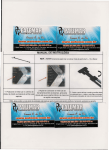
assembly. Binding can result if the belt is too tight. The red circles in the photos indicate screw locations.
Tools needed:
4 mm Allen Wrench
5 mm Allen Wrench
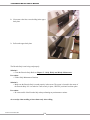
1. Using the 4 mm Allen Wrench, unscrew the two
screws holding the front plate to the upper back
plate.
115
T-Jet Blazer Series User’s Manual
2. Next remove the four screws holding in the upper
back plate.
3. Pull out the upper back plate.
The Encoder Strip is not being read properly.
Solution 1:
• Clean the Encoder Strip. Refer to Chapter 13 - Daily, Weekly and Montly Maintenance.
Prevention:
• Follow Daily Maintenance Routines
Solution 2:
• Make sure the Encoder Strip is seated properly in the sensor. The sensor is located in the center of
the Encoder Strip. If it is crooked or is not securely in place, GENTLY position it back into place.
Prevention:
• Be extra careful of the Encoder Strip when performing any maintenance routines.
air record(s) when emailing or have them ready when calling.
Version 4.0 Revised June, 2008
116
Chapter 15 - Troubleshooting
Error Code: 1001E Blazer Express
Problem 1:
• The Height Sensor has been tripped too many times.
Solution:
• Lower the Shirtboard (Increase the Platen to Head Clearance).
Prevention:
• Pay attention to the MINIMUM clearance of 3mm between the Print Head and Shirt Board
(Platen).
Problem 2:
• The Page Size is too big.
Solutions:
• Decrease the Page Size to a maximum of 17” x 30”
Prevention:
• Practice working in FastARTIST using the supplied Art Layout Templates. See Chapter 10 Printing Basics as well as the Art Layout Chapter in your FastARTIST User’s Manual.
1-800-408-0040
(01) 201-797-1504
[email protected]
117