1
module from the Android device, the mobile Android device will need the password
and name of the Bluetooth module. As there is an AT command to get the
password and name of the module. An AT command will be needed to check if the
device is configured as a slave or a master device. Also an AT command to change
the device to a slave if it is originally configured as a master device may be needed.
If the module may somehow get corrupted and will need to reset to its default
setting, an AT command restoring to the original setting may be potentially needed.
When the module is configured to reset, it sets the pin code back to “1234” and
baud rate back to 38400 bps. Under some system debugging circumstances, the
firmware version may be needed to view if the Android device will be able to
connect to the module. To check the state of the module is a significant aspect of
making sure configuring to the Android device will be done correctly.
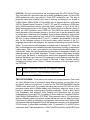
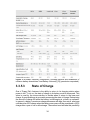
Command (USER)
AT+ADDR
Response
(From HC-05)
+ADDR:< address of the
module>
OK
Functionality
To retrieve the address
of the Bluetooth Module
AT+UART=<9600, 1,2>
OK
Set baud rate to 9600
AT+UART?
+UART =<baud
rate>,<stop bit>,
<parity>
OK
Check baud rate, stop
bit, and parity
AT+PSWD=<pin set>
OK
AT+PSWD?
+PSWD : <default pin>
OK
AT+NAME=<set name>
OK
AT+ROLE=<0 or 1>
OK
AT+ROLE?
+ROLE:<0 or 1>
OK
AR+ORGL
OK
AT+VERSION
+VERSION :<firmware
version>
OK
Set the pin code for
module
Check the default pin
code of module
Set the name of the
module
Set module to slave or
master (0-slave, 1master)
Check if the module is
slave or master device
Sets module back to
default state
Checks the firmware
version of module
Checks the state of
AT+STATE?
+ STATE:<state>
device ( different states
are provided below)
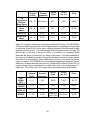
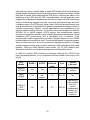
Table 4.7 Table listing relevant AT commands for the HC-05 Bluetooth Module.
(Data gathered from electronicaestudio.com)
66