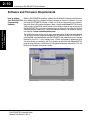
1
2–4
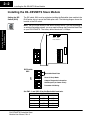
Installing the D0–DEVNETS Slave Module
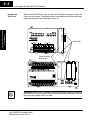
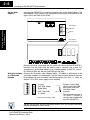
When the D0–DEVNETS module is ready to be installed the protective option slot
cover must be removed. The protective cover is removed from the option card slot by
squeezing the pinch tabs and lifting the cover off.
Installing the DeviceNet
Slave Module
Remove the
Slot Cover
Pinch Tabs
Option Module
Slot Covers
G
LG
Y0 Y2
C1 Y5 Y7 Y10 Y12 C3 Y15 Y17
0V
Y1
Y3 Y4
Y6 C2
Y11 Y13 Y14 Y16 N.C.
AC(L) AC(N) 24V C0
OUTPUT: 6–240V
50 – 60Hz 2.0A, 6 – 27V
2.0A PWR: 100–240V 50–60Hz40VA
Y
0
1
2
3
4
5
6
7
10
11
12 13
14
15 16
17
20
PWR
RUN
CPU
D0–06DR
21 22
TX1
RX1
TX2
23
X
Installation and
Safety Guidelines
INPUT: 12 – 24V
RX2
3 – 15mA
C0
X1
X0
X2
X3
X4
X6
C2 X11 X13 X14 X16 C4 X21 X23 N.C.
C1
X5
X7 X10 X12 C3 X15 X17 X20 X22 N.C.
TERM
PORT1
PORT2
RUN STOP
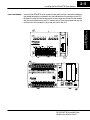
WARNING: Power to the PLC must be disconnected before inserting or removing
the D0–DEVNETS slave module. Failure to disconnect power could result in serious
damage to the module, the PLC or both.
D0–DEVNETS DeviceNet Slave
Module User Manual, Rev A