1
Appendix F: USB data reporting format
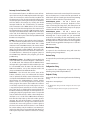
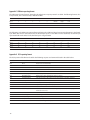
The USB report has two formats, depending whether boot or report protocol is enabled. The following format is the
boot protocol, and is understood by a USB aware BIOS.
Bit 7
Bit 0
Byte 0
0
0
0
0
0
Middle
Right
Left
Byte 1
X
X
X
X
X
X
X
X
Byte 2
Y
Y
Y
Y
Y
Y
Y
Y
The following is the USB report protocol format allowing the additional wheel movement information in the fourth
byte. When the wheel is moved forward, the fourth byte reports a 0x01. When moved backward, the fourth byte
reports 0xFF. When the wheel is idle, then this byte is assigned 0x00.
Bit 7
Bit 0
Byte 0
0
0
0
0
0
Middle
Right
Left
Byte 1
X
X
X
X
X
X
X
X
Byte 2
Y
Y
Y
Y
Y
Y
Y
Y
Byte 3
R
R
R
R
R
R
R
F/R
Appendix G: PS/2 reporting format
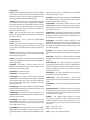
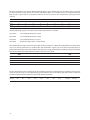
The PS/2 portion of the firmware handles the following requests and commands listed in the table below.
Hex Code
Command
Action
0xFF
Reset
Resets mouse to default states
0xFE Resend Resends last data to host
0xF6
Set Default
Sets mouse to use default parameters
0xF5
Disable
Disables the mouse
0xF4
Enable
Enables the mouse
0xF3
Set Sampling Rate
Set sampling rate to 10,20,40,60,80,100,200/second
0xF2
Read Device Type
Returns 0x00 to host, indicating the device is a mouse
0xF0
Set Remote Mode
Sets remote mode so data values are only reported after a read data command
0xEE
Set Wrap Mode
Set wrap mode until 0xFF or 0xEC is received
0xEC
Reset Wrap Mode
Reset to previous mode of operation
0xEB
Read Data
Responds by sending a mouse report packet to host
0xEA
Set Stream Mode
Sets stream mode
0xE9
Status Request
Returns current mode, en/disabled, scaling, button, resolution, and sampling rate
information to the host.
0xE8
Set Resolution
Sets resolution to 1,2,4,8 counts/mm
0xE7
Set Scaling 2:1
Sets scaling to 2:1
0xE6
Reset Scaling
Resets scaling to 1:1
0xAA Completion Code
Command completion code
0xFA
Peripheral ACK
Sent to acknowledge host requests
18