1
6.3
How do I make it easier to use gnuplot with LATEX?
There is a set of LATEX macros and shell scripts that are meant to make your life easier when using gnuplot with
LATEX. This package can be found on ftp.dartmouth.edu in pub/gnuplot/latex.shar, by David
Kotz. For example, the program "plotskel" can turn a gnuplot-output file plot.tex into a skeleton file skel.tex,
that has the same size as the original plot but contains no graph. With the right macros, the skeleton can be used
for preliminary LATEX passes, reserving the full graph for later passes, saving tremendous amounts of time.
6.4
How do I save and restore my settings?
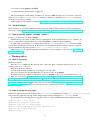
Use the save and load commands for this; see help save and help load for details.
You can save the current terminal and restore it later without touching the filesystem by set term push
and set term pop, respectively.
6.5
How do I plot lines (not grids) using splot?
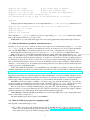
If the data in a data file for splot is arranged in such a way that each one has the same number of data points
(using blank lines as delimiters, as usual), splot will plot the data with a grid. If you want to plot just lines, use
a different number of data entries (you can do this by doubling the last data point, for example). Don’t forget
to set parametric mode, of course.
6.6
How do I plot a function f(x,y) that is bounded by other functions in the x-y plane?
An example:
gnuplot> f(x,y) = x**2 + y **2
gnuplot> x(u) = 3*u
gnuplot> yu(x) = x**2
gnuplot> yl(x) = -x**2
gnuplot> set parametric
gnuplot> set cont
gnuplot> splot [0:1] [0:1] u,yl(x(u))+(yu(x(u)) - yl(x(u)))*v,\
> f(x(u), (yu(x(u)) - yl(x(u)))*v)
6.7
How do I turn off <feature> in a plot?
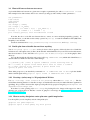
Most gnuplot features are controlled by a corresponding set/unset command. If a feature is enabled by default,
or by using set <feature>, then you should be able to turn it by using set no<feature>. However,
the prefered syntax since version 4.0 is unset <feature>.
6.8
How do I call gnuplot from my own programs?
On unix-like systems, commands to gnuplot can be piped via stdin. Output from gnuplot’s print command
can be read via a named pipe. On M$ Windows platforms, due to the lacking standard input (stdin) in GUI
programs, you need to use the helper program pgnuplot which should be included in your gnuplot for M$W
distribution package. Reading gnuplot output may be impossible.
6.9
What if I need h-bar (Planck’s constant)?
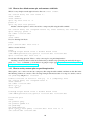
The most straightforward way is to use a UTF-8 font, and type in the h̄ character (Unicode code point #x210F)
directly.
This does not work in PostScript, however, so you must use approximations like @{/=56 -} {/=24 h}
or {/=8 @{/Symbol=24 -} _{/=14 h}} In the latter, the "-" (a long one in /Symbol) is non-spacing
and 24-pt. The 14-pt "h" is offset by an 8-pt space (which is the space preceding the "_") but smaller, since
it’s written as a subscript. But these don’t look too much like the hbar we’re used to, since the bar is horizontal instead of sloped. I don’t see a way to get that. I tried using an accent (character 264 in iso-latin-1
17