1
Ford 6.0 Liter
Evolution
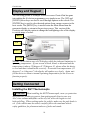
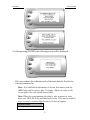
bottom of the screen. These numbers will be useful to quickly view the state
of your device, and whether or not it is currently programmed to a vehicle.
MODEL: The model number for your device
LVL: The currently programmed level
BOOTLOADER: The bootloader version currently on your device
FIRMWARE: The firmware version currently on your device
CALIBRATION: The calibration version currently on your device
SERIAL NUMBER: The serial number assigned to your device
Possible Programming Errors
Update Required
Fusion is designed to help the development team at Edge Products support
new vehicle calibrations. When you connect your device to the vehicle, the
first step it takes is identifying your vehicle’s stock file. If the stock file isn’t
currently supported the device will display a screen alerting you that the
stock file is not yet supported, and prompt you to press a button/touch the
screen in order to read and save the stock file. Once the device has saved the
stock calibration, it will prompt you to connect the device to Fusion. Fusion
will ask you if you want to upload your vehicle’s stock files to our server.
Choosing yes will upload the files to the server, and alert the development
team. This will help the development team at Edge Products provide support
for your vehicle’s calibration as quickly as possible.
Non Stock condition
During programming, the device will read the stock file on your vehicle and
compare it to a corresponding stock file that has been verified by Edge
Products. If there is a mismatch the device will alert you, and display this
message,
“Non-stock condition detected. This is most likely because your vehicle has
been programmed with a competitive product. It is recommended that you
return your vehicle to a stock condition with the product that changed it.
Alternatively, you can plug your device into the internet update system and it
will load the necessary files onto your device to return your vehicle to stock.”
If you don’t have the competitive product that programmed your truck,
connect the device to Fusion where you’ll be prompted to download the
correct stock files. Once downloaded, simply connect the device to your
vehicle, and the device will program the verified stock files to your vehicle.
42