1
Comfort Quick Start Guide
Using The Security System
Arming the Security System
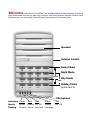
You can arm the security system to Away, Night, Day or Holiday Modes using the one-touch
keys (the 4 keys on the far right). Follow the steps below.
Away Mode
Arm to Away if all occupants are leaving the premises, by pressing the Away Key
If any
doors and windows are open, their names will be announced, close them and leave the premises
by the entry door. When the door is closed, you will hear 2 beeps on the siren and/or voice on
the doorphone to confirm that the system is armed.
Re-entry
Now enter the premises by the Entry door. The Keypad gives a steady beeping signal to warn
you that you must turn off the security system before it goes into alarm. Enter your code (default
1234#) on the Keypad. The red Armed/Alarm LED indicator turns off and the green
Home/Trouble LED indicator turns on to show that security is off, and the voice says “Security
Off”. Using the *star key in front of you code will take you to a menu rather than switch off the
system, should this happen, pressing the 0 key will disarm the system as usual.
Day Mode
Press the Day button
to arm to Day Mode. Depending on your design Day Mode may
either protect the perimeter of your property or separate areas requiring daytime protection. The
security system will arm after a few seconds and announce “Day Mode”. The red Armed/Alarm
indicator on the Keypad will be lighted. You may move around freely within the premises without
causing an alarm while the doors and windows are protected. To turn off the security, enter your
code (default 1234#). The voice will announce “Security Off” and the green Home/Trouble LED
will come on.
Night Mode
Press the Night button
(to arm to “Night Mode”. Arm to “Night Mode” when everyone goes to
sleep at night. All zones are protected, with the possible exception of designated interior zones
such as Bedrooms and landings. After a few seconds, the red Armed/Alarm LED indicator comes
on and the Keypad announces “Night Mode”.
If the Entry door is opened in “Night Mode”, an entry delay will be started to allow time to turn off
security, to allow people to come home at night. If the system was previously armed to “Day
Mode”, you can arm to “Night Mode” directly without having to disarm from “Day Mode”.
Holiday Mode
This is identical to arming the system to “Away Mode” if all occupants are leaving the premises,
the difference is that sequenced events such as operating lights, curtains, radio or TV, intended
to give the impression of an occupied house, will come into operation each day or evening
(provided they have been provided by your installer). These events do not happen at precise
times but will operate randomly within one hour of their scheduled time. This way, someone
watching the property will find it difficult to identify a pattern, providing a deterrent effect. To set
this mode simply press the function key twice.
Force-Arming
7