1
User's Guide
Getting started
WorkZone Explorer uses WebDAV (Web Document Authoring and Versioning), which is a standard
document protocol over HTTP. With WorkZone Explorer, you can manage cases and documents
from Windows Explorer. You can perform common operations on cases and documents such as
creating and renaming cases and documents, opening, editing, and saving documents directly into
the ScanJour archive from a document editor that supports the WebDAV protocol, for example,
Microsoft Office or Notepad.
WorkZone Explorer is part of the WorkZone Content Server installation. Note that it is not required
to install a client, such as WorkZone Client or Captia Web Client.
GETTING ACCESS TO WORKZONE EXPLORER
To start WorkZone Explorer, enter the following URL in your browser:
http://[WebDAVHostHeader]
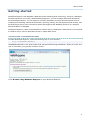
WebDAVHostHeader is the host header that was specified during installation. When you enter this
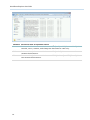
URL in a browser, you get this welcome screen:
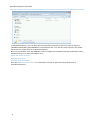
Click Browse using Windows Explorer to open Windows Explorer:
5