1
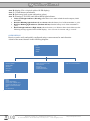
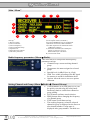
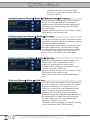
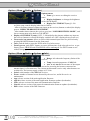
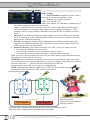
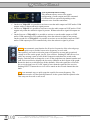
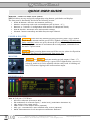
Main “Menu” 1 7 3 8 D 2 C 4 6 9 5 10 12 11 Following info areas of main “menu” (displayed at device start-up): 1) Receiver Name 2) Current Channel 3) Current Frequency 4) Current Channel Group 5) Squelch level 6) Equivalent TV Channel 7) TX battery status bar 8) TX battery % indication 9) Tone squelch status (on/off/adv.) 10) LOCAL/REMOTE receiver management 11) Remote connection (USB or Ethernet) 12) Audio output level at nominal deviation (6dB before clipping) C) Selectable sub menu (use related push button): it allows to access to Radio/Audio/Sync sub-menus. D) Current menu name Radio frequency parameters (Menu Radio) This menu allows to setup main radiofrequency parameters such as: Channel/Group: current working channel/ group Group name: the name assigned to selected group Squelch level (in dBVolt or in Volt) Walk Test: enable recording of the RF signal for antenna A and B for installation check Options: allow the user to access to options sub menu Setting Channel and Group (Menu Radio Channel/Group) Current channel (0-59) and group (0-39) can be quickly selected using the rotary knob. Push rotary knob to switch from channel to group editing. SAVE button confirms actual selection. FREQ button allows changing the frequency of a channel/group. EXIT button exit without saving. The working frequency related to selected channel & group is displayed on the first row after channel number. Group name is displayed after group number. The third row Wisycom Srl - Via Spin, 156 - I-36060 Romano d’Ezzelino (VI) - Italy tel. +39 0424 382605 fax. +39 0424 382733 http:// www.wisycom.com - e-mail: [email protected] Subject to change without notice