1
Chapter 3 Design entry
Recommended schematic design and file naming
conventions
There are a number of recommended conventions that
you should use when working with PLD schematics.
File naming conventions
In general, it is best to name project files (.OPJ) and design
files (.DSN) using alphanumeric characters. Avoid using
numeric characters as the first characters in the name.
Design component naming conventions
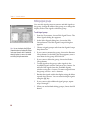
For more information on EDIF 2 0 0 naming
conventions, refer to the Express online
help topic, EDIF 2 0 0.
To avoid netlist generation warnings and EDIF 2 0 0
rename conditions, name hierarchical block, pin, and port,
or wire and bus labels that comply with the EDIF 2 0 0
naming standard. A good convention is to use
alphanumeric names only. Avoid special characters and
names that begin with a number.
Managing signal flow
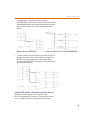
Often, it is worthwhile to use buses (or wide nets) to group
signals in your schematic to more easily complete signal
connections. Drawing buses on the schematic page is just
like drawing wires. Special care must be taken, however,
to name bus elements. In general, follow these guidelines
when creating buses:
42
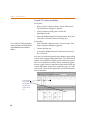
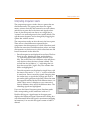
•
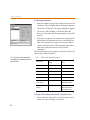
The bus itself, and each of its constituent signals must
be labeled with a net alias or an hierarchical port. The
bus and its constituent signals are associated through
a common label prefix. So, for example, if the
individual signals are labeled D0 through D3, the bus
is labeled D[3:0].
•
In order to connect a bus to a pin on an hierarchical
block, the hierarchical block pin must be a legal bus
name, and it must exactly match the hierarchical port
name on the lower-level schematic. For example, if
you connect a bus, DATA[2:0], to an hierarchical pin,