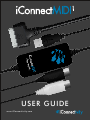
1
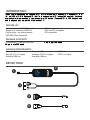
1 mini-USB Connector - connect this to an available port on the computer
2
iConnectMIDI 1 interface
3 DIN Connectors - connect these to a compatible MIDI DIN equipped device
4 30-pin iOS to USB cable - use this to connect to an iOS device
5 mini-USB to USB cable - use this to connect to a computer
HOW TO CONNECT
Using iConnectMIDI 1 with a Mac or PC:
1 ) Connect the MIDI DIN connectors 3 to the MIDI device you wish to control
2) Connect the mini-USB A to USB A cable 5 to the mini-USB B connector 1
3) Connect the USB A cable to a Mac of PC computer
Using iConnectMIDI 1 with an iOS Device:
1 ) Connect the MIDI DIN connectors 3 to the MIDI device you wish to control
2) Connect the 30-pin iOS to USB cable 4 to the mini-USB B connector 1
3) Connec the 30-pin iOS cable to the iOS device
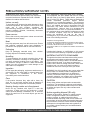
DIRECTION OF MIDI DATA
OUT
IN
The labels on the DIN connectors describes the flow of MIDI data to and from iConnectMIDI 1 . This
means that the OUT connector must be connected to the IN jack on your device, and the IN
connector to the OUT jack.