1
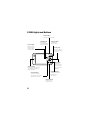
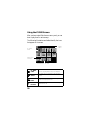
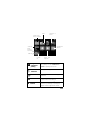
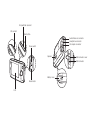
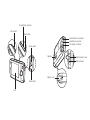
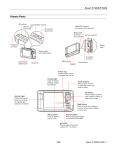
P-2000 Lights and Buttons
Print button
Displays the Print menu.
Charge light
Access light
Turns green
when the battery
is being charged.
Menu button
Displays the
Pop-up menu.
Flashes orange
when you turn
on the P-2000
or access files.
4-way ring
Press to select a
photo or an option
in a menu.
OK button
Selects an
option, opens a
folder or photo,
and zooms into
an image.
Activity light
Flashes blue during power
on, printing, and certain
other operations.
Cancel button
Cancels the current
operation and returns to
the previous screen.
Display button
Displays information,
instructions, or
messages.
Home button
Returns to the
Home screen.
8