1
HOW TO USE THE BASELINE DUAL SPEED HUB
2
1
1
4 5
8
9
12
13
16 17
20 21
24
4
3
7
5
6
series, ensure that there are no more than four 10 Mbps hubs between
any two devices on your network, as shown below.
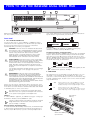
Numbered elements in this diagram refer to numbered sections in the
text. These numbers, in bold, are used as references.
Front Panel
1
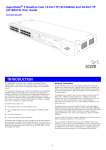
16 or 24 RJ-45 10/100 Ports
You can use these ports to connect 10BASE-T or 100BASE-TX devices
(workstations and other equipment) to the Baseline Dual Speed Hub. As
the ports are autosensing, the speed of the ports is determined
automatically when you connect your equipment.
100BASE-TX
To connect 100BASE-TX equipment, use 100BASE-TX Category 5
unshielded or shielded (screened) 100 Ohm TP cable.
WARNING: RJ-45 Ports. These are shielded RJ-45 data sockets.
They cannot be used as standard traditional telephone sockets,
or to connect the unit to a traditional PBX or public telephone
network. Only connect RJ-45 data connectors, network
telephony systems, or network telephones to these sockets.
Either shielded or unshielded data cables with shielded or
unshielded jacks can be connected to these data sockets.
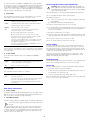
Fast Ethernet Network Configuration Rules
To remain within IEEE 802.3 100 Mbps Fast Ethernet rules, the maximum
length of cable between the Baseline Dual Speed Hub and an attached
device must not exceed 100 m (328 ft). Ensure that there are no more
than two 100 Mbps hubs between any two devices on your network, and
that the total cable distance (A+B+C) between the two devices does not
exceed 205 m (672.4 ft), as shown below.
AVERTISSEMENT: Points d’accès RJ-45. Ceux-ci sont protégés
par des prises de données. Ils ne peuvent pas être utilisés comme
prises de téléphone conventionnelles standard, ni pour la
connection de l’unité à un réseau téléphonique central privé ou
public. Raccorder seulement connecteurs de données RJ-45,
systèmes de réseaux de téléphonie ou téléphones de réseaux à
ces prises.
Il est possible de raccorder des câbles protégés ou non protégés
avec des jacks protégés ou non protégés à ces prises de
données.
If you connect two Baseline Dual Speed Hubs together, the link
between them operates at 100 Mbps.
2
WARNHINWEIS: RJ-45-Porte. Diese Porte sind geschützte
Datensteckdosen. Sie dürfen weder wie normale traditionelle
Telefonsteckdosen noch für die Verbindung der Einheit mit
einem traditionellem privatem oder öffentlichem Telefonnetzwerk
gebraucht werden. Nur RJ-45-Datenanscluße, Telefonnetzsysteme
or Netztelefone an diese Steckdosen anschließen.
Entweder geschützte oder ungeschützte Buchsen dürfen an diese
Datensteckdosen angeschlossen werden.
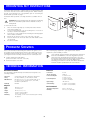
MDI Switch
This switch affects port 16 (3C16410) or port 24 (3C16411). Ports 1–15
(3C16410) or 1–23 (3C16411) are fixed as MDIX ports. Each can be
connected to a device with an MDI port (such as most workstations) using
a normal “straight through” TP cable. Port 16 or 24 is “switch selectable”
using the MDI switch:
Connect one end of the TP (twisted pair) cable to the RJ-45 port on the
Baseline Dual Speed Hub and the other end to the appropriate RJ-45 port
on the device. Use either shielded or unshielded data cables (with shielded
or unshielded jacks) to connect to the devices.
Out
In this position, port 16 or 24 is an MDIX port. It can be
connected to a device with an MDI port (such as most
workstations) using a normal “straight through” TP cable.
In
In this position, port 16 or 24 is an MDI port.
It can be connected to an MDIX port on a device (such as
another hub) using a normal “straight through” TP cable.
MDIX
MDI
The equipment that is connected to the Baseline Dual Speed
Hub must not be set to operate in full duplex mode. It must be
set to operate in autonegotiate or half duplex mode.
1
10BASE-T
To connect 10BASE-T equipment, use 10BASE-T Category 3 or Category 5
unshielded or shielded (screened) 100 Ohm TP cable.
Unit 1
Set switch to
MDI (in)
4 5
13
8 9
16 17
Category 5 cable should be used with this product in structured
wiring environments. This will ensure correct operation of all
ports at 10 Mbps or 100 Mbps.
12
Unit 2
13
Ethernet Network Configuration Rules
To remain within IEEE 802.3 10 Mbps Ethernet rules, the maximum length
of cable between the Baseline Dual Speed Hub and an attached device
must not exceed 100 m (328 ft). If you are connecting multiple hubs in
20 21
1
4
24
5
16 17
8
9
20 2
1
12
24
Switch set to MDIX (out)
if port 24 used
2