1
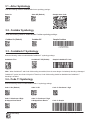
1.6.2.1 - Addional USB Communication Settings
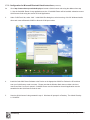
USB Keyboard Mode - Data is sent from the Reader and interpreted by the host just as if a USB keyboard was being
used to enter data.
USB Downloader - This mode is used when downloading firmware.
USB Native Two Way Mode - This mode is utilized when there is a need for error-corrected communication between the
CR2 and an application through the USB port.
USB Virtual COM 1 Way Mode - This mode allows a USB-cabled CR2 to function as a virtual COM port. To use the CR2
in this mode, download the driver at www.codecorp.com/downloads.html.
USB HID POS (Terminal ID 131) - This mode allows a USB-cabled CR2 to communicate as a USB HID POS (Terminal ID
131) device.
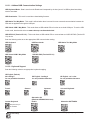
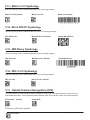
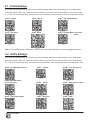
Scan the following codes to set the appropriate USB communication setting:
USB Keyboard
USB Downloader
USB Native Two Way Mode
USB Virtual COM 1 Way Mode
USB HID POS (Terminal ID 131)
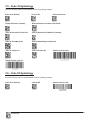
1.6.2.2 - Keyboard Support
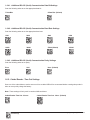
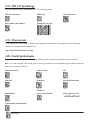
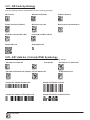
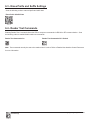
Scan the following codes to set appropriate keyboard mapping:
US English (Default)
No Leading 0
for non-printable characters
French
German
Custom Keyboard
US English - Leading 0
for non-printable characters
Japanese
Alternative OS
(Windows CE/MAC/Unix/Linux)
Enable
US English - ctrl + char
for non-printable characters
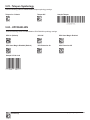
Universal Keyboard
Alternative OS Disable
Requests map to
be installed
Save Settings
C001537_18_CR2_User_Manual
10