1
RocketRAID BIOS Utility
Controller Settings
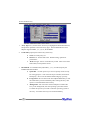
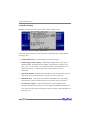
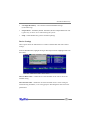
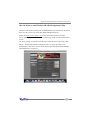
Highlight Controller from the toolbar, select Settings and press Enter.
Use the tab and arrow keys to select each item, and the Spacebar to enable/disable
the target option.
•
Enable Audible Alarm – enables/disables card’s alarm (beeper)
•
Enable Staggered drive spinup – enable/disable staggered drive spin-up. Disabled by default. If enabled, the host adapter will spin disks in sequence (one
disk, every “x#” of seconds – enter the desired value). Some hard disks do not
support this setting – consult the hard disk’s documentation for more
information.
•
Spin down idle disk – If enabled, the host adapter will power down idle (inactive)
disks/arrays based on the allotted time. Specify the value (in minutes)
•
Rebuild Priority – This option is provided for redundant arrays. This setting
determines the priority of rebuilding arrays in regards to other system tasks.
•
Provide INT13 support – enable or disable INT13 (the host adapter’s boot
function). Disabling this setting may resolve motherboard BIOS related issues in
cases where the card cannot be loaded into memory properly (option ROM/out of
memory errors).
34