1
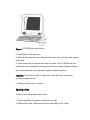
Figure 1 CD-ROM drive open button
2. Pull the tray all the way open.
3. With the disc label facing up, place the hole of the disc over the center spindle
on the tray.
4. Press down until you feel the disc snap into place. The CD-ROM drive has
small locks on the spindle that securely hold the disc in place. When inserting a
disc over these locks, you may need to apply additional pressure.
Important: If the disc is not flat, it might catch when the tray is closed and
possibly damage the disc.
5 .Gently push the tray in to close it.
Ejecting a Disc
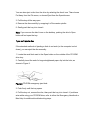
To eject a disc, follow these instructions.
1. Quit all application programs running from the disc.
2. While in the Finder, select the disc's icon and drag it to the Trash.