1
4
TROUBLESHOOTING AND
USEFUL INFORMATION
TROUBLESHOOTING
This section provides solutions to possible installation problems. See the following table of contents to locate the
appropriate page for your question or problem.
• The software cannot be installed. . . . . . . . . . . . . . . . . . . . . . . . . . . . . . . . . . . . . . . . . . . . . . . . . . . . . . 36
• The machine is not detected (when connected to a network). . . . . . . . . . . . . . . . . . . . . . . . . . . . . . . . 36
• The plug and play screen does not appear (USB connection in Windows). . . . . . . . . . . . . . . . . . . . . . 37
• The printer driver is not installed correctly by plug and play (USB connection in Windows). . . . . . . . . 38
• The printer driver cannot be installed (Windows 2000/XP/Server 2003) . . . . . . . . . . . . . . . . . . . . . . . 38
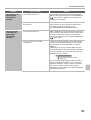
Problem
The software cannot
be installed.
The machine is not
detected (when
connected to a
network).
36
Point to check
Solution
Is there sufficient free space on your
hard drive?
Delete any unneeded files and applications to increase
free space on your hard drive.
Are you using an operating system that
is not supported?
Make sure that the software can run on your operating
system.
For detailed information on installation requirements for
each software program in Windows, click the [Display
Readme] button in the installer.
In a Macintosh environment, this can be checked in
"ReadMe First" in the [US-English] folder ([English]
folder in areas other than the U.S.) in the [Readme]
folder of the "Software CD-ROM".
Is the IP address of the machine
configured?
If the IP address of the machine is not configured, the
machine will not be detected. Make sure that the IP
address is configured correctly in "Network Settings" in
the machine's system settings (administrator).
➞ System Settings (Administrator) > "Network Settings"
Is your computer connected to the same
network as the machine?
Windows:
If the machine and your computer are not connected
to the same local area network, the machine will not
be detected. If the two are connected to different
sub-networks, click the [Specify condition] button and
enter the machine's name (host name) or IP address
to search for the machine.
Macintosh:
If multiple AppleTalk zones exist, select the zone to
which the machine is connected from the menu.








![1 Fare clic sul pulsante [Driver stampante].](http://vs1.manualzilla.com/store/data/006120544_1-47c489e2987a65efbc0bc7e87e93bec4-150x150.png)