1
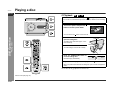
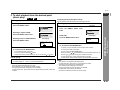
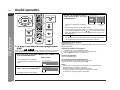
Playing a disc SD-PX2 ENGLISH Playback z For a wide-screen TV, set the video output to (see page 40). z Turn on the TV, and switch the input to the "VIDEO 1", "VIDEO 2", etc. accordingly. 1 Turn on the power and press the button to set the input to "DVD". 2 button on the main unit. Press the OPEN/CLOSE button to open the sliding door. Label side The sliding door closes after approx. 2 minutes of inactivity. - Playing a disc - DVD Operation You can also use the 3 Click sound Insert a disc. To avoid damage, insert the disc carefully. 4 Press the OPEN/CLOSE button to close the sliding door. DVD Some discs play automatically. 5 If you cannot start playback in step 4, press the When you press the starts. You can also use the Volume control (See page 16). E-17 or button. button with the sliding door open, it closes and playback button on the main unit.