1
Chapter 1 Getting Started: Transporting
5
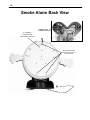
5. Set the volume levels. There is a volume on the back of the Smoke Alarm base unit and
volume controls on the operator control box for the music/Smoke Alarm voice and headset
hearing levels. If you have a MP3 player, set the volume at the maximum level, then you
can adjust the master volumes where you want them.
Step # 6 Running the Smoke Alarm and House with a separate control box and extension
wire (optional feature):
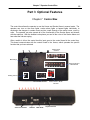
1. Attach the extension wire to the back of the operator control box. There is a round
connector on the back of the Smoke Alarm base unit to connect to. Put the two connectors
together, rotate the connector until it sits into the mating connector and then twist the ring
until it stops.
2. With the control box option you can operate the house automatic or manually. For
automatic operation, just press play on the MP3 Player that has the programmed music on
it. If you buy additional modules later, you will need to load the music on your MP3 player
from a CD. For manual operation use the switches of the control box to operate the Smoke
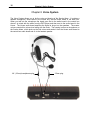
Alarm and lights of the House. The headset microphone will allow you to be the voice of the
Smoke Alarm and also hear children talking to you.
3. Video Monitor Option: There is a video cable and power wire that comes with the monitor.
The power wire plugs in to the back of the control box and then to the DC in jack on the
monitor. The video plug is yellow and it runs from the control box to the video in of the
monitor.
4. Set the volume levels. There is volume level for the music and the Smoke Alarm’s voice
on the operator control box. There is also a volume on this same box for the volume of your
hearing in the headset.
Step # 7 Test all the functions
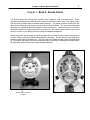
Test all of the functions of the House and Smoke Alarm: For the Smoke Alarm, test the eyelids,
eyes left and right, eyebrows, arms, and mouth movement. For the House, check the room
lights, Smoke Alarm LEDs, and danger LEDs. You are now ready to operate the House and
Smoke Alarm.
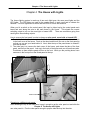
On a new system, the house will have a plastic protective covering over the color panels.
You may remove this now.
Step # 8 Powering Down: Turn off the main power switch, power supply and the MP3 player
TRANSPORTING
¾ Remove the chimney from the top of the house. It is held on by velcro.
¾ You can leave the Smoke Alarm on the base unit if you want. If you have removed the
cover, attach this to better protect the Smoke Alarm.
¾ Make sure the latches on the side of the House are secure before transporting.
¾ Disconnect the extension wire from the back of the house.
¾ Put the front house panels back on.
¾ Put the House in the canvas carrier to protect it from scratching or damage.
¾ Put all other accessories in the canvas carry bags.
¾ Do not allow anything sharp or hard to push against the room panels.
¾ Protect the plastic cover from getting scratched.