1
4-30
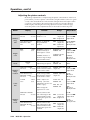
{path}/{directory}/CJ
W {path}/{directory}/CJ |
(host to processor)
(host to processor)
Esc
URL Encoded (Web)
ASCII (Telnet)
Esc
Esc
Move up one directory
View current directory
Esc
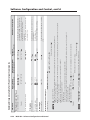
Erase current directory and its files24, 28
Esc
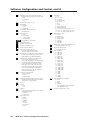
WZXXX |
WZQQQ |
WZY |
ZXXX
ZQQQ
ZY
Esc
Absolute system reset
Absolute reset retaining IP address
WZFFF |
W//EF |
Esc
ZFFF
//EF
W/EF |
W {filename} EF |
WCJ |
W%2E%2ECJ |
W%2FCJ |
Esc
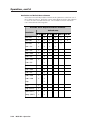
Reset all device settings to factory default24
Erase flash memory24
Esc
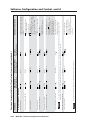
Erase current directory and subdirectories
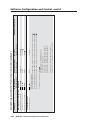
Reset (ZAP)/Erase commands
/EF
{filename} EF
CJ
..CJ
/ CJ
24, 28
Esc
Erase user-supplied Web page/file24, 28
File erase commands
Esc
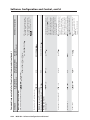
Move back to root directory
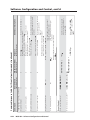
A directory does not actually exist until a file has been copied into the path.
Change/create directory
Directory commands
Command
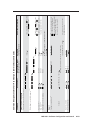
MGP 462 • Software Configuration and Control
Zpy
Zpq
Zpx
Zpf
Ddl
Ddl
Del • {filename}
{path}/{directory}/
Dir•{path}/{directory}/
Dir•/
Dir•{path}/{directory}/
(processor to host)
Response
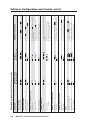
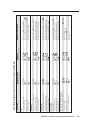
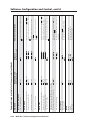
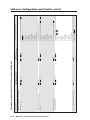
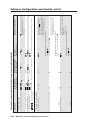
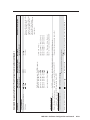
Command/response table for IP control port commands (continued)
All settings are reset except the IP
address.
Reset all settings/memories. The
ZQQQ command resets all
settings, adjustments, the IP
address, and subnet mask to the
factory default values. The IP
address is reset to 192.168.254.254,
and the subnet mask is set to
255.255.0.0. (This command is
identical to Reset mode 5).
No IP-related settings are reset.
Additional description
Software Configuration and Control, cont’d