1
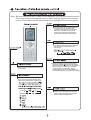
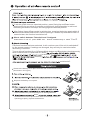
Name and function of wireless remote control
Some
buttons on this control are not applicable to this unit.
Preset temperature is increased by
pressing this button. Continuously
pressing and holding for 2 seconds
changes the temperature rapidly.
Preset temperature is decreased by
pressing this button. Continuously
pressing and holding for 2 seconds
changes the temperature rapidly. The
temperature adjustment is unavailable
under the Auto Mode.
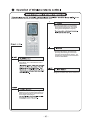
Press this button to select or cancel Blow
mo de. Blow 'off' is default wh en unit is
swi tched on.
Pres s this button to turn light On or Off.
Light On is defau lt when unit is switched on.
Under Co ol or He at mo de, pressing this
button turns on or off the Turbo function.
After the turbo function is turned on, the
Turbo signal is displayed.