1
5.2 Enrolling
Lights,
Fire,
Emergency Functions
and
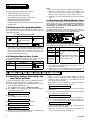
The following MCM-140 PowerCode control functions can be
enrolled:
• X-10 devices ( 1-7)
• PGM output (activated by
).
• Fire
• Emergency
To enroll these functions, proceed as follows:
A. Enter PowerMax installer menu (see PowerMax Programming
Guide, document DE5450P, par. 1.2). The PowerMax display
will be "1. NEW INSTL CODE".
B. Click <NEXT>. The enrolling mode will be selected and the
PowerMax display will show:
2. ENROLLING
C. Click <OK>. The PowerMax display will change to:
ENROLL WL DEVICE
D. Click <OK> again. The PowerMax display will read:
_ _
Zone No :
E. From the PowerMax keypad, enter the number of the zone to
which you wish to enroll your first X-10 device. For instance, if
you enter <2> Ö <3>, the PowerMax display will change to:
Zone No:
23
The clear space at the far right tells you that the zone is free no device has been enrolled to it as yet.
F. Click <OK>. The PowerMax display will prompt you to initiate
a transmission from the chosen wireless device:
TRANSMIT NOW
G. Initiate transmission from the MCM-140 by pressing the
LIGHT key followed by pressing "1" (for X-10 device #1).
H. In response to the transmitted signal, the “Happy Tune”
(- - - ––– ) will sound and the PowerMax display changes to:
Zone No:
23
A dark box will appear at the far right, indicating that the
chosen device has been enrolled to Zone No. 23.
I. On the PowerMax, press NEXT button.
J. Perform steps "E" to "H" for the other electrical devices (2 - 8).
K. Perform steps "E" to "H" for the MCM-140 FIRE and
EMERGENCY functions. When you are instructed to transmit,
press the MCM-140 FIRE/EMERGENCY key for 2 seconds
until the RED LED lights and “Happy Tune” (- - - ––– ) sounds.
Notes
1. There is no need to teach the keypad PANIC function for the
PowerMax - it will be automatically performed.
2. Define the zones that are enrolled with X-10 and PGM
devices as "non-alarm" zones, to prevent an alarm display
when the device is activated.
5.3 Programming PGM/X-10 Devices
as "On by Zones"
To enable activation of PGM/X-10 devices from the MCM-140,
they must be programmed as "On by Zones". For the
programming process, refer to the PowerMax programming
guide, section 7 (Defining Output Parameters).
6. OPERATION
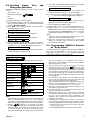
The following table describes how to activate the various functions.
Function
Actions
Arming HOME
(1) (8)
Arming AWAY
(8)
3.
Disarming
X-10 device (1-7) On/Off
(2)
PGM output
AUX Function
4.
(≈ 2 sec.) (3)
Emergency alarm
(≈ 2 sec.) (7)
Fire alarm
(≈ 2 sec.) (7)
Panic alarm
Latchkey arming
Quick arm
(≈ 2 sec.) (7)
5.
(4)
....
(≈ 2 sec.). (LED blinks, then
lights RED during transmission)
6.
7.
Notes
1. Eight user codes are possible (user code # 1 is the master user
code). Factory default master code is "1111". Upon entering a
valid code or a valid command, the success (victory) melody is
heard and the red LED lights briefly (transmission indication).
followed by the desired X-10 device
2. Pressing
number (1-7) turns on this device (success beeps are heard).
Performing these actions again turns this device off. In order
for the X-10 device to be turned off when the light key is
pressed the second time, the Toggle mode must be selected.
DE2460U
8.
This can be selected in the "PGM/X-10 Time" under "4.
Define Panel" in the installer mode (refer to the PowerMax
programming guide, par. 5.20).
The AUX function works just like the [∗] key in the keyfob.
(≈ 2 sec.) can
Pressing the Auxiliary Function key
initiate the STATUS action (system status announcement),
the INSTANT action (entry delay cancellation) or the PGM
action (activation of PGM output or X-10 units), depending on
prior installer programming. For selecting the desired auxiliary
function, refer to the PowerMax Programming manual, Para.
5.16 (AUX Button).
For LATCHKEY arming function, press the AWAY key, wait
until the red LED extinguishes, then press the AWAY key
again. The red LED lights and extinguishes again.
From PowerMax version V1.16: For Latchkey disarming, the
MCM-140 can be learned into the PowerMax as user 5, 6, 7
or 8. You can use the MCM code 1, 2, 3, 4, 5, 6, 7, or 8.
Pressing a non-valid code combination (not master / user
code) causes a long failure beep.
If a keying sequence is not completed within timeout, the
desired function will not be executed.
Pressing the Emergency, Fire or Panic buttons, causes the
red and green LEDs to blink alternately for 2 seconds to alert
the user. The red LED lights during transmission. The
PowerMax panic function can be programmed (enabled or
disabled) by the installer.
If arming Home or arming AWAY command is used with an
invalid user code, the command will not be performed. To enter
the arming HOME/AWAY command again, you have 2 choices:
a. Wait until time out to expire and the green LED stops
blinking. Then try again.
b. Press HOME/AWAY twice, then enter user code again.
3