1
Unit 6: Maintenance
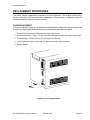
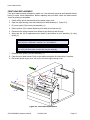
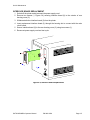
INTERFACE BOARD REPLACEMENT
1
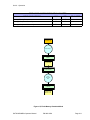
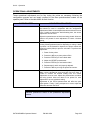
Switch off the printer and disconnect the power supply cord.
2
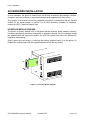
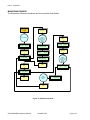
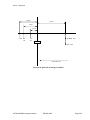
Remove two screws (1, Figure 6-4) securing interface board (2) to the exterior of rear
housing cover (3).
3
Withdraw defective interface board (2) from the printer.
4
Insert replacement interface board (2) through the housing slot to connect with the main
circuit board.
5
Secure interface board (2) to the rear housing cover (3) using two screws (1).
6
Reconnect power supply cord and test cycle.
2
84 + RS
IEEE12
D
BOAR
1
3
Figure 6-4, Interface Board Replacement
SATO M5900RVe Operator Manual
PN 9001125A
Page 6-5