1
Getting to know your appliance
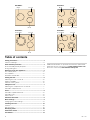
The instruction manual is the same for various different hobs.
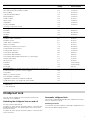
An overview of the models with their dimensions is given on
page 2.
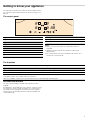
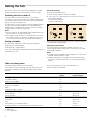
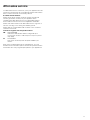
The control panel
Controls
Displays
‚-Š
Heat settings
Ð or ð
Automatic zone control
•/œ
Residual heat
0
Timer
‰‰
Timer
Notes
■ When you touch a symbol, the respective function is
activated.
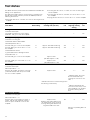
Controls
#
Main switch
‚
Childproof lock
μ
Hotplate selection
A@
Adjustment fields
■
■
Always keep the controls dry. Moisture reduces their
effectiveness.
Do not pull pans close to the displays and sensors. The
electronics could overheat.
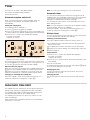
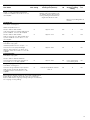
The hotplates
Hotplate
Connecting and disconnecting
$
Single-circuit hotplate
ð
Dual-circuit hotplate
Select the hotplate and touch the Ð or ð symbol
î
Extended cooking zone
Select the hotplate and touch the Ð symbol
When the hotplate is connected: the corresponding indicator lights up. On appliances with multiple zone connection, the display
only lights up when the hotplate has been selected.
When the hotplate is switched on: the last selected size is automatically selected again
Residual heat indicator
The hob has a two-stage residual heat indicator for each
hotplate.
If • appears in the display the hob is still hot. It may be used,
for example, to keep a small meal warm or to melt cooking
chocolate. As the hotplate cools down further, the display
changes to œ. The display remains lit until the hotplate has
cooled sufficiently.
5