1
VMware
vCloud Director
Evaluator’s Guide
®
™
TEC H N I C A L W H ITE PA P E R
VMware vCloud Director Evaluator’s Guide
Table of Contents
1. Getting Started . . . . . . . . . . . . . . . . . . . . . . . . . . . . . . . . . . . . . . . . . . . . . . . . . . . . . . . . . . . . . . 4
1.1 About This Guide . . . . . . . . . . . . . . . . . . . . . . . . . . . . . . . . . . . . . . . . . . . . . . . . . . . . . . . . . . 4
1.2 Intended Audience. . . . . . . . . . . . . . . . . . . . . . . . . . . . . . . . . . . . . . . . . . . . . . . . . . . . . . . . . 4
1.3 Help and Support During the Evaluation . . . . . . . . . . . . . . . . . . . . . . . . . . . . . . . . . . . . . 4
2. What is the VMware Private Cloud?. . . . . . . . . . . . . . . . . . . . . . . . . . . . . . . . . . . . . . . . . . . . 6
3. System Requirements . . . . . . . . . . . . . . . . . . . . . . . . . . . . . . . . . . . . . . . . . . . . . . . . . . . . . . . . 7
3.1 Hardware Requirements. . . . . . . . . . . . . . . . . . . . . . . . . . . . . . . . . . . . . . . . . . . . . . . . . . . . 7
Servers . . . . . . . . . . . . . . . . . . . . . . . . . . . . . . . . . . . . . . . . . . . . . . . . . . . . . . . . . . . . . . . . . . . . 7
Storage. . . . . . . . . . . . . . . . . . . . . . . . . . . . . . . . . . . . . . . . . . . . . . . . . . . . . . . . . . . . . . . . . . . . 7
Networking . . . . . . . . . . . . . . . . . . . . . . . . . . . . . . . . . . . . . . . . . . . . . . . . . . . . . . . . . . . . . . . . 7
3.2 Software and Licensing Requirements. . . . . . . . . . . . . . . . . . . . . . . . . . . . . . . . . . . . . . . 8
vCenter Server . . . . . . . . . . . . . . . . . . . . . . . . . . . . . . . . . . . . . . . . . . . . . . . . . . . . . . . . . . . . . 8
vShield Manager. . . . . . . . . . . . . . . . . . . . . . . . . . . . . . . . . . . . . . . . . . . . . . . . . . . . . . . . . . . . 8
VMware vCloud Director . . . . . . . . . . . . . . . . . . . . . . . . . . . . . . . . . . . . . . . . . . . . . . . . . . . . 8
3.3. Software Configurations . . . . . . . . . . . . . . . . . . . . . . . . . . . . . . . . . . . . . . . . . . . . . . . . . . . 8
4. Lab Environment. . . . . . . . . . . . . . . . . . . . . . . . . . . . . . . . . . . . . . . . . . . . . . . . . . . . . . . . . . . . . 9
5. VMware vCloud Director Evaluation Tasks. . . . . . . . . . . . . . . . . . . . . . . . . . . . . . . . . . . . . 10
5.1 Attach vCenter Server. . . . . . . . . . . . . . . . . . . . . . . . . . . . . . . . . . . . . . . . . . . . . . . . . . . . . 13
Step 1: Log In to VMware vCloud Director . . . . . . . . . . . . . . . . . . . . . . . . . . . . . . . . . . . 13
Step 2: Attach vCenter Server . . . . . . . . . . . . . . . . . . . . . . . . . . . . . . . . . . . . . . . . . . . . . . 14
Step 3: Verify. . . . . . . . . . . . . . . . . . . . . . . . . . . . . . . . . . . . . . . . . . . . . . . . . . . . . . . . . . . . . . 15
5.2 Compute and Storage Infrastructure in the Cloud. . . . . . . . . . . . . . . . . . . . . . . . . . . . 16
Step 1: Create Provider VDC. . . . . . . . . . . . . . . . . . . . . . . . . . . . . . . . . . . . . . . . . . . . . . . . 17
Step 2: Verify. . . . . . . . . . . . . . . . . . . . . . . . . . . . . . . . . . . . . . . . . . . . . . . . . . . . . . . . . . . . . . 19
5.3 Network Infrastructure in the Cloud . . . . . . . . . . . . . . . . . . . . . . . . . . . . . . . . . . . . . . . . 20
5.3.1 Create External Networks. . . . . . . . . . . . . . . . . . . . . . . . . . . . . . . . . . . . . . . . . . . . . . . . 20
Step 1: Create External Networks. . . . . . . . . . . . . . . . . . . . . . . . . . . . . . . . . . . . . . . . . . . 20
Step 2: Verify. . . . . . . . . . . . . . . . . . . . . . . . . . . . . . . . . . . . . . . . . . . . . . . . . . . . . . . . . . . . . . 21
5.3.2 Create Network Pools . . . . . . . . . . . . . . . . . . . . . . . . . . . . . . . . . . . . . . . . . . . . . . . . . . . 22
Step 1: Create Network Pools. . . . . . . . . . . . . . . . . . . . . . . . . . . . . . . . . . . . . . . . . . . . . . . 23
Step 2: Verify. . . . . . . . . . . . . . . . . . . . . . . . . . . . . . . . . . . . . . . . . . . . . . . . . . . . . . . . . . . . . . 24
5.4 Create Organizations. . . . . . . . . . . . . . . . . . . . . . . . . . . . . . . . . . . . . . . . . . . . . . . . . . . . . . 24
Step 1: Create Organization . . . . . . . . . . . . . . . . . . . . . . . . . . . . . . . . . . . . . . . . . . . . . . . . 24
Step 2: Verify. . . . . . . . . . . . . . . . . . . . . . . . . . . . . . . . . . . . . . . . . . . . . . . . . . . . . . . . . . . . . . 27
5.5 Create Organization VDC. . . . . . . . . . . . . . . . . . . . . . . . . . . . . . . . . . . . . . . . . . . . . . . . . . 28
TECH N I C AL WH ITE PAPE R / 2
VMware vCloud Director Evaluator’s Guide
Step 1: Create Organization VDC. . . . . . . . . . . . . . . . . . . . . . . . . . . . . . . . . . . . . . . . . . . . 29
Step 2: Verify. . . . . . . . . . . . . . . . . . . . . . . . . . . . . . . . . . . . . . . . . . . . . . . . . . . . . . . . . . . . . . 31
5.6 Create Organization Networks . . . . . . . . . . . . . . . . . . . . . . . . . . . . . . . . . . . . . . . . . . . . . 32
Step 1: Create Organization Network. . . . . . . . . . . . . . . . . . . . . . . . . . . . . . . . . . . . . . . . 32
Step 2: Create an External Direct Connect Network. . . . . . . . . . . . . . . . . . . . . . . . . . 34
Step 3: Verify. . . . . . . . . . . . . . . . . . . . . . . . . . . . . . . . . . . . . . . . . . . . . . . . . . . . . . . . . . . . . . 35
5.7 Create Catalogs. . . . . . . . . . . . . . . . . . . . . . . . . . . . . . . . . . . . . . . . . . . . . . . . . . . . . . . . . . . 36
Step 1: Create Catalog. . . . . . . . . . . . . . . . . . . . . . . . . . . . . . . . . . . . . . . . . . . . . . . . . . . . . 37
Step 2: Creating vApp Templates . . . . . . . . . . . . . . . . . . . . . . . . . . . . . . . . . . . . . . . . . . . 38
Step 3: Verify. . . . . . . . . . . . . . . . . . . . . . . . . . . . . . . . . . . . . . . . . . . . . . . . . . . . . . . . . . . . . . 40
5.8 Infrastructure-as-a-Service . . . . . . . . . . . . . . . . . . . . . . . . . . . . . . . . . . . . . . . . . . . . . . . . 40
Step 1: Log In as a User in the Sales Organization . . . . . . . . . . . . . . . . . . . . . . . . . . . . 40
Step 2: Browse the Catalog. . . . . . . . . . . . . . . . . . . . . . . . . . . . . . . . . . . . . . . . . . . . . . . . . 41
Step 3: Verify. . . . . . . . . . . . . . . . . . . . . . . . . . . . . . . . . . . . . . . . . . . . . . . . . . . . . . . . . . . . . . 42
6. Next Steps . . . . . . . . . . . . . . . . . . . . . . . . . . . . . . . . . . . . . . . . . . . . . . . . . . . . . . . . . . . . . . . . . 44
6.1. VMware Contact Information. . . . . . . . . . . . . . . . . . . . . . . . . . . . . . . . . . . . . . . . . . . . . . 44
6.2. Providing Feedback . . . . . . . . . . . . . . . . . . . . . . . . . . . . . . . . . . . . . . . . . . . . . . . . . . . . . . 44
TECH N I C AL WH ITE PAPE R / 3
VMware vCloud Director Evaluator’s Guide
1. Getting Started
1.1 About This Guide
The purpose of this evaluator’s guide is to support a self-guided, hands-on evaluation of VMware® vCloud
Director 1.0. This evaluator’s guide is intended to provide IT professionals with the necessary information to
deploy a VMware vCloud Director–based cloud in a VMware vSphere™ (“vSphere”) environment.
This guide will walk you through key use cases for VMware vCloud Director to help you conduct a successful
product evaluation.
1.2 Intended Audience
The VMware vCloud Director Evaluator’s Guide is intended to provide VMware vCloud Director customers and
evaluators a guide that walks them through the workflows that have to be completed by IT administrators to
stand up a private cloud on top of an existing vSphere environment and empower users to self-provision
workloads.
The guide also contains the information required for end users to access the private cloud.
1.3 Help and Support During the Evaluation
This guide is not meant to substitute for product documentation. For detailed information regarding installation,
configuration, administration and usage of VMware products, please refer to the online documentation. You may
also consult the online Knowledge Base if you have any additional questions. Should you require further
assistance, please contact a VMware sales representative or channel partner.
Below are some links to online resources, documentation and self-help tools:
VMware vSphere and VMware vCenter™ Server resources
Product overview:
http://www.vmware.com/products/vSphere
Product documentation:
http://www.vmware.com/support/pubs/vs_pubs.html
vSphere documentation (including hardware compatibility guides):
http://www.vmware.com/support/pubs/vs_pages/vsp_pubs_esx40_vc40.html
Whitepapers and technical papers
vSphere Evaluator’s Guide:
http://www.vmware.com/resources/techresources/10020
VMware vCloud Director resources
Product overview:
http://www.vmware.com/products/cloud-director
Product documentation:
http://www.vmware.com/support/pubs/vcd_pubs.html
TECH N I C AL WH ITE PAPE R / 4
VMware vCloud Director Evaluator’s Guide
Installation and Configuration Guide:
http://www.vmware.com/support/pdf/vcd_10_install.pdf
Administrator’s Guide:
http://www.vmware.com/support/pdf/vcd_10_admin_guide.pdf
User’s Guide:
http://www.vmware.com/support/pdf/vcd_10_users_guide.pdf
VMware vCloud Director community:
http://communities.vmware.com/community/vmtn/vcd
Support
Knowledge Base:
http://kb.vmware.com
TECH N I C AL WH ITE PAPE R / 5
VMware vCloud Director Evaluator’s Guide
2. What is the VMware Private Cloud?
VMware’s private cloud is a solution that yields improved IT efficiency and agility while enhancing security and
choice. Private clouds built on VMware provide the benefits of cloud computing while leveraging a customer’s
existing investments. At the same time, deploying a VMware private cloud provides an organization with an
evolutionary path to the highly scalable, high-performance public clouds being built by the top service providers
on the vSphere platform. By adopting the leading platform chosen by the largest number of enterprises and
service providers, customers gain the choice to place each of their workloads in the optimal location, while fully
retaining the ability to move workloads between or across private and public cloud infrastructure providers.
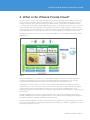
The VMware private cloud solution consists of VMware vCloud Director 1.0, vShield Edge and VMware vCenter
Chargeback 1.5.
Figure 2-1.
VMware vCloud Director is a software solution that enables enterprises to build secure, multitenant private
clouds by pooling infrastructure resources into virtual datacenters and exposing them to users through
Web-based portals and programmatic interfaces as fully automated, catalog-based services.
By building secure and cost-effective private clouds with vSphere and VMware vCloud Director, internal IT
organizations can act as true service providers for the businesses they support, driving innovation and agility
while increasing IT efficiency and enhancing security. This solution provides a pragmatic path to cloud
computing by giving customers the power to leverage existing investments and the flexibility to extend capacity
among clouds.
Integrated vShield Edge technologies such as perimeter protection, port-level firewalling, network address
translation and DHCP services offer virtualization-aware security, simplify application deployment, and enforce
boundaries required by compliance standards in the private cloud.
VMware vCenter Chargeback is a software solution that allows IT organizations to gain visibility into the costs of
provisioned virtual machines to facilitate planning and decision making. It also enables IT organizations to meter
and charge users based on policies.
TECH N I C AL WH ITE PAPE R / 6
VMware vCloud Director Evaluator’s Guide
3. System Requirements
3.1 Hardware Requirements
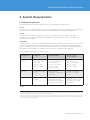
This guide makes the following assumptions about your existing physical infrastructure:
Servers:
You have at least two dedicated ESXi™/ESX® servers running vSphere 4.0 U2 or vSphere 4.1 to provide resources
for the private cloud—in other words, for running workloads deployed with VMware vCloud Director. 1
Storage:
You have at least two dedicated datastores available. It is preferred to have two datastores of different
characteristics, for example, Fibre Channel (FC) and iSCSI, or one large and one small, or even simply fast,
medium and slow storage. 2
Networking:
You have at least one network on a vNetwork Distributed Switch to which the private cloud hosts are connected.
You have External Network connectivity through one or more uplinks on the VMware vNetwork Distributed
Switch. You will also need a block of IP addresses valid on this network. The number of IP addresses depends on
the number of virtual machines you will deploy onto this network using VMware vCloud Director.
For more detailed requirements see the table below:
H A R D WA R E
MINIMUM
RECOMMENDED
W H AT ’ S U S E D
IN THIS GUIDE
ESXi/ESX
Servers
2 ESXi/ESX servers
CPU — 2 processors
of 1500MHz
Memory — 1GB
Network —1Gb NIC
Minimum of 3 ESXi servers
for a small environment
CPU — 2 dual-core
processors of 1500MHz
Memory — 16GB
Network — 2Gb NIC
4 ESXi servers
CPU —2 quad core
processors of 2600MHz
Memory — 24GB
Network — 1Gb NIC
Storage
2 datastores (300GB
each)
Multiple datastores
(ranging from 300GB to 1TB
each in size)
3 datastores (1 x NFS, 1 x
iSCSI, 1 x FC — 300GB
each)
Network
1 VLAN for carrying
VM traffic
Separate VLANs for
management, IP storage
and vMotion and one VLAN
for each type of VM traffic
Separate VLANs for ESX
management, vMotion and
IP Storage, and one VLAN
for VM traffic
Table 3-1-1.
1. These servers should not be used to run VMware vCloud Director, vCenter Server or other management virtual machines required to install and
configure the cloud. Ensure you have enough additional capacity (compute, storage and networking) to install and configure VMware vCloud Director,
VMware vShield Manager, VMware vCenter Server and associated databases.
2. This storage should not be used to store VMware vCloud Director, vCenter or other management virtual machines. Ensure that the above servers can
access this storage. Ensure you have additional storage capacity to install and configure VMware vCloud Director, VMware vShield Manager, VMware
vCenter Server and associated databases.
TECH N I C AL WH ITE PAPE R / 7
VMware vCloud Director Evaluator’s Guide
3.2 Software and Licensing Requirements
This guide assumes that you have the obtained and installed the following software:
vCenter Server:
You have at least one evaluation or licensed vCenter Server 4 Standard. You have at least two vSphere
Enterprise Plus evaluation or licensed ESXi/ESX servers. You have one or more virtual machines in your vSphere
environment with Guest Operating System (GOS) installed. Later in the guide we will be importing these virtual
machines into VMware vCloud Director.
For details on installing and configuring vCenter Server and ESXi/ESX servers and creating virtual machines,
please refer to VMware vSphere documentation.
vShield Manager:
You have vShield Manager 4.1 deployed, licensed and configured in your vCenter server. A license for the vShield
Edge components of VMware vCloud Director is included with your VMware vCloud Director evaluation. For details
on installing vShield Manager, please refer to the VMware vCloud Director Installation and Configuration Guide.
VMware vCloud Director:
You have VMware vCloud Director installed and running in a virtual machine or physical machine. For details,
refer to the VMware vCloud Director Installation and Configuration Guide.
Ensure that the above servers are running on separate infrastructures (hosts, storage) than the servers and
storage allocated for the private cloud in Section 3.1. We will refer to the above as management virtual machines
in this guide as depicted in Figure 4-1 of the Lab Environment section (Section 4).
3.3. Software Configurations
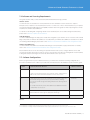
Before you get started on your evaluation exercises, you will need to create the following configurations to
provide cloud infrastructure. Table 3-3 provides time estimates based on the hardware used to write this guide.
STEP
C O N F I G U R AT I O N D E TA I L S
T I M E E S T I M AT E
1.
Start the vSphere client and connect to the vCenter server.
10 minutes
Create a cluster called “Private Cloud Compute Cluster,” enable HA and
DRS on this cluster and add the ESXi/ESX servers to this cluster. 3
2.
Create at least two resource pools in private cloud compute cluster. Use
the default settings for these resource pools. We will be combining
resource pools with storage and creating infrastructure offerings later in
the guide.
10 minutes
In our lab environment, we have three datastores available and we have
created three resource pools.
3.
4.
Create a vNetwork Distributed Switch, create a portgroup called
“External Network” and assign the appropriate VLAN tag. 4
10 minutes
Total estimated time:
30 minutes
Table 3-3.
3. For instructions on creating clusters and resource pools, please refer to the vSphere Basic System Administration Guide.
4. For instructions on creating a vNetwork distributed switch and portgroups, please refer to the vSphere Basic System Administration Guide.
TECH N I C AL WH ITE PAPE R / 8
VMware vCloud Director Evaluator’s Guide
4. Lab Environment
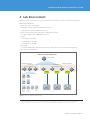
When you are done with Section 3, your environment will look similar to our lab environment shown below.
Our lab environment has:
•One vCenter Server 4.1 Standard
•Management cluster5 with 3 ESXi Enterprise Plus hosts
––3 x Dell PE 2950 (2 CPU, 32GB RAM per server)
•Private cloud compute cluster with 4 ESXi 4.1 Enterprise Plus hosts
––4 x HP DL380 G6 (2 CPU, 24GB RAM per server)
•Storage
––1 x FC datastore (300GB)
––1 x iSCSI datastore (300GB)
––1 x NFS datastore (300GB)
•Networking
––1 vNetwork distributed switch attached to private cloud compute cluster hosts with one portgroup
dv1-Static01 with VLAN 1815
VMware vCloud Director Environment
vCenter vCloud
Private cloud cluster
Management cluster
3 x Dell PE 2950
(2 cpu, 32 GB RAM per server)
4 x HP DL 380 G6
(2 cpu, 24 GB RAM per server)
RP 01
VMware
vCloud
Director
Chargeback
vCenter
Server
vShield
Manager
Directory
services,
DNS, DHCP
Primary
Directory
services,
DNS, DHCP
Secondary
Oracle
database
SQL
Server
database
FC Storage
RP 02
iSCSI Storage
RP 03
NFS Storage
Figure 4-1. VMware vCloud Director Lab Environment.
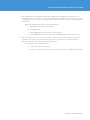
5. Three-node management cluster is to ensure that n+1 redundancy. During this evaluation you could run your management virtual machines
(VMware vCloud Director, vShield Manager, vCenter Server and associated databases) on a single host if you have enough capacity.
TECH N I C AL WH ITE PAPE R / 9
VMware vCloud Director Evaluator’s Guide
5. VMware vCloud Director Evaluation Tasks
In the remainder of this evaluator’s guide, we will detail the suggested evaluation tasks to demonstrate the value
of VMware vCloud Director in a private cloud.
The tasks are:
1.Set up Provider VDCs
2.Set up External Networks
3.Set up Network Pools
4.Set up Organizations and users
5.Set up Organization VDCs
6.Set up Catalogs
7.Use Infrastructure-as-a-Service (IaaS)
Tasks 1 through 5 are performed by the cloud administrator initially to set up cloud infrastructure and add
tenants to the cloud. Once the initial setup is done, the cloud administrator will have to perform these tasks
relatively infrequently on an ongoing basis as the cloud matures.
Task 6 is delegated by cloud administrators to Organization administrators. Organization administrators perform
task 6 initially after creation of an Organization to add standard content to the cloud. Once the initial setup of
Catalogs, vApp templates and media is done, this is a relatively infrequent operation done as needed.
Task 7 is performed by end users of the cloud on a day-to-day basis.
When the above tasks are performed, you will:
•Have a functional private cloud solution in your lab
•See firsthand how VMware vCloud Director allows you to pool your vSphere virtualized infrastructure together
and offer standardized services for your organization
•Realize that the private cloud promotes efficiencies through automation, agility and lower total cost of
ownership
Associating costs with the cloud infrastructure and running cost reports is out of the scope of this evaluation.
Refer to the VMware vCenter Chargeback Manager 1.5 Evaluator’s Guide for details regarding cost allocation and
reporting.
There are three main types of roles in the cloud:
1.Cloud administrators set up the cloud infrastructure and organizations. They access the underlying vSphere
infrastructure during initial cloud setup and on an ongoing basis to manage the cloud infrastructure. They
are root users of the cloud.
Cloud administrators perform the following functions:
a. Deploy and manage cloud infrastructure
b. Add vCenter servers
c. Create Provider VDCs, External Networks and Network Pools
d. Create Organizations
e. Create Organization VDCs and Organization Networks
TECH N I C AL WH ITE PAPE R / 1 0
VMware vCloud Director Evaluator’s Guide
2.Each organization has an organization administrator. Organization administrators manage their own
organizations in the cloud. They set up users and permissions and manage catalogs. They are root users for
an organization. They cannot access or modify cloud infrastructure. They do not access underlying vSphere
infrastructure.
Organization administrators perform the following functions:
a. Organization user and roles management
b. Creating Catalogs
c. Managing Organization policies leases, quotas and limits
d. Setting up Organization-specific SMTP settings and Organization-specific domain to join
3.End users are basic users in the cloud. They use the workloads that are made available to them in their
organization via catalogs. They cannot make modifications to organizations or cloud infrastructures.
They do not have access to underlying vSphere infrastructure.
End users perform the following functions:
a. Self-provision vApps from Catalogs
b. Self-provision vApp networks and connect VMs to vApp Networks or Organization Networks
TECH N I C AL WH ITE PAPE R / 11
VMware vCloud Director Evaluator’s Guide
Table 5-1 presents an overview of the tasks, a description of these tasks with their benefits, and the operator for
these tasks. The time estimates provide an approximation of the expected time that you will spend in each use
case. They do not necessarily reflect the exact time needed.
TA S K
DESCRIPTION
PERFORMED
BY
TIME
E S T I M AT E
Attaching
vCenter Servers
vCenter Server provides resources for
the cloud; VMware vCloud Director can
use one or more vCenter servers to
create a cloud
Cloud
Administrator
5 minutes
Setting up
Provider Virtual
Datacenters
(VDC)
Provider VDCs allow you to combine
compute and storage and offer tiers of
services to your end users
Cloud
Administrator
10 minutes
Creating
External
Networks
External networks provide connectivity
between vApps inside the cloud and
external shared resources such as the
Internet, or network-addressed storage
Cloud
Administrator
10 minutes
Creating
Network Pool
Network pools are collections of
undifferentiated Layer 2 networks; used
to create Organization Networks and
vApp networks without network
administrator involvement
Cloud
Administrator
10 minutes
Creating
Organizations
and Users
Organizations are the unit of tenancy in
VMware vCloud Director; multiple
Organizations enable you to isolate
groups or users or lines of business
from one another while still managing
their infrastructure consumption using
VMware vCloud Director
Cloud
Administrator
10 minutes
Creating
Organization
VDCs
Organization VDCs are the resources
visible to Organizations; created from
Provider VDCs
Cloud
Administrator
10 minutes
Creating a
Catalog
Catalogs are used to offer standardized
vApps and media as a shared resource
to end users; users can also be
empowered to create their own
Catalogs to store frequently used
templates
Organization
administrators
10 minutes
Consuming
Infrastructureas-a-Service
(IaaS)
End users can browse the Catalog of
vApps via a Web-browser portal and
use IT infrastructure as a service
End users
20 minutes
Total estimated
time:
1 hour, 25 minutes
Table 5-1.
TECH N I C AL WH ITE PAPE R / 12
VMware vCloud Director Evaluator’s Guide
5.1 Attach vCenter Server
vSphere is the foundation layer for VMware vCloud Director. vCenter servers provide the compute, storage and
networking resources required for the cloud. In a very large-scale cloud VCD supports up to 25 vCenter servers
being controlled simultaneously. For this exercise we will limit ourselves to only one vCenter server.
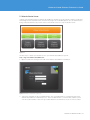
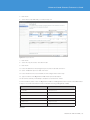
Figure 5-1-1.
The first step is to attach your vCenter server to your VMware vCloud Director system.
Step 1: Log In to VMware vCloud Director
1.Open a web browser and type in the URL of the VMware vCloud Director installation.
Figure 5-1-2. VMware vCloud Director Login Screen.
2.Type in the credentials for the cloud administrator. The cloud administrator is configured as part of the
VMware vCloud Director installation process. The cloud administrator is a role that has complete control
over the cloud installation. Later we’ll log in under different roles with far less access to various controls.
TECH N I C AL WH ITE PAPE R / 13
VMware vCloud Director Evaluator’s Guide
Step 2: Attach vCenter Server
1.Click “Manage and Monitor.”
2.Click on “vCenters” in the left pane under “vSphere Resources.”
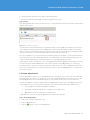
3.Click the
button to launch the wizard.
4.Enter the vCenter server information.
a.Enter the hostname or IP address of your vCenter server.
b.Enter an administrator username and password.
c.Enter a vCenter name.
d.Enter an optional description. Click “Next.”
Figure 5-1-3. Enter vCenter Server Details.
5.Enter the vShield Manager information
a.Enter the hostname or IP address. 6
b.Enter an administrator username and password.
c.Click “Next.”
6. Ensure that the vShield Manager can ping all the ESX hosts via their FQDN.
TECH N I C AL WH ITE PAPE R / 14
VMware vCloud Director Evaluator’s Guide
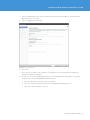
Figure 5-1-4. Enter vShield Manager Details.
6.Review the summary in the Ready to Complete screen and click “Finish.”
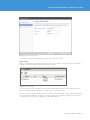
Step 3: Verify
When you are finished, click “Manage and Monitor” and click on “vCenters” in the left pane to verify that the
vCenter server has been added. Ensure that the status is green.
Figure 5-1-5. Verify vCenter Status.
You can scale the resources available to your cloud by adding multiple vCenter servers to VMware vCloud
Director. Scaling VMware vCloud Director is outside the scope of this document.
vCenter servers provide the foundation for the cloud infrastructure. By building on top of vSphere and vCenter
Server, VMware vCloud Director leverages your existing investments in technology and people to help build
cloud infrastructures on a robust, scalable, secure and stable platform.
TECH N I C AL WH ITE PAPE R / 15
VMware vCloud Director Evaluator’s Guide
5.2 Compute and Storage Infrastructure in the Cloud
Once you have added vCenter servers, you can now take the resources that the vCenter exposes and create
cloud constructs using them. VMware vCloud Director treats vCenter and vSphere resources as a giant pool
of resources.
The first cloud infrastructure object we will create is called a Provider Virtual Datacenter or Provider VDC.
A Provider VDC is a combination of compute and storage resources. You can take compute and storage
resources with specific characteristics, such as cost and performance, and combine them to create a Provider
VDC. When you do this, you can logically tier your pool of compute and storage resources into multiple service
offerings, each implemented by one or more Provider VDCs.
Each Provider VDC will have an SLA7 and cost8 associated with it and is intended to be a shared resource. You
will see later in this evaluation how multiple Organizations can use resources from Provider VDCs.
As system administrators, IT users are pooling resources together and creating virtual datacenters. VMware
vCloud Director calls these pooled resources Provider VDCs, because in the private cloud, IT is acting like a
service provider within the enterprise datacenter.
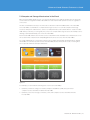
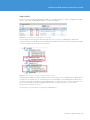
Figure 5-2-1.
For example, you can create the following tiers of service (Provider VDCs):
1.Combine your fastest storage, for instance, Enterprise Flash Drives (EFD), and your fastest
compute resources and offer a Platinum Provider VDC.
2.Combine your slowest storage, for instance, SATA, with compute resources and offer a Bronze
Provider VDC.
TECH N I C AL WH ITE PAPE R / 1 6
VMware vCloud Director Evaluator’s Guide
The compute resource for a Provider VDC comes from a vSphere cluster or resource pool. You can scale up a
Provider VDC by adding more ESXi/ESX servers to the vSphere clusters and adding more datastores to the
clusters. The maximum size of a Provider VDC is 32 hosts. Scaling up a Provider VDC is outside the scope of
this document.
Step 1: Create Provider VDC
1.Click on “Manager and Monitor” tab.
2.Click on “Provider VDCs.”
3.Click on
button to start the wizard to create new Provider VDC.
4.Type in the name and an optional description.
5.Select the vCenter from the list. Select the resource pool you wish to use for the Provider VDC. You can
select any resource pool or cluster that is part of any vCenter server added to VMware vCloud Director.
Figure 5-2-2. Select Resource Pool.
6.Select the datastores you wish to use for this Provider VDC.
a.You can select more than one datastore. If you have two datastores available for this evaluation, select
one of the datastores. If you have two or more datastores of different characteristics, you can select
multiple datastores of the same type to attach to this Provider VDC, for example, Fiber Channel
storage.
b.Click “Next.”
TECH N I C AL WH ITE PAPE R / 17
VMware vCloud Director Evaluator’s Guide
Figure 5-2-3. Select Datastores.
7.Enter the root username and password for the ESXi/ESX Server hosts.
8.Click “Finish.”
In our lab environment, we have three resource pools and three types of datastores— NFS, iSCSI and FC —
attached to our cluster. We have created three Provider VDCs by combining the following resource pools
and storage:
P R OV I D E R V D C
C O M P U T E A N D S TO R AG E
FC
RP01 and Fiber Channel Storage
iSCSI
RP02 and iSCSI Storage
NFS
RP03 and NFS Storage
Table 5-2-1.
In your environment, your Provider VDCs may be called Gold, Silver and Bronze to help differentiate different
tiers of service.
When you create a Provider VDC, you will notice that VMware vCloud Director creates a system VDC resource
pool under the resource pool that you assign to the VDC. The system VDC is used to host vShield Edge devices
that provide NAT services among Organization Networks and External Networks without consuming resources
from Organizations.
TECH N I C AL WH ITE PAPE R / 1 8
VMware vCloud Director Evaluator’s Guide
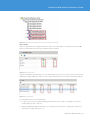
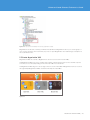
Figure 5-2-4. vSphere Environment After Creating Provider VDCs in VMware vCloud Director.
Step 2: Verify
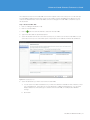
When you are finished, click “Manage and Monitor” and click “Provider VDCs” to ensure that the Provider VDC
has been created, that their status is green and that they are enabled.
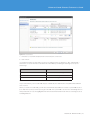
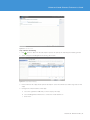
Figure 5-2-5. List of Provider VDCs.
VMware vCloud Director prepares the hosts associated with the resource pools you have used to create Provider
VDCs. Click “Manage and Monitor” and click “Hosts” under vSphere Resources to ensure host spanning is enabled.
Figure 5-2-6. Verify Host Status.
Provider VDCs help you achieve the following:
1.Pooling of your resources together, breaking down infrastructure silos and consolidating your resources
further, helping to drive cost down
2.Defining standardized deployment targets for your applications and end users, helping drive automation,
which improves agility and lowers cost
TECH N I C AL WH ITE PAPE R / 1 9
VMware vCloud Director Evaluator’s Guide
5.3 Network Infrastructure in the Cloud
5.3.1 Create External Networks
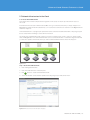
Now that we have created compute and storage units in the cloud, we need to provide network access to
the cloud.
External networks are used in VMware vCloud Director to give external connectivity to vApps. vApps live in
Organizations (which will be introduced later), so in a sense these networks are “external” to the Organization in
which the vApps live.
An External Network is a portgroup in vSphere that carries external virtual-machine traffic. This portgroup can
be associated with a VLAN tag to ensure network isolation.
The simple way of thinking about this is that if you wish your vApps in the cloud to connect to vApps outside
their own Organization or to an External Network service such as the Internet or a shared storage network that
you have in a vSphere environment, then you create an External Network and connect the vApp to it.
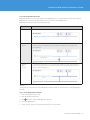
Figure 5-3-1-1.
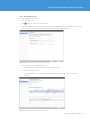
Step 1: Create External Networks
1.Click “Manage and Monitor.”
2.Click “External Networks” in the left pane.
3.Click
button to create new External Network.
4.Select the vCenter server and the vSphere network (portgroup on vDS). Click “Next.”
Figure 5-3-1-2. Select vCenter Server and vSphere Portgroup.
TECH N I C AL WH ITE PAPE R / 20
VMware vCloud Director Evaluator’s Guide
5.Enter the following details to configure the External Network.
a.Network mask
b.Default gateway
c.Primary and Secondary DNS
d.DNS suffix
e.Static IP Pool
Contact your network administrator to obtain the above details. Click “Next.”
Figure 5-3-1-3. Configure Settings for the External Network.
6.Enter a name for the External Network and an optional Description. Click “Next.”
7.Review the summary in the Ready to Complete page and click “Finish.”
Step 2: Verify
Once you are done creating External Networks, click “Manage and Monitor” and click “External Networks.” Verify
that the External Network you created is available and the status is green.
Figure 5-3-1-4. Verify External Network Status.
With External Networks being plumbed in from the outside of the cloud, the cloud administrator is able to
configure External Networks in a highly customized way.
TECH N I C AL WH ITE PAPE R / 21
VMware vCloud Director Evaluator’s Guide
Cloud administrators can create External Networks that have quality of service (QoS), rich networking policies,
control and security, and integrate them easily into the cloud infrastructure.
5.3.2 Create Network Pools
Network pools are collections of isolated Layer 2 networks. Network pools provide the building blocks necessary
to create Organization and vApp networks. They are the key enabler for self-provisioning of networks in the cloud.
Organization networks are used for connectivity of vApps within an Organization. vApp networks are used for
connectivity of virtual machines within a vApp.
Networks from a Network Pool are created on the fly by VMware vCloud Director each time the user creates an
Organization or vApp network. The pool size reduces by one. When a network is destroyed, the pool size
increases by one.
Network pools can be backed by:
1.VLANs
2.VMware vCloud Director Network Isolation technology (VCDNI)
3.Portgroups
To create a VLAN-backed Network Pool, you require a vDS and a range of VLAN IDs available to all hosts being
managed by VMware vCloud Director and on that vDS. Each time that a user creates a network in VMware
vCloud Director, a new portgroup is created on the vDS and a VLAN tag is attached to the portgroup. VMware
vCloud Director manages the VLAN tags as a pool and the tags are sequentially assigned and returned back to
the pool when the networks are deleted.
To create VCDNI Network Pools, all you need is a vDS attached to the ESXi/ESX hosts in the cloud. VMware
vCloud Director uses a MAC-in-MAC encapsulation technique to create an isolated Layer 2 network without
using a VLAN. Each time a user creates a VCDNI network, a new portgroup is created on the vDS and the
portgroup is removed when the network is deleted.
To create portgroup-backed Network Pools, you need to have a preconfigured set of portgroups either on a vDS
or on a standard vSwitch. These portgroups must be isolated, either with VLANs or with separate physical
uplinks. VMware vCloud Director manages the portgroups as a pool and creates a new network on a portgroup
when a user creates a network. It returns the portgroup back to the pool when the network is deleted.
N E T WOR K POOL
B U I L D I N G B LO C K S
VLAN backed
+ range of VLAN tags
VCDNI backed
+ one VLAN for transport
Portgroup backed
or
portgroups
Figure 5-3-2-1.
During this evaluation, we will create VCDNI-backed Network Pools.
TECH N I C AL WH ITE PAPE R / 2 2
VMware vCloud Director Evaluator’s Guide
Step 1: Create Network Pool
1.Click “Manage and Monitor.”
2.Click “Network Pools.”
3.Click
button to create a new Network Pool.
4.Select the “VCD Network Isolation-backed” Network Pool. VCD Network Isolation (VCDNI) is technology
that allows you to create Layer 2–isolated networks without using VLANs. Click “Next.”
Figure 5-3-2-2. Select VCD Network Isolation-Backed Network Pool Type.
5.Enter the details of the VCDNI Network Pool.
a.Enter the number of VCD-isolated networks you wish to create.
b.Enter an optional VLAN ID.
c.Select the vCenter server and the vNetwork distributed switch you wish to use to create these
networks.
Figure 5-3-2-3. Creating a VCDNI Network Pool with 20 Networks.
TECH N I C AL WH ITE PAPE R / 2 3
VMware vCloud Director Evaluator’s Guide
6.Enter a name for the Network Pool and an optional description.
7.Review the summary in the Ready to Complete page and click “Finish.”
Step 2: Verify
Click “Manage and Monitor” and click “Network Pools” to ensure that the Network Pool has been created. Ensure
that the status is green.
Figure 5-3-2-4. Verify Network Pool Status.
It is important to ensure that the network or VLAN ID on which you create VCD-isolated networks is allocated
only to VCD for creating isolated networks. VCDNI traffic is unencrypted and therefore visible to any machine
directly connected to the underlying transport network. Do not connect systems that are not managed by VCD
directly to the network or VLAN or they will be able to see the traffic on the network.
Thus, an IT organization can set up a Network Pool, thereby giving users the ability to create vApp networks on
the fly without IT involvement. Each vApp network is an isolated Layer 2 network, which means that users can
connect multitiered applications in an isolated fashion for testing during app development.
Administrators can also use Network Pools to create Organization Networks. Organization networks are used to
provide connectivity within an Organization. They can be isolated to a single Organization, or connected to
External Networks to provide cross-tenant connectivity. vApps can, in turn, connect to Organization Networks.
Now we have integrated into our cloud the required resources; we can now add Organizations or tenants who
will use the resources.
5.4 Create Organizations
VMware vCloud Director allows you to create Organizations to separate groups of users from one another and
apply different policy controls — for example, you can create separate Organizations for Finance, Sales, IT, and
HR. Each Organization can contain different groups of users, and has its own set of resources and policies.
VMware vCloud Director creates a separate URL for each Organization where users of that Organization log in.
Inside organizations, you can create users and groups. Users can be authenticated in three different ways:
1.Locally against the VMware vCloud Director database
2.Systemwide VMware vCloud Director Active Directory or LDAP server
3.Organization-specific Active Directory or LDAP server
In this evaluation, we will be creating two Organizations called Finance and Sales.
Step 1: Create Organization
1.Click on the “Manager and Monitor” tab.
2.Click on “Organizations.”
3.Click the
button to create a new Organization.
TECH N I C AL WH ITE PAPE R / 24
VMware vCloud Director Evaluator’s Guide
4.Type in the Organization name; note the unique URL in the VMware vCloud Director system where this
Organization’s users can log in.
5.Type in the Organization’s full name.
Figure 5-4-1. Create Organization.
6.Click “Next.”
7.Select “Do Not Use LDAP.” In this evaluation, we will define local users and authenticate against the
VMware vCloud Director database.
8.Create two local users for this Organization. We will create an Organization administrator account and
a regular user. To create an Organization administrator user:
a.Click the “Add” button to launch the New User Wizard.
b.Type in the username and password and select the Organization Administrator role.
c.Type in the contact information (optional).
TECH N I C AL WH ITE PAPE R / 2 5
VMware vCloud Director Evaluator’s Guide
Figure 5-4-2. Add Local Users.
d.Click “OK.”
9.To create a regular user:
a.Click the “Add” button to launch the New User Wizard.
b.Type in the username and password and select the vApp User role.
c.Type in the contact information (optional).
d.Click “OK.”
10.Click “Next” to bring up the Catalog Publishing screen.
11.Select “Allow publishing catalogs to all organizations.”
12.Click “Next” to bring up the Email Preferences screen.
13.Leave the defaults checked and click “Next” to bring up the Policies screen.
14.Select the Leases, Quotas and Limits that you wish to apply to this Organization. Spend a few minutes
reading the text here and understanding the implications.
TECH N I C AL WH ITE PAPE R / 26
VMware vCloud Director Evaluator’s Guide
Figure 5-4-3. Select Leases, Quotas and Limits.
15.Review the summary in the Ready to Complete screen.
16.Click “Finish” to create your Organization in VMware vCloud Director.
Step 2: Verify
Once you create your Organization, click “Manage and Monitor” and click “Organizations” to ensure that the
Organization you created is enabled.
Figure 5-4-4. Verify Organizations are Enabled.
Next, pull up your vSphere client and switch to the VMs and Templates view. You will see folders created for the
Organization under the vCloud folder.
TECH N I C AL WH ITE PAPE R / 27
VMware vCloud Director Evaluator’s Guide
Figure 5-4-5. vSphere VMs and Templates View Showing Organizations Created.
Organizations are the unit of tenancy in VMware vCloud Director. Organizations allow you to isolate groups or
users or lines of business from each other, set policies on a per-Organization level and manage consumption of
the cloud infrastructure.
5.5 Create Organization VDC
Organization VDCs are created so Organizations can use resources from Provider VDCs.
An Organization VDC is a resource container that contains compute and storage resources and has a specific
SLA and cost associated, depending on which Provider VDC it is created from.
An Organization VDC can grow to be as large as the size of a Provider VDC. An Organization can use resources
through multiple Organization VDCs created from multiple Provider VDCs.
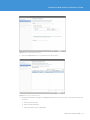
Figure 5-5-1.
TECH N I C AL WH ITE PAPE R / 2 8
VMware vCloud Director Evaluator’s Guide
There are three ways of consuming resources from a Provider VDC.
1.Pay per virtual machine
a.There is no upfront resource allocation.
b.Organization VDC resources are allocated only as users create vApps.
c.You can set limits to cap usage.
d.You can guarantee a percentage of the resources being used to provide overcommitment of compute
and memory across your cloud.
2.Reservation Pool
a.Organization VDC is allocated a “container” set of resources.
b.Organizations can use advanced vSphere resource management controls such as Shares and
Reservations to manage overcommitment of their resources between their workloads. Some more
sophisticated aspects of resource management are owned by the cloud tenant and not the cloud
operator.
3.Allocation Pool
a.Organization VDC is allocated a “container” set of resources.
b.Organizations have very simple models of resources and advanced resource management controls such
as Shares and Reservations that are managed by the cloud operator, thus enabling more coherent
resource management across Organizations.
Step 1: Create Organization VDC
1.Click “Manage and Monitor” tab.
2.Click “Organization VDCs” in the left pane.
3.Click
button to create new Organization VDC.
4.Select the Organization that you created in Section 5.2.
Figure 5-5-2. Select Organization.
TECH N I C AL WH ITE PAPE R / 2 9
VMware vCloud Director Evaluator’s Guide
5.Click “Next.”
6.Select the Provider VDC that you created in Step 5-1.
Figure 5-5-3: Select Provider VDC.
7.Click “Next.”
8.Select the “Pay-As-You-Go” allocation model.
9.Click “Next.”
10.Leave the defaults for the Configure Pay-As-You-Go model and click “Next.”
11.Select “Enable thin provision” and click “Next.”
12.Leave the Network Pool section blank; we will configure this at a later step.
13.Type in a name for the Organization VDC and an optional description.
14.Review the summary in the Ready to Complete screen and click “Finish.”
For this evaluation, please create one Organization VDC for each Organization from each Provider VDC created
in Step 5.2. In our lab environment we have created the following six Organization VDCs:
O R G A N I Z AT I O N V D C
A L LO C AT I O N T Y P E
Sales-NFS
Allocation Pool
Sales- FC
Reservation Pool
Sales – iSCSI
Reservation Pool
Finance – NFS
Reservation Pool
Finance – FC
Pay-As-You-Go
Finance – iSCSI
Pay-As-You-Go
Table 5-5-1.
TECH N I C AL WH ITE PAPE R / 30
VMware vCloud Director Evaluator’s Guide
Step 2: Verify
When you are done creating the Organization VDC, click “Manage and Monitor” and select “Organization VDCs.”
Check to ensure that the Organization VDCs you created are available.
Figure 5-5-4. Verify Organization VDC Status and Ensure They Are Enabled.
Pull up vSphere client and open the VMs and Templates view. You will see your Organization VDC folders
created under the Provider VDC folders. Each Organization VDC folder will have its name prefixed with a number
to ensure uniqueness across vCenter server instances.
Figure 5-5-5. vSphere Inventory Showing Newly Created Organization VDC Folders.
Thus Organization VDCs provide the compute, memory and storage resources for Organizations. Organizations
can gain access to multiple tiers of cloud infrastructure (Provider VDC) by using an Organization VDC created
from the tiers. VMware vCloud Director enables Organizations to consume resources in a way that makes sense
for the users and vApps owned by the Organization via three consumption models — Pay As You Go,
Reservation Pool and Allocation Pool.
The next step is to provide network connectivity to Organizations.
TECH N I C AL WH ITE PAPE R / 3 1
VMware vCloud Director Evaluator’s Guide
5.6 Create Organization Networks
Organization networks are used by vApps inside the Organization to communicate with each other inside the
Organization or communicate with shared services located outside the Organization.
Organization networks can be of three different types:
N E T WOR K
F E AT U R E S
Internal
Connectivity to vApps within the Organization. No external connectivity.
External
Routed
Connectivity to vApps and services on a shared External Network. vShield Edge device is
deployed outside the Organization to provide NAT and firewall services for vApps inside
the Organization.
External
Direct
Connect
Connectivity to vApps and services on a shared External Network. vApps get IP addresses on
the External Network. No NAT or firewall exists between the Organization vApps and other
vApps on the External Network.
Table 5-6-1.
In this guide, we will create one internal Organization Network and one external direct connect Organization
Network.
Step 1: Create Organization Network
1.Click “Manage and Monitor” tab.
2.Click “Organization Networks.”
3.Click
button to create new Organization Network.
4.Select the Organization.
5.Select “Typical” and select “Create an internal network.” Click “Next.”
TECH N I C AL WH ITE PAPE R / 32
VMware vCloud Director Evaluator’s Guide
Figure 5-6-1. Select Internal Organization Network.
6.Select the VCDNI Network Pool created in Step 5.3. Click “Next.”
Figure 5-6-2. Selecting the VCDNI Network Pool.
7.Configure the Internal IP settings for this Organization Network. This network is a completely isolated Layer
2 network.
a.Enter the network mask.
b.Enter the default gateway.
c.Enter the primary and secondary DNS.
TECH N I C AL WH ITE PAPE R / 33
VMware vCloud Director Evaluator’s Guide
d.Enter the DNS suffix.
e.Enter a static IP pool.
f.Click “Next.”
8.Enter a name and optional description for this internal network. Click “Next.”
9.Review the summary in the Ready to Complete screen and click “Finish.”
Step 2: Create an External Direct Connect Network
1.Click “Manage and Monitor” tab.
2.Click “Organization Networks.”
3.Click
button to create new Organization Network.
4.Select the Organization.
5.Select “Typical” and select “Create an External Network via direct connection.” Click “Next.”
Figure 5-6-3. Select External Direct Connect Organization Network.
6.Select the External Network created in Step 5.2. Click “Next.”
TECH N I C AL WH ITE PAPE R / 3 4
VMware vCloud Director Evaluator’s Guide
Figure 5-6-4. Selecting the External Network.
7.Enter a name and optional description for this internal network. Click “Next.”
8.Review the summary in the Ready to Complete screen and click “Finish.”
Step 3: Verify
When you are done creating the Organization Networks, select “Manage and Monitor” and click “Organization
Networks.” Verify that the new internal network created is listed. You can also click Network Pools and verify
that the percentage of used networks in the Network Pool has gone up accordingly. Verify that the new External
Network is listed and the status is green.
Figure 5-6-5. List of Newly Created Organization Networks.
You can pull up the vSphere client, and change to the Networking view. Find the vNetwork distributed switch
used to create the Network Pool. You will see a new portgroup created on the vDS by VMware vCloud Director.
TECH N I C AL WH ITE PAPE R / 35
VMware vCloud Director Evaluator’s Guide
Figure 5-6-6. vSphere Networking View.
Right-click on the portgroup and click “Edit Settings” to view the properties of the portgroup created by VMware
vCloud Director.
Thus VMware vCloud Director allows cloud administrators to create very rich networking models in the cloud.
With VCD, the following networking can be offered to Organizations:
1.Internal vApp networks in which virtual machines in a vApp can communicate with each other
2.Internal Organization Networks in which vApps in an Organization can connect to each other
3.Internal routed Organization Networks in which vApps in an Organization can connect to each other
and to External Networks via a vShield Edge9 router
4.External Organization Networks in which vApps can communicate with External Networks plumbed into
the cloud by the cloud administrator
At this point we now have a cloud with resources, tenants and connectivity but no content, so we’ll move onto
the final phase of preparing the cloud for use — adding content.
5.7 Create Catalogs
Catalogs are used to offer vApps and media (iso, floppies) to end users for self service. IT can build standardized
offerings of virtual machine and application environments by creating them and uploading them to the Catalog.
Catalogs are created by Organization administrators or Catalog authors, and can be shared or published. When
a Catalog is shared it can be set up to be accessible by one or more members of an Organization. When a
Catalog is published, it can be accessed by other Organizations in the private cloud.
vApps can be created in Organization Catalogs using three ways.
1.Copy VMs and templates from vSphere. A cloud administrator can copy virtual machines and templates
from the underlying vSphere infrastructure.
2.Copy vApp from local disk. An Organization administrator can copy a vApp in OVF format from local
disk to the private cloud.
9. Configuring vShield Edge routers for NAT, DHCP and firewall services is outside the scope of this document. For details on configuring vShield Edge
services, refer to the VMware Cloud Director User’s Guide.In this evaluation we will go through the first option—importing virtual machines and
templates from vSphere. This guide assumes that you have virtual machines and templates available in your vSphere environment to import into
VMware vCloud Director.
TECH N I C AL WH ITE PAPE R / 3 6
VMware vCloud Director Evaluator’s Guide
3.Create vApps from scratch in the private cloud, in other words, create virtual machines, install the
Guest Operating System (GOS) and application. This can be done by an Organization administrator,
catalog author, or vApp author. Only Organization administrators and Catalog authors can add items to
the Catalog.
In this evaluation we will go through the first option—importing virtual machines and templates from vSphere.
This guide assumes that you have virtual machines and templates available in your vSphere environment to
import into VMware vCloud Director. 10
Step 1: Create Catalog
1.Click “Manage and Monitor.”
2.Click “Organizations.”
3.Double-click the Organization you wish to create a Catalog in and a new tab will open for the Organization.
Figure 5-7-1. Organization Home Screen.
4.Click “Catalogs” tab.
5.Click
button to create new Organization Catalog.
6.Enter the name and an optional description.
7.Select the users that you wish to share this Catalog with by clicking “Add Members.” Select “Everyone in
the Organization” and, for Access level, “Read Only.” Click “OK.” Click “Next.”
10. For instructions on creating virtual machines and templates in vSphere, refer to the vSphere Administrator’s Guide.
TECH N I C AL WH ITE PAPE R / 37
VMware vCloud Director Evaluator’s Guide
Figure 5-7-2. Sharing the Catalog with Everyone in the Organization.
8.Select “Published to Organizations” in the Publish this Catalog screen. An Organization needs to be enabled
to publish Catalogs and the enablement is done by the vCloud administrator. Click “Next.”
9.Review the summary in the Ready to Complete screen and click “Finish.”
Click “Catalogs” and ensure that the new Catalog you created is available.
Step 2: Creating vApp Templates
1.Click the button to launch the Import VM as vApp Template wizard.
2.Select the vCenter server in the drop down box that you wish to import virtual machines from.
3.Select the virtual machine or virtual machine template from the virtual machine list. You can type keywords
into the search box to narrow down your searches.
4.Type in the vApp template name and an optional description.
5.Select the organization VDC in which you wish to create this vApp template.
6.Select the Catalog to which you wish to add the vApp template.
7.Select “Copy to…” to make a copy of the virtual machine as a vApp template in VMware vCloud Director.
8.Select “Yes” for Goldmaster.
TECH N I C AL WH ITE PAPE R / 3 8
VMware vCloud Director Evaluator’s Guide
Figure 5-7-3. Importing vApp Template from vSphere.
Create a few vApp templates in the vApp Catalog; for example you can create:
1.Small, medium and large Windows and Linux single virtual machine vApps; small virtual machines
can be 1 vCPU and 2GB RAM, medium virtual machines 2 vCPU and 4GB RAM and large vApps can
be 4 vCPU 8GB RAM and so on
2.Simple packaged applications like a LAMP (Linux, Apache, MySQL, and PHP) stack as a vApp
3.Simple file servers and print servers and so on
TECH N I C AL WH ITE PAPE R / 39
VMware vCloud Director Evaluator’s Guide
Step 3: Verify
When you are done creating the Catalogs and adding vApp templates, click the “Catalogs” tab and ensure that
the Catalogs you created are available. If you shared the Catalog or had it published, ensure that the Shared
column or the Published column shows the correct status. Click on vApp Templates and Media tabs to verify that
the templates and media you imported are available.
Figure 5-7-4. Verify That the Catalogs Are Created.
Catalogs are very powerful constructs that allow you to build standard offerings of vApp templates and media
files to your end users. By centrally managing vApp templates in Catalogs, IT departments are able to
standardize offerings, and simplify troubleshooting, patching and change management.
Once Catalogs are built and shared/published, IT departments can empower users to self-provision vApps from
Catalogs. The standardization and self-provisioning help cut down cost and improve agility and time to market
for applications.
5.8 Infrastructure-as-a-Service
Now that we have stood up the VMware vCloud Director–based cloud and provisioned vApp templates in the
Catalog, we are ready to allow users to use Infrastructure-as-a-Service.
To do this we will:
1.Log in as a user in the Sales Organization.
2.Browse the Catalog.
3.Copy a vApp template from the Catalog to the users cloud (self-service).
4.Connect the vApp to an External Network.
Step 1: Log In as a User in the Sales Organization
1.Log in as a user into the Finance Organization by pulling up the URL of the Finance Organization in the
VMware vCloud Director system.11 You will notice that the home screen for the user is very simple and all
the complexity of the private cloud is hidden away from the user. Use the regular user login credentials
created in Section 5.1.
11. The list of Organizations is accessible by clicking the “Manage and Monitor” tab and clicking on “Organizations” in the left pane when logged in as
cloud administrator. Each Organization’s URL can be accessed by launching the properties of the Organization and clicking on the “General” tab.
TECH N I C AL WH ITE PAPE R / 40
VMware vCloud Director Evaluator’s Guide
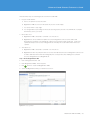
Figure 5-8-1. User Home Screen.
Step 2: Browse the Catalog
1.Click
button to add a new Cloud Computer System; this pulls up the Add vApp from Catalog wizard.
2.Select a vApp from the Organization’s Catalog. Click “Next.”
Figure 5-8-2. Select vApp from Catalog.
3.Enter a name for this vApp and an optional description. Select the runtime lease and storage lease for this
vApp.
4.Configure the virtual machines in this vApp.
a.Select the organization VDC that you wish to deploy this vApp.
b.Select the Organization Networks to connect the virtual machines to.
c.Click “Next.”
TECH N I C AL WH ITE PAPE R / 41
VMware vCloud Director Evaluator’s Guide
Figure 5-8-3. Select Organization VDC and Organization Networks.
5.Click “Next” in the Configure Networking screen. Leave “Fence vApp” unchecked.
6.Review the summary in the Ready to Complete screen and click “Finish.”
This initiates a full copy of the vApp from the Catalog to the Organization VDC that the user selected. You can
deploy one vApp with Network Fencing and one without Network Fencing to see the difference.
7.Click “My Cloud” and click “vApps.” Right-click on the newly created vApp and click “Start” to power on the
vApp.
Step 3: Verify
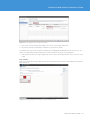
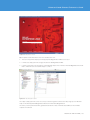
Click “Home” and verify that the vApp has been deployed and powered on. Click on the thumbnail to launch the
Remote Console.
Figure 5-8-4. Click the Thumbnail on the Home Screen to Launch the Remote Console.
TECH N I C AL WH ITE PAPE R / 42
VMware vCloud Director Evaluator’s Guide
Figure 5-8-5. vApp Remote Console.
Open vSphere client and switch to the Hosts and Clusters view.
1.The users vApp will be deployed in the appropriate Organization VDC resource pool
2.It will also be deployed in the storage allocated to the Organization VDC.
3.It will be connected to the portgroup on the vDS that maps to the external or internal Organization Network
that to which the user selected the vApp to connect.
Figure 5-8-6. vApp Deployed in vSphere.
The vApp is deployed in the correct resource pool and storage and connected to the portgroup on a vDS that
maps to the internal/external Organization Network in the Finance Organization.
The tasks you have performed in this guide demonstrate the value of VMware vCloud Director in a VMware
vSphere environment.
TECH N I C AL WH ITE PAPE R / 43
VMware vCloud Director Evaluator’s Guide
VMware vCloud Director’s various features transform your vSphere environment into a cloud environment by
allowing you to pool your resources together and create standardized offerings, infrastructure and vApps for
your end users. This allows you to increase utilization of infrastructure and reduce cost.
VMware vCloud Director allows IT to define policies via Roles and Rights, Quotas and Leases, which define how
users can use services in the cloud.
The net result is that now end users can log in to the cloud and self-provision vApp workloads, which increase
agility and time to market for applications. The increased automation helps you realize cost savings and unlocks
increased agility and faster time to market for applications.
6. Next Steps
With VMware vCloud Director, you can:
•Increase business agility by empowering users to deploy preconfigured services or custom build a complete
application stack with the click of a button
•Maintain security and control over a multitenant environment with policy-based user controls and VMware
vShield security technologies
•Reduce costs by efficiently delivering resources to internal organizations as virtual datacenters, enabling a
reduction in cost from increased resource pooling and automation
•Follow an evolutionary path to the cloud by leveraging existing investments and open standards for
interoperability and application portability between clouds
In this paper, we have shown how you can use VMware vCloud Director to transform your vSphere environment
into a cloud environment. Refer to the VMware vCloud Director User’s Guide for more details.
To gain cost visibility into your VMware vCloud Director–based private cloud, download and evaluate vCenter
Chargeback 1.5. For details refer to the vCenter Chargeback Manager 1.5 Evaluator’s Guide.
6.1. VMware Contact Information
For additional information or to purchase VMware vCloud Director, VMware’s global network of solutions
providers is ready to assist. If you would like to contact VMware directly, you can reach a sales representative at
1-877-4VMWARE (650-475-5000 outside North America) or email [email protected]. When emailing, please
include the state, country and company name from which you are inquiring. You can also visit http://www.
vmware.com/vmwarestore/ to purchase VMware vCloud Director online.
6.2. Providing Feedback
We appreciate your feedback on the material included in this guide. In particular, we would be grateful for any
guidance on the following topics:
•How useful was the information in this guide?
•What other specific topics would you like to see covered?
•Overall, how would you rate this guide?
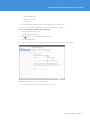
Please send your feedback to the following address: [email protected], with “VMware vCloud
Director Evaluator’s Guide” in the subject line. Thank you for your help in making this guide a valuable resource.
VMware, Inc. 3401 Hillview Avenue Palo Alto CA 94304 USA Tel 877-486-9273 Fax 650-427-5001 www.vmware.com
Copyright © 2010 VMware, Inc. All rights reserved. This product is protected by U.S. and international copyright and intellectual property laws. VMware products are covered by one or more patents listed
at http://www.vmware.com/go/patents. VMware is a registered trademark or trademark of VMware, Inc. in the United States and/or other jurisdictions. All other marks and names mentioned herein may be
trademarks of their respective companies. Item No: VMW_10Q3_WP_EvalGuide_p44_A_R2