1
VIEWING IMAGES ON A COMPUTER
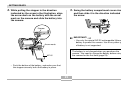
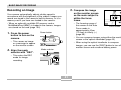
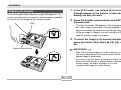
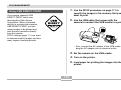
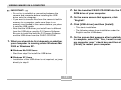
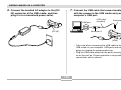
6. Connect the bundled AC adaptor to the [DC
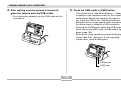
7. Connect the USB cable that comes bundled
IN] connector of the USB cradle, and then
plug it in to a household power outlet.
with the camera to the USB cradle and your
computer’s USB port.
USB port
[DC IN]
USB cable
(bundled)
Connector B
Connector A
[USB]
• Take care when connecting the USB cable to the
USB cradle or your computer. USB ports and cable
plugs are shaped for proper positioning.
• Plug the USB cable plugs into the ports securely, as
far as they will go. Proper operation is not possible if
connections are not correct.
142