1
Command|8 with Other Control Surfaces
003 or Digi 002 and Command|8
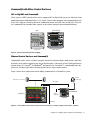
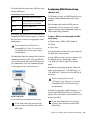
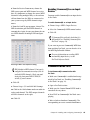
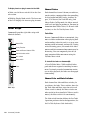
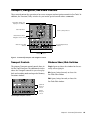
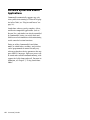
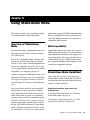
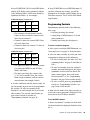
When used as a MIDI control surface with a supported 003 or Digi 002® system, the faders on Command|8 function as additional faders (9–16). Figure 2 shows fader mapping when Command|8 is used
with a 003. (Plug-ins cannot be edited on Command|8 when used with a 003 or Digi 002.) You can
use Command|8 for expanded fader control, or for remote transport control and monitoring.
003
Faders 1–8
Command|8
Faders 9–16
Figure 2. 003 and Command|8 fader mapping
Ethernet Control Surfaces and Command|8
Command|8 can be used as a remote transport control for isolation rooms, drum booths, and other
locations, or for remote control of play and record functions. When used with a Digidesign Ethernet
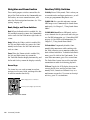
control surface (D-Control®, D-Command®, ProControl™ or Control|24™), Command|8 faders duplicate the left-most eight faders currently banked on the larger control surface.
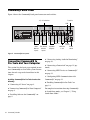
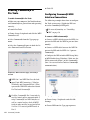
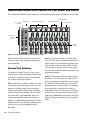
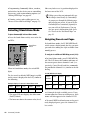
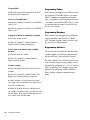
Figure 3 shows basic connections when adding Command|8 to a Control|24 system.
Remote
monitoring
Control Room monitors
Alt outputs
Command|8
Control|24
USB to
computer
Mic input
Figure 3. Control|24-based Pro Tools system with Command|8 as a remote transport and monitor controller
Chapter 2: Installing and Configuring Command|8
7