1
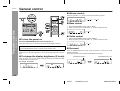
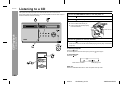
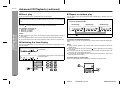
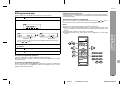
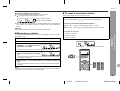
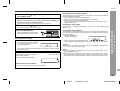
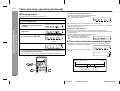
Advanced CD Playback To remove the CD 1 2 3 While in the stop mode, press the button. Press the CD eject button and remove the CD. Press the button to close the CD cover. SD-EX200 To locate the beginning of a track To move to the beginning of the next track: Press the button during playback. z You can skip to any track by pressing the track number appears. button repeatedly until the desired To restart the track being played: Press the button during playback. z You can skip to any track by pressing the track number appears. button repeatedly until the desired CD Eject Button For audible fast forward: Caution: Press and hold down the z Do not open or close the CD cover manually. It may cause malfunctions to the unit. z Be careful not to jam your fingers in the CD cover. z Do not play discs with special shapes (heart- or octagon-shaped). It may cause malfunctions. z If the power fails while the CD cover is open, wait until the power is restored. z Keep foreign objects out of the CD compartment. z When the unit is not being used, be sure to close the CD cover. If it is left open, the lens may be covered with dust and the unit may not operate properly. z When the unit enters the stand-by mode, the opened CD cover will be close automatically. For audible fast reverse: Notes: z Subjecting the unit to shock or vibration may cause mistracking. z Playing certain CD at a high volume may cause mistracking. In this case, listen at a lower volume. z If the recorded side of the CD is touched or becomes dirty, refer to "Care of compact discs" (page 28) and clean it. z If a disc is damaged or dirty, the sound may skip. z If an error message is displayed during CD operation, see "Error messages" on page 28. z If TV or radio interference occurs during CD operation, move the unit away from the TV or radio. Press and hold down the button during playback. button during playback. Notes: z Normal playback will resume when the or button is released. z When the end of the last track is reached during fast forward, "END" will appear on the display and CD operation will be paused. When the beginning of the first track is reached during fast reverse, the unit will enter the playback mode. To search very quickly: When fast forward or fast reverse is used while in the pause mode, the playback point will move more quickly than when using audible fast forward or audible fast reverse playback. z In this mode, no sound is heard. Therefore, you should refer to the time display. z When you lift your finger, the unit will re-enter the pause mode. CD Playback To locate the desired portion - Listening to a CD / Advanced CD Playback - Push 1 2 3 4 5 6 7 8 17 03/3/14 SD-EX200_sec.fm TINSZ0523AWZZ