1
TS400/TS410 Installation Instructions
Testing & Fault Finding
Testing & Fault Finding
Testing the System
Fault Finding
Once the system has been installed and fully
programmed it can be tested. Before performing
any tests it is advisable to warn your neighbours of
any tests that involve using the external sounder.
If you have carefully followed the installation and
wiring instructions and carried out the various
checks correctly, your security system will now be
fully operational.
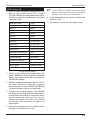
1. Perform a WALK TEST to ensure that all zones are
operating correctly.
However if the system is not operating correctly
when you have completed the installation, or it
has developed a fault after a period of trouble
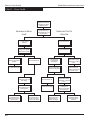
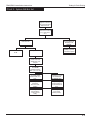
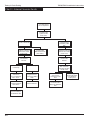
free operation, the Fault Finding Charts will help
you identify and clear the fault.
2. Perform a BELL TEST to ensure that the external
sounder and strobe is operating correctly (See
"User Operating Instructions" for details on BELL
TEST).
3. Set the alarm system. Open a door or activate
a detector to create an alarm.
Before using the fault finding charts refer to the
following notes:
l
When removing covers from the control
panel, external sounder or detectors you must
remember to first enter the four digit engineer
code into the control panel.
l
When all tests are complete, remember to
replace all covers etc.
l
A battery operated circuit tester available
from most hardware and DIY stores, or a
simple battery bulb and length of wire, will
assist in checking the continuity of circuit
wiring, if necessary.
4. Unset the system to silence the internal and
external sounder.
5. Ensure the correct zone LED is lit, then enter the
passcode again to clear the indications.
Installation and checks are now complete, if there
are any problems in your installation refer to the
section on Fault Finding.
19