1
Chapter 5: Initial Setup
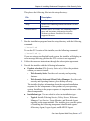
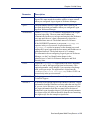
Parameter
Description
<server>
IP address or name of the machine running the Websense Logon
Agent. This must match the machine address or name entered
when you configured Logon Agent in Websense Manager.
<port>
The port number used by Logon Agent. Enter 15880 if you
accepted the default port number when you configured Logon
Agent in Websense Manager.
/NOPERSIST
Causes LogonApp.exe to send user information to the Logon
Agent at logon only. The user name and IP address are
communicated to the server at logon and remain in the Websense
user map until the user’s data is automatically cleared at a
predefined time interval. The default interval is 24 hours.
If the NOPERSIST parameter is not present, LogonApp.exe
operates in the persistent mode. In persistent mode,
LogonApp.exe resides in memory on the domain server and
updates the Logon Agent with the user names and IP addresses at
predefined intervals. The default interval is 15 minutes.
For information about configuring Logon Agent via Websense
Manager, see the User Identification chapter in the
Administrator’s Guide for Websense Enterprise and Web
Security Suite.
/COPY
Copies the LogonApp.exe application to the users’ machines,
where it is run by the logon script from local memory. This
optional parameter can be helpful if you experience any hangs
with your logon script. The application is copied into the
%USERPROFILE%\Local Settings\Temp folder. COPY can
be used only in the persistent mode.
/VERBOSE
Debugging parameter that must be used only at the direction of
Technical Support.
/LOGOUT
(Used only in an optional logout script) Removes the user’s logon
information from the Websense user map when the user logs off.
If you use Active Directory, you can use this parameter to clear
the logon information from the user map before the interval
defined in Logon Agent has elapsed. Use this optional parameter
in a logout script in a different batch file than the one containing
the logon script. See the example scripts below.
Sun Java System Web Proxy Server
199