1
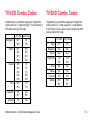
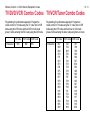
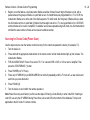
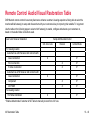
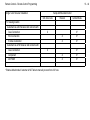
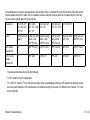
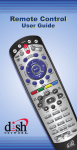
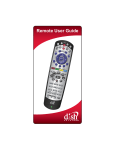
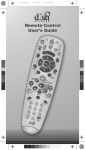
The available keys are shown and explained in the following chart. It’s important to note that the 6.2/6.3/6.4 tabs are not
interchangeable with 4.0/6.0 tabs. So in the instance where a customer receives a 6.4 tab to replace their 6.0 tab, they
can not use the original tab on the new remote.
Receivers
211, 211k, 411,
222, 322, 522,
625 TV1
222, 222k,
322, 522, 625
622, 722, 722k, only TV1
only TV1
222, 522, 622,
625, 722, TV2
501, 508, 510
Color
Green key with
green 1
Green key with
black 1 and
UHF Pro icon
Green key with
black 1 and
UHF Pro icon
Blue key with
black 2 and
UHF Pro icon
Black key with
UHF icon
Silver key with
UHF Pro icon
SAT mode
Sends Out:
IR
UHF Pro only
UHF Pro only
UHF Pro only
UHF & IR
UHF Pro only
SAT In AUX
Mode
Sends Out:
IR
UHF & IR
UHF & IR
UHF & IR
UHF & IR
UHF & IR
• The tabs can be broken down into the following:
• TV1 IR: Used for any IR configuration.
• TV1 UHF Pro: Used for TV1 of duo receivers when there is something preventing an IR remote from working orrectly;
this can include instances of IR interference or a customer having the receiver in a different room from the TV. There
are two different
Remote Troubleshooting
13 - 63