1
Web Browser Access (Internet Explorer):
User can monitor the current condition of the monitor area via
Internet Explorer which is found on all Windows based machine.
Please refer the following steps:
1. Open the Internet Explorer.
2. Enter the IP 50 / 50W’s IP address.
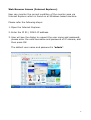
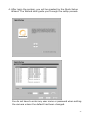
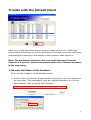
3. User will see the dialog to request the user name and password;
please enter the valid username and password of IP camera, and
then press OK.
The default user name and password is “admin”.
17