1
1
Installing and Configuring Enhanced OS-9 for StrongARM
Connecting the Reference Board to an
Ethernet Network (Optional)
Enhanced OS-9 for StrongARM supports using the onboard
SMC91C94 or a 3COM Etherlink III - LAN PC Card for mwSoftStax
TCP/IP connections. Also, Enhanced OS-9 for StrongARM provides
system level support for telnet, FTP, and NFS.
To use Ethernet networking, you must create a bootfile that has the
Ethernet options enabled and insert an Ethernet PCMCIA card into the
reference board if you choose to use a PCMCIA Ethernet card.
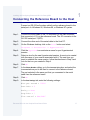
Step 1.
Click the Start button on the Windows desktop.
Step 2.
Select Programs -> Enhanced OS-9 StrongARM ->
Microware Configuration Wizard. You should see the opening
screen.
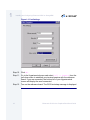
Step 3.
Click OK. The configuration screen is displayed.
Step 4.
Select Configure -> Bootfile -> NetWork Configuration.
The network options dialog box appears.
Step 5.
Change the network settings as needed. See the Configuration Wizard
help for more information on the network settings.
Step 6.
Create a new Bootfile by following the directions in the Creating and
Configuring an OS-9 ROM Image section.
Step 7.
Turn off the power to the reference board.
!
WARNING
Inserting and removing a PCMCIA card with the power on is not
supported in this release. Damage may occur to the PCMCIA card if it is
inserted or removed while power is applied to the board.
Step 8.
Position the PCMCIA IDE card so that the end with the PCMCIA female
connector is facing PCMCIA socket and the label is facing up.
Enhanced OS-9 for the GraphicsClient Board Guide
23