1
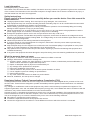
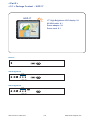
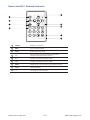
How to Use RC-2 Remote Controller
1
8
2
INPUT
3
4
MUTE
1
2
3
4
5
6
7
8
9
AUTO
0
-/--
VOL
9
CH
10
FREEZE
11
1
12
MENU
5
SELECT
13
ASPECT
14
6
SLEEP
ENTER
15
16
7
BACK
20
SOURCE
SWAP
EXIT
PIP
POSITION
PIP
AUDIO
17
1
18
PIP
21
19
Water proof
1
INPUT
2
Switches on or off the TV
3
0-9
4
AUTO
MENU
5
6
▲ / ▼ / ◄ / ► / ENTER
7
BACK
MUTE
Vol + / CH + / FREEZE
- / -ASPECT
SELECT
SLEEP
EXIT
8
9
10
11
12
13
14
15
16
17
18
19
20
21
Select the source
PIP functions
PIP
PIP AUDIO
POSITION
SOURCE
SWAP
UM-UV-621-H17-Q414V4
Only use in TV mode. Select channels. For channel numbers 10
and above, enter the second digit within two seconds.
Auto adjust
Display the menu on the screen or go to the previous menu
Go to the upper menu or select the previous value /
Go to the next menu or select the next value /
Decrease the setting value /
Increase the setting value or enter to the select item setting
Enter to the select item settings or excude the setting
Back to previous value
Turn on or off the speaker
Increase or decrease the speaker volume
For TV model only, increase or decrease the channel number
Reserve for OEM model
For setting input single or double digits
Adjust the screen size
To select the existing item
Select the sleeping time
Exit the menu or cancel
Picture in picture
To set the audio of in PIP mode
To set the screen position in PIP mode
PIP Source
Swap screen in PIP mode
P.22
www.austin-hughes.com