1
LEDJ Intense 9P10 RGBWA LED Slim Panel
Operations
DMX mode:
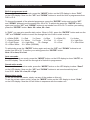
To access the DMX mode, press the “MODE” button on the LED display to show “d001” on the
LED display. Now press the “ENTER” button and use the “UP” and “DOWN” buttons to set the
desired DMX address setting from “d001 - d512”. Once you have selected the desired DMX
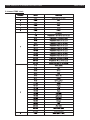
address setting, press the “ENTER” button to choose one of the 5, 7 or 9 DMX channel modes
use the “UP” and “DOWN” buttons and press the “ENTER” button to confirm the setting.
Static colour mode
To access the static colour mode, press the “MODE” button on the LED display to show “Colt” on
the LED display. To change the brightness of each colour please see below.
Red Adjustment
To adjust the brightness of the red LEDs, press the “MODE” button to show “r255” on the
display. Now press use the “UP” and “DOWN” buttons to adjust the brightness from 000-255.
To confirm your choice, press the “ENTER” button. Note: 000 = off, 255 = full on.
Green Adjustment
To adjust the brightness of the green LEDs, press the “MODE” button to show “9255” on the
display. Now press use the “UP” and “DOWN” buttons to adjust the brightness from 000-255.
To confirm your choice, press the “ENTER” button. Note: 000 = off, 255 = full on.
Blue Adjustment
To adjust the brightness of the blue LEDs, press the “MODE” button to show “b255” on the
display. Now press use the “UP” and “DOWN” buttons to adjust the brightness from 000-255.
To confirm your choice, press the “ENTER” button. Note: 000 = off, 255 = full on.
White Adjustment
To adjust the brightness of the green LEDs, press the “MODE” button to show “u255” on the
display. Now press use the “UP” and “DOWN” buttons to adjust the brightness from 000-255.
To confirm your choice, press the “ENTER” button. Note: 000 = off, 255 = full on.
Amber Adjustment
To adjust the brightness of the blue LEDs, press the “MODE” button to show “A255” on the
display. Now press use the “UP” and “DOWN” buttons to adjust the brightness from 000-255.
To confirm your choice, press the “ENTER” button. Note: 000 = off, 255 = full on.