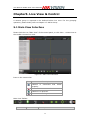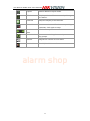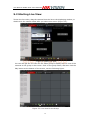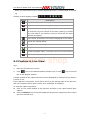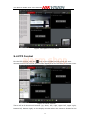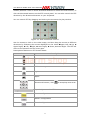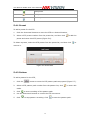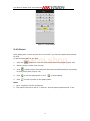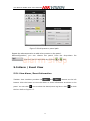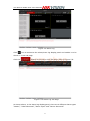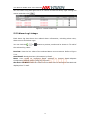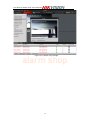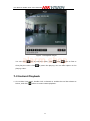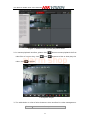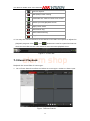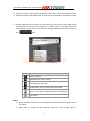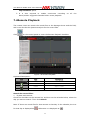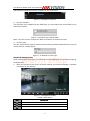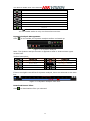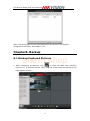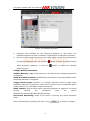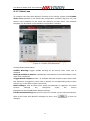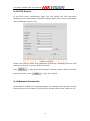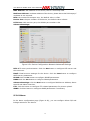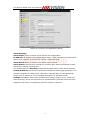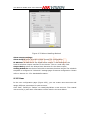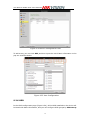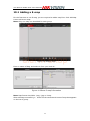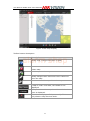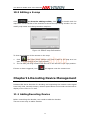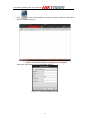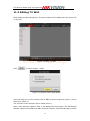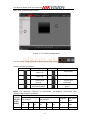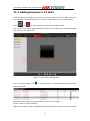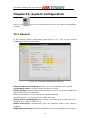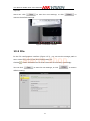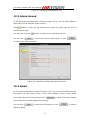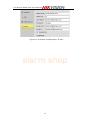
1
iVMS-4200 Client Software User Manual alarm shop Hangzhou Hikvision Digital Technology Co., Ltd. User Manual ofiVMS-4200 Client Software Notices The information in this documentation is subject to change without notice and does not represent any commitment on behalf of HIKVISION. HIKVISION disclaims any liability whatsoever for incorrect data that may appear in this documentation. The product(s) described in this documentation are furnished subject to a license and may only be used in accordance with the terms and conditions of such license. Copyright © 2006-2011 by HIKVISION. All rights reserved. This documentation is issued in strict confidence and is to be used only for the purposes for which it is supplied. It may not be reproduced in whole or in part, in any form, or by any means or be used for any other purpose without prior written consent of HIKVISION and then only on the condition that this notice is included in any such reproduction. No information as to the contents or subject matter of this documentation, or any part thereof, or arising directly or indirectly therefrom, shall be given orally or in writing or shall be communicated in any manner whatsoever to any third party being an individual, firm, or company or any alarm shop employee thereof without the prior written consent of HIKVISION. Use of this product is subject to acceptance of the HIKVISION agreement required to use this product. HIKVISION reserves the right to make changes to its products as circumstances may warrant, without notice. This documentation is provided “as-is,” without warranty of any kind. Please send any comments regarding the documentation to: [email protected] Find out more about HIKVISION at www.hikvision.com 1 User Manual ofiVMS-4200 Client Software Contents Notices .......................................................................................................................................... 1 Contents ........................................................................................................................................... 2 Chapter1. Overview .............................................................................................................. 4 1.1 Description .................................................................................................................... 4 1.2 Features & Functions ................................................................................................. 4 Chapter2. Update Info......................................................................................................... 5 Chapter3. Starting iVMS-4200 ........................................................................................ 6 3.1 Installing the Software ............................................................................................. 6 3.2 Uninstalling the Software ...................................................................................... 11 3.3 User Registration ...................................................................................................... 12 3.4 Import Camera Wizard ........................................................................................... 13 3.5 User Login ................................................................................................................... 16 3.6 Control Panel Introduction .................................................................................... 17 3.7 Account Management.............................................................................................. 20 Chapter4. Adding Devices ............................................................................................... 22 4.1 Adding Device ............................................................................................................ 22 4.1.1 Adding Device ................................................................................................ 22 4.1.2 Device Configuration ................................................................................... 24 4.2 Adding a Stream Media Server ........................................................................... 25 4.3 Adding a Camera Group......................................................................................... 26 Chapter5. Live View & Control ..................................................................................... 28 5.1 Main View Interface ................................................................................................. 28 5.2 Starting Live View .................................................................................................... 30 5.3 Capture in Live View................................................................................................ 31 5.4 PTZ Control ................................................................................................................. 32 5.4.1 Preset ................................................................................................................ 34 5.4.2 Pattern .............................................................................................................. 34 5.4.3 Patrol ................................................................................................................. 35 5.5 Alarm / Event View .................................................................................................. 36 5.5.1 View Alarm /Event Information ............................................................... 36 5.5.2 Alarm Log Linkage........................................................................................ 38 Chapter6. Recording ........................................................................................................... 40 6.1 Local Recording ......................................................................................................... 40 6.2 Storage Server Recording ..................................................................................... 40 6.2.1 Adding Storage Server ............................................................................... 40 6.2.2 Setting Storage Server Recording Schedule ...................................... 42 6.3 Remote Recording .................................................................................................... 45 Chapter7. Playback ............................................................................................................. 47 7.1 Playback of Local Stored Files ............................................................................. 47 7.2 Instant Playback ....................................................................................................... 48 7.3 Event Playback .......................................................................................................... 50 alarm shop 2 User Manual ofiVMS-4200 Client Software 7.4 Remote Playback ...................................................................................................... 52 Chapter8. Backup ................................................................................................................. 55 8.1 Backup Captured Pictures ..................................................................................... 55 8.2 Record Files Backup ................................................................................................. 56 Chapter9. Camera & Device Configuration ........................................................... 59 9.1 Camera Settings ....................................................................................................... 59 9.1.1 Image Quality ................................................................................................ 60 9.1.2 Video Quality .................................................................................................. 61 9.1.3 Schedule........................................................................................................... 62 9.1.4 Video Display .................................................................................................. 64 9.1.5 Motion Detection ........................................................................................... 66 9.1.6 Tampering Alarm ........................................................................................... 67 9.1.7 Video Loss ....................................................................................................... 69 9.1.8 PTZ Control ..................................................................................................... 70 9.1.9 Network Connection .................................................................................... 70 9.2 Device Configuration ............................................................................................... 71 9.2.1 Information ..................................................................................................... 73 9.2.2 General ............................................................................................................. 73 9.2.3 Network ............................................................................................................ 74 9.2.4 Alarm ................................................................................................................. 76 9.2.5 User .................................................................................................................... 78 9.2.6 HDD.................................................................................................................... 79 9.2.7 Exception ......................................................................................................... 80 9.2.8 File ...................................................................................................................... 81 9.2.9 Log...................................................................................................................... 82 9.2.10 Holiday ........................................................................................................... 83 9.2.11 Others ............................................................................................................. 84 9.2.12 Channel-Zero ............................................................................................... 85 Chapter10. E-Map................................................................................................................. 86 10.1 Adding a E-map ...................................................................................................... 88 10.2 Editing a E-map ...................................................................................................... 90 Chapter11. Decoding Device Management ........................................................... 90 11.1 Adding Decoding Device ...................................................................................... 90 11.2 Editing TV Wall ........................................................................................................ 92 11.3 Adding Cameras to TV Wall ................................................................................ 95 11.4 PC Decoder ............................................................................................................... 96 Chapter12. Log ...................................................................................................................... 98 12.1 Log Query.................................................................................................................. 98 12.2 Log Backup ............................................................................................................... 98 12.3 Opening Log File ..................................................................................................... 99 Chapter13. System Configuration ............................................................................ 100 13.1 General ..................................................................................................................... 100 13.2 File ............................................................................................................................. 101 alarm shop 3 User Manual ofiVMS-4200 Client Software 13.3 Alarm Sound .......................................................................................................... 102 13.4 Email ......................................................................................................................... 102 Chapter14. FAQ ................................................................................................................... 104 Live View ............................................................................................................................ 104 Recording ........................................................................................................................... 104 Playback ............................................................................................................................. 104 Configuration .................................................................................................................... 105 Chapter1. Overview 1.1 Description iVMS-4200 Intelligent Video Management System is a newly-developed colligation software which includes not only NVR, DVR, and IP camera management functions alarm shop but also compression card, decoder connection and setup functions. The powerful functions make it popular in local & remote surveillance of supermarkets, stores, districts and residential places, etc. This user manual describes the function, configuration and operation steps of iVMS-4200 software. To ensure the properness and stability of the software, please refer to the contents below and read the manual carefully before installation and operation. This user manual can be acquired from your supplier. 1.2 Features& Functions V1.01.00 1. The software contains 5 subsystems: User Client, PC Storage Server, Stream Media Server, Decoding Sever, and Encoding Server. 2. Main View: View live video and instant video playback; and various video operations such as capture, recording, PTZ control, etc. are supported. 3. E-Map: Manage and display E-Map and hot spots; operate map zoom in/out, view hot spot, display alarm, and other E-Map operations are supported. 4. Event Search: Search and playback of the event record files. 5. TV Wall View: Configure and operate TV wall for video decoders. 6. Camera Import: Add, modify and delete groups and all kinds of camera from Hikvision devices. 4 User Manual ofiVMS-4200 Client Software 7. Local Log Search: Search, view and backup different sorts of local logs such as alarm, operation, system logs, etc. 8. User Management: Add, modify and delete the user of iVMS-4200; assign operating permissions to each user. 9. Device Management: Add, delete, and configure parameters of Hikvision devices, such as network settings, alarm in/out, hard disk management and upgrade, etc. 10. NVR Management: Add, modify and delete the storage server; configure parameters (e.g., record schedule, network, HDD, etc.) for the added storage server. 11. Stream Media Servers: Add, modify and delete the stream media server; configure parameters (e.g., RTSP port, port upper/lower limit, etc.) for the added stream media server. 12. Decoder Server: Add, modify and delete the decoder; configureparameters(e.g., network, alarm input/output, exception, etc.) for the added decoder. 13. Camera Configuration: Configure camera parameters (e.g., image quality, record schedule, motion detection, etc.). 14. System Configuration: Configure the general settings of iVMS-4200, such as the saving path of captured images, recordings, alarm sound settings and email settings. alarm shop 4 User Manual ofiVMS-4200 Client Software Chapter2. Update Info * This is the first edition. alarm shop 5 User Manual ofiVMS-4200 Client Software Chapter3. Starting iVMS-4200 3.1 Installing the Software Insert the DX4500/DX4600 resource disc into the remote computer CD/DVD drive, and wait for the window to open. Follow the installation prompts to install the software. Step1:Double click the program file to enter the following InstallShield Wizard as shown below: alarm shop Figure 3.1Welcome to InstallShield Wizard Step2: Click “Next” to start the InstallShield Wizard. Select the language (English) for installation, and then click “Next” to continue. Figure 3.2Select Language 6 User Manual ofiVMS-4200 Client Software Step3:Install vcredist_x86 patch/Card Driver/WinpCap Select the driver you want to install. vcredist_x86patch:for X86 operating system Card Driver: for compression card WinpCap: for open source software, SADP driver Figure 3.3Select Driver Install vcredist_x86 patch alarm shop Start to install the vcredist_x86 patch and then click”Next”to continue. Figure 3.4Install vcredist_x86 patch-Start Installation In the License Terms dialog box, click “I have read and accept the license terms”, and then click “Install” to install the vcredist_x86 patch. 7 User Manual ofiVMS-4200 Client Software Figure 3.5Install vcredist_x86 patch-Accept License Terms After the Setup Complete interface appears, click Finish to complete the installation of vcredist_x86 patch. alarm shop Figure 3.6Install vcredist_x86 patch-Complete Installation Install Card Driver If there is compression card installed on your computer, you can click the “Install or Update Driver” option to install the card driver. 8 User Manual ofiVMS-4200 Client Software Figure 3.7Install Card Driver Install WinPcap Follow the installation prompt to complete the installation of WinPcap. If it has been installed on your computer, you can cancel this step. alarm shop Figure 3.8Install WinPcap Note: The SADP is used for automatically searching the online device in the local network. If the WinPcap is not installed, the SADP software cannot be used. After the driver has been installed, continue the following steps. Step5:Select the programs you want to install on your computer, including the User Client, PC NVR Server and Stream Media Server. User can also click Browse to change the directory to save the program files. Click “Next”to continue. 9 User Manual ofiVMS-4200 Client Software Figure 3.9Select Installation Programs Step6:In theLicense Terms interface, click “I accept the terms of the license agreement”, and then click “Next” to continue the installation. alarm shop Figure 3.10Select Installation Programs Step7:Click “Install” to start installation of the selected programs. Figure 3.11Install the Selected Programs 10 User Manual ofiVMS-4200 Client Software Step8:After the installing progress is completed, enter the Setup Type interface to select the desktop shortcut icons for the installed programs. Click “Next” to continue the installation. Figure 3.12Create Desktop Shortcut Icons Step9:Click “Finish” to complete the installation. alarm shop Figure 3.13Finish the Completion 3.2 Uninstalling the Software Click StartAll Programs4200 client and select “Uninstall iVMS-4200” option to enter the following interface: 11 User Manual ofiVMS-4200 Client Software Figure 3.13 Uninstall the Programs Select “Remove” to remove all installed features and then click “Next” to uninstall iVMS-4200 according to the prompt. 3.3 User Registration For the first time to use the iVMS-4200 software, you need to register a super user for login. alarm shop Figure 3.14User Login Input the super user name, password and confirm the password in the dialog box and click Register. Then, you can log in as the super user. Note: Enter, Space, and TAB buttons are invalid for the user name and password. The password cannot be empty, andit should not be less than six characters and can’t be copied and pasted. 12 User Manual ofiVMS-4200 Client Software 3.4Import Camera Wizard After registration and login, the following message box will pop up: Figure 3.15Import Camera Wizard Click OK to start the wizard and add the device, or click Cancel to exit the wizard. Step1: According to the hint, click ImportCamera icon to enter the CameraImport control interface. alarm shop Figure 3.16 Enter Camera Import Interface 13 User Manual ofiVMS-4200 Client Software Figure 3.17Device Management Interface Step2: Add DVR Click Add Device and then input the device information and then click Add to enter the device information in the dialog box of Add DVR interface. alarm shop Figure 3.18Add DVR Step 3:After adding the device according to the above steps, you will see the toolbar after the device name. click Click to enter the Device Parameters configuration interface (Figure 3.19). to edit the connected device settings. 14 User Manual ofiVMS-4200 Client Software Click to delete the added group. Click to refresh the page. Click to import all the monitoring point to the group named by the name of the device. Step 4: Add Group After addingDVR, please click the Add on Group dialog box. Edit the name of group and then click OK to save your settings.. The added group will be displayed in the list. alarm shop Figure 3.19Add Group Step 5: Import Channel to Group In the left area on the Camera Import interface, click to select the channels and then click Import button to import the selected channels to the Group on the right. 15 User Manual ofiVMS-4200 Client Software Figure 3.20 Import Channel Note: alarm shop 1. You can hold the Ctrl key on PC to select multiple channels or click Import All button to select all channels for import. 2. The devices to be added must be online currently. 3. Each channel can be added to one group only once, while the same channel can be added to different groups. 4. Up to50 channels can be added to each group, with a maximum of 256 channels for all the groups totally. Step 6: After importing the selected channels to the group, you can return to the control panel and then enter the Main View interface to get a live view of the added channels. 3.5 User Login When you open the iVMS-4200 software after registration, the login dialog box pops up, shown as follows: 16 User Manual ofiVMS-4200 Client Software Figure 3.21User Login Input the user name and password, and then click Login.You can also enable the auto-login by checking the Enable Auto-login checkbox. 3.6 Control Panel Introduction The main control panel of the iVMS-4200 is shown as follows: alarm shop Figure 3.22 Control Panel Menu Bar: Open Captured Picture: File Open Video File: Enter the Capture interface to select the folder location of the exported captured picture file (s). Enter the video player and select the folder 17 User Manual ofiVMS-4200 Client Software location of the exported video file (s), You can also capture pictures during the playing of the video file. Open Log File: Exit: Lock: Switch User: System System Enter the Log File interface to select the folder location of the exported log file (s) Exit the iVMS-4200 remote client. Lock the screen operation. User must log in after locking the system. Switch login user. Enter the System Configuration interface. Configuration: Import Configuration Import client configuration from your computer. File: Export Configuration Export client configuration to your computer. File: 1024*768: 1280*1024: Display window at 1280*1024. Full Screen: Display window in full screen. Control Panel: View Display window at 1024*768. Main View: Enter Control Panel. Enter Main View interface. alarm shop E-map: Enter E-map interface. Event Search: Enter Event Search interface. TV Wall: Enter TV Wall View interface. ImportCamera Enter ImportCamera interface. Camera Settings Enter Camera Setting interface. Account Enter User Account Management interface. Management Tools Device Management Storage Server Enter Device Management interface. Enter Storage Server Management interface. Management Stream Media Server Management Decoding Enter Stream Media Server Managementinterface. Enter Decoding DeviceManagement interface. DeviceManagement Help Broadcast Select device to start broadcasting. Open Wizard Open the guide for camera import. About Help User Manual (F1) View information of the client software, including company, software name, version, etc. To get help about the FAQs. Click to open the User Manual; you can also open the User Manual by pressing FI on your keyboard. 18 User Manual ofiVMS-4200 Client Software There are 14 icons on the control panel, and their functions are described in the following table: View live and playback video; realize Main View video operation (e.g., picture capture, recording, PTZ control, etc.). Manage and display E-Map and hot spots; E-map realize E-Map operation (e.g., operate map zoom in/out, view hot spot, display alarm, etc.) Operating Search and playback of the event record Event Search Options Remote Playback TV Wall ImportCamera Local Log Search files; realize playback operation. Playback the recorded video and/or audio files in the remote client. Configure and operate TV wall. Add, modify or remove the groups; import/export of cameras. Search, view and backup of local logs (alarm, operation, system logs). Add, modify or remove the user account alarm shop Account Management parameters; assign operating permission to each user. Add, modify or remove the DVR device; Device Management configure parameters (e.g., network, alarm input/output, HDD, etc.) for the added DVR. Add, modify or remove the storage Management Options Storage Server Management server; configure parameters (e.g., record schedule, network, HDD, etc.) for the added storage server. Add, modify or remove the stream media Stream Media server; configure parameters (e.g., RTSP Server port, port upper/lower limit, etc.) for the added stream media server. Add, modify or remove the decoder; Decoding Device Camera Settings Configuration Options System Configuration configure parameters (e.g., network, alarm input/output, exception, etc.) for the added decoder. Configure camera parameters (e.g., image quality, record schedule, motion detection, etc.). Configure the general parameters (e.g., saving path of files, alarm sound, Email, etc.). 19 User Manual ofiVMS-4200 Client Software 3.7Account Management Click to enter the following account management interface: alarm shop Figure 3.23 User Management Click Add to enter the popup Add User dialog box as follows: 20 User Manual ofiVMS-4200 Client Software Figure 3.24Add User There are two parts of the dialog box of Add User: Basic Information and User Permissions. alarm shop Basic Information—provides two kinds of user types (Administrator and Operator) to support the users with different permissions. User Permissions—include 26 optional permissions and provide manual selected permission function for the different users. Note: The Admin user has all the permissions asdefault and operator user’s permission should be selected from list. All selected permissions will immediate take effect. Input user name and password, and then click Save to add a new user. Click Modify to change the settings. 21 User Manual ofiVMS-4200 Client Software Chapter4. Adding Devices Before any operation, you need to add a device and import cameras. Please refer to Section 3.2 Import Camera Wizard. Click to enter the device managementinterface. 4.1 Adding Device 4.1.1 Adding Device To add DVR device to the remote client, you click Add in the Device Management interface. alarm shop Figure 4.1 Add Device Create a nickname for the device and then input it with other information, the User Name and Password are admin and 12345 respectively by default. 22 User Manual ofiVMS-4200 Client Software Figure 4.2 Add Device-pop-out If you check the Private Domain Mode checkbox, you should input the DNS address and Device Mark (the device identifier) as well. alarm shop Figure 4.2 Add Device-Private Domain Click the Show Online Devices icon to search the online devices. All the online devices will show in the list. Click to select the online device you want to add, and then click Select Device to add the device. 23 User Manual ofiVMS-4200 Client Software Figure 4.3 Add Online Device-Private Domain 4.1.2 Device Configuration alarm shop After adding the device, you can follow the procedure in this chapter to configure the device. Click to select the device in the Device Management interface. Figure 4.4Configure Device You can click Modify to edit the device basic information as device name and address. 24 User Manual ofiVMS-4200 Client Software Figure 4.5Modify Device Click Delete icon to delete this device and you can also configure the settings of the device by clicking . For the detailed procedures of remote configuration, please refer to9.2 Device Configuration alarm shop 4.2 Adding a Stream Media Server Click to enter the Stream Media Server configuration interface. 25 User Manual ofiVMS-4200 Client Software Figure 4.6Manage Stream Server And then click Add, the configure dialog box will pop up as below. Figure 4.7Add Stream Media Server Input the Nike Name, IP address and Port (the Port 554 is the default RTSP number), and then click Add to save it. Click Modify to change the Nick Name and IP address. Click Delete to delete the Stream Media Server. Click Remote Configuration to configure the SMS with RTSP Listen port, Port pool upper limit and Port pool lower limit. alarm shop Figure 4.8Configure Stream Media Server 4.3 Adding a Camera Group After adding the target device, please return to the control panel interface and click Import Camerato enter camera group configuration interface (Figure 4.7).And then click Add to create a group in the right area (Figure 4.7, Figure 4.8). Select the camera in the left area, and then click import or import all to add the cameras to the group. User can also hold the Ctrl key and select multiple channels each time. 26 User Manual ofiVMS-4200 Client Software Figure 4.9Camera Import - Add a Group alarm shop Figure 4.10Camera Import –Completed Click Delete to delete the added group or camera. Click Modify to modify the group No. and camera’s information in the group. 27 User Manual ofiVMS-4200 Client Software Chapter5. Live View & Control Note: A camera group is required to be defined before live view. For the grouping operation, please kindly refer to chapter 4.3 Add a Group. 5.1 Main View Interface Please click the icon “Main View” of the control panel, or click View -> Main View on the toolbar to start live view. alarm shop Figure 5.1 Main View Interface Icons in the camera list: Icon Description Camera is connected properly. Camera is not connected. Camera is in preview. Camera is recording. Main View Toolbar: Button Name Description 28 and works User Manual ofiVMS-4200 Client Software Layout Select different layout mode. Full Screen Display video in full screen mode, click again to restore. Close All Stop the display of all cameras. Manual Record Start manual record for the corresponding cameras, click again to stop. Previous and Click to view previous and next camera. Next Auto Switch Start auto switchingthe screen by cameras or by groups. Volume Adjust the volume for live audio. Live Audio Enable/disable live audio. alarm shop 29 User Manual ofiVMS-4200 Client Software 5.2 Starting Live View Toview the live video, drag the camera from the list to the displaying window, or double click the camera name after you select one screen (Figure 5.2). alarm shop Figure 5.2 Start Live View You can also get the live view for the whole group to display the live view of the cameras in the group in the screen. Click on the group name, and then click the Play button at the bottom of the screen, see the following figure. Figure 5.3 Live View for the Group 30 User Manual ofiVMS-4200 Client Software When you move the mouse to a small displaying screen, a small toolbar is showed up. Toolbar in each display window: Button Description Capture Start manual record, click again to stop Start voice talk, click again to stop. This two-way audio can be used for only one camera at one time. When you enable the voice talk of one camera, then the voice talk for other camera is stopped. PTZ control, 8 direction icons will be displayed on the video. Check the camera status Go to the camerasetting interface Stop live view Remote playback about 7 minutes record of current camera Audio button, click to open and close alarm shop 5.3 Capture in Live View Steps: 1. Move the mouseto the screen. 2. Click icon on the bottom toolbar of Main View, or click icon in the tool bar of this display window. A small window of the captured picture will be displayed to notifyyou if the capture is done or not. If the capture is successful, there will be a link to the staving path of the pictures, and if the capture failed, there will be error messages accordingly. To view the captured pictures: Click on the small window of the pictures showed on the right bottom after capture. Click the Picture icon on the left toolbar, all the pictures captured on the remote client are stored here. 31 User Manual ofiVMS-4200 Client Software Figure 5.4Capture in Live View 5.4 PTZ Control alarm shop For the PTZ control, click the icon on the toolbar on the screen for each camera,and the PTZ control panel will be displayed on the left side of the Main View. Figure 5.4 PTZ Control There will be 8 directional buttons (up, down, left, right, upper left, upper right, bottom left, bottom right) on the display window when the mouse is located in the 32 User Manual ofiVMS-4200 Client Software relative positions. Click on those directional buttons to control the PTZ function, or click the directional buttons on the PTZ control panel. You can also control the PTZ direction by the directional buttons on your keyboard. You can control PTZ by dragging and clicking the mouseon the play window. Figure 5.5 Soft Directional Control Use the mouse to click on the video image, and then drag the mouse to different directions by following the arrows displayed on the video:Upper Left; Up; Upper Right; Left; Right; Lower Right; Down; Lower Right. The PTZ will move to the direction as the arrow goes. Descriptionof buttons on PTZ Control Panel: Button Description Zoom alarm shop Focus Iris 3D Positioning Light Wiper Directional buttons, click to start/stop auto-scan. Speed adjustment for PT function Preset configuration Pattern configuration Patrol configuration 33 User Manual ofiVMS-4200 Client Software Call preset Add preset Delete preset 5.4.1 Preset To add a preset for the PTZ: 1. Click the directional buttons to move the PTZ to a desired location, 2. Select a PTZ preset number from the preset list, and then click to add the preset and name this PTZ preset (Figure 5.6). To delete a preset, select the PTZ preset from the preset list, and then click to remove it. alarm shop Figure 5.6 PTZ Preset 5.4.2 Pattern To add a pattern for the PTZ, 1. Click the button to enter the PTZ pattern path setup panel (Figure 5.7). 2. Select a PTZ pattern path number from the pattern list, click to enter edit mode. 3. 4. Click to start recording of this pattern path. Use the directional buttons to control the PTZ movement. 5. Click to stop pattern recording. Click 34 to save the pattern path. User Manual ofiVMS-4200 Client Software Figure 5.7 PTZ Pattern 5.4.3 Patrol After adding two or more presets for one channel, you can set a patrol with presets for PTZ. alarm shop To add a patrol path for the PTZ, 1. Click the button to enter the PTZ patrol path setup panel (Figure 5.8). 2. Select a track number from the list, 3. Click to add a preset (including the dwell time and PTZ speed for the preset) for this patrol path (Figure 5.8). to stop calling. 4. Click to call the patrolpath or click 5. Click to edit a preset in the patrol path. Note: 1. Up to 16 patrols can be configured. 2. The patrol time can be set to 1~255 sec, and the patrol speed tolevel 1~40. 35 User Manual ofiVMS-4200 Client Software Figure 5.8 Add preset to patrol path Repeat the aboveoperation to add other presets to the patrol. Afterconfiguration, you can choose the patrol from the drop-down list alarm shop , and then call or stop them by clicking or key. 5.5 Alarm / Event View 5.5.1 View Alarm /Event Information TheMain View interface provides the and buttons at the left bottom. Click the button to view the alarm or event information as shown in the panel. You can click icon to show the alarm/event log list or click the list. Refer to Figure 5.7. 36 to hide User Manual ofiVMS-4200 Client Software Figure 5.9 Alarm Log Click icon to maximize the alarm/event log display panel and enable it to be shown in a new tab page. Click the alarm shop button at the top to close tab page. Refer to Figure 5.8: Figure 5.10 Alarm Log Tab Page As shown above, in the alarm log display panel, there are 4 different alarm types: “Motion”, “Video Abnormal”, “Alarm Input” and “Device Abnormal”. 37 User Manual ofiVMS-4200 Client Software You can select a log and right click it to remove it from the list by right clicking the mouse and then click . Figure 5.11Clear Alarm Log 5.5.2Alarm Log Linkage Each alarm log has shown the related alarm information, including alarm time, alarm source and alarm type. You can click the , or button to preview, send email or shown in TV wall of the selected log video. Preview: View the live video of the selected alarm source camera. Refer to Figure 5.10. alarm shop Send Email: Send the alarm information by Email. Note: User needs to configure Email settings in Control PanelSystem ConfigurationEmail before using this function. Shown In TV Wall:Enable the video from the alarm source camera be decoded and displayed on TV wall. 38 User Manual ofiVMS-4200 Client Software Figure 5.12 Alarm Log Linkage alarm shop 39 User Manual ofiVMS-4200 Client Software Chapter6. Recording iVMS-4200 software provides the local recording, and remote recording modes 6.1 Local Recording Local Recording (also known as Manual Recording) function allows you to record the live video in the Main View mode. Please follow the steps to start local recording: 1. Select a channel in the group and double click it to view the live video. 2. Then click button at the bottom of main view panel to start to record the live video. 3. When you wish to stop recording, please re-click button to finish recording. A prompt box will pop up if all the operations succeed, as shown in Figure 1. alarm shop Figure 6.1 Local Recording Succeed 6.2 Storage Server Recording Through iVMS-4200, you can configure the recording schedule for any added channels and store the recorded files in the NVR storage server. 6.2.1 AddingStorage Server 1. While installing iVMS-4200 software, please select PC NVR Server as well to enableNVR software, as shown in the following figure below. Note: NVR Server and the client software can be installed on different PC. 40 User Manual ofiVMS-4200 Client Software Figure 6.2 Install PC NVR Server 2. Click button in the Control Panel then click button to add the storage server. 3. Create a nickname for the storage device and input with other information. alarm shop Figure 6.3 Add NVR 4. After adding the device, click button and go to HDD sub-menu and select a local HDD in the server for storing recorded files, then click button to format the HDD, shown as figure below: 41 User Manual ofiVMS-4200 Client Software Figure 6.4 Format HDD 6.2.2Setting Storage Server Recording Schedule Steps: alarm shop 1. Add Recording Channels: Go to Camera sub menu of the Remote Configuration. 2. Click button and select a channel from the group, shown as figure below. You may also remove or get the channel information by clicking Delete buttons. 42 User Manual ofiVMS-4200 Client Software Figure 6.5 Add Channels 3. Set Recording Schedule: click Schedule on the left to enter schedule configuration interface. alarm shop Figure 6.6ConfigureRecording Schedule 4. Select the camera from the dropdown list, then click Edit Schedule Template icon and configure the schedule template shown as below: 43 User Manual ofiVMS-4200 Client Software Figure 6.7Schedule Templates All-day Template for all-day continuous recording, Weekday Template for working-hours continuous recording from 8:00 AM to alarm shop 8:00 PM; Alarm Template for all-day event recording) and 8 customized templates. Toolbar Description: means normal scheduled recording. The schedule time bar shows blue. means schedule recording for events. The schedule time bar shows yellow means schedule recording triggered by command. The schedule time bar shows green. Note: 1. If you want to change recording resolution, bit rate or other recording parameters, please clickImageQuality button in the CameraSettings panel and modify the main stream quality as needed. 2. To ensure that event recording works properly, please set motion detection&video tampering area, schedule/alarm schedule first and then enable trigger camera recording. More details in CameraSettings Chapter. 3. Command recording function is only available when iVMS-4200 added ATM DVR while the ATM transactions are taking place. 44 User Manual ofiVMS-4200 Client Software 6.3 Remote Recording When the video storage devices are HDDs, NetHDDs or SD/SDHC cards installed in the DVR or IP cameras, you may adopt remote recording mode as well. 1. Format the HDD or SD/SDHC card: After adding the devices into iVMS-4200, enter the Device Management interface and then HDD sub-menu to format the storage devices first, shown in the figure below. alarm shop Figure 6.8 Format the HDD 2. Enable Local Recording: Go to Camera Configuration Panel and tick Local Recording of the Schedule tab. Note:Here the Local Recording refers to the recording on the DVR or IP Camera. 45 User Manual ofiVMS-4200 Client Software Figure 6.9 Enable Local Recording 5. Recording Schedule Setup: After enabling the Use DVR option, please click Edit Schedule Template and select a recording schedule from the templates alarm shop shown as below, please refer to previous chapter for schedule setting procedure. Figure 6.10 Recording Templates 46 User Manual ofiVMS-4200 Client Software Chapter7. Playback Based on the different recording modes, the playback function consists of three playback modes: Local playbackand Event Playback. 7.1 Playback of Local Stored Files Playback the video files created in local recording mode. 1. Go to Main View panel and click the All Files icon to enter the Local Record Files interface. Select a camera and specify the start time and the stop time, andthen click Search button to search the video clips. The matched video found will belisted in the display panel below. Refer to Figure 7.1: alarm shop Figure 7.1Search Local Record Files 2. User can click button to save the selected video clip. User can also click to delete the clip from the panel, or click the button to send the selected video clip by Email (size of video clip must be less than 5M). 3. Select a video clip and double click it, and then a player will pop up (refer to Figure 7.2). 47 User Manual ofiVMS-4200 Client Software Figure 7.2Playback Player alarm shop You can click icon to view the video, click slow play the video. Click and icons to fast or to pause the playing. You can also capture in the playing video. 7.2 Instant Playback 1. Go to Main View panel, double-click a channel to enable the tool bar shown as below, and click button to start instant playback. 48 User Manual ofiVMS-4200 Client Software Figure 7.3Switch Live Preview/Playback Mode 2. In instant playback interface, please click button to start playback the first alarm shop video files of current day; click video. Click and buttons to fast or slow play the to pause. 7.4Playback Player 3. The table below is a list of other buttons in this interface for video management. Button Description 49 User Manual ofiVMS-4200 Client Software Picture capture Start/Stop video cutting Download the video file with flow control Switch preview/playback mode Open/close audio Add default tag Add customized tag Tag download 4. You may also use the timeline at the bottom of the Main View panel to adjust the playback progress. Also and buttons are used to expand and narrow down the time bar so user can choose a more accurate playback time. Figure 7.5 Time Bar alarm shop 7.3 Event Playback Playback the record files of event type. 1. Go to Event Search interface and select an event type: motion or alarm input. Figure 7.6Event Search 50 User Manual ofiVMS-4200 Client Software 2. Select a camera in the group and specify a start time, then click Search button. 3. Select a window, and double-click a video file from the search results list to play. 4. During playing back the video, you may right click the mouse in the image to get a drop-down menu as shown inFigure 7.7. Please refer to the table below for more details on this menu. You may also change playback speed by clicking on the bar. alarm shop Figure 7.7 Event Playback Button Description Picture capture Start/Stop the video cutting Download the video file Audio button, click to open and close audio Select a recording-triggered channel for playback Full screen Note: 1. Event playback function is only available for NVR/DVR which support event recording. 2. Make sure to import all the channels that you wish to play back in 51 User Manual ofiVMS-4200 Client Software ImportCamera panel. 3. It is also required to enable continuous recording on all the alarm/motion-triggered channels before event playback. 7.4Remote Playback The remote client can search the record files on the Storage Server and the DVR, and it can also do the dynamic analysis for the record files. Click on the control panel to enter the Remote Playback Interface. alarm shop Figure 7.8 Remote Playback Keyboard Description: Icon Name Description Screen Split 1、4、9、16 screen-mode Stop Stop all the playback Volume Adjust volume Full-screen Full-screen Preview Search the record files: 1. By date and camera: Check the checkbox on the camera list, and then on the calendar below, select the day you want to search. Then click Search. Note: If there are record files for that camera in that day. In the calendar, the icon for that day is displayed as . Otherwise it is displayed as 52 . User Manual ofiVMS-4200 Client Software The timeline indicates the time duration for the record file. Figure 7.9 Playback Timeline 2. By card number: This function is only applied to the ATM DVR, you can search the record files by the DVR card number. Figure 7.10 Search by Card Number Note: You still need to choose the date and camera to search the files. 3. By File Type: You can select the file type to restrict the searching condition and search for only the record files for certain types. Figure 7.11 Search by File Type alarm shop Playback Management: After finding the record files, you can see the files displayed on the screen playing automatically. 1. Move the mouse to the screen of which camera you’d like to manage. A toolbar is showed at the bottom. Figure 7.12 Playback Toolbar Toolbar description: Icon Description Pause the video Stop playing Playback by single frame 53 User Manual ofiVMS-4200 Client Software Dynamic Analysis Clip Audio on/off Play Speed Control Digital Zoom Capture in the playback mode. Download Note: Click , the video move forward to next frame. You can enable audio on only one channel at one time. Dynamic Analysis Management: Click on the toolbar, the dynamic analysis toolbar is showed up. Figure 7.13 Dynamic Analysis Note: The dynamic analysis function is applied to 9000 or 9100 seriesor upper version DVR. alarm shop Toolbar Description: Icons Description Icons Description Draw Area All Area Delete Area Sensitivity of Event Start Searching Last Event Next Event Close If there are eligible record files for dynamic analysis, there are red areas on the time line. Figure 7.14 Dynamic Analysis Time Line Download Record Files: Click to download the files you selected. 54 User Manual ofiVMS-4200 Client Software Note: The saving path for the downloaded files can be set in the System Configuration interface. See chapter 13.2. Chapter8. Backup alarm shop 8.1 Backup Captured Pictures 1. After configuring all settings, click to enter the Main View interface (Figure 8.1). To preview the live video, drag the camera from the left list to the right display window. 55 User Manual ofiVMS-4200 Client Software Figure 8.1 Main View 2. Click the button to capture video picturein preview mode and a snapshot window will popup at the lower right corner as shown in Figure 8.2. Figure 8.2Captured Pictures 3. Double click the popup picture window to maximize it (Figure 8.3), on which it shows the default saving path of the captured pictures. alarm shop Figure 8.3Maximize Captured Picture 4. You can also save the picture by clicking the Picture icon on the left bar, select the picture you want to save and then click button in the Picture interface. 8.2 Record Files Backup 1. Go to Main Viewinterface and click the All Files icon..Select a camera and specify 56 User Manual ofiVMS-4200 Client Software the start time and the stop time, andthen click Search button to search the recorded files. The files found will belisted in the display panel below. Refer to Figure 8.4: Figure 8.4Search Local Record Files alarm shop 2. Click the button to backup the selected files. Figure 8.5Save Local Record Files User can also click to delete the clip from the panel, or click the button to send the selected video clip by Email (size of video clip must be less than 57 User Manual ofiVMS-4200 Client Software 5M). alarm shop 58 User Manual ofiVMS-4200 Client Software Chapter9. Camera& Device Configuration 9.1 CameraSettings Click on the “Camera Configuration” icon on the control panel to enter the camera configuration interface (Figure 9.1). alarm shop Figure 9.1 Camera Configuration Select the camera on the upper dropdown list on left side of the interface, and the video image will be displayed in the screen below. Click on different icons in the bottom left area to enter different configuration pages. Click on the Device Settings icon and the relative device parameters will be displayed. Button Description Video picture parameters configuration Video encoding quality configuration Recording schedule configuration 59 User Manual ofiVMS-4200 Client Software Configure information to be displayed on the video Motion detect configuration View tampering alarm configuration Video loss alarm configuration PTZ Configuration Network parameter configuration for the camera 9.1.1 Image Quality In the image quality configuration interface, you can adjust the brightness, contrast, saturation and hue of the video image (Figure 9.2). Drag the round icon to adjust the level from lowest to highest. There are several modes to be selected, including alarm shop Standard, Mode 1, Mode 2, Mode 3 and Customize. Figure 9.2 Image Configuration You can click theAdvanced Settings icon to enter advanced setting interface. Click the Default icon to restore default settings. 60 User Manual ofiVMS-4200 Client Software 9.1.2 Video Quality alarm shop Figure 9.3 Video Quality Configuration You can set video resolution and video quality for main stream and sub streamseparately. Select the encoding resolution in “Main stream” or “Sub stream”, and click on the position of the block-indicators to select the appropriate video quality setting for the camera stream. You can click theAdvanced Settings icon to enter advanced setting interface. 61 User Manual ofiVMS-4200 Client Software Figure 9.4 Advanced Video Parameters Click Copy to icon to copy the settings to other cameras in the group. alarm shop Figure 9.5 Advanced Video Parameters 9.1.3 Schedule You can set different recording schedules in this interface. “Record” indicates that 62 User Manual ofiVMS-4200 Client Software the recording schedule will be configured onto the device, and “Storage Server Recording” indicates that the recording schedule will be configured onto a Storage Server software. To assign anStorage Server for the recording schedule, please click Storage Servericon to add at least one server and then select the storage server from the list. alarm shop Figure 9.6 Schedule Settings Click to enter Schedule Template setting page (Figure 9.6). Click onSchedule Recording, Event Recording or Command Triggered Recording to select different recording type to schedule a record, and then use the mouse to drag on each day’s time bar to configure the recording schedule. Double click the colored (configured) time bar to get this time period and displays the scheduled time. You can click Click Click to delete the selected schedule. to clear all the record schedules. to copy the selected schedule section to other day (s) Click Confirm to save the changes. Toolbar Description: means normal scheduled recording. The schedule time bar shows blue. means schedule recording for events. The schedule time bar 63 User Manual ofiVMS-4200 Client Software shows yellow means schedule recording triggered by command. The schedule time bar shows green. alarm shop Figure 9.7 Edit Schedule Template You can also copy the settings to other camera by clicking Copy to. The schedule configuring procedure for the Capture Schedule is the same as configuring record schedule. 9.1.4Video Display 1. The Display menu allows user to configure the display settings for the camera, including: Display Name: the camera name displayed on the live video. Display Date: the date displayed on the live video. Display Week: Display the week on the live video. Enable Privacy Mask: Enable privacy mask function on the live video. Text Overlay: Edit user-defined text to be displayed on the live video. 64 User Manual ofiVMS-4200 Client Software Figure 9.8Video Display Settings 2. To configure the user-defined text content, click the checkbox in the text box below and then input the characters. alarm shop 3. User can configure the OSD/text location and the privacy mask location & size on the video image. a. Select Draw OSD/Camera Name/text option from the drop-down list and then use the mouse the move the OSD to the desired location on the video image. Refer to Figure 9.9: Figure 9.9Configure OSD Location b. After having enabled the privacy zones function, select Draw Tampering Area option from the drop-down list to start drawing the privacy mask on the video image, and then use the mouse to move the privacy mask to the desired location or change the size. Please refer to Figure 9.10: 65 User Manual ofiVMS-4200 Client Software Figure 9.10Configure Privacy Zone c. User can click the button to remove the selected privacy zone, or click to clear all privacy zones on the live video. Note:No more than 4 privacy zones can be configured. After all the display settings are completed, click to save the settings. alarm shop 9.1.5 Motion Detection You can configure Motion Detection related parameters by clicking the Motion Detection icon on the Camera Settings interface. Figure 9.11 Motion Detection 66 User Manual ofiVMS-4200 Client Software Check the Enable Motion Detection checkbox. Draw the motion detection area on the video image by dragging the mouse and set the sensitivity by moving the round icon on the sliding bar. Click the icon to select the whole video area for motion detection. Click the icon to delete the selected motion detection area Click the icon to delete all the motion detection areas. Schedule: configure the motion detection record schedule. Linkage Method Description: Audible Warning: trigger audible warning on the device when motion detection is triggered. Notify Surveillance Center: upload alarm information to the CMS software when motion detection is triggered. Trigger Alarm Output: activate 1 or multiple channels of alarm output when motion detection is triggered. Users need to specify the corresponding alarm output channel (s) in the alarm output channel list. Upload Captured Picture to FTP: when motion alarm is triggered, several pictures will be captured and uploaded to FTP server. alarm shop Email Linkage: send an Email when motion detection is triggered. The email account settings are configured under the Device ManagementConfigNetworkEmail Settings. Full Screen Monitoring: switch to full screen to monitor the motion detection video.. TriggeredCamera: trigger motion detection recording on the camera. Please select the camera (s) that required to be recorded on the motion detection of current camera in the camera input list. After all the motion detection settings are completed, click to save the changes. 9.1.6 Tampering Alarm 1. Check Enable Tampering Detection in the Tampering configuration interface (Figure 9.12). 67 User Manual ofiVMS-4200 Client Software Figure 9.12Tampering Alarm 2. Configure time schedule for the tampering detection to take effect. The schedule template can also be edited in the Schedule configuration interface. 3. alarm shop Draw the video tampering area on the video image and set the sensitivity by moving the sliding bar. User can click the button to select the whole area for video tampering detection, or click the button to delete the selected tampering area. Linkage Method Description Audible Warning: trigger audio warning on the device when tampering detection is triggered. Notify Surveillance Center: upload alarm information to the CMS software when tampering detection is triggered. Trigger Alarm Output: activate 1 or multiple channels of alarm output when tampering detection is triggered. Users need to specify the corresponding alarm output channel (s) in the alarm output channel list. Email Linkage: send an Email when tampering detection is triggered. The email account settings are configured under the Device ManagementConfigNetworkEmail Settings. Full Screen Monitoring: switch to full screen to monitor the motion detection video. After all the tampering settings are done, click 68 to save the changes. User Manual ofiVMS-4200 Client Software 9.1.7 Video Loss To configure the video loss detection function of the camera, please check Enable Video Loss checkbox in the Video Loss configuration interface (Figure 9.13), and select a time schedule for the video loss detection to take effect. The schedule template can be edited in the Schedule configuration interface. alarm shop Figure 9.13 Video Loss Detection Linkage Method Description: Audible Warning: trigger audible warning on the device when video loss is detected Notify Surveillance Center: upload alarm information to the CMS software when video loss is detected. Trigger Alarm Output:activate 1 or multiple channels of alarm output when video loss detection is triggered. Users need to specify the corresponding alarm output channel (s) in the alarm output channel list. Email Linkage: send an Email when video loss detection is triggered. The email account settings are configured under the Device ManagementConfigNetworkEmail Settings. Full Screen Monitoring:switch to full screen to monitor on the video loss camera. After all the video loss detection settings are done, click changes. 69 to save the User Manual ofiVMS-4200 Client Software 9.1.8 PTZ Control In the PTZ Control configuration page, you can specific the PTZ connection parameters, such as baud rate, data bits, stop bits, parity, flow control, PTZ protocol and PTZ address (Figure 9.14). alarm shop Figure 9.14 PTZ Please note that all these PTZ parameters should be consistent with the local settings on the PTZ to ensure valid PTZ control. Click to copy all the PTZ settings to another camera. After all the PTZ settings are done, click to save the changes. 9.1.9Network Connection In the Network Connection configuration page, you can specify the protocol, choose the stream type of the camera, and configure stream media server (Figure 9.15). 70 User Manual ofiVMS-4200 Client Software Figure 9.15Network Connection If Obtain Video Stream via Stream Media Server is enabled, please click alarm shop , click Add in the popup dialog box and input the stream media server information to assign a stream media server for the stream. Click to copy all the Connection settings to another stream. After all the Connection settings are done, click to save the changes. 9.2 Device Configuration Click on the “Device Management” icon in the control panel. 71 User Manual ofiVMS-4200 Client Software Figure 9.16 Device Configuration Select the device you want to configure, and click alarm shop to enter the device configuration interface (Figure 9.16). You can also enter the device configuration interface by clicking button in the Camera Import interface. Figure 9.17 Device Configuration-General 72 button User Manual ofiVMS-4200 Client Software 9.2.1 Information In this status page (Figure 9.16), you can check the basic information of the device, including device type, total channel number, HDD number, physical Alarm I/O number, Device Serial Number, version information and so on. alarm shop Figure 9.18 Device Configuration-Information 9.2.2 General In the general configuration page (Figure 9.17), you can configure some general properties of the device. 73 User Manual ofiVMS-4200 Client Software Figure 9.19 Device Configuration-General Device Name: you can define the name of the device, which will be displayed on the device list of the software. alarm shop Device No.: device number for the remote controller. Record Replace: overwrite HDDs when HDDs are full. Main BNC Scaling: scale image display on the main BNC output. Spot BNC Scaling: scale image display on the spot BNC output. 9.2.3 Network In the network configuration page (Figure 9.19), you can configure network parameters for the device. 74 User Manual ofiVMS-4200 Client Software Figure 9.20 Device Configuration-Network alarm shop General Settings: NIC Type: NIC type of the device. Device IP Address: IP address of the device. DevicePort: network port of the device, the default port number is 8000. Subnet Mask: sub net mask IP for the device. Gateway: default gateway IP for the device. 75 User Manual ofiVMS-4200 Client Software MAC Address: Mac address of the device, this is a read-only field. Multicast Address: multicast address of the device, please leave this field empty if multicast is not required. MTU: the maximum transport unit, the default value is 1500. Device Port: the port number of the device, the default value is 8000. HTTP Port: Web servicer port, the default port number is 80. Advanced Settings: alarm shop Figure 9.21 Device Configuration-Network Advanced Settings NTP: NTP time synchronization. Click the Set button to configure NTP server and the time zone. Email: Email account settings for the device. Click the Sett button to configure SMTP server parameters. PPPOE:click the Set button to configure PPPOE parameters. DDNS:click the Set button to configure DDNS parameters. Advanced Settings: click the Set button to configure DNS Server Address, Alarm Host IP and Alarm Host Port. FTP: click Set button to configure FTP-related parameters for picture upload. SNMP: click Set button to configure SNMP parameters if necessary. 9.2.4 Alarm In the alarm configuration page (Figure 9.20), you can configure Alarm I/O and linkage actions for the device. 76 User Manual ofiVMS-4200 Client Software Figure 9.22 Device Configuration–Alarm Alarm Settings: Alarm Input: select an alarm input channel for configuration. alarm shop IP Address: IP address of the digital alarm input. “Local” stands for the hard-wired alarm input interface on the device. This is a read-only field. Alarm Name: define a name for the alarm input channel. Alarm Status: Normal Open stands for normally open status and Normal Closed stands for normally closed status. You should check the Handling checkboxto activate alarm linked action settings. Arming Schedule: set the time schedule to handle the alarmtriggered actions. The schedule template is configured in “Schedule” settings page of cameraSettings. Please refer to Section 9.1.3 for detailed description of operation steps. Linkage:click Set to enter alarm linked action settings (Figure 9.21). Check the alarm action(s) which are required to be activated after the alarm input has been triggered, and select corresponding channel number if required. 77 User Manual ofiVMS-4200 Client Software Figure 9.23 Alarm Handling Method alarm shop Alarm output settings: Alarm Output: select an alarm output channel for configuration. IP Address: IP address for the digital alarm output. “Local”stands for the hard-wired alarm output interface on the device. This is a read-only field. Output Delay: select the delayed time duration for the alarm output. Arming Schedule: set the time schedule to activate the alarm output.The schedule template is configured in “Schedule” settings page of camera configuration. Please refer to Section 9.1.3 for detailedinformation. 9.2.5 User In the user configuration page (Figure 9.22), you can create users accounts and assign different permission for each account. Click “Add”, “Modify”or ”Delete” to create/edit/delete a user account. The created user account(s) with basic information will be listed in the area below. 78 User Manual ofiVMS-4200 Client Software Figure 9.24 Device Configuration-User To add a user, you can click Add, and then input the user’s basic information in the pop-out interface below. alarm shop Figure 9.25 User Configuration 9.2.6 HDD In the HDD configuration page (Figure 9.24), all the HDD installed on the device will be listed with basic information, and you can configure HDD groups by HDD Group 79 User Manual ofiVMS-4200 Client Software Settings, or format the HDD byFormat button on the HDD configuration interface. Figure 9.26 Device Configuration-HDD alarm shop 9.2.7 Exception You can select the exception type, and check the linkage actions accordingly under “Alarm Triggering Mode” (also select the channel number in “Alarm Output”). Different linkage actions can be configured for different exception type. 80 User Manual ofiVMS-4200 Client Software Figure 9.27 Device Configuration-Exception 9.2.8 File Select theChannel Number, select different file property (i.e. All, locked, unlocked), define the start and end time of the record log files, and then click Search. The matched record files will be listed accordingly. alarm shop Figure 9.28 Device Configuration-File If the device supports remote backup function, user can also select files and click Backupto backup all the selected record files. 81 User Manual ofiVMS-4200 Client Software Figure 9.29 Device Configuration-File Backup Similarly, captured pictures stored on local device can also be searched, played back alarm shop and backed up. Picture types include Normal, Motion, Alarm, Continuous Capture, etc. 9.2.9 Log Log file query on the local device (Figure 9.27). Select the Search Mode, select different Major Type and MinorType of the log file, define the start and end time of the log files, and then click Search. The log will be listed accordingly. 82 User Manual ofiVMS-4200 Client Software Figure 9.30 Device Configuration-Log 9.2.10 Holiday alarm shop In the holiday setting interface for the device, you can check the holiday settings and edit the holiday schedule. Figure 9.31 Device Configuration-Holiday To edit the holiday schedule you click the edit icon on the right. Then you can set the start and end time for the holiday. 83 User Manual ofiVMS-4200 Client Software Figure 9.32 Device Configuration-Holiday Modification 9.2.11 Others In this interface, you can set the RS232 information and remote upgrade information. alarm shop Figure 9.33 Device Configuration-Other For the remote upgrading function, click […] to browse and select the upgrade file, and then click Upgradeto start upgrading. The upgrading process will be displayed and reboot is required when the upgrading process is finished. 84 User Manual ofiVMS-4200 Client Software 9.2.12Channel-Zero Channel Zero is a feature to decrease the required bandwidth, when you remotely view many channels at the same time using web browser or remote client software. Channel Zero is specially used for encoding the spot output port. You could set the spot output (zero-channel) encoding parameters, window divisions and the cycle mode. By this function, user could preview the video of the spot output, and it could save the bandwidth for user. If the device supports Channel Zero feature and the channel number is set to be more than the analog channel number, the last channel of the device will be the Channel Zero. The priority of the Channel Zero is higher than IP camera channel. If you want to use the IP channel of the DVR, you need to set the channel number to be more than the summation of the analog and IP channel number, and zero-channel need this one channel to display. You can enter the settings interface to configure the zero channel settings, e.g., enable/disable zero-channel coding, Max. bitrate, frame rate, screen layout, dwell time, and camera order. alarm shop Figure 9.34 Device Configuration- Zero Channel The camera order is to set the camera order for displaying. Click Set to enter the Channel Sequence Settings interface. Select the screen split mode and then adjust the camera order as required. Refer to Figure 9.30. 85 User Manual ofiVMS-4200 Client Software Figure 9.35Zero Channel- Camera Order Settings Chapter10. E-Map alarm shop Click View->E-map Viewon the menu bar or click on the Control Panel to enter the main interface of E-map. Refer to the following figure: Figure 10.1E-map 86 User Manual ofiVMS-4200 Client Software alarm shop 87 User Manual ofiVMS-4200 Client Software 10.1 Adding a E-map For the first time to use E-map, you are required to add a map first. Click Add Map iconto add a new map. Note: Only one map can be added for each group. alarm shop Figure 10.2Add E-map Enter in name of Map, and select it from your local PC. Figure 10.3Enter E-map Information Note: Map format should be *png, *jpg or *bmp. After add map successfully, it shows on the window and name of map also appears on the list of group. 88 User Manual ofiVMS-4200 Client Software Figure 10.4E-map Display Toolbar buttons description: alarm shop Button Description Modify map, change map name or path. Delete map. Add hot spot on the map Modify hotspot name and select which camera to show the map. Remove selected hot spot from the map. E-Map is under view state, the toolbar is not displayed. E-Map is under edit state, the toolbar with the above icons is displayed. Clear alarm display on E-Map manually. This icon only shows in Map Preview mode. 89 User Manual ofiVMS-4200 Client Software 10.2 Editing a E-map Click to show the editing toolbar, click or double click the map name on the left bar of the interface to show the map editing window. You can modify map name and change another map here. Figure 10.5Edit E-map Information To show the location of the camera on the map: alarm shop 1. Click and select which camera you want to add on the map as a hot spot, and then drag it to the right position. 2. You can also just drag camera from the list on the left bar to the right position. If there is alarm triggered, icon will appear near the camera icon. Chapter11.Decoding Device Management iVMS-4200 client software allows the access of the DS-6000DI, DS-6300DI and DS-6401HDI Series Decoder for decoding and outputting the network video signal from DVR, DVS, network Camera, network speed dome and encoder card as well as display of the video on TV wall. 11.1 AddingDecoding Device Before controlling the decoder, user needs to add the decoder. There are two ways to add a decoder. 90 User Manual ofiVMS-4200 Client Software 1. Click to enter decodingdevice setting interface. And the click Add to add the decoding device. alarm shop Figure 11.1DecodingDevice Management Interface Input the information for the decoding device. Figure 11.2 Add Decoding Device 91 User Manual ofiVMS-4200 Client Software 11.2 Editing TV Wall After adding the decoding device, the device name will be displayed in the device list on the left. alarm shop Figure 11.3Edit TV Wall Click to select output mode. Figure 11.4Select Video Wall Model Click and drag one or more output (VGA or BNC) from the output list (Area 1) to the blank area (Area 2). The channels of the decoder will be listed (Area 1). Note: If the decoder supports VGA, it will display the VGA output. The DS-6300DI decoder supports simultaneous BNC and VGA outputs, and DS-6401HDI provides 92 User Manual ofiVMS-4200 Client Software BNC, VGA, HDMI and DVI output. Figure 11.5TV Wall Configuration alarm shop You can select 1/4/9/16 window-splitting layout by clicking . Bottom Toolbar Description: Button Description Button Description Align Right Align Left Align Bottom Align Top Center and Center and Vertical Horizontal Distribute Distribute Vertical Horizontal Space Space Note: The decoding resource of DS-6000DI, DS-6300DI, DS-6101DI and DS-6401HDI is shown as below: Resolut ion/De coder Model CIF Decoding Channel Number DS-6000DI DS-6300DI DS-6101 DS-6400 DI HDI 6001 6004 6008 6301 6304 6308 6101 6401 DI DI DI DI DI DI DI HDI 1 4 8 4 8 16 4 4 93 User Manual ofiVMS-4200 Client Software 4CIF 1 720P 1080P 4 8 2 4 8 1 4 N/A 1 2 4 N/A 2 N/A N/A N/A 1 alarm shop 94 User Manual ofiVMS-4200 Client Software 11.3 AddingCameras to TV Wall Click the camera number on the left bar, and then add it to the TV Wall. There are three modes to add cameras into TV wall: Preview, Alarm and Cycle decoding. Click or to switch between Preview and Alarm mode. If it is in Preview mode, drag channel from left list to window, then it start decoding and show on the video wall. alarm shop Figure 11.6TV Wall Configuration If it is in Alarm mode, click in “Alarm Events” to start decoding channel when alarm occurred. Drag the whole group into window and it start cycle decoding. Pause / Recover cycle decoding Right click window to pop up a dialog box and select Pause or Recover cycle decoding. 95 User Manual ofiVMS-4200 Client Software User may alsodirectly click / on the bottom. Buttons Description Preview mode Alarm mode PTZ mode alarm shop Start decoding Stop decoding Start cycle decoding Stop cycle decoding Click to save settings or to cancel the saving of settings of current edit mode interface. 11.4 PC Decoder PC decoder is a computer which is installed with decoder card. Firstly install the card drivers before using it. Run “Decoder Server” to enter the following interface: 96 User Manual ofiVMS-4200 Client Software Figure 11.7Run Decoder Server After having installation, the computer can be used as a PC decoder. For instructions of using PC decoder, please refer to Chapter 11.1, 11.2 and 11.3. alarm shop 97 User Manual ofiVMS-4200 Client Software Chapter12. Log 12.1 Log Query Click on the Control Panel to enter the Local Log Search interface.User is allowed to search logs by log type, minor log type, user, group, camera and start/end time. Select search criteria of log, and clickSearch to start searching. The matched logs will be listed on the display pane. Refer to Figure 12.1. alarm shop Figure 12.1Log Search 12.2Log Backup Select the logs from the list and then click , the Backup Log dialog box pops out. Select saving path of log files and then click Backup icon.The log will be exported as .XML file. 98 User Manual ofiVMS-4200 Client Software Figure 12.2Log Backup to Device 12.3 Opening Log File For the log files that have been backed up to local PC, you can open them by clicking FileOpen Log File from the menu bar to enter the Log File interface. alarm shop Figure 12.3Open Log File Click the button to browse the folders where the log files are located. After selecting the log file, click to open the log file. Refer to Figure 12.4. 99 User Manual ofiVMS-4200 Client Software Chapter13. System Configuration Click on the interface. icon on the control panel to enter the system configuration 13.1 General In the General system configuration page (Figure 13.1), you can set general configuration for the local system. alarm shop Figure 13.1 System Configuration-General Interval of Screen Switching:switching the TV wall display. Unit: second. Log Keeping Time:the expire time for the logs to be kept. Picture Quality: general image quality settings. It can be set as low, middle and high according on your demands. Network Performance: can be set as low, middle, and high. CPU Performance: can be set as low, middle, and high. Enable Screen toolbardisplay:Show toolbar at the bottom of window in preview, playback, etc. Refer to Figure 13.2. Enable auto-logon: automatically login the software without user account validation. NVR Playback Priority:Enable NVR playback priority during playback operation if 100 User Manual ofiVMS-4200 Client Software required. Users can click to save the new settings, or click to restore the default settings. Figure 13.2Enable Toolbar 13.2 File alarm shop In the File configuration interface (Figure 13.3), you can set the storage path to store video files, picture files and configuration file. Clickthe button tobrowse the file and select the file directory accordingly. You can click to save the new settings, or click default setting. 101 to restore User Manual ofiVMS-4200 Client Software Figure 13.3 System Configuration-File 13.3 Alarm Sound In the Alarm Sound configuration interface (Figure 13.4), you can select different audio wave file for different types of alarm. Click button to open the file browser, and select an audio wav file for the selected alarm type. You may also click the button to listen to the selected audio file. You can click to save the current configuration, or click to restore the default settings. alarm shop Figure 13.4 System Configuration-Alarm Sound 13.4 Email In the email configuration interface (Figure 13.5), you can set the SMTP account information for the alarm action of the local software. Input correct SMTP information about the mail serverand click to check if the test message can be send to the email address successfully. You can click to save the new settings, or click default settings 102 to restore User Manual ofiVMS-4200 Client Software Figure 13.5 System Configuration- E-mail alarm shop 103 User Manual ofiVMS-4200 Client Software Chapter14. FAQ Live View Question: How to get the live view for the channels in the remote client from a HIKVISION device? Answer: Step 1: Add the device into the software device list; please refer to 4.1 Adding Devicefor more details. Step 2: Add a channel from the device from the device list into a group. Please refer to 4.3 Adding a Camera Groupfor detailed information. Step3: Open the Main View interface from the Control Panel, and drag the camera from the group list on the left side to the display window, see 5.2 Starting Live View. Recording alarm shop Question: How to set motion detection recording from a HIKVISION device? Answer: Step 1: Configure event recording mode in recording schedule setup. For motion detection recording on NVR, please refer to Section 6.2.3; and for motion detection recording on the device, please refer to Section 9.1.3. Step 2: Configure Motion Detection parameters, including motion detection area, sensitivity and linkage options (please enable “Upload to Center” option for motion recording on NVR) in the camera configuration. Please refer to Section 9.1.5 for setup details of motion detection. Playback Question: How to search for video files recorded of certain event mode? Answer: Step 1: Go to Event Search panel and select an event type: motion or input (i.e. alarm input). Step 2: Choose a camera in the group and specify a start time, then click Search button. Step 3: Select a window, and double-click a video file from the search results list to play. 104 User Manual ofiVMS-4200 Client Software Configuration Question: How to set encoding parameters in the device configuration? Answer: The encoding parameters should be set separately for each camera, and it is configured in “Camera Configuration” setup page. Click on the “Camera Configuration” icon in the control panel to enter the CameraConfiguration interface. alarm shop 105