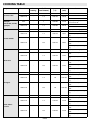
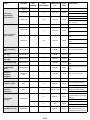
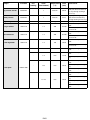
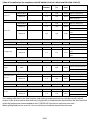
1
ACCESSORIES NOT SUPPLIED
Other accessories which can be purchased separately from the After-sales Service include catalytic panels and
a turnspit.
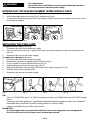
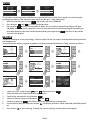
INSERTING WIRE SHELVES AND OTHER ACCESSORIES IN THE OVEN
The wire shelf and other accessories are provided with a locking mechanism to prevent their accidental
removal.
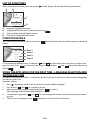
Fig. 1
1.
2.
Insert the wire shelf horizontally, with the raised part “A” upwards (Fig. 1).
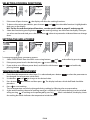
Angle the wire shelf when it reaches the locking position “B” (Fig. 2).
Fig. 2
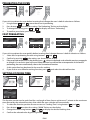
Fig. 3
3.
Return the wire shelf to the horizontal position and push it in fully to “C” (Fig. 3).
4.
To remove the wire shelf proceed in reverse order.
The other accessories, like the drip tray and baking tray, are inserted in exactly the same way. The protrusion
on the flat surface enables the accessories to lock in place.
WARNING
Use oven gloves to remove food after cooking and take care not to touch the
inside of the oven door - risk of burns!
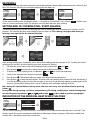
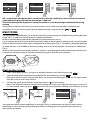
CONTROL PANEL DESCRIPTION
Recipes
Traditional
Specials
Traditional manual
cooking functions
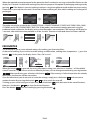
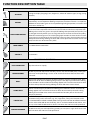
TOUCH KEYS: to use, simply touch the corresponding symbol (a light touch is all that is required).
On/Off (when you press on / off button to turn off the oven an acoustic signal will sound, this sound can
not be disabled)
to access the main MENU or return to the start screen
to access the 10 most used functions. For how to store and use your favourite settings, see paragraph
“FAVOURITES”
to return to the previous screen
and
to browse the functions/options and change preset values
to select and confirm settings
to start cooking
EN38