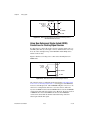
1
DAQ M Series
NI USB-621x User Manual
Bus-Powered M Series USB Devices
NI USB-621x User Manual
Français
Deutsch
ni.com/manuals
March 2008
371931E-01
Support
Worldwide Technical Support and Product Information
ni.com
National Instruments Corporate Headquarters
11500 North Mopac Expressway
Austin, Texas 78759-3504
USA Tel: 512 683 0100
Worldwide Offices
Australia 1800 300 800, Austria 43 662 457990-0, Belgium 32 (0) 2 757 0020, Brazil 55 11 3262 3599,
Canada 800 433 3488, China 86 21 5050 9800, Czech Republic 420 224 235 774, Denmark 45 45 76 26 00,
Finland 358 (0) 9 725 72511, France 01 57 66 24 24, Germany 49 89 7413130, India 91 80 41190000,
Israel 972 3 6393737, Italy 39 02 41309277, Japan 0120-527196, Korea 82 02 3451 3400,
Lebanon 961 (0) 1 33 28 28, Malaysia 1800 887710, Mexico 01 800 010 0793, Netherlands 31 (0) 348 433 466,
New Zealand 0800 553 322, Norway 47 (0) 66 90 76 60, Poland 48 22 3390150, Portugal 351 210 311 210,
Russia 7 495 783 6851, Singapore 1800 226 5886, Slovenia 386 3 425 42 00, South Africa 27 0 11 805 8197,
Spain 34 91 640 0085, Sweden 46 (0) 8 587 895 00, Switzerland 41 56 2005151, Taiwan 886 02 2377 2222,
Thailand 662 278 6777, Turkey 90 212 279 3031, United Kingdom 44 (0) 1635 523545
For further support information, refer to the Technical Support and Professional Services appendix. To comment
on National Instruments documentation, refer to the National Instruments Web site at ni.com/info and enter
the info code feedback.
© 2006–2008 National Instruments Corporation. All rights reserved.
Important Information
Warranty
The NI USB-6210, NI USB-6211, NI USB-6212, NI USB-6215, NI USB-6216, and NI USB-6218 are warranted against defects in materials
and workmanship for a period of one year from the date of shipment, as evidenced by receipts or other documentation. National Instruments
will, at its option, repair or replace equipment that proves to be defective during the warranty period. This warranty includes parts and labor.
The media on which you receive National Instruments software are warranted not to fail to execute programming instructions, due to defects in
materials and workmanship, for a period of 90 days from date of shipment, as evidenced by receipts or other documentation. National Instruments
will, at its option, repair or replace software media that do not execute programming instructions if National Instruments receives notice of such defects
during the warranty period. National Instruments does not warrant that the operation of the software shall be uninterrupted or error free.
A Return Material Authorization (RMA) number must be obtained from the factory and clearly marked on the outside of the package before any
equipment will be accepted for warranty work. National Instruments will pay the shipping costs of returning to the owner parts which are covered by
warranty.
National Instruments believes that the information in this document is accurate. The document has been carefully reviewed for technical accuracy. In
the event that technical or typographical errors exist, National Instruments reserves the right to make changes to subsequent editions of this document
without prior notice to holders of this edition. The reader should consult National Instruments if errors are suspected. In no event shall National
Instruments be liable for any damages arising out of or related to this document or the information contained in it.
EXCEPT AS SPECIFIED HEREIN, NATIONAL INSTRUMENTS MAKES NO WARRANTIES, EXPRESS OR IMPLIED, AND SPECIFICALLY DISCLAIMS ANY WARRANTY OF
MERCHANTABILITY OR FITNESS FOR A PARTICULAR PURPOSE. CUSTOMER’S RIGHT TO RECOVER DAMAGES CAUSED BY FAULT OR NEGLIGENCE ON THE PART OF NATIONAL
INSTRUMENTS SHALL BE LIMITED TO THE AMOUNT THERETOFORE PAID BY THE CUSTOMER. NATIONAL INSTRUMENTS WILL NOT BE LIABLE FOR DAMAGES RESULTING
FROM LOSS OF DATA, PROFITS, USE OF PRODUCTS, OR INCIDENTAL OR CONSEQUENTIAL DAMAGES, EVEN IF ADVISED OF THE POSSIBILITY THEREOF. This limitation of
the liability of National Instruments will apply regardless of the form of action, whether in contract or tort, including negligence. Any action against
National Instruments must be brought within one year after the cause of action accrues. National Instruments shall not be liable for any delay in
performance due to causes beyond its reasonable control. The warranty provided herein does not cover damages, defects, malfunctions, or service
failures caused by owner’s failure to follow the National Instruments installation, operation, or maintenance instructions; owner’s modification of the
product; owner’s abuse, misuse, or negligent acts; and power failure or surges, fire, flood, accident, actions of third parties, or other events outside
reasonable control.
Copyright
Under the copyright laws, this publication may not be reproduced or transmitted in any form, electronic or mechanical, including photocopying,
recording, storing in an information retrieval system, or translating, in whole or in part, without the prior written consent of National
Instruments Corporation.
National Instruments respects the intellectual property of others, and we ask our users to do the same. NI software is protected by copyright and other
intellectual property laws. Where NI software may be used to reproduce software or other materials belonging to others, you may use NI software only
to reproduce materials that you may reproduce in accordance with the terms of any applicable license or other legal restriction.
Trademarks
National Instruments, NI, ni.com, and LabVIEW are trademarks of National Instruments Corporation. Refer to the Terms of Use section
on ni.com/legal for more information about National Instruments trademarks.
Other product and company names mentioned herein are trademarks or trade names of their respective companies.
Members of the National Instruments Alliance Partner Program are business entities independent from National Instruments and have no agency,
partnership, or joint-venture relationship with National Instruments.
Patents
For patents covering National Instruments products, refer to the appropriate location: Help»Patents in your software, the patents.txt file
on your CD, or ni.com/patents.
WARNING REGARDING USE OF NATIONAL INSTRUMENTS PRODUCTS
(1) NATIONAL INSTRUMENTS PRODUCTS ARE NOT DESIGNED WITH COMPONENTS AND TESTING FOR A LEVEL OF
RELIABILITY SUITABLE FOR USE IN OR IN CONNECTION WITH SURGICAL IMPLANTS OR AS CRITICAL COMPONENTS IN
ANY LIFE SUPPORT SYSTEMS WHOSE FAILURE TO PERFORM CAN REASONABLY BE EXPECTED TO CAUSE SIGNIFICANT
INJURY TO A HUMAN.
(2) IN ANY APPLICATION, INCLUDING THE ABOVE, RELIABILITY OF OPERATION OF THE SOFTWARE PRODUCTS CAN BE
IMPAIRED BY ADVERSE FACTORS, INCLUDING BUT NOT LIMITED TO FLUCTUATIONS IN ELECTRICAL POWER SUPPLY,
COMPUTER HARDWARE MALFUNCTIONS, COMPUTER OPERATING SYSTEM SOFTWARE FITNESS, FITNESS OF COMPILERS
AND DEVELOPMENT SOFTWARE USED TO DEVELOP AN APPLICATION, INSTALLATION ERRORS, SOFTWARE AND HARDWARE
COMPATIBILITY PROBLEMS, MALFUNCTIONS OR FAILURES OF ELECTRONIC MONITORING OR CONTROL DEVICES,
TRANSIENT FAILURES OF ELECTRONIC SYSTEMS (HARDWARE AND/OR SOFTWARE), UNANTICIPATED USES OR MISUSES, OR
ERRORS ON THE PART OF THE USER OR APPLICATIONS DESIGNER (ADVERSE FACTORS SUCH AS THESE ARE HEREAFTER
COLLECTIVELY TERMED “SYSTEM FAILURES”). ANY APPLICATION WHERE A SYSTEM FAILURE WOULD CREATE A RISK OF
HARM TO PROPERTY OR PERSONS (INCLUDING THE RISK OF BODILY INJURY AND DEATH) SHOULD NOT BE RELIANT SOLELY
UPON ONE FORM OF ELECTRONIC SYSTEM DUE TO THE RISK OF SYSTEM FAILURE. TO AVOID DAMAGE, INJURY, OR DEATH,
THE USER OR APPLICATION DESIGNER MUST TAKE REASONABLY PRUDENT STEPS TO PROTECT AGAINST SYSTEM FAILURES,
INCLUDING BUT NOT LIMITED TO BACK-UP OR SHUT DOWN MECHANISMS. BECAUSE EACH END-USER SYSTEM IS
CUSTOMIZED AND DIFFERS FROM NATIONAL INSTRUMENTS' TESTING PLATFORMS AND BECAUSE A USER OR APPLICATION
DESIGNER MAY USE NATIONAL INSTRUMENTS PRODUCTS IN COMBINATION WITH OTHER PRODUCTS IN A MANNER NOT
EVALUATED OR CONTEMPLATED BY NATIONAL INSTRUMENTS, THE USER OR APPLICATION DESIGNER IS ULTIMATELY
RESPONSIBLE FOR VERIFYING AND VALIDATING THE SUITABILITY OF NATIONAL INSTRUMENTS PRODUCTS WHENEVER
NATIONAL INSTRUMENTS PRODUCTS ARE INCORPORATED IN A SYSTEM OR APPLICATION, INCLUDING, WITHOUT
LIMITATION, THE APPROPRIATE DESIGN, PROCESS AND SAFETY LEVEL OF SUCH SYSTEM OR APPLICATION.
Compliance
Compliance with FCC/Canada Radio Frequency Interference
Regulations
Determining FCC Class
The Federal Communications Commission (FCC) has rules to protect wireless communications from interference. The FCC
places digital electronics into two classes. These classes are known as Class A (for use in industrial-commercial locations only)
or Class B (for use in residential or commercial locations). All National Instruments (NI) products are FCC Class A products.
Depending on where it is operated, this Class A product could be subject to restrictions in the FCC rules. (In Canada, the
Department of Communications (DOC), of Industry Canada, regulates wireless interference in much the same way.) Digital
electronics emit weak signals during normal operation that can affect radio, television, or other wireless products.
All Class A products display a simple warning statement of one paragraph in length regarding interference and undesired
operation. The FCC rules have restrictions regarding the locations where FCC Class A products can be operated.
Consult the FCC Web site at www.fcc.gov for more information.
FCC/DOC Warnings
This equipment generates and uses radio frequency energy and, if not installed and used in strict accordance with the instructions
in this manual and the CE marking Declaration of Conformity*, may cause interference to radio and television reception.
Classification requirements are the same for the Federal Communications Commission (FCC) and the Canadian Department
of Communications (DOC).
Changes or modifications not expressly approved by NI could void the user’s authority to operate the equipment under the
FCC Rules.
Class A
Federal Communications Commission
This equipment has been tested and found to comply with the limits for a Class A digital device, pursuant to part 15 of the FCC
Rules. These limits are designed to provide reasonable protection against harmful interference when the equipment is operated
in a commercial environment. This equipment generates, uses, and can radiate radio frequency energy and, if not installed and
used in accordance with the instruction manual, may cause harmful interference to radio communications. Operation of this
equipment in a residential area is likely to cause harmful interference in which case the user is required to correct the interference
at their own expense.
Canadian Department of Communications
This Class A digital apparatus meets all requirements of the Canadian Interference-Causing Equipment Regulations.
Cet appareil numérique de la classe A respecte toutes les exigences du Règlement sur le matériel brouilleur du Canada.
Compliance with EU Directives
Users in the European Union (EU) should refer to the Declaration of Conformity (DoC) for information* pertaining to the
CE marking. Refer to the Declaration of Conformity (DoC) for this product for any additional regulatory compliance
information. To obtain the DoC for this product, visit ni.com/certification, search by model number or product line,
and click the appropriate link in the Certification column.
* The CE marking Declaration of Conformity contains important supplementary information and instructions for the user or
installer.
Contents
About This Manual
Conventions ...................................................................................................................xiii
Related Documentation..................................................................................................xiv
Chapter 1
Getting Started
Installing NI-DAQmx ....................................................................................................1-1
Installing Other Software...............................................................................................1-1
Installing the Hardware..................................................................................................1-1
Device Pinouts ...............................................................................................................1-1
Device Specifications ....................................................................................................1-2
Applying Signal Labels to the USB-621x......................................................................1-2
USB Cable Strain Relief ................................................................................................1-3
Mounting the USB-621x ................................................................................................1-4
Desktop Use.....................................................................................................1-4
DIN Rail Mounting..........................................................................................1-4
Panel Mounting ...............................................................................................1-5
Chapter 2
DAQ System Overview
DAQ Hardware ..............................................................................................................2-1
DAQ-STC2......................................................................................................2-2
Calibration Circuitry........................................................................................2-2
Signal Conditioning .......................................................................................................2-3
Sensors and Transducers .................................................................................2-3
Cables and Accessories..................................................................................................2-4
USB-621x Mass Termination Custom Cabling...............................................2-4
Programming Devices in Software ................................................................................2-5
Chapter 3
Connector and LED Information
I/O Connector Signal Descriptions ................................................................................3-1
+5 V Power ....................................................................................................................3-3
+5 V Power as an Output ................................................................................3-3
+5 V Power as an Input ...................................................................................3-3
USB Device Fuse Replacement .....................................................................................3-3
PWR/ACT LED Indicator .............................................................................................3-5
© National Instruments Corporation
v
NI USB-621x User Manual
Contents
Chapter 4
Analog Input
Analog Input Range....................................................................................................... 4-2
Analog Input Ground-Reference Settings ..................................................................... 4-3
Configuring AI Ground-Reference Settings in Software................................ 4-5
Multichannel Scanning Considerations......................................................................... 4-5
Analog Input Data Acquisition Methods....................................................................... 4-8
Analog Input Digital Triggering.................................................................................... 4-10
Field Wiring Considerations.......................................................................................... 4-10
Analog Input Timing Signals ........................................................................................ 4-11
AI Sample Clock Signal.................................................................................. 4-14
Using an Internal Source .................................................................. 4-14
Using an External Source ................................................................. 4-14
Routing AI Sample Clock to an Output Terminal ............................ 4-14
Other Timing Requirements ............................................................. 4-14
AI Sample Clock Timebase Signal ................................................................. 4-15
AI Convert Clock Signal................................................................................. 4-16
Using an Internal Source .................................................................. 4-16
Using an External Source ................................................................. 4-16
Routing AI Convert Clock to an Output Terminal ........................... 4-16
Using a Delay from Sample Clock to Convert Clock ...................... 4-17
Other Timing Requirements ............................................................. 4-17
AI Convert Clock Timebase Signal ................................................................ 4-19
AI Hold Complete Event Signal ..................................................................... 4-19
AI Start Trigger Signal.................................................................................... 4-20
Using a Digital Source...................................................................... 4-20
Routing AI Start Trigger to an Output Terminal .............................. 4-20
AI Reference Trigger Signal ........................................................................... 4-21
Using a Digital Source...................................................................... 4-22
Routing AI Reference Trigger to an Output Terminal ..................... 4-22
AI Pause Trigger Signal .................................................................................. 4-22
Using a Digital Source...................................................................... 4-22
Getting Started with AI Applications in Software ........................................................ 4-22
Connecting Analog Input Signals on USB-6210/6211/6212 Devices .......................... 4-23
Connecting Floating Signal Sources ............................................................... 4-25
What Are Floating Signal Sources?.................................................. 4-25
When to Use Differential Connections with Floating
Signal Sources ............................................................................... 4-25
When to Use Referenced Single-Ended (RSE) Connections
with Floating Signal Sources ......................................................... 4-25
When to Use Non-Referenced Single-Ended (NRSE)
Connections with Floating Signal Sources .................................... 4-26
Using Differential Connections for Floating Signal Sources ........... 4-27
NI USB-621x User Manual
vi
ni.com
Contents
Using Non-Referenced Single-Ended (NRSE) Connections
for Floating Signal Sources............................................................4-30
Using Referenced Single-Ended (RSE) Connections for
Floating Signal Sources..................................................................4-31
Connecting Ground-Referenced Signal Sources .............................................4-31
What Are Ground-Referenced Signal Sources?................................4-31
When to Use Differential Connections with Ground-Referenced
Signal Sources................................................................................4-32
When to Use Non-Referenced Single-Ended (NRSE)
Connections with Ground-Referenced Signal Sources ..................4-32
When to Use Referenced Single-Ended (RSE) Connections with
Ground-Referenced Signal Sources ...............................................4-33
Using Differential Connections for Ground-Referenced
Signal Sources................................................................................4-33
Using Non-Referenced Single-Ended (NRSE) Connections for
Ground-Referenced Signal Sources ...............................................4-34
Connecting Analog Input Signals on USB-6215/6216/6218 Devices...........................4-36
Taking Differential Measurements..................................................................4-36
Taking Referenced Single-Ended (RSE) Measurements ................................4-37
Taking Non-Referenced Single-Ended (NRSE) Measurements .....................4-38
Chapter 5
Analog Output
AO Range ......................................................................................................................5-2
Minimizing Glitches on the Output Signal ....................................................................5-2
Analog Output Data Generation Methods .....................................................................5-2
Analog Output Digital Triggering .................................................................................5-3
Connecting Analog Output Signals ...............................................................................5-4
Analog Output Timing Signals ......................................................................................5-4
AO Start Trigger Signal...................................................................................5-5
Using a Digital Source ......................................................................5-5
Routing AO Start Trigger to an Output Terminal.............................5-6
AO Pause Trigger Signal.................................................................................5-6
Using a Digital Source ......................................................................5-7
AO Sample Clock Signal.................................................................................5-7
Using an Internal Source...................................................................5-7
Using an External Source..................................................................5-8
Routing AO Sample Clock to an Output Terminal...........................5-8
Other Timing Requirements..............................................................5-8
AO Sample Clock Timebase Signal ................................................................5-8
Getting Started with AO Applications in Software .......................................................5-9
© National Instruments Corporation
vii
NI USB-621x User Manual
Contents
Chapter 6
Digital I/O
Digital I/O on USB-6210/6211/6215/6218 Devices ..................................................... 6-1
Static DIO on USB-6210/6211/6215/6218 Devices ....................................... 6-2
I/O Protection on USB-6210/6211/6215/6218 Devices.................................. 6-2
Increasing Current Drive on USB-6210/6211/6215/6218 Devices ................ 6-3
Connecting Digital I/O Signals on USB-6210/6211/6215/6218 Devices....... 6-3
Getting Started with DIO Applications in Software on
USB-6210/6211/6215/6218 Devices ........................................................... 6-4
Digital I/O on USB-6212/6216 Devices........................................................................ 6-4
Static DIO on USB-6212/6216 Devices ......................................................... 6-5
I/O Protection on USB-6212/6216 Devices.................................................... 6-5
Programmable Power-Up States on USB-6212/6216 Devices ....................... 6-6
Increasing Current Drive on USB-6212/6216 Devices................................... 6-6
Connecting Digital I/O Signals on USB-6212/6216 Devices......................... 6-6
Getting Started with DIO Applications in Software on
USB-6212/6216 Devices.............................................................................. 6-7
Chapter 7
PFI
Using PFI Terminals as Timing Input Signals .............................................................. 7-2
Exporting Timing Output Signals Using PFI Terminals............................................... 7-3
Using PFI Terminals as Static Digital I/Os ................................................................... 7-3
Connecting PFI Input Signals........................................................................................ 7-4
PFI Filters ...................................................................................................................... 7-4
I/O Protection ................................................................................................................ 7-6
Programmable Power-Up States.................................................................................... 7-6
Chapter 8
Counters
Counter Input Applications ........................................................................................... 8-2
Counting Edges ............................................................................................... 8-2
Single Point (On-Demand) Edge Counting ...................................... 8-2
Buffered (Sample Clock) Edge Counting......................................... 8-3
Controlling the Direction of Counting.............................................. 8-4
Pulse-Width Measurement .............................................................................. 8-4
Single Pulse-Width Measurement .................................................... 8-4
Buffered Pulse-Width Measurement ................................................ 8-5
Period Measurement ....................................................................................... 8-6
Single Period Measurement.............................................................. 8-6
Buffered Period Measurement.......................................................... 8-7
NI USB-621x User Manual
viii
ni.com
Contents
Semi-Period Measurement ..............................................................................8-8
Single Semi-Period Measurement.....................................................8-8
Buffered Semi-Period Measurement.................................................8-8
Frequency Measurement .................................................................................8-9
Choosing a Method for Measuring Frequency .................................8-13
Position Measurement .....................................................................................8-15
Measurements Using Quadrature Encoders......................................8-15
Measurements Using Two Pulse Encoders .......................................8-17
Two-Signal Edge-Separation Measurement....................................................8-18
Single Two-Signal Edge-Separation Measurement ..........................8-18
Buffered Two-Signal Edge-Separation Measurement ......................8-19
Counter Output Applications .........................................................................................8-20
Simple Pulse Generation .................................................................................8-20
Single Pulse Generation ....................................................................8-20
Single Pulse Generation with Start Trigger ......................................8-20
Retriggerable Single Pulse Generation .............................................8-21
Pulse Train Generation ....................................................................................8-22
Continuous Pulse Train Generation ..................................................8-22
Frequency Generation .....................................................................................8-23
Using the Frequency Generator ........................................................8-23
Frequency Division .........................................................................................8-24
Pulse Generation for ETS................................................................................8-24
Counter Timing Signals .................................................................................................8-25
Counter n Source Signal..................................................................................8-26
Routing a Signal to Counter n Source...............................................8-26
Routing Counter n Source to an Output Terminal ............................8-26
Counter n Gate Signal .....................................................................................8-27
Routing a Signal to Counter n Gate ..................................................8-27
Routing Counter n Gate to an Output Terminal................................8-27
Counter n Aux Signal ......................................................................................8-27
Routing a Signal to Counter n Aux...................................................8-27
Counter n A, Counter n B, and Counter n Z Signals.......................................8-28
Routing Signals to A, B, and Z Counter Inputs ................................8-28
Counter n Up_Down Signal ............................................................................8-28
Counter n HW Arm Signal ..............................................................................8-28
Routing Signals to Counter n HW Arm Input...................................8-29
Counter n Internal Output and Counter n TC Signals .....................................8-29
Routing Counter n Internal Output to an Output Terminal...............8-29
Frequency Output Signal.................................................................................8-29
Routing Frequency Output to a Terminal .........................................8-29
Default Counter/Timer Pinouts......................................................................................8-30
Counter Triggering ........................................................................................................8-31
© National Instruments Corporation
ix
NI USB-621x User Manual
Contents
Other Counter Features.................................................................................................. 8-32
Sample Clock .................................................................................................. 8-32
Cascading Counters......................................................................................... 8-33
Counter Filters................................................................................................. 8-33
Prescaling ........................................................................................................ 8-34
Duplicate Count Prevention ............................................................................ 8-35
Example Application That Works Correctly
(No Duplicate Counting) ............................................................... 8-35
Example Application That Works Incorrectly
(Duplicate Counting) ..................................................................... 8-36
Example Application That Prevents Duplicate Count...................... 8-36
Enabling Duplicate Count Prevention in NI-DAQmx...................... 8-37
Chapter 9
Isolation and Digital Isolators on USB-6215/6216/6218 Devices
Digital Isolation ............................................................................................................. 9-2
Benefits of an Isolated DAQ Device ............................................................................. 9-2
Reducing Common-Mode Noise................................................................................... 9-3
Creating an AC Return Path............................................................................ 9-3
Isolated Systems ............................................................................... 9-4
Non-Isolated Systems ....................................................................... 9-4
Chapter 10
Digital Routing and Clock Generation
80 MHz Timebase ......................................................................................................... 10-1
20 MHz Timebase ......................................................................................................... 10-1
100 kHz Timebase......................................................................................................... 10-1
Chapter 11
Bus Interface
USB Signal Stream........................................................................................................ 11-1
Data Transfer Methods .................................................................................................. 11-1
Changing Data Transfer Methods ................................................................... 11-2
Chapter 12
Triggering
Triggering with a Digital Source................................................................................... 12-1
NI USB-621x User Manual
x
ni.com
Contents
Appendix A
Device-Specific Information
USB-6210 ......................................................................................................................A-2
USB-6211/6215 .............................................................................................................A-4
USB-6212/6216 Screw Terminal...................................................................................A-6
USB-6212/6216 Mass Termination ...............................................................................A-8
USB-6218 ......................................................................................................................A-13
Appendix B
Troubleshooting
Appendix C
Technical Support and Professional Services
Glossary
Index
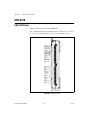
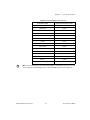
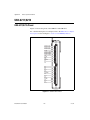
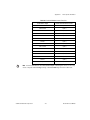
Device Pinouts
Figure A-1.
Figure A-2.
Figure A-3.
Figure A-4.
Figure A-5.
USB-6210 Pinout ..................................................................................A-2
USB-6211/6215 Pinout .........................................................................A-4
USB-6212/6216 Screw Terminal Pinout...............................................A-6
USB-6212/6216 Mass Termination Pinout ...........................................A-9
USB-6218 Pinout ..................................................................................A-13
© National Instruments Corporation
xi
NI USB-621x User Manual
About This Manual
The NI USB-621x User Manual contains information about using the
National Instruments USB-621x data acquisition (DAQ) devices with
NI-DAQmx 8.7.1 and later. NI USB-6210, USB-6211, USB-6212,
USB-6215, USB-6216, and USB-6218 devices feature up to 32 analog
input (AI) channels, up to two analog output (AO) channels, two counters,
and up to eight lines of digital input (DI) and up to eight lines of digital
output (DO), or 32 bidirectional static DIO lines.
Conventions
The following conventions are used in this manual:
<>
Angle brackets that contain numbers separated by an ellipsis represent
a range of values associated with a bit or signal name—for example,
AO <3..0>.
»
The » symbol leads you through nested menu items and dialog box options
to a final action. The sequence File»Page Setup»Options directs you to
pull down the File menu, select the Page Setup item, and select Options
from the last dialog box.
This icon denotes a note, which alerts you to important information.
This icon denotes a caution, which advises you of precautions to take to
avoid injury, data loss, or a system crash. When this symbol is marked on a
product, refer to the Read Me First: Safety and Radio-Frequency
Interference for information about precautions to take.
bold
Bold text denotes items that you must select or click in the software, such
as menu items and dialog box options. Bold text also denotes parameter
names.
italic
Italic text denotes variables, emphasis, a cross-reference, or an introduction
to a key concept. Italic text also denotes text that is a placeholder for a word
or value that you must supply.
monospace
Text in this font denotes text or characters that you should enter from the
keyboard, sections of code, programming examples, and syntax examples.
This font is also used for the proper names of disk drives, paths, directories,
programs, subprograms, subroutines, device names, functions, operations,
variables, filenames, and extensions.
© National Instruments Corporation
xiii
NI USB-621x User Manual
About This Manual
Platform
Text in this font denotes a specific platform and indicates that the text
following it applies only to that platform.
Related Documentation
Each application software package and driver includes information about
writing applications for taking measurements and controlling measurement
devices. The following references to documents assume you have
NI-DAQ 8.7.1 or later, and where applicable, version 7.1 or later of the
NI application software.
NI-DAQmx for Windows
The NI-DAQmx for USB Devices Getting Started Guide describes
how to install your NI-DAQmx for Windows software, your
NI-DAQmx-supported DAQ device, and how to confirm that your device is
operating properly. Select Start»All Programs»National Instruments»
NI-DAQ»NI-DAQmx for USB Devices Getting Started.
The NI-DAQ Readme lists which devices are supported by this version of
NI-DAQ. Select Start»All Programs»National Instruments»NI-DAQ»
NI-DAQ Readme.
The NI-DAQmx Help contains general information about measurement
concepts, key NI-DAQmx concepts, and common applications that are
applicable to all programming environments. Select Start»All Programs»
National Instruments»NI-DAQ»NI-DAQmx Help.
NI-DAQmx Base (Linux/Mac OS X/LabVIEW PDA 8.x)
The NI-DAQmx Base Getting Started Guide describes how to install your
NI-DAQmx Base software, your NI-DAQmx Base-supported DAQ device,
and how to confirm that your device is operating properly. In Windows,
select Start»All Programs»National Instruments»NI-DAQmx Base»
Documentation»Getting Started Guide.
Getting Started with NI-DAQmx Base for Linux and Mac Users describes
how to install your NI-DAQmx Base software, your NI-DAQmx
Base-supported DAQ device, and how to confirm that your device is
operating properly on your Mac/Linux machine.
The NI-DAQmx Base Readme lists which devices are supported by this
version of NI-DAQmx Base. In Windows, select Start»All Programs»
National Instruments»NI-DAQmx Base»DAQmx Base Readme.
NI USB-621x User Manual
xiv
ni.com
About This Manual
The NI-DAQmx Base VI Reference Help contains VI reference and general
information about measurement concepts. In LabVIEW, select Help»
NI-DAQmx Base VI Reference Help.
The NI-DAQmx Base C Reference Help contains C reference and general
information about measurement concepts. In Windows, select Start»
All Programs»National Instruments»NI-DAQmx Base»
Documentation»C Function Reference Help.
Note All NI-DAQmx Base documentation for Linux is installed at /usr/local/
natinst/nidaqmxbase/documentation.
Note All NI-DAQmx Base documentation for Mac OS X is installed at /Applications/
National Instruments/NI-DAQmx Base/documentation.
Note
USB-6212/6216 devices are not supported in NI-DAQmx Base.
LabVIEW
If you are a new user, use the Getting Started with LabVIEW manual
to familiarize yourself with the LabVIEW graphical programming
environment and the basic LabVIEW features you use to build data
acquisition and instrument control applications. Open the Getting Started
with LabVIEW manual by selecting Start»All Programs»National
Instruments»LabVIEW»LabVIEW Manuals or by navigating to the
labview\manuals directory and opening LV_Getting_Started.pdf.
Use the LabVIEW Help, available by selecting Help»Search the
LabVIEW Help in LabVIEW, to access information about LabVIEW
programming concepts, step-by-step instructions for using LabVIEW, and
reference information about LabVIEW VIs, functions, palettes, menus, and
tools. Refer to the following locations on the Contents tab of the LabVIEW
Help for information about NI-DAQmx:
•
Getting Started»Getting Started with DAQ—Includes overview
information and a tutorial to learn how to take an NI-DAQmx
measurement in LabVIEW using the DAQ Assistant.
•
VI and Function Reference»Measurement I/O VIs and
Functions—Describes the LabVIEW NI-DAQmx VIs and properties.
•
Taking Measurements—Contains the conceptual and how-to
information you need to acquire and analyze measurement data
in LabVIEW, including common measurements, measurement
fundamentals, NI-DAQmx key concepts, and device considerations.
© National Instruments Corporation
xv
NI USB-621x User Manual
About This Manual
LabWindows/CVI
The Data Acquisition book of the LabWindows/CVI Help contains
measurement concepts for NI-DAQmx. This book also contains Taking
an NI-DAQmx Measurement in LabWindows/CVI, which includes
step-by-step instructions about creating a measurement task using the DAQ
Assistant. In LabWindows™/CVI™, select Help»Contents, then select
Using LabWindows/CVI»Data Acquisition.
The NI-DAQmx Library book of the LabWindows/CVI Help contains
API overviews and function reference for NI-DAQmx. Select Library
Reference»NI-DAQmx Library in the LabWindows/CVI Help.
Measurement Studio
If you program your NI-DAQmx-supported device in Measurement Studio
using Visual C++, Visual C#, or Visual Basic .NET, you can interactively
create channels and tasks by launching the DAQ Assistant from MAX or
from within Visual Studio .NET. You can generate the configuration code
based on your task or channel in Measurement Studio. Refer to the DAQ
Assistant Help for additional information about generating code. You also
can create channels and tasks, and write your own applications in your
ADE using the NI-DAQmx API.
For help with NI-DAQmx methods and properties, refer to the NI-DAQmx
.NET Class Library or the NI-DAQmx Visual C++ Class Library included
in the NI Measurement Studio Help. For general help with programming
in Measurement Studio, refer to the NI Measurement Studio Help, which
is fully integrated with the Microsoft Visual Studio .NET help. To view
this help file in Visual Studio. NET, select Measurement Studio»
NI Measurement Studio Help.
To create an application in Visual C++, Visual C#, or Visual Basic .NET,
follow these general steps:
NI USB-621x User Manual
1.
In Visual Studio .NET, select File»New»Project to launch the New
Project dialog box.
2.
Find the Measurement Studio folder for the language you want to
create a program in.
3.
Choose a project type. You add DAQ tasks as a part of this step.
xvi
ni.com
About This Manual
ANSI C without NI Application Software
The NI-DAQmx Help contains API overviews and general information
about measurement concepts. Select Start»All Programs»National
Instruments»NI-DAQmx Help.
The NI-DAQmx C Reference Help describes the NI-DAQmx Library
functions, which you can use with National Instruments data acquisition
devices to develop instrumentation, acquisition, and control applications.
Select Start»All Programs»National Instruments»NI-DAQ»
NI-DAQmx C Reference Help.
.NET Languages without NI Application Software
With the Microsoft .NET Framework version 1.1 or later, you can use
NI-DAQmx to create applications using Visual C# and Visual Basic .NET
without Measurement Studio. You need Microsoft Visual Studio .NET
2003 or Microsoft Visual Studio 2005 for the API documentation to be
installed.
The installed documentation contains the NI-DAQmx API overview,
measurement tasks and concepts, and function reference. This help is fully
integrated into the Visual Studio .NET documentation. To view the
NI-DAQmx .NET documentation, go to Start»Programs»National
Instruments»NI-DAQ»NI-DAQmx .NET Reference Help. Expand
NI Measurement Studio Help»NI Measurement Studio .NET Class
Library»Reference to view the function reference. Expand
NI Measurement Studio Help»NI Measurement Studio .NET Class
Library»Using the Measurement Studio .NET Class Libraries to view
conceptual topics for using NI-DAQmx with Visual C# and Visual Basic
.NET.
To get to the same help topics from within Visual Studio, go to Help»
Contents. Select Measurement Studio from the Filtered By drop-down
list and follow the previous instructions.
Device Documentation and Specifications
The NI USB-621x Specifications contains all specifications for the
USB-6210, USB-6211, USB-6212, USB-6215, USB-6216, and USB-6218
M Series devices.
Documentation for supported devices and accessories, including PDF
and help files describing device terminals, specifications, features, and
operation are on the NI-DAQmx CD that includes Device Documentation.
© National Instruments Corporation
xvii
NI USB-621x User Manual
About This Manual
Insert the CD, open the Device Documentation directory, and double-click
the Device Documents shortcut for your language to find, view, and print
device documents.
Training Courses
If you need more help getting started developing an application with
NI products, NI offers training courses. To enroll in a course or obtain a
detailed course outline, refer to ni.com/training.
Technical Support on the Web
For additional support, refer to ni.com/support or zone.ni.com.
Note
You can download these documents at ni.com/manuals.
DAQ specifications and manuals are available as PDFs. You must have
Adobe Acrobat Reader with Search and Accessibility 5.0.5 or later
installed to view the PDFs. Refer to the Adobe Systems Incorporated
Web site at www.adobe.com to download Acrobat Reader. Refer to the
National Instruments Product Manuals Library at ni.com/manuals for
updated documentation resources.
NI USB-621x User Manual
xviii
ni.com
1
Getting Started
NI USB-621x devices feature up to 32 analog input (AI) channels, up to
two analog output (AO) channels, two counters, and up to eight lines
of digital input (DI) and up to eight lines of digital output (DO), or
32 bidirectional static DIO lines. If you have not already installed your
device, refer to the NI-DAQmx for USB Devices Getting Started Guide.
Before installing your DAQ device, you must install the software you plan
to use with the device.
Installing NI-DAQmx
The NI-DAQmx for USB Devices Getting Started Guide, which you can
download from ni.com/manuals, offers NI-DAQmx users step-by-step
instructions for installing software and hardware, configuring channels and
tasks, and getting started developing an application.
Installing Other Software
If you are using other software, refer to the installation instructions that
accompany your software.
Installing the Hardware
The NI-DAQmx for USB Devices Getting Started Guide contains
non-software-specific information about how to install USB devices.
Device Pinouts
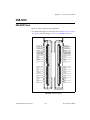
Refer to Appendix A, Device-Specific Information, for USB-621x device
pinouts.
© National Instruments Corporation
1-1
NI USB-621x User Manual
Chapter 1
Getting Started
Device Specifications
Refer to the NI USB-621x Specifications, available on the NI-DAQ Device
Documentation Browser or from ni.com/manuals, for more detailed
information about USB-621x devices.
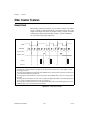
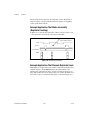
Applying Signal Labels to the USB-621x
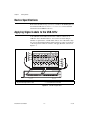
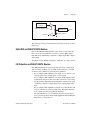
Your USB-621x kit includes labels for the combicon connectors on
USB-621x Screw Terminal devices. You can choose labels with pin
numbers or signal names, or blank labels. Choose one of the labels, align
the correct label with the terminals printed on the top panel of your device
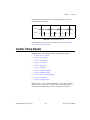
or the 16-position combicon connector, and apply the label, as shown in
Figure 1-1.
P/N 19XXXX REVX
6000
msi
1
or
or
or
2
3
1
4
2
3
or
or
or
4
1
2
Terminal Number Label
Single-Ended Signal Name Label
3
4
Differential Signal Name Label
User-Defined Custom Label
Figure 1-1. USB-621x Signal Labels
NI USB-621x User Manual
1-2
ni.com
Chapter 1
Getting Started
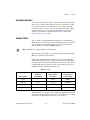
USB Cable Strain Relief
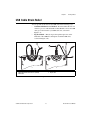
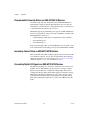
You can provide strain relief for the USB cable in the following ways:
•
Cable Strain Relief Groove Method—Press the USB cable into one
of the two grooves on the underside of the USB-621x. Choose the USB
cable groove that matches your USB cable size, as shown in
Figure 1-2a.
•
Zip Tie Method—Thread a zip tie through the zip tie bar on the
underside of the USB-621x and tighten around the USB cable,
as shown in Figure 1-2b.
3
3
4
2
1
5
or
a
1
2
3
b
USB Cable Strain Relief Groove (Large)
USB Cable Strain Relief Groove (Small)
USB Cable
4
5
Zip Tie
Zip Tie Bar
Figure 1-2. USB Cable Strain Relief Options
© National Instruments Corporation
1-3
NI USB-621x User Manual
Chapter 1
Getting Started
Mounting the USB-621x
You can use the USB-621x on a desktop or mount it to a standard DIN rail
or a panel.
Desktop Use
You can use the USB-621x on a desktop. The USB-621x has grooves on the
underside that allow it to be stacked with other like-sized USB-621x
devices.
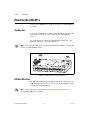
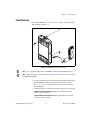
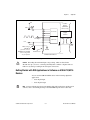
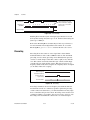
For secure desktop use. adhere the supplied rubber non-skid feet to the
underside of the device, as shown in Figure 1-3.
Do not apply the rubber feet if you are panel mounting the USB-621x or stacking the
device on another USB-621x device.
Note
Figure 1-3. Applying Rubber Feet to the USB-621x
DIN Rail Mounting
The DIN rail mounting kit (part number 779689-01, not included in your
USB-621x kit) is an accessory you can use to mount the USB-621x family
of products to a standard DIN rail.
Apply strain relief, as described in the USB Cable Strain Relief section, before
mounting the USB-621x to a DIN rail.
Note
NI USB-621x User Manual
1-4
ni.com
Chapter 1
Getting Started
Panel Mounting
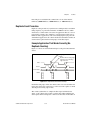
To mount the USB-621x to a board or panel, complete the following steps
while referring to Figure 1-4.
Figure 1-4. Mounting the USB-621x on a Panel
Note Do not apply the rubber feet to the USB-621x when panel mounting the device.
Note Apply strain relief, as described in the USB Cable Strain Relief section, before panel
mounting the USB-621x.
1.
Download and print the panel mounting template PDF attached in the
KnowledgeBase document, USB-621x Panel Mounting Template.
Go to ni.com/info and enter the info code ex3x98 to locate the
KnowledgeBase.
2.
Using the template, mark the bottom point and top point on the panel.
(USB-621x Screw Terminal Devices) The points will be 171.45 mm
(6.75 in.) from each other.
(USB-621x Mass Termination Devices) The points will be 182.56 mm
(7.188 in.) from each other.
© National Instruments Corporation
1-5
NI USB-621x User Manual
Chapter 1
Getting Started
NI USB-621x User Manual
3.
Remove the USB cable from the connector on the USB-621x.
4.
Screw a #8 or M4 screw into the bottom point on the panel.
5.
Set the USB-621x on the screw by fitting it into the bottom screw notch
on the underside of the USB-621x.
6.
Screw a #8 or M4 screw through the USB-621x top screw hole into the
panel.
1-6
ni.com
2
DAQ System Overview
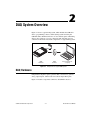
Figure 2-1 shows a typical DAQ system, which includes the USB-621x
device, programming software, and PC (DAQ systems involving the
USB-621x Mass Termination device can also include signal conditioning
devices and a cable for accessory connection). The following sections
contain more information about the components of a typical DAQ system.
DAQ
Hardware
DAQ
Software
Personal Computer
or Laptop
Figure 2-1. Components of a Typical DAQ System
DAQ Hardware
DAQ hardware digitizes signals, performs D/A conversions to generate
analog output signals, and measures and controls digital I/O signals.
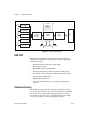
Figure 2-2 features components common to all USB-621x devices.
© National Instruments Corporation
2-1
NI USB-621x User Manual
Chapter 2
DAQ System Overview
Isolation
Barrier
(USB-6215/
6216/6218
devices only)
Analog Input
I/O Connector
Analog Output
Digital
Routing
and Clock
Generation
Digital I/O
Digital
Isolators
Bus
Interface
Bus
Counters
PFI
Figure 2-2. USB-621x Block Diagram
DAQ-STC2
The DAQ-STC2 implements a high-performance digital engine for
M Series data acquisition hardware. Some key features of this engine
include the following:
•
Flexible AI and AO sample and convert timing
•
Many triggering modes
•
Independent AI, AO, and CTR FIFOs
•
Generation and routing of internal and external timing signals
•
Two flexible 32-bit counter/timer modules with hardware gating
•
Static DI, DO, and DIO signals
•
USB Hi-Speed 2.0 interface
•
Up to four USB Signal Streams for acquisition and generation
functions
Calibration Circuitry
The USB-621x analog inputs and outputs have calibration circuitry to
correct gain and offset errors. You can calibrate the device to minimize
AI and AO errors caused by time and temperature drift at run time.
No external circuitry is necessary; an internal reference ensures high
accuracy and stability over time and temperature changes.
NI USB-621x User Manual
2-2
ni.com
Chapter 2
DAQ System Overview
Factory-calibration constants are permanently stored in an onboard
EEPROM and cannot be modified. When you self-calibrate the device,
software stores new constants in a user-modifiable section of the EEPROM.
To return a device to its initial factory calibration settings, software can
copy the factory-calibration constants to the user-modifiable section
of the EEPROM. Refer to the NI-DAQmx Help or the LabVIEW Help in
version 8.0 or later for more information about using calibration constants.
For a detailed calibration procedure for USB-621x devices, refer to the
B/E/M/S Series Calibration Procedure for NI-DAQmx by clicking
Manual Calibration Procedures on ni.com/calibration.
Signal Conditioning
Many sensors and transducers require signal conditioning before a
measurement system can effectively and accurately acquire the signal.
The front-end signal conditioning system can include functions such
as signal amplification, attenuation, filtering, electrical isolation,
simultaneous sampling, and multiplexing. In addition, many transducers
require excitation currents or voltages, bridge completion, linearization,
or high amplification for proper and accurate operation. Therefore, most
computer-based measurement systems include some form of signal
conditioning in addition to plug-in data acquisition DAQ devices.
Sensors and Transducers
Sensors can generate electrical signals to measure physical phenomena,
such as temperature, force, sound, or light. Some commonly used sensors
are strain gauges, thermocouples, thermistors, angular encoders, linear
encoders, and resistance temperature detectors (RTDs).
To measure signals from these various transducers, you must convert them
into a form that a DAQ device can accept. For example, the output voltage
of most thermocouples is very small and susceptible to noise. Therefore,
you may need to amplify or filter the thermocouple output before digitizing
it. The manipulation of signals to prepare them for digitizing is called
signal conditioning.
For more information about sensors, refer to the following documents:
•
For general information about sensors, visit ni.com/sensors.
•
If you are using LabVIEW, refer to the LabVIEW Help by selecting
Help»Search the LabVIEW Help in LabVIEW and then navigate to
the Taking Measurements book on the Contents tab.
© National Instruments Corporation
2-3
NI USB-621x User Manual
Chapter 2
DAQ System Overview
•
If you are using other application software, refer to Common Sensors
in the NI-DAQmx Help or the LabVIEW Help in version 8.0 or later.
Cables and Accessories
Cable and accessory options for USB-621x devices are as follows:
•
Combicon Accessory for USB-621x Screw Terminal Devices
(Optional)—Your USB-621x kit includes combicon connectors with
screws and signal labels. The NI USB-621x Accessory Kit (part
number 779807-01) contains four additional combicon connectors
with screws, a screwdriver, and additional signal labels. You can use
the combicon accessory to create custom connection solutions for
USB-621x Screw Terminal devices.
•
Cables and Accessories for USB-621x Mass Termination
Devices—Refer to the USB-6212/6216 Mass Termination Cables and
Accessories section of Appendix A, Device-Specific Information, for a
list of cables and accessories for USB-621x Mass Termination devices.
USB-621x Mass Termination Custom Cabling
NI offers cables and accessories for many applications. However, if you
want to develop your own cable, adhere to the following guidelines for best
results:
•
For AI signals, use shielded, twisted-pair wires for each AI pair of
differential inputs. Connect the shield for each signal pair to the ground
reference at the source.
•
Route the analog lines separately from the digital lines.
•
When using a cable shield, use separate shields for the analog and
digital sections of the cable. Failure to do so results in noise coupling
into the analog signals from transient digital signals.
For more information about the connectors used for DAQ devices, refer
to the KnowledgeBase document, Specifications and Manufacturers for
Board Mating Connectors, by going to ni.com/info and entering the info
code rdspmb.
NI USB-621x User Manual
2-4
ni.com
Chapter 2
DAQ System Overview
Programming Devices in Software
National Instruments measurement devices are packaged with NI-DAQ
driver software, an extensive library of functions and VIs you can call from
your application software, such as LabVIEW or LabWindows/CVI, to
program all the features of your NI measurement devices. Driver software
has an application programming interface (API), which is a library of VIs,
functions, classes, attributes, and properties for creating applications for
your device.
USB-621x devices use the NI-DAQmx driver. NI-DAQmx includes a
collection of programming examples to help you get started developing an
application. You can modify example code and save it in an application.
You can use examples to develop a new application or add example code to
an existing application.
To locate LabVIEW and LabWindows/CVI examples, open the National
Instruments Example Finder.
•
In LabVIEW, select Help»Find Examples.
•
In LabWindows/CVI, select Help»NI Example Finder.
Measurement Studio, Visual Basic, and ANSI C examples are located in the
following directories:
•
•
NI-DAQmx examples for Measurement Studio-supported languages
are in the following directories:
–
MeasurementStudio\VCNET\Examples\NIDaq
–
MeasurementStudio\DotNET\Examples\NIDaq
NI-DAQmx examples for ANSI C are in the
NI-DAQ\Examples\DAQmx ANSI C Dev directory
For additional examples, refer to zone.ni.com.
© National Instruments Corporation
2-5
NI USB-621x User Manual
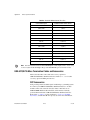
Connector and LED Information
3
The I/O Connector Signal Descriptions and +5 V Power sections contain
information about NI USB-621x connectors. The PWR/ACT LED Indicator
section contains information about the NI USB-621x PWR/ACT LED.
Refer to Appendix A, Device-Specific Information, for device I/O
connector pinouts. Refer to the Applying Signal Labels to the USB-621x
section of Chapter 1, Getting Started, for information about applying signal
labels.
I/O Connector Signal Descriptions
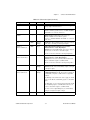
Table 3-1 describes the signals found on the I/O connectors. Not all signals
are available on all devices.
Table 3-1. I/O Connector Signals
Signal Name
AI GND
AI <0..31>
Reference
Direction
Description
—
—
Analog Input Ground—These terminals are the reference
point for single-ended AI measurements in RSE mode and the
bias current return point for DIFF measurements. All three
ground references—AI GND, AO GND, and D GND—are
connected on the device.
Varies
Input
Analog Input Channels 0 to 31—For single-ended
measurements, each signal is an analog input voltage channel.
In RSE mode, AI GND is the reference for these signals. In
NRSE mode, the reference for each AI <0..31> signal is
AI SENSE.
For differential measurements, AI 0 and AI 8 are the positive
and negative inputs of differential analog input channel 0.
Similarly, the following signal pairs also form differential input
channels:
<AI 1, AI 9>, <AI 2, AI 10>, <AI 3, AI 11>, <AI 4, AI 12>,
<AI 5, AI 13>, <AI 6, AI 14>, <AI 7, AI 15>, <AI 16, AI 24>,
<AI 17, AI 25>, <AI 18, AI 26>, <AI 19, AI 27>,
<AI 20, AI 28>, <AI 21, AI 29>, <AI 22, AI 30>,
<AI 23, AI 31>
AI SENSE
—
© National Instruments Corporation
Input
Analog Input Sense—In NRSE mode, the reference for each
AI <0..31> signal is AI SENSE.
3-1
NI USB-621x User Manual
Chapter 3
Connector and LED Information
Table 3-1. I/O Connector Signals (Continued)
Signal Name
AO <0..1>
Reference
AO GND
Direction
Description
Output
Analog Output Channels 0 to 1—These terminals supply the
voltage output of AO channels 0 to 1.
AO GND
—
—
Analog Output Ground—AO GND is the reference for
AO <0..1>. All three ground references—AI GND, AO GND,
and D GND—are connected on the device.
D GND
—
—
Digital Ground—D GND supplies the reference for
PFI <0..15>/P0/P1 and +5 V. All three ground
references—AI GND, AO GND, and D GND—are connected
on the device.
+5 V
D GND
Input or
Output
+5 V Power—These terminals provide a +5 V power source or
can be used to externally power the digital outputs.
PFI <0..3>,
PFI <8..11>/P0.<0..7>
D GND
Input
(USB-6210/6211/6215/6218 Devices) Programmable
Function Interface or Static Digital Input
Channels 0 to 7—Each PFI terminal can be used to supply an
external source for AI, AO, or counter/timer inputs.
You also can use these terminals as static digital input lines.
PFI <4..7>,
PFI <12..15>/P1.<0..7>
D GND
Output
(USB-6210/6211/6215/6218 Devices) Programmable
Function Interface or Static Digital Output
Channels 0 to 7—You can route many different internal AI,
AO, or counter/timer outputs to each PFI terminal.
You also can use these terminals as static digital output lines.
P0.<0..15>
D GND
Input or
Output
(USB-6212/6216 Devices) Port 0 Digital I/O
Channels 0 to 15—You can individually configure each signal
as an input or output.
PFI <0..7>/P1.<0..7>,
PFI <8..15>/P2.<0..7>
D GND
Input or
Output
(USB-6212/6216 Devices) Programmable Function Interface
or Digital I/O Channels 0 to 15—Each of these terminals can
be individually configured as a PFI terminal or a digital I/O
terminal.
As a PFI input, each terminal can be used to supply an external
source for AI, AO, DI, and DO timing signals or counter/timer
inputs.
As a PFI output, you can route many different internal AI, AO,
DI, or DO timing signals to each PFI terminal. You also can
route the counter/timer outputs to each PFI terminal.
As a Port 1 or Port 2 digital I/O signal, you can individually
configure each signal as an input or output.
NC
—
© National Instruments Corporation
—
No connect—Do not connect signals to these terminals.
3-2
NI USB-621x User Manual
Chapter 3
Connector and LED Information
+5 V Power
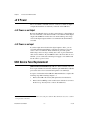
The +5 V terminals on the I/O connector can be use as either an output or
an input. Both terminals are internally connected on the USB-621x.
+5 V Power as an Output
Because the USB-621x devices are bus powered, there is a 50 mA limit on
the total current that can be drawn from the +5 V terminals and the digital
outputs. The USB-621x monitors the total current and drops the voltage
on all of the digital outputs and the +5 V terminals if the 50 mA limit is
exceeded.
+5 V Power as an Input
If you have high current loads for the digital outputs to drive, you can
exceed the 50 mA internal limit by connecting an external +5 V power
source to the +5 V terminals. These terminals are protected against
undervoltage and overvoltage, and they have a fuse to protect them from
short circuit conditions1. If your USB-621x device has more than one +5 V
terminal, you can connect the external power supply to one terminal and
use the other as a power source.
USB Device Fuse Replacement
(USB-621x Mass Termination Devices) USB-621x Mass Termination devices
have a replaceable 0.75A,125V fuse (Littelfuse part number 0453.750) that
protects the device from overcurrent through the +5 V terminal(s).
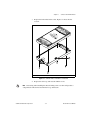
To replace a broken fuse in the USB-621x Mass Termination, complete the
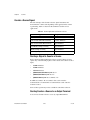
following steps while referring to Figure 3-1.
1
1.
Remove the USB cable and any I/O signal wires from the device.
2.
Remove the four Phillips screws on the bottom of the device to remove
the device top. You may have to remove the rubber feet.
USB-621x Screw Terminal devices have a 350 mA self-resetting fuse. USB-621x Mass Termination devices have a 750 mA
user-replaceable socketed fuse.
NI USB-621x User Manual
3-3
ni.com
Chapter 3
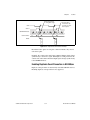
Replace the broken fuse in the socket. Figure 3-1 shows the fuse
location.
pu d
In toe
16 sola
I
L S
A T
N EN
O M
TI U /s,
A R 6 kS I/O
N ST B-62i1t, 40n0ction
IN NI UtsS, 16M-bultifu
3.
Connector and LED Information
1
1
0.75A,125V Fuse, Socketed
Figure 3-1. USB-621x Mass Termination Fuse Location
4.
Replace the device top and reattach with the screws.
Unscrewing and reinstalling the thread-forming screws over time will produce a
compromised connection between the device top and bottom.
Note
© National Instruments Corporation
3-4
NI USB-621x User Manual
Chapter 3
Connector and LED Information
PWR/ACT LED Indicator
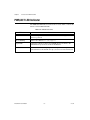
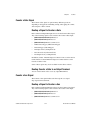
The PWR/ACT LED indicator indicates device status. Table 3-2 shows the
behavior of the PWR/ACT LED.
Table 3-2. PWR/ACT LED Status
LED State
Device Status
Not lit
Device not powered or device error. Refer to ni.com/support if
device is powered.
On, not blinking
Device error. Refer to ni.com/support.
Single-blink
Operating normally. Connected to USB Hi-Speed port. Refer to the
NI USB-621x Specifications for more information.
Double-blink
Connected to USB Full-Speed port. Device performance might be
affected. Refer to the NI USB-621x Specifications for more information.
NI USB-621x User Manual
3-5
ni.com
4
Analog Input
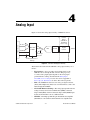
Figure 4-1 shows the analog input circuitry of USB-621x devices.
I/O Connector
Isolation
Barrier
(USB-6215/
6216/6218
devices only)
AI <0..n>
Mux
AI SENSE
DIFF, RSE,
or NRSE
NI-PGIA
ADC
AI FIFO
Digital
Isolators
AI Data
Input Range
Selection
AI GND
AI Ground-Reference
Settings
Figure 4-1. USB-621x Analog Input Circuitry
The main blocks featured in the USB-621x analog input circuitry are as
follows:
•
I/O Connector—You can connect analog input signals to the
USB-621x device through the I/O connector. The proper way
to connect analog input signals depends on the analog input
ground-reference settings, described in the Analog Input
Ground-Reference Settings section. Also refer to Appendix A,
Device-Specific Information, for device I/O connector pinouts.
•
Mux—Each USB-621x device has one analog-to-digital converter
(ADC). The multiplexers (mux) route one AI channel at a time to the
ADC through the NI-PGIA.
•
AI Ground-Reference Settings—The analog input ground-reference
settings circuitry selects between differential (DIFF), referenced
single-ended (RSE), and non-referenced single-ended (NRSE) input
modes. Each AI channel can use a different mode.
•
NI-PGIA—The NI programmable gain instrumentation amplifier
(NI-PGIA) is a measurement and instrument class amplifier that
© National Instruments Corporation
4-1
NI USB-621x User Manual
Chapter 4
Analog Input
minimizes settling times for all input ranges. The NI-PGIA can
amplify or attenuate an AI signal to ensure that you use the maximum
resolution of the ADC.
USB-621x devices use the NI-PGIA to deliver high accuracy even
when sampling multiple channels with small input ranges at fast rates.
USB-621x devices can sample channels in any order at the maximum
conversion rate, and you can individually program each channel in a
sample with a different input range.
•
ADC—The analog-to-digital converter (ADC) digitizes the AI signal
by converting the analog voltage into a digital number.
•
AI FIFO—USB-621x devices can perform both single and multiple
A/D conversions of a fixed or infinite number of samples. A large
first-in-first-out (FIFO) buffer holds data during AI acquisitions to
ensure that no data is lost. USB-621x devices can handle multiple A/D
conversion operations with DMA, interrupts, or programmed I/O.
•
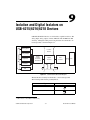
Isolation Barrier and Digital Isolators—Refer to Chapter 9,
Isolation and Digital Isolators on USB-6215/6216/6218 Devices,
for more information.
Analog Input Range
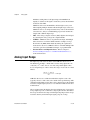
The input range affects the resolution of the USB-621x device for an
AI channel. For example, a 16-bit ADC converts analog inputs into one
of 65,536 (= 216) codes—that is, one of 65,536 possible digital values.
So, for an input range of –10 V to 10 V, the voltage of each code of a 16-bit
ADC is:
( 10 V – ( – 10 V ) )
------------------------------------------ = 305 μV
16
2
USB-621x devices use a calibration method that requires some codes
(typically about 5% of the codes) to lie outside of the specified range. This
calibration method improves absolute accuracy, but it increases the nominal
resolution of input ranges by about 5% over what the formula shown above
would indicate.
Choose an input range that matches the expected input range of your signal.
A large input range can accommodate a large signal variation, but reduces
the voltage resolution. Choosing a smaller input range improves the voltage
resolution, but may result in the input signal going out of range.
NI USB-621x User Manual
4-2
ni.com
Chapter 4
Analog Input
For more information about setting ranges, refer to the NI-DAQmx Help or
the LabVIEW Help in version 8.0 or later.
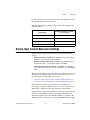
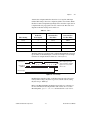
The following table shows the input ranges and resolutions supported by
USB-621x devices.
Input Range
Nominal Resolution Assuming
5% Over Range
–10 V to 10 V
320 μV
–5 V to 5 V
160 μV
–1 V to 1 V
32 μV
–200 mV to 200 mV
6.4 μV
Analog Input Ground-Reference Settings
USB-621x devices support the following analog input ground-reference
settings:
•
Differential mode—In DIFF mode, USB-621x devices measure the
difference in voltage between two AI signals.
•
Referenced single-ended mode—In RSE mode, USB-621x devices
measure the voltage of an AI signal relative to AI GND.
•
Non-referenced single-ended mode—In NRSE mode, USB-621x
devices measure the voltage of an AI signal relative to the AI SENSE
input.
The AI ground-reference setting determines how you should connect your
AI signals to the USB-621x device. For more information, refer to one of
the following sections depending on your device:
•
Connecting Analog Input Signals on USB-6210/6211/6212 Devices
•
Connecting Analog Input Signals on USB-6215/6216/6218 Devices
Ground-reference settings are programmed on a per-channel basis.
For example, you might configure the device to scan 12 channels—four
differentially-configured channels and eight single-ended channels.
USB-621x devices implement the different analog input ground-reference
settings by routing different signals to the NI-PGIA. The NI-PGIA is a
differential amplifier. That is, the NI-PGIA amplifies (or attenuates) the
difference in voltage between its two inputs. The NI-PGIA drives the ADC
© National Instruments Corporation
4-3
NI USB-621x User Manual
Chapter 4
Analog Input
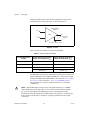
with this amplified voltage. The amount of amplification (the gain) is
determined by the analog input range, as shown in Figure 4-2.
Instrumentation
Amplifier
Vin+
+
PGIA
Vm Measured
Voltage
Vin–
–
Vm = [Vin+ – V in–] × Gain
Figure 4-2. NI-PGIA
Table 4-1 shows how signals are routed to the NI-PGIA.
Table 4-1. Signals Routed to the NI-PGIA
AI Ground-Reference
Settings
Signals Routed to the Positive
Input of the NI-PGIA (Vin+)
Signals Routed to the Negative
Input of the NI-PGIA (Vin–)
RSE
AI <0..31>
AI GND
NRSE
AI <0..31>
AI SENSE
DIFF
AI <0..7>
AI <8..15>
AI <16..23>
AI <24..31>
For differential measurements, AI 0 and AI 8 are the positive and negative
inputs of differential analog input channel 0. For a complete list of signal
pairs that form differential input channels, refer to the I/O Connector Signal
Descriptions section of Chapter 3, Connector and LED Information.
AI ground-reference setting is sometimes referred to as AI terminal
configuration.
The maximum input voltages rating of AI signals with respect to AI GND
(and for differential signals with respect to each other) are listed in the NI USB-621x
Specifications. Exceeding the maximum input voltage of AI signals distorts the
measurement results. Exceeding the maximum input voltage rating also can damage the
device and the computer. NI is not liable for any damage resulting from such signal
connections.
Caution
NI USB-621x User Manual
4-4
ni.com
Chapter 4
Analog Input
Configuring AI Ground-Reference Settings in Software
You can program channels on an USB-621x device to acquire with
different ground references.
To enable multimode scanning in LabVIEW, use NI-DAQmx Create
Virtual Channel.vi of the NI-DAQmx API. You must use a new VI for
each channel or group of channels configured in a different input mode. In
Figure 4-3, channel 0 is configured in differential mode, and channel 1 is
configured in RSE mode.
Figure 4-3. Enabling Multimode Scanning in LabVIEW
To configure the input mode of your voltage measurement using the DAQ
Assistant, use the Terminal Configuration drop-down list. Refer to the
DAQ Assistant Help for more information about the DAQ Assistant.
To configure the input mode of your voltage measurement using the
NI-DAQmx C API, set the terminalConfig property. Refer to the
NI-DAQmx C Reference Help for more information.
Multichannel Scanning Considerations
USB-621x devices can scan multiple channels at high rates and digitize the
signals accurately. However, you should consider several issues when
designing your measurement system to ensure the high accuracy of your
measurements.
In multichannel scanning applications, accuracy is affected by settling
time. When your USB-621x device switches from one AI channel to
another AI channel, the device configures the NI-PGIA with the input range
of the new channel. The NI-PGIA then amplifies the input signal with the
gain for the new input range. Settling time refers to the time it takes the
NI-PGIA to amplify the input signal to the desired accuracy before it is
sampled by the ADC. The NI USB-621x Specifications lists settling time.
USB-621x devices are designed to have fast settling times. However,
several factors can increase the settling time which decreases the accuracy
© National Instruments Corporation
4-5
NI USB-621x User Manual
Chapter 4
Analog Input
of your measurements. To ensure fast settling times, you should do the
following (in order of importance):
•
Use Low Impedance Sources—To ensure fast settling times, your
signal sources should have an impedance of <1 kΩ. Large source
impedances increase the settling time of the NI-PGIA, and so decrease
the accuracy at fast scanning rates.
Settling times increase when scanning high-impedance signals due to
a phenomenon called charge injection. Multiplexers contain switches,
usually made of switched capacitors. When one of the channels, for
example channel 0, is selected in a multiplexer, those capacitors
accumulate charge. When the next channel, for example channel 1,
is selected, the accumulated charge leaks backward through channel 1.
If the output impedance of the source connected to channel 1 is high
enough, the resulting reading of channel 1 can be partially affected by
the voltage on channel 0. This effect is referred to as ghosting.
If your source impedance is high, you can decrease the scan rate to
allow the NI-PGIA more time to settle. Another option is to use a
voltage follower circuit external to your DAQ device to decrease the
impedance seen by the DAQ device. Refer to the KnowledgeBase
document, How Do I Create a Buffer to Decrease the Source
Impedance of My Analog Input Signal?, by going to ni.com/info
and entering the info code rdbbis.
•
Use Short High-Quality Cabling—Using short high-quality cables
can minimize several effects that degrade accuracy including crosstalk,
transmission line effects, and noise. The capacitance of the cable also
can increase the settling time.
National Instruments recommends using individually shielded,
twisted-pair wires that are 2 m or less to connect AI signals to
the device. Refer to the Connecting Analog Input Signals on
USB-6210/6211/6212 Devices or Connecting Analog Input Signals on
USB-6215/6216/6218 Devices section for more information.
•
Carefully Choose the Channel Scanning Order
–
Avoid Switching from a Large to a Small Input
Range—Switching from a channel with a large input range to a
channel with a small input range can greatly increase the settling
time.
Suppose a 4 V signal is connected to channel 0 and a 1 mV signal
is connected to channel 1. The input range for channel 0 is –10 V
to 10 V and the input range of channel 1 is –200 mV to 200 mV.
When the multiplexer switches from channel 0 to channel 1, the
input to the NI-PGIA switches from 4 V to 1 mV. The
NI USB-621x User Manual
4-6
ni.com
Chapter 4
Analog Input
approximately 4 V step from 4 V to 1 mV is 1,000% of the new
full-scale range. For a 16-bit device to settle within 0.0015%
(15 ppm or 1 LSB) of the ±200 mV full-scale range on channel 1,
the input circuitry must settle to within 0.000031% (0.31 ppm or
1/50 LSB) of the ±10 V range. Some devices can take many
microseconds for the circuitry to settle this much.
To avoid this effect, you should arrange your channel scanning
order so that transitions from large to small input ranges are
infrequent.
In general, you do not need this extra settling time when the
NI-PGIA is switching from a small input range to a larger input
range.
–
Insert Grounded Channel between Signal Channels—Another
technique to improve settling time is to connect an input channel
to ground. Then insert this channel in the scan list between two of
your signal channels. The input range of the grounded channel
should match the input range of the signal after the grounded
channel in the scan list.
Consider again the example above where a 4 V signal is connected
to channel 0 and a 1 mV signal is connected to channel 1. Suppose
the input range for channel 0 is –10 V to 10 V and the input range
of channel 1 is –200 mV to 200 mV.
You can connect channel 2 to AI GND (or you can use the internal
ground signal; refer to Internal Channels in the NI-DAQmx Help).
Set the input range of channel 2 to –200 mV to 200 mV to match
channel 1. Then scan channels in the order: 0, 2, 1.
Inserting a grounded channel between signal channels improves
settling time because the NI-PGIA adjusts to the new input range
setting faster when the input is grounded.
–
Minimize Voltage Step between Adjacent Channels—When
scanning between channels that have the same input range, the
settling time increases with the voltage step between the channels.
If you know the expected input range of your signals, you can
group signals with similar expected ranges together in your scan
list.
For example, suppose all channels in a system use a –5 to 5 V
input range. The signals on channels 0, 2, and 4 vary between
4.3 V and 5 V. The signals on channels 1, 3, and 5 vary between
–4 V and 0 V. Scanning channels in the order 0, 2, 4, 1, 3, 5
produces more accurate results than scanning channels in the
order 0, 1, 2, 3, 4, 5.
© National Instruments Corporation
4-7
NI USB-621x User Manual
Chapter 4
Analog Input
•
Avoid Scanning Faster Than Necessary—Designing your system to
scan at slower speeds gives the NI-PGIA more time to settle to a more
accurate level. Consider the following examples:
–
Example 1—Averaging many AI samples can increase the
accuracy of the reading by decreasing noise effects. In general,
the more points you average, the more accurate the final result.
However, you may choose to decrease the number of points you
average and slow down the scanning rate.
Suppose you want to sample 10 channels over a period of 20 ms
and average the results. You could acquire 250 points from each
channel at a scan rate of 125 kS/s. Another method would be to
acquire 500 points from each channel at a scan rate of 250 kS/s.
Both methods take the same amount of time. Doubling the number
of samples averaged (from 250 to 500) decreases the effect of
noise by a factor of 1.4 (the square root of 2). However, doubling
the number of samples (in this example) decreases the time the
NI-PGIA has to settle from 8 μs to 4 μs. In some cases, the slower
scan rate system returns more accurate results.
–
Example 2—If the time relationship between channels is not
critical, you can sample from the same channel multiple times and
scan less frequently. For example, suppose an application requires
averaging 100 points from channel 0 and averaging 100 points
from channel 1. You could alternate reading between
channels—that is, read one point from channel 0, then one point
from channel 1, and so on. You also could read all 100 points from
channel 0 then read 100 points from channel 1. The second
method switches between channels much often and is affected less
by settling time.
Analog Input Data Acquisition Methods
When performing analog input measurements, you either can perform
software-timed or hardware-timed acquisitions:
•
NI USB-621x User Manual
Software-Timed Acquisitions—With a software-timed acquisition,
software controls the rate of the acquisition. Software sends a separate
command to the hardware to initiate each ADC conversion. In
NI-DAQmx, software-timed acquisitions are referred to as having
on-demand timing. Software-timed acquisitions are also referred to as
immediate or static acquisitions and are typically used for reading a
single sample of data.
4-8
ni.com
Chapter 4
•
Analog Input
Hardware-Timed Acquisitions—With hardware-timed acquisitions,
a digital hardware signal, AI Sample Clock, controls the rate of the
acquisition. This signal can be generated internally on your device or
provided externally.
Hardware-timed acquisitions have several advantages over
software-timed acquisitions:
–
The time between samples can be much shorter.
–
The timing between samples is deterministic.
–
Hardware-timed acquisitions can use hardware triggering.
Hardware-timed operations are buffered. In a buffered acquisition,
data is moved from the DAQ device’s onboard FIFO memory to a
PC buffer using USB signal streams or programmed I/O before it is
transferred to application memory. Buffered acquisitions typically
allow for much faster transfer rates than non-buffered acquisitions
because data is moved in large blocks, rather than one point at a time.
One property of buffered I/O operations is the sample mode. The
sample mode can be either finite or continuous.
Finite sample mode acquisition refers to the acquisition of a specific,
predetermined number of data samples. After the specified number of
samples has been read in, the acquisition stops. If you use a reference
trigger, you must use finite sample mode.
Continuous acquisition refers to the acquisition of an unspecified
number of samples. Instead of acquiring a set number of data samples
and stopping, a continuous acquisition continues until you stop
the operation. Continuous acquisition is also referred to as
double-buffered or circular-buffered acquisition.
If data cannot be transferred across the bus fast enough, the FIFO
becomes full. New acquisitions will overwrite data in the FIFO before
it can be transferred to host memory. The device generates an error in
this case. With continuous operations, if the user program does not
read data out of the PC buffer fast enough to keep up with the data
transfer, the buffer could reach an overflow condition, causing an error
to be generated.
© National Instruments Corporation
4-9
NI USB-621x User Manual
Chapter 4
Analog Input
Analog Input Digital Triggering
Analog input supports three different triggering actions:
•
Start trigger
•
Reference trigger
•
Pause trigger
Refer to the AI Start Trigger Signal, AI Reference Trigger Signal, and
AI Pause Trigger Signal sections for information about these triggers.
A digital trigger can initiate these actions. All USB-621x devices support
digital triggering. USB-621x devices do not support analog triggering.
Field Wiring Considerations
Environmental noise can seriously affect the measurement accuracy of the
device if you do not take proper care when running signal wires between
signal sources and the device. The following recommendations apply
mainly to AI signal routing to the device, although they also apply to signal
routing in general.
Minimize noise pickup and maximize measurement accuracy by taking the
following precautions:
•
Use DIFF AI connections to reject common-mode noise.
•
Use individually shielded, twisted-pair wires to connect AI signals to
the device. With this type of wire, the signals attached to the positive
and negative input channels are twisted together and then covered with
a shield. You then connect this shield only at one point to the signal
source ground. This kind of connection is required for signals traveling
through areas with large magnetic fields or high electromagnetic
interference.
Refer to the NI Developer Zone document, Field Wiring and Noise
Considerations for Analog Signals, for more information. To access this
document, go to ni.com/info and enter the info code rdfwn3.
NI USB-621x User Manual
4-10
ni.com
Chapter 4
Analog Input
Analog Input Timing Signals
In order to provide all of the timing functionality described throughout this
section, USB-621x devices have a flexible timing engine. Figure 4-4
summarizes all of the timing options provided by the analog input timing
engine.
Analog Comparison Event
AI Sample Clock
Ctr n Internal Output
AI Sample
Clock
Timebase
20 MHz Timebase
SW Pulse
Programmable
Clock
Divider
100 kHz Timebase
AI Convert Clock
AI Convert
Clock
Timebase
Ctr n Internal Output
Programmable
Clock
Divider
Figure 4-4. Analog Input Timing Options
USB-621x devices use AI Sample Clock (ai/SampleClock) and AI Convert
Clock (ai/ConvertClock) to perform interval sampling. As Figure 4-5
shows, AI Sample Clock controls the sample period, which is determined
by the following equation:
1/Sample Period = Sample Rate
© National Instruments Corporation
4-11
NI USB-621x User Manual
Chapter 4
Analog Input
Channel 0
Channel 1
Convert Period
Sample Period
Figure 4-5. Interval Sampling
AI Convert Clock controls the Convert Period, which is determined by the
following equation:
1/Convert Period = Convert Rate
The sampling rate is the fastest you can acquire data on the device and still achieve
accurate results. For example, if a USB-621x device has a sampling rate of 250 kS/s, this
sampling rate is aggregate—one channel at 250 kS/s or two channels at 125 kS/s per
channel illustrates the relationship.
Note
Posttriggered data acquisition allows you to view only data that is acquired
after a trigger event is received. A typical posttriggered DAQ sequence
is shown in Figure 4-6. The sample counter is loaded with the specified
number of posttrigger samples, in this example, five. The value decrements
with each pulse on AI Sample Clock, until the value reaches zero and all
desired samples have been acquired.
AI Start Trigger
AI Sample Clock
AI Convert Clock
Sample Counter
4
3
2
1
0
Figure 4-6. Posttriggered Data Acquisition Example
NI USB-621x User Manual
4-12
ni.com
Chapter 4
Analog Input
Pretriggered data acquisition allows you to view data that is acquired before
the trigger of interest, in addition to data acquired after the trigger.
Figure 4-7 shows a typical pretriggered DAQ sequence. AI Start Trigger
(ai/StartTrigger) can be either a hardware or software signal. If AI Start
Trigger is set up to be a software start trigger, an output pulse appears on
the AI Start Trigger line when the acquisition begins. When the AI Start
Trigger pulse occurs, the sample counter is loaded with the number of
pretriggered samples, in this example, four. The value decrements with
each pulse on AI Sample Clock, until the value reaches zero. The sample
counter is then loaded with the number of posttriggered samples, in this
example, three.
AI Start Trigger
AI Reference Trigger
n/a
AI Sample Clock
AI Convert Clock
Scan Counter
3
2
1
0
2
2
2
1
0
Figure 4-7. Pretriggered Data Acquisition Example
If an AI Reference Trigger (ai/ReferenceTrigger) pulse occurs before the
specified number of pretrigger samples are acquired, the trigger pulse is
ignored. Otherwise, when the AI Reference Trigger pulse occurs, the
sample counter value decrements until the specified number of posttrigger
samples have been acquired.
USB-621x devices feature the following analog input timing signals:
•
AI Sample Clock Signal
•
AI Sample Clock Timebase Signal
•
AI Convert Clock Signal
•
AI Convert Clock Timebase Signal
•
AI Hold Complete Event Signal
•
AI Start Trigger Signal
•
AI Reference Trigger Signal
•
AI Pause Trigger Signal
© National Instruments Corporation
4-13
NI USB-621x User Manual
Chapter 4
Analog Input
AI Sample Clock Signal
Use the AI Sample Clock (ai/SampleClock) signal to initiate a set of
measurements. Your USB-621x device samples the AI signals of every
channel in the task once for every AI Sample Clock. A measurement
acquisition consists of one or more samples.
You can specify an internal or external source for AI Sample Clock. You
also can specify whether the measurement sample begins on the rising edge
or falling edge of AI Sample Clock.
Using an Internal Source
One of the following internal signals can drive AI Sample Clock:
•
Counter n Internal Output
•
AI Sample Clock Timebase (divided down)
•
A pulse initiated by host software
A programmable internal counter divides down the sample clock timebase.
Using an External Source
Use any input PFI line as the source of AI Sample Clock.
Routing AI Sample Clock to an Output Terminal
You can route AI Sample Clock out to any output PFI terminal. This pulse
is always active high.
You can specify the output to have one of two behaviors. With the pulse
behavior, your DAQ device briefly pulses the PFI terminal once for every
occurrence of AI Sample Clock.
With level behavior, your DAQ device drives the PFI terminal high during
the entire sample.
Other Timing Requirements
Your DAQ device only acquires data during an acquisition. The device
ignores AI Sample Clock when a measurement acquisition is not in
progress. During a measurement acquisition, you can cause your DAQ
device to ignore AI Sample Clock using the AI Pause Trigger signal.
A counter on your device internally generates AI Sample Clock unless you
select some external source. AI Start Trigger starts this counter and either
NI USB-621x User Manual
4-14
ni.com
Chapter 4
Analog Input
software or hardware can stop it once a finite acquisition completes. When
using an internally generated AI Sample Clock, you also can specify a
configurable delay from AI Start Trigger to the first AI Sample Clock pulse.
By default, this delay is set to two ticks of the AI Sample Clock Timebase
signal. When using an externally generated AI Sample Clock, you must
ensure the clock signal is consistent with respect to the timing requirements
of AI Convert Clock. Failure to do so may result in AI Sample Clock pulses
that are masked off and acquisitions with erratic sampling intervals. Refer
to the AI Convert Clock Signal section for more information about the
timing requirements between AI Convert Clock and AI Sample Clock.
Figure 4-8 shows the relationship of AI Sample Clock to AI Start Trigger.
AI Sample Clock Timebase
AI Start Trigger
AI Sample Clock
Delay
From
Start
Trigger
Figure 4-8. AI Sample Clock and AI Start Trigger
AI Sample Clock Timebase Signal
You can route any of the following signals to be the AI Sample Clock
Timebase (ai/SampleClockTimebase) signal:
•
20 MHz Timebase
•
100 kHz Timebase
•
(USB-6210/6211/6215 Devices) PFI <0..3>
•
(USB-6212/6216 Devices) PFI <0..15>
•
(USB-6218 Devices) PFI <0..3>, PFI <8..11>
AI Sample Clock Timebase is not available as an output on the I/O
connector. AI Sample Clock Timebase is divided down to provide one of
the possible sources for AI Sample Clock. You can configure the polarity
selection for AI Sample Clock Timebase as either rising or falling edge.
© National Instruments Corporation
4-15
NI USB-621x User Manual
Chapter 4
Analog Input
AI Convert Clock Signal
Use the AI Convert Clock (ai/ConvertClock) signal to initiate a single A/D
conversion on a single channel. A sample (controlled by the AI Sample
Clock) consists of one or more conversions.
You can specify either an internal or external signal as the source of
AI Convert Clock. You also can specify whether the measurement sample
begins on the rising edge or falling edge of AI Convert Clock.
By default, NI-DAQmx chooses the fastest conversion rate possible based
on the speed of the A/D converter and adds 10 μs of padding between each
channel to allow for adequate settling time. This scheme enables the
channels to approximate simultaneous sampling and still allow for
adequate settling time. If the AI Sample Clock rate is too fast to allow
for this 10 μs of padding, NI-DAQmx chooses the conversion rate so that
the AI Convert Clock pulses are evenly spaced throughout the sample.
To explicitly specify the conversion rate, use AI Convert Clock Rate
DAQmx Timing property node or function.
Caution Setting the conversion rate higher than the maximum rate specified for your
device will result in errors.
Using an Internal Source
One of the following internal signals can drive AI Convert Clock:
•
AI Convert Clock Timebase (divided down)
•
Counter n Internal Output
A programmable internal counter divides down the AI Convert Clock
Timebase to generate AI Convert Clock. Started by AI Sample Clock, the
counter counts down to zero, produces an AI Convert Clock, reloads itself,
and repeats the process until the sample is finished. It then reloads itself in
preparation for the next AI Sample Clock pulse.
Using an External Source
Use any input PFI line as the source of AI Convert Clock.
Routing AI Convert Clock to an Output Terminal
You can route AI Convert Clock (as an active low signal) out to any output
PFI terminal.
NI USB-621x User Manual
4-16
ni.com
Chapter 4
Analog Input
Using a Delay from Sample Clock to Convert Clock
When using an internally generated AI Convert Clock, you also can specify
a configurable delay from AI Sample Clock to the first AI Convert Clock
pulse within the sample. By default, this delay is three ticks of AI Convert
Clock Timebase.
Figure 4-9 shows the relationship of AI Sample Clock to AI Convert Clock.
AI Convert Clock Timebase
AI Sample Clock
AI Convert Clock
Delay
From
Sample
Clock
Convert
Period
Figure 4-9. AI Sample Clock and AI Convert Clock
Other Timing Requirements
The sample and conversion level timing of USB-621x devices work such
that clock signals are gated off unless the proper timing requirements are
met. For example, the device ignores both AI Sample Clock and AI
Convert Clock until it receives a valid AI Start Trigger signal. Once the
device recognizes an AI Sample Clock pulse, it ignores subsequent AI
Sample Clock pulses until it receives the correct number of AI Convert
Clock pulses.
Similarly, the device ignores all AI Convert Clock pulses until it recognizes
an AI Sample Clock pulse. Once the device receives the correct number of
AI Convert Clock pulses, it ignores subsequent AI Convert Clock pulses
until it receives another AI Sample Clock. Figures 4-10, 4-11, 4-12,
and 4-13 show timing sequences for a four-channel acquisition (using AI
channels 0, 1, 2, and 3) and demonstrate proper and improper sequencing
of AI Sample Clock and AI Convert Clock.
© National Instruments Corporation
4-17
NI USB-621x User Manual
Chapter 4
Analog Input
AI Sample Clock
AI Convert Clock
Channel Measured
0 1 2 3
0 1 2 3
0 1 2 3
Sample #1
Sample #2
Sample #3
Figure 4-10. AI Sample Clock Too Fast For AI Convert Clock;
AI Sample Clock Pulses Are Gated Off
AI Sample Clock
AI Convert Clock
0 1 2 3
Sample #2
0 1 2 3
Sample #1
Channel Measured
0 1 2 3
Sample #3
Figure 4-11. AI Convert Clock Too Fast For AI Sample Clock;
AI Convert Clock Pulses Are Gated Off
AI Sample Clock
AI Convert Clock
Channel Measured
0
1
2
3
Sample #1
0
1
2
Sample #2
3
0
Sample #3
Figure 4-12. AI Sample Clock and AI Convert Clock Improperly Matched;
Leads To Aperiodic Sampling
NI USB-621x User Manual
4-18
ni.com
Chapter 4
Analog Input
AI Sample Clock
AI Convert Clock
Channel Measured
0 1 2 3
0 1 2 3
0 1 2 3
Sample #1
Sample #2
Sample #3
Figure 4-13. AI Sample Clock and AI Convert Clock Properly Matched
A single external signal can drive both AI Sample Clock and AI Convert
Clock at the same time. In this mode, each tick of the external clock causes
a conversion on the ADC. Figure 4-14 shows this timing relationship.
AI Sample Clock
AI Convert Clock
Channel Measured
0 1 2 3 0 1 2 3 0 1 …
Sample #1 Sample #2 Sample #3
Figure 4-14. Single External Signal Driving AI Sample Clock and
AI Convert Clock Simultaneously
AI Convert Clock Timebase Signal
The AI Convert Clock Timebase (ai/ConvertClockTimebase) signal is
divided down to provide one of the possible sources for AI Convert Clock.
Use one of the following signals as the source of AI Convert Clock
Timebase:
•
AI Sample Clock Timebase
•
20 MHz Timebase
AI Convert Clock Timebase is not available as an output on the
I/O connector.
AI Hold Complete Event Signal
The AI Hold Complete Event (ai/HoldCompleteEvent) signal generates a
pulse after each A/D conversion begins. You can route AI Hold Complete
Event out to any output PFI terminal.
© National Instruments Corporation
4-19
NI USB-621x User Manual
Chapter 4
Analog Input
The polarity of AI Hold Complete Event is software-selectable, but is
typically configured so that a low-to-high leading edge can clock external
AI multiplexers indicating when the input signal has been sampled and can
be removed.
AI Start Trigger Signal
Use the AI Start Trigger (ai/StartTrigger) signal to begin a measurement
acquisition. A measurement acquisition consists of one or more samples.
If you do not use triggers, begin a measurement with a software command.
After the acquisition begins, configure the acquisition to stop:
•
When a certain number of points are sampled (in finite mode)
•
After a hardware reference trigger (in finite mode)
•
With a software command (in continuous mode)
An acquisition that uses a start trigger (but not a reference trigger) is
sometimes referred to as a posttriggered acquisition.
Using a Digital Source
To use AI Start Trigger with a digital source, specify a source and an edge.
The source can be any of the following signals:
•
(USB-6210/6211/6215 Devices) PFI <0..3>
•
(USB-6212/6216 Devices) PFI <0..15>
•
(USB-6218 Devices) PFI <0..3>, PFI <8..11>
•
Counter n Internal Output
The source also can be one of several other internal signals on your DAQ
device. Refer to Device Routing in MAX in the NI-DAQmx Help or the
LabVIEW Help in version 8.0 or later for more information.
You also can specify whether the measurement acquisition begins on the
rising edge or falling edge of AI Start Trigger.
Routing AI Start Trigger to an Output Terminal
You can route AI Start Trigger out to any output PFI terminal.
The output is an active high pulse.
The device also uses AI Start Trigger to initiate pretriggered DAQ
operations. In most pretriggered applications, a software trigger generates
AI Start Trigger. Refer to the AI Reference Trigger Signal section for a
NI USB-621x User Manual
4-20
ni.com
Chapter 4
Analog Input
complete description of the use of AI Start Trigger and AI Reference
Trigger in a pretriggered DAQ operation.
AI Reference Trigger Signal
Use a reference trigger (ai/ReferenceTrigger) signal to stop a measurement
acquisition. To use a reference trigger, specify a buffer of finite size and
a number of pretrigger samples (samples that occur before the reference
trigger). The number of posttrigger samples (samples that occur after the
reference trigger) desired is the buffer size minus the number of pretrigger
samples.
After the acquisition begins, the DAQ device writes samples to the buffer.
After the DAQ device captures the specified number of pretrigger samples,
the DAQ device begins to look for the reference trigger condition. If the
reference trigger condition occurs before the DAQ device captures the
specified number of pretrigger samples, the DAQ device ignores the
condition.
If the buffer becomes full, the DAQ device continuously discards the oldest
samples in the buffer to make space for the next sample. This data can be
accessed (with some limitations) before the DAQ device discards it. Refer
to the KnowledgeBase document, Can a Pretriggered Acquisition be
Continuous?, for more information. To access this KnowledgeBase, go
to ni.com/info and enter the info code rdcanq.
When the reference trigger occurs, the DAQ device continues to write
samples to the buffer until the buffer contains the number of posttrigger
samples desired. Figure 4-15 shows the final buffer.
Reference Trigger
Pretrigger Samples
Posttrigger Samples
Complete Buffer
Figure 4-15. Reference Trigger Final Buffer
© National Instruments Corporation
4-21
NI USB-621x User Manual
Chapter 4
Analog Input
Using a Digital Source
To use AI Reference Trigger with a digital source, specify a source and an
edge. The source can be any input PFI signal.
The source also can be one of several internal signals on your DAQ device.
Refer to Device Routing in MAX in the NI-DAQmx Help or the LabVIEW
Help in version 8.0 or later for more information.
You also can specify whether the measurement acquisition stops on the
rising edge or falling edge of AI Reference Trigger.
Routing AI Reference Trigger to an Output Terminal
You can route AI Reference Trigger out to any output PFI terminal.
AI Pause Trigger Signal
You can use the AI Pause Trigger (ai/PauseTrigger) signal to pause and
resume a measurement acquisition. The internal sample clock pauses while
the external trigger signal is active and resumes when the signal is inactive.
You can program the active level of the pause trigger to be high or low.
Using a Digital Source
To use AI Sample Clock, specify a source and a polarity. The source can
be any input PFI signal.
The source also can be one of several other internal signals on your DAQ
device. Refer to Device Routing in MAX in the NI-DAQmx Help or the
LabVIEW Help in version 8.0 or later for more information.
Getting Started with AI Applications in Software
You can use the USB-621x device in the following analog input
applications:
•
Single-point analog input
•
Finite analog input
•
Continuous analog input
You can perform these applications through DMA, interrupt, or
programmed I/O data transfer mechanisms. Some of the applications
also use start, reference, and pause triggers.
NI USB-621x User Manual
4-22
ni.com
Chapter 4
Analog Input
Note For more information about programming analog input applications and triggers in
software, refer to the NI-DAQmx Help or the LabVIEW Help in version 8.0 or later.
Connecting Analog Input Signals on
USB-6210/6211/6212 Devices
Table 4-2 summarizes the recommended input configuration for both types
of signal sources on USB-6210/6211/6212 devices.
© National Instruments Corporation
4-23
NI USB-621x User Manual
Chapter 4
Analog Input
Table 4-2. USB-6210/6211/6212 Analog Input Configuration
Floating Signal Sources
(Not Connected to
Building Ground)
AI Ground-Reference
Setting*
Differential (DIFF)
Ground-Referenced
Signal Sources†
Examples:
Example:
• Ungrounded thermocouples
• Plug-in instruments with
non-isolated outputs
• Signal conditioning with
isolated outputs
• Battery devices
Signal Source
DAQ Device
AI+
+
–
AI+
+
AI–
+
–
–
AI GND
Non-Referenced
Single-Ended (NRSE)
Signal Source
DAQ Device
AI
AI–
Signal Source
+
–
AI GND
Signal Source
–
AI GND
Vcm
DAQ Device
AI
+
AI SENSE
AI SENSE
Referenced Single-Ended
(RSE)
–
DAQ Device
AI
–
+
AI GND
Vcm
+
+
–
DAQ Device
Signal Source
NOT RECOMMENDED for the
USB-6210/6211/6212
+
+
–
Signal Source
DAQ Device
–
AI
+
–
+
–
AI GND
VA
VB
AI GND
Ground-loop potential (VA – VB) are added
to measured signal.
*
Refer to the Analog Input Ground-Reference Settings section for descriptions of the RSE, NRSE, and DIFF modes and
software considerations.
†
Refer to the Connecting Ground-Referenced Signal Sources section for more information.
NI USB-621x User Manual
4-24
ni.com
Chapter 4
Analog Input
Connecting Floating Signal Sources
What Are Floating Signal Sources?
A floating signal source is not connected to the building ground system, but
has an isolated ground-reference point. Some examples of floating signal
sources are outputs of transformers, thermocouples, battery-powered
devices, optical isolators, and isolation amplifiers. An instrument or device
that has an isolated output is a floating signal source.
When to Use Differential Connections with Floating
Signal Sources
Use DIFF input connections for any channel that meets any of the
following conditions:
•
The input signal is low level (less than 1 V).
•
The leads connecting the signal to the device are greater than 3 m
(10 ft).
•
The input signal requires a separate ground-reference point or return
signal.
•
The signal leads travel through noisy environments.
•
Two analog input channels, AI+ and AI–, are available for the signal.
DIFF signal connections reduce noise pickup and increase common-mode
noise rejection. DIFF signal connections also allow input signals to float
within the common-mode limits of the NI-PGIA.
Refer to the Using Differential Connections for Floating Signal Sources
section for more information about differential connections.
When to Use Referenced Single-Ended (RSE)
Connections with Floating Signal Sources
Only use RSE input connections if the input signal meets the following
conditions:
•
The input signal can share a common reference point, AI GND, with
other signals that use RSE.
•
The input signal is high-level (greater than 1 V).
•
The leads connecting the signal to the device are less than 3 m (10 ft).
© National Instruments Corporation
4-25
NI USB-621x User Manual
Chapter 4
Analog Input
DIFF input connections are recommended for greater signal integrity for
any input signal that does not meet the preceding conditions.
In the single-ended modes, more electrostatic and magnetic noise couples
into the signal connections than in DIFF configurations. The coupling is the
result of differences in the signal path. Magnetic coupling is proportional
to the area between the two signal conductors. Electrical coupling is a
function of how much the electric field differs between the two conductors.
With this type of connection, the NI-PGIA rejects both the common-mode
noise in the signal and the ground potential difference between the signal
source and the device ground.
Refer to the Using Referenced Single-Ended (RSE) Connections for
Floating Signal Sources section for more information about RSE
connections.
When to Use Non-Referenced Single-Ended (NRSE)
Connections with Floating Signal Sources
Only use NRSE input connections if the input signal meets the following
conditions:
•
The input signal is high-level (greater than 1 V).
•
The leads connecting the signal to the device are less than 3 m (10 ft).
DIFF input connections are recommended for greater signal integrity for
any input signal that does not meet the preceding conditions.
In the single-ended modes, more electrostatic and magnetic noise couples
into the signal connections than in DIFF configurations. The coupling is the
result of differences in the signal path. Magnetic coupling is proportional
to the area between the two signal conductors. Electrical coupling is a
function of how much the electric field differs between the two conductors.
With this type of connection, the NI-PGIA rejects both the common-mode
noise in the signal and the ground potential difference between the signal
source and the device ground.
Refer to the Using Non-Referenced Single-Ended (NRSE) Connections for
Floating Signal Sources section for more information about NRSE
connections.
NI USB-621x User Manual
4-26
ni.com
Chapter 4
Analog Input
Using Differential Connections for Floating Signal
Sources
It is important to connect the negative lead of a floating source to AI GND
(either directly or through a bias resistor). Otherwise, the source may float
out of the maximum working voltage range of the NI-PGIA and the DAQ
device returns erroneous data.
The easiest way to reference the source to AI GND is to connect the
positive side of the signal to AI+ and connect the negative side of the signal
to AI GND as well as to AI– without using resistors. This connection works
well for DC-coupled sources with low source impedance (less than 100 Ω).
AI+
Floating
Signal
Source
+
Vs
–
AI–
Impedance
<100 Ω
AI SENSE
AI GND
Figure 4-16. Differential Connections for Floating Signal Sources
without Bias Resistors
However, for larger source impedances, this connection leaves the DIFF
signal path significantly off balance. Noise that couples electrostatically
onto the positive line does not couple onto the negative line because it is
connected to ground. This noise appears as a DIFF-mode signal instead of
a common-mode signal, and thus appears in your data. In this case, instead
of directly connecting the negative line to AI GND, connect the negative
line to AI GND through a resistor that is about 100 times the equivalent
source impedance. The resistor puts the signal path nearly in balance,
so that about the same amount of noise couples onto both connections,
yielding better rejection of electrostatically coupled noise. This
configuration does not load down the source (other than the very
high input impedance of the NI-PGIA).
© National Instruments Corporation
4-27
NI USB-621x User Manual
Chapter 4
Analog Input
AI+
Floating
Signal
Source
+
Vs
–
AI–
R is about
100 times
source
impedance
of sensor
R
AI SENSE
AI GND
Figure 4-17. Differential Connections for Floating Signal Sources
with Single Bias Resistor
You can fully balance the signal path by connecting another resistor
of the same value between the positive input and AI GND on the
USB-6210/6211/6212 device, as shown in Figure 4-18. This fully balanced
configuration offers slightly better noise rejection, but has the disadvantage
of loading the source down with the series combination (sum) of the
two resistors. If, for example, the source impedance is 2 kΩ and each of the
two resistors is 100 kΩ, the resistors load down the source with 200 kΩ and
produce a –1% gain error.
NI USB-621x User Manual
4-28
ni.com
Chapter 4
Analog Input
AI+
Floating
Signal
Source
+
Bias
Resistors
(see text)
Vs
+
Instrumentation
Amplifier
–
PGIA
+
AI–
–
Measured
Voltage
Vm
–
Bias
Current
Return
Paths
Input Multiplexers
AI SENSE
AI GND
I/O Connector
USB-6210/6211/6212 Device Configured in DIFF Mode
Figure 4-18. Differential Connections for Floating Signal Sources
with Balanced Bias Resistors
Both inputs of the NI-PGIA require a DC path to ground in order for the
NI-PGIA to work. If the source is AC coupled (capacitively coupled), the
NI-PGIA needs a resistor between the positive input and AI GND. If the
source has low-impedance, choose a resistor that is large enough not to
significantly load the source but small enough not to produce significant
input offset voltage as a result of input bias current (typically 100 kΩ to
1 MΩ). In this case, connect the negative input directly to AI GND. If the
source has high output impedance, balance the signal path as previously
described using the same value resistor on both the positive and negative
inputs; be aware that there is some gain error from loading down the source,
as shown in Figure 4-19.
© National Instruments Corporation
4-29
NI USB-621x User Manual
Chapter 4
Analog Input
AC Coupling
AI+
AC-Coupled
Floating
Signal
Source
+
Vs
–
AI–
AI SENSE
AI GND
Figure 4-19. Differential Connections for AC Coupled Floating Sources
with Balanced Bias Resistors
Using Non-Referenced Single-Ended (NRSE)
Connections for Floating Signal Sources
It is important to connect the negative lead of a floating signals source to
AI GND (either directly or through a resistor). Otherwise the source may
float out of the valid input range of the NI-PGIA and the DAQ device
returns erroneous data.
Figure 4-20 shows a floating source connected to the DAQ device in
NRSE mode.
AI
Floating
Signal
Source
+
Vs
–
AI SENSE
R
AI GND
Figure 4-20. NRSE Connections for Floating Signal Sources
All of the bias resistor configurations discussed in the Using Differential
Connections for Floating Signal Sources section apply to the NRSE bias
resistors as well. Replace AI– with AI SENSE in Figures 4-16, 4-17, 4-18,
and 4-19 for configurations with zero to two bias resistors. The noise
rejection of NRSE mode is better than RSE mode because the AI SENSE
connection is made remotely near the source. However, the noise rejection
of NRSE mode is worse than DIFF mode because the AI SENSE
connection is shared with all channels rather than being cabled in a
twisted pair with the AI+ signal.
NI USB-621x User Manual
4-30
ni.com
Chapter 4
Analog Input
Using the DAQ Assistant, you can configure the channels for RSE or NRSE
input modes. Refer to the Configuring AI Ground-Reference Settings in
Software section for more information about the DAQ Assistant.
Using Referenced Single-Ended (RSE) Connections
for Floating Signal Sources
Figure 4-21 shows how to connect a floating signal source to the
USB-6210/6211/6212 device configured for RSE mode.
AI <0..n>
Floating
Signal
Source
Programmable Gain
Instrumentation
+
Amplifier
+
Vs
–
Input Multiplexers
AI SENSE
AI GND
PGIA
–
+
Vm Measured
Voltage
–
I/O Connector
Selected Channel in RSE Configuration
Figure 4-21. RSE Connections for Floating Signal Sources
Using the DAQ Assistant, you can configure the channels for RSE or NRSE
input modes. Refer to the Configuring AI Ground-Reference Settings in
Software section for more information about the DAQ Assistant.
Connecting Ground-Referenced Signal Sources
What Are Ground-Referenced Signal Sources?
A ground-referenced signal source is a signal source connected to the
building system ground. It is already connected to a common ground point
with respect to the device, assuming that the computer is plugged into the
same power system as the source. Non-isolated outputs of instruments and
devices that plug into the building power system fall into this category.
The difference in ground potential between two instruments connected to
the same building power system is typically between 1 and 100 mV, but the
difference can be much higher if power distribution circuits are improperly
connected. If a grounded signal source is incorrectly measured, this
© National Instruments Corporation
4-31
NI USB-621x User Manual
Chapter 4
Analog Input
difference can appear as measurement error. Follow the connection
instructions for grounded signal sources to eliminate this ground potential
difference from the measured signal.
When to Use Differential Connections with
Ground-Referenced Signal Sources
Use DIFF input connections for any channel that meets any of the
following conditions:
•
The input signal is low level (less than 1 V).
•
The leads connecting the signal to the device are greater than 3 m
(10 ft).
•
The input signal requires a separate ground-reference point or return
signal.
•
The signal leads travel through noisy environments.
•
Two analog input channels, AI+ and AI–, are available.
DIFF signal connections reduce noise pickup and increase common-mode
noise rejection. DIFF signal connections also allow input signals to float
within the common-mode limits of the NI-PGIA.
Refer to the Using Differential Connections for Ground-Referenced Signal
Sources section for more information about differential connections.
When to Use Non-Referenced Single-Ended (NRSE)
Connections with Ground-Referenced Signal
Sources
Only use non-referenced single-ended input connections if the input signal
meets the following conditions:
•
The input signal is high-level (greater than 1 V).
•
The leads connecting the signal to the device are less than 3 m (10 ft).
•
The input signal can share a common reference point with other
signals.
DIFF input connections are recommended for greater signal integrity for
any input signal that does not meet the preceding conditions.
NI USB-621x User Manual
4-32
ni.com
Chapter 4
Analog Input
In the single-ended modes, more electrostatic and magnetic noise couples
into the signal connections than in DIFF configurations. The coupling is the
result of differences in the signal path. Magnetic coupling is proportional
to the area between the two signal conductors. Electrical coupling is a
function of how much the electric field differs between the two conductors.
With this type of connection, the NI-PGIA rejects both the common-mode
noise in the signal and the ground potential difference between the signal
source and the device ground.
Refer to the Using Non-Referenced Single-Ended (NRSE) Connections for
Ground-Referenced Signal Sources section for more information about
NRSE connections.
When to Use Referenced Single-Ended (RSE)
Connections with Ground-Referenced Signal
Sources
Do not use RSE connections with ground-referenced signal sources.
Use NRSE or DIFF connections instead.
As shown in the bottom-rightmost cell of Table 4-2, there can be a potential
difference between AI GND and the ground of the sensor. In RSE mode,
this ground loop causes measurement errors.
Using Differential Connections for
Ground-Referenced Signal Sources
Figure 4-22 shows how to connect a ground-referenced signal source to the
USB-6210/6211/6212 device configured in DIFF mode.
© National Instruments Corporation
4-33
NI USB-621x User Manual
Chapter 4
Analog Input
AI+
GroundReferenced
Signal
Source
+
Vs
+
–
Instrumentation
Amplifier
+
PGIA
AI–
–
CommonMode
Noise and
Ground
Potential
+
Vm
Measured
Voltage
–
Vcm
–
Input Multiplexers
AI SENSE
AI GND
I/O Connector
USB-6210/6211/6212 Configured in DIFF Mode
Figure 4-22. Differential Connections for Ground-Referenced Signal Sources
With this type of connection, the NI-PGIA rejects both the common-mode
noise in the signal and the ground potential difference between the signal
source and the device ground, shown as Vcm in the figure.
AI+ and AI– must both remain within ±11 V of AI GND.
Using Non-Referenced Single-Ended (NRSE)
Connections for Ground-Referenced Signal Sources
Figure 4-23 shows how to connect ground-reference signal sources to the
USB-6210/6211/6212 device in NRSE mode.
NI USB-621x User Manual
4-34
ni.com
Chapter 4
I/O Connector
GroundReferenced
Signal
Source
Analog Input
AI <0..15>
or AI <16..n>
+
+
Vs
–
Instrumentation
Amplifier
+
PGIA
Input Multiplexers
CommonMode
Noise
and Ground
Potential
AI SENSE
–
Vm Measured
Voltage
AI GND
–
+
Vcm
–
USB-6210/6211/6212 Configured in NRSE Mode
Figure 4-23. Single-Ended Connections for Ground-Referenced Signal Sources
(NRSE Configuration)
AI+ and AI– must both remain within ±11 V of AI GND.
To measure a single-ended, ground-referenced signal source, you must use
the NRSE ground-reference setting. Connect the signal to one of
AI <0..31> and connect the signal local ground reference to AI SENSE.
AI SENSE is internally connected to the negative input of the NI-PGIA.
Therefore, the ground point of the signal connects to the negative input of
the NI-PGIA.
Any potential difference between the device ground and the signal ground
appears as a common-mode signal at both the positive and negative inputs
of the NI-PGIA, and this difference is rejected by the amplifier. If the
input circuitry of a device were referenced to ground, as it is in the RSE
ground-reference setting, this difference in ground potentials would appear
as an error in the measured voltage.
Using the DAQ Assistant, you can configure the channels for RSE or NRSE
input modes. Refer to the Configuring AI Ground-Reference Settings in
Software section for more information about the DAQ Assistant.
© National Instruments Corporation
4-35
NI USB-621x User Manual
Chapter 4
Analog Input
Connecting Analog Input Signals on
USB-6215/6216/6218 Devices
You can connect the USB-6215/6216/6218 directly to a variety of devices
and other signal sources. Make sure the devices you connect to the
USB-6215/6216/6218 are compatible with the input specifications of the
module.
When connecting various sources to the USB-6215/6216/6218, you can use
differential, single-ended, or a combination of single-ended and differential
connections.
Note You must always connect AI GND to a local ground signal in your system using
a low impedance connection. If you leave AI GND unconnected, you cannot ensure that
AI <0..31> are within 10 V of AI GND, and your measurement may be unreliable.
Taking Differential Measurements
To attain more accurate measurements and less noise, use a differential
measurement configuration. A differential measurement configuration
requires two inputs for each measurement. The AI <0..31> description in
Table 3-1, I/O Connector Signals, lists the signal pairs that are valid for
differential connection configurations with USB-621x devices.
Figure 4-24 shows a differential connection configuration.
AI 0+
AI 0– (AI 8)*
V1
Mux
PGIA
ADC
AI 1+
Vcm
V2
AI 1– (AI 9)*
AI GND
USB-6215/6216/6218
* This signal name indicates the differential pair. Refer to Table 3-1, I/O Connector
Signals, for a list of differential signal pairs.
Figure 4-24. Connecting to the USB-6215/6216/6218 in Differential Mode
NI USB-621x User Manual
4-36
ni.com
Chapter 4
Analog Input
The differential connection configuration allows the common-mode noise
voltage, Vcm, to be rejected during the measurement of V1.
You must connect the negative lead of your sensors and AI GND to a local
ground signal on your system.
Taking Referenced Single-Ended (RSE) Measurements
Using the RSE measurement configuration allows the
USB-6215/6216/6218 to take measurements on all AI channels when all
channels share a common ground. Figure 4-25 shows an RSE connection
configuration.
Note If you leave the AI GND pin unconnected, the signals float outside the working input
range of the USB-6215/6216/6218. This can result in unreliable measurements because
you cannot ensure that the input signal is within 10 V of AI GND.
AI 1
AI 2
Mux
PGIA
ADC
AI GND
USB-6215/6216/6218
Figure 4-25. Connecting to the USB-6215/6216/6218 in RSE Mode
In an RSE connection configuration, each input channel is measured with
respect to AI GND.
© National Instruments Corporation
4-37
NI USB-621x User Manual
Chapter 4
Analog Input
Taking Non-Referenced Single-Ended (NRSE) Measurements
To reach a compromise between RSE and differential measurements, you
can use an NRSE measurement configuration. This configuration allows
for a remote sense for the negative (–) input of the instrumentation
amplifier (PGIA) that is shared among all channels configured for NRSE
mode. The behavior of this configuration is similar to that of RSE
connections, except it provides improved noise rejection. Figure 4-26
shows an NRSE connection configuration.
AI 1
Mux
AI 0
PGIA
ADC
AI SENSE
AI GND
USB-6215/6216/6218
Figure 4-26. Connecting to the USB-6215/6216/6218 in NRSE Mode
In NRSE connection configuration, each input channel is measured with
respect to AI SENSE.
NI USB-621x User Manual
4-38
ni.com
5
Analog Output
Most USB-621x devices have analog output functionality. USB-621x
devices that support analog output have two AO channels controlled
by a single clock and capable of waveform generation. Refer to the
NI USB-621x Specifications for information about your device capabilities.
Figure 5-1 shows the analog output circuitry of USB-621x devices.
Isolation
Barrier
(USB-6215/
6216/6218
devices only)
AO 0
DAC0
AO FIFO
AO 1
Digital
Isolators
AO Data
DAC1
AO Sample Clock
Figure 5-1. USB-621x Analog Output Circuitry
The main blocks featured in the USB-621x analog output circuitry are as
follows:
•
DAC0 and DAC1—Digital-to-analog converters (DACs) convert
digital codes to analog voltages.
•
AO FIFO—The AO FIFO enables analog output waveform
generation. It is a first-in-first-out (FIFO) memory buffer between the
computer and the DACs. It allows you to download the points of a
waveform to your USB-621x device without host computer
interaction.
© National Instruments Corporation
5-1
NI USB-621x User Manual
Chapter 5
Analog Output
•
AO Sample Clock—The AO Sample Clock signal reads a sample
from the DAC FIFO and generates the AO voltage. Refer to the
AO Sample Clock Signal section for more information.
•
Isolation Barrier and Digital Isolators—Refer to Chapter 9,
Isolation and Digital Isolators on USB-6215/6216/6218 Devices,
for more information.
AO Range
The AO range is ±10 V for USB-621x devices.
Minimizing Glitches on the Output Signal
When you use a DAC to generate a waveform, you may observe glitches
on the output signal. These glitches are normal; when a DAC switches from
one voltage to another, it produces glitches due to released charges. The
largest glitches occur when the most significant bit of the DAC code
changes. You can build a lowpass deglitching filter to remove some of
these glitches, depending on the frequency and nature of the output signal.
Visit ni.com/support for more information about minimizing glitches.
Analog Output Data Generation Methods
When performing an analog output operation, you can perform
software-timed or hardware-timed generations:
•
Software-timed generations—Software controls the rate at which
data is generated. Software sends a separate command to the hardware
to initiate each DAC conversion. In NI-DAQmx, software-timed
generations are referred to as on-demand timing. Software-timed
generations are also referred to as immediate or static operations.
They are typically used for writing a single value out, such as a
constant DC voltage.
•
Hardware-timed generations—A digital hardware signal controls
the rate of the generation. This signal can be generated internally
on your device or provided externally.
Hardware-timed generations have several advantages over
software-timed acquisitions:
NI USB-621x User Manual
–
The time between samples can be much shorter.
–
The timing between samples can be deterministic.
5-2
ni.com
Chapter 5
–
Analog Output
Hardware-timed acquisitions can use hardware triggering.
Hardware-timed operations are buffered. During hardware-timed AO
generation, data is moved from a PC buffer to the onboard FIFO on
the USB-621x device using USB Signal Streams before it is written to
the DACs one sample at a time. Buffered acquisitions allow for fast
transfer rates because data is moved in large blocks rather than one
point at a time.
One property of buffered I/O operations is the sample mode. The
sample mode can be either finite or continuous.
Finite sample mode generation refers to the generation of a specific,
predetermined number of data samples. Once the specified number of
samples has been written out, the generation stops.
Continuous generation refers to the generation of an unspecified
number of samples. Instead of generating a set number of data samples
and stopping, a continuous generation continues until you stop the
operation. There are several different methods of continuous
generation that control what data is written. These methods are
regeneration, FIFO regeneration, and non-regeneration modes.
Regeneration is the repetition of the data that is already in the buffer.
Standard regeneration is when data from the PC buffer is continually
downloaded to the FIFO to be written out. New data can be written to
the PC buffer at any time without disrupting the output.
With FIFO regeneration, the entire buffer is downloaded to the FIFO
and regenerated from there. Once the data is downloaded, new data
cannot be written to the FIFO. To use FIFO regeneration, the entire
buffer must fit within the FIFO size. The advantage of using FIFO
regeneration is that it does not require communication with the main
host memory once the operation is started, thereby preventing any
problems that may occur due to excessive bus traffic.
With non-regeneration, old data is not repeated. New data must be
continually written to the buffer. If the program does not write new
data to the buffer at a fast enough rate to keep up with the generation,
the buffer underflows and causes an error.
Analog Output Digital Triggering
Analog output supports two different triggering actions:
•
Start trigger
•
Pause trigger
© National Instruments Corporation
5-3
NI USB-621x User Manual
Chapter 5
Analog Output
A digital trigger can initiate these actions on USB-621x devices. Refer to
the AO Start Trigger Signal and AO Pause Trigger Signal sections for more
information about these triggering actions.
Connecting Analog Output Signals
AO <0..1> are the voltage output signals for AO channels 0 and 1.
AO GND is the ground reference for AO <0..1>.
Figure 5-2 shows how to make AO connections to the device.
Analog Output Channels
AO 0
Load
+
V OUT
–
Channel 0
Isolation
Barrier
(USB-6215/
6216/6218
devices only)
Digital
Isolators
AO GND
–
Load
V OUT
AO 1
Channel 1
+
USB-621x Device
Figure 5-2. Analog Output Connections
Analog Output Timing Signals
Figure 5-3 summarizes all of the timing options provided by the analog
output timing engine.
NI USB-621x User Manual
5-4
ni.com
Chapter 5
Analog Output
PFI
PFI
Ctr n Internal Output
AO Sample Clock
Timebase
20 MHz Timebase
AO Sample Clock
Programmable
Clock
Divider
100 kHz Timebase
Sample Clock
Timebase Divisor
Figure 5-3. Analog Output Timing Options
USB-621x devices feature the following AO (waveform generation) timing
signals:
•
AO Start Trigger Signal
•
AO Pause Trigger Signal
•
AO Sample Clock Signal
•
AO Sample Clock Timebase Signal
AO Start Trigger Signal
Use the AO Start Trigger (ao/StartTrigger) signal to initiate a waveform
generation. If you do not use triggers, you can begin a generation with a
software command.
Using a Digital Source
To use AO Start Trigger, specify a source and an edge. The source can be
one of the following signals:
•
A pulse initiated by host software
•
(USB-6211/6215 Devices) PFI <0..3>
•
(USB-6212/6216 Devices) PFI <0..15>
•
(USB-6218 Devices) PFI <0..3>, PFI <8..11>
•
AI Start Trigger (ai/StartTrigger)
© National Instruments Corporation
5-5
NI USB-621x User Manual
Chapter 5
Analog Output
The source also can be one of several internal signals on your USB-621x
device. Refer to Device Routing in MAX in the NI-DAQmx Help or the
LabVIEW Help in version 8.0 or later for more information.
You also can specify whether the waveform generation begins on the rising
edge or falling edge of AO Start Trigger.
Routing AO Start Trigger to an Output Terminal
You can route AO Start Trigger out to any output PFI terminal. The output
is an active high pulse.
AO Pause Trigger Signal
Use the AO Pause Trigger signal (ao/PauseTrigger) to pause the generation
of AO samples in a DAQ sequence. That is, when AO Pause Trigger is
active, no samples occur.
If the AO Sample Clock is derived from AO Sample Clock Timebase—for
example, when you choose the onboard 20 MHz or 100 kHz
Timebase—the AO Sample Clock Timebase is divided down by a
programmable clock divider circuit and then drives AO Sample Clock,
as shown in Figure 5-3.
In this case, AO Pause Trigger masks off AO Sample Clock Timebase
pulses from the programmable clock divider.
For example, an internal timebase is routed to AO Sample Clock Timebase
and the Timebase divisor is 5, as shown in Figure 5-4. AO Sample Clock
normally asserts once for every five periods of AO Sample Clock
Timebase; the programmable clock divider counts down from 4 to 0. When
AO Pause Trigger is asserted, the programmable clock divider ignores
pulses of AO Sample Clock Timebase.
AO Sample Clock
AO Sample Clock Timebase
Programmable Clock Divider Count
0
4
3
2
1
0
4
3
2
1
0
AO Pause Trigger
The Programmable Clock Divider
ignores AO Sample Clock Timebase
when AO Pause Trigger is true.
Figure 5-4. AO Pause Trigger Example
NI USB-621x User Manual
5-6
ni.com
Chapter 5
Analog Output
If you are using any signal as the source of your sample clock, the
generation resumes as soon as AO Pause Trigger is deasserted and another
edge of the sample clock is received, as shown in Figure 5-5.
Pause Trigger
Sample Clock
Figure 5-5. AO Pause Trigger with Other Signal Source
Using a Digital Source
To use AO Pause Trigger, specify a source and a polarity. The source can
be any input PFI signal.
The source also can be one of several other internal signals on your
USB-621x device. Refer to Device Routing in MAX in the NI-DAQmx Help
or the LabVIEW Help in version 8.0 or later for more information.
You also can specify whether the samples are paused when AO Pause
Trigger is at a logic high or low level.
AO Sample Clock Signal
Use the AO Sample Clock (ao/SampleClock) signal to initiate AO samples.
Each sample updates the outputs of all of the DACs. You can specify an
internal or external source for AO Sample Clock. You also can specify
whether the DAC update begins on the rising edge or falling edge of
AO Sample Clock.
Using an Internal Source
One of the following internal signals can drive AO Sample Clock:
•
AO Sample Clock Timebase (divided down)
•
Counter n Internal Output
A programmable internal counter divides down the AO Sample Clock
Timebase signal.
© National Instruments Corporation
5-7
NI USB-621x User Manual
Chapter 5
Analog Output
Using an External Source
Use any input PFI line as the source of AO Sample Clock.
Routing AO Sample Clock to an Output Terminal
You can route AO Sample Clock (as an active low signal) out to any output
PFI terminal.
Other Timing Requirements
A counter on your device internally generates AO Sample Clock unless you
select an external source. AO Start Trigger starts the counter and either the
software or hardware can stop it once a finite generation completes. When
using an internally generated AO Sample Clock, you also can specify a
configurable delay from AO Start Trigger to the first AO Sample Clock
pulse. By default, this delay is two ticks of AO Sample Clock Timebase.
Figure 5-6 shows the relationship of AO Sample Clock to AO Start Trigger.
AO Sample Clock Timebase
AO Start Trigger
AO Sample Clock
Delay
From
Start
Trigger
Figure 5-6. AO Sample Clock and AO Start Trigger
AO Sample Clock Timebase Signal
The AO Sample Clock Timebase (ao/SampleClockTimebase) signal is
divided down to provide a source for AO Sample Clock.
You can route any of the following signals to be the AO Sample Clock
Timebase signal:
NI USB-621x User Manual
•
20 MHz Timebase
•
100 kHz Timebase
•
(USB-6211/6215 Devices) PFI <0..3>
5-8
ni.com
Chapter 5
•
(USB-6212/6216 Devices) PFI <0..15>
•
(USB-6218 Devices) PFI <0..3>, PFI <8..11>
Analog Output
AO Sample Clock Timebase is not available as an output on the
I/O connector.
You might use AO Sample Clock Timebase if you want to use an external
sample clock signal, but need to divide the signal down. If you want to use
an external sample clock signal, but do not need to divide the signal, then
you should use AO Sample Clock rather than AO Sample Clock Timebase.
Getting Started with AO Applications in Software
You can use a USB-621x device in the following analog output
applications:
•
Single-point (on-demand) generation
•
Finite generation
•
Continuous generation
•
Waveform generation
You can perform these generations through programmed I/O or USB Signal
Stream data transfer mechanisms. Some of the applications also use start
triggers and pause triggers.
For more information about programming analog output applications and triggers in
software, refer to the NI-DAQmx Help or the LabVIEW Help in version 8.0 or later.
Note
© National Instruments Corporation
5-9
NI USB-621x User Manual
6
Digital I/O
Refer to one of the following sections, depending on your device:
•
Digital I/O on USB-6210/6211/6215/6218 Devices—
USB-6210/6211/6215/6218 devices have up to eight lines of digital
inputs (DI) and up to eight lines of digital output (DO).
•
Digital I/O on USB-6212/6216 Devices—USB-6212/6216 devices
have up to 32 bidirectional static digital I/O (DIO) lines.
Digital I/O on USB-6210/6211/6215/6218 Devices
USB-6210/6211/6215/6218 devices have up to eight static digital input
lines, P0.<0..7>. These lines also can be used as PFI inputs.
USB-6210/6211/6215/6218 devices have up to eight static digital output
lines, P1.<0..7>. These lines also can be used as PFI output. By default the
digital output lines are disabled (high impedance with a 47 kΩ pull-down
resistor) on power up. Software can enable or disable the entire port
(software cannot enable individual lines). Once the port is enabled, you can
individually configure each line to the following:
•
Set a line to a static 0
•
Set a line to a static 1
•
Export a timing output signal to a line as a PFI pin
The voltage input and output levels and the current drive level of the DI and
DO lines are listed in the NI USB-621x Specifications. Refer to Chapter 7,
PFI, for more information on PFI inputs and outputs.
Figure 6-1 shows the circuitry of one DI line and one DO line. The
following sections provide information about the various parts of the DIO
circuit.
© National Instruments Corporation
6-1
NI USB-621x User Manual
Chapter 6
Digital I/O
Static DI
I/O Protection
P0.x
47 kΩ Pull-Down
I/O Protection
Static DO
P1.x
47 kΩ Pull-Down
Figure 6-1. USB-6210/6211/6215/6218 Digital I/O Circuitry
The DI terminals are named P0.<0..7> on the USB-6210/6211/6215/6218
device I/O connector. The DO terminals are named P1.<0..7> on the
USB-6210/6211/6215/6218 device I/O connector.
The voltage input and output levels and the current drive levels of the DIO
lines are listed in the NI USB-621x Specifications.
Static DIO on USB-6210/6211/6215/6218 Devices
You can use static DI and DO lines to monitor or control digital signals.
All samples of static DI lines and updates of DO lines are software-timed.
I/O Protection on USB-6210/6211/6215/6218 Devices
Each DI, DO, and PFI signal is protected against overvoltage,
undervoltage, and overcurrent conditions as well as ESD events. However,
you should avoid these fault conditions by following these guidelines:
NI USB-621x User Manual
•
Do not connect a DO or PFI output lines to any external signal source,
ground signal, or power supply.
•
Understand the current requirements of the load connected to DO or
PFI output signals. Do not exceed the specified current output limits of
the DAQ device. NI has several signal conditioning solutions for
digital applications requiring high current drive.
•
Do not drive a DI or PFI input line with voltages outside of its normal
operating range. The PFI or DI lines have a smaller operating range
than the AI signals.
6-2
ni.com
Chapter 6
Digital I/O
Increasing Current Drive on USB-6210/6211/6215/6218 Devices
The total internal current limit for digital outputs and power drawn from the
+5 V terminals is 50 mA. You can increase this internal current limit by
supplying an external +5 V supply. Refer to the +5 V Power as an Input
section of Chapter 3, Connector and LED Information.
Connecting Digital I/O Signals on USB-6210/6211/6215/6218 Devices
The DI and DO signals, P0.<0..7> and P1.<0..7> are referenced to D GND.
Digital input applications include receiving TTL signals and sensing
external device states, such as the state of the switch shown in the figure.
Digital output applications include sending TTL signals and driving
external devices, such as the LED shown in Figure 6-2.
+5 V
Isolation
Barrier
(USB-6215
and USB-6218
devices only)
LED
P1.<0..3>
TTL Signal
Digital
Isolators
P0.<0..3>
+5 V
Switch
When using a
USB-6215/6218,
you must connect
D GND and/or AI GND
to the local ground
on your system.
D GND
I/O Connector
USB-6210/6211/6215/6218 Device
Figure 6-2. USB-6210/6211/6215/6218 Digital I/O Connections
Exceeding the maximum input voltage ratings, which are listed in the
NI USB-621x Specifications, can damage the DAQ device and the computer. NI is not
liable for any damage resulting from such signal connections.
Caution
© National Instruments Corporation
6-3
NI USB-621x User Manual
Chapter 6
Digital I/O
Getting Started with DIO Applications in Software on
USB-6210/6211/6215/6218 Devices
You can use the USB-6210/6211/6215/6218 device in the following digital
I/O applications:
•
Static digital input
•
Static digital output
Note For more information about programming digital I/O applications and triggers in
software, refer to the NI-DAQmx Help or the LabVIEW Help in version 8.0 or later.
Digital I/O on USB-6212/6216 Devices
USB-6212/6216 devices contain:
•
•
Up to 16 DIO signals (P0.<0..15>). Each signal can be individually
configured as either:
–
Static digital input
–
Static digital output
16 PFI/DIO signals (PFI <0..7>/P1.<0..7> and
PFI <8..15>/P2.<0..7>).
Each signal can be individually configured as either:
–
Static digital input
–
Static digital output
–
PFI input
–
PFI output
Each pin is called PFI x when used as a PFI; each pin is named P1.x or P2.x
when used as a digital input or output.
Figure 6-3 shows the circuitry of one DIO line. Each DIO line is similar.
The voltage input and output levels and the current drive levels of the DIO
lines are listed in the NI USB-621x Specifications.
NI USB-621x User Manual
6-4
ni.com
Chapter 6
Digital I/O
Static DO
Buffer
Digital Line Direction Control
Static DI
I/O Protection
P0.x
Weak Pull-Down
Figure 6-3. USB-6212/6216 Digital I/O Circuitry
The following sections provide information about the various parts of the
DIO circuit.
Static DIO on USB-6212/6216 Devices
Each of the USB-6212/6216 DIO lines can be used as a static DI or DO
line. You can use static DIO lines to monitor or control digital signals.
Each DIO can be individually configured as a digital input (DI) or digital
output (DO).
All samples of static DI lines and updates of DO lines are software-timed.
I/O Protection on USB-6212/6216 Devices
Each DIO and PFI signal is protected against overvoltage, undervoltage,
and overcurrent conditions as well as ESD events. However, you should
avoid these fault conditions by following these guidelines:
•
If you configure a PFI or DIO line as an output, do not connect it to any
external signal source, ground signal, or power supply.
•
If you configure a PFI or DIO line as an output, understand the current
requirements of the load connected to these signals. Do not exceed the
specified current output limits of the DAQ device. NI has several signal
conditioning solutions for digital applications requiring high current
drive.
•
If you configure a PFI or DIO line as an input, do not drive the line with
voltages outside of its normal operating range. The PFI or DIO lines
have a smaller operating range than the AI signals.
•
Treat the DAQ device as you would treat any static sensitive device.
Always properly ground yourself and the equipment when handling the
DAQ device or connecting to it.
© National Instruments Corporation
6-5
NI USB-621x User Manual
Chapter 6
Digital I/O
Programmable Power-Up States on USB-6212/6216 Devices
At system startup and reset, the hardware sets all PFI and DIO lines to
high-impedance inputs by default. The DAQ device does not drive the
signal high or low. Each line has a weak pull-down resistor connected to it,
as described in the NI USB-621x Specifications.
NI-DAQmx supports programmable power-up states for PFI and DIO lines.
Software can program any value at power up to the P0, P1, or P2 lines. The
PFI and DIO lines can be set as:
•
A high-impedance input with a weak pull-down resistor (default)
•
An output driving a 0
•
An output driving a 1
Refer to the NI-DAQmx Help or the LabVIEW Help in version 8.0 or later
for more information about setting power-up states in NI-DAQmx or MAX.
Increasing Current Drive on USB-6212/6216 Devices
The total internal current limit for digital outputs and power drawn from the
+5 V terminals is 50 mA. You can increase this internal current limit by
supplying an external +5 V supply. Refer to the +5 V Power as an Input
section of Chapter 3, Connector and LED Information.
Connecting Digital I/O Signals on USB-6212/6216 Devices
The DIO signals, P0.<0..15>, P1.<0..7>, and P2.<0..7> are referenced to
D GND. You can individually program each line as an input or output.
Figure 6-4 shows P0.<0..3> configured for digital input and P1.<0..3>
configured for digital output. Digital input applications include receiving
TTL signals and sensing external device states, such as the state of the
switch shown in the figure. Digital output applications include sending
TTL signals and driving external devices, such as the LED shown in the
figure.
NI USB-621x User Manual
6-6
ni.com
Chapter 6
Digital I/O
+5 V
Isolation
Barrier
(USB-6216
devices only)
LED
P1.<0..3>
TTL Signal
Digital
Isolators
P0.<0..3>
+5 V
Switch
When using a
USB-6216,
you must connect
D GND and/or AI GND
to the local ground
on your system.
D GND
I/O Connector
USB-6212/6216 Device
Figure 6-4. USB-6212/6216 Digital I/O Connections
Exceeding the maximum input voltage ratings, which are listed in the
NI USB-621x Specifications, can damage the DAQ device and the computer. NI is not
liable for any damage resulting from such signal connections.
Caution
Getting Started with DIO Applications in Software on USB-6212/6216
Devices
You can use the USB-6212/6216 device in the following digital I/O
applications:
•
Static digital input
•
Static digital output
Note For more information about programming digital I/O applications and triggers in
software, refer to the NI-DAQmx Help or the LabVIEW Help in version 8.0 or later.
© National Instruments Corporation
6-7
NI USB-621x User Manual
7
PFI
USB-621x devices have multiple Programmable Function Interface (PFI)
signals.
Each input PFI can be individually configured as the following:
•
A static digital input
•
A timing input signal for AI, AO, or counter/timer functions
Each output PFI can be individually configured as the following:
Note
•
A static digital output
•
A timing output signal from AI, AO, or counter/timer functions
(USB-6212/6216 Devices) PFI signals on USB-6212/6216 devices can be configured
as input or output.
Each PFI input also has a programmable debouncing filter. Figure 7-1
shows the circuitry of an input PFI line.
Static DI
PFI/DIO Pin
I/O Protection
Weak Pull-Down
PFI
Filters
Isolation
Barrier
(USB-6215/
6216/6218
devices only)
Digital
Isolators
To Input Timing
Signal Selectors
Figure 7-1. USB-621x PFI Input Circuitry
© National Instruments Corporation
7-1
NI USB-621x User Manual
Chapter 7
PFI
Figure 7-2 shows the circuitry of an output PFI line.
Isolation
Barrier
(USB-6215/
6216/6218
devices only)
Timing Signals
Digital
Isolators
I/O Protection
Static DO
Buffer
PFI/DIO Pin
47 kΩ Pull-Down
Direction Control
Figure 7-2. USB-621x PFI Output Circuitry
When a terminal is used as a timing input or output signal, it is called PFI x.
When a terminal is used as a static digital input or output, it is called P0.x,
P1.x, or P2.x.
The voltage input and output levels and the current drive levels of the PFI
signals are listed in the NI USB-621x Specifications.
Using PFI Terminals as Timing Input Signals
Use PFI terminals to route external timing signals to many different
USB-621x functions. Each input PFI terminal can be routed to any of the
following signals:
NI USB-621x User Manual
•
AI Convert Clock (ai/ConvertClock)
•
AI Sample Clock (ai/SampleClock)
•
AI Start Trigger (ai/StartTrigger)
•
AI Reference Trigger (ai/ReferenceTrigger)
•
AI Pause Trigger (ai/PauseTrigger)
•
AI Sample Clock Timebase (ai/SampleClockTimebase)
•
AO Start Trigger (ao/StartTrigger)
•
AO Sample Clock (ao/SampleClock)
7-2
ni.com
Chapter 7
•
AO Sample Clock Timebase (ao/SampleClockTimebase)
•
AO Pause Trigger (ao/PauseTrigger)
•
Counter input signals for either counter—Source, Gate, Aux,
HW_Arm, A, B, Z
PFI
Most functions allow you to configure the polarity of PFI inputs and
whether the input is edge or level sensitive.
Exporting Timing Output Signals Using PFI Terminals
You can route any of the following timing signals to any PFI output
terminal:
•
AI Convert Clock* (ai/ConvertClock)
•
AI Hold Complete Event (ai/HoldCompleteEvent)
•
AI Reference Trigger (ai/ReferenceTrigger)
•
AI Sample Clock (ai/SampleClock)
•
AI Start Trigger (ai/StartTrigger)
•
AO Sample Clock* (ao/SampleClock)
•
AO Start Trigger (ao/StartTrigger)
•
Counter n Source
•
Counter n Gate
•
Counter n Internal Output
•
Frequency Output
Note Signals with a * are inverted before being driven to a terminal; that is, these signals
are active low.
Using PFI Terminals as Static Digital I/Os
Each input PFI line can be individually configured as a static digital input,
called P0.x. Each output PFI line can be individually configured as a static
digital output, called P1.x.1
1
On USB-6212/6216 devices, all PFI lines can be individually configured as static digital inputs or static digital outputs, called
P0.x.
© National Instruments Corporation
7-3
NI USB-621x User Manual
Chapter 7
PFI
Connecting PFI Input Signals
All PFI input connections are referenced to D GND. Figure 7-3 shows this
reference, and how to connect an external PFI 0 source and an external
PFI 2 source to two PFI terminals.
PFI 0
PFI 2
PFI 0
Source
PFI 2
Source
D GND
I/O Connector
USB-621x Device
Figure 7-3. PFI Input Signals Connections
PFI Filters
You can enable a programmable debouncing filter on each PFI signal.
When the filters are enabled, your device samples the input on each rising
edge of a filter clock. USB-621x devices use an onboard oscillator to
generate the filter clock with a 40 MHz frequency.
Note
NI-DAQmx only supports filters on counter inputs.
The following is an example of low to high transitions of the input signal.
High to low transitions work similarly.
NI USB-621x User Manual
7-4
ni.com
Chapter 7
PFI
Assume that an input terminal has been low for a long time. The input
terminal then changes from low to high, but glitches several times. When
the filter clock has sampled the signal high on N consecutive edges, the low
to high transition is propagated to the rest of the circuit. The value of N
depends on the filter setting; refer to Table 7-1.
Table 7-1. Filters
Filter Setting
N (Filter Clocks
Needed to
Pass Signal)
Pulse Width
Guaranteed to
Pass Filter
Pulse Width
Guaranteed to
Not Pass Filter
125 ns
5
125 ns
100 ns
6.425 μs
257
6.425 μs
6.400 μs
2.56 ms
~101,800
2.56 ms
2.54 ms
Disabled
—
—
—
The filter setting for each input can be configured independently. On power
up, the filters are disabled. Figure 7-4 shows an example of a low to high
transition on an input that has its filter set to 125 ns (N = 5).
PFI Terminal
Filter Clock
(40 MHz)
1
1
2
3
4
1
2
3
4
5
Filtered input goes high
when terminal is sampled
high on five consecutive
filter clocks.
Filtered Input
Figure 7-4. Filter Example
Enabling filters introduces jitter on the input signal. For the 125 ns and
6.425 μs filter settings, the jitter is up to 25 ns. On the 2.56 ms setting,
the jitter is up to 10.025 μs.
Refer to the KnowledgeBase document, Digital Filtering with M Series,
for more information about digital filters and counters. To access this
KnowledgeBase, go to ni.com/info and enter the info code rddfms.
© National Instruments Corporation
7-5
NI USB-621x User Manual
Chapter 7
PFI
I/O Protection
Each DI, DO, and PFI signal is protected against overvoltage,
undervoltage, and overcurrent conditions as well as ESD events. However,
you should avoid these fault conditions by following these guidelines:
•
Do not connect a DO or PFI output lines to any external signal source,
ground signal, or power supply.
•
Understand the current requirements of the load connected to DO or
PFI output signals. Do not exceed the specified current output limits of
the DAQ device. NI has several signal conditioning solutions for
digital applications requiring high current drive.
•
Do not drive a DI or PFI input line with voltages outside of its normal
operating range. The PFI or DI lines have a smaller operating range
than the AI signals.
•
Treat the DAQ device as you would treat any static sensitive device.
Always properly ground yourself and the equipment when handling the
DAQ device or connecting to it.
Programmable Power-Up States
At system startup and reset, the hardware sets all output PFI and DO lines
to high-impedance by default. The DAQ device does not drive the signal
high or low. Each line has a weak pull-down resistor connected to it, as
described in the NI USB-621x Specifications.
NI-DAQmx supports programmable power-up states for PFI and DIO lines.
Software can program any value at power up to the P1 lines. The output PFI
and DO lines can be set as:
•
A high-impedance input with a weak pull-down resistor (default)
•
An output driving a 0
•
An output driving a 1
Refer to the NI-DAQmx Help or the LabVIEW Help in version 8.0 or later
for more information about setting power-up states in NI-DAQmx or MAX.
NI USB-621x User Manual
7-6
ni.com
8
Counters
USB-621x devices have two general-purpose 32-bit counter/timers and
one frequency generator, as shown in Figure 8-1. The general-purpose
counter/timers can be used for many measurement and pulse generation
applications.
Input Selection Muxes
Counter 0
Counter 0 Source (Counter 0 Timebase)
Counter 0 Gate
Counter 0 Internal Output
Counter 0 Aux
Counter 0 HW Arm
Counter 0 A
Counter 0 B (Counter 0 Up_Down)
Counter 0 TC
Counter 0 Z
Input Selection Muxes
Counter 1
Counter 1 Source (Counter 1 Timebase)
Counter 1 Gate
Counter 0 Internal Output
Counter 1 Aux
Counter 1 HW Arm
Counter 1 A
Counter 1 B (Counter 1 Up_Down)
Counter 0 TC
Counter 1 Z
Input Selection Muxes
Frequency Generator
Frequency Output Timebase
Freq Out
Figure 8-1. USB-621x Counters
© National Instruments Corporation
8-1
NI USB-621x User Manual
Chapter 8
Counters
The counters have seven input signals, although in most applications only
a few inputs are used.
For information about connecting counter signals, refer to the Default
Counter/Timer Pinouts section.
Counter Input Applications
Counting Edges
In edge counting applications, the counter counts edges on its Source
after the counter is armed. You can configure the counter to count rising
or falling edges on its Source input. You also can control the direction of
counting (up or down).
The counter values can be read on demand or with a sample clock.
Single Point (On-Demand) Edge Counting
With single point (on-demand) edge counting, the counter counts the
number of edges on the Source input after the counter is armed. On-demand
refers to how the software can read the counter contents at any time without
disturbing the counting process. Figure 8-2 shows an example of single
point edge counting.
Counter Armed
SOURCE
Counter Value
0
1
2
3
4
5
Figure 8-2. Single Point (On-Demand) Edge Counting
You also can use a pause trigger to pause (or gate) the counter. When the
pause trigger is active, the counter ignores edges on its Source input. When
the pause trigger is inactive, the counter counts edges normally.
You can route the pause trigger to the Gate input of the counter. You can
configure the counter to pause counting when the pause trigger is high or
when it is low. Figure 8-3 shows an example of on-demand edge counting
with a pause trigger.
NI USB-621x User Manual
8-2
ni.com
Chapter 8
Counters
Counter Armed
Pause Trigger
(Pause When Low)
SOURCE
Counter Value
0
0
1
2
3
4
5
Figure 8-3. Single Point (On-Demand) Edge Counting with Pause Trigger
Buffered (Sample Clock) Edge Counting
With buffered edge counting (edge counting using a sample clock), the
counter counts the number of edges on the Source input after the counter is
armed. The value of the counter is sampled on each active edge of a sample
clock. A USB Signal Stream transfers the sampled values to host memory.
The count values returned are the cumulative counts since the counter
armed event; that is, the sample clock does not reset the counter.
You can route the counter sample clock to the Gate input of the counter. You
can configure the counter to sample on the rising or falling edge of the
sample clock.
Figure 8-4 shows an example of buffered edge counting. Notice that
counting begins when the counter is armed, which occurs before the first
active edge on Gate.
Counter Armed
Sample Clock
(Sample on Rising Edge)
SOURCE
Counter Value
0
1
2
3
4
5
3
Buffer
6
7
3
6
Figure 8-4. Buffered (Sample Clock) Edge Counting
© National Instruments Corporation
8-3
NI USB-621x User Manual
Chapter 8
Counters
Controlling the Direction of Counting
In edge counting applications, the counter can count up or down. You can
configure the counter to do the following:
•
Always count up
•
Always count down
•
Count up when the Counter n B input is high; count down when
it is low
For information about connecting counter signals, refer to the Default
Counter/Timer Pinouts section.
Pulse-Width Measurement
In pulse-width measurements, the counter measures the width of a pulse on
its Gate input signal. You can configure the counter to measure the width
of high pulses or low pulses on the Gate signal.
You can route an internal or external periodic clock signal (with a known
period) to the Source input of the counter. The counter counts the number
of rising (or falling) edges on the Source signal while the pulse on the Gate
signal is active.
You can calculate the pulse width by multiplying the period of the Source
signal by the number of edges returned by the counter.
A pulse-width measurement is accurate even if the counter is armed while
a pulse train is in progress. If a counter is armed while the pulse is in the
active state, it waits for the next transition to the active state to begin the
measurement.
Single Pulse-Width Measurement
With single pulse-width measurement, the counter counts the number of
edges on the Source input while the Gate input remains active. When the
Gate input goes inactive, the counter stores the count in a hardware save
register and ignores other edges on the Gate and Source inputs. Software
then reads the stored count.
NI USB-621x User Manual
8-4
ni.com
Chapter 8
Counters
Figure 8-5 shows an example of a single pulse-width measurement.
GATE
SOURCE
0
Counter Value
1
HW Save Register
2
2
Figure 8-5. Single Pulse-Width Measurement
Buffered Pulse-Width Measurement
Buffered pulse-width measurement is similar to single pulse-width
measurement, but buffered pulse-width measurement takes measurements
over multiple pulses.
The counter counts the number of edges on the Source input while the Gate
input remains active. On each trailing edge of the Gate signal, the counter
stores the count in a hardware save register. A USB Signal Stream transfers
the stored values to host memory.
Figure 8-6 shows an example of a buffered pulse-width measurement.
GATE
SOURCE
0
Counter Value
1
2
3
1
2
3
Buffer
3
3
2
2
Figure 8-6. Buffered Pulse-Width Measurement
Note that if you are using an external signal as the Source, at least one
Source pulse should occur between each active edge of the Gate signal.
This condition ensures that correct values are returned by the counter. If this
© National Instruments Corporation
8-5
NI USB-621x User Manual
Chapter 8
Counters
condition is not met, consider using duplicate count prevention, described
in the Duplicate Count Prevention section.
For information about connecting counter signals, refer to the Default
Counter/Timer Pinouts section.
Period Measurement
In period measurements, the counter measures a period on its Gate input
signal after the counter is armed. You can configure the counter to measure
the period between two rising edges or two falling edges of the Gate input
signal.
You can route an internal or external periodic clock signal (with a known
period) to the Source input of the counter. The counter counts the number
of rising (or falling) edges occurring on the Source input between the
two active edges of the Gate signal.
You can calculate the period of the Gate input by multiplying the period of
the Source signal by the number of edges returned by the counter.
Single Period Measurement
With single period measurement, the counter counts the number of rising
(or falling) edges on the Source input occurring between two active edges
of the Gate input. On the second active edge of the Gate input, the counter
stores the count in a hardware save register and ignores other edges on the
Gate and Source inputs. Software then reads the stored count.
Figure 8-7 shows an example of a single period measurement.
GATE
SOURCE
0
Counter Value
1
2
3
4
HW Save Register
5
5
Figure 8-7. Single Period Measurement
NI USB-621x User Manual
8-6
ni.com
Chapter 8
Counters
Buffered Period Measurement
Buffered period measurement is similar to single period measurement, but
buffered period measurement measures multiple periods.
The counter counts the number of rising (or falling) edges on the Source
input between each pair of active edges on the Gate input. At the end of
each period on the Gate signal, the counter stores the count in a hardware
save register. A USB Signal Stream transfers the stored values to host
memory.
The counter begins on the first active edge of the Gate after it is armed. The
arm usually occurs in the middle of a period of the Gate input. The counter
does not store a measurement for this incomplete period.
Figure 8-8 shows an example of a buffered period measurement. In this
example, a period is defined by two consecutive rising edges.
Counter Armed
GATE
SOURCE
1
Counter Value
2
3
1
3 3
2
3
1
3 3
3
Buffer
Time N
t0
t1
t2
t3
t0 At t0, the counter is armed. No measurements are taken until the counter is armed.
t1 The rising edge of Gate indicates the beginning of the first period to measure. The counter begins counting
rising edges of Source.
t2 The rising edge of Gate indicates the end of the first period. The USB-621x device stores the counter value in
the buffer.
t3 The rising edge of Gate indicates the end of the second period. The USB-621x device stores the counter value
in the buffer.
Figure 8-8. Buffered Period Measurement
Note that if you are using an external signal as the Source, at least one
Source pulse should occur between each active edge of the Gate signal.
This condition ensures that correct values are returned by the counter. If this
© National Instruments Corporation
8-7
NI USB-621x User Manual
Chapter 8
Counters
condition is not met, the counter returns a zero. Refer to the Duplicate
Count Prevention section for more information.
For information about connecting counter signals, refer to the Default
Counter/Timer Pinouts section.
Semi-Period Measurement
In semi-period measurements, the counter measures a semi-period on its
Gate input signal after the counter is armed. A semi-period is the time
between any two consecutive edges on the Gate input.
You can route an internal or external periodic clock signal (with a known
period) to the Source input of the counter. The counter counts the number
of rising (or falling) edges occurring on the Source input between two
edges of the Gate signal.
You can calculate the semi-period of the Gate input by multiplying the
period of the Source signal by the number of edges returned by the counter.
Single Semi-Period Measurement
Single semi-period measurement is equivalent to single pulse-width
measurement.
Buffered Semi-Period Measurement
In buffered semi-period measurement, on each edge of the Gate signal, the
counter stores the count in a hardware save register. A USB Signal Stream
transfers the stored values to host memory.
The counter begins counting on the first active edge of the Gate after it is
armed. The arm usually occurs between edges on the Gate input. The
counter does not store a value for this incomplete semi-period.
NI USB-621x User Manual
8-8
ni.com
Chapter 8
Counters
Figure 8-9 shows an example of a buffered semi-period measurement.
Counter Armed
GATE
SOURCE
Counter Value
0
1
2
3
3 3
Buffer
1
1
1
2
13
1
23
1
2
Figure 8-9. Buffered Semi-Period Measurement
Note that if you are using an external signal as the Source, at least one
Source pulse should occur between each active edge of the Gate signal.
This condition ensures that correct values are returned by the counter. If this
condition is not met, the counter returns a zero. Refer to the Duplicate
Count Prevention section for more information.
For information about connecting counter signals, refer to the Default
Counter/Timer Pinouts section.
Frequency Measurement
You can use the counters to measure frequency in several different ways.
You can choose one of the following methods depending on your
application:
•
Method 1: Measure Low Frequency with One Counter—In this
method, you measure one period of your signal using a known
timebase. This method is good for low frequency signals.
You can route the signal to measure (F1) to the Gate of a counter. You
can route a known timebase (Ft) to the Source of the counter. The
known timebase can be 80MHzTimebase. For signals that might be
slower than 0.02 Hz, use a slower known timebase.
© National Instruments Corporation
8-9
NI USB-621x User Manual
Chapter 8
Counters
You can configure the counter to measure one period of the gate signal.
The frequency of F1 is the inverse of the period. Figure 8-10 illustrates
method 1.
Interval Measured
F1
F1
Gate
1
Ft
Source
2
3
…
…
N
Ft
Single Period
Measurement
Period of F1 =
N
Ft
Frequency of F1 =
Ft
N
Figure 8-10. Method 1
•
Method 1b: Measure Low Frequency with One Counter
(Averaged)—In this method, you measure several periods of your
signal using a known timebase. This method is good for low to medium
frequency signals.
You can route the signal to measure (F1) to the Gate of a counter. You
can route a known timebase (Ft) to the Source of the counter. The
known timebase can be 80MHzTimebase. For signals that might be
slower than 0.02 Hz, use a slower known timebase.
You can configure the counter to make K + 1 buffered period
measurements. Recall that the first period measurement in the buffer
should be discarded.
NI USB-621x User Manual
8-10
ni.com
Chapter 8
Counters
Average the remaining K period measurements to determine the
average period of F1. The frequency of F1 is the inverse of the average
period. Figure 8-11 illustrates this method.
T1
F1
Gate
Ft
Source
Intervals Measured
T2
…
TK
F1
1 2 ...N11... ...N2
… 1... ...NK
Ft
Buffered Period
Measurement
Average Period of F1 =
N1 + N2 + …NK
K
×
1
Ft
K × Ft
Frequency of F1 =
N1 + N2 + …NK
Figure 8-11. Method 1b
•
Method 2: Measure High Frequency with Two Counters—In this
method, you measure one pulse of a known width using your signal
and derive the frequency of your signal from the result. This method is
good for high frequency signals.
In this method, you route a pulse of known duration (T) to the Gate of
a counter. You can generate the pulse using a second counter. You also
can generate the pulse externally and connect it to a PFI terminal. You
only need to use one counter if you generate the pulse externally.
Route the signal to measure (F1) to the Source of the counter.
Configure the counter for a single pulse-width measurement. Suppose
you measure the width of pulse T to be N periods of F1. Then the
frequency of F1 is N/T.
© National Instruments Corporation
8-11
NI USB-621x User Manual
Chapter 8
Counters
Figure 8-12 illustrates this method. Another option would be to
measure the width of a known period instead of a known pulse.
Width of Pulse (T)
Pulse
Pulse
Gate
1
F1
Source
2
…
N
F1
Width of T =
Pulse
Pulse-Width
Measurement
N
F1
Frequency of F1 =
N
T
Figure 8-12. Method 2
•
Method 3: Measure Large Range of Frequencies Using Two
Counters—By using two counters, you can accurately measure a
signal that might be high or low frequency. This technique is called
reciprocal frequency measurement. In this method, you generate a long
pulse using the signal to measure. You then measure the long pulse
with a known timebase. The USB-621x device can measure this long
pulse more accurately than the faster input signal.
You can route the signal to measure to the Source input of Counter 0,
as shown in Figure 8-13. Assume this signal to measure has frequency
F1. Configure Counter 0 to generate a single pulse that is the width of
N periods of the source input signal.
NI USB-621x User Manual
8-12
ni.com
Chapter 8
Signal to
Measure (F1)
SOURCE
Counters
OUT
COUNTER 0
Signal of Known
Frequency (F2)
SOURCE
OUT
COUNTER 1
GATE
CTR_0_SOURCE
(Signal to Measure)
CTR_0_OUT
(CTR_1_GATE)
0
1
2
3 … N
Interval
to Measure
CTR_1_SOURCE
Figure 8-13. Method 3
Then route the Counter 0 Internal Output signal to the Gate input of
Counter 1. You can route a signal of known frequency (F2) to the
Counter 1 Source input. F2 can be 80MHzTimebase. For signals that
might be slower than 0.02 Hz, use a slower known timebase. Configure
Counter 1 to perform a single pulse-width measurement. Suppose the
result is that the pulse width is J periods of the F2 clock.
From Counter 0, the length of the pulse is N/F1. From Counter 1, the
length of the same pulse is J/F2. Therefore, the frequency of F1 is
given by F1 = F2 * (N/J).
Choosing a Method for Measuring Frequency
The best method to measure frequency depends on several factors
including the expected frequency of the signal to measure, the desired
accuracy, how many counters are available, and the measurement duration.
•
Method 1 uses only one counter. It is a good method for many
applications. However, the accuracy of the measurement decreases as
the frequency increases.
Consider a frequency measurement on a 50 kHz signal using an
80 MHz Timebase. This frequency corresponds to 1600 cycles of the
© National Instruments Corporation
8-13
NI USB-621x User Manual
Chapter 8
Counters
80 MHz Timebase. Your measurement may return 1600 ± 1 cycles
depending on the phase of the signal with respect to the timebase. As
your frequency becomes larger, this error of ±1 cycle becomes more
significant; Table 8-1 illustrates this point.
Table 8-1. Frequency Measurement Method 1
Task
Equation
Example 1
Example 2
Actual Frequency to Measure
F1
50 kHz
5 MHz
Timebase Frequency
Ft
80 MHz
80 MHz
Ft/F1
1600
16
(Ft/F1) – 1
1599
15
Ft F1/(Ft – F1)
50.031 kHz
5.33 MHz
[Ft F1/(Ft – F1)] – F1
31 Hz
333 kHz
[Ft/(Ft – F1)] – 1
0.06%
6.67%
Actual Number of Timebase
Periods
Worst Case Measured Number of
Timebase Periods
Measured Frequency
Error
Error %
NI USB-621x User Manual
•
Method 1b (measuring K periods of F1) improves the accuracy of the
measurement. A disadvantage of Method 1b is that you have to take
K + 1 measurements. These measurements take more time and
consume some of the available USB bandwidth.
•
Method 2 is accurate for high frequency signals. However, the
accuracy decreases as the frequency of the signal to measure
decreases. At very low frequencies, Method 2 may be too inaccurate
for your application. Another disadvantage of Method 2 is that it
requires two counters (if you cannot provide an external signal of
known width). An advantage of Method 2 is that the measurement
completes in a known amount of time.
•
Method 3 measures high and low frequency signals accurately.
However, it requires two counters.
8-14
ni.com
Chapter 8
Counters
Table 8-2 summarizes some of the differences in methods of measuring
frequency.
Table 8-2. Frequency Measurement Method Comparison
Method
Number of
Counters
Used
Number of
Measurements
Returned
Measures High
Frequency
Signals
Accurately
Measures Low
Frequency
Signals
Accurately
1
1
1
Poor
Good
1b
1
Many
Fair
Good
2
1 or 2
1
Good
Poor
3
2
1
Good
Good
For information about connecting counter signals, refer to the Default
Counter/Timer Pinouts section.
Position Measurement
You can use the counters to perform position measurements with
quadrature encoders or two-pulse encoders. You can measure angular
position with X1, X2, and X4 angular encoders. Linear position can be
measured with two-pulse encoders. You can choose either a single point
(on-demand) position measurement or a buffered (sample clock) position
measurement. You must arm a counter to begin position measurements.
Measurements Using Quadrature Encoders
The counters can perform measurements of quadrature encoders
that use X1, X2, or X4 encoding. A quadrature encoder can have up
to three channels—channels A, B, and Z.
•
X1 Encoding—When channel A leads channel B in a quadrature
cycle, the counter increments. When channel B leads channel A in a
quadrature cycle, the counter decrements. The amount of increments
and decrements per cycle depends on the type of encoding—X1, X2,
or X4.
Figure 8-14 shows a quadrature cycle and the resulting increments and
decrements for X1 encoding. When channel A leads channel B, the
increment occurs on the rising edge of channel A. When channel B
leads channel A, the decrement occurs on the falling edge of
channel A.
© National Instruments Corporation
8-15
NI USB-621x User Manual
Chapter 8
Counters
Ch A
Ch B
Counter Value 5
6
7
7
5
6
Figure 8-14. X1 Encoding
•
X2 Encoding—The same behavior for X1 encoding holds for X2
encoding except the counter increments or decrements on each edge of
channel A, depending on which channel leads the other. Each cycle
results in two increments or decrements, as shown in Figure 8-15.
Ch A
Ch B
Counter Value 5
6
7
8
9
9
7
8
6
5
Figure 8-15. X2 Encoding
•
X4 Encoding—Similarly, the counter increments or decrements on
each edge of channels A and B for X4 encoding. Whether the counter
increments or decrements depends on which channel leads the other.
Each cycle results in four increments or decrements, as shown in
Figure 8-16.
Ch A
Ch B
Counter Value
5
6
7
8
9
10
11
12
13
13 12
11 10
9
8
7
6
5
Figure 8-16. X4 Encoding
Channel Z Behavior
Some quadrature encoders have a third channel, channel Z, which is also
referred to as the index channel. A high level on channel Z causes the
counter to be reloaded with a specified value in a specified phase of the
quadrature cycle. You can program this reload to occur in any one of the
four phases in a quadrature cycle.
Channel Z behavior—when it goes high and how long it stays
high—differs with quadrature encoder designs. You must refer to the
documentation for your quadrature encoder to obtain timing of channel Z
with respect to channels A and B. You must then ensure that channel Z is
NI USB-621x User Manual
8-16
ni.com
Chapter 8
Counters
high during at least a portion of the phase you specify for reload. For
instance, in Figure 8-17, channel Z is never high when channel A is high
and channel B is low. Thus, the reload must occur in some other phase.
In Figure 8-17, the reload phase is when both channel A and channel B are
low. The reload occurs when this phase is true and channel Z is high.
Incrementing and decrementing takes priority over reloading. Thus, when
the channel B goes low to enter the reload phase, the increment occurs first.
The reload occurs within one maximum timebase period after the reload
phase becomes true. After the reload occurs, the counter continues to count
as before. The figure illustrates channel Z reload with X4 decoding.
Ch A
Ch B
Ch Z
Max Timebase
Counter Value
5
6
7
8
9
0
1
2
3
4
A=0
B=0
Z=1
Figure 8-17. Channel Z Reload with X4 Decoding
Measurements Using Two Pulse Encoders
The counter supports two pulse encoders that have two channels—channels
A and B.
The counter increments on each rising edge of channel A. The counter
decrements on each rising edge of channel B, as shown in Figure 8-18.
Ch A
Ch B
Counter Value 2
3
4
5
4
3
4
Figure 8-18. Measurements Using Two Pulse Encoders
For information about connecting counter signals, refer to the Default
Counter/Timer Pinouts section.
© National Instruments Corporation
8-17
NI USB-621x User Manual
Chapter 8
Counters
Two-Signal Edge-Separation Measurement
Two-signal edge-separation measurement is similar to pulse-width
measurement, except that there are two measurement signals—Aux and
Gate. An active edge on the Aux input starts the counting and an active
edge on the Gate input stops the counting. You must arm a counter to begin
a two edge separation measurement.
After the counter has been armed and an active edge occurs on the Aux
input, the counter counts the number of rising (or falling) edges on the
Source. The counter ignores additional edges on the Aux input.
The counter stops counting upon receiving an active edge on the Gate input.
The counter stores the count in a hardware save register.
You can configure the rising or falling edge of the Aux input to be the active
edge. You can configure the rising or falling edge of the Gate input to be
the active edge.
Use this type of measurement to count events or measure the time that
occurs between edges on two signals. This type of measurement is
sometimes referred to as start/stop trigger measurement, second gate
measurement, or A-to-B measurement.
Single Two-Signal Edge-Separation Measurement
With single two-signal edge-separation measurement, the counter counts
the number of rising (or falling) edges on the Source input occurring
between an active edge of the Gate signal and an active edge of the Aux
signal. The counter then stores the count in a hardware save register and
ignores other edges on its inputs. Software then reads the stored count.
NI USB-621x User Manual
8-18
ni.com
Chapter 8
Counters
Figure 8-19 shows an example of a single two-signal edge-separation
measurement.
Counter
Armed
Measured Interval
AUX
GATE
SOURCE
Counter Value
0
0
0
0
1
2
3
4
5
6
7
8
HW Save Register
8
8
8
Figure 8-19. Single Two-Signal Edge-Separation Measurement
Buffered Two-Signal Edge-Separation Measurement
Buffered and single two-signal edge-separation measurements are similar,
but buffered measurement measures multiple intervals.
The counter counts the number of rising (or falling) edges on the Source
input occurring between an active edge of the Gate signal and an active
edge of the Aux signal. The counter then stores the count in a hardware save
register. On the next active edge of the Gate signal, the counter begins
another measurement. A USB Signal Stream transfers the stored values to
host memory.
Figure 8-20 shows an example of a buffered two-signal edge-separation
measurement.
AUX
GATE
SOURCE
Counter Value
1
2
3
1
3
Buffer
2
3
3
3
1
2
3
3
3
3
Figure 8-20. Buffered Two-Signal Edge-Separation Measurement
For information about connecting counter signals, refer to the Default
Counter/Timer Pinouts section.
© National Instruments Corporation
8-19
NI USB-621x User Manual
Chapter 8
Counters
Counter Output Applications
Simple Pulse Generation
Single Pulse Generation
The counter can output a single pulse. The pulse appears on the Counter n
Internal Output signal of the counter.
You can specify a delay from when the counter is armed to the beginning
of the pulse. The delay is measured in terms of a number of active edges of
the Source input.
You can specify a pulse width. The pulse width is also measured in terms
of a number of active edges of the Source input. You also can specify the
active edge of the Source input (rising or falling).
Figure 8-21 shows a generation of a pulse with a pulse delay of four and a
pulse width of three (using the rising edge of Source).
Counter Armed
SOURCE
OUT
Figure 8-21. Single Pulse Generation
Single Pulse Generation with Start Trigger
The counter can output a single pulse in response to one pulse on a
hardware Start Trigger signal. The pulse appears on the Counter n Internal
Output signal of the counter.
You can route the Start Trigger signal to the Gate input of the counter. You
can specify a delay from the Start Trigger to the beginning of the pulse. You
also can specify the pulse width. The delay and pulse width are measured
in terms of a number of active edges of the Source input.
After the Start Trigger signal pulses once, the counter ignores the Gate
input.
NI USB-621x User Manual
8-20
ni.com
Chapter 8
Counters
Figure 8-22 shows a generation of a pulse with a pulse delay of four and a
pulse width of three (using the rising edge of Source).
GATE
(Start Trigger)
SOURCE
OUT
Figure 8-22. Single Pulse Generation with Start Trigger
Retriggerable Single Pulse Generation
The counter can output a single pulse in response to each pulse on a
hardware Start Trigger signal. The pulses appear on the Counter n Internal
Output signal of the counter.
You can route the Start Trigger signal to the Gate input of the counter. You
can specify a delay from the Start Trigger to the beginning of each pulse.
You also can specify the pulse width. The delay and pulse width are
measured in terms of a number of active edges of the Source input.
The counter ignores the Gate input while a pulse generation is in progress.
After the pulse generation is finished, the counter waits for another Start
Trigger signal to begin another pulse generation.
Figure 8-23 shows a generation of two pulses with a pulse delay of five and
a pulse width of three (using the rising edge of Source).
GATE
(Start Trigger)
SOURCE
OUT
Figure 8-23. Retriggerable Single Pulse Generation
For information about connecting counter signals, refer to the Default
Counter/Timer Pinouts section.
© National Instruments Corporation
8-21
NI USB-621x User Manual
Chapter 8
Counters
Pulse Train Generation
Continuous Pulse Train Generation
This function generates a train of pulses with programmable frequency and
duty cycle. The pulses appear on the Counter n Internal Output signal of the
counter.
You can specify a delay from when the counter is armed to the beginning
of the pulse train. The delay is measured in terms of a number of active
edges of the Source input.
You specify the high and low pulse widths of the output signal. The pulse
widths are also measured in terms of a number of active edges of the Source
input. You also can specify the active edge of the Source input (rising or
falling).
The counter can begin the pulse train generation as soon as the counter is
armed, or in response to a hardware start trigger. You can route the Start
Trigger to the Gate input of the counter.
You also can use the Gate input of the counter as a Pause Trigger (if it is not
used as a Start Trigger). The counter pauses pulse generation when the
Pause Trigger is active.
Figure 8-24 shows a continuous pulse train generation (using the rising
edge of Source).
SOURCE
OUT
Counter Armed
Figure 8-24. Continuous Pulse Train Generation
Continuous pulse train generation is sometimes called frequency division.
If the high and low pulse widths of the output signal are M and N periods,
then the frequency of the Counter n Internal Output signal is equal to the
frequency of the Source input divided by M + N.
For information about connecting counter signals, refer to the Default
Counter/Timer Pinouts section.
NI USB-621x User Manual
8-22
ni.com
Chapter 8
Counters
Frequency Generation
You can generate a frequency by using a counter in pulse train generation
mode or by using the frequency generator circuit.
Using the Frequency Generator
The frequency generator can output a square wave at many different
frequencies. The frequency generator is independent of the two
general-purpose 32-bit counter/timer modules on USB-621x devices.
Figure 8-25 shows a block diagram of the frequency generator.
÷2
20 MHz Timebase
Frequency
Output
Timebase
Frequency Generator
FREQ OUT
100 kHz Timebase
Divisor
(1–16)
Figure 8-25. Frequency Generator Block Diagram
The frequency generator generates the Frequency Output signal. The
Frequency Output signal is the Frequency Output Timebase divided by a
number you select from 1 to 16. The Frequency Output Timebase can be
either the 20 MHz Timebase divided by 2 or the 100 kHz Timebase.
The duty cycle of Frequency Output is 50% if the divider is either 1 or
an even number. For an odd divider, suppose the divider is set to D. In
this case, Frequency Output is low for (D + 1)/2 cycles and high for
(D – 1)/2 cycles of the Frequency Output Timebase.
Figure 8-26 shows the frequency generator output waveform when the
divider is set to 5.
Frequency
Output
Timebase
FREQ OUT
(Divisor = 5)
Figure 8-26. Frequency Generator Output Waveform
© National Instruments Corporation
8-23
NI USB-621x User Manual
Chapter 8
Counters
Frequency Output can be routed out to any output PFI terminal. All PFI
terminals are set to high-impedance at startup. The FREQ OUT signal also
can be routed to DO Sample Clock and DI Sample Clock.
In software, program the frequency generator as you would program one of
the counters for pulse train generation.
For information about connecting counter signals, refer to the Default
Counter/Timer Pinouts section.
Frequency Division
The counters can generate a signal with a frequency that is a fraction
of an input signal. This function is equivalent to continuous pulse train
generation.
For information about connecting counter signals, refer to the Default
Counter/Timer Pinouts section.
Pulse Generation for ETS
In the equivalent time sampling (ETS) application, the counter produces a
pulse on the output a specified delay after an active edge on Gate. After
each active edge on Gate, the counter cumulatively increments the delay
between the Gate and the pulse on the output by a specified amount. Thus,
the delay between the Gate and the pulse produced successively increases.
The increase in the delay value can be between 0 and 255. For instance, if
you specify the increment to be 10, the delay between the active Gate edge
and the pulse on the output increases by 10 every time a new pulse is
generated.
Suppose you program your counter to generate pulses with a delay of 100
and pulse width of 200 each time it receives a trigger. Furthermore, suppose
you specify the delay increment to be 10. On the first trigger, your pulse
delay is 100, on the second it is 110, on the third it is 120; the process
repeats in this manner until the counter is disarmed. The counter ignores
any Gate edge that is received while the pulse triggered by the previous
Gate edge is in progress.
The waveform thus produced at the counter's output can be used to provide
timing for undersampling applications where a digitizing system can
sample repetitive waveforms that are higher in frequency than the Nyquist
frequency of the system. Figure 8-27 shows an example of pulse generation
NI USB-621x User Manual
8-24
ni.com
Chapter 8
Counters
for ETS; the delay from the trigger to the pulse increases after each
subsequent Gate active edge.
GATE
OUT
D2 = D1 + ΔD
D1
D3 = D1 + 2ΔD
Figure 8-27. Pulse Generation for ETS
For information about connecting counter signals, refer to the Default
Counter/Timer Pinouts section.
Counter Timing Signals
USB-621x devices feature the following counter timing signals:
•
Counter n Source Signal
•
Counter n Gate Signal
•
Counter n Aux Signal
•
Counter n A Signal
•
Counter n B Signal
•
Counter n Z Signal
•
Counter n Up_Down Signal
•
Counter n HW Arm Signal
•
Counter n Internal Output Signal
•
Counter n TC Signal
•
Frequency Output Signal
In this section, n refers to either Counter 0 or 1. For example, Counter n
Source refers to two signals—Counter 0 Source (the source input to
Counter 0) and Counter 1 Source (the source input to Counter 1).
© National Instruments Corporation
8-25
NI USB-621x User Manual
Chapter 8
Counters
Counter n Source Signal
The selected edge of the Counter n Source signal increments and
decrements the counter value depending on the application the counter
is performing. Table 8-3 lists how this terminal is used in various
applications.
Table 8-3. Counter Applications and Counter n Source
Application
Purpose of Source Terminal
Pulse Generation
Counter Timebase
One Counter Time Measurements
Counter Timebase
Two Counter Time Measurements
Input Terminal
Non-Buffered Edge Counting
Input Terminal
Buffered Edge Counting
Input Terminal
Two-Edge Separation
Counter Timebase
Routing a Signal to Counter n Source
Each counter has independent input selectors for the Counter n Source
signal. Any of the following signals can be routed to the Counter n Source
input:
•
80 MHz Timebase
•
20 MHz Timebase
•
100 kHz Timebase
•
(USB-6210/6211/6215 Devices) PFI <0..3>
•
(USB-6212/6216 Devices) PFI <0..15>
•
(USB-6218 Devices) PFI <0..3>, PFI <8..11>
In addition, Counter 1 TC or Counter 1 Gate can be routed to
Counter 0 Source. Counter 0 TC or Counter 0 Gate can be routed to
Counter 1 Source.
Some of these options may not be available in some driver software.
Routing Counter n Source to an Output Terminal
You can route Counter n Source out to any output PFI terminal.
NI USB-621x User Manual
8-26
ni.com
Chapter 8
Counters
Counter n Gate Signal
The Counter n Gate signal can perform many different operations
depending on the application including starting and stopping the counter,
and saving the counter contents.
Routing a Signal to Counter n Gate
Each counter has independent input selectors for the Counter n Gate signal.
Any of the following signals can be routed to the Counter n Gate input:
•
(USB-6210/6211/6215 Devices) PFI <0..3>
•
(USB-6212/6216 Devices) PFI <0..15>
•
(USB-6218 Devices) PFI <0..3>, PFI <8..11>
•
AI Reference Trigger (ai/ReferenceTrigger)
•
AI Start Trigger (ai/StartTrigger)
•
AI Sample Clock (ai/SampleClock)
•
AI Convert Clock (ai/ConvertClock)
•
AO Sample Clock (ao/SampleClock)
In addition, Counter 1 Internal Output or Counter 1 Source can be routed to
Counter 0 Gate. Counter 0 Internal Output or Counter 0 Source can be
routed to Counter 1 Gate.
Some of these options may not be available in some driver software.
Routing Counter n Gate to an Output Terminal
You can route Counter n Gate out to any output PFI terminal.
Counter n Aux Signal
The Counter n Aux signal indicates the first edge in a two-signal
edge-separation measurement.
Routing a Signal to Counter n Aux
Each counter has independent input selectors for the Counter n Aux signal.
Any of the following signals can be routed to the Counter n Aux input:
•
(USB-6210/6211/6215 Devices) PFI <0..3>
•
(USB-6212/6216 Devices) PFI <0..15>
•
(USB-6218 Devices) PFI <0..3>, PFI <8..11>
© National Instruments Corporation
8-27
NI USB-621x User Manual
Chapter 8
Counters
•
AI Reference Trigger (ai/ReferenceTrigger)
•
AI Start Trigger (ai/StartTrigger)
In addition, Counter 1 Internal Output, Counter 1 Gate, Counter 1 Source,
or Counter 0 Gate can be routed to Counter 0 Aux. Counter 0 Internal
Output, Counter 0 Gate, Counter 0 Source, or Counter 1 Gate can be routed
to Counter 1 Aux.
Some of these options may not be available in some driver software.
Counter n A, Counter n B, and Counter n Z Signals
Counter n B can control the direction of counting in edge counting
applications. Use the A, B, and Z inputs to each counter when measuring
quadrature encoders or measuring two pulse encoders.
Routing Signals to A, B, and Z Counter Inputs
Each counter has independent input selectors for each of the A, B, and
Z inputs. You can route any input PFI signal to each input.
Counter n Up_Down Signal
Counter n Up_Down is another name for the Counter n B signal.
Counter n HW Arm Signal
The Counter n HW Arm signal enables a counter to begin an input or output
function.
To begin any counter input or output function, you must first enable,
or arm, the counter. In some applications, such as buffered semi-period
measurement, the counter begins counting when it is armed. In other
applications, such as single pulse-width measurement, the counter begins
waiting for the Gate signal when it is armed. Counter output operations can
use the arm signal in addition to a start trigger.
Software can arm a counter or configure counters to be armed on a
hardware signal. Software calls this hardware signal the Arm Start Trigger.
Internally, software routes the Arm Start Trigger to the Counter n HW Arm
input of the counter.
NI USB-621x User Manual
8-28
ni.com
Chapter 8
Counters
Routing Signals to Counter n HW Arm Input
Any of the following signals can be routed to the Counter n HW Arm input:
•
(USB-6210/6211/6215 Devices) PFI <0..3>
•
(USB-6212/6216 Devices) PFI <0..15>
•
(USB-6218 Devices) PFI <0..3>, PFI <8..11>
•
AI Reference Trigger (ai/ReferenceTrigger)
•
AI Start Trigger (ai/StartTrigger)
Counter 1 Internal Output can be routed to Counter 0 HW Arm. Counter 0
Internal Output can be routed to Counter 1 HW Arm.
Some of these options may not be available in some driver software.
Counter n Internal Output and Counter n TC Signals
The Counter n Internal Output signal changes in response to Counter n TC.
The two software-selectable output options are pulse output on TC and
toggle output on TC. The output polarity is software-selectable for both
options.
With pulse or pulse train generation tasks, the counter drives the pulse(s) on
the Counter n Internal Output signal. The Counter n Internal Output signal
can be internally routed to be a counter/timer input or an “external” source
for AI, AO, DI, or DO timing signals.
Routing Counter n Internal Output to an Output
Terminal
You can route Counter n Internal Output to any output PFI terminal.
Frequency Output Signal
The Frequency Output (FREQ OUT) signal is the output of the frequency
output generator.
Routing Frequency Output to a Terminal
You can route Frequency Output to any output PFI terminal.
© National Instruments Corporation
8-29
NI USB-621x User Manual
Chapter 8
Counters
Default Counter/Timer Pinouts
By default, NI-DAQmx routes the counter/timer inputs and outputs to the
USB-6210/6211/6215 device PFI pins as shown in Table 8-4.
Table 8-4. Default NI-DAQmx Counter/Timer Pins for
USB-6210/6211/6215 Devices
Counter/Timer Signal
Default Terminal Number (Name)
CTR 0 SRC
1 (PFI 0)
CTR 0 GATE
2 (PFI 1)
CTR 0 AUX
1 (PFI 0)
CTR 0 OUT
6 (PFI 4)
CTR 0 A
1 (PFI 0)
CTR 0 Z
3 (PFI 2)
CTR 0 B
2 (PFI 1)
CTR 1 SRC
4 (PFI 3)
CTR 1 GATE
3 (PFI 2)
CTR 1 AUX
4 (PFI 3)
CTR 1 OUT
7 (PFI 5)
CTR 1 A
4 (PFI 3)
CTR 1 Z
2 (PFI 1)
CTR 1 B
3 (PFI 2)
FREQ OUT
8 (PFI 6)
You can find the default NI-DAQmx counter/timer pins for all USB-621x devices in
the applicable section of Appendix A, Device-Specific Information.
Note
You can use these defaults or select other sources and destinations for the
counter/timer signals in NI-DAQmx. Refer to Connecting Counter Signals
in the NI-DAQmx Help or the LabVIEW Help in version 8.0 or later for
more information about how to connect your signals for common counter
measurements and generations. USB-621x default PFI lines for counter
functions are listed in Physical Channels in the NI-DAQmx Help or the
LabVIEW Help in version 8.0 or later.
NI USB-621x User Manual
8-30
ni.com
Chapter 8
Counters
Counter Triggering
Counters support three different triggering actions:
•
Arm Start Trigger—To begin any counter input or output function,
you must first enable, or arm, the counter. Software can arm a counter
or configure counters to be armed on a hardware signal. Software calls
this hardware signal the Arm Start Trigger. Internally, software routes
the Arm Start Trigger to the Counter n HW Arm input of the counter.
For counter output operations, you can use the arm start trigger in
addition to the start and pause triggers. For counter input operations,
you can use the arm start trigger to have start trigger-like behavior. The
arm start trigger can be used for synchronizing multiple counter input
and output tasks.
When using an arm start trigger, the arm start trigger source is routed
to the Counter n HW Arm signal.
•
Start Trigger—For counter output operations, a start trigger can be
configured to begin a finite or continuous pulse generation. Once a
continuous generation has triggered, the pulses continue to generate
until you stop the operation in software. For finite generations, the
specified number of pulses is generated and the generation stops unless
you use the retriggerable attribute. When you use this attribute,
subsequent start triggers cause the generation to restart.
When using a start trigger, the start trigger source is routed to the
Counter n Gate signal input of the counter.
Counter input operations can use the arm start trigger to have start
trigger-like behavior.
•
Pause Trigger—You can use pause triggers in edge counting and
continuous pulse generation applications. For edge counting
acquisitions, the counter stops counting edges while the external
trigger signal is low and resumes when the signal goes high or vice
versa. For continuous pulse generations, the counter stops generating
pulses while the external trigger signal is low and resumes when the
signal goes high or vice versa.
When using a pause trigger, the pause trigger source is routed to the
Counter n Gate signal input of the counter.
© National Instruments Corporation
8-31
NI USB-621x User Manual
Chapter 8
Counters
Other Counter Features
Sample Clock
When taking counter measurements, you can enable a sample clock. When
you use a sample clock, measurements are saved after an active edge of the
sample clock. Figure 8-28 shows an example of using a sample clock with
a buffered period measurement. In this example, a period is defined by
two consecutive rising edges of the Gate.
Counter Armed
GATE
SOURCE
1
Counter Value
2
3
4
1
1
2
2
3
1
Sample Clock
4
3
4 4
Buffer
Time N
t0
t1
t2
t3
t4
t5
t0 At t0, the counter is armed. No measurements are taken until the counter is armed.
t1 The rising edge of Gate indicates the beginning of the first period to measure. The counter begins counting
rising edges of Source.
t2 The rising edge of Sample Clock indicates that the USB-621x device should store the result of the measurement
of the current period when the period ends.
t3 The rising edge of Gate indicates the end of the first period. The USB-621x device stores the counter value in
the buffer.
t4 The rising edge of Gate indicates the end of the second period. Sample Clock did not assert during this period,
so the counter discards the measurement of the second period.
t5 The rising edge of Gate indicates the end of the third period. Sample Clock asserts during this period, so the
USB-621x device stores the measurement in the buffer.
Figure 8-28. Sample Clock Example
NI USB-621x User Manual
8-32
ni.com
Chapter 8
Counters
Cascading Counters
You can internally route the Counter n Internal Output and Counter n TC
signals of each counter to Gate inputs of the other counter. By cascading
two counters together, you can effectively create a 64-bit counter. By
cascading counters, you also can enable other applications. For example,
to improve the accuracy of frequency measurements, use reciprocal
frequency measurement, as described in the Method 3 bullet of the
Frequency Measurement section.
Counter Filters
You can enable a programmable debouncing filter on each PFI signal.
When the filters are enabled, your device samples the input on each rising
edge of a filter clock. USB-621x devices use an onboard oscillator to
generate the filter clock with a 40 MHz frequency.
Note
NI-DAQmx only supports filters on counter inputs.
The following is an example of low to high transitions of the input signal.
High to low transitions work similarly.
Assume that an input terminal has been low for a long time. The input
terminal then changes from low to high, but glitches several times. When
the filter clock has sampled the signal high on N consecutive edges, the low
to high transition is propagated to the rest of the circuit. The value of N
depends on the filter setting; refer to Table 8-5.
Table 8-5. Filters
Filter Setting
N (Filter Clocks
Needed to
Pass Signal)
Pulse Width
Guaranteed to
Pass Filter
Pulse Width
Guaranteed to
Not Pass Filter
125 ns
5
125 ns
100 ns
6.425 μs
257
6.425 μs
6.400 μs
2.56 ms
~101,800
2.56 ms
2.54 ms
Disabled
—
—
—
The filter setting for each input can be configured independently. On power
up, the filters are disabled. Figure 8-29 shows an example of a low to high
transition on an input that has its filter set to 125 ns (N = 5).
© National Instruments Corporation
8-33
NI USB-621x User Manual
Chapter 8
Counters
PFI Terminal
Filter Clock
(40 MHz)
1
1
2
3
4
1
2
3
4
5
Filtered input goes high
when terminal is sampled
high on five consecutive
filter clocks.
Filtered Input
Figure 8-29. Filter Example
Enabling filters introduces jitter on the input signal. For the 125 ns and
6.425 μs filter settings, the jitter is up to 25 ns. On the 2.56 ms setting, the
jitter is up to 10.025 μs.
Refer to the KnowledgeBase document, Digital Filtering with M Series,
for more information about digital filters and counters. To access this
KnowledgeBase, go to ni.com/info and enter the info code rddfms.
Prescaling
Prescaling allows the counter to count a signal that is faster than the
maximum timebase of the counter. USB-621x devices offer 8X and 2X
prescaling on each counter (prescaling can be disabled). Each prescaler
consists of a small, simple counter that counts to eight (or two) and rolls
over. This counter can run faster than the larger counters, which simply
count the rollovers of this smaller counter. Thus, the prescaler acts as a
frequency divider on the Source and puts out a frequency that is one-eighth
(or one-half) of what it is accepting.
External Signal
Prescaler Rollover
(Used as Source
by Counter)
Counter Value
0
1
Figure 8-30. Prescaling
Prescaling is intended to be used for frequency measurement where the
measurement is made on a continuous, repetitive signal. The prescaling
counter cannot be read; therefore, you cannot determine how many edges
have occurred since the previous rollover. Prescaling can be used for event
counting provided it is acceptable to have an error of up to seven (or one).
Prescaling can be used when the counter Source is an external signal.
NI USB-621x User Manual
8-34
ni.com
Chapter 8
Counters
Prescaling is not available if the counter Source is one of the internal
timebases (80MHzTimebase, 20MHzTimebase, or 100kHzTimebase).
Duplicate Count Prevention
Duplicate count prevention (or synchronous counting mode) is used when
taking frequency or period measurements on USB-621x devices, which
ensures that a counter returns correct data in applications that use a slow or
non-periodic external source. Duplicate count prevention applies only to
buffered counter applications, such as measuring frequency or period. In
such buffered applications, the counter should store the number of times an
external Source pulses between rising edges on the Gate signal.
Example Application That Works Correctly (No
Duplicate Counting)
Figure 8-31 shows an external buffered signal as the period measurement
Source.
Rising Edge
of Gate
Counter detects rising edge
of Gate on the next rising
edge of Source.
Gate
Source
Counter Value
6
7
Buffer
1
2
1
7
2
7
Figure 8-31. Duplicate Count Prevention Example
On the first rising edge of Gate, the current count of 7 is stored. On the next
rising edge of Gate, the counter stores a 2 since two Source pulses occurred
after the previous rising edge of Gate.
The counter synchronizes or samples the Gate signal with the Source
signal, so the counter does not detect a rising edge in Gate until the next
Source pulse. In this example, the counter stores the values in the buffer on
© National Instruments Corporation
8-35
NI USB-621x User Manual
Chapter 8
Counters
the first rising Source edge after the rising edge of Gate. The details of
when exactly the counter synchronizes the Gate signal vary depending
on the synchronization mode.
Example Application That Works Incorrectly
(Duplicate Counting)
In Figure 8-32, after the first rising edge of Gate, no Source pulses occur,
so the counter does not write the correct data to the buffer.
No Source edge, so no
value written to buffer.
Gate
Source
Counter Value
6
7
1
7
Buffer
Figure 8-32. Duplicate Count Example
Example Application That Prevents Duplicate Count
With duplicate count prevention, the counter synchronizes both the Source
and Gate signals to the 80 MHz Timebase. By synchronizing to the
timebase, the counter detects edges on Gate even if the Source does not
pulse. This enables the correct current count to be stored in the buffer even
if no Source edges occur between Gate signals, as shown in Figure 8-33.
NI USB-621x User Manual
8-36
ni.com
Chapter 8
Counter detects
rising Gate edge.
Counters
Counter value
increments only
one time for each
Source pulse.
Gate
Source
80 MHz Timebase
Counter Value
6
7
0
1
7
Buffer
0
7
Figure 8-33. Duplicate Count Prevention Example
Even if the Source pulses are long, the counter increments only once for
each Source pulse.
Normally, the counter value and Counter n Internal Output signals change
synchronously to the Source signal. With duplicate count prevention, the
counter value and Counter n Internal Output signals change synchronously
to the 80 MHz Timebase.
Enabling Duplicate Count Prevention in NI-DAQmx
Duplicate count prevention is automatically used with USB-621x devices.
Disabling duplicate count prevention is not supported.
© National Instruments Corporation
8-37
NI USB-621x User Manual
9
Isolation and Digital Isolators on
USB-6215/6216/6218 Devices
USB-6215/6216/6218 devices are isolated data acquisition devices. The
analog input, analog output, counters, PFI/static DI, and PFI/static DO
circuitry1, and digital routing and clock generation are referenced to an
isolated ground, as shown in Figure 9-1.
Analog Input
Isolation
Barrier
I/O Connector
Analog Output
Digital
Routing
and Clock
Generation
Digital I/O
Digital
Isolators
Bus
Interface
Bus
Counters
PFI
Figure 9-1. USB-6215/6216/6218 Block Diagram
The bus interface circuitry is referenced to a non-isolated ground.
The following table lists the ground symbols.
Ground Type
Symbol
Isolated Ground
Non-Isolated Ground
1
USB-6216 devices have PFI/static DIO circuitry.
© National Instruments Corporation
9-1
NI USB-621x User Manual
Chapter 9
Isolation and Digital Isolators on USB-6215/6216/6218 Devices
The non-isolated ground is connected to the chassis ground of the PC.
Each isolated ground is not connected to the chassis ground of the PC.
The isolated ground can be at a higher or lower voltage relative to the
non-isolated ground. All analog measurements are made relative to the
isolated ground signal.
The isolated ground is an input to the USB-6215/6216/6218 device. The
user must connect this ground to the ground of system being measured or
controlled. For more information, refer to the following:
•
The Connecting Analog Input Signals on USB-6215/6216/6218
Devices section of Chapter 4, Analog Input
•
The Connecting Analog Output Signals section of Chapter 5, Analog
Output
•
The Connecting Digital I/O Signals on USB-6210/6211/6215/6218
Devices or Connecting Digital I/O Signals on USB-6212/6216 Devices
section of Chapter 6, Digital I/O
•
The Connecting PFI Input Signals section of Chapter 7, PFI
Digital Isolation
USB-6215/6216/6218 devices use digital isolators. Unlike analog isolators,
digital isolators do not introduce any analog error in the measurements
taken by the device. The A/D converter, used for analog input, is on the
isolated side of the device. The analog inputs are digitized before they are
sent across the isolation barrier. Similarly, the D/A converters, used for
analog output, are on the isolated side of the device.
Benefits of an Isolated DAQ Device
With isolation, engineers can safely measure a small signal in the presence
of a large common-mode voltage signal. Some advantages of isolation are
as follows:
•
Improved rejection—Isolation increases the ability of the
measurement system to reject common-mode voltages.
Common-mode voltage is the signal that is present or “common”
to both the positive and negative input of a measurement device, but
is not part of the signal to be measured.
•
Improved accuracy—Isolation improves measurement accuracy by
physically preventing ground loops. Ground loops, a common source
© National Instruments Corporation
9-2
NI USB-621x User Manual
Chapter 9
Isolation and Digital Isolators on USB-6215/6216/6218 Devices
of error and noise, are the result of a measurement system having
multiple grounds at different potentials.
•
Improved safety—The isolation barrier allows you to make floating
measurements while protecting the USB host computer against large
transient voltage spikes.
Reducing Common-Mode Noise
Isolated products require an isolated power supply to deliver power to the
isolated side from the non-isolated side. Isolated power supplies work by
switching voltages through a transformer with high-speed transistors.
Switching voltages through the transformer cause charging and
discharging of the parasitic capacitances and inductances in the switching
power supplies that occur on every switch cycle, resulting in high-speed
currents flowing through the isolated side and returning to the non-isolated
side, which is earth ground.
These parasitic currents interact with parasitic and non-parasitic resistances
causing voltage spikes. These voltage spikes are called common-mode
noise, a noise source that travels in the ground and is therefore common to
both the ground and any signal referenced to the ground, such as AI, AO,
and digital signals. Common-mode noise appears at the harmonics of the
switching power supply frequency and can corrupt measurements
depending on the system setup.
You can perform some tasks to reduce common-mode noise:
•
Better grounding from the front connector AI GND to the signal source
ground can reduce common-mode noise. Use low resistance cabling
and connections and verify that all ground connections are kept short.
Keep the number of connections to a minimum. If the device’s isolated
ground is being connected back to earth ground, verify that this is done
in the most direct way possible.
•
Reduce source impedances if possible. The parasitic currents react
with these impedances.
Creating an AC Return Path
Adding a capacitor will degrade the USB-6215/6216/6218 device withstand
voltage and isolation specifications. Withstand voltage must be retested by an approved
testing facility after adjustments are made to the measurement system.
Caution
NI USB-621x User Manual
9-3
ni.com
Chapter 9
Isolation and Digital Isolators on USB-6215/6216/6218 Devices
Isolated Systems
A fully isolated measurement system is one where the device’s isolated
front end is not connected back to earth ground.
Create an AC path back to earth ground from the device’s isolated ground
by connecting a high voltage capacitor between the isolated board ground
and earth ground. The voltage rating of the capacitor must be larger than
the voltage drop between the isolated ground and earth ground.
Non-Isolated Systems
A non-isolated measurement system is one where the device’s isolated
front end connects to earth ground.
Add an AC return path from the device isolated ground to earth ground. For
non-isolated systems, an AC return path is only needed for high or source
impedances. An AC return path can be created by connecting a capacitor
between the device’s isolated ground and earth ground.
© National Instruments Corporation
9-4
NI USB-621x User Manual
10
Digital Routing and Clock Generation
The digital routing circuitry has the following main functions:
•
Manages the flow of data between the bus interface and the
acquisition/generation sub-systems (analog input, analog output,
digital I/O, and the counters). The digital routing circuitry uses FIFOs
(if present) in each sub-system to ensure efficient data movement.
•
Routes timing and control signals. The acquisition/generation
sub-systems use these signals to manage acquisitions and generations.
These signals can come from the following sources:
•
–
Your USB-621x device
–
User input through the PFI terminals
Routes and generates the main clock signals for the USB-621x device.
80 MHz Timebase
The 80 MHz Timebase can be used as the Source input to the 32-bit
general-purpose counter/timers. The 80 MHz Timebase is generated from
the onboard oscillator.
20 MHz Timebase
The 20 MHz Timebase normally generates many of the AI and AO timing
signals. The 20 MHz Timebase also can be used as the Source input to the
32-bit general-purpose counter/timers. The 20 MHz Timebase is generated
by dividing down the 80 MHz Timebase.
100 kHz Timebase
The 100 kHz Timebase can be used to generate many of the AI and AO
timing signals. The 100 kHz Timebase also can be used as the Source input
to the 32-bit general-purpose counter/timers. The 100 kHz Timebase is
generated by dividing down the 20 MHz Timebase by 200.
© National Instruments Corporation
10-1
NI USB-621x User Manual
11
Bus Interface
The bus interface circuitry of USB-621x devices efficiently moves data
between host memory and the measurement and acquisition circuits.
All USB-621x devices are jumperless for complete plug-and-play
operation. The operating system automatically assigns the base address,
interrupt levels, and other resources.
USB-621x devices incorporate USB-STC2 technology to implement a
Hi-Speed USB interface.
USB Signal Stream
USB-621x devices have four fully-independent USB Signal Streams for
high-performance transfers of data blocks. One USB Signal Stream is
available for each measurement and acquisition block:
•
Analog input
•
Analog output
•
Counter 0
•
Counter 1
Data Transfer Methods
The two primary ways to transfer data across the USB bus are USB Signal
Stream and programmed I/O:
•
USB Signal Stream—A method to transfer data between the device
and computer memory using USB bulk transfers without intervention
of the microcontroller on the NI device. NI uses USB Signal Stream
hardware and software technology to achieve high throughput rates
and increase system utilization in USB devices.
•
Programmed I/O—A data transfer mechanism where the user’s
program is responsible for transferring data. Each read or write call in
the program initiates the transfer of data. Programmed I/O is typically
used in software-timed (on-demand) operations. Refer to the Analog
© National Instruments Corporation
11-1
NI USB-621x User Manual
Chapter 11
Bus Interface
Output Data Generation Methods section of Chapter 5, Analog
Output, for more information.
Changing Data Transfer Methods
USB-621x devices have four dedicated USB Signal Stream channels. To
change your data transfer mechanism between USB Signal Streams and
programmed I/O, use the Data Transfer Mechanism property node
function in NI-DAQmx.
NI USB-621x User Manual
11-2
ni.com
12
Triggering
A trigger is a signal that causes an action, such as starting or stopping the
acquisition of data. When you configure a trigger, you must decide how
you want to produce the trigger and the action you want the trigger to cause.
All USB-621x devices support internal software triggering, as well as
external digital triggering. For information about the different actions
triggers can perform for each sub-system of the device, refer to the
following sections:
•
The Analog Input Digital Triggering section of Chapter 4, Analog
Input
•
The Analog Output Digital Triggering section of Chapter 5, Analog
Output
•
The Counter Triggering section of Chapter 8, Counters
Triggering with a Digital Source
Your USB-621x device can generate a trigger on a digital signal. You must
specify a source and an edge. The digital source can be any input PFI
signal.
The edge can be either the rising edge or falling edge of the digital signal.
A rising edge is a transition from a low logic level to a high logic level.
A falling edge is a high to low transition. Figure 12-1 shows a falling-edge
trigger.
5V
Digital Trigger
0V
Falling Edge Initiates Acquisition
Figure 12-1. Falling-Edge Trigger
© National Instruments Corporation
12-1
NI USB-621x User Manual
Chapter 12
Triggering
You also can program your USB-621x device to perform an action in
response to a trigger from a digital source. The action can affect the
following:
NI USB-621x User Manual
•
Analog input acquisition
•
Analog output generation
•
Counter behavior
12-2
ni.com
Device-Specific Information
A
This appendix contains device pinouts and other information for the
following USB-621x devices:
•
USB-6210
•
USB-6211/6215
•
USB-6212/6216 Screw Terminal
•
USB-6212/6216 Mass Termination
•
USB-6218
Refer to the NI USB-621x Specifications, available on the NI-DAQ Device
Documentation Browser or from ni.com/manuals, for more detailed
information about USB-621x devices.
To obtain documentation for devices not listed here, refer to ni.com/
manuals.
© National Instruments Corporation
A-1
NI USB-621x User Manual
Appendix A
Device-Specific Information
USB-6210
USB-6210 Pinout
Figure A-1 shows the pinout of the USB-6210.
For a detailed description of each signal, refer to the I/O Connector Signal
Descriptions section of Chapter 3, Connector and LED Information.
17 18 19 20 21 22 23 24 25 26 27 28 29 30 31 32
AI 1
AI 9
AI 2
AI 10
AI 3
AI 11
AI SENSE
AI 4
AI 12
AI 5
AI 13
AI GND
AI 6
AI 14
AI 7
AI 15
1 2 3 4 5 6 7 8 9 10 11 12 13 14 15 16
PFI 0/P0.0 (In)
PFI 1/P0.1 (In)
PFI 2/P0.2 (In)
PFI 3/P0.3 (In)
D GND
PFI 4/P1.0 (Out)
PFI 5/P1.1 (Out)
PFI 6/P1.2 (Out)
PFI 7/P1.3 (Out)
+5 V
D GND
NC
NC
RESERVED
AI 0
AI 8
NC = No Connect
Figure A-1. USB-6210 Pinout
NI USB-621x User Manual
A-2
ni.com
Appendix A
Device-Specific Information
Table A-1. Default NI-DAQmx Counter/Timer Pins
Counter/Timer Signal
Default Terminal Number (Name)
CTR 0 SRC
1 (PFI 0)
CTR 0 GATE
2 (PFI 1)
CTR 0 AUX
1 (PFI 0)
CTR 0 OUT
6 (PFI 4)
CTR 0 A
1 (PFI 0)
CTR 0 Z
3 (PFI 2)
CTR 0 B
2 (PFI 1)
CTR 1 SRC
4 (PFI 3)
CTR 1 GATE
3 (PFI 2)
CTR 1 AUX
4 (PFI 3)
CTR 1 OUT
7 (PFI 5)
CTR 1 A
4 (PFI 3)
CTR 1 Z
2 (PFI 1)
CTR 1 B
3 (PFI 2)
FREQ OUT
8 (PFI 6)
Note For more information about default NI-DAQmx counter inputs, refer to Connecting
Counter Signals in the NI-DAQmx Help or the LabVIEW Help in version 8.0 or later.
© National Instruments Corporation
A-3
NI USB-621x User Manual
Appendix A
Device-Specific Information
USB-6211/6215
USB-6211/6215 Pinout
Figure A-2 shows the pinout of the USB-6211 and USB-6215.
For a detailed description of each signal, refer to the I/O Connector Signal
Descriptions section of Chapter 3, Connector and LED Information.
PFI 0/P0.0 (In)
PFI 1/P0.1 (In)
PFI 2/P0.2 (In)
PFI 3/P0.3 (In)
D GND
PFI 4/P1.0 (Out)
PFI 5/P1.1 (Out)
PFI 6/P1.2 (Out)
PFI 7/P1.3 (Out)
+5 V
D GND
AO 0
AO 1
AO GND
AI 0
AI 8
1 2 3 4 5 6 7 8 9 10 11 12 13 14 15 16
AI 1
AI 9
AI 2
AI 10
AI 3
AI 11
AI SENSE
AI 4
AI 12
AI 5
AI 13
AI GND
AI 6
AI 14
AI 7
AI 15
17 18 19 20 21 22 23 24 25 26 27 28 29 30 31 32
Figure A-2. USB-6211/6215 Pinout
NI USB-621x User Manual
A-4
ni.com
Appendix A
Device-Specific Information
Table A-2. Default NI-DAQmx Counter/Timer Pins
Counter/Timer Signal
Default Terminal Number (Name)
CTR 0 SRC
1 (PFI 0)
CTR 0 GATE
2 (PFI 1)
CTR 0 AUX
1 (PFI 0)
CTR 0 OUT
6 (PFI 4)
CTR 0 A
1 (PFI 0)
CTR 0 Z
3 (PFI 2)
CTR 0 B
2 (PFI 1)
CTR 1 SRC
4 (PFI 3)
CTR 1 GATE
3 (PFI 2)
CTR 1 AUX
4 (PFI 3)
CTR 1 OUT
7 (PFI 5)
CTR 1 A
4 (PFI 3)
CTR 1 Z
2 (PFI 1)
CTR 1 B
3 (PFI 2)
FREQ OUT
8 (PFI 6)
Note For more information about default NI-DAQmx counter inputs, refer to Connecting
Counter Signals in the NI-DAQmx Help or the LabVIEW Help in version 8.0 or later.
© National Instruments Corporation
A-5
NI USB-621x User Manual
Appendix A
Device-Specific Information
USB-6212/6216 Screw Terminal
USB-6212/6216 Screw Terminal Pinout
Figure A-3 shows the pinout of the USB-6212 Screw Terminal and
USB-6216 Screw Terminal.
PFI 0/P1.0
PFI 1/P1.1
PFI 2/P1.2
PFI 3/P1.3
D GND
PFI 4/P1.4
PFI 5/P1.5
PFI 6/P1.6
PFI 7/P1.7
+5 V
D GND
AO 0
AO 1
AO GND
AI 0
AI 8
1 2 3 4 5 6 7 8 9 10 11 12 13 14 15 16
48 47 46 45 44 43 42 41 40 39 38 37 36 35 34 33
PFI 8/P2.0
PFI 9/P2.1
PFI 10/P2.2
PFI 11/P2.3
D GND
PFI 12/P2.4
PFI 13/P2.5
PFI 14/P2.6
PFI 15/P2.7
+5 V
D GND
P0.0
P0.1
P0.2
P0.3
D GND
AI 1
AI 9
AI 2
AI 10
AI 3
AI 11
AI SENSE
AI 4
AI 12
AI 5
AI 13
AI GND
AI 6
AI 14
AI 7
AI 15
17 18 19 20 21 22 23 24 25 26 27 28 29 30 31 32
64 63 62 61 60 59 58 57 56 55 54 53 52 51 50 49
For a detailed description of each signal, refer to the I/O Connector Signal
Descriptions section of Chapter 3, Connector and LED Information.
D GND
P0.4
P0.5
P0.6
P0.7
D GND
P0.8
P0.9
P0.10
P0.11
D GND
P0.12
P0.13
P0.14
P0.15
D GND
Figure A-3. USB-6212/6216 Screw Terminal Pinout
NI USB-621x User Manual
A-6
ni.com
Appendix A
Device-Specific Information
Table A-3. Default NI-DAQmx Counter/Timer Pins
Counter/Timer Signal
Default Terminal Number (Name)
CTR 0 SRC
33 (PFI 8)
CTR 0 GATE
34 (PFI 9)
CTR 0 AUX
35 (PFI 10)
CTR 0 OUT
38 (PFI 12)
CTR 0 A
33 (PFI 8)
CTR 0 Z
34 (PFI 9)
CTR 0 B
35 (PFI 10)
CTR 1 SRC
4 (PFI 3)
CTR 1 GATE
6 (PFI 4)
CTR 1 AUX
36 (PFI 11)
CTR 1 OUT
39 (PFI 13)
CTR 1 A
4 (PFI 3)
CTR 1 Z
6 (PFI 4)
CTR 1 B
36 (PFI 11)
FREQ OUT
40 (PFI 14)
Note For more information about default NI-DAQmx counter inputs, refer to Connecting
Counter Signals in the NI-DAQmx Help or the LabVIEW Help in version 8.0 or later.
© National Instruments Corporation
A-7
NI USB-621x User Manual
Appendix A
Device-Specific Information
USB-6212/6216 Mass Termination
USB-6212/6216 Mass Termination Pinout
Figure A-4 shows the pinout of the USB-6212 Mass Termination and
USB-6216 Mass Termination.
For a detailed description of each signal, refer to the I/O Connector Signal
Descriptions section of Chapter 3, Connector and LED Information.
NI USB-621x User Manual
A-8
ni.com
Appendix A
AI 8
34 68
AI 0
AI 1
33 67
AI GND
AI GND
32 66
AI 9
AI 10
31 65
AI 2
AI 3
30 64
AI GND
AI GND
29 63
AI 11
AI 4
28 62
AI SENSE
AI GND
27 61
AI 12
AI 13
26 60
AI 5
AI 6
25 59
AI GND
AI GND
24 58
AI 14
AI 15
23 57
AI 7
AO 0
22 56
AI GND
AO 1
21 55
AO GND
NC
P0.4
20 54
19 53
AO GND
D GND
D GND
18 52
P0.0
P0.1
17 51
P0.5
P0.6
16 50
D GND
D GND
15 49
P0.2
+5 V
14 48
P0.7
D GND
13 47
P0.3
D GND
12 46
PFI 11/P2.3
PFI 0/P1.0
11 45
PFI 10/P2.2
PFI 1/P1.1
10 44
D GND
D GND
9
43
PFI 2/P1.2
+5 V
8
42
PFI 3/P1.3
D GND
7
41
PFI 4/P1.4
PFI 5/P1.5
6
40
PFI 13/P2.5
PFI 6/P1.6
5
39
PFI 15/P2.7
D GND
4
38
PFI 7/P1.7
PFI 9/P2.1
3
37
PFI 8/P2.0
PFI 12/P2.4
2
36
D GND
PFI 14/P2.6
1
35
D GND
Device-Specific Information
TERMINAL 34
TERMINAL 68
TERMINAL 1
TERMINAL 35
NC = No Connect
Figure A-4. USB-6212/6216 Mass Termination Pinout
© National Instruments Corporation
A-9
NI USB-621x User Manual
Appendix A
Device-Specific Information
Table A-4. Default NI-DAQmx Counter/Timer Pins
Counter/Timer Signal
Default Terminal Number (Name)
CTR 0 SRC
37 (PFI 8)
CTR 0 GATE
3 (PFI 9)
CTR 0 AUX
45 (PFI 10)
CTR 0 OUT
2 (PFI 12)
CTR 0 A
37 (PFI 8)
CTR 0 Z
3 (PFI 9)
CTR 0 B
45 (PFI 10)
CTR 1 SRC
42 (PFI 3)
CTR 1 GATE
41 (PFI 4)
CTR 1 AUX
46 (PFI 11)
CTR 1 OUT
40 (PFI 13)
CTR 1 A
42 (PFI 3)
CTR 1 Z
41 (PFI 4)
CTR 1 B
46 (PFI 11)
FREQ OUT
1 (PFI 14)
Note For more information about default NI-DAQmx counter inputs, refer to Connecting
Counter Signals in the NI-DAQmx Help or the LabVIEW Help in version 8.0 or later.
USB-6212/6216 Mass Termination Cables and Accessories
This section describes some cable and accessory options for
USB-6212/6216 Mass Termination devices. Refer to ni.com for other
accessory options including new devices.
SCC Accessories
SCC provides portable, modular signal conditioning to your DAQ system.
To connect your USB-6212/6216 Mass Termination device to an SCC
module carrier, such as the SC-2345, SC-2350, or SCC-68, use an
SH68-68-EPM shielded cable. The SCC carrier must be externally
powered when used with a USB-6212/6216 Mass Termination device.
Refer to the +5 V Power section of Chapter 3, Connector and LED
Information, and the NI USB-621x Specifications for more information.
NI USB-621x User Manual
A-10
ni.com
Appendix A
Device-Specific Information
Refer to the SCC Advisor, available by going to ni.com/info and entering
the info code rdscav, for more information.
BNC Accessories
You can use the SH68-68-EPM shielded cable, to connect the
USB-6212/6216 Mass Termination device to BNC accessories, such as the
following:
•
BNC-2110—Provides BNC connectivity to all analog signals, some
digital signals, and spring terminals for other digital signals
•
BNC-2111—Provides BNC connectivity to 16 single-ended analog
input signals, two analog output signals, five DIO/PFI signals, and the
external reference voltage for analog output
•
BNC-2120—Similar to the BNC-2110, and also has a built-in function
generator, quadrature encoder, temperature reference, and
thermocouple connector
•
BNC-2090A—Desktop/rack-mountable device with 22 BNCs for
connecting analog, digital, and timing signals
Screw Terminal Accessories
National Instruments offers several styles of screw terminal connector
blocks. Use an SH68-68-EPM shielded cable to connect a USB-6212/6216
Mass Termination device to a connector block, such as the following:
•
CB-68LP and CB-68LPR unshielded connector blocks
•
SCC-68 I/O connector block with screw terminals, general breadboard
area, bus terminals, and four expansion slots for SCC signal
conditioning modules
•
SCB-68 shielded connector block with temperature sensor
•
TBX-68 DIN rail-mountable connector block
Cables
In most applications, you can use the following cables:
•
SH68-68-EPM—High-performance cable with individual bundles
separating analog and digital signals. Each differential analog input
channel is routed on an individually shielded twisted pair of wires.
Analog outputs are also individually shielded
•
R68-68—Highly-flexible unshielded ribbon cable
© National Instruments Corporation
A-11
NI USB-621x User Manual
Appendix A
Device-Specific Information
Custom Cabling and Connectivity
The CA-1000 is a configurable enclosure that gives user-defined
connectivity and flexibility through customized panelettes. Visit ni.com
for more information about the CA-1000.
Refer to the USB-621x Mass Termination Custom Cabling section of
Chapter 2, DAQ System Overview, for more information about custom
cabling solutions.
NI USB-621x User Manual
A-12
ni.com
Appendix A
Device-Specific Information
USB-6218
USB-6218 Pinout
Figure A-5 shows the pinout of the USB-6218.
PFI 0/P0.0 (In)
PFI 1/P0.1 (In)
PFI 2/P0.2 (In)
PFI 3/P0.3 (In)
D GND
PFI 4/P1.0 (Out)
PFI 5/P1.1 (Out)
PFI 6/P1.2 (Out)
PFI 7/P1.3 (Out)
+5 V
D GND
AO 0
AO 1
AO GND
AI 0
AI 8
1 2 3 4 5 6 7 8 9 10 11 12 13 14 15 16
48 47 46 45 44 43 42 41 40 39 38 37 36 35 34 33
PFI 8/P0.4 (In)
PFI 9/P0.5 (In)
PFI 10/P0.6 (In)
PFI 11/P0.7 (In)
D GND
PFI 12/P1.4 (Out)
PFI 13/P1.5 (Out)
PFI 14/P1.6 (Out)
PFI 15/P1.7 (Out)
+5 V
D GND
NC
NC
AI GND
AI 16
AI 24
AI 1
AI 9
AI 2
AI 10
AI 3
AI 11
AI SENSE
AI 4
AI 12
AI 5
AI 13
AI GND
AI 6
AI 14
AI 7
AI 15
17 18 19 20 21 22 23 24 25 26 27 28 29 30 31 32
64 63 62 61 60 59 58 57 56 55 54 53 52 51 50 49
For a detailed description of each signal, refer to the I/O Connector Signal
Descriptions section of Chapter 3, Connector and LED Information.
AI 17
AI 25
AI 18
AI 26
AI 19
AI 27
AI GND
AI 20
AI 28
AI 21
AI 29
AI GND
AI 22
AI 30
AI 23
AI 31
NC = No Connect
Figure A-5. USB-6218 Pinout
© National Instruments Corporation
A-13
NI USB-621x User Manual
Appendix A
Device-Specific Information
Table A-5. Default NI-DAQmx Counter/Timer Pins
Counter/Timer Signal
Default Terminal Number (Name)
CTR 0 SRC
1 (PFI 0)
CTR 0 GATE
2 (PFI 1)
CTR 0 AUX
34 (PFI 9)
CTR 0 OUT
6 (PFI 4)
CTR 0 A
1 (PFI 0)
CTR 0 Z
2 (PFI 1)
CTR 0 B
34 (PFI 9)
CTR 1 SRC
4 (PFI 3)
CTR 1 GATE
3 (PFI 2)
CTR 1 AUX
35 (PFI 10)
CTR 1 OUT
7 (PFI 5)
CTR 1 A
4 (PFI 3)
CTR 1 Z
3 (PFI 2)
CTR 1 B
35 (PFI 10)
FREQ OUT
8 (PFI 6)
Note For more information about default NI-DAQmx counter inputs, refer to Connecting
Counter Signals in the NI-DAQmx Help or the LabVIEW Help in version 8.0 or later.
NI USB-621x User Manual
A-14
ni.com
B
Troubleshooting
This section contains common questions about USB-621x devices. If your
questions are not answered here, refer to the National Instruments
KnowledgeBase at ni.com/kb.
Analog Input
I am seeing crosstalk or ghost voltages when sampling multiple
channels. What does this mean?
You may be experiencing a phenomenon called charge injection, which
occurs when you sample a series of high-output impedance sources with a
multiplexer. Multiplexers contain switches, usually made of switched
capacitors. When a channel, for example AI 0, is selected in a multiplexer,
those capacitors accumulate charge. When the next channel, for example
AI 1, is selected, the accumulated current (or charge) leaks backward
through channel 1. If the output impedance of the source connected to AI 1
is high enough, the resulting reading can somewhat affect the voltage in
AI 0. To circumvent this problem, use a voltage follower that has
operational amplifiers (op-amps) with unity gain for each high-impedance
source before connecting to a USB-621x device. Otherwise, you must
decrease the sample rate for each channel.
Another common cause of channel crosstalk is due to sampling among
multiple channels at various gains. In this situation, the settling times can
increase. For more information about charge injection and sampling
channels at different gains, refer to the Multichannel Scanning
Considerations section of Chapter 4, Analog Input.
I am using my device in differential analog input ground-reference
mode and I have connected a differential input signal, but my readings
are random and drift rapidly. What is wrong?
In DIFF mode, if the readings from the DAQ device are random and drift
rapidly, you should check the ground-reference connections. The signal can
be referenced to a level that is considered floating with reference to the
device ground reference. Even if you are in DIFF mode, you must still
reference the signal to the same ground level as the device reference. There
© National Instruments Corporation
B-1
NI USB-621x User Manual
Appendix B
Troubleshooting
are various methods of achieving this reference while maintaining a high
common-mode rejection ratio (CMRR). These methods are outlined in the
Connecting Analog Input Signals on USB-6210/6211/6212 Devices and
Connecting Analog Input Signals on USB-6215/6216/6218 Devices
sections of Chapter 4, Analog Input.
AI GND is an AI common signal that routes directly to the ground
connection point on the devices. You can use this signal if you need a
general analog ground connection point to the device. Refer to the When to
Use Differential Connections with Ground-Referenced Signal Sources
section of Chapter 4, Analog Input, for more information.
How can I use the AI Sample Clock and AI Convert Clock signals on a
USB-621x device to sample the AI channel(s)?
USB-621x devices use AI Sample Clock and AI Convert Clock to perform
interval sampling. As Figure B-1 shows, AI Sample Clock controls the
sample period, which is determined by the following equation:
1/sample period = sample rate
Channel 0
Channel 1
Convert Period
Sample Period
Figure B-1. AI Sample Clock and AI Convert Clock
AI Convert Clock controls the convert period, which is determined by the
following equation:
1/convert period = convert rate
This method allows multiple channels to be sampled relatively quickly in
relationship to the overall sample rate, providing a nearly simultaneous
effect with a fixed delay between channels.
NI USB-621x User Manual
B-2
ni.com
Appendix B
Troubleshooting
Analog Output
I am seeing glitches on the output signal. How can I minimize it?
When you use a DAC to generate a waveform, you may observe glitches on
the output signal. These glitches are normal; when a DAC switches from
one voltage to another, it produces glitches due to released charges. The
largest glitches occur when the most significant bit of the DAC code
changes. You can build a lowpass deglitching filter to remove some of these
glitches, depending on the frequency and nature of the output signal. Visit
ni.com/support for more information about minimizing glitches.
© National Instruments Corporation
B-3
NI USB-621x User Manual
Technical Support and
Professional Services
C
Visit the following sections of the National Instruments Web site at
ni.com for technical support and professional services:
•
Support—Technical support resources at ni.com/support include
the following:
–
Self-Help Technical Resources—For answers and solutions,
visit the award-winning National Instruments Web site for
software drivers and updates, a searchable KnowledgeBase,
product manuals, step-by-step troubleshooting wizards, thousands
of example programs, tutorials, application notes, instrument
drivers, and so on. Registered users also receive access to the
NI Discussion Forums at ni.com/forums. NI Applications
Engineers make sure every question submitted online receives
an answer.
–
Standard Service Program Membership—This program
entitles members to direct access to NI Applications Engineers
via phone and email for one-to-one technical support as well as
exclusive access to ondemand training modules via the Services
Resource Center. NI offers complementary membership for a full
year after purchase, after which you may renew to continue your
benefits.
For information about other technical support options in your
area, visit ni.com/services, or contact your local office at
ni.com/contact.
•
Training and Certification—Visit ni.com/training for
self-paced training, eLearning virtual classrooms, interactive CDs,
and Certification program information. You also can register for
instructor-led, hands-on courses at locations around the world.
•
System Integration—If you have time constraints, limited in-house
technical resources, or other project challenges, National Instruments
Alliance Partner members can help. To learn more, call your local
NI office or visit ni.com/alliance.
© National Instruments Corporation
C-1
NI USB-621x User Manual
Appendix C
Technical Support and Professional Services
•
Declaration of Conformity (DoC)—A DoC is our claim of
compliance with the Council of the European Communities using
the manufacturer’s declaration of conformity. This system affords
the user protection for electronic compatibility (EMC) and product
safety. You can obtain the DoC for your product by visiting
ni.com/certification.
•
Calibration Certificate—If your product supports calibration,
you can obtain the calibration certificate for your product at
ni.com/calibration.
If you searched ni.com and could not find the answers you need, contact
your local office or NI corporate headquarters. Phone numbers for our
worldwide offices are listed at the front of this manual. You also can visit
the Worldwide Offices section of ni.com/niglobal to access the branch
office Web sites, which provide up-to-date contact information, support
phone numbers, email addresses, and current events.
NI USB-621x User Manual
C-2
ni.com
Glossary
Symbol
Prefix
Value
p
pico
10 –12
n
nano
10 –9
μ
micro
10 –6
m
milli
10 –3
k
kilo
10 3
M
mega
10 6
Symbols
%
Percent.
+
Positive of, or plus.
–
Negative of, or minus.
±
Plus or minus.
<
Less than.
>
Greater than.
≤
Less than or equal to.
≥
Greater than or equal to.
/
Per.
º
Degree.
Ω
Ohm.
© National Instruments Corporation
G-1
NI USB-621x User Manual
Glossary
A
A
Amperes—the unit of electric current.
A/D
Analog-to-Digital. Most often used as A/D converter.
AC
Alternating current.
accuracy
A measure of the capability of an instrument or sensor to faithfully indicate
the value of the measured signal. This term is not related to resolution;
however, the accuracy level can never be better than the resolution of the
instrument.
ADE
Application development environment.
AI
1. Analog input.
2. Analog input channel signal.
AI GND
Analog input ground signal.
AI SENSE
Analog input sense signal.
analog
A signal whose amplitude can have a continuous range of values.
analog input signal
An input signal that varies smoothly over a continuous range of values,
rather than in discrete steps.
analog output signal
An output signal that varies smoothly over a continuous range of values,
rather than in discrete steps.
analog trigger
A trigger that occurs at a user-selected point on an incoming analog signal.
Triggering can be set to occur at a specific level on either an increasing or
a decreasing signal (positive or negative slope). Analog triggering can be
implemented either in software or in hardware. When implemented in
software (LabVIEW), all data is collected, transferred into system memory,
and analyzed for the trigger condition. When analog triggering is
implemented in hardware, no data is transferred to system memory until the
trigger condition has occurred.
AO
Analog output.
AO GND
Analog output ground signal.
application
A software program that creates an end-user function.
NI USB-621x User Manual
G-2
ni.com
Glossary
arm
The process of getting an instrument ready to perform a function. For
example, the trigger circuitry of a digitizer is armed, meaning that it is
ready to start acquiring data when an appropriate trigger condition is met.
ASIC
Application-specific integrated circuit—A proprietary semiconductor
component designed and manufactured to perform a set of specific
functions for a specific customer.
asynchronous
1. Hardware—A property of an event that occurs at an arbitrary time,
without synchronization to a reference clock.
2. Software—A property of a function that begins an operation and
returns prior to the completion or termination of the operation.
B
b
Bit—One binary digit, either 0 or 1.
B
Byte—Eight related bits of data, an eight-bit binary number. Also used to
denote the amount of memory required to store one byte of data.
block diagram
A pictorial description or representation of a program or algorithm.
buffer
1. Temporary storage for acquired or generated data.
2. A memory device that stores intermediate data between two devices.
bus, buses
The group of electrical conductors that interconnect individual circuitry in
a computer. Typically, a bus is the expansion vehicle to which I/O or other
devices are connected. Examples of PC buses are the PCI, AT (ISA), and
EISA bus.
C
C
Celsius.
calibration
The process of determining the accuracy of an instrument. In a formal
sense, calibration establishes the relationship of an instrument’s
measurement to the value provided by a standard. When that relationship is
known, the instrument may then be adjusted (calibrated) for best accuracy.
cascading
Process of extending the counting range of a counter chip by connecting to
the next higher counter.
© National Instruments Corporation
G-3
NI USB-621x User Manual
Glossary
CE
European emissions control standard.
channel
Pin or wire lead to which you apply or from which you read the analog or
digital signal. Analog signals can be single-ended or differential. For digital
signals, you group channels to form ports. Ports usually consist of either
four or eight digital channels.
clock
Hardware component that controls timing for reading from or writing to
groups.
CMOS
Complementary metal-oxide semiconductor.
CMRR
Common-mode rejection ratio—A measure of the ability of a differential
amplifier to reject interference from a common-mode signal, usually
expressed in decibels (dB).
common-mode
rejection
The ability of an electronic system to cancel any electronic noise pick-up
that is common to both the positive and negative polarities of the input leads
to the instrument front end. Common mode rejection is only a relevant
specification for systems having a balanced or differential input.
common-mode signal
1. Any voltage present at the instrumentation amplifier inputs with
respect to amplifier ground.
2. The signal, relative to the instrument chassis or computer’s ground, of
the signals from a differential input. This is often a noise signal, such
as 50 or 60 Hz hum.
connector
1. A device that provides electrical connection.
2. A fixture (either male or female) attached to a cable or chassis for
quickly making and breaking one or more circuits. A symbol that
connects points on a flowchart.
convert rate
Reciprocal of the interchannel delay.
count
The number of events, such as zero crossings, pulses, or cycles.
counter
1. Software. A memory location used to store a count of certain
occurrences.
2. Hardware. A circuit that counts events. When it refers to an instrument,
it refers to a frequency counter.
counter/timer
NI USB-621x User Manual
A circuit that counts external pulses or clock pulses (timing).
G-4
ni.com
Glossary
D
D GND
Digital ground signal.
DAC
Digital-to-Analog Converter—An electronic device, often an integrated
circuit, that converts a digital number into a corresponding analog voltage
or current.
In the instrumentation world, DACs can be used to generate arbitrary
waveform shapes, defined by the software algorithm that computes the
digital data pattern, which is fed to the DAC.
DAQ
Data acquisition—The process of collecting and measuring electrical
signals from sensors, transducers, and test probes or fixtures and inputting
them to a computer for processing.
DAQ-STC2
Data acquisition system timing controller chip.
data acquisition
The general concept of acquiring data, as in begin data acquisition or data
acquisition and control. See also DAQ.
data transfer
A technique for moving digital data from one system to another.
Options for data transfer are DMA, interrupt, and programmed I/O. For
programmed I/O transfers, the CPU in the PC reads data from the DAQ
device whenever the CPU receives a software signal to acquire a single data
point. Interrupt-based data transfers occur when the DAQ device sends an
interrupt to the CPU, telling the CPU to read the acquired data from the
DAQ device. DMA transfers use a DMA controller, instead of the CPU, to
move acquired data from the device into computer memory. Even though
high-speed data transfers can occur with interrupt and programmed I/O
transfers, they require the use of the CPU to transfer data. DMA transfers
are able to acquire data at high speeds and keep the CPU free for
performing other tasks at the same time.
dB
Decibel—The unit for expressing a logarithmic measure of the ratio of two
signal levels: dB = 20log10 V1/V2, for signals in volts.
DC
Direct current—although the term speaks of current, many different types
of DC measurements are made, including DC Voltage, DC current, and
DC power.
device
An electronic board that performs general analog or digital I/O functions
on one or multiple channels, connected to a PC through a bus or I/O port,
such as PCI, PXI, Ethernet, USB, or serial.
© National Instruments Corporation
G-5
NI USB-621x User Manual
Glossary
DIFF
Differential mode—An analog input mode consisting of two terminals,
both of which are isolated from computer ground, whose difference is
measured.
differential input
An input circuit that actively responds to the difference between two
terminals, rather than the difference between one terminal and ground.
Often associated with balanced input circuitry, but also may be used with
an unbalanced source.
digital I/O
The capability of an instrument to generate and acquire digital signals.
Static digital I/O refers to signals where the values are set and held, or
rarely change. Dynamic digital I/O refers to digital systems where the
signals are continuously changing, often at multi-MHz clock rates.
digital signal
A representation of information by a set of discrete values according to a
prescribed law. These values are represented by numbers.
digital trigger
A TTL level signal having two discrete levels—A high and a low level.
DIO
Digital input/output.
DMA
Direct Memory Access—A method by which data can be transferred
to/from computer memory from/to a device or memory on the bus while the
processor does something else. DMA is the fastest method of transferring
data to/from computer memory.
DMA controller chip
Performs the transfers between memory and I/O devices independently of
the CPU.
driver
Software unique to the device or type of device, and includes the set of
commands the device accepts.
E
edge detection
A technique that locates an edge of an analog signal, such as the edge of a
square wave.
EEPROM
Electrically Erasable Programmable Read-Only Memory—ROM that can
be erased with an electrical signal and reprogrammed. Some SCXI modules
contain an EEPROM to store measurement-correction coefficients.
NI USB-621x User Manual
G-6
ni.com
Glossary
encoder
A device that converts linear or rotary displacement into digital or pulse
signals. The most popular type of encoder is the optical encoder, which uses
a rotating disk with alternating opaque areas, a light source, and a
photodetector.
external trigger
A voltage pulse from an external source that causes a DAQ operation to
begin.
F
FIFO
First-In-First-Out memory buffer—A data buffering technique that
functions like a shift register where the oldest values (first in) come out
first. Many DAQ products and instruments use FIFOs to buffer digital data
from an A/D converter, or to buffer the data before or after bus
transmission.
The first data stored is the first data sent to the acceptor. FIFOs are often
used on DAQ devices to temporarily store incoming or outgoing data until
that data can be retrieved or output. For example, an analog input FIFO
stores the results of A/D conversions until the data can be retrieved into
system memory, a process that requires the servicing of interrupts and often
the programming of the DMA controller. This process can take several
milliseconds in some cases. During this time, data accumulates in the FIFO
for future retrieval. With a larger FIFO, longer latencies can be tolerated. In
the case of analog output, a FIFO permits faster update rates, because the
waveform data can be stored on the FIFO ahead of time. This again reduces
the effect of latencies associated with getting the data from system memory
to the DAQ device.
filter
A physical device or digital algorithm that selectively removes noise from
a signal, or emphasizes certain frequency ranges and de-emphasizes others.
Electronic filters include lowpass, band-pass, and highpass types. Digital
filters can operate on numeric data to perform equivalent operations on
digitized analog data or to enhance video images.
filtering
A type of signal conditioning that allows you to filter unwanted frequency
components from the signal you are trying to measure.
floating
The condition where a common mode voltage exists, or may exist, between
earth ground and the instrument or circuit of interest. Neither the high, nor
the low side of a circuit is at earth potential.
© National Instruments Corporation
G-7
NI USB-621x User Manual
Glossary
floating signal sources
Signal sources with voltage signals that are not connected to an absolute
reference of system ground. Also called non-referenced signal sources.
Some common examples of floating signal sources are batteries,
transformers, and thermocouples.
FREQ OUT
Frequency Output signal.
frequency
The number of alternating signals that occur per unit time.
ft
Feet.
function
1. A built-in execution element, comparable to an operator, function, or
statement in a conventional language.
2. A set of software instructions executed by a single line of code that may
have input and/or output parameters and returns a value when executed.
G
glitch
An unwanted signal excursion of short duration that is usually unavoidable.
GND
See ground.
ground
1. A pin.
2. An electrically neutral wire that has the same potential as the
surrounding earth. Normally, a noncurrent-carrying circuit intended for
safety.
3. A common reference point for an electrical system.
H
hardware
The physical components of a computer system, such as the circuit boards,
plug-in devices, chassis, enclosures, peripherals, and cables.
hardware triggering
A form of triggering where you set the start time of an acquisition and
gather data at a known position in time relative to a trigger signal.
Hz
1. Hertz—The SI unit for measurement of frequency. One hertz (Hz)
equals one cycle per second.
2. The number of scans read or updates written per second.
NI USB-621x User Manual
G-8
ni.com
Glossary
I
I/O
Input/Output—The transfer of data to/from a computer system involving
communications channels, operator interface devices, and/or data
acquisition and control interfaces.
impedance
1. The electrical characteristic of a circuit expressed in ohms and/or
capacitance/inductance.
2. Resistance.
in.
Inch or inches.
instrument driver
A set of high-level software functions that controls a specific GPIB, VXI,
or RS232 programmable instrument or a specific plug-in DAQ device.
Instrument drivers are available in several forms, ranging from a function
callable language to a virtual instrument (VI) in LabVIEW.
instrumentation
amplifier
A circuit whose output voltage with respect to ground is proportional to the
difference between the voltages at its two inputs. An instrumentation
amplifier normally has high-impedance differential inputs and high
common-mode rejection.
interchannel delay
Amount of time that passes between sampling consecutive channels in an
AI scan list. The interchannel delay must be short enough to allow sampling
of all the channels in the channel list, within the sample interval. The
greater the interchannel delay, the more time the PGIA is allowed to settle
before the next channel is sampled. The interchannel delay is regulated by
AI Convert Clock.
interface
Connection between one or more of the following: hardware, software, and
the user. For example, hardware interfaces connect two other pieces of
hardware.
interrupt, interrupt
request line
1. A means for a device to notify another device that an event occurred.
2. A computer signal indicating that the CPU should suspend its current
task to service a designated activity.
IOH
Current, output high.
IOL
Current, output low.
IRQ
See interrupt, interrupt request line.
© National Instruments Corporation
G-9
NI USB-621x User Manual
Glossary
L
LabVIEW
A graphical programming language.
LED
Light-Emitting Diode—A semiconductor light source.
lowpass filter
A filter that passes signals below a cutoff frequency while blocking signals
above that frequency.
LSB
Least Significant Bit.
M
m
Meter.
M Series
An architecture for instrumentation-class, multichannel data acquisition
devices based on the earlier E Series architecture with added new features.
measurement
The quantitative determination of a physical characteristic. In practice,
measurement is the conversion of a physical quantity or observation to a
domain where a human being or computer can determine the value.
MIO
Multifunction I/O—DAQ module. Designates a family of data acquisition
products that have multiple analog input channels, digital I/O channels,
timing, and optionally, analog output channels. An MIO product can be
considered a miniature mixed signal tester, due to its broad range of signal
types and flexibility. Also known as multifunction DAQ.
module
A board assembly and its associated mechanical parts, front panel, optional
shields, and so on. A module contains everything required to occupy one or
more slots in a mainframe. SCXI and PXI devices are modules.
monotonicity
A characteristic of a DAC in which the analog output always increases as
the values of the digital code input to it increase.
multichannel
Pertaining to a radio-communication system that operates on more than one
channel at the same time. The individual channels might contain identical
information, or they might contain different signals.
multifunction DAQ
See MIO.
multiplex
To assign more than one signal to a channel. See also mux.
NI USB-621x User Manual
G-10
ni.com
Glossary
mux
Multiplexer—A set of semiconductor or electromechanical switches
arranged to select one of many inputs to a single output. The majority of
DAQ cards have a multiplexer on the input, which permits the selection of
one of many channels at a time.
A switching device with multiple inputs that sequentially connects each of
its inputs to its output, typically at high speeds, in order to measure several
signals with a single analog input channel.
N
NI-DAQmx
The latest NI-DAQ driver with new VIs, functions, and development tools
for controlling measurement devices. The advantages of NI-DAQmx over
earlier versions of NI-DAQ include the DAQ Assistant for configuring
channels and measurement tasks for your device for use in LabVIEW,
LabWindows/CVI, and Measurement Studio; increased performance such
as faster single-point analog I/O; and a simpler API for creating DAQ
applications using fewer functions and VIs than earlier versions of
NI-DAQ.
NI-PGIA
See instrumentation amplifier.
non-referenced signal
sources
Signal sources with voltage signals that are not connected to an absolute
reference or system ground. Also called floating signal sources. Some
common example of non-referenced signal sources are batteries,
transformers, or thermocouples.
NRSE
Non-Referenced Single-Ended mode—All measurements are made with
respect to a common (NRSE) measurement system reference, but the
voltage at this reference can vary with respect to the measurement system
ground.
O
offset
The unwanted DC voltage due to amplifier offset voltages added to a signal.
P
period
The period of a signal, most often measured from one zero crossing to the
next zero crossing of the same slope. The period of a signal is the reciprocal
of its frequency (in Hz). Period is designated by the symbol T.
© National Instruments Corporation
G-11
NI USB-621x User Manual
Glossary
PFI
Programmable Function Interface.
PGIA
Programmable Gain Instrumentation Amplifier.
physical channel
See channel.
posttriggering
The technique used on a DAQ device to acquire a programmed number of
samples after trigger conditions are met.
power source
An instrument that provides one or more sources of AC or DC power. Also
known as power supply.
ppm
Parts per million.
pretriggering
The technique used on a DAQ device to keep a continuous buffer filled with
data, so that when the trigger conditions are met, the sample includes the
data leading up to the trigger condition.
pulse
A signal whose amplitude deviates from zero for a short period of time.
pulse width
The time from the rising to the falling slope of a pulse (at 50% amplitude).
Q
quadrature encoder
An encoding technique for a rotating device where two tracks of
information are placed on the device, with the signals on the tracks offset
by 90° from each other. This makes it possible to detect the direction of the
motion.
R
range
The maximum and minimum parameters between which a sensor,
instrument, or device operates with a specified set of characteristics. This
may be a voltage range or a frequency range.
real time
1. Displays as it comes in; no delays.
2. A property of an event or system in which data is processed and acted
upon as it is acquired instead of being accumulated and processed at a
later time.
3. Pertaining to the performance of a computation during the actual
time that the related physical process transpires so results of the
computation can be used in guiding the physical process.
NI USB-621x User Manual
G-12
ni.com
Glossary
RSE
Referenced Single-Ended mode—All measurements are made with respect
to a common reference measurement system or a ground. Also called a
grounded measurement system.
S
s
Seconds.
S
Samples.
sample counter
The clock that counts the output of the channel clock, in other words, the
number of samples taken. On devices with simultaneous sampling, this
counter counts the output of the scan clock and hence the number of scans.
scan
One or more analog or digital input samples. Typically, the number of input
samples in a scan is equal to the number of channels in the input group. For
example, one pulse from the scan clock produces one scan which acquires
one new sample from every analog input channel in the group.
scan interval
Controls how often a scan is initialized; is regulated by the AI Sample
Clock signal.
scan rate
Reciprocal of the scan interval.
sensor
A device that responds to a physical stimulus (heat, light, sound, pressure,
motion, flow, and so on), and produces a corresponding electrical signal.
Primary characteristics of sensors are sensitivity, frequency range, and
linearity.
signal conditioning
1. Electronic equipment that makes transducer or other signals suitable in
level and range to be transmitted over a distance, or to interface with
voltage input instruments.
2. The manipulation of signals to prepare them for digitizing.
signal source
A generic term for any instrument in the family of signal generators.
signals
Signals are waveforms containing information. Although physical signals
can be in the form of mechanical, electromagnetic, or other forms, they are
most often converted to electronic form for measurement.
single trigger mode
When the arbitrary waveform generator goes through the staging list only
once.
© National Instruments Corporation
G-13
NI USB-621x User Manual
Glossary
single-buffered
Describes a device that acquires a specified number of samples from one or
more channels and returns the data when the acquisition is complete.
single-ended input
A circuit that responds to the voltage on one input terminal and ground.
See also differential input.
single-ended output
A circuit whose output signal is present between one output terminal and
ground.
software triggering
A method of triggering in which you simulate an analog trigger using
software. Also called conditional retrieval.
source impedance
A parameter of signal sources that reflects current-driving ability of voltage
sources (lower is better) and the voltage-driving ability of current sources
(higher is better).
synchronous
1. Hardware—A property of an event that is synchronized to a reference
clock.
2. Software—A property of a function that begins an operation and
returns only when the operation is complete. A synchronous process is,
therefore, locked and no other processes can run during this time.
T
task
In NI-DAQmx, a collection of one or more channels, timing, and triggering
and other properties that apply to the task itself. Conceptually, a task
represents a measurement or generation you want to perform.
TC
See terminal count.
terminal
An object or region on a node through which data passes.
terminal count
The highest value of a counter.
tgh
Gate hold time.
tgsu
Gate setup time.
tgw
Gate pulse width.
Timebase
The reference signals for controlling the basic accuracy of time or
frequency-based measurements. For instruments, timebase refers to the
accuracy of the internal clock.
NI USB-621x User Manual
G-14
ni.com
Glossary
tout
Output delay time.
transducer
A device that responds to a physical stimulus (heat, light, sound, pressure,
motion, flow, and so on), and produces a corresponding electrical signal.
See also sensor.
trigger
1. Any event that causes or starts some form of data capture.
2. An external stimulus that initiates one or more instrument functions.
Trigger stimuli include a front panel button, an external input voltage
pulse, or a bus trigger command. The trigger may also be derived from
attributes of the actual signal to be acquired, such as the level and slope
of the signal.
tsc
Source clock period.
tsp
Source pulse width.
TTL
Transistor-Transistor Logic—A digital circuit composed of bipolar
transistors wired in a certain manner. A typical medium-speed digital
technology. Nominal TTL logic levels are 0 and 5 V.
U
USB
Universal Serial Bus—A 480 Mbit/s serial bus with up to 12-Mbps
bandwidth for connecting computers to keyboards, printers, and other
peripheral devices. USB 2.0 retains compatibility with the original USB
specification.
V
V
Volts.
Vcm
Common-mode voltage.
Vg
Ground loop voltage.
VIH
Volts, input high.
VIL
Volts, input low.
Vin
Volts in.
© National Instruments Corporation
G-15
NI USB-621x User Manual
Glossary
Vm
Measured voltage.
VOH
Volts, output high.
VOL
Volts, output low.
Vout
Volts out.
Vs
Signal source voltage.
virtual channel
See channel.
W
waveform
1. The plot of the instantaneous amplitude of a signal as a function
of time.
2. Multiple voltage readings taken at a specific sampling rate.
NI USB-621x User Manual
G-16
ni.com
Index
Symbols
ai/ConvertClock, 4-16
ai/ConvertClockTimebase, 4-19
ai/HoldCompleteEvent, 4-19
ai/PauseTrigger, 4-22
ai/ReferenceTrigger, 4-21
ai/SampleClock, 4-14
ai/SampleClockTimebase, 4-15
ai/StartTrigger, 4-20
analog input, 4-1
channels, sampling with AI Sample Clock
and AI Convert Clock, B-2
charge injection, B-1
circuitry, 4-1
connecting signals on
USB-6210/6211/6212 devices, 4-23
connecting signals on
USB-6215/6216/6218 devices, 4-36
connecting through I/O connector, 4-1
crosstalk when sampling multiple
channels, B-1
data acquisition methods, 4-8
differential, troubleshooting, B-1
getting started with applications in
software, 4-22
ghost voltages when sampling multiple
channels, B-1
ground-reference settings, 4-1
MUX, 4-1
sampling channels with AI Sample Clock
and AI Convert Clock, B-2
timing signals, 4-11
triggering, 4-10
troubleshooting, B-1
analog input signals, 4-11
AI Convert Clock, 4-16
AI Convert Clock Timebase, 4-19
AI Hold Complete Event, 4-19
AI Pause Trigger, 4-22
+5 V power
input, 3-3
output, 3-3
source, 3-3
Numerics
100 kHz Timebase, 10-1
20 MHz Timebase, 10-1
80 MHz Timebase, 10-1
A
A/D converter, 4-2
AC return path, creating, 9-3
accessories
USB-6212 Mass Termination, A-10
USB-6216 Mass Termination, A-10
accessory, 2-4
acquisition
circular-buffered, 4-9
double-buffered, 4-9
hardware-timed, 4-9
on-demand, 4-8
software-timed, 4-8
ACT LED, 3-5
ADC, 4-2
AI Convert Clock signal, 4-16
AI Convert Clock Timebase signal, 4-19
AI FIFO, 4-2
AI Hold Complete Event signal, 4-19
AI Pause Trigger signal, 4-22
AI Reference Trigger signal, 4-21
AI Sample Clock signal, 4-14
AI Sample Clock Timebase signal, 4-15
AI Start Trigger signal, 4-20
© National Instruments Corporation
I-1
NI USB-621x User Manual
Index
B
AI Reference Trigger, 4-21
AI Sample Clock, 4-14
AI Sample Clock Timebase, 4-15
AI Start Trigger, 4-20
analog output, 5-1
circuitry, 5-1
connecting signals, 5-4
data generation methods, 5-2
fundamentals, 5-1
getting started with applications in
software, 5-9
glitches on the output signal, 5-2
range, 5-2
timing signals, 5-4
trigger signals, 5-3
triggering, 5-3
troubleshooting, B-3
analog output signals, 5-4
AO Pause Trigger, 5-6
AO Sample Clock, 5-7
AO Sample Clock Timebase, 5-8
AO Start Trigger, 5-5
analog-to-digital converter, 4-2
ANSI C documentation, xvii
AO FIFO, 5-1
AO Pause Trigger signal, 5-6
AO Sample Clock, 5-2
AO Sample Clock signal, 5-7
AO Sample Clock Timebase signal, 5-8
AO Start Trigger signal, 5-5
ao/PauseTrigger, 5-6
ao/SampleClock, 5-7
ao/StartTrigger, 5-5
applications
counter input, 8-2
counter output, 8-20
edge counting, 8-2
applying rubber feet, 1-4
arm start trigger, 8-31
NI USB-621x User Manual
board mounting, 1-5
buffered
edge counting, 8-3
hardware-timed acquisitions, 4-9
hardware-timed generations, 5-3
period measurement, 8-7
pulse-width measurement, 8-5
semi-period measurement, 8-8
two-signal edge-separation
measurement, 8-19
bus interface, 11-1
C
cables, 2-4
custom, 2-4
USB-6212 Mass Termination, A-10
USB-6212/6216 Mass Termination, A-10
USB-6216 Mass Termination, A-10
calibration, 2-2
circuitry, 2-2
calibration certificate (NI resources), C-2
cascading counters, 8-33
changing data transfer methods
between USB Signal Stream and
programmed I/O, 11-2
channel scanning order, 4-6
channel Z behavior, 8-16
channels, sampling with AI Sample Clock and
AI Convert Clock, B-2
charge injection, B-1
choosing frequency measurement, 8-13
circular-buffered acquisition, 4-9
clock
generation, 10-1
sample, 8-32
combicon, 2-4
common-mode noise, 9-3
configuring AI ground-reference settings in
software, 4-5
I-2
ni.com
Index
Counter n Internal Output signal, 8-29
Counter n Source signal, 8-26
Counter n TC signal, 8-29
Counter n Up_Down signal, 8-28
Counter n Z signal, 8-28
counter signals
Counter n A, 8-28
Counter n Aux, 8-27
Counter n B, 8-28
Counter n Gate, 8-27
Counter n HW Arm, 8-28
Counter n Internal Output, 8-29
Counter n Source, 8-26
Counter n TC, 8-29
Counter n Up_Down, 8-28
FREQ OUT, 8-29
Frequency Output, 8-29
counters, 8-1
cascading, 8-33
connecting terminals, 8-30
duplicate count prevention, 8-35
edge counting, 8-2
filters, 8-33
generation, 8-20
input applications, 8-2
other features, 8-32
output applications, 8-20
prescaling, 8-34
pulse train generation, 8-22
retriggerable single pulse
generation, 8-21
simple pulse generation, 8-20
single pulse generation, 8-20
single pulse generation with start
trigger, 8-20
terminals, default, 8-30
timing signals, 8-25
triggering, 8-31
counting edges, 8-2
creating an AC return path, 9-3
connecting
analog input signals on
USB-6210/6211/6212 devices, 4-23
analog input signals on
USB-6215/6216/6218 devices, 4-36
analog output signals, 5-4
digital I/O signals on
USB-6210/6211/6215/6218, 6-3
digital I/O signals on
USB-6212/6216, 6-6
floating signal sources, 4-25
ground-referenced signal sources, 4-31
PFI input signals, 7-4
connections
for floating signal sources, 4-31
single-ended for floating signal
sources, 4-31
single-ended, RSE configuration, 4-31
connector
information, 3-1
labels for USB-621x Screw Terminal, 1-2
USB-6210 pinout, A-2
USB-6211 pinout, A-4
USB-6212 Mass Termination pinout, A-8
USB-6212 Screw Terminal pinout, A-6
USB-6215 pinout, A-4
USB-6216 Mass Termination pinout, A-8
USB-6216 Screw Terminal pinout, A-6
USB-6218 pinout, A-13
considerations
for field wiring, 4-10
for multichannel scanning, 4-5
continuous pulse train generation, 8-22
controlling counting direction, 8-2
conventions used in the manual, xiii
counter input and output, 8-30
Counter n A signal, 8-28
Counter n Aux signal, 8-27
Counter n B signal, 8-28
Counter n Gate signal, 8-27
Counter n HW Arm signal, 8-28
© National Instruments Corporation
I-3
NI USB-621x User Manual
Index
differential connections
using with floating signal sources, 4-27
using with ground-referenced signal
sources, 4-33
when to use with floating signal
sources, 4-25
when to use with ground-referenced
signal sources, 4-32
digital
isolation, 9-2
isolators, 9-1
routing, 10-1
signals, connecting
USB-6210/6211/6215/6218, 6-3
source, triggering, 12-1
digital I/O
triggering, 12-1
USB-6210/6211/6215/6218, 6-1
block diagram, 6-1
circuitry, 6-1
connecting signals, 6-3
getting started with applications in
software, 6-4
I/O protection, 6-2
static DIO, 6-2
USB-6212/6216, 6-4
block diagram, 6-4
circuitry, 6-4
connecting signals, 6-6
getting started with applications in
software, 6-7
I/O protection, 6-5
programmable power-up states, 6-6
static DIO, 6-5
digital isolators, 4-2, 5-2
DIN rail mounting kit, 1-4
documentation
conventions used in manual, xiii
NI resources, C-1
related documentation, xiv
crosstalk when sampling multiple
channels, B-1
custom cabling, 2-4
D
DACs, 5-1
DAQ
hardware, 2-1
system, 2-1
DAQ-STC2, 2-2
data
acquisition methods, 4-8
generation methods, 5-2
transfer methods, 11-1
changing, 11-2
programmed I/O, 11-1
USB Signal Stream, 11-1
Declaration of Conformity (NI resources), C-2
default
counter terminals, 8-30
NI-DAQmx counter/timer pins, 8-30
pins, 8-30
desktop use, 1-4
device
information, A-1
pinouts, 1-1
specifications, 1-2, A-1
USB-6210, A-2
USB-6211, A-4
USB-6212, A-6, A-8
USB-6215, A-4
USB-6216, A-6, A-8
USB-6218, A-13
diagnostic tools (NI resources), C-1
DIFF connections
when to use with ground-referenced
signal sources, 4-32
differential analog input, troubleshooting, B-1
NI USB-621x User Manual
I-4
ni.com
Index
using in RSE mode, 4-31
when to use in differential mode, 4-25
when to use in NRSE mode, 4-26
when to use in RSE mode, 4-25
FREQ OUT signal, 8-29
frequency
division, 8-24
generation, 8-23
generator, 8-23
measurement, 8-9
Frequency Output signal, 8-29
fuse replacement (USB devices), 3-3
double-buffered acquisition, 4-9
drivers (NI resources), C-1
duplicate count prevention, 8-35
enabling in NI-DAQmx, 8-37
example, 8-35
prevention example, 8-36
E
edge counting, 8-2
buffered, 8-3
on-demand, 8-2
sample clock, 8-3
single point, 8-2
edge-separation measurement
buffered two-signal, 8-19
single two-signal, 8-18
enabling duplicate count prevention in
NI-DAQmx, 8-37
encoders, quadrature, 8-15
encoding
X1, 8-15
X2, 8-16
X4, 8-16
equivalent time sampling, 8-24
examples (NI resources), C-1
exporting timing output signals using PFI
terminals, 7-3
G
generations
analog output data, 5-2
buffered hardware-timed, 5-3
clock, 10-1
continuous pulse train, 8-22
frequency, 8-23
hardware-timed, 5-2
pulse for ETS, 8-24
pulse train, 8-22
retriggerable single pulse, 8-21
simple pulse, 8-20
single pulse, 8-20
single pulse with start trigger, 8-20
software-timed, 5-2
getting started, 1-1
AI applications in software, 4-22
AO applications in software, 5-9
DIO applications in software
USB-6210/6211/6215/6218, 6-4
USB-6212/6216, 6-7
ghost voltages when sampling multiple
channels, B-1
ground-reference
connections, checking, B-1
settings, 4-1, 4-3
analog input, 4-3
F
features, counter, 8-32
field wiring considerations, 4-10
filters
counter, 8-33
PFI, 7-4
floating signal sources
connecting, 4-25
description, 4-25
using in differential mode, 4-27
using in NRSE mode, 4-30
© National Instruments Corporation
I-5
NI USB-621x User Manual
Index
K
ground-referenced signal sources
connecting, 4-31
description, 4-31
using in differential mode, 4-33
using in NRSE mode, 4-34
when to use in differential mode, 4-32
when to use in NRSE mode, 4-32
when to use in RSE mode, 4-33
KnowledgeBase, C-1
L
LabVIEW documentation, xv
LabVIEW PDA 8.x, xiv
LabWindows/CVI documentation, xvi
LED, 3-5
Linux, xiv
low impedance sources, 4-6
H
hardware, 1-1, 2-1
hardware-timed
acquisitions, 4-9
generations, 5-2
help, technical support, C-1
M
Mac OS X, xiv
Measurement Studio documentation, xvi
measurements
buffered period, 8-7
buffered pulse-width, 8-5
buffered semi-period, 8-8
buffered two-signal edge-separation, 8-19
choosing frequency, 8-13
frequency, 8-9
period, 8-6
position, 8-15
pulse-width, 8-4
semi-period, 8-8
single period, 8-6
single pulse-width, 8-4
single semi-period, 8-8
single two-signal edge-separation, 8-18
two-signal edge-separation, 8-18
using quadrature encoders, 8-15
using two pulse encoders, 8-17
measuring
high frequency with two counters, 8-11
large range of frequencies using two
counters, 8-12
low frequency with one counter, 8-9
averaged, 8-10
I
I/O connector, 3-1
USB-6210 pinout, A-2
USB-6211 pinout, A-4
USB-6212 pinout, A-6, A-8
USB-6215 pinout, A-4
USB-6216 pinout, A-6, A-8
USB-6218 pinout, A-13
I/O protection, 6-2, 6-5, 7-6
input signals, using PFI terminals as, 7-2
insertion of grounded channels between signal
channels, 4-7
installation
hardware, 1-1
NI-DAQ, 1-1
other software, 1-1
instrument drivers (NI resources), C-1
instrumentation amplifier, 4-1
interface, bus, 11-1
isolated DAQ devices, 9-1
benefits, 9-2
common-mode noise, 9-3
isolation barrier, 4-2, 5-2
isolators, 9-1
NI USB-621x User Manual
I-6
ni.com
Index
O
methods, data transfer, 11-1
minimizing
glitches on the output signal, 5-2
output signal glitches, B-3
voltage step between adjacent
channels, 4-7
mounting
DIN rail, 1-4
panel, 1-5
multichannel scanning considerations, 4-5
MUX, 4-1
on-demand
acquisitions, 4-8
edge counting, 8-2
timing, 4-8
order of channels for scanning, 4-6
other software, 1-1
output signal
glitches, B-3
minimizing glitches, 5-2
overview, 2-1
N
P
National Instruments support and
services, C-1
.NET languages documentation, xvii
NI-DAQmx
default counter terminals, 8-30
documentation, xiv
device documentation browser, xvii
enabling duplicate count prevention, 8-37
NI-DAQmx Base documentation, xiv
NI-PGIA, 4-1
non-referenced single-ended connections
using with floating signal sources, 4-30
using with ground-referenced signal
sources, 4-34
when to use with floating signal
sources, 4-26
when to use with ground-referenced
signal sources, 4-32
NRSE connections
using with floating signal sources, 4-30
using with ground-referenced signal
sources, 4-34
when to use with floating signal
sources, 4-26
when to use with ground-referenced
signal sources, 4-32
© National Instruments Corporation
panel mounting, 1-5
pause trigger, 8-31
period measurement, 8-6
buffered, 8-7
single, 8-6
PFI, 7-1
connecting input signals, 7-4
exporting timing output signals using PFI
terminals, 7-3
filters, 7-4
I/O protection, 7-6
programmable power-up states, 7-6
terminals as static digital I/Os, 7-3
using terminals as static digital I/Os, 7-3
using terminals as timing input
signals, 7-2
pin assignments. See pinouts
pinouts
counter default, 8-30
device, 1-1
USB-6210, A-2
USB-6211, A-4
USB-6212, A-6, A-8
USB-6215, A-4
USB-6216, A-6, A-8
USB-6218, A-13
I-7
NI USB-621x User Manual
Index
routing, digital, 10-1
RSE configuration, 4-31
RSE connections
using with floating signal sources, 4-31
when to use with floating signal
sources, 4-25
when to use with ground-referenced
signal sources, 4-33
rubber feet, 1-4
pins, default, 8-30
position measurement, 8-15
power, +5 V, 3-3
input, 3-3
output, 3-3
power-up states, 7-6
USB-6212/6216, 6-6
prescaling, 8-34
programmable
function interface, 7-1
power-up states, 7-6
USB-6212/6216, 6-6
programmed I/O, 11-1
changing data transfer methods, 11-2
programming devices in software, 2-5
programming examples (NI resources), C-1
pulse
encoders, 8-17
generation for ETS, 8-24
train generation, 8-22
continuous, 8-22
pulse-width measurement, 8-4
buffered, 8-5
single, 8-4
PWR LED, 3-5
S
sample clock, 8-32
edge counting, 8-3
scan speed, 4-8
scanning speed, 4-8
semi-period measurement, 8-8
buffered, 8-8
single, 8-8
sensors, 2-3
settings, analog input ground-reference, 4-3
short high-quality cabling, 4-6
signal
conditioning, 2-3
descriptions, 3-1
labels for USB-621x Screw Terminal, 1-2
sources
floating, 4-25
ground-referenced, 4-31
Signal Stream, USB, 11-1
signals
AI Convert Clock, 4-16
AI Convert Clock Timebase, 4-19
AI Hold Complete Event, 4-19
AI Pause Trigger, 4-22
AI Reference Trigger, 4-21
AI Sample Clock, 4-14
AI Sample Clock Timebase, 4-15
AI Start Trigger, 4-20
analog input, 4-11
analog output, 5-4
Q
quadrature encoders, 8-15
R
reciprocal frequency measurement, 8-12
referenced single-ended connections
using with floating signal sources, 4-31
when to use with floating signal
sources, 4-25
when to use with ground-referenced
signal sources, 4-33
related documentation, xiv
retriggerable single pulse generation, 8-21
NI USB-621x User Manual
I-8
ni.com
Index
two-signal edge-separation
measurement, 8-18
single-ended connections
for floating signal sources, 4-31
RSE configuration, 4-31
software
configuring AI ground-reference
settings, 4-5
NI resources, C-1
programming devices, 2-5
software-timed
acquisitions, 4-8
generations, 5-2
specifications, A-1
device, 1-2
stacking, 1-4
start trigger, 8-31
static DIO
USB-6210/6211/6215/6218, 6-2
USB-6212/6216, 6-5
using PFI terminals as, 7-3
strain relief, 1-3
support, technical, C-1
switching from a large to a small
input range, 4-6
synchronous counting mode, 8-35
AO Pause Trigger, 5-6
AO Sample Clock, 5-7
AO Sample Clock Timebase, 5-8
AO Start Trigger, 5-5
connecting analog input
on USB-6210/6211/6212
devices, 4-23
on USB-6215/6216/6218
devices, 4-36
connecting analog output, 5-4
connecting digital I/O
on USB-6210/6211/6215/6218, 6-3
on USB-6212/6216, 6-6
connecting PFI input, 7-4
Counter n A, 8-28
Counter n Aux, 8-27
Counter n B, 8-28
Counter n Gate, 8-27
Counter n HW Arm, 8-28
Counter n Internal Output, 8-29
Counter n Source, 8-26
Counter n TC, 8-29
Counter n Up_Down, 8-28
Counter n Z, 8-28
counters, 8-25
exporting timing output using PFI
terminals, 7-3
FREQ OUT, 8-29
Frequency Output, 8-29
minimizing output glitches, B-3
output, minimizing glitches on, 5-2
simple pulse generation, 8-20
single
period measurement, 8-6
point edge counting, 8-2
pulse generation, 8-20
retriggerable, 8-21
with start trigger, 8-20
pulse-width measurement, 8-4
semi-period measurement, 8-8
© National Instruments Corporation
T
technical support, xviii, C-1
terminal configuration, 4-3
analog input, 4-1
terminals
connecting counter, 8-30
NI-DAQmx default counter, 8-30
Timebase
100 kHz, 10-1
20 MHz, 10-1
80 MHz, 10-1
timed acquisitions, 4-8
I-9
NI USB-621x User Manual
Index
USB-6212 Mass Termination, A-8
accessories, A-10
analog input signals, 4-23
cables, A-10
default counter/timer pins, A-10
digital I/O, 6-4
pinout, A-8
USB-6212 Screw Terminal, A-6
analog input signals, 4-23
default counter/timer pins, A-7
digital I/O, 6-4
pinout, A-6
USB-6215, A-4
analog input signals, 4-36
default counter/timer pins, A-5
digital I/O, 6-1
pinout, A-4
USB-6216 Mass Termination, A-8
accessories, A-10
analog input signals, 4-36
cables, A-10
default counter/timer pins, A-10
digital I/O, 6-4
pinout, A-8
USB-6216 Screw Terminal, A-6
analog input signals, 4-36
default counter/timer pins, A-7
digital I/O, 6-4
pinout, A-6
USB-6218, A-13
analog input signals, 4-36
default counter/timer pins, A-14
digital I/O, 6-1
pinout, A-13
USB-621x
combicon, 2-4
desktop use, 1-4
DIN rail mounting kit, 1-4
information, A-1
LED, 3-5
timing output signals, exporting using PFI
terminals, 7-3
training, xviii
training and certification (NI resources), C-1
transducers, 2-3
trigger, 12-1
arm start, 8-31
pause, 8-31
start, 8-31
triggering, 12-1
analog input, 4-10
counter, 8-31
with a digital source, 12-1
troubleshooting
analog input, B-1
analog output, B-3
NI resources, C-1
two-signal edge-separation
measurement, 8-18
buffered, 8-19
single, 8-18
U
USB
bulk transfers, 11-1
cable strain relief, 1-3
Signal Stream, 11-1
USB Signal Stream
as a transfer method, 11-1
changing data transfer methods, 11-2
USB-6210, A-2
analog input signals, 4-23
default counter/timer pins, A-3
digital I/O, 6-1
pinout, A-2
USB-6211, A-4
analog input signals, 4-23
default counter/timer pins, A-5
digital I/O, 6-1
pinout, A-4
NI USB-621x User Manual
I-10
ni.com
Index
W
mass termination variant cables and
accessories, 2-4
panel mounting, 1-5
specifications, xvii
stacking, 1-4
USB cable strain relief, 1-3
USB-621x Screw Terminal
signal labels, 1-2
using low impedance sources, 4-6
using PFI terminals
as static digital I/Os, 7-3
as timing input signals, 7-2
to export timing output signals, 7-3
using short high-quality cabling, 4-6
© National Instruments Corporation
waveform generation signals, 5-4
Web resources, C-1
X
X1 encoding, 8-15
X2 encoding, 8-16
X4 encoding, 8-16
I-11
NI USB-621x User Manual